Stored XSS via autocomplete results in rich text editor
The autocomplete suggestion dropdown in GitLab's rich text editor highlighted matches by inserting the query into HTML without escaping, allowing an attacker to inject DOM attributes. An attacker could create a public snippet and an issue with a crafted title so that when a victim triggers autocomplete in a merge request description, clicking the transparent overlay executes arbitrary JavaScript, bypassing CSP.

GitLab
Originally disclosed on GitLab
- Fixed in 35 days
- Disclosed after 35 days
⚠️ Please read the process on how to fix security issues before starting to work on the issue. Vulnerabilities must be fixed in a security mirror.
HackerOne report #2404710 by yvvdwf on 2024-03-06, assigned to @cmaxim:
Report | Attachments | How To Reproduce
Report
Hello,
Recently Gitlab improved autocomplete results in rich text editor:
//https://gitlab.com/gitlab-org/gitlab/-/blob/3617b242c79d080dc3757c2defb5574170566051/app/assets/javascripts/content_editor/components/suggestions_dropdown.vue#L236-244
  highlight(text) {
      return this.query
        ? String(text).replace(
            new RegExp(this.query, 'i'),
            (match) => `<strong class="gl-text-body!">${match}</strong>`,
          )
        : text;
    },
Although the results are then rendered via v-safe-html but attacker can inject some DOM attributes, such as, class attribute that can be exploited to execute arbitrary javascript at the client side.
Reproduction
As attacker:
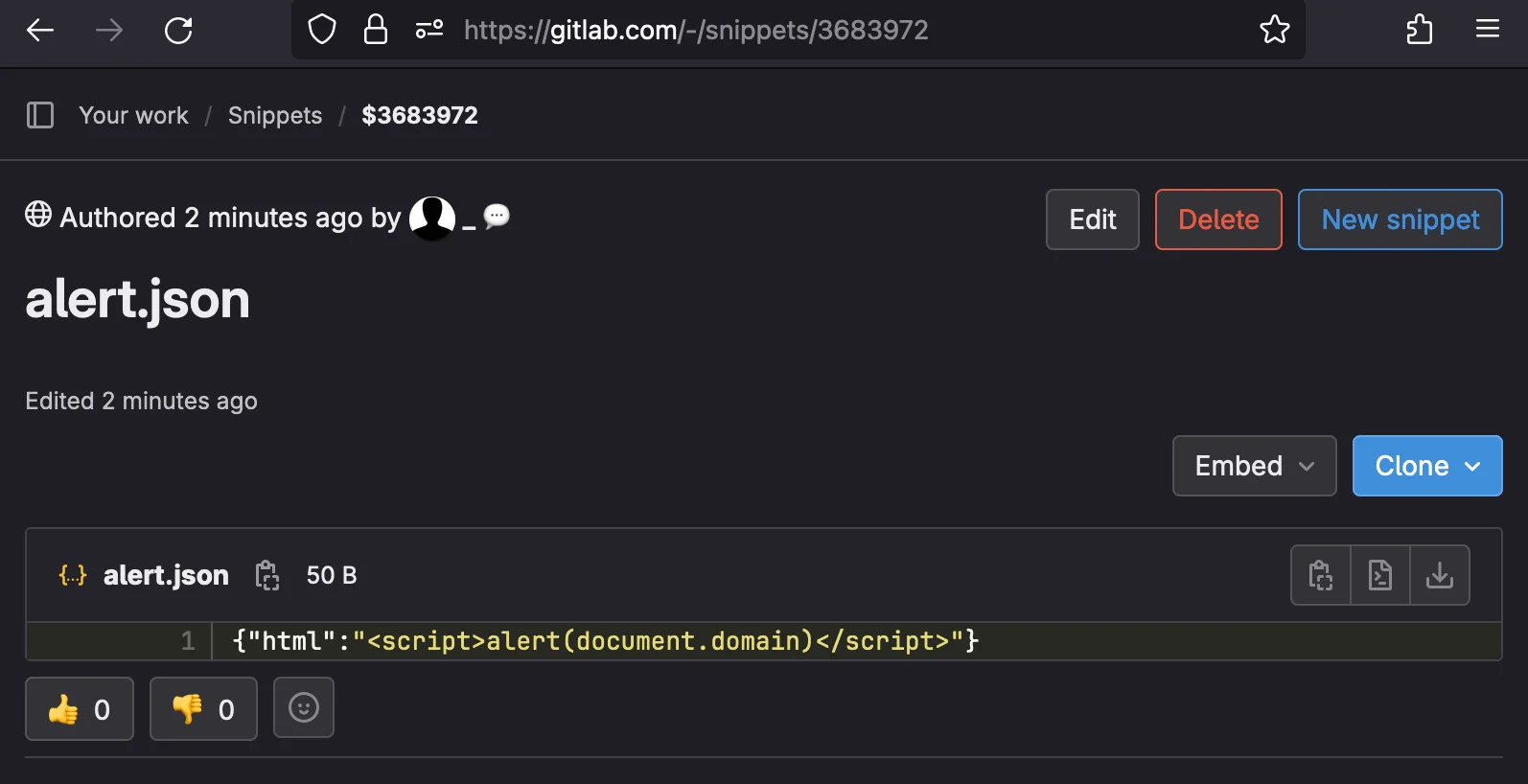
- create a public snippet with a json file
alert.jsoncontaining{"html":"<script>alert(document.domain)</script>"}, then open the raw version and make note of the path, for example:https://gitlab.com/-/snippets/3683972/raw/main/alert.json
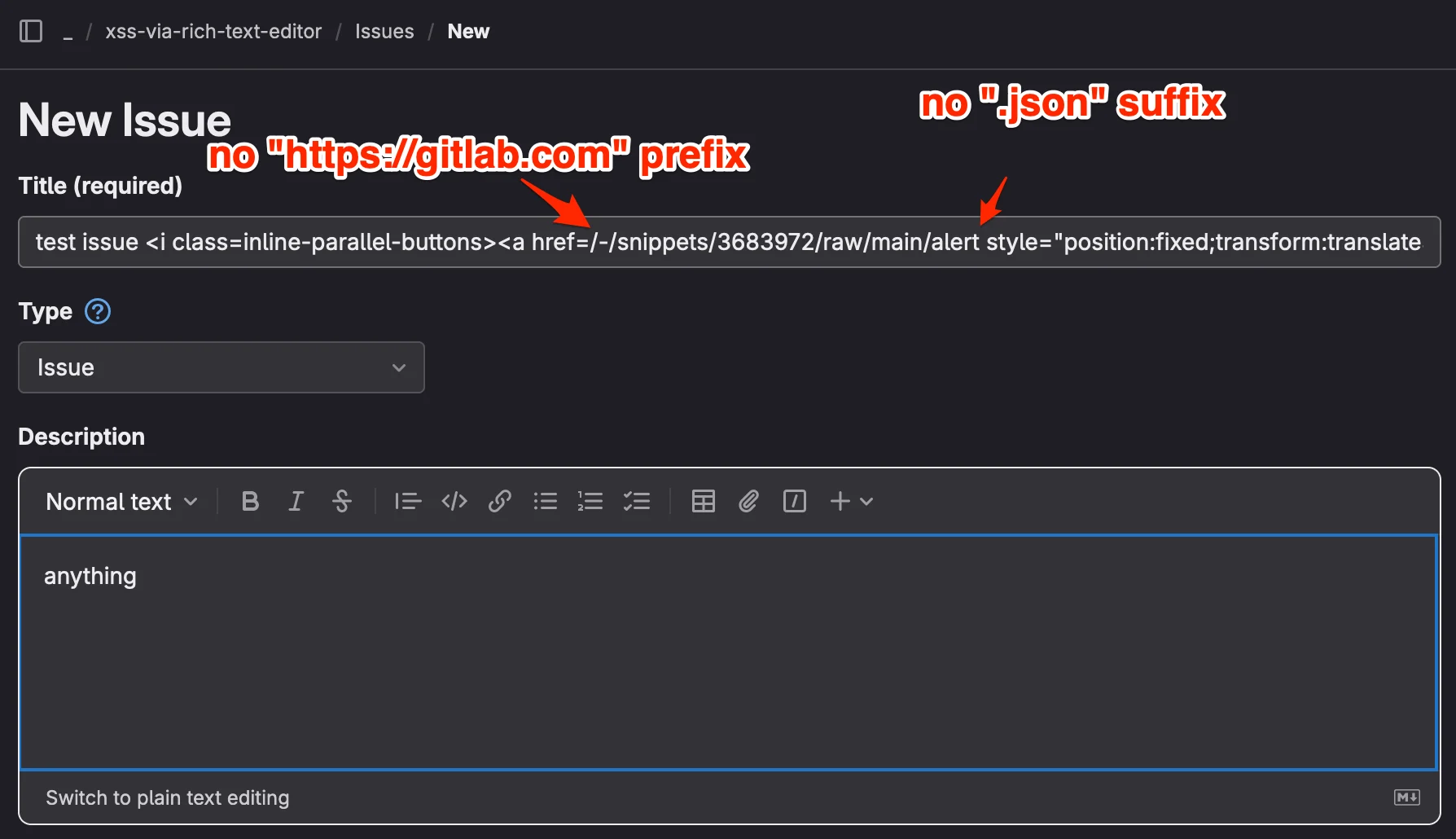
- create a new project and add a new issue within the following title:
test issue <i class=inline-parallel-buttons><a href=/-/snippets/3683972/raw/main/alert style="position:fixed;transform:translate3d(-2000px,-5000px,0px);width:10000px;height:20000px">
Note: replace the url in href by the path to your json file noted above with the following modification:
- no
https://gitlab.comprefix - no
.jsonsuffix
As victim:
go in the project, modify a file, then create a new merge request:
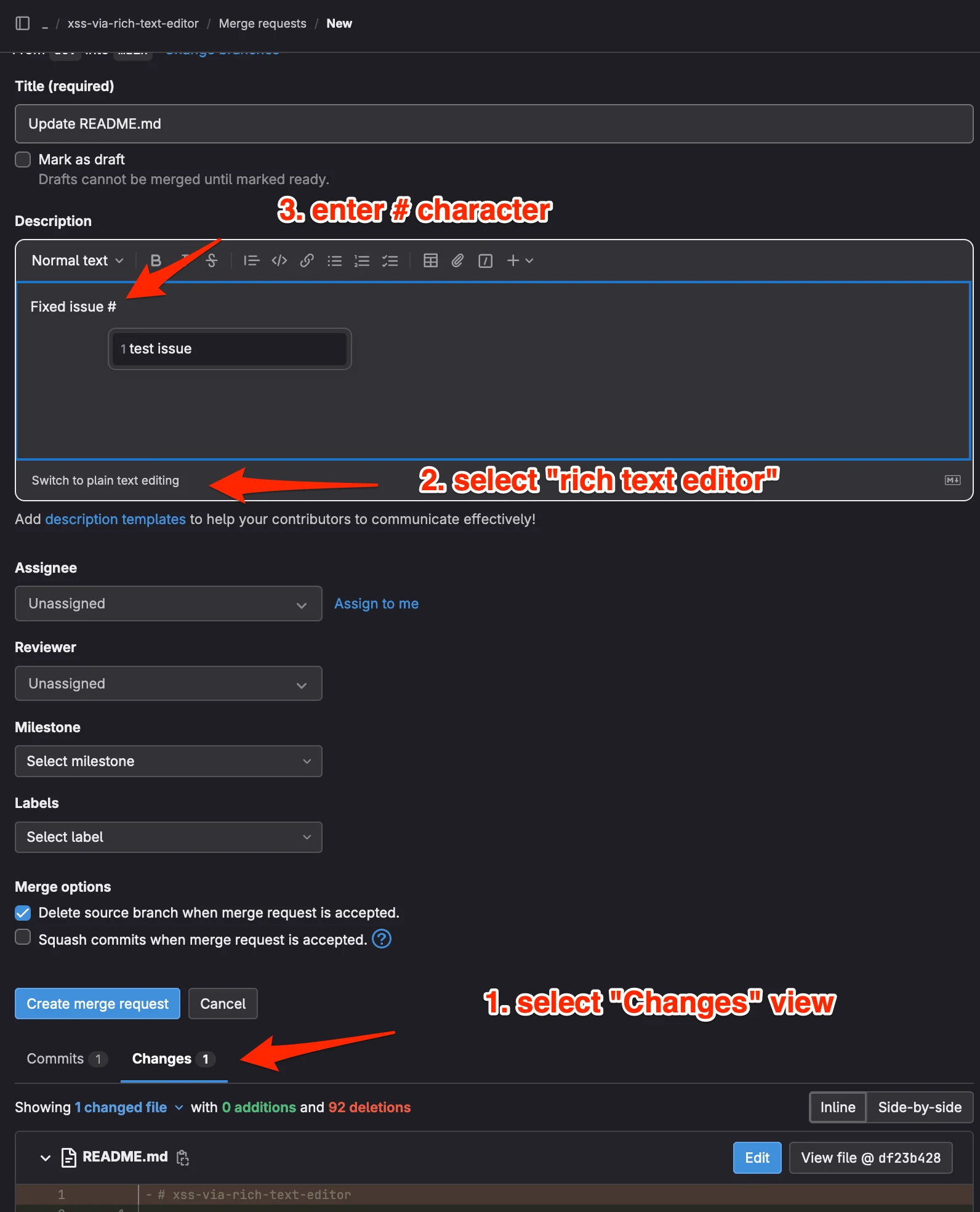
- click
Changesto open a diff view - click
Switch to rich text editingif you are inplain text editingmode - in
Description, enter#character to get suggestion results of the project's issue. Once the suggestion list appears, you might notice a transparent layer on the topmost. Click anywhere to trigger XSS.
Note:
PR:L as attackers need only permission to create a public snippet and an issue inside victim's project. An issue can be also created via Service Desk which is enabled by default for any project. If so, attacks can even create an issue on a private project.
Impact:
XSS with CSP bypassed allows attackers to perform arbitrary actions on behalf of victims
Best,
yvvdwf
Impact
XSS with CSP bypassed allows attackers to perform arbitrary actions on behalf of victims
Attachments
Warning: Attachments received through HackerOne, please exercise caution!
How To Reproduce
Please add reproducibility information to this section:
Not written yet. The AI write-up for this report has not been written yet. The Original tab links to the source.
How it worked
Impact
XSS with CSP bypassed allows attackers to perform arbitrary actions on behalf of victims.
What the attacker needed
Attacker can create a public snippet; attacker can create an issue in victim's project; victim uses rich text editor and triggers autocomplete; victim clicks on the page
How it was found
- Create a public snippet containing a JSON file with a script payload and note its raw path.
- Create a new project and add an issue with a title containing HTML that includes a link to the snippet's raw path (without domain and .json suffix) and styling to make it cover the page.
- As the victim, go to the project, modify a file, and create a new merge request.
- Click 'Changes' to open the diff view and switch to rich text editing if needed.
- In the Description field, type '#' to trigger the suggestion list; a transparent layer appears.
- Click anywhere on the page to trigger the XSS.
Explained by bugbounty.wiki with AI from the original and checked against quotes from it; it can still be wrong. Read the original before relying on a detail.
Not written yet. The AI write-up for this report has not been written yet. The Original tab links to the source.
When you type a character like '#' in a text box, the application shows a list of suggestions and highlights the part you typed. The code that does the highlighting inserted your text directly into the page's HTML without cleaning it first. This meant an attacker could put special HTML attributes in an issue title, and when that title appeared in the suggestion list, clicking on it would run the attacker's JavaScript in the victim's browser.
What is XSS?
Script an attacker supplies runs in another user's browser, on the target's origin, with that user's session.




