XSS and content injection when viewing raw XHTML files on IOS devices
GitLab's raw file serving on iOS devices could be tricked into serving XHTML files as HTML, bypassing a previous fix, because a newline in the DOCTYPE made the file appear safe. An attacker could inject HTML and, on self-hosted instances, execute XSS, or on gitlab.com perform a login form injection to steal credentials and 2FA codes, leading to account takeover.

GitLab
Originally disclosed on GitLab
- Fixed in 48 days
- Disclosed after 48 days
⚠️ Please read the process on how to fix security issues before starting to work on the issue. Vulnerabilities must be fixed in a security mirror.
HackerOne report #2473886 by joaxcar on 2024-04-22, assigned to GitLab Team:
Report | Attachments | How To Reproduce
Report
Summary
Back again to an issue that I thought was fixed. Namely, #1923293 content injection in WebKit browsers. The issue that I previously reported to you here was fixed by GitLab, but it is not sufficient; it seems as if I have now found a bypass.
First of all, I found a bypass to the WebKit CVE-2023-32445, which was the fix for my initial report to Apple. It turns out that they only fixed this issue for svg and xml files. Again, as I explained in my last report, this could be intentional as the HTML specs do allow browsers to ignore content-type. But I do believe they will fix this one as well, eventually. Still, I think fixing the bypass on the GitLab's side could be a good thing, as similar issues might pop up.
The issue
When visiting a site with content-type: text/plain on IOS any browser on IOS will sniff the file content instead of adhering to the content-type in these two scenarios
- The URL ends in
.xhtml - The URL does not end in a file type, but the
Content-Disposition: inline; filename="name.xhtml";header contains the filename with.xhtml
This behavior exists on two places on GitLab:
- The API, for example,
https://gitlab.com/api/v4/snippets/<SNIPPET_ID>/rawthat will serve the raw content with these headers (and you can also add arbitrary URL endings on this one likehttps://gitlab.com/api/v4/snippets/<SNIPPET_ID>/raw.xhtml) - The
rawpages likehttps://gitlab.com/-/snippets/<SNIPPET_ID>/raw/main/test.xhtml(this is where the old fix existed, which I can now bypass)
When visiting https://gitlab.com/-/snippets/<SNIPPET_ID>/raw/main/test.xhtml we get either
Content-Disposition: inline
Content-Type: text/plain; charset=utf-8
if the file is deemed "safe" and this if the file is deemed "unsafe" (this was the fix for the previous report)
Content-Disposition: inline; filename=blob
Content-Type: text/plain; charset=utf-8
Notice the filename=blob part, which will force WebKit not to sniff the `content-type' as it has no file ending.
I don't know how the check for "unsafe" works but it will mark a file containing <!DOCTYPE html> in the first line as "unsafe". Hovewer by altering this line to this
<!DOCTYPE html
>
(adding a newline) the file will be considered "safe" again and have disposition inline.
Using this bypass together with the WebKit bypass, we can now again serve HTML from GitLab.com if the victim view a raw file on IOS. (This bypass works on both snippets and raw files in repos https://gitlab.com/GROUPNAME/PROJECTNAME/-/raw/main/test.xhtml)
What is the problem
I know that the severity got pulled down quite a bit last time because it is only working on IOS. I do, however, still believe this is a highly potent attack vector as you can easily target victims' phones by sending links in a medium where you more often open it on the phone. Working myself with GitLab, I know that you often end up viewing links from text messages or emails on the phone.
First of all, on a self hosted instance, this will lead to XSS through a payload like this
<!DOCTYPE html
>
<x xmlns:x="http://www.w3.org/1999/xhtml">
<x:script>alert(document.domain);</x:script>
</x>
but this will not bypass the CSP on gitlab.com. There is still a CSP bypass for the form-action attribute as it is defined as
form-action 'self' https: http:
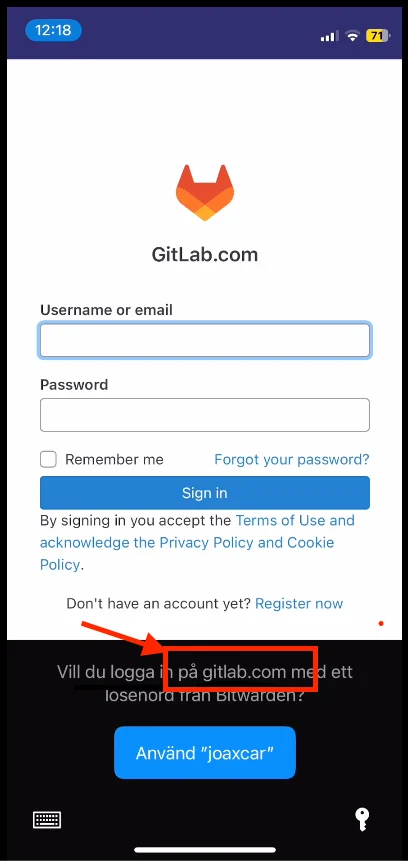
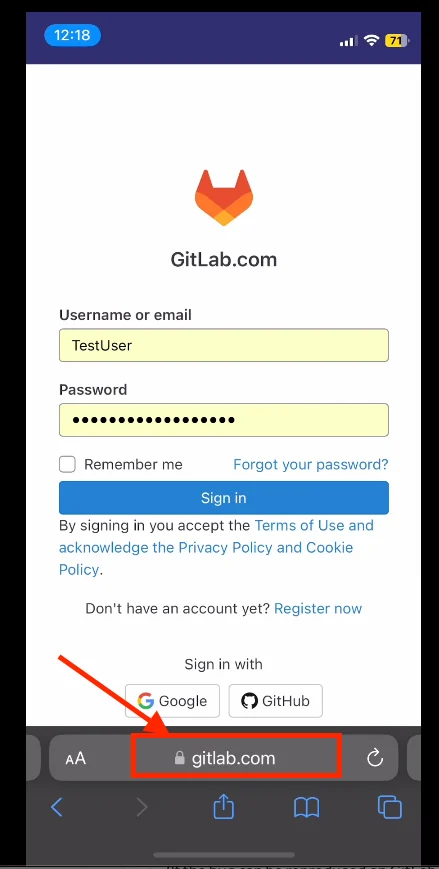
which means that we can send form content to any https domain. The most effective POC on gitlab.com thus becomes a login form injection. As we are on the gitlab.com origin we are allowed to just copy in most of the HTML (including styling) from the real login page and can create an attack that does the following
- Show a login prompt (this will show as trusted and on gitlab.com domain which will allow IOS autofill and biometric 2FA)
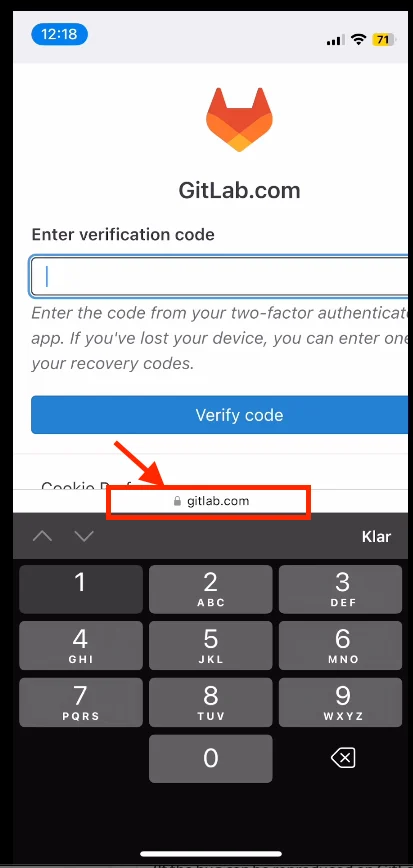
- Catch the credentials and redirect the user to a copy of gitlabs 2FA endpoint. Again IOS will show this as running on gitlab.com
- Catch the 2FA code and gain full control over the victims account, bypassing 2FA
See this video for an example
Some details zoomin:
Even if this is not a full "XSS CSP bypass" I do think that it should qualify for the higher impact on confidentiality and integrity.
Remediation
I do think that Apple will fix this, but have not gotten any response yet. Last time, it took them six months to fix, and it will still leave users who have not upgraded directly vulnerable to attacks for longer than that. For this reason I think that GitLab can benefit from fixing the bypass on your side. The fix is the same as last time. Putting Content-Disposition: inline; filename=blob as the header will remove the injection.
As mentioned, this is already in place but bypassable using new line in DOCTYPE
Steps to reproduce
- Create a new snippet https://gitlab.com/-/snippets/new
- Add a file called
test.xthmlin the snippet and add this content
<?xml version="1.0" encoding="UTF-8"?>
<x xmlns:x="http://www.w3.org/1999/xhtml">
<x:script>alert(document.domain);</x:script>
<x:iframe src="https://example.com"></x:iframe>
</x>
- Create the snippet
- Visit the snippet on an IOS device and click "view RAW". Or use a link like this https://gitlab.com/-/snippets/SNIPPET_ID/raw/main/test.xhtml
- If you are on self-hosted without CSP, you should get a popup. If on gitlab.com you only see the iframe render, but this proves HTML injection
Impact
XSS on self-hosted instances and HTML with form injection on gitlab.com. leading to account takeover (bypassing 2fa)
Examples
If you want to test the whole POC payload here are the two snippet files needed and the corresponding HTML files you need to host on the catch server:
What is the current bug behavior?
GitLab fail to put xhtml files in "unsafe" mode when viewed as RAW when doctype contains newline
What is the expected correct behavior?
GitLab should not allow to bypass the "unsafe" mode as it can still lead to issues
Output of checks
This bug happens on GitLab.com
Impact
XSS on self-hosted instances and HTML with form injection on gitlab.com. leading to account takeover (bypassing 2fa)
Attachments
Warning: Attachments received through HackerOne, please exercise caution!
How To Reproduce
Please add reproducibility information to this section:
Not written yet. The AI write-up for this report has not been written yet. The Original tab links to the source.
How it worked
Root cause
Likely the check that marks files as unsafe only looks for a specific DOCTYPE pattern and fails when a newline is inserted, so the file is served with inline disposition and a .xhtml filename, allowing WebKit to sniff and render it as HTML.
Impact
On self-hosted instances, this leads to XSS; on gitlab.com, it allows HTML injection and a login form that can steal credentials and 2FA codes, leading to account takeover, though the CSP on gitlab.com limits script execution.
What the attacker needed
Victim uses an iOS device; victim clicks a link to a raw file; attacker can create a snippet or repo file
The fix
The fix is to ensure that files with .xhtml extensions are always served with a Content-Disposition header that includes a filename without an extension, such as 'filename=blob', to prevent WebKit from sniffing the content type.
How it was found
- Create a new snippet on GitLab.
- Add a file named test.xhtml with XHTML content containing a script and an iframe.
- Create the snippet.
- Visit the snippet on an iOS device and click 'view RAW', or use a direct link to the raw file.
- Observe that on self-hosted instances without CSP a popup appears, and on gitlab.com the iframe renders, proving HTML injection.
Explained by bugbounty.wiki with AI from the original and checked against quotes from it; it can still be wrong. Read the original before relying on a detail.
Not written yet. The AI write-up for this report has not been written yet. The Original tab links to the source.
When you view a file on a website, the server tells the browser what type it is. On iPhones, the browser sometimes ignores that and guesses based on the file name. Here, GitLab tried to stop dangerous files by marking them as plain text, but a small change in the file's first line tricked GitLab into not marking it, so the iPhone browser treated it as a web page and ran any scripts in it.
What is XSS?
Script an attacker supplies runs in another user's browser, on the target's origin, with that user's session.



