GKE Autopilot Node Compromise via local-storage PersistentVolume
GKE Autopilot's security controls did not prevent PersistentVolumes with the local-storage storage class from mounting node files into a pod, allowing a user with pod and persistent volume creation rights to mount the node's /run directory and access docker.sock. This enabled a root shell on the node and access to cluster secrets and the node metadata service.
 Published on lf.lc
GKE Autopilot provides many default security controls to protect the node, including protections against privileged pods and limitations on hostPath volume mounts. However, these security configurations did not prevent PersistentVolumes with the “local-storage” storage class.
The full write-up lives on its author's site
It belongs to its author, so we link to it rather than copy it. The other two tabs are our own rewrites, checked against it.
Context
GKE Autopilot is Google's managed mode for Google Kubernetes Engine. In Autopilot, Google manages the nodes, and the cluster applies a set of default security controls that are stricter than what you get in GKE Standard. The report quotes the Autopilot documentation on the motivation for those controls:
In order for GKE to offer management of the nodes and provide you with a more streamlined operational experience, there are a few restrictions and limitations when compared to GKE Standard. Some of these limitations are security best practices, while others allow Autopilot clusters to be safely managed.
Among those controls are protections against privileged pods and limitations on hostPath volume mounts. The point of these controls is to stop a workload from reaching the underlying node. The finding in this report is that the controls did not cover PersistentVolumes using the local-storage storage class, which can mount files from the node into a pod in a way similar to a hostPath mount.
Setup
The preconditions are modest. The researcher needed:
- An Autopilot cluster.
- Credentials for that cluster, obtained with
gcloud container clusters get-credentials, verified by a successfulkubectl get nodes. - Permission to create pods and persistent volumes in the cluster. The report notes that you can optionally create a user with limited access for exactly those two things, or use the built-in "Kubernetes Engine Developer" role.
Two files are used, exploit.sh and docker.yaml, which the report links to alongside the write-up. The exploit script drives the whole sequence; docker.yaml holds the PersistentVolume and pod definitions.
Finding it
The observation is a gap in coverage rather than a bug in a single line of code. Autopilot blocks privileged pods and restricts hostPath mounts, but PersistentVolumes with the local-storage storage class were still permitted. A local-storage volume can be used to mount files from the node into a pod, which is functionally similar to a hostPath mount. That makes it a way around the restriction: mount a sensitive path from the node into a pod, and from there elevate permissions.
The path chosen for the demonstration is /run on the node, because it contains docker.sock. Access to the node's Docker socket is enough to compromise the node further.
Exploitation
The report gives the reproduction as a numbered sequence, with the script performing the cluster-side steps.
Step 1: Create the cluster and authenticate
Create an Autopilot cluster, then authenticate to it and confirm that kubectl can reach it:
gcloud container clusters get-credentials
kubectl get nodes
The second command is the check that the credentials work and that the nodes are visible.
Step 2: Get the right permissions
Either use an account with the "Kubernetes Engine Developer" role, or create a user whose access is limited to creating pods and persistent volumes. That limited set is all the attack needs, which is the important part: no node-level or cluster-admin rights are required.
Step 3: Prepare the files
Download exploit.sh and docker.yaml into the working directory. The script performs the following steps.
Step 4: Provision a node with a dummy pod
The script creates a dummy pod so that the autoscaler provisions a node. It then waits for the dummy pod to reach the ready state and records the name of the node the pod landed on. That node name is what the PersistentVolume will later point at.
Step 5: Mount the node's /run into a pod
The script deploys docker.yaml, which contains a PersistentVolume that mounts /run from that node into a new pod. This is the step that the Autopilot controls were supposed to prevent, and the local-storage class lets it through.
Step 6: Move the exploit pod onto the same node
The script deletes the dummy pod, which frees capacity on the node so that the exploit pod is scheduled there. The exploit pod has to run on the same node whose /run is mounted, so this hand-off is what makes the volume usable.
Step 7: Get a root shell on the node
The script execs into the exploit pod and runs the following command to launch a root shell on the node:
docker -H unix:///host/docker.sock run --rm -it --privileged --net=host --pid=host \
  alpine nsenter --mount=/proc/1/ns/mnt -- /bin/bash
The -H unix:///host/docker.sock points the Docker client at the socket mounted from the node. The container it starts is --privileged, shares the host network (--net=host) and the host PID namespace (--pid=host), and then uses nsenter to enter the mount namespace of PID 1 on the host (--mount=/proc/1/ns/mnt) before starting /bin/bash. The result is a shell in the node's mount namespace with the privileges of the Docker daemon that launched it.
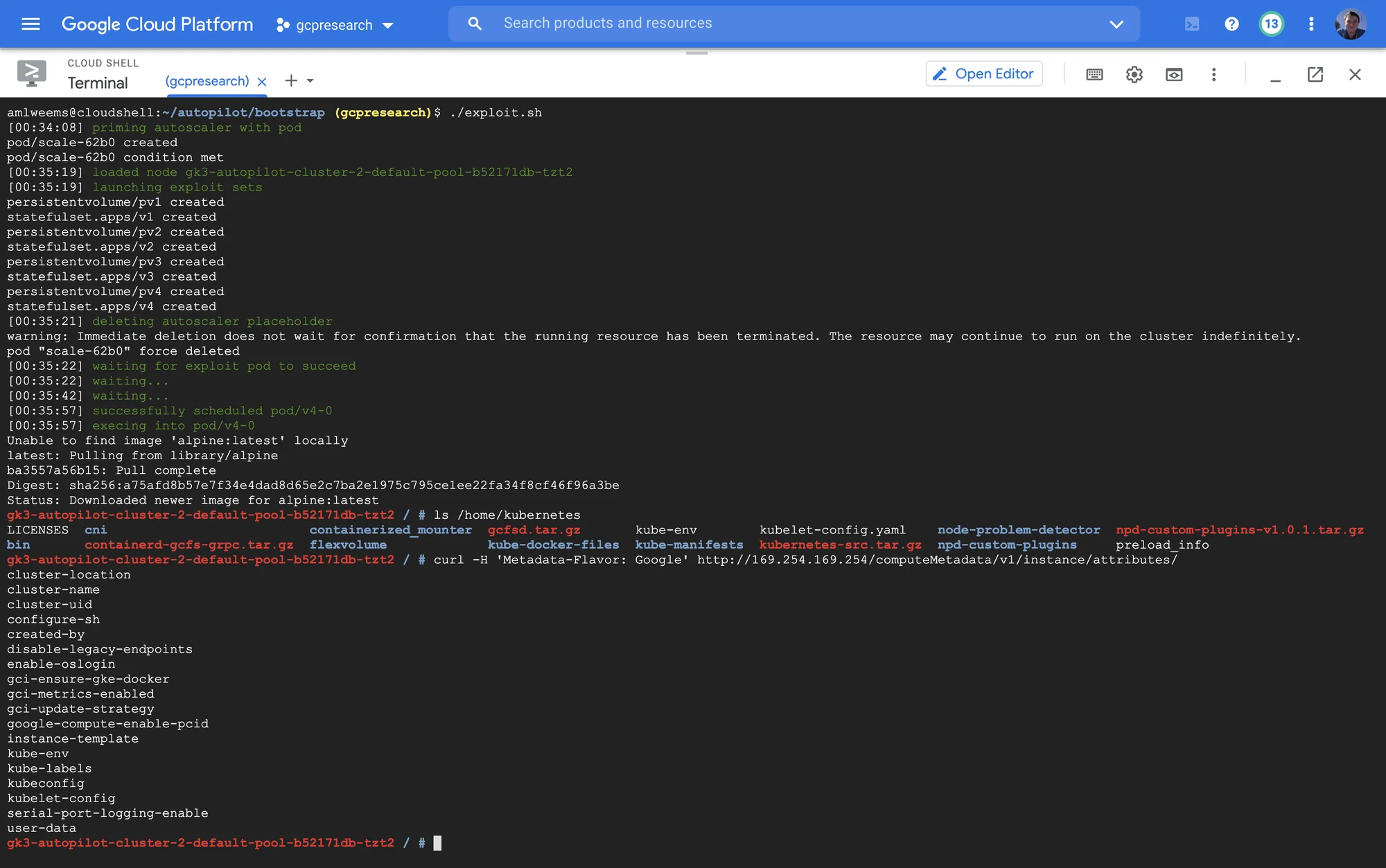
The screenshot shows the working exploit: the root shell obtained on the node after the command above.
Root cause
The design intent is that a pod in Autopilot cannot reach the node. Privileged pods are blocked and hostPath mounts are limited, so the obvious routes are closed. The local-storage storage class was not covered by the same restriction, even though it can mount files from the node into a pod just as a hostPath mount can. The check was applied to one mechanism and not to the equivalent one, so a user who could create pods and persistent volumes could mount /run from the node, reach docker.sock, and from there run a privileged container that enters the host mount namespace.
Impact
A user with access to create pods and persistent volumes in the Autopilot cluster could bypass the cluster's security controls and gain privileged access to the managed Kubernetes nodes. With that access, per the report, they could:
- read all secrets in the cluster, including secrets outside their provisioned access;
- explore the attack surface of the Autopilot control plane;
- retrieve a service account token from the node metadata service for the default compute service account.
The report does not assign a severity or CVSS score. The reward was $1337 per variant.
Fix
The report does not describe the change that was made. The timeline records that the issue was reported fixed on 2021-06-07, that a retest on 2021-09-10 verified only variant "a" was fixed, and that the issue was reopened on 2021-09-11. The retest verified that only variant "a" was fixed, and the issue was reopened the next day.
- Try other storage classes and volume types that can reference node paths, not just
local-storage. A positive result is a pod that can read a node path such as/runor/var/libthat the platform'shostPathpolicy is meant to block. - Try the same technique on other managed Kubernetes offerings that restrict
hostPathand privileged pods. A positive result is a pod scheduled on a node with a mounted node path, followed by access to a socket or credential file under it. - Try the same sequence with the minimum role that can create pods and persistent volumes, as the report does with "Kubernetes Engine Developer". A positive result is a full node shell from an account that holds no node-level or cluster-admin rights.
- Check whether the node metadata service is reachable from the compromised pod and whether it returns a token for the default compute service account, as the report describes. A positive result is a usable token obtained from the node rather than from the pod's own identity.
Timeline
| Date | Event |
|---|---|
| 2021-03-01 | Initial report to Google VRP |
| 2021-03-01 | Issue triaged |
| 2021-03-04 | Internal bug report filed |
| 2021-03-05 | Additional variants reported (vrp/181521559b, vrp/181521559c) |
| 2021-03-09 | Internal bug report updated |
| 2021-04-01 | Additional variant reported (vrp/181521559d) |
| 2021-04-06 | Internal bug report updated |
| 2021-04-08 | VRP issued reward ($1337 per variant) |
| 2021-06-07 | Issue reported fixed |
| 2021-09-10 | Retested and verified only variant "a" is fixed |
| 2021-09-11 | Issue reopened |
What happened, in plain words
Google runs a service called Google Kubernetes Engine, or GKE. It lets you rent computers in Google's data centres and run your own software on them, without buying or maintaining the machines yourself. GKE has two modes. In the standard mode you look after a lot of the setup yourself. In the other mode, called Autopilot, Google looks after the machines for you and applies a set of security rules by default, so that your software cannot reach or damage the machines underneath.
One of those rules is meant to stop your software from reading files on the machine it runs on. The researcher, Anthony Weems, found that the rule had a gap. There was a second, less obvious way to read those files, and Autopilot did not block it. Using that gap, someone with only modest permissions could get a root shell on one of Google's managed machines, read all secrets in the cluster, and retrieve a token for the default compute service account.
Google paid $1337 per variant of the issue. The report does not give a severity rating or a CVSS score.
Background: the words you need first
Before the steps make sense, a few ideas need explaining from zero.
A cluster and a node. A cluster is a group of computers that work together to run software. Each individual computer in that group is called a node. In Autopilot, Google owns and manages the nodes; you only say what software you want to run.
A pod. A pod is the smallest unit Kubernetes runs. Think of it as a box that holds one or more pieces of software, plus the settings they need. When you ask the cluster to run something, you create a pod, and the cluster decides which node the pod runs on.
Kubernetes. Kubernetes is the software that manages clusters of computers: it decides where pods go, restarts them when they fail, and so on. GKE is Google's hosted version of Kubernetes.
kubectl. This is the command-line tool you use to talk to a Kubernetes cluster. You type commands into a terminal and kubectl sends them to the cluster.
gcloud. This is Google's command-line tool for managing Google Cloud resources, including GKE clusters.
A volume. A volume is a storage area that a pod can read from and write to. Normally a volume is just a disk for the pod's own files. Some volume types, however, can point at folders on the node itself.
hostPath. This is a volume type that mounts a folder from the node directly into a pod. It is powerful and dangerous: if a pod can mount the node's folders, it can read the node's files. Autopilot restricts hostPath mounts for exactly this reason.
PersistentVolume and storage class. A PersistentVolume is a piece of storage that exists independently of any one pod, so it can outlive the pod that uses it. A storage class is a label that says what kind of storage it is and how it should be provided. One such class is called local-storage.
Privileged pod. A pod marked as privileged gets almost the same powers as software running directly on the node, with none of the usual safety limits. Autopilot blocks privileged pods by default.
Docker and docker.sock. Docker is software that runs and manages containers (a container is similar to a pod: a packaged piece of software with its own isolated environment). Docker listens for commands on a special file called a socket, usually docker.sock. Anyone who can send commands to that socket can ask Docker to start new containers, including very powerful ones. On a node, that socket is effectively a key to the whole machine.
Namespace. Linux isolates processes into namespaces, which are separate views of the system. One namespace controls which files and folders a process can see (the mount namespace). Another controls which processes exist (the PID namespace). Entering the host's mount namespace means seeing the node's real filesystem.
nsenter. A Linux command that lets a process step into another process's namespaces. It is the tool used here to move from inside a container into the node's own view of the filesystem.
Service account and metadata service. A service account is an identity that software uses, the way a person uses a login. Cloud nodes have a metadata service, a small internal web service that software on the node can ask for information, including a token proving which service account the node runs as.
Secrets. In Kubernetes, a secret is a stored piece of sensitive data such as a password, an API key or a certificate. Reading all secrets in a cluster means reading every credential the cluster holds.
Container escape. This is the general name for the class of problem in this report: software that is supposed to be trapped inside a container or pod finds a way out onto the machine underneath.
Context: what Autopilot promises
GKE Autopilot is Google's managed mode for Google Kubernetes Engine. In Autopilot, Google manages the nodes, and the cluster applies a set of default security controls that are stricter than what you get in GKE Standard. The report quotes the Autopilot documentation on the motivation for those controls:
In order for GKE to offer management of the nodes and provide you with a more streamlined operational experience, there are a few restrictions and limitations when compared to GKE Standard. Some of these limitations are security best practices, while others allow Autopilot clusters to be safely managed.
Among those controls are protections against privileged pods and limitations on hostPath volume mounts. The point of these controls is to stop a workload from reaching the underlying node. The finding in this report is that the controls did not cover PersistentVolumes using the local-storage storage class, which can mount files from the node into a pod in a way similar to a hostPath mount.
In everyday terms: Autopilot locks the front door (privileged pods) and the obvious side door (hostPath mounts). The researcher found a third door, the local-storage volume, that was left unlocked even though it leads to the same place.
Setup: what you need before starting
The preconditions are modest. The researcher needed:
- An Autopilot cluster.
- Credentials for that cluster, obtained with
gcloud container clusters get-credentials, verified by a successfulkubectl get nodes. - Permission to create pods and persistent volumes in the cluster. The report notes that you can optionally create a user with limited access for exactly those two things, or use the built-in "Kubernetes Engine Developer" role.
Two files are used, exploit.sh and docker.yaml, which the report links to alongside the write-up. The exploit script drives the whole sequence; docker.yaml holds the PersistentVolume and pod definitions.
Why this matters: the attacker does not need to be an administrator. Being allowed to create pods and persistent volumes, which is a fairly ordinary developer permission, is enough. That is the difference between a problem that only affects cluster owners and one that affects anyone who can deploy software into the cluster.
Finding it: the gap in coverage
The observation is a gap in coverage rather than a bug in a single line of code. Autopilot blocks privileged pods and restricts hostPath mounts, but PersistentVolumes with the local-storage storage class were still permitted. A local-storage volume can be used to mount files from the node into a pod, which is functionally similar to a hostPath mount. That makes it a way around the restriction: mount a sensitive path from the node into a pod, and from there elevate permissions.
The path chosen for the demonstration is /run on the node, because it contains docker.sock. Access to the node's Docker socket is enough to compromise the node further.
Think of it like a building that bans copying the master key, but leaves the key cabinet unlocked. The rule was written against one method of copying the key, not against the outcome of having the key.
Exploitation: the steps, one at a time
The report gives the reproduction as a numbered sequence, with the script performing the cluster-side steps.
Step 1: Create the cluster and authenticate
Create an Autopilot cluster, then authenticate to it and confirm that kubectl can reach it:
gcloud container clusters get-credentials
kubectl get nodes
Line by line:
gcloud container clusters get-credentialsasks Google Cloud for the login details of a cluster and saves them on your computer, so that kubectl knows how to connect and how to prove who you are. Without this, kubectl has no way to talk to the cluster.kubectl get nodesasks the cluster to list its nodes. It is the check that the credentials work and that the nodes are visible. If this command succeeds, everything that follows can be attempted.
Step 2: Get the right permissions
Either use an account with the "Kubernetes Engine Developer" role, or create a user whose access is limited to creating pods and persistent volumes. That limited set is all the attack needs, which is the important part: no node-level or cluster-admin rights are required.
Why this step exists: the researcher wanted to prove that the attack works from a realistic, low-privilege starting point. If the exploit only worked for cluster administrators, it would be far less serious, because administrators can already do almost anything.
Step 3: Prepare the files
Download exploit.sh and docker.yaml into the working directory. The script performs the following steps.
A shell script is a text file of commands that the computer runs in order, like a recipe. docker.yaml is a settings file written in a format called YAML, which Kubernetes reads to know what to create. The report does not include the contents of either file; it only links to them.
Step 4: Provision a node with a dummy pod
The script creates a dummy pod so that the autoscaler provisions a node. It then waits for the dummy pod to reach the ready state and records the name of the node the pod landed on. That node name is what the PersistentVolume will later point at.
Why this step exists: the autoscaler is the part of the cluster that adds new machines when there is not enough room. By creating a throwaway pod, the researcher forces a fresh node to appear, and learns its name. The name matters because a local-storage volume is tied to one specific node: it points at a folder on that machine, not on any machine.
Step 5: Mount the node's /run into a pod
The script deploys docker.yaml, which contains a PersistentVolume that mounts /run from that node into a new pod. This is the step that the Autopilot controls were supposed to prevent, and the local-storage class lets it through.
Why /run: that folder on the node contains docker.sock, the socket through which Docker accepts commands. Once the pod can see that file, it can talk to the node's Docker daemon, which is the software that runs containers on the node.
Step 6: Move the exploit pod onto the same node
The script deletes the dummy pod, which frees capacity on the node so that the exploit pod is scheduled there. The exploit pod has to run on the same node whose /run is mounted, so this hand-off is what makes the volume usable.
Why this step exists: a local-storage volume only exists on one node. If the exploit pod were placed on a different node, the volume would not be there for it to use. Deleting the dummy pod makes room on the chosen node, so the cluster places the exploit pod there.
Step 7: Get a root shell on the node
The script execs into the exploit pod and runs the following command to launch a root shell on the node:
docker -H unix:///host/docker.sock run --rm -it --privileged --net=host --pid=host \
  alpine nsenter --mount=/proc/1/ns/mnt -- /bin/bash
Line by line:
dockeris the Docker client, the program that sends commands to Docker.-H unix:///host/docker.socktells the client where to send those commands. Instead of the pod's own Docker, it points at the socket mounted from the node at/host/docker.sock. This is the moment the pod starts giving orders to the node's Docker daemon.runasks Docker to start a new container.--rmmeans the container should be deleted when it stops, so nothing is left behind.-itgives the container an interactive terminal, so you can type commands into it.--privilegedgives the container almost full powers over the machine, with none of the usual limits.--net=hostmakes the container share the node's network, so it can reach anything the node can reach.--pid=hostmakes the container see the node's processes, including the very first process the node started, which has process ID 1.alpineis the name of the small Linux image the container is built from.nsenteris the command run inside that container.--mount=/proc/1/ns/mnttells nsenter to step into the mount namespace of process 1, which is the node's own view of its filesystem.-- /bin/bashis the command to run once inside: a shell.
The result is a shell in the node's mount namespace with the privileges of the Docker daemon that launched it. In plain terms: the pod asked the node's Docker to start a powerful container, and that container then stepped out onto the node itself, giving the researcher a root shell on the machine.
The screenshot shows the working exploit: the root shell obtained on the node after the command above.
Root cause: why it worked
The design intent is that a pod in Autopilot cannot reach the node. Privileged pods are blocked and hostPath mounts are limited, so the obvious routes are closed. The local-storage storage class was not covered by the same restriction, even though it can mount files from the node into a pod just as a hostPath mount can. The check was applied to one mechanism and not to the equivalent one, so a user who could create pods and persistent volumes could mount /run from the node, reach docker.sock, and from there run a privileged container that enters the host mount namespace.
This is a common pattern in security: a rule is written against a specific feature rather than against the outcome the feature produces. When a second feature produces the same outcome, the rule does not apply to it.
Impact: what an attacker could do
A user with access to create pods and persistent volumes in the Autopilot cluster could bypass the cluster's security controls and gain privileged access to the managed Kubernetes nodes. With that access, per the report, they could:
- read all secrets in the cluster, including secrets outside their provisioned access;
- explore the attack surface of the Autopilot control plane;
- retrieve a service account token from the node metadata service for the default compute service account.
The report does not assign a severity or CVSS score. The reward was $1337 per variant.
In everyday terms: someone who was only supposed to deploy their own software could end up reading every password and key the cluster holds, including those belonging to other teams, and could obtain an identity token for the node's own service account.
Fix: what the timeline shows
The report does not describe the change that was made. The timeline records that the issue was reported fixed on 2021-06-07, that a retest on 2021-09-10 verified only variant "a" was fixed, and that the issue was reopened on 2021-09-11. The retest verified that only variant "a" was fixed, and the issue was reopened the next day.
Variants to test
- Try other storage classes and volume types that can reference node paths, not just
local-storage. A positive result is a pod that can read a node path such as/runor/var/libthat the platform'shostPathpolicy is meant to block. - Try the same technique on other managed Kubernetes offerings that restrict
hostPathand privileged pods. A positive result is a pod scheduled on a node with a mounted node path, followed by access to a socket or credential file under it. - Try the same sequence with the minimum role that can create pods and persistent volumes, as the report does with "Kubernetes Engine Developer". A positive result is a full node shell from an account that holds no node-level or cluster-admin rights.
- Check whether the node metadata service is reachable from the compromised pod and whether it returns a token for the default compute service account, as the report describes. A positive result is a usable token obtained from the node rather than from the pod's own identity.
Timeline
| Date | Event |
|---|---|
| 2021-03-01 | Initial report to Google VRP |
| 2021-03-01 | Issue triaged |
| 2021-03-04 | Internal bug report filed |
| 2021-03-05 | Additional variants reported (vrp/181521559b, vrp/181521559c) |
| 2021-03-09 | Internal bug report updated |
| 2021-04-01 | Additional variant reported (vrp/181521559d) |
| 2021-04-06 | Internal bug report updated |
| 2021-04-08 | VRP issued reward ($1337 per variant) |
| 2021-06-07 | Issue reported fixed |
| 2021-09-10 | Retested and verified only variant "a" is fixed |
| 2021-09-11 | Issue reopened |
Glossary
- API: a defined way for one piece of software to ask another piece of software to do something, like a menu of requests a program accepts.
- Autopilot: Google's managed mode for GKE, in which Google runs the nodes and applies stricter default security rules.
- Autoscaler: the part of a cluster that adds or removes machines automatically depending on how much work there is.
- Cluster: a group of computers that work together to run software.
- Container: a packaged piece of software with its own isolated environment, similar in spirit to a pod.
- Container escape: a class of problem where software meant to be trapped inside a container or pod reaches the machine underneath.
- CVSS: a standard scoring system for the severity of a security issue.
- Docker: software that runs and manages containers on a machine.
- docker.sock: the file through which software sends commands to Docker; access to it is effectively control over the machine's containers.
- gcloud: Google's command-line tool for managing Google Cloud resources.
- GKE: Google Kubernetes Engine, Google's hosted Kubernetes service.
- hostPath: a volume type that mounts a folder from the node directly into a pod.
- kubectl: the command-line tool used to send commands to a Kubernetes cluster.
- Kubernetes: software that manages clusters of computers and the software running on them.
- local-storage: a storage class whose volumes live on one specific node.
- Metadata service: a small internal web service on a cloud node that software can ask for information, including identity tokens.
- Mount namespace: a Linux isolation boundary that controls which files and folders a process can see.
- Node: one individual computer inside a cluster.
- PersistentVolume: a piece of storage that exists independently of any one pod.
- PID namespace: a Linux isolation boundary that controls which processes a process can see.
- Pod: the smallest unit Kubernetes runs, a box holding software and its settings.
- Privileged pod: a pod with almost full powers over the node, with none of the usual safety limits.
- Root shell: a command prompt with the highest level of permission on a machine.
- Secret: a stored piece of sensitive data such as a password, key or certificate.
- Service account: an identity used by software, the way a person uses a login.
- Socket: a special file that programs use to send messages to each other on the same machine.
- Storage class: a label saying what kind of storage a volume is and how it should be provided.
- Variant: a different version of the same underlying issue, found by changing one detail.
- Volume: a storage area a pod can read from and write to.
- VRP: Google's Vulnerability Reward Program, which pays researchers for reporting security issues.
- YAML: a text format for writing settings files that Kubernetes reads.

