Crossposting Live Videos
A page admin could add another page as a crossposting partner, and after the victim accepted, the attacker could start a live video that would automatically crosspost to the victim's page even after the victim removed the attacker's page. This allowed the attacker to broadcast content on the victim's page without further approval.
 Published on yaswanthmangalagiri.blogspot.com
May 22, 2021
The full write-up lives on its author's site
It belongs to its author, so we link to it rather than copy it. The other two tabs are our own rewrites, checked against it.
Context
Facebook Pages have a Page Settings area where an admin can configure crossposting of live videos from other pages. The Page Settings area lets an admin set up crossposting of live videos from other pages.
The report describes a flaw in that approval flow: after the victim removes the attacker's page, the victim's page still crossposts the attacker's live video. The result is that a page can keep pushing live video to a victim page after the victim has removed it.
Setup
Two Facebook Pages are involved:
- An attacker-controlled page.
- A victim page whose admin will approve the crossposting request.
The only interface used is the Page Settings screen, reached through the URL pattern shown in the report:
https://www.facebook.com/[PAGE]/settings/?tab=settings
No special tooling is described; the whole flow is performed through the normal Facebook UI.
Finding it
The crossposting configuration in Page Settings lets a page nominate other pages as sources of live video. When one page adds another, the added page's admin receives an approval request, and the default option presented is to crosspost videos without further approval. The default option presented is to crosspost videos without further approval.
Exploitation
Step 1: The attacker adds the victim page as a crossposting source
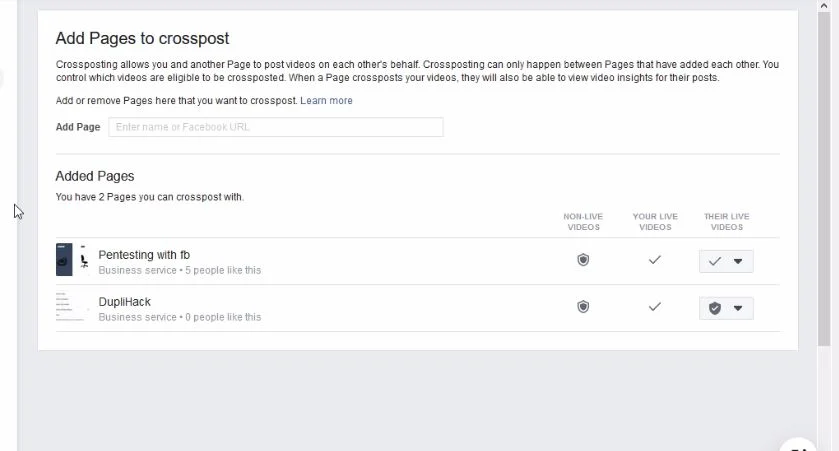
From the attacker page's settings, the attacker adds the victim's page as a page whose videos will be crossposted. The screenshot shows the crossposting configuration with the victim page added.
Step 2: The victim admin approves
The victim page's admin accepts the approval request. The default option in that approval is crossposting videos without further approval, so the victim ends up granting a standing permission rather than a per-broadcast one.
Step 3: The attacker starts a live video and selects the victim page
The attacker begins a live broadcast and, in the "Crosspost to more pages" selector, chooses the victim's page.
Step 4: The victim removes the attacker page
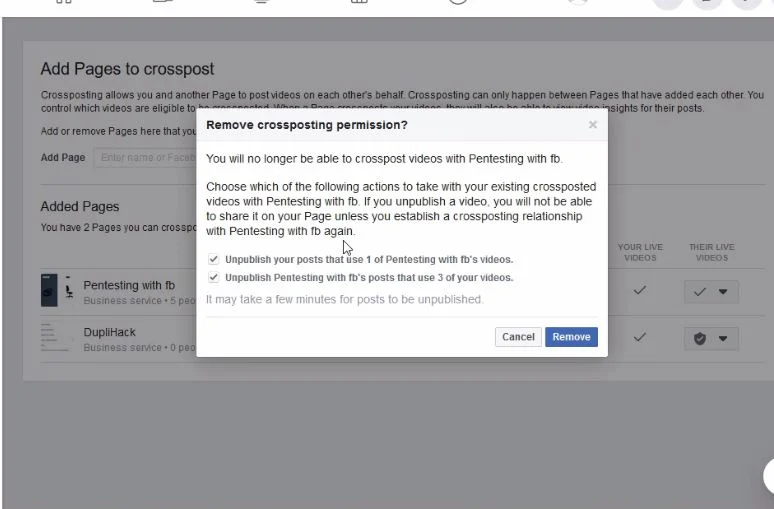
The victim visits the Crossposting page in the Page settings and removes the attacker's page from the list. The screenshot shows the crossposting settings at this point.
Step 5: The attacker goes live anyway
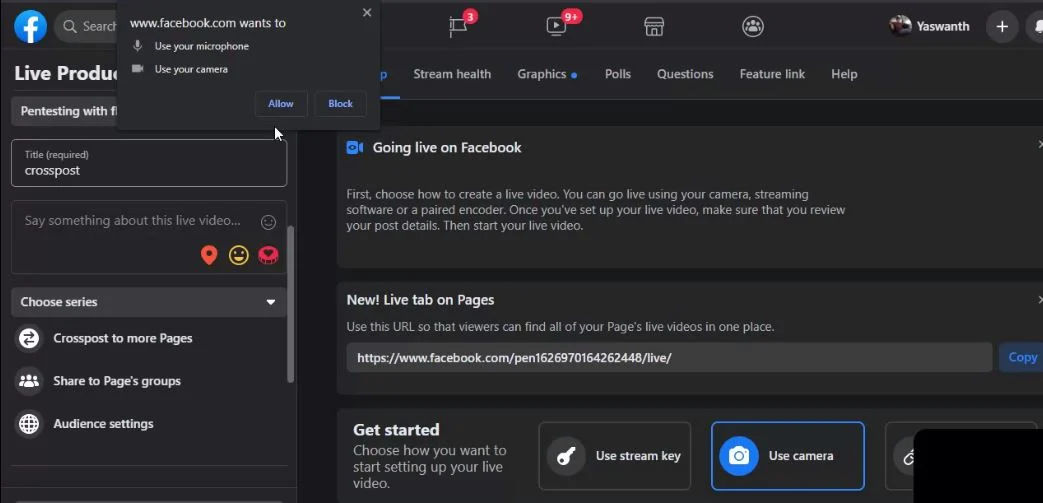
The attacker selects "Use camera" and clicks "Go Live".
Step 6: The victim page crossposts the stream
Despite the removal in step 4, the victim's page starts automatically crossposting the attacker's live video. The report does not describe any further interaction by the victim at this stage.
Root cause
The removal of a crossposting source in Page Settings does not invalidate the permission that was granted at approval time, or the live broadcast path does not consult the current crossposting configuration before publishing to the target page. Either way, the authorisation decision is made once and then trusted, while the state it depends on can change afterwards. The report does not include the underlying requests or server-side logic, so the precise location of the mistake is not shown.
Impact
An attacker can make a victim page broadcast the attacker's live video to the victim's audience, after the victim has explicitly removed the attacker from the crossposting settings. The victim's page starts automatically crossposting the attacker's live video. The report does not discuss how long the behaviour persists, whether it survives further removals, or whether other page roles are affected.
Fix
Facebook awarded a $500 bounty for the report. The report does not state what change was made, so the appropriate fix can only be described in general terms: re-check the current crossposting configuration, including whether the source page is still listed, at the moment a live video is published to a target page, and treat removal as revoking the earlier approval.
Variants to test
- Remove and re-add cycles: remove the source page, then have the source start a stream, then re-add it. A positive result is a stream that publishes during the window when the page is not listed.
- Role changes on the victim page: demote the admin who granted the approval and check whether the crossposting permission is re-evaluated. A positive result is a stream that still publishes after the granting admin loses the role.
- Other one-time approvals: any feature where a page or account approves a standing relationship (partner links, shared audiences, delegated publishing) is worth testing for the same pattern, where the approval is checked at setup but not at use. A positive result is an action that succeeds after the relationship has been removed.
- Scheduled or delayed publishing: queue a broadcast or post before removal and let it publish afterwards. A positive result is content appearing on the target after the link is gone.
What happened, in plain words
Each page has admins, the people allowed to change its settings and post on its behalf. One of the settings a page admin can change is crossposting: a page can be set up to automatically publish another page's live video to its own followers.
The report describes a logic flaw in that setup. A page adds another page as a crossposting source, and the other page's admin approves it. The approval screen offers, as the default, crossposting videos without further approval. That means the permission is granted once, at setup time. The report shows that after the victim removes the attacker's page, the victim's page still crossposts the attacker's live video. So a page can keep pushing live video to a victim page even after the victim has removed it from the crossposting settings.
The researcher, Yaswanth Mangalagiri, reported this to Meta's bug bounty programme and was awarded $500. A bug bounty programme is a scheme where a company pays people for reporting security problems responsibly instead of exploiting them.
The setup
Two Facebook Pages are involved:
- An attacker-controlled page, meaning a page the researcher created and controls.
- A victim page, whose admin will approve the crossposting request.
The only interface used is the Page Settings screen, reached through this URL pattern:
https://www.facebook.com/[PAGE]/settings/?tab=settings
Here [PAGE] is a placeholder for the page's identifier, and ?tab=settings is a query parameter that tells Facebook which tab of the page settings to open. A query parameter is the part of a URL after the question mark that passes extra information to the page.
No special tooling is described. The whole flow is performed through the normal Facebook user interface, the same screens any page admin would use in a browser.
Finding it
The crossposting configuration in Page Settings lets a page nominate other pages as sources of live video. When one page adds another, the added page's admin receives an approval request. The default option presented in that request is to crosspost videos without further approval. In other words, the permission is treated like a one-off handshake rather than something that is re-checked every time it is used.
Exploitation
Step 1: The attacker adds the victim page as a crossposting source
From the attacker page's settings, the attacker adds the victim's page as a page whose videos will be crossposted. The screenshot shows the crossposting configuration with the victim page added.
This step is the setup for the whole attack. The attacker needs the victim page to appear in the crossposting list so that the victim's admin will be asked to approve it. Without that approval, nothing else in the flow would work.
Step 2: The victim admin approves
The victim page's admin accepts the approval request. The default option in that approval is crossposting videos without further approval, so the victim ends up granting a standing permission rather than a per-broadcast one. A standing permission is one that stays valid until it is explicitly taken away, as opposed to a permission that is asked for again each time.
Step 3: The attacker starts a live video and selects the victim page
The attacker begins a live broadcast and, in the "Crosspost to more pages" selector, chooses the victim's page. The selector is the part of the live video setup screen where the broadcaster picks which other pages should receive the stream.
Step 4: The victim removes the attacker page
The victim visits the Crossposting page in the Page settings and removes the attacker's page from the list. The screenshot shows the crossposting settings at this point.
From the victim's point of view, this is the natural way to revoke the permission. The page is gone from the list, so the victim expects no more crossposting from it.
Step 5: The attacker goes live anyway
The attacker selects "Use camera" and clicks "Go Live".
The attacker selects "Use camera" and clicks on "Go Live". "Go Live" is the button that actually starts the stream. The attacker is doing nothing unusual here, just starting a normal live video.
Step 6: The victim page crossposts the stream
Despite the removal in step 4, the victim's page starts automatically crossposting the attacker's live video. The report does not describe any further interaction by the victim at this stage.
Root cause
The removal of a crossposting source in Page Settings does not invalidate the permission that was granted at approval time, or the live broadcast path does not consult the current crossposting configuration before publishing to the target page. Either way, the authorisation decision is made once and then trusted, while the state it depends on can change afterwards. Authorisation here means the check that decides whether an action is allowed. The report does not include the underlying requests or server-side logic, so the precise location of the mistake is not shown.
A useful everyday comparison: a building's front desk gives a visitor a permanent pass after one phone call from a tenant. When the tenant later calls back to cancel the pass, the front desk writes the cancellation in a notebook but the door still opens with the old pass, because the door only checks the pass, not the notebook.
Impact
An attacker can make a victim page broadcast the attacker's live video to the victim's audience, after the victim has explicitly removed the attacker from the crossposting settings. The victim's page starts automatically crossposting the attacker's live video.
The report does not discuss how long the behaviour persists, whether it survives further removals, or whether other page roles are affected.
Fix
Facebook awarded a $500 bounty for the report. The report does not state what change was made, so the appropriate fix can only be described in general terms: re-check the current crossposting configuration, including whether the source page is still listed, at the moment a live video is published to a target page, and treat removal as revoking the earlier approval.
In plain terms, the door should check the notebook, not just the old pass.
Variants to test
These are follow-up ideas in the same spirit, for anyone testing similar features:
- Remove and re-add cycles: remove the source page, then have the source start a stream, then re-add it. A positive result is a stream that publishes during the window when the page is not listed.
- Role changes on the victim page: demote the admin who granted the approval and check whether the crossposting permission is re-evaluated. A positive result is a stream that still publishes after the granting admin loses the role.
- Other one-time approvals: any feature where a page or account approves a standing relationship (partner links, shared audiences, delegated publishing) is worth testing for the same pattern, where the approval is checked at setup but not at use. A positive result is an action that succeeds after the relationship has been removed.
- Scheduled or delayed publishing: queue a broadcast or post before removal and let it publish afterwards. A positive result is content appearing on the target after the link is gone.
Glossary
- Facebook Page: a public profile on Facebook used by businesses, brands and public figures, managed by one or more admins.
- Admin: a person with permission to change a page's settings and act on its behalf.
- Crossposting: automatically publishing another page's content, here a live video, to your own page's audience.
- Live video: a broadcast streamed in real time rather than uploaded as a finished file.
- Logic flaw: a bug where the code works as written but the rules it enforces are wrong, so a legitimate feature can be abused.
- Bug bounty programme: a scheme where a company pays researchers for reporting security problems responsibly.
- URL: the address of a web page, made up of a scheme, host, path and optional query parameters.
- Query parameter: the part of a URL after the question mark that passes extra information to the page.
- User interface (UI): the screens and controls a person uses in a browser or app.
- Approval request: a prompt sent to a page's admin asking them to accept a relationship or permission.
- Standing permission: a permission that stays valid until explicitly removed, rather than being asked for each time it is used.
- Revoke: to take back a permission that was previously granted.
- Authorisation: the check that decides whether an action is allowed for a given user or page.
- Root cause: the underlying reason a bug exists, as opposed to its visible symptoms.
- Server-side logic: the code that runs on the company's servers, which the user does not see directly.
- Impact: the harm an attacker can cause by exploiting a bug.
- Bounty: the payment a company makes for a valid security report.

