Reporting a HTMLi(Accidental Bug)
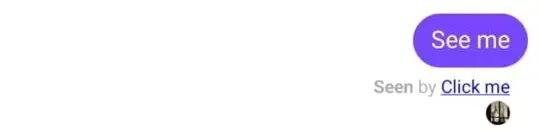
A group nickname containing an HTML heading tag was rendered and executed in the 'seen' list of a Messenger group message, making the name appear in an unusually large font. The author reports limited impact because the injection only worked in one direction and with restrictions.
 Published on armx64.medium.com
This is maybe the shortest article on my medium blog, this is all about a simple “HTMLi on Messenger Group (Nickname)”.
The full write-up lives on its author's site
It belongs to its author, so we link to it rather than copy it. The other two tabs are our own rewrites, checked against it.
What the report shows
The target was a Messenger group chat, and the feature in question was the group nickname shown in the list of people who had seen a message. The researcher was browsing a community group and tapped on a message, which opened the usual 'seen' list.
One entry in that list was rendered in a noticeably larger font than the others. The researcher first assumed it was a display glitch, then checked the nicknames in the group chat and found that the oversized name had been set using an H1 HTML tag. The conclusion was that HTML was being executed inside the seen list rather than shown as text.

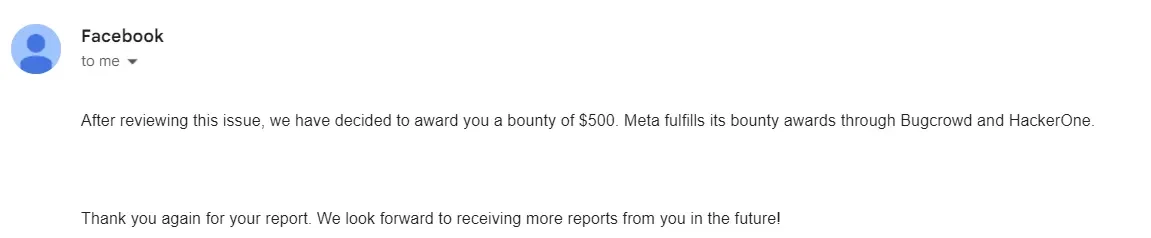
The report describes the behaviour as one-way execution with restrictions, which limited how much impact could be demonstrated. The researcher reported it to Meta, and the report states that the issue was resolved in 14 days. No severity rating or weakness classification is given.
Root cause
The report does not describe how the nickname reached the seen list, so the exact cause is not identified. The report does not describe the server-side or client-side code path, so the exact sink is not identified. The report says execution was one-way and restricted, without explaining why.
Impact
The report only demonstrates that an HTML tag in a nickname is rendered as markup in the seen list. The researcher explicitly says that impact could not be shown beyond this, because execution was one-way and restricted. No script execution, data theft or account action is claimed. In general terms, stored HTML injection matters when it can be escalated to script execution or used to spoof interface elements, but this report does not show either.
How this kind of bug works
HTML injection happens when user-controlled input is placed into a page's markup without context-aware encoding. If the value lands in an element's text content and is escaped, angle brackets appear literally. If it is concatenated into an HTML string, assigned through an unsafe DOM property, or rendered by a template that does not escape, the browser treats the input as structure: tags become elements, attributes become behaviour.
The severity depends on the sink. Plain tag injection with no script may only allow layout changes or convincing fake content. It becomes cross-site scripting when the injected markup can carry an event handler, a script element, or a URL scheme such as javascript: that the application later navigates to. Client-side rendering frameworks and mobile app webviews are common sources because the same string may be escaped in one view and not in another.
Defences are output encoding matched to context, a strict Content Security Policy that blocks inline script, sanitisation of any field that is allowed to contain markup, and treating profile fields such as nicknames and display names as plain text everywhere they are rendered.
How to test for it
- Identify every place a user-controlled string is displayed: nicknames, display names, group titles, status messages, file names, comments, and the secondary views such as read receipts, mention lists and notification previews.
- Set the field to a harmless marker that is unmistakable as markup, for example a distinctive tag wrapping a word, and save it.
- Visit each view where that value appears and inspect the rendered DOM, not just the visual output. A positive result is your marker appearing as an element in the DOM rather than as text.
- If tags render, test whether attributes and event handlers survive, and whether the value is reflected into attributes, URLs or script blocks. Try the same value in every context: page body, attribute value, JavaScript string, and inside a webview.
- Check the read-receipt and notification surfaces separately, since they often use a different rendering path from the main profile view.
Common false positives: the value is escaped but a CSS rule makes it look large; the tag is stripped and only its text remains; the rendering you see is a cached or stale view; or the markup renders but a Content Security Policy blocks every route to script execution, which limits severity even though the injection is real. Confirm by reloading and by checking a second account's view.
How it is fixed
Encode user-controlled values on output using the escaping appropriate to the context (HTML text, attribute, URL, JavaScript). Where rich text is genuinely required, run it through a well-maintained sanitiser with an allowlist. Render profile fields through text nodes or framework-escaped bindings rather than raw HTML. Add a Content Security Policy as defence in depth, and apply the same encoding in secondary surfaces such as read receipts, notifications and embedded webviews, which are easy to miss.
Hunting notes
This class tends to hide in secondary rendering paths: read receipts, seen lists, mention autocomplete, notification previews, email digests, admin panels and exported reports. Any field that is set once and displayed in many places is a candidate, because each display path may encode differently.
Recon signals include mobile apps that render server-supplied strings in webviews, features that support 'rich' names or statuses, and any place where the same value appears with different formatting across screens. Watching how a value is escaped in one view and not another is often the fastest route to a finding.
For impact, show what the injected markup actually does in the victim's session: whether script runs, whether a fake login prompt can be rendered, or whether data can be exfiltrated. If execution is restricted, say so plainly and describe the restriction, as this report does. A clear, honest demonstration of the limit is more likely to be accepted than an inflated claim.
What happened, in plain words
This report is about a small feature in Messenger group chats: the nickname. The group chat had nicknames set for its members. The researcher was looking through a community group and tapped on a message. As usual, Messenger showed a list of the people who had read that message, the "seen" list.
One name in that list was much bigger than the others. At first the researcher thought it was just a display glitch, a small visual mistake. Then they checked the nicknames in the group chat and found that the oversized name had been written using an H1 HTML tag.
To understand why that matters, you need two ideas. HTML is the language that describes the structure of a web page: tags such as <h1> mark a heading, and the browser draws them as headings rather than showing the tag itself. A nickname is just text a user types. If the app treats that text as plain text, the tag appears literally on screen. If the app treats it as HTML, the browser builds a real heading out of it. Here the second thing happened: HTML code was being executed inside the list of people who had seen the message.
The researcher could not show much impact, because the code only ran one way and with some restrictions. In other words, the tag changed how the name looked, but the researcher did not demonstrate anything more serious, such as stealing data or taking over an account. They reported it to Meta, and the report says the issue was resolved in 14 days. No severity rating or weakness classification is given.
In general, how this kind of bug works
This is called HTML injection. The everyday comparison is a form where you write your name, and the person reading it copies whatever you wrote straight into a printed document instead of checking it first. If you wrote a heading command, the document would show a heading. The nickname was rendered as markup in the seen list rather than shown as text.
Encoding means converting special characters so they are shown as characters and not interpreted as instructions. If the nickname is encoded, the angle brackets of a tag appear on screen as text. If it is not encoded, the browser reads the tag as structure. The report does not describe the code that handles the nickname, so the exact place where this happens is not identified.
The severity depends on where the injected markup ends up. Plain tag injection with no script may only change layout or create convincing fake content. It becomes cross-site scripting when the injected markup can carry a script or an event handler that runs code. This report only shows that a tag in a nickname is rendered as markup in the seen list. No script execution, data theft or account action is claimed.
Defences are output encoding matched to the context, a strict Content Security Policy that blocks inline script, sanitisation of any field allowed to contain markup, and treating profile fields such as nicknames and display names as plain text everywhere they are rendered.
In general, how to test for it
- Identify every place a user-controlled string is displayed: nicknames, display names, group titles, status messages, file names, comments, and secondary views such as read receipts, mention lists and notification previews.
- Set the field to a harmless marker that is unmistakable as markup, for example a distinctive tag wrapping a word, and save it.
- Visit each view where that value appears and inspect the rendered DOM, not just the visual output. A positive result is your marker appearing as an element in the DOM rather than as text.
- If tags render, test whether attributes and event handlers survive, and whether the value is reflected into attributes, URLs or script blocks. Try the same value in every context: page body, attribute value, JavaScript string, and inside a webview.
- Check the read-receipt and notification surfaces separately, since they often use a different rendering path from the main profile view.
Common false positives: the value is escaped but a CSS rule makes it look large; the tag is stripped and only its text remains; the rendering you see is a cached or stale view; or the markup renders but a Content Security Policy blocks every route to script execution, which limits severity even though the injection is real. Confirm by reloading and by checking a second account's view.
In general, how it is fixed
Encode user-controlled values on output using the escaping appropriate to the context (HTML text, attribute, URL, JavaScript). Where rich text is genuinely required, run it through a well-maintained sanitiser with an allowlist. Render profile fields through text nodes or framework-escaped bindings rather than raw HTML. Add a Content Security Policy as defence in depth, and apply the same encoding in secondary surfaces such as read receipts, notifications and embedded webviews, which are easy to miss.
In general, where to look
This class tends to hide in secondary rendering paths: read receipts, seen lists, mention autocomplete, notification previews, email digests, admin panels and exported reports. Any field that is set once and displayed in many places is a candidate, because each display path may encode differently.
Signals worth watching include mobile apps that render server-supplied strings in webviews, features that support rich names or statuses, and any place where the same value appears with different formatting across screens. Watching how a value is escaped in one view and not another is often the fastest route to a finding.
For impact, show what the injected markup actually does in the victim's session: whether script runs, whether a fake login prompt can be rendered, or whether data can be exfiltrated. If execution is restricted, say so plainly and describe the restriction, as this report does. A clear, honest demonstration of the limit is more likely to be accepted than an inflated claim.
Glossary
- HTML: the language that describes the structure of a web page using tags.
- Tag: a piece of HTML such as
<h1>that tells the browser how to treat the content. - H1: an HTML tag that marks a top-level heading, which browsers draw in a large font.
- HTML injection: when user input is placed into a page as markup instead of plain text, so the browser interprets it as structure.
- Encoding (escaping): converting special characters so they are displayed as characters rather than interpreted as instructions.
- Nickname: a name set for a person in a group chat, shown to other members.
- Seen list: the list of people who have read a message.
- DOM: the browser's in-memory model of the page, built from the HTML; inspecting it shows whether input became an element or stayed text.
- Cross-site scripting (XSS): a bug where injected markup can run code in another user's browser.
- Event handler: an attribute that makes the browser run code when something happens, such as a click.
- Sanitisation: cleaning input so only an allowed set of tags and attributes survives.
- Content Security Policy (CSP): a rule set a site sends to the browser that restricts what scripts may run.
- Webview: an embedded browser inside a mobile app, used to display web content.
- False positive: a result that looks like a bug but is not one.
- Bounty: a payment a company makes for a valid security report.
- Disclosure date: the date a report is made public.



