Deleted data stored permanently on Instagram? Facebook Bug Bounty 2020
Instagram's data backup feature included photos and direct messages that the user had deleted years earlier, and the URLs for deleted photos remained accessible. An attacker with access to a backup file could view deleted content, compromising user privacy.
 Published on medium.com
Hello, I am Saugat from Kathmandu, Nepal. Today I am going to explain one of the coolest and easiest bugs which I accidentally found on Instagram a few months ago.
The full write-up lives on its author's site
It belongs to its author, so we link to it rather than copy it. The other two tabs are our own rewrites, checked against it.
Context
Instagram's data download feature lets a user request a copy of their account data. The author describes that data as covering login details, followers and following, likes, conversations, photos, search history and checkout. The request is made from the account settings, and the resulting archive is delivered as a zip file after the user re-authenticates.
The report concerns what that archive contained: photos and direct-message conversations that the user had deleted years earlier, still present in the backup and, for conversation attachments, still reachable through signed URLs.
Setup
The researcher used his own Instagram account, with no special role or tooling. The only preconditions were an account with a history of deleted photos and deleted conversations, and the ability to request an account data backup from the settings. He later repeated the test on a second account of his own.
Finding it
He was not hunting for a bug. He wanted a copy of his own photos and went to Instagram settings > Accounts > Privacy and Security, clicked View Account Data and requested the backup after entering the necessary credentials. The page told him the file would arrive within a few hours.
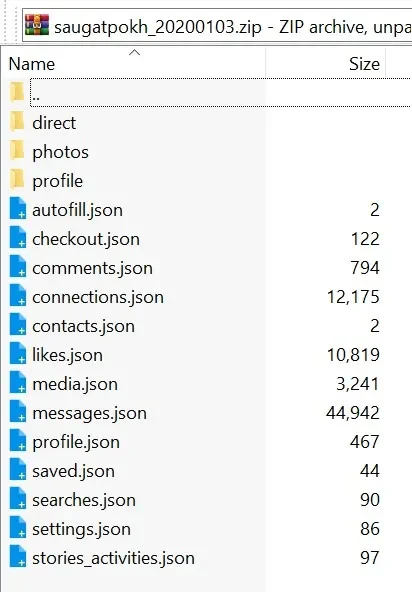
About two hours later the "Your Instagram Data" mail arrived. The link redirected to the Instagram login page; after entering his password the zip file was downloaded. Unzipping it and browsing the folders, he found photos he had deleted back in 2013, including one he remembered deleting within a minute of uploading. He questioned whether this was intended, recalling that raw images had been reported as reachable from the Facebook CDN after deletion, but six years seemed far too long for that explanation.
Looking further, he found that conversations deleted long ago were still viewable in the Message.json folder. That file contained URL links for the photos in the conversations; pasting those links into a browser produced a valid signed URL that loaded the respective photos and attachments, which had been sent and deleted four to five years earlier.
Exploitation
Step 1: request the account data backup
From Instagram settings > Accounts > Privacy and Security, click View Account Data, enter the credentials, and submit the request. The confirmation says the backup will arrive within a few hours.
Step 2: download the archive
The mail arrives (about two hours in the author's case). Its link redirects to the Instagram login page; after re-entering the password, the zip file containing the account data is downloaded.
Step 3: inspect the archive for deleted content
Unzip the file and go through the folders. Deleted photos from 2013 were present, and the Message.json file held conversations deleted years earlier.
Step 4: resolve the attachment links
The conversation file contains URLs for the photos exchanged in those chats. Copying such a URL into the browser returns a valid signed URL and loads the photo or attachment, even though it was sent and deleted four to five years before.
Step 5: reproduce on a second account
He took a backup of another account and found it contained photos and information deleted more than a year earlier, which he reported the next day.
The triage conversation
He reported through facebook.com/whitehat/report.
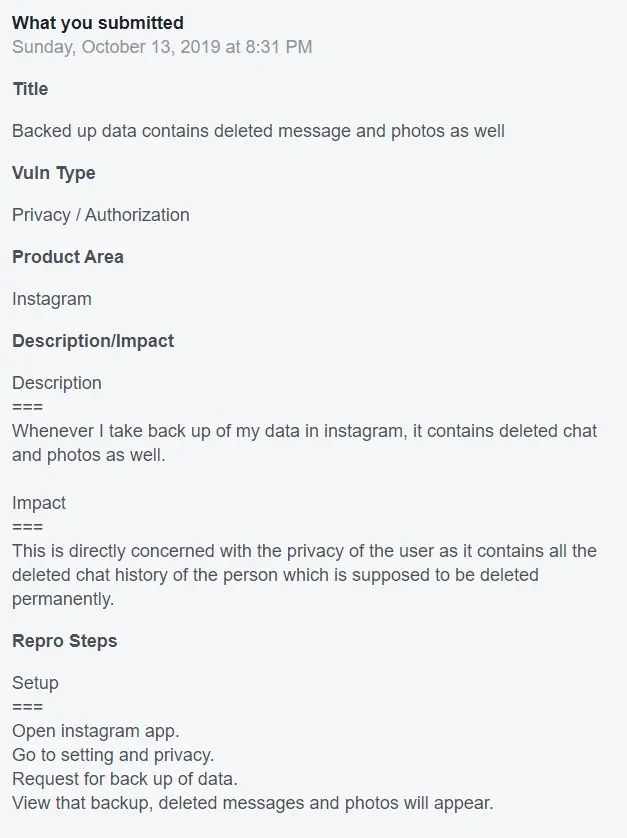
The first reply, from Ed Kurson on the Security team, said the team was unsure whether this was a privacy or security issue and asked how the bug could compromise the integrity of Facebook user data, circumvent its privacy protections, or enable access to a system within Facebook's infrastructure.
He argued that the backup reveals all deleted photos and conversations, that deleted chats and photos should not appear in backed-up data, and that the behaviour shows data is kept permanently even after the user deletes it, which he called a major compromise of user privacy.
The team then asked for the timeline: did the backup happen quickly after the conversations were deleted? He answered that the conversations had been deleted two weeks earlier, the backup was requested 10 to 12 days after deletion, and the data was provided 7 to 8 hours after the request. The folder contained all conversations from the beginning regardless of when they were deleted, plus photos deleted five to six years back.
The team replied that when a user deletes something, a profile picture in the example, it is immediately removed from public view but remains accessible with a direct link. The CDN is described as a complex, highly distributed network of servers, and per policy full deletion, including from backups, can take up to 90 days, with a pointer to the data retention policy at https://www.facebook.com/policy/.
He was not satisfied: 90 days did not explain photos deleted more than five years earlier. The next day Megan from the Security team apologised for the confusion and said the report was being looked at again. She asked for the affected Instagram username, which he supplied (redacted here), then asked him to confirm the last backup request and, if possible, request a new one.
He answered that he had requested the data on October 5 at around 4 PM and received the backup link at exactly 7:36 PM the same day in his Gmail account, and added that the new backup still showed the deleted messages and photos, so the issue persisted.
Megan said she was having difficulty locating the backup request and asked for a screenshot or copy of the email from Instagram. He replied that he had requested the backup on October 24 and received the mail the same day, clicked the DOWNLOAD DATA button, was redirected to the login page, and after logging in reached the download page, giving this link:
https://www.instagram.com/download/confirm/nGzKfDA8PX/
Megan then asked for one or both of: a photo that was deleted but still appears in the backup zip, and the username of a user whose chat was deleted but still appears in the backup zip. He supplied a deleted photo that appeared in the archive, the username of such a user (redacted here) and the existing link of the deleted photo (redacted here). Megan passed the report to the Instagram Security & Privacy team.
After taking a backup of another account and finding photos deleted more than a year earlier, he wrote again to say the issue was still present and hoped it would be fixed soon. The conversation then went quiet while the issue sat with the appropriate team and a fix was being deployed.
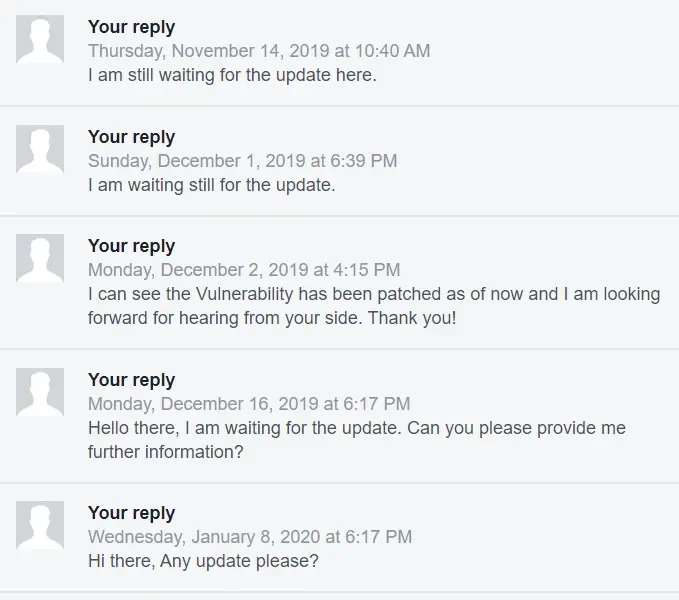
After three months without a response, the team replied on January 10, 2020, apologising for the delay and saying the team was working on a complete fix and would update when there was new information. He decided not to keep asking for updates.
On February 7, 2020, without him asking, another reply arrived. It was a BOUNTY DECISION, with a note not to disclose the issue until it was fully resolved. The bounty was far beyond what he expected.
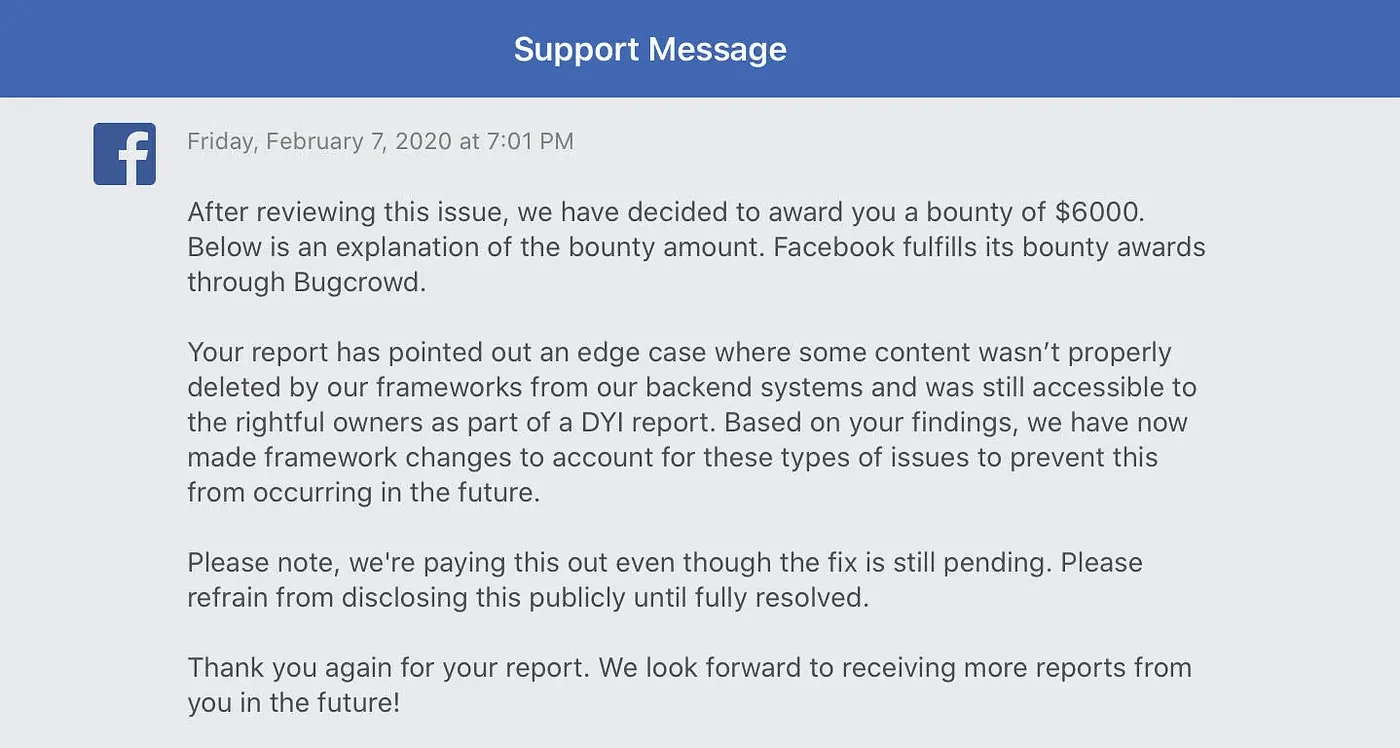
Along with the bounty came additional information that a framework change of the back-end was under way. Asked when the fix would be complete, the team said there was no solid time frame but it could take until March. The Coronavirus pandemic delayed it further, and the confirmation of the fix arrived on July 7, 2020.
Timeline
| Date | Event |
|---|---|
| October 13, 2019 | Initial report sent |
| October 15, 2019 | Report marked as Informative and closed |
| October 22, 2019 | Report re-opened by Facebook Security Team |
| November 4, 2019 | Report triaged |
| February 7, 2020 | $6000 bounty rewarded without the fix |
| July 7, 2020 | Confirmation of fix |
Root cause
The report does not describe the implementation. What it shows is that the account data export drew on stored copies of content the user had deleted, and that the attachment URLs embedded in the exported Message.json still resolved to valid signed URLs for those attachments. The team's own explanation was that deletion removes content from public view immediately while the content stays reachable by direct link, and that full deletion, including from backups, can take up to 90 days under the data retention policy. That policy window does not account for photos and conversations that were still present years after deletion, which is the discrepancy the researcher kept raising. The back-end framework change mentioned with the bounty decision suggests the retention and export path was being reworked, but the report does not say what specifically was changed.
Impact
A user who deletes a photo or a conversation expects it to be gone. In this case the deleted items reappeared in the user's own data export, and conversation attachments remained retrievable through signed URLs contained in that export, for content deleted four to six years earlier in the author's tests and more than a year earlier on his second account. The exposure is to the account owner's own deleted content and to anyone who obtains those signed links.
Fix
The report states that confirmation of the fix arrived on July 7, 2020, and that a back-end framework change was in progress at the time of the bounty decision.
Variants to test
- Request a data export on an account with photos and chats deleted at known dates, then search the archive for those items. A positive result is any deleted photo or message that appears in the export.
- Extract attachment URLs from the exported message file and open them in a browser. A positive result is a signed URL that still loads the attachment after the message was deleted.
- Repeat the export shortly after deleting a conversation and again weeks later, to see whether the retention window behaves as documented. A positive result is deleted content still present well beyond the stated retention period.
- Test the same export and attachment-link behaviour on other accounts and other Meta products that offer a data download. A positive result is the same pattern of deleted content reappearing in the export or resolving through stored links.
What happened, in plain words
A security researcher in Kathmandu, Nepal, was not looking for a bug. He simply wanted a copy of his own Instagram photos, so he used Instagram's built-in feature that lets you download everything the platform holds about your account. When the archive arrived and he opened it, he found photos he had deleted back in 2013, including one he remembered removing within a minute of uploading it. He also found direct-message conversations he had deleted years earlier, and the links to the photos inside those conversations still worked in a browser.
He reported this to Facebook (which owns Instagram). At first the report was closed as "informative", meaning the security team did not think it was a real security problem. After he explained further, the report was re-opened, then triaged, and eventually paid a $6000 bounty. The fix took until July 2020 to be confirmed.
This article walks through what he did, step by step, and explains every technical idea along the way as if you have never heard of it before. You only need to know how to use a browser.
Some ideas you will need first
Before we start, here are a few concepts that come up repeatedly. Each one is explained again where it first appears in the story, but a quick overview helps.
- Account data export (or backup): a feature many online services offer that packages everything the service knows about your account into a single file you can download. Think of it like asking a shop for a copy of every receipt they have ever issued to you, bundled into one envelope.
- Zip file: a single file that contains many other files and folders, compressed to take less space. On Windows or macOS you can usually double-click it to open it, or right-click and choose "Extract".
- Server: a computer somewhere in the world that stores data and answers requests from your browser. When you open Instagram, your browser is talking to Instagram's servers.
- CDN (Content Delivery Network): a large collection of servers spread around the world that hold copies of images and other files so they can be delivered quickly to whoever asks. Think of it like a chain of local warehouses that each keep a copy of popular products, so customers do not have to wait for delivery from a single central factory.
- URL: the address of something on the web, like
https://www.instagram.com/. When you paste a URL into your browser's address bar and press Enter, the browser asks the server at that address for the page or file. - Signed URL: a URL that contains an extra code (a signature) proving the server itself created it. Anyone holding that URL can use it, because the signature tells the server "this link was issued by us, so let it through". It is like a stamped ticket: whoever holds the ticket gets in, no questions asked, until the ticket expires or is cancelled.
- JSON file: a plain text file that stores data in a structured way, using curly braces and labels. It is the format many programs use to exchange information.
Message.jsonin this story is a JSON file holding the user's chat history. - Bug bounty program: a scheme where a company pays people who find and report security or privacy problems in its products. Facebook runs one at
facebook.com/whitehat/report. - Triage: the first stage of handling a bug report, where the security team decides whether the report describes a real problem and how serious it is.
- Informative: a status some bug bounty programs use for reports that are judged not to be a security or privacy issue worth paying for. It is not a rejection of the person, just of the report's classification.
- Data retention policy: a company's written rules about how long it keeps different kinds of data before deleting it permanently.
- Back-end: the part of a service that runs on the company's servers, as opposed to the front-end that you see in your browser. A "framework change of the back-end" means the company was rebuilding the server-side software.
Setting up
The researcher used his own Instagram account. He had no special role, no special tools, and no permission from Instagram beyond being a normal user. The only things he needed were:
- An Instagram account that had, over the years, had photos and conversations deleted from it.
- The ability to request an account data backup from the settings, which every Instagram user has.
Later in the story he repeated the test on a second account of his own, to check whether the problem was specific to one account or general.
Finding it
He was not hunting for a bug. He wanted a copy of his own photos, all at once, and he knew Instagram offered a way to download account data. Instagram describes that data as covering login details, followers and following, likes, conversations, photos, search history and checkout.
He went to Instagram settings > Accounts > Privacy and Security, clicked View Account Data, and requested the backup by entering the necessary credentials. The page told him the file would arrive within a few hours.
About two hours later, an email titled "Your Instagram Data" arrived. He clicked the link in it and was redirected to the Instagram login page. He entered his password again, and the zip file containing his account data was downloaded.
He unzipped the file and began browsing the folders one after another. Then he noticed something odd. The backup contained photos he had deleted back in 2013. He remembered one in particular: he had uploaded it and deleted it within a minute. Yet there it was, clearly visible in the backup folder.
He wondered whether this was intended behaviour. He had read before that raw images could still be reached from the Facebook CDN after deletion, but six years seemed far too long for that to be the explanation. He did not think it should have happened.
Digging further, he found that conversations deleted long ago were still viewable in the Message.json folder. That file contained URL links for the photos in those conversations. When he copied one of those links and pasted it into his browser, it produced a valid signed URL and loaded the corresponding photo or attachment, even though it had been sent and deleted four to five years earlier.
In plain words: the export was not just a list of things that still existed. It was a window into things the user believed were gone, and the links inside it still worked.
Walking through it step by step
Step 1: request the account data backup
From Instagram settings > Accounts > Privacy and Security, click View Account Data, enter your credentials, and submit the request. The confirmation says the backup will arrive within a few hours.
Step 2: download the archive
The email arrives (about two hours later in the author's case). Its link redirects to the Instagram login page; after re-entering the password, the zip file containing the account data is downloaded.
Step 3: inspect the archive for deleted content
Unzip the file and go through the folders. Deleted photos from 2013 were present, and the Message.json file held conversations deleted years earlier.
Step 4: resolve the attachment links
The conversation file contains URLs for the photos exchanged in those chats. Copying such a URL into the browser returns a valid signed URL and loads the photo or attachment, even though it was sent and deleted four to five years before.
Step 5: reproduce on a second account
He took a backup of another account and found it contained photos and information deleted more than a year earlier. He reported this the next day.
Why this step matters: reproducing on a second account shows the problem was not limited to the first account.
The conversation with the security team
He reported through facebook.com/whitehat/report, Facebook's public page for submitting security and privacy reports.
The first reply came from Ed Kurson on the Security team. He said the team was unsure whether this was a privacy or security issue, and asked how the bug could compromise the integrity of Facebook user data, circumvent its privacy protections, or enable access to a system within Facebook's infrastructure.
He argued back that the backup reveals all deleted photos and conversations, that deleted chats and photos should not appear in backed-up data, and that the behaviour shows data is kept permanently even after the user deletes it. He called this a major compromise of user privacy.
The team then asked for the timeline: did the backup happen quickly after the conversations were deleted?
He answered that the conversations had been deleted two weeks earlier, the backup was requested 10 to 12 days after deletion, and the data was provided 7 to 8 hours after the request. The folder contained all conversations from the beginning regardless of when they were deleted, plus photos deleted five to six years back.
The team replied that when a user deletes something, a profile picture in the example, it is immediately removed from public view but remains accessible with a direct link. The CDN is described as a complex, highly distributed network of servers, and per policy full deletion, including from backups, can take up to 90 days. They pointed to the data retention policy at https://www.facebook.com/policy/.
He was not satisfied. A 90-day window does not explain photos deleted more than five years earlier. The next day, Megan from the Security team apologised for the confusion and said the report was being looked at again.
She asked for the affected Instagram username, which he supplied (redacted here). She then asked him to confirm the last backup request and, if possible, to request a new one.
He answered that he had requested the data on October 5 at around 4 PM and received the backup link at exactly 7:36 PM the same day in his Gmail account. He added that the new backup still showed the deleted messages and photos, so the issue persisted.
Megan said she was having difficulty locating the backup request and asked for a screenshot or copy of the email from Instagram. He replied that he had requested the backup on October 24 and received the mail the same day. He clicked the DOWNLOAD DATA button, was redirected to the login page, and after logging in reached the download page, giving this link:
https://www.instagram.com/download/confirm/nGzKfDA8PX/
The researcher shared it so the security team could look up the exact request on their side.
Megan then asked for one or both of: a photo that was deleted but still appears in the backup zip, and the username of a user whose chat was deleted but still appears in the backup zip. He supplied a deleted photo that appeared in the archive, the username of such a user (redacted here), and the existing link of the deleted photo (redacted here). Megan passed the report to the Instagram Security & Privacy team.
After taking a backup of another account and finding photos deleted more than a year earlier, he wrote again to say the issue was still present and hoped it would be fixed soon. The conversation then went quiet while the issue sat with the appropriate team and a fix was being deployed.
After three months without a response, the team replied on January 10, 2020, apologising for the delay and saying the team was working on a complete fix and would update when there was new information. He decided not to keep asking for updates.
On February 7, 2020, without him asking, another reply arrived. It was a BOUNTY DECISION, with a note not to disclose the issue until it was fully resolved. The bounty was far beyond what he expected.
Along with the bounty came additional information that a framework change of the back-end was under way. Asked when the fix would be complete, the team said there was no solid time frame but it could take until March. The Coronavirus pandemic delayed it further, and the confirmation of the fix arrived on July 7, 2020.
Timeline
| Date | Event |
|---|---|
| October 13, 2019 | Initial report sent |
| October 15, 2019 | Report marked as Informative and closed |
| October 22, 2019 | Report re-opened by Facebook Security Team |
| November 4, 2019 | Report triaged |
| February 7, 2020 | $6000 bounty rewarded without the fix |
| July 7, 2020 | Confirmation of fix |
Why it happened
The report does not describe the implementation. What it shows is that the account data export drew on stored copies of content the user had deleted, and that the attachment URLs embedded in the exported Message.json still resolved to valid signed URLs for those attachments.
The team's own explanation was that deletion removes content from public view immediately while the content stays reachable by direct link, and that full deletion, including from backups, can take up to 90 days under the data retention policy. That policy window does not account for photos and conversations that were still present years after deletion, which is the discrepancy the researcher kept raising.
The back-end framework change mentioned with the bounty decision suggests the retention and export path was being reworked, but the report does not say what specifically was changed.
What it means for users
A user who deletes a photo or a conversation expects it to be gone. In this case the deleted items reappeared in the user's own data export, and conversation attachments remained retrievable through signed URLs contained in that export, for content deleted four to six years earlier in the author's tests and more than a year earlier on his second account.
The exposure is to the account owner's own deleted content and to anyone who obtains those signed links.
The fix
The report states that confirmation of the fix arrived on July 7, 2020, and that a back-end framework change was in progress at the time of the bounty decision.
Things you could test yourself
If you want to try the same kind of check on your own account, here are the same ideas in plain steps. Only ever do this on accounts you own.
- Request a data export on an account with photos and chats deleted at known dates, then search the archive for those items. A positive result is any deleted photo or message that appears in the export.
- Extract attachment URLs from the exported message file and open them in a browser. A positive result is a signed URL that still loads the attachment after the message was deleted.
- Repeat the export shortly after deleting a conversation and again weeks later, to see whether the retention window behaves as documented. A positive result is deleted content still present well beyond the stated retention period.
- Test the same export and attachment-link behaviour on other accounts and other Meta products that offer a data download. A positive result is the same pattern of deleted content reappearing in the export or resolving through stored links.
Glossary
- Account data export (backup): a feature that packages everything a service knows about your account into a downloadable file.
- Back-end: the part of a service that runs on the company's servers, as opposed to what you see in your browser.
- CDN (Content Delivery Network): a large collection of servers spread around the world that hold copies of files so they can be delivered quickly.
- Informative: a status some bug bounty programs use for reports judged not to be a security or privacy issue worth paying for.
- Signed URL: a URL that contains an extra code proving the server itself created it, so anyone holding it can use it.
- Triage: the first stage of handling a bug report, where the security team decides whether it describes a real problem and how serious it is.
- URL: the address of something on the web.



