How I was able to view anyone’s private email and birthday
Facebook Business Suite exposed the private email addresses and birthdays of Instagram users in the page messaging interface. An attacker could view these details for any Instagram user, including private accounts and those who restrict messages, simply by initiating a message.
 Published on saugatpokharel.medium.com
Hi, I am Saugat from Kathmandu, Nepal. This is a write-up about a bug that I found recently on Facebook.
The full write-up lives on its author's site
It belongs to its author, so we link to it rather than copy it. The other two tabs are our own rewrites, checked against it.
Context
Facebook Business Suite is an upgraded version of the page manager app, used for managing Facebook Pages. A business admin can link a Facebook Page to an Instagram account, then create or schedule posts, view analytics, message, and reply to comments on both Instagram and Facebook from a single application. On the desktop it is reached at business.facebook.com.
The feature at the centre of this report is the page messaging section of Business Suite. When an Instagram account is linked to a Page, the admin can read and reply to that Instagram inbox from inside Business Suite. The report shows that this messaging view also rendered the Instagram user's private email address in the top right corner of the conversation window, and later a birthday from the same place.
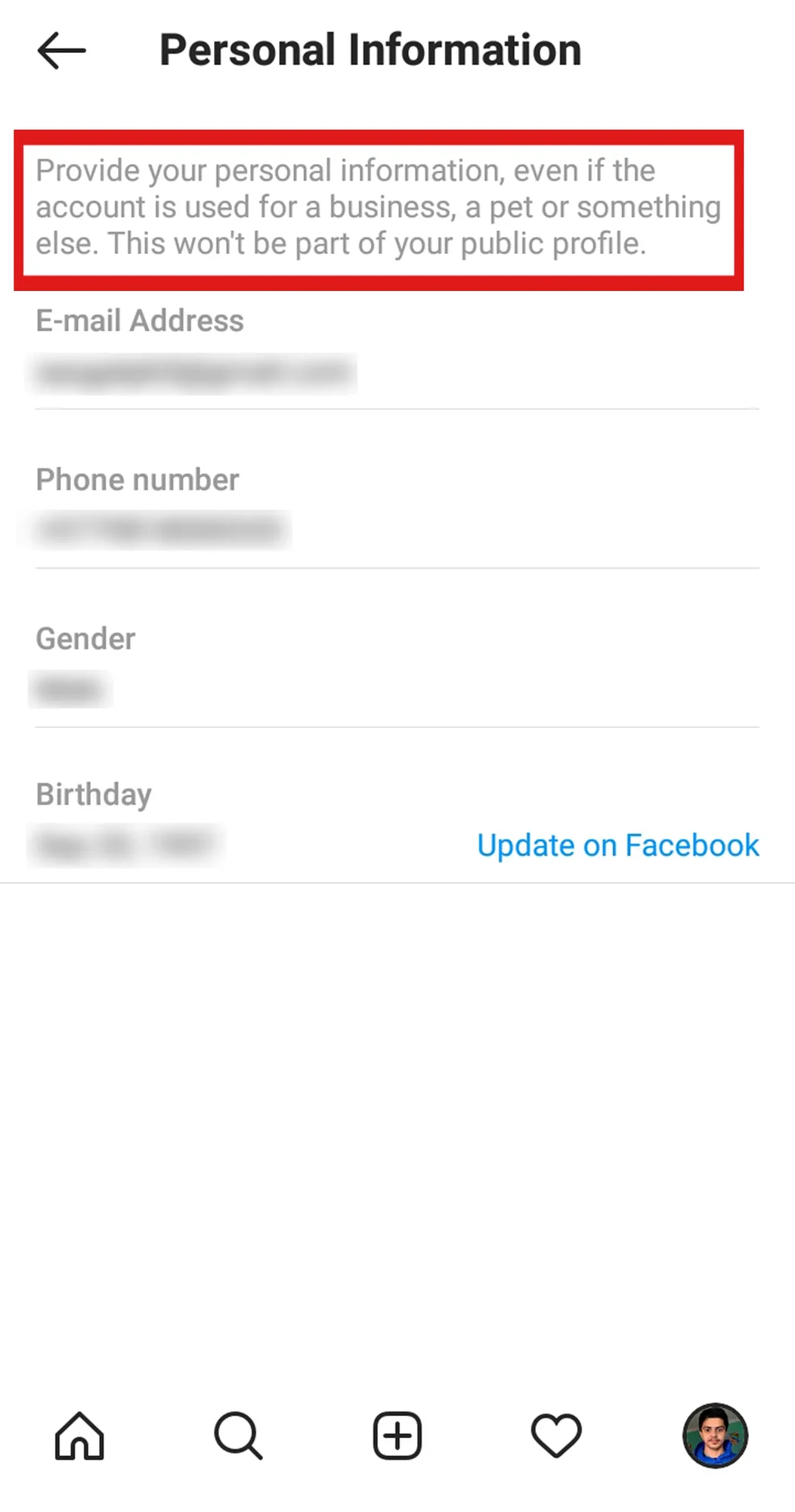
Instagram's own documentation states that email address, phone number, gender and date of birth are never visible to other users. The report quotes the official help page as saying the email address is not visible to other users, and the in-app path Instagram app > Edit Profile > Personal Information Settings as saying that email, phone number, gender and date of birth are never visible to other users.
Setup
The researcher used his own personal Instagram account, connected to a Facebook Page through Page Name > Settings > Instagram. With that link in place he could reply to his Instagram inbox through Business Suite.
To test the limits he created additional Instagram accounts:
- One test account with privacy set to private, messaged from his own Instagram account.
- Another account configured so that only followers can send it messages, also messaged from his own account.
No special tooling is described. The observations were made in the Business Suite web interface, and the report was submitted with a written description and a video proof of concept.
Finding it
While replying to a friend from Business Suite, the researcher noticed an email address in the top right corner of the interface. It was the friend's email. He asked her whether her email was set to public, and she could not confirm either way, so he searched for Instagram's stated email privacy behaviour.
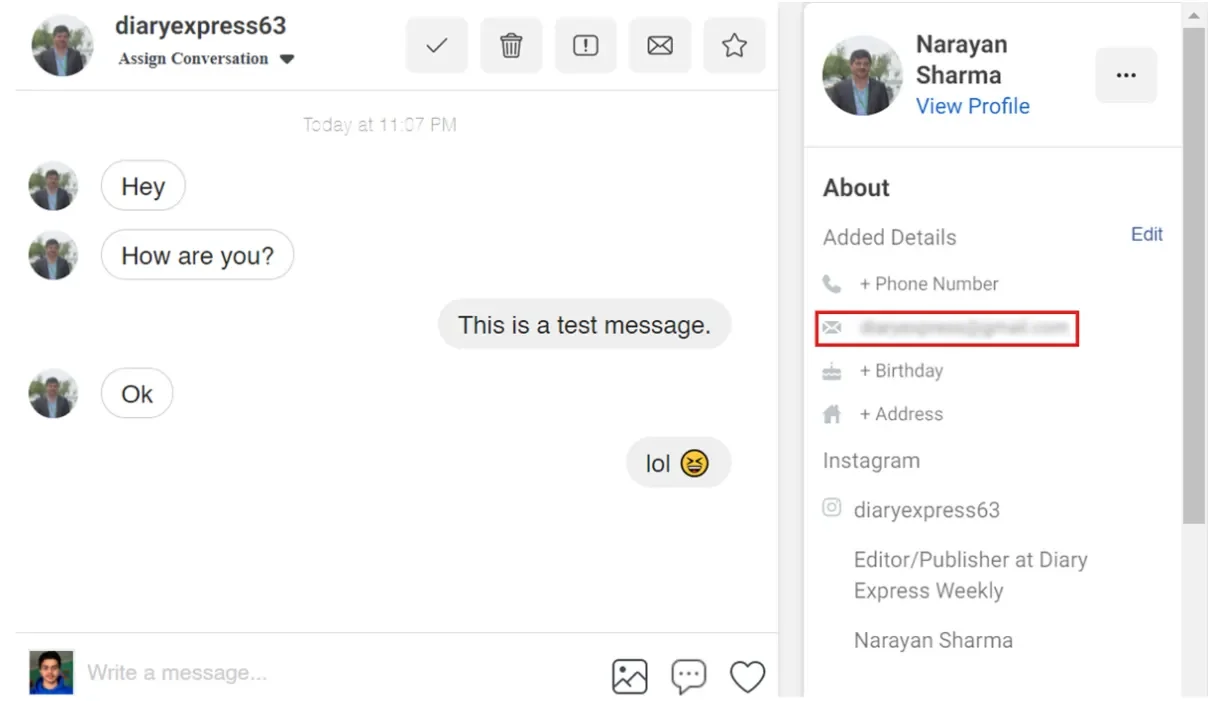
The screenshot shows an Instagram user's email being exposed through Business Suite. The official help page confirmed that email addresses are not visible to other users, which made him almost certain it was a bug.
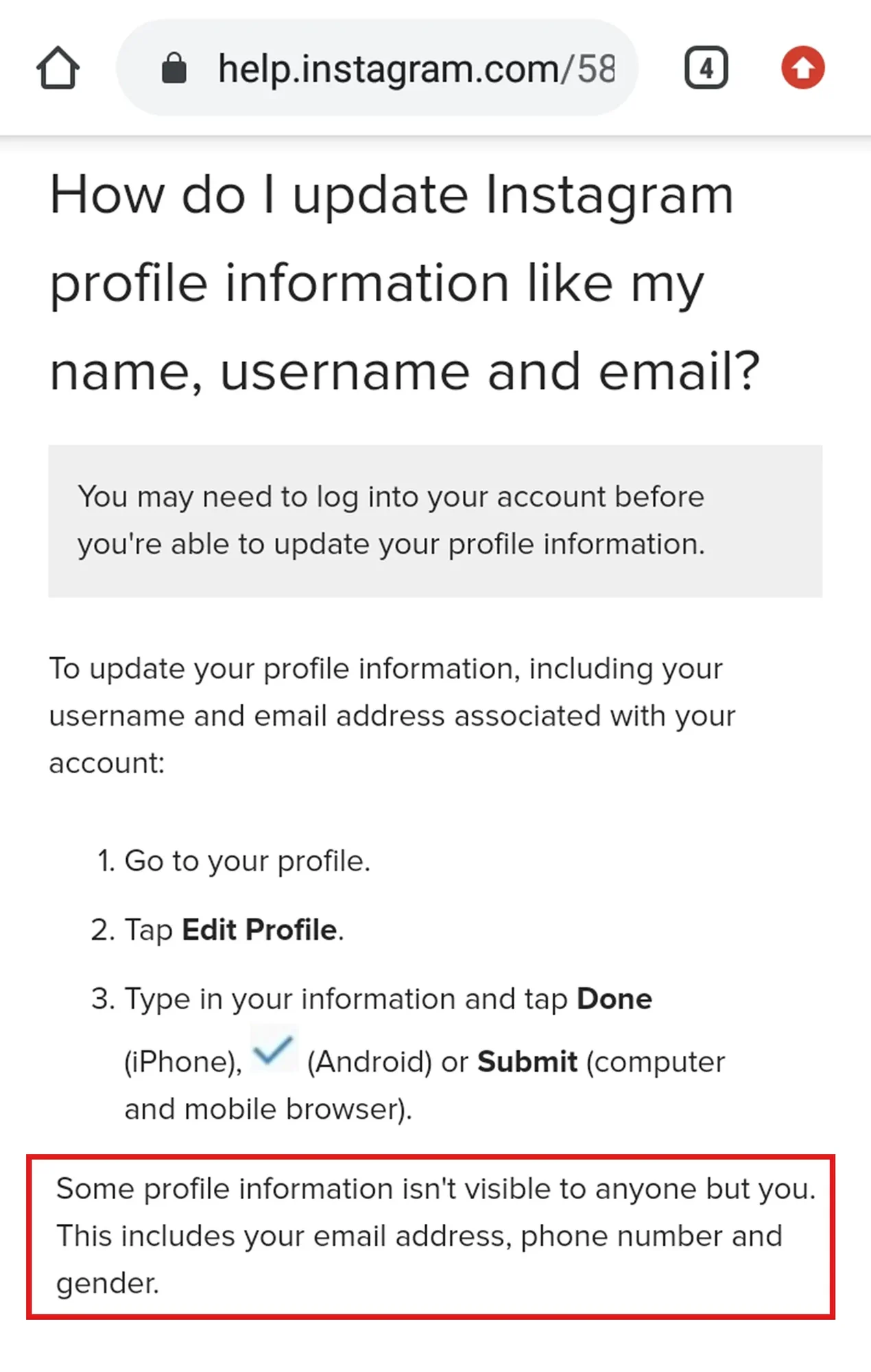
The help page states that email, phone number and gender are always private. The in-app personal information settings repeated the promise for email, phone number, gender and date of birth.
Opening a conversation with another friend showed that friend's email address as well, so the behaviour was not limited to a single account.
Exploitation
Step 1: Link an Instagram account to a Page
Connect a personal Instagram account to a Facebook Page via Page Name > Settings > Instagram. This is the normal, documented setup for Business Suite, and it is the precondition for everything that follows: the attacker needs admin control of a Page and the ability to link an Instagram account to it.
Step 2: Open an Instagram conversation in Business Suite
With the link in place, open the page messaging section and select a conversation with an Instagram user. The email address of that user is rendered in the top right corner of the conversation window. The report shows this for two different friends.
Step 3: Test against a private account
Create a test Instagram account, set its privacy to private, and send it a message from the attacker's Instagram account. The message appears in Business Suite, and the email address of the private account is displayed. Private accounts are therefore affected in the same way as public ones.
Step 4: Test against an account that refuses messages from non-followers
Create another account and set it so that only followers can send it messages. Send a message from the attacker's account. The message is not delivered, as expected, but a chat window still opens in Business Suite, and the email address of that account is disclosed anyway. The disclosure therefore does not depend on the message being accepted or delivered.
At this point the researcher concluded that the primary email address of any Instagram user could be disclosed simply by messaging them, including private accounts and accounts that do not accept direct messages from the public.
Step 5: Report and verify the email fix
The report was sent to Facebook with a detailed description and a video proof of concept. The researcher also notified a security engineer he could reach through a workplace group so the report would be looked at before it reached anyone malicious. The issue was triaged and a fix deployed in less than two hours after triage. About 8 to 9 hours after he noticed the patch, the security team messaged him to say the issue was fixed and asked him to check whether the patch resolved it.
Step 6: Notice the birthday leak while verifying
While checking the email fix, he saw that the birthday of an Instagram user was leaking from the same place. He replied that his birthday was leaking from the same location. A Facebook engineer replied that the birthday issue had already been identified from his initial report and that a fix was in progress. It was fixed the next day.
During that investigation he found that the birthday leaked only for users who had manually signed up for Instagram. That allowed an inference about how an account was created:
| Observation | Inference |
|---|---|
| Birthday disclosed | Manually signed up |
| Birthday not disclosed | Logged in with Facebook |
He considered this a separate privacy concern.
A video proof of concept and explanation accompanies the report:
Root cause
The report does not describe the server-side code or the exact defect. What it establishes is that the page messaging view in Business Suite returned and displayed profile fields, email address and birthday, that Instagram treats as private and never shows to other users.
Two observations constrain the cause.
The report does not say which existing defences, if any, were in place or why they did not stop the disclosure.
Impact
An attacker who controls a Facebook Page and links an Instagram account to it could obtain the primary email address of any Instagram user by messaging them from the linked account. The report states this worked against private accounts and against accounts configured to accept messages only from followers, and that delivery of the message was not required. The birthday of manually signed-up users was disclosed from the same place, and its presence or absence revealed whether an account was created by manual sign-up or through Login with Facebook.
The researcher describes the issue as highly critical in terms of user privacy.
Fix
Facebook fixed the email disclosure on October 23, 2020, the same day the report was triaged, and the birthday disclosure on October 28, 2020.
Timeline
| Event | Date |
|---|---|
| Initial report sent | October 22, 2020, 6:59 PM |
| Triaged | October 23, 2020 |
| Email disclosure issue fixed | October 23, 2020 |
| Birthday disclosure issue fixed | October 28, 2020 |
| Rewarded | December 16, 2020 |
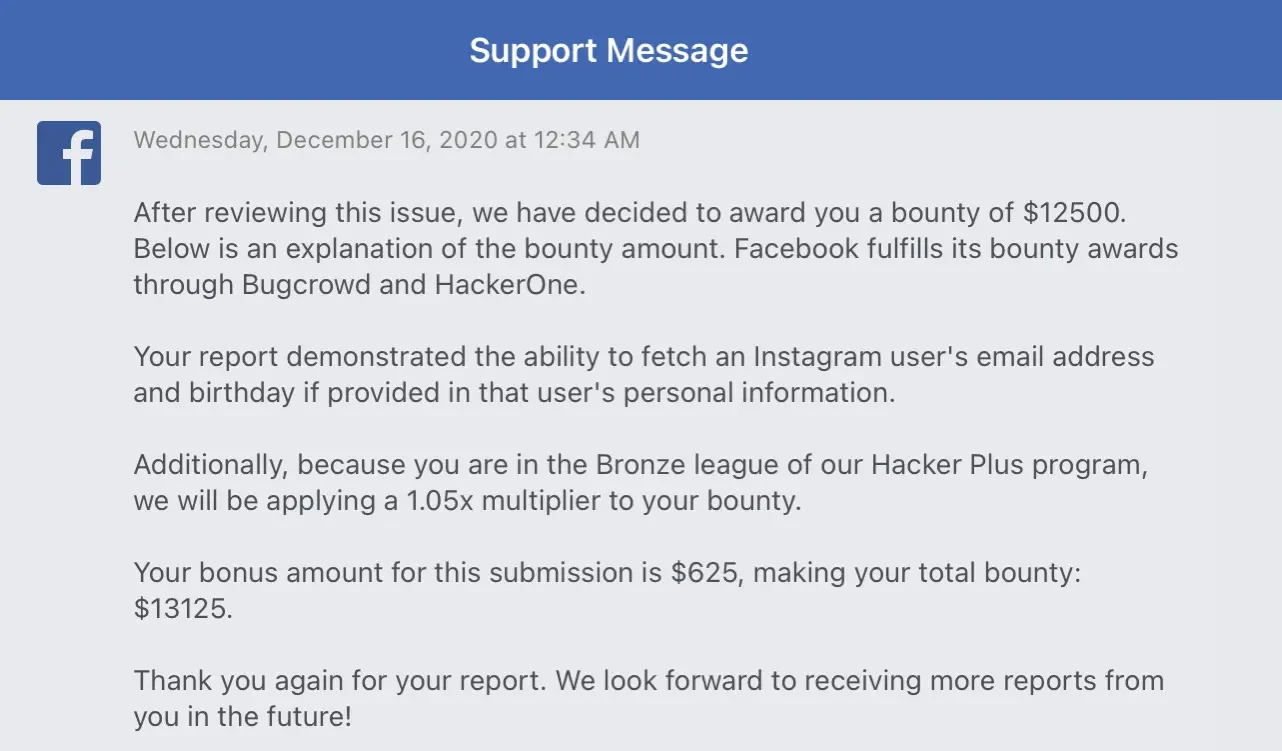
The bounty was a five-digit figure issued after about seven weeks, which the researcher describes as the highest reward of his lifetime.
Variants to test
- Other linked-account surfaces. Check every place where a business or creator tool renders a linked social account's profile: inbox headers, contact panels, analytics exports, comment moderation views. A positive result is a private field such as email, phone number or date of birth appearing for an account that does not publish it.
- Undelivered and blocked messages. Send messages to accounts that restrict who may message them, or that block the sender, and inspect any conversation object created as a result. A positive result is a conversation or participant record containing profile fields even though no message was delivered.
- Field presence as an oracle. Compare which optional fields appear for accounts created through different sign-up paths. A positive result is a field that reliably distinguishes account creation method, as the birthday did here.
- Cross-product linking. Link accounts across related products, for example a Page to an Instagram account, and check whether the admin view exposes fields the source product marks private. A positive result is any field the source product's own settings describe as never visible to other users.
What happened, in plain words
A security researcher found that a Facebook tool for businesses, called Facebook Business Suite, was showing him private information about Instagram users: their email address, and in some cases their birthday. Instagram promises that this information is never visible to other users. He could see it simply by sending a message to someone from an Instagram account that was linked to a Facebook Page. It worked even against accounts set to private, and even when the message was never actually delivered. He reported it, Facebook fixed the email leak the same day and the birthday leak a few days later, and he was paid a five-digit bounty.
This article walks through the whole story from the beginning, explaining each idea as it comes up, so you do not need any security background to follow it.
The product and the feature
Facebook Business Suite is a tool for people who run a Facebook Page, for example a shop or a brand. It is an upgraded version of the older page manager app. In Business Suite, the person who administers the Page can link the Page to an Instagram account. Once linked, they can create or schedule posts, look at statistics, send messages, and reply to comments on both Instagram and Facebook from one place. On a computer it is reached at business.facebook.com.
The part of Business Suite this report is about is its messaging section. When an Instagram account is linked to a Page, the admin can read and reply to that Instagram inbox from inside Business Suite. The report shows that this messaging view also displayed the Instagram user's private email address in the top right corner of the conversation window, and later a birthday from the same place.
A useful comparison: think of Business Suite as a reception desk for a business. Messages sent to the business on Instagram and Facebook all arrive at the same desk, and the receptionist can answer them from one screen. The problem was that the desk also had a private file about each person who wrote in, sitting in plain view.
What Instagram promises
Instagram's own documentation says that email address, phone number, gender and date of birth are never visible to other users. The report quotes the official help page as saying the email address is not visible to other users. It also quotes the in-app path Instagram app > Edit Profile > Personal Information Settings as saying that email, phone number, gender and date of birth are never visible to other users.
That promise is the yardstick for the whole report. If a product tells users a piece of information is private, then any place where another person can see it is a bug.
Setting up the test
The researcher used his own personal Instagram account and connected it to a Facebook Page through Page Name > Settings > Instagram. With that link in place, he could reply to his Instagram inbox through Business Suite.
To test the limits, he created additional Instagram accounts:
- One test account with privacy set to private, messaged from his own Instagram account.
- Another account configured so that only followers can send it messages, also messaged from his own account.
No special tooling is described. Everything was observed in the ordinary Business Suite web interface, the kind of screen anyone with a browser can open. The report was submitted with a written description and a video proof of concept.
A proof of concept, often shortened to PoC, is simply a demonstration that the problem is real: here, a recording showing the private information appearing on screen.
Finding it
While replying to a friend from Business Suite, the researcher noticed an email address in the top right corner of the interface. It was the friend's email. He asked her whether her email was set to public, and she could not confirm either way. So he searched for what Instagram says about email privacy.
The screenshot shows an Instagram user's email being exposed through Business Suite. The official help page confirmed that email addresses are not visible to other users, which made him almost certain it was a bug.
The help page states that email, phone number and gender are always private. The in-app personal information settings repeated the promise for email, phone number, gender and date of birth.
Opening a conversation with another friend showed that friend's email address as well, so the behaviour was not limited to a single account. That second observation matters: one odd result could be a fluke, but the same result for two different people suggests a pattern in how the software works.
Exploitation, step by step
Exploitation here does not mean breaking into anything with clever code. It means using the product in a normal way and noticing that it hands over information it should not. Each step below explains what was done and why.
Step 1: Link an Instagram account to a Page
Connect a personal Instagram account to a Facebook Page via Page Name > Settings > Instagram. This is the normal, documented setup for Business Suite, and it is the precondition for everything that follows: the attacker needs admin control of a Page and the ability to link an Instagram account to it.
Why this step: the messaging view only exists for a Page admin with a linked Instagram account. Without the link there is no inbox to look at, so this is the doorway into the feature being tested.
Step 2: Open an Instagram conversation in Business Suite
With the link in place, open the page messaging section and select a conversation with an Instagram user. The email address of that user is rendered in the top right corner of the conversation window. The report shows this for two different friends.
Why this step: it reproduces the original observation deliberately, rather than by accident, and confirms it happens for more than one person.
Step 3: Test against a private account
Create a test Instagram account, set its privacy to private, and send it a message from the attacker's Instagram account. The message appears in Business Suite, and the email address of the private account is displayed. Private accounts are therefore affected in the same way as public ones.
Why this step: a private account is the case where users most expect protection. If the leak survives there, it is not limited to people who have chosen to be open.
Step 4: Test against an account that refuses messages from non-followers
Create another account and set it so that only followers can send it messages. Send a message from the attacker's account. The message is not delivered, as expected, but a chat window still opens in Business Suite, and the email address of that account is disclosed anyway. The disclosure therefore does not depend on the message being accepted or delivered.
Why this step: it separates two things that look connected but are not. You might assume the information only appears because a message was successfully delivered.
At this point the researcher concluded that the primary email address of any Instagram user could be disclosed simply by messaging them, including private accounts and accounts that do not accept direct messages from the public.
Step 5: Report and verify the email fix
The report was sent to Facebook with a detailed description and a video proof of concept. The researcher also notified a security engineer he could reach through a workplace group, so the report would be looked at before it reached anyone malicious. The issue was triaged and a fix deployed in less than two hours after triage. About 8 to 9 hours after he noticed the patch, the security team messaged him to say the issue was fixed and asked him to check whether the patch resolved it.
Two terms worth knowing here. Triaged means the security team has read the report, confirmed it is a genuine problem, and put it into their workflow. A patch is a change to the software that removes the flaw. Asking the reporter to verify the patch is normal practice: the person who found the bug is well placed to confirm it is really gone.
Step 6: Notice the birthday leak while verifying
While checking the email fix, he saw that the birthday of an Instagram user was leaking from the same place. He replied that his birthday was leaking from the same location. A Facebook engineer replied that the birthday issue had already been identified from his initial report and that a fix was in progress. It was fixed the next day.
During that investigation he found that the birthday leaked only for users who had manually signed up for Instagram. That allowed an inference about how an account was created:
| Observation | Inference |
|---|---|
| Birthday disclosed | Manually signed up |
| Birthday not disclosed | Logged in with Facebook |
He considered this a separate privacy concern.
Why this matters: even when a piece of data is not itself very sensitive, the fact that it appears or does not appear can reveal something else. Here, the presence or absence of a birthday told you which route the person took when creating their account. That is called an oracle in security: a signal you can observe that answers a question you were not supposed to be able to ask.
A video proof of concept and explanation accompanies the report:
Why it probably happened
The report does not describe the server-side code or the exact defect. What it establishes is that the page messaging view in Business Suite returned and displayed profile fields, email address and birthday, that Instagram treats as private and never shows to other users.
Some of those words deserve unpacking. An endpoint is a specific address inside a service that answers a particular kind of request, like a particular counter in a large office. Serialised means turned into a format that can be sent over the network, for example a block of text describing the user's details. Field-level visibility rules are simply the per-field decisions about who may see what: the email is hidden, the username is shown, and so on. The Instagram app applies those rules; the Business Suite messaging view apparently did not.
The report does not say which existing defences, if any, were in place or why they did not stop the disclosure.
Who was affected and how badly
An attacker who controls a Facebook Page and links an Instagram account to it could obtain the primary email address of any Instagram user by messaging them from the linked account. The report states this worked against private accounts and against accounts configured to accept messages only from followers, and that delivery of the message was not required. The birthday of manually signed-up users was disclosed from the same place, and its presence or absence revealed whether an account was created by manual sign-up or through Login with Facebook.
The researcher describes the issue as highly critical in terms of user privacy.
The fix
Facebook fixed the email disclosure on October 23, 2020, the same day the report was triaged, and the birthday disclosure on October 28, 2020.
In plain terms: the messaging view should ask the same questions the Instagram app asks before showing a field, and hide anything the user has been promised will stay private.
Timeline
| Event | Date |
|---|---|
| Initial report sent | October 22, 2020, 6:59 PM |
| Triaged | October 23, 2020 |
| Email disclosure issue fixed | October 23, 2020 |
| Birthday disclosure issue fixed | October 28, 2020 |
| Rewarded | December 16, 2020 |
The bounty was a five-digit figure issued after about seven weeks, which the researcher describes as the highest reward of his lifetime.
Where else to look
These are the kinds of places a tester would check next, based on the same idea: private data appearing in a tool that was built for a different purpose.
- Other linked-account surfaces. Check every place where a business or creator tool renders a linked social account's profile: inbox headers, contact panels, analytics exports, comment moderation views. A positive result is a private field such as email, phone number or date of birth appearing for an account that does not publish it.
- Undelivered and blocked messages. Send messages to accounts that restrict who may message them, or that block the sender, and inspect any conversation object created as a result. A positive result is a conversation or participant record containing profile fields even though no message was delivered.
- Field presence as an oracle. Compare which optional fields appear for accounts created through different sign-up paths. A positive result is a field that reliably distinguishes account creation method, as the birthday did here.
- Cross-product linking. Link accounts across related products, for example a Page to an Instagram account, and check whether the admin view exposes fields the source product marks private. A positive result is any field the source product's own settings describe as never visible to other users.
Glossary
- API: a defined way for one piece of software to ask another for data or an action, like a service counter with set request forms.
- Bounty: a payment a company makes to someone who reports a security problem responsibly.
- Business Suite: Facebook's tool for managing a Page and a linked Instagram account from one place, including messages, posts and statistics.
- Endpoint: a specific address inside a service that handles a particular kind of request.
- Exploitation: using a flaw in practice to obtain something you should not have, here by simply using the product normally.
- Field-level visibility rules: per-field decisions about who is allowed to see each piece of profile data.
- Information disclosure: a flaw where data that should stay private is shown to someone who should not see it.
- Logic flaw: a mistake in how a feature is designed or sequenced, rather than a crash or memory error; the software does what it was told, but the rules are wrong.
- Oracle: an observable signal that reveals an answer you were not supposed to be able to obtain.
- Patch: a change to software that removes a flaw.
- PoC (proof of concept): a demonstration, often a video, that a problem is real.
- Private account: an Instagram account whose posts are visible only to approved followers.
- Serialised: converted into a format that can be sent over a network, such as a block of text describing a user's details.
- Triaged: reviewed by a security team and confirmed as a genuine issue to be worked on.
- Vulnerability: a weakness in software that can be used to cause harm or break a promise about privacy.




