Stealing First Party Access Token of Facebook Users: Meta Bug Bounty
A website abused Facebook's device login flow to obtain first-party access tokens from users who thought they were granting limited permissions. The stolen tokens allowed access to private posts and could be used for account takeover.
 Published on iamsaugat.medium.com
Hi, I am Saugat Pokharel from Kathmandu, Nepal. I am going to talk about one of my findings on Facebook.
The full write-up lives on its author's site
It belongs to its author, so we link to it rather than copy it. The other two tabs are our own rewrites, checked against it.
Context
Facebook Login for Devices is an authentication flow that lets a user connect a Facebook account to a device without typing a username and password. The user is shown a short temporary code on the device, goes to facebook.com/device, enters the code, and approves the connection. Meta documents it for smart TVs, cameras, printers and similar hardware. The report gives two examples: the Facebook Watch app on an Android TV, and Meta Quest, where the headset shows a code and the user enters it at facebook.com/device to link the device to the account.
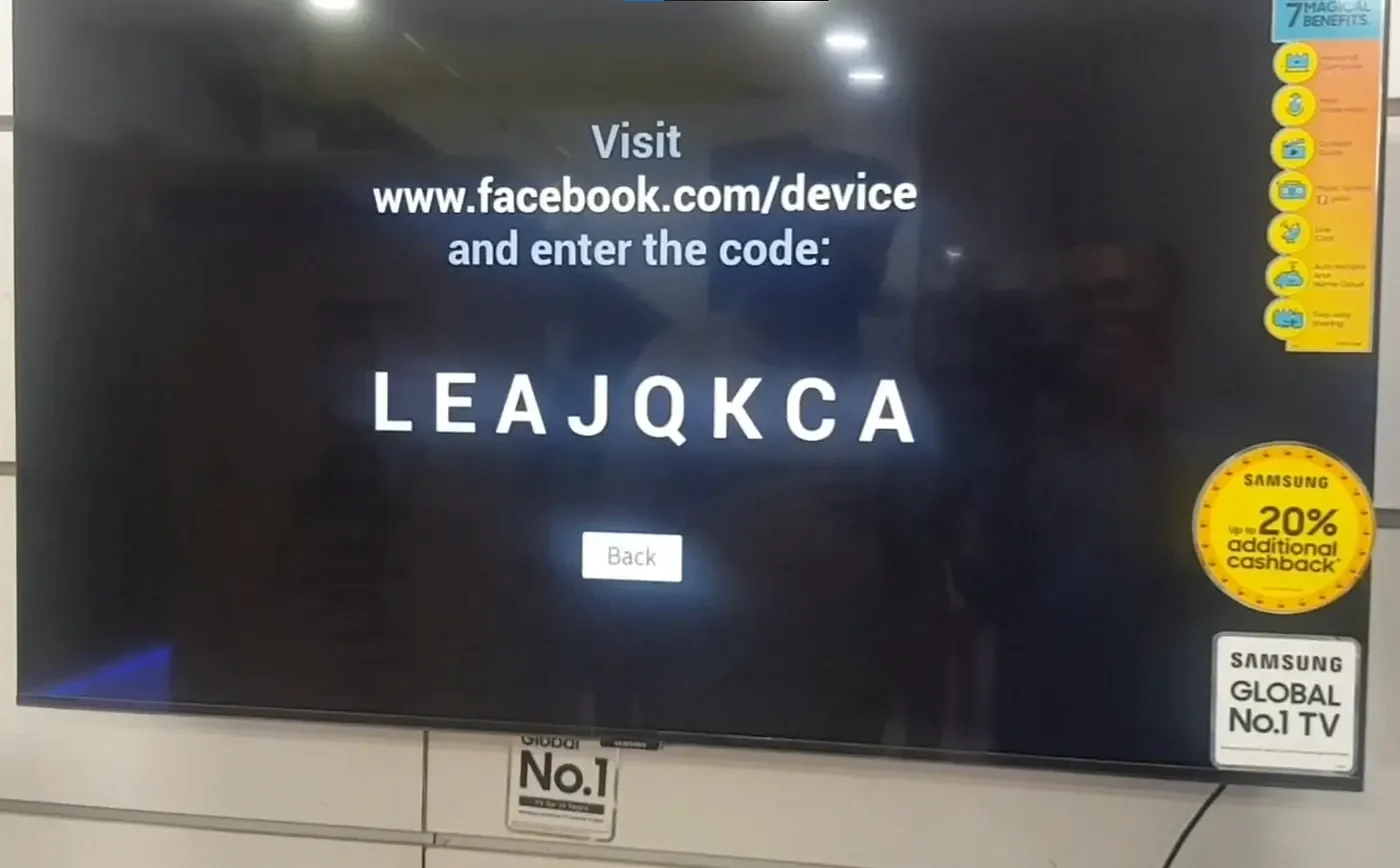
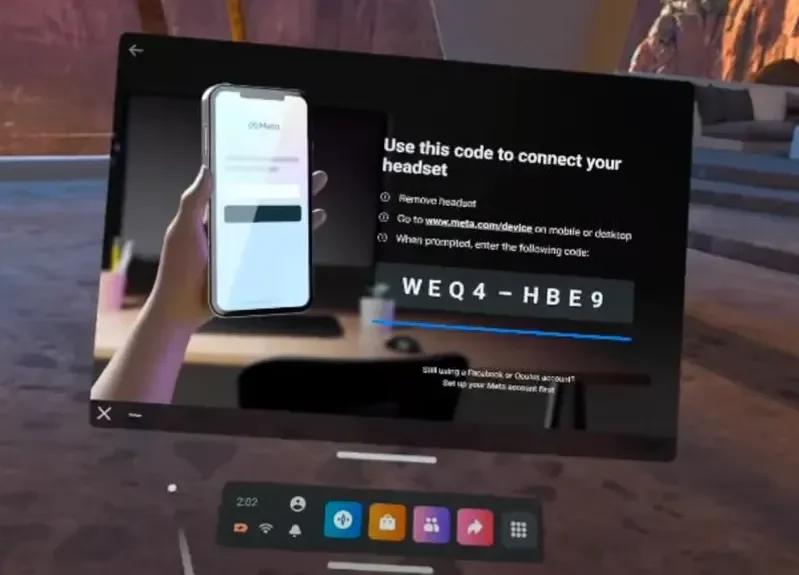
The target in this write-up is not a Meta endpoint but a third-party site called "Machine-liker", which offered to increase likes on Facebook posts. Its login button presented itself as an ordinary "Login with Facebook" OAuth flow, but underneath it was driving the device authorisation flow.
Setup
The researcher, Saugat Pokharel, came to this after a Facebook security engineer at BountyCon 2022 in Singapore suggested looking into business integrity issues, and after learning the scope of the Integrity Safeguard Program: bypassing business checkpoints and settings, such as running ads with a fake payment method, generating ad revenue through fake impressions, or creating prepaid balance without a valid payment method.
He already knew that likes on Facebook are sold through bots and applications, and that friends had collected large numbers of likes and comments by visiting sites that give Facebook likes for free. He started analysing those sites and found Machine-liker. No special tooling, test accounts or versions are described; the work was done with a normal Facebook account and a browser.
Finding it
The site had a Login with Facebook button that looked identical to the Facebook third-party login flow.

Clicking it opened another window asking for permission, which the researcher allowed, assuming it was a normal OAuth flow.
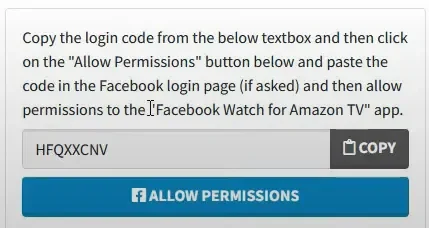
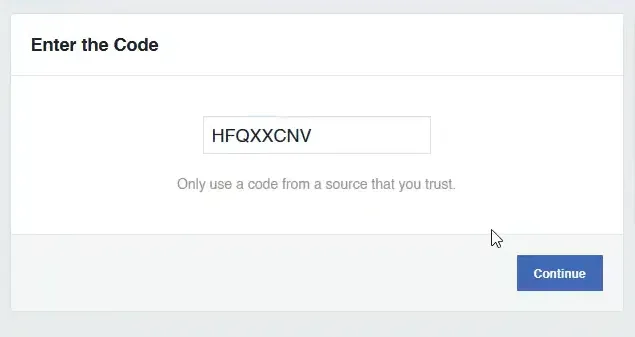
He was then redirected to facebook.com/device with a code already filled in, and clicked Continue.
What followed was a permission screen covering name and email address and also critical permissions such as accessing the pages he managed and posting on behalf of his account.
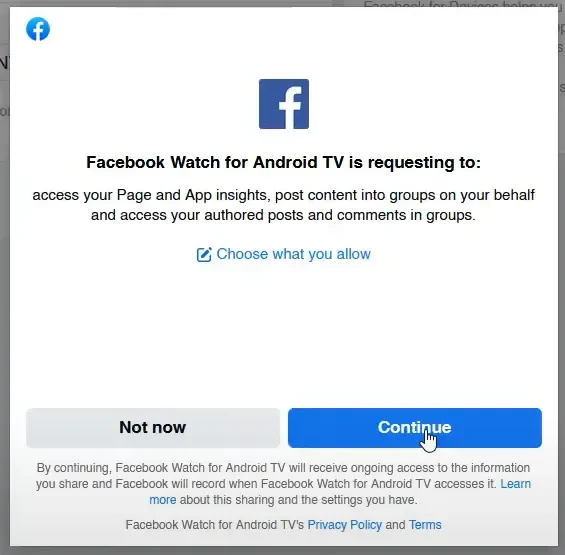
He used "Choose what you allow" and unchecked everything except Name and Profile pictures, and the authorisation completed.
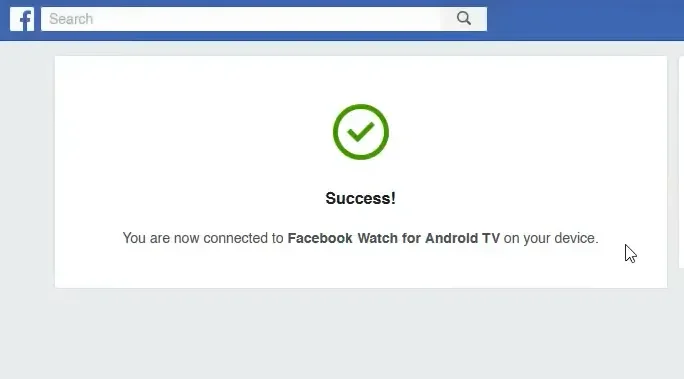
Two things stood out. There was no proper redirect back to the site's login page after authorisation, and after he returned to the site and clicked verify & login, it listed all of his posts and asked where he wanted to increase reactions. Most of those posts had privacy set to "Only Me" and "Friends".
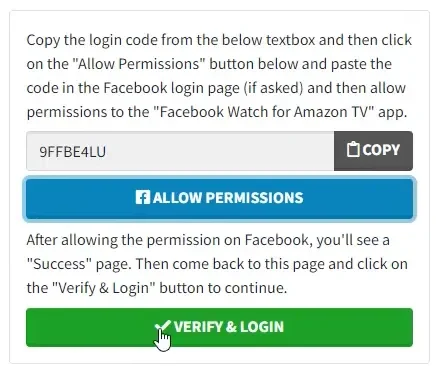
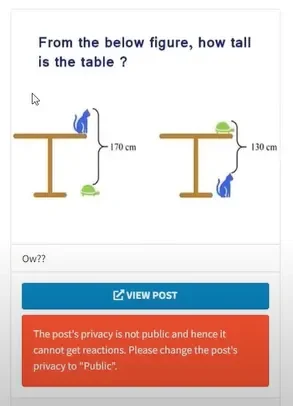
He had declined photo access, so the site should not have been able to read those posts at all. He went to Facebook > Settings > Apps & Websites to remove the app, but found no recent apps or websites he had logged into, and he was receiving suspicious login attempt alerts on the account.
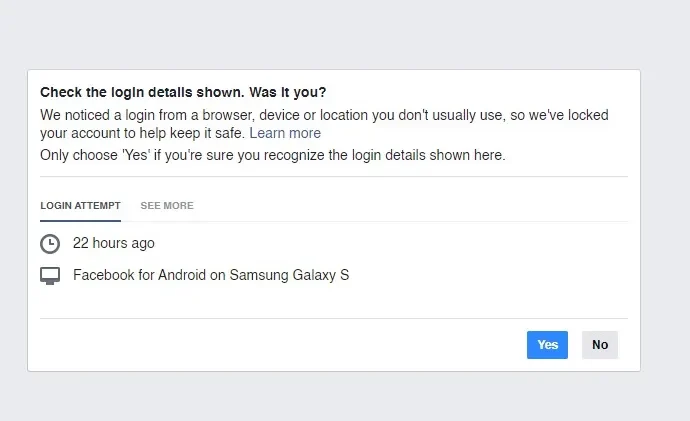
Because the alerts were arriving, he reported the behaviour to Facebook Whitehat before working out the exact cause, then continued investigating and found that the site was using Facebook Login for Devices.
Exploitation
The device flow can be implemented on any website, not only on hardware. All that is needed is the client_token and app_id of an application that has login with devices enabled. The report says both can be obtained through specific endpoints or by reverse engineering the application. With those, the login process can be automated through two endpoints.
Step 1: generate the code and user_code
https://graph.facebook.com/v2.6/device/login?access_token=app_id|client_secret&scope={permissions}&method=post
The report's link contains a concrete app id and secret, which are redacted here:
https://graph.facebook.com/v2.6/device/login?access_token=[redacted]&scope=email&method=post
Step 2: exchange the code for an access token
The report's example again carries real values, redacted:
https://graph.facebook.com/v2.6/device/login_status?access_token=[redacted]&method=post&code=[redacted]
Step 3: what the site did with it
Machine-liker automated this process with the two URLs above. The user sees a familiar-looking "Login with Facebook" button, is sent to facebook.com/device with the code pre-filled, and approves. The site never needs the user's password, and the approval happens on Facebook's own domain. The token that comes back is a first-party access token.
Root cause
A site that holds an app's client_token and app_id can generate a user_code, pre-fill it on facebook.com/device, and collect the resulting first-party token through device/login_status.
The report does not describe the server-side checks that were missing. What it does say is that the code autofill on facebook.com/device was possible, that the permission dialog was the third-party style rather than the first-party style, and that the token obtained was long lived. The absence of a redirect back to the site after authorisation, which the researcher noticed as odd, is consistent with the site driving the flow through the API rather than through a normal OAuth redirect; the report does not state this explicitly.
Impact
With a stolen first-party access token an attacker can perform sensitive actions, including GraphQL queries and mutations to change phone numbers or email addresses, which the report says can potentially lead to takeover of Facebook or Instagram accounts. The tokens are long lived: they do not expire on a quick time interval or after logout. The site used them to make GraphQL queries to send reactions and make comments, which is what Machine-liker had been doing for years. The report also says these sites collect millions of first-party access tokens and that several forums trade them for money.
In this case the researcher unchecked everything except Name and Profile pictures, yet the site still displayed posts marked "Only Me" and "Friends", which is the observation that made the missing photo permission irrelevant to the outcome.
Fix
The report lists five changes:
- Code autofill was removed. Clicking a link no longer fills the code on
facebook.com/device, which makes the attack more difficult. - The first-party dialog box is used instead of the third-party one, so users are warned that the app is gaining access to their Facebook account.
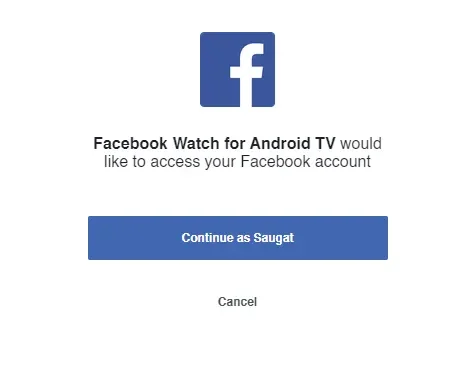
- The site that was actively stealing user data is no longer active. The report does not know whether Facebook forced it closed or the owner closed it.
- An advisory was added: "Only use a code from a source that you trust."
- Many Facebook first-party applications no longer support device logins.
Variants to test
- Look for sites that present a "Login with Facebook" button but send the browser to
facebook.com/devicewith a pre-filled code. A positive result is a code field already populated on arrival, or a redirect to the device page that the user did not initiate from a device. - Enumerate apps with device login enabled and check whether their
client_tokenandapp_idcan be recovered from public endpoints or from the client application. A positive result is a workingdevice/logincall that returns auser_codefor an app you do not own. - After approving a device flow, check whether the resulting token appears under Settings > Apps & Websites. A positive result is a token that works but leaves no revocable entry in the user's app list.
- Test whether the token survives logout and remains valid over time. A positive result is a token that still performs GraphQL queries after the session is ended.
- Compare the permission dialog shown for a device flow with the one shown for a normal third-party OAuth login. A positive result is a device flow that presents the less explicit third-party dialog.
Timeline
| Date | Event |
|---|---|
| October 25, 2022 | Report sent |
| October 26, 2022 | Report confirmed by Facebook |
| June 2023 | Multiple bounties rewarded |
What happened, in plain words
A security researcher found a website that offered to get you more likes on your Facebook posts. To use it, you clicked a button that said "Login with Facebook", which looks exactly like the button you see on thousands of legitimate sites. But behind that button, the site was quietly using a Facebook feature meant for devices such as smart TVs, called Facebook Login for Devices. That feature lets a device show a short code, and you type the code into Facebook to link the device to your account. The website was generating those codes itself, filling them in for you, and collecting the special key (called an access token) that Facebook hands back once you approve. With that key, the site could read your private posts, even though you had unticked most of the permissions. The researcher reported it, several parts of the flow were changed, and bounties were paid.
Background: what the researcher was looking for
The researcher is Saugat Pokharel from Kathmandu, Nepal. He came to this topic after a Facebook security engineer at an event called BountyCon 2022 in Singapore suggested he look into "business integrity" issues, and after learning about the scope of the Integrity Safeguard Program. That program covers things like bypassing business checkpoints and settings: for example, running ads with a fake payment method, generating ad revenue through fake impressions, or creating prepaid balance without a valid payment method.
He already knew that likes on Facebook are sold through bots and applications, and that some of his friends had collected large numbers of likes and comments by visiting sites that give Facebook likes for free. So he started analysing those sites. No special tools, test accounts or software versions are described: the work was done with a normal Facebook account and a browser.
What Facebook Login for Devices is
Facebook Login for Devices is a way to connect a Facebook account to a device without typing your username and password. The device shows a short temporary code on its screen. You go to facebook.com/device in a browser, enter the code, and approve the connection. Meta documents this for smart TVs, cameras, printers and similar hardware.
A useful comparison: it works like pairing a Bluetooth speaker. The speaker shows or says a number, you confirm it on your phone, and the two are linked. You never type your password into the speaker.
The report gives two examples. The first is the Facebook Watch app on an Android TV: you open the app, a temporary code appears on the TV screen, and you enter that code at facebook.com/device to connect your account to the TV.
The second is Meta Quest: the headset shows a code, you go to facebook.com/device, enter the code, and the headset is linked to your Meta/Facebook account.
So the feature itself is legitimate and useful. The problem in this report is that a website, not a piece of hardware, was using it.
Finding the site
The target here is not a Facebook page but a third-party site called "Machine-liker", which offered to increase likes on Facebook posts. Its login button presented itself as an ordinary "Login with Facebook" OAuth flow.
A quick word on OAuth, since it comes up constantly. OAuth is the standard way one website asks another (here, Facebook) for permission to access your account without ever seeing your password. You have seen it as "Sign in with Google" or "Continue with Facebook". The site sends you to Facebook, Facebook asks whether you agree, and if you do, Facebook sends the site a token: a digital key that the site can use later to act on your behalf. A token is like a coat-check ticket: whoever holds it can collect the coat, so it must be kept secret.
The site's button looked identical to the normal Facebook third-party login flow.
Walking through the flow
Clicking the button opened another window asking for permission. The researcher allowed it, assuming it was a normal OAuth flow.
He was then redirected to facebook.com/device with a code already filled in, and clicked Continue.
This is the first odd detail. In a normal device login, you are the one who reads a code off a TV or headset and types it in. Here the code was already sitting in the box, put there by the website. The researcher did not yet know that, so he continued.
What followed was a permission screen covering name and email address, and also critical permissions such as accessing the pages he managed and posting on behalf of his account.
He used "Choose what you allow" and unticked everything except Name and Profile pictures, and the authorisation completed.
Permissions, in plain terms, are the list of things an app is allowed to do with your account. Unticking them is like telling a delivery driver they may leave the parcel at the door but may not come inside. The researcher deliberately kept the access as small as possible.
What went wrong
Two things stood out. First, there was no proper redirect back to the site's login page after authorisation. In a normal OAuth flow, Facebook sends you back to the site automatically. Here it did not, which the researcher found strange. Second, after he returned to the site and clicked verify & login, it listed all of his posts and asked where he wanted to increase reactions. Most of those posts had privacy set to "Only Me" and "Friends".
He had declined photo access, so the site should not have been able to read those posts at all. This is the core of the bug: the site was seeing content it had not been granted permission to see.
He went to Facebook > Settings > Apps & Websites to remove the app, but found no recent apps or websites he had logged into, and he was receiving suspicious login attempt alerts on the account.
That second point matters. Normally, when you grant an app access, it appears in that list so you can revoke it later. Here there was nothing to revoke, even though the site clearly had access. Because the alerts kept arriving, he reported the behaviour to Facebook Whitehat before working out the exact cause, then continued investigating and found that the site was using Facebook Login for Devices.
How the trick was automated
The device flow can be implemented on any website, not only on hardware. All that is needed is the client_token and app_id of an application that has login with devices enabled. The report says both can be obtained through specific endpoints or by reverse engineering the application.
Two terms to unpack. An API (application programming interface) is a set of web addresses a program can call to make something happen, like a service counter at a bank: you hand over a request and get a response. An endpoint is one specific address in that API. The app_id is a public identifier for a Facebook application, a bit like a shop's name on a sign. The client_secret (or client_token) is the matching private password, like the shop's safe combination. Anyone holding both can act as that application.
With those, the login process can be automated through two endpoints.
Step 1: generate the code and user_code
https://graph.facebook.com/v2.6/device/login?access_token=app_id|client_secret&scope={permissions}&method=post
Line by line:
https://graph.facebook.com/v2.6/device/loginis the address of the device login endpoint.graph.facebook.comis Facebook's API server, andv2.6is the version of the API being called.access_token=app_id|client_secretis how the call proves it is the application. The app id and the secret are joined by a pipe character|. This is the application's own credential, not the user's.scope={permissions}is the list of permissions being requested.{permissions}is a placeholder for whatever the caller wants to ask for.method=postsays this is a POST request, meaning data is being sent to the server rather than just asking for a page.
The report's link contains a concrete app id and secret, which are redacted here:
https://graph.facebook.com/v2.6/device/login?access_token=[redacted]&scope=email&method=post
The access_token value is the app's own id and secret, which must never be public.
Step 2: exchange the code for an access token
Line by line:
https://graph.facebook.com/v2.6/device/login_statusis the endpoint that checks whether the user has approved yet.access_token=app_id|client_secretagain identifies the application with its id and secret.method=postagain means a POST request.code={code}is the device code from the first call.{code}is a placeholder for the real value.
"Polls" means asking the same question repeatedly until the answer changes, like refreshing a tracking page until the parcel says "delivered". The report's example again carries real values, redacted:
https://graph.facebook.com/v2.6/device/login_status?access_token=[redacted]&method=post&code=[redacted]
Step 3: what the site did with it
Machine-liker automated this process with the two URLs above. The user sees a familiar-looking "Login with Facebook" button, is sent to facebook.com/device with the code pre-filled, and approves. The site never needs the user's password, and the approval happens on Facebook's own domain. The token that comes back is a first-party access token.
A first-party access token is a key issued by Facebook itself for use with Facebook's own services, rather than a limited key issued to a third-party app. It is the difference between a master key and a key that only opens the front door. The report calls these tokens particularly dangerous because of what they can do.
Why it worked
A site that holds an app's client_token and app_id can generate a user_code, pre-fill it on facebook.com/device, and collect the resulting first-party token through device/login_status.
The report does not describe the server-side checks that were missing. What it does say is that the code autofill on facebook.com/device was possible, that the permission dialog was the third-party style rather than the first-party style, and that the token obtained was long lived. The absence of a redirect back to the site after authorisation, which the researcher noticed as odd, is consistent with the site driving the flow through the API rather than through a normal OAuth redirect; the report does not state this explicitly.
What an attacker could do with the token
With a stolen first-party access token an attacker can perform sensitive actions, including GraphQL queries and mutations to change phone numbers or email addresses, which the report says can potentially lead to takeover of Facebook or Instagram accounts.
GraphQL is a way of asking a server for exactly the data you want, and a mutation is a GraphQL request that changes data rather than just reading it. Think of a query as asking to see a file and a mutation as asking to edit it. Changing the phone number or email on an account is a classic route to account takeover, because those are the details used to reset a password.
The tokens are long lived: they do not expire on a quick time interval or after logout. That is unusual and serious. Most session keys stop working when you log out, like a hotel key card that is cancelled at checkout. These did not.
The site used them to make GraphQL queries to send reactions and make comments, which is what Machine-liker had been doing for years. The report also says these sites collect millions of first-party access tokens and that several forums trade them for money.
In this case the researcher unticked everything except Name and Profile pictures, yet the site still displayed posts marked "Only Me" and "Friends", which is the observation that made the missing photo permission irrelevant to the outcome.
What Facebook changed
The report lists five changes:
- Code autofill was removed. Clicking a link no longer fills the code on
facebook.com/device, which makes the attack more difficult. - The first-party dialog box is used instead of the third-party one, so users are warned that the app is gaining access to their Facebook account.
- The site that was actively stealing user data is no longer active. The report does not know whether Facebook forced it closed or the owner closed it.
- An advisory was added: "Only use a code from a source that you trust."
- Many Facebook first-party applications no longer support device logins.
Things worth testing yourself
- Look for sites that present a "Login with Facebook" button but send the browser to
facebook.com/devicewith a pre-filled code. A positive result is a code field already populated on arrival, or a redirect to the device page that the user did not initiate from a device. - Enumerate apps with device login enabled and check whether their
client_tokenandapp_idcan be recovered from public endpoints or from the client application. A positive result is a workingdevice/logincall that returns auser_codefor an app you do not own. - After approving a device flow, check whether the resulting token appears under Settings > Apps & Websites. A positive result is a token that works but leaves no revocable entry in the user's app list.
- Test whether the token survives logout and remains valid over time. A positive result is a token that still performs GraphQL queries after the session is ended.
- Compare the permission dialog shown for a device flow with the one shown for a normal third-party OAuth login. A positive result is a device flow that presents the less explicit third-party dialog.
Timeline
| Date | Event |
|---|---|
| October 25, 2022 | Report sent |
| October 26, 2022 | Report confirmed by Facebook |
| June 2023 | Multiple bounties rewarded |
Glossary
- Access token: a digital key a site or app uses to act on your account without your password; whoever holds it can use it.
- API (application programming interface): a set of web addresses a program can call to make something happen, like a service counter at a bank.
- App id: a public identifier for a Facebook application, like a shop's name on a sign.
- Authentication: proving who you are, for example by logging in.
- Authorisation: granting permission to do something, for example letting an app read your posts.
- BountyCon: a security event in Singapore where the researcher received the suggestion that led to this work.
- Client secret / client token: the private password that belongs with an app id; anyone holding both can act as that application.
- Code (device code): the longer internal value generated in the first step of the device flow, exchanged in the second step for an access token.
- Device authorisation flow: the login method where a device shows a short code and you enter it on a website to link the device to your account.
- Endpoint: one specific address in an API.
- Facebook Login for Devices: Facebook's feature for connecting an account to hardware such as smart TVs, cameras, printers and headsets using a short code.
- First-party access token: a key issued by Facebook itself for use with Facebook's own services, rather than a limited key issued to a third-party app.
- GraphQL: a way of asking a server for exactly the data you want; a query reads data and a mutation changes it.
- Integrity Safeguard Program: Meta's bug bounty scope covering business integrity issues such as fake payment methods and fake impressions.
- Long lived token: a token that does not expire quickly and keeps working after logout.
- Machine-liker: the third-party site in this report that offered to increase likes on Facebook posts.
- Mutation: a GraphQL request that changes data rather than just reading it.
- OAuth: the standard way one website asks another for permission to access your account without seeing your password, seen as "Sign in with Facebook".
- Permission / scope: the specific things an app is allowed to do with your account, such as reading your name or posting on your behalf.
- Polling: asking the same question repeatedly until the answer changes.
- POST request: a request that sends data to a server rather than just asking for a page.
- Redirect: an automatic forward from one web address to another.
- Reverse engineering: taking an application apart to learn how it works and what values it uses.
- Third-party login: logging into one site using your account on another, such as "Login with Facebook".
- Token: see access token.
- User code: the short temporary code normally shown on a TV or headset screen and typed in at
facebook.com/device. - Whitehat: Facebook's programme for receiving security reports from researchers.

