Sending messages as a page with jobmanager permission
A user whose page role was downgraded from Admin to Jobmanager could still send messages from the page's inbox if the inbox tab was left open and not refreshed. An attacker with a downgraded role could impersonate the page in messages to anyone.
 Published on medium.com
Hey , One of my college friend called me , and said she wants to hire some content creators and graphic designers for her page , She was asking for an efficient way of hiring ,I told her about “Facebook Jobs”and how she can find/recruit creators using this feature.
The full write-up lives on its author's site
It belongs to its author, so we link to it rather than copy it. The other two tabs are our own rewrites, checked against it.
Context
Facebook Pages support a set of predefined roles, and one of them is Jobmanager. The report lists the privileges of that role as:
- View insights.
- Create ads, promotions or boosted posts.
- View Page Quality tab.
- See who published as the Page.
- Publish and manage jobs.
Notably, the Page inbox is not among them. The feature in play here is the Page inbox, reachable at a URL of the form https://www.facebook.com/{page-username}/inbox/, where a Page role holder can read and send messages as the Page. The researcher's interest was in what happens to an already loaded inbox tab when the underlying role changes underneath it.
Setup
The researcher was helping a friend who wanted to hire content creators and graphic designers for her Page, and who asked him to create and publish jobs on her behalf. The plan was for her to assign him the Jobmanager role. Instead, she accidentally added him as an Admin of the Page.
No special tooling is described. The precondition that matters is a browser tab that has already loaded the Page inbox while the account still held Admin rights, combined with a second account (the Page owner) able to change the researcher's role and to send messages to the Page.
Finding it
While he was still an Admin, the researcher sent a message to his friend from her Page, using the Page inbox at:
https://www.facebook.com/{page-username}/inbox/
After receiving that message she changed his role permission to Jobmanager. Jobmanager has no access to the Page's inbox, but the inbox page had not been refreshed, so it was still rendered in front of him. That mismatch between the role he now held and the interface still on screen is what prompted him to test role permission issues there.
Exploitation
Step 1: Confirm the inbox is closed to the new role
He opened the Page inbox in a new tab:
https://www.facebook.com/{page-username}/inbox/
He got an error. That was expected, since Jobmanager has no access to the Page's inbox. The already loaded tab, however, remained usable.
Step 2: Try to read new messages from the stale tab
He asked his friend to send a message to her Facebook Page, hoping to read new messages from the existing inbox tab. This failed: the tab reported "No new messages arrived". Reading was not possible from the stale page.
Step 3: Send a message from the stale tab
He then tried sending a message from the same non-refreshed inbox page. He knew that refreshing the page would make the inbox unavailable, so the tab had to stay untouched. The send succeeded: he was able to send a message from the existing Page.
His own note on the result: he was not able to receive new messages, but he was able to send messages to anyone from that existing, non-refreshed inbox page while holding only Jobmanager permissions.
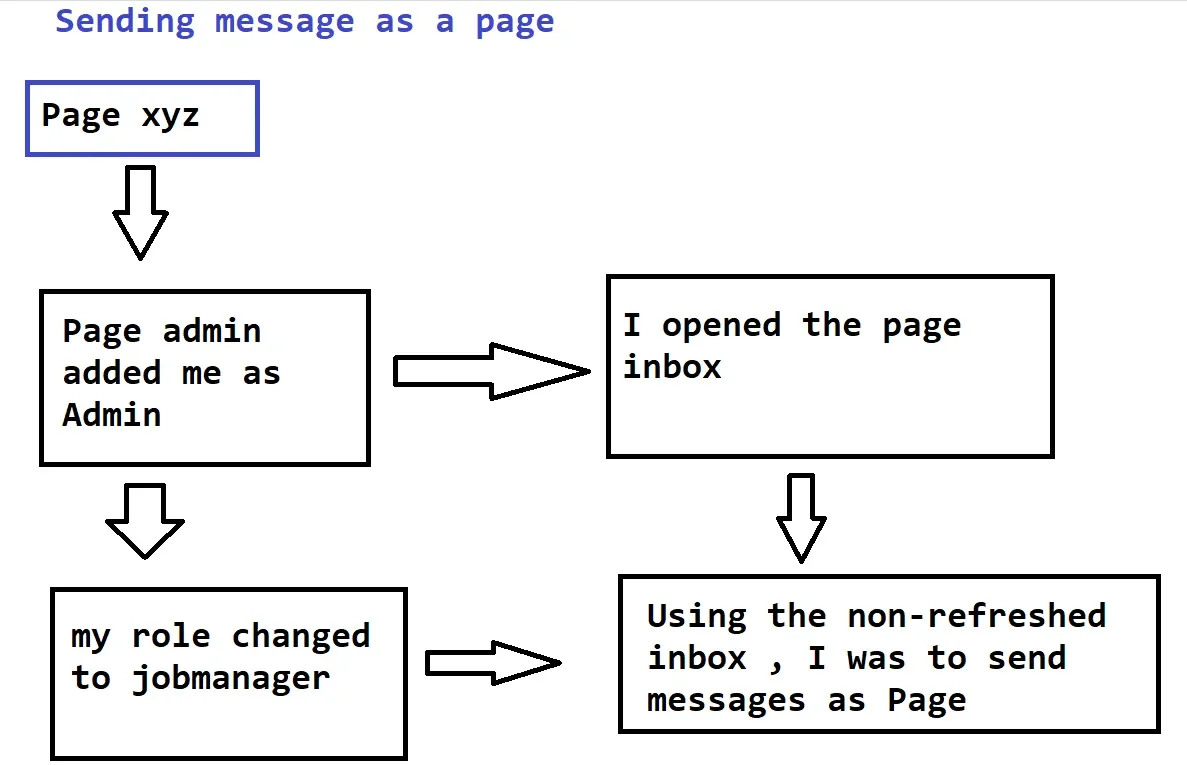
The report includes a diagram of the flow, captioned "simple asf".
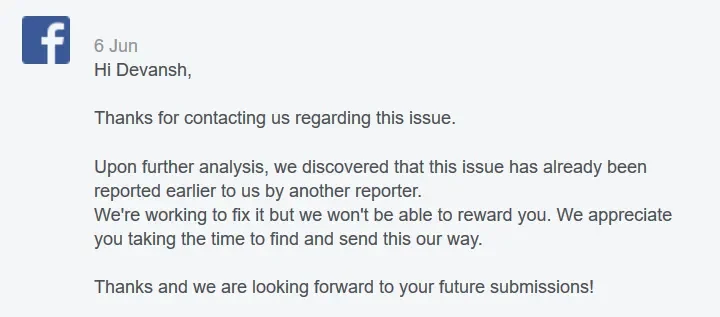
He reported the issue soon after the discovery. It was marked as "Duplicate".
A video proof of concept is linked in the report:
https://youtu.be/rztZkCVE6Rk
Root cause
The report does not describe the server-side implementation. What the behaviour shows is that the send action from the inbox page was still authorised for the account after the role had been reduced to Jobmanager, while the read path was not: new messages did not arrive, but outgoing messages went through. The report does not explain why sending still worked while reading did not. The fresh tab gave an error and no new messages arrived, but sending from the stale tab still worked.
Impact
An account holding only Jobmanager permissions, which explicitly has no access to the Page inbox, could send messages as the Page to anyone, provided it had loaded the inbox while still holding a role that allowed it and had not refreshed the tab. The researcher could not read new incoming messages under these conditions, so the exposure is limited to sending messages impersonating the Page, not to reading its conversations.
Fix
The timeline records that the bug was retested on 15 July 2019 and found fixed.
Variants to test
- Change a user's role on a Page or group while their privileged tab stays open, then exercise every action in that tab (send, post, comment, invite, edit settings) without refreshing. A positive result is any action that succeeds after a fresh load of the same URL is refused.
- Repeat with other role transitions, for example Admin to Editor or Moderator to a role without messaging rights, and check whether the send path and the read path diverge as they did here.
- Test the same stale-tab pattern on other surfaces that carry a role check, such as Page publishing, ads creation and job publishing, looking for actions that still succeed after the downgrade.
- Check whether the stale capability survives a logout and login, or a session token rotation, to see whether the authorisation is bound to the session or to the loaded page state.
- Read Facebook help posts and newsroom announcements, especially for this kind of bug, since this report was closed as a duplicate.
What happened, in plain words
A researcher helped a friend who wanted to hire content creators and graphic designers for her Facebook Page. She asked him to create and publish jobs on her behalf, so the plan was for her to give his account the Jobmanager role on her Page. By mistake she added him as an Admin instead, which is a much more powerful role.
While he still had Admin rights, he used the Page's inbox to send his friend a message, telling her she had added him as an admin rather than as a jobmanager. She then corrected the role and changed him to Jobmanager. Jobmanager cannot open the Page inbox at all. But the inbox page was still open in his browser, because he had not reloaded it. He tested what that leftover page could still do. Opening the inbox in a fresh tab gave an error, as expected. Reading new messages from the old tab did not work either. But sending a message from the old tab did work: he could send messages as the Page even though his role no longer allowed him anywhere near the inbox.
He reported it, and Facebook marked it as a duplicate of something already known. The bug was retested on 15 July 2019 and found fixed.
Background: Pages, roles and the inbox
A Facebook Page is the public profile a business, brand or public figure uses on Facebook, separate from a personal profile. Pages are run by people, and Facebook lets the owner give each helper a role: a named bundle of permissions that says what that person is allowed to do on the Page.
The report lists six different roles for Facebook Pages. One of them is Jobmanager, and the report gives its privileges as:
- View insights.
- Create ads, promotions or boosted posts.
- View Page Quality tab.
- See who published as the Page.
- Publish and manage jobs.
Notice what is missing from that list: the Page inbox. The inbox is the messaging area where a Page's messages are read and answered, and it is reachable at a URL of this shape:
https://www.facebook.com/{page-username}/inbox/
In that URL, {page-username} is a placeholder for the Page's own username, the short name that appears in its web address. The researcher's own example link in the report uses the username antiinfosecmemes, so the address looks like https://www.facebook.com/antiinfosecmemes/inbox/.
A role is not a label that only decorates a menu. Behind the scenes, every action you take on a Page (reading a message, sending one, publishing a job) is a request to Facebook's servers, and the servers decide whether your account is allowed to do it. That decision is called authorisation: authentication is proving who you are, authorisation is deciding what you may do. When a program lets someone do something their role should forbid, security people call it broken authorisation, and when it lets a lower role act like a higher one, privilege escalation.
The interesting question in this report is what happens to a page that is already open in your browser when your role changes underneath it. Think of a hotel key card: the card is checked at the door each time you use it, but if a door was already propped open before your card was downgraded, does the open door stay open? That is exactly what the researcher went to test.
Setting it up
The researcher was helping a friend who wanted to hire content creators and graphic designers for her Page and asked him to create and publish jobs for her. The plan was for her to assign him the Jobmanager role. Instead, she accidentally added him as an Admin of the Page, the highest level of control.
No special tools are described in the report. What mattered was a browser tab that had already loaded the Page inbox while the account still held Admin rights, plus a second account (the Page owner) able to change the researcher's role and to send messages to the Page. That is all a beginner needs to picture: two people, two accounts, one Page, and a browser tab left open.
Finding it
While he was still an Admin, the researcher sent a message to his friend from her Page, using the Page inbox at:
https://www.facebook.com/{page-username}/inbox/
This is the ordinary inbox address. He was using it legitimately at that moment, because Admin rights include access to the inbox. The message itself was just a note telling her she had added him as an admin rather than as a jobmanager.
After receiving that message she changed his role permission to Jobmanager. Jobmanager has no access to the Page's inbox, but the inbox page had not been refreshed, so it was still displayed in front of him. That mismatch, between the role he now held and the interface still on his screen, is what prompted him to test role permission issues there.
This is the key idea to understand before anything else: a web page in your browser is a snapshot. When you load a page, your browser asks the server for it and the server sends back the content, which the browser then draws on screen. If your permissions change afterwards, the picture on your screen does not update by itself. Only a reload asks the server again. So the old tab was showing an inbox that his account might no longer be entitled to use, and the question was whether the server would still honour the actions coming from it.
Exploitation
Step 1: Confirm the inbox is closed to the new role
He opened the Page inbox in a new tab:
https://www.facebook.com/{page-username}/inbox/
He got an error. That was expected, since Jobmanager has no access to the Page's inbox. The already loaded tab, however, remained usable.
Why do this step? Because you need a baseline. Before claiming that the old tab is doing something wrong, you show that the same address, loaded fresh, is refused. The fresh tab is the control: it proves the role change really took effect on the server. The old tab is the experiment: it was loaded before the change and never asked the server again.
Step 2: Try to read new messages from the stale tab
He asked his friend to send a message to her Facebook Page, hoping to read new messages from the existing inbox tab. This failed: the tab reported "No new messages arrived". Reading was not possible from the stale page.
Why this step? To find out how far the leftover access goes. If the old tab could still pull in new conversations, the problem would be much bigger: a former Admin could keep reading private messages after being demoted. The result was negative, which is itself useful information. It tells you the reading side of the inbox was being checked properly, and it narrows the issue down to sending.
Step 3: Send a message from the stale tab
He then tried sending a message from the same non-refreshed inbox page. He knew that refreshing the page would make the inbox unavailable, so the tab had to stay untouched. The send succeeded: he was able to send a message from the existing Page.
Why this step? Because sending is the other half of the inbox. If reading was blocked but sending was not, then the server was treating the two actions differently, and that difference is the bug. The constraint about not refreshing is important: a reload would have replaced the stale page with the error page, and the test would have been over before it began.
His own note on the result: he was not able to receive new messages, but he was able to send messages to anyone from that existing, non-refreshed inbox page while holding only Jobmanager permissions.
The report includes a diagram of the flow, captioned "simple asf".
He reported the issue soon after the discovery. It was marked as "Duplicate".
A video proof of concept is linked in the report:
https://youtu.be/rztZkCVE6Rk
Why it worked
The report does not describe the server-side implementation, so the exact code path is unknown. What the behaviour shows is that the send action from the inbox page was still authorised for the account after the role had been reduced to Jobmanager, while the read path was not: new messages did not arrive, but outgoing messages went through.
The report does not explain why sending still worked while reading did not. The fresh tab gave an error and no new messages arrived, but sending from the stale tab still worked.
In everyday terms: the bouncer checked your invitation again at the reading room door, but not at the letter-writing desk. The demotion was real; one of the doors simply did not look at it.
What it meant in practice
An account holding only Jobmanager permissions, which explicitly has no access to the Page inbox, could send messages as the Page to anyone, provided it had loaded the inbox while still holding a role that allowed it and had not refreshed the tab. The researcher could not read new incoming messages under these conditions, so the exposure is limited to sending messages impersonating the Page, not to reading its conversations.
Why does sending as a Page matter? Because messages sent from a Page carry the Page's identity. Anyone receiving one sees the business or brand speaking, not the individual behind the keyboard. A person who should no longer be able to speak for the Page could still do so, which is a trust problem even without any reading of private conversations.
The fix
The timeline records that the bug was retested on 15 July 2019 and found fixed.
Things worth trying yourself
- Change a user's role on a Page or group while their privileged tab stays open, then exercise every action in that tab (send, post, comment, invite, edit settings) without refreshing. A positive result is any action that succeeds after a fresh load of the same URL is refused.
- Repeat with other role transitions, for example Admin to Editor or Moderator to a role without messaging rights, and check whether the send path and the read path diverge as they did here.
- Test the same stale-tab pattern on other surfaces that carry a role check, such as Page publishing, ads creation and job publishing, looking for actions that still succeed after the downgrade.
- Check whether the stale capability survives a logout and login, or a session token rotation, to see whether the authorisation is bound to the session or to the loaded page state.
- Read Facebook help posts and newsroom announcements, especially for this kind of bug, since this report was closed as a duplicate.
Timeline
The report gives these dates:
| Date | What happened |
|---|---|
| 29 May 2019 | Bug submitted |
| 1 June 2019 | Bug reproduced by the Facebook security team |
| 6 June 2019 | Bug marked as duplicate |
| 15 July 2019 | Retested, bug fixed |
Glossary
- Admin: a Facebook Page role that includes access to the Page inbox.
- Authorisation: the decision about what an authenticated account is allowed to do. Authentication proves who you are; authorisation decides what you may access.
- Broken authorisation: a flaw where the program lets an account do something its permissions should forbid.
- Browser tab: one open page inside a web browser. It keeps showing what the server sent when it was loaded until you reload it.
- Duplicate: a bug report closed because the same issue had already been reported by someone else.
- Inbox: the messaging area of a Facebook Page, where messages to and from the Page are handled.
- Jobmanager: a Facebook Page role whose listed privileges are viewing insights, creating ads and boosted posts, viewing the Page Quality tab, seeing who published as the Page, and publishing and managing jobs. It has no access to the Page inbox.
- Page: a public Facebook profile for a business, brand or public figure, run by people who hold roles on it.
- Permission: a specific allowance, such as being able to send a message as a Page.
- Privilege escalation: gaining or keeping abilities that belong to a higher level of access than the one you currently hold.
- Proof of concept (PoC): a demonstration, often a video or a set of steps, showing that a bug can actually be triggered.
- Refresh / reload: asking the browser to fetch the page from the server again, replacing what is on screen with a fresh copy.
- Request: a message your browser sends to a server asking it to do something, such as load a page or send a message.
- Role: a named bundle of permissions on a Page, such as Admin or Jobmanager.
- Server: the computer that stores the site's data and decides whether each request is allowed.
- Session: the period during which a server remembers that you are logged in, usually tracked with a cookie or token stored by your browser.
- Stale tab: an open browser tab that was loaded earlier and has not been refreshed, so it may show content or offer actions that no longer match your current permissions.
- URL: the address of a page or resource on the web, such as
https://www.facebook.com/{page-username}/inbox/. - Username: the short name that identifies a Page in its web address, shown as
{page-username}in the URLs above.

