Facebook page admin disclosure by "Message Seller"
A page admin's identity could be revealed because when acting as a page, clicking 'Message Seller' on an unapproved post sent a message from the admin's personal profile. An attacker could determine the admin's identity under certain circumstances.
 Published on theshubh77.medium.com
Hi guys, I’m Shubham Bhamare from Maharashtra, India. As I promised in my previous write-up, here’s my first Facebook bug bounty write-up.
The full write-up lives on its author's site
It belongs to its author, so we link to it rather than copy it. The other two tabs are our own rewrites, checked against it.
Context
Facebook pages can be administered by people whose roles are not public. The report treats that secrecy as a security property: disclosing which personal account administers a page is a privacy issue. The feature involved here is the "Message Seller" button that appears at the bottom of a selling post in a Facebook group, on Facebook Web. The researcher found that, under certain circumstances, using that button while acting as a page sent the message from the operator's personal profile instead, which could tie a personal identity to a page admin role.
Setup
The report lists the following preconditions:
- 2 Facebook users: Shubham and John.
- 1 Facebook page: Shubham's Page.
- 1 Facebook group: Shubham's Page Group, a group for Shopping, with post approval turned on.
- Platform: Facebook Web.
Shubham is the admin of Shubham's Page. The page is linked to the group. John is a member of the group. Shubham deliberately does not make himself an admin of the group, because he does not want to disclose his identity, so the only group admin is Shubham's Page. Shubham is just a member of the group and always acts as the page.
Finding it
The researcher frames the bug as a logical one: the page admin's roles are secret, and disclosing the identity of the page admin may cause a significant privacy issue. The unintended behaviour is that a message initiated from the page context is delivered from the personal profile instead.
Exploitation
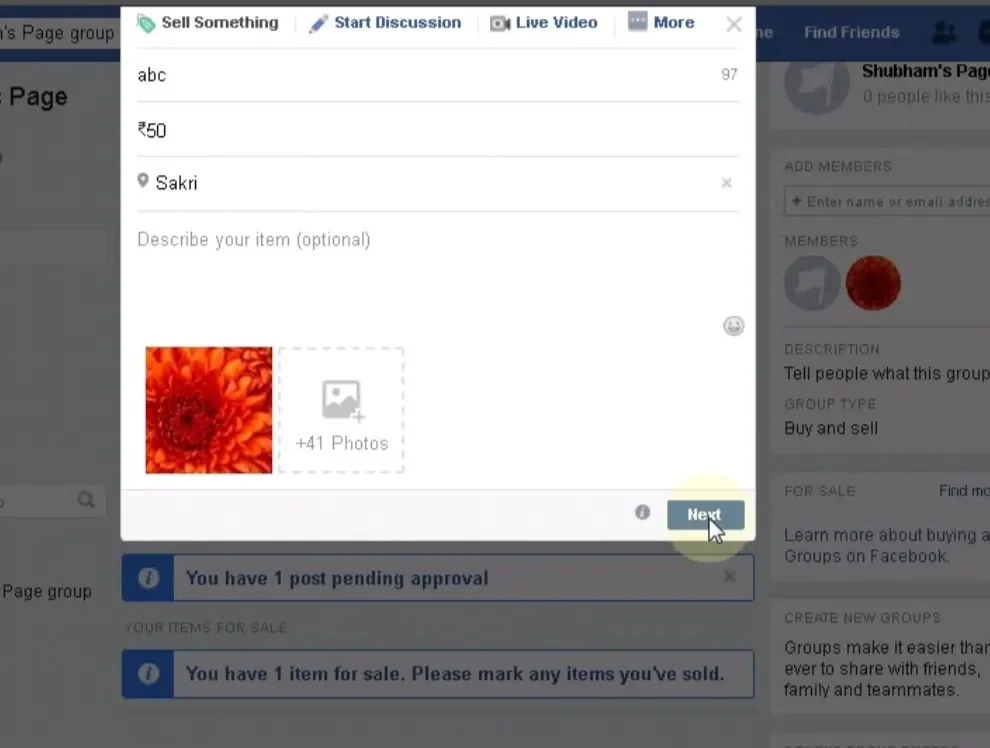
Step 1: create a selling post as John
From John's account, create a selling post in the group.
Step 2: the post awaits approval
The post is sent to the admin for approval, because post approval is turned on for the group.
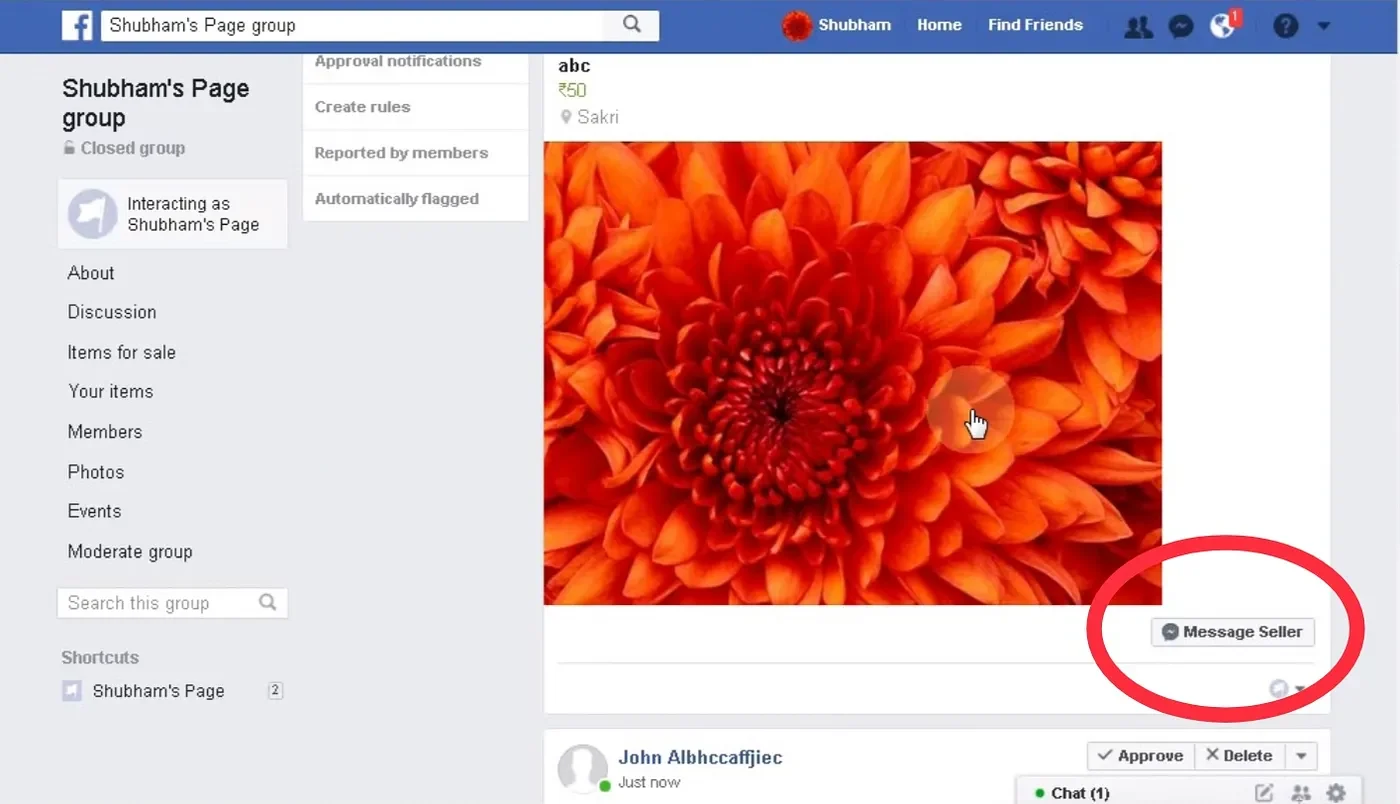
Step 3: message the seller as the page
From Shubham's account, acting as a page, click the "Message Seller" button at the bottom of the unapproved post and send a message.
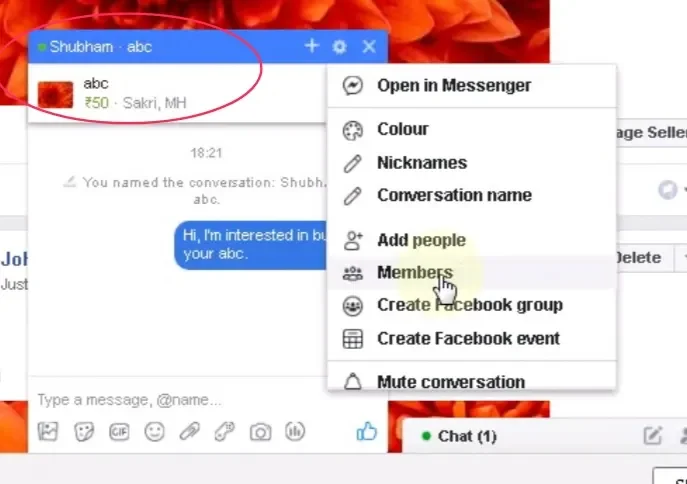
Step 4: the message comes from the personal profile
The message is sent from Shubham's personal profile instead of the page, which is unintended.
The logic behind it
Because there is only one group admin, Shubham's Page, and only that admin can see the unapproved post, it is easy for John to determine who administers the page. The message that arrives from the personal profile is what lets John identify the person behind the page.
Root cause
The report does not describe the code or design mistake beyond the observed behaviour: the "Message Seller" action, taken while acting as a page on an unapproved post, is attributed to the personal profile rather than the page.
Impact
Under the conditions above, the identity of the page admin could be disclosed to a group member: the member knows the only admin able to see the unapproved post, and receives a message from the admin's personal profile. The report hedges this as happening "under certain circumstances" and describes it as a privacy issue rather than a direct account compromise.
Fix
The team fixed the issue by removing the "Message Seller" button when acting as a page. The researcher then found the fix incomplete, because the issue still worked on old unapproved posts. The timeline records the sequence:
| Date | Event |
|---|---|
| Sep 09, 2018 | Report sent |
| Sep 11, 2018 | Pre-triaged |
| Sep 12, 2018 | Triaged |
| Oct 13, 2018 | Fixed |
| Oct 13, 2018 | Fix bypassed |
| Oct 23, 2018 | Fixed completely |
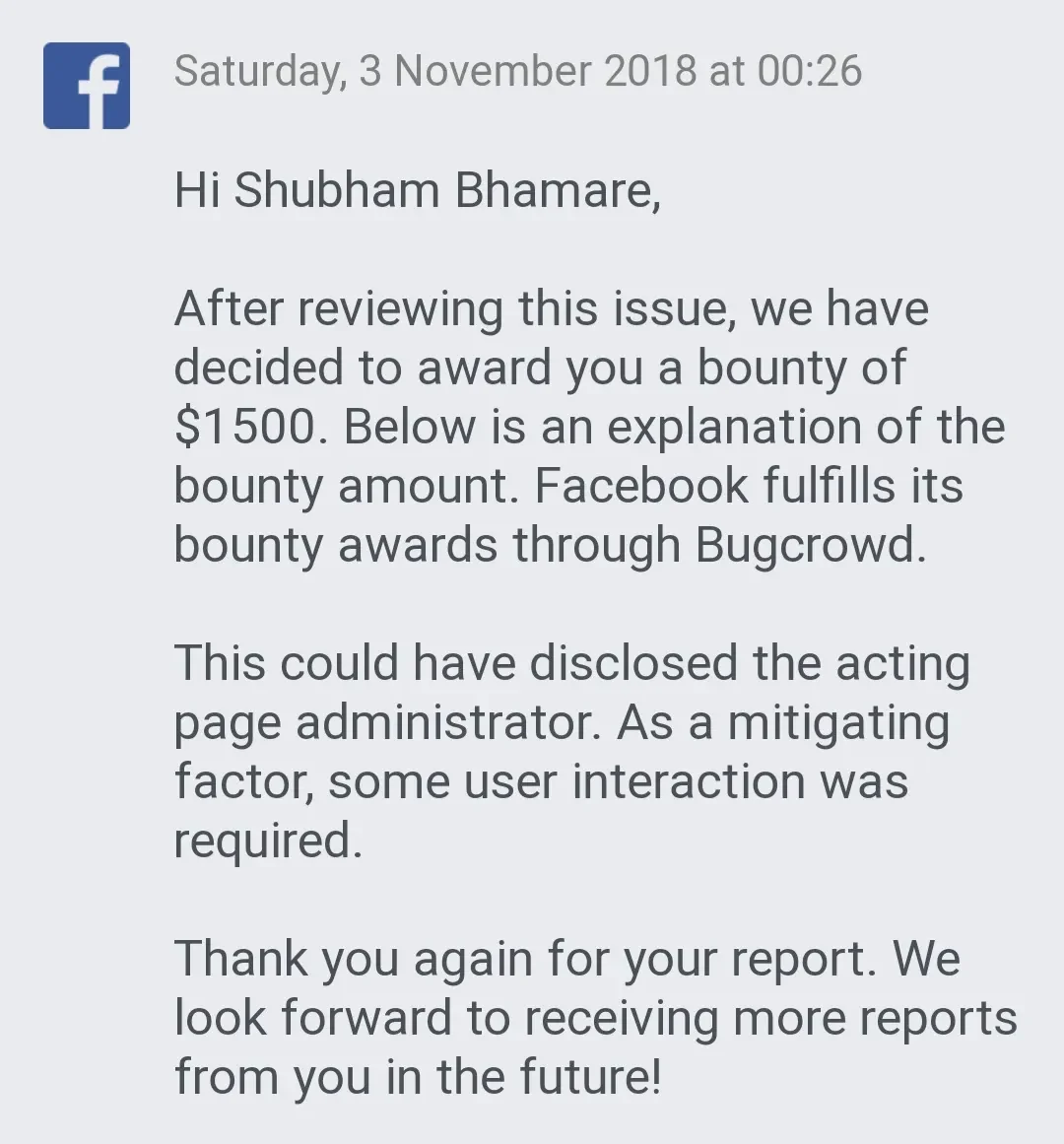
| Nov 03, 2018 | 1500 USD bounty awarded |
Variants to test
- Old objects after a UI fix. The bypass here came from posts that already existed before the button was removed. A positive result is the same unintended attribution on a pre-fix object.
- Acting-as contexts. A positive result is a message or action delivered from the personal profile.
- Single-admin visibility. A positive result is a notification or message that names the personal account.
Takeaways
The researcher's own takeaways: if you are new to the Facebook bug bounty, try to find logical bugs the most, and always try to find a bypass.
What happened, in plain words
Facebook lets a person run a business or brand as a page, which is a separate profile that is not tied publicly to the person behind it. The person who runs the page is called an admin. Facebook keeps the list of admins secret on purpose: if you look at a page, you cannot normally see which real person is behind it. That secrecy matters, because a page can be used by someone who does not want their personal name attached to it.
This report is about a way that secrecy could break. A researcher found that, in a particular situation, a message sent from a page was actually delivered from the person's own personal profile. The person receiving the message could then work out who runs the page. The report calls this an information disclosure: a bug where information that should stay hidden becomes visible to someone who should not see it.
The feature involved is a button labelled "Message Seller". It appears at the bottom of a selling post in a Facebook group, and it lets a buyer contact the person who posted the item. The researcher found that using this button while acting as a page sent the message from the operator's personal profile instead. That is the whole bug in one sentence: the message came from the wrong identity.
The report was filed in 2018 and paid a bounty of 1500 USD. A bounty is a reward that a company pays to someone who reports a security problem responsibly instead of abusing it.

The image above is the one the researcher placed at the top of the write-up, next to the sentence saying the issue could have accidentally revealed the identity of the Facebook page admin under certain circumstances.
The setup: who and what is involved
Before the steps make sense, you need to know the cast of characters. The researcher describes a small test world with two people and two Facebook objects.
- 2 Facebook users: Shubham and John. These are two separate personal accounts. Shubham is the researcher; John plays the role of an ordinary member of the public.
- 1 Facebook page: Shubham's Page. This is the brand-style profile that Shubham administers.
- 1 Facebook group: Shubham's Page Group. A group is a place on Facebook where members can post and discuss things, a bit like a club with a noticeboard. This one is a group for Shopping, meaning people post items for sale.
- Platform: Facebook Web, meaning the normal website you open in a browser, not a mobile app.
Two settings in this setup are important.
First, the group has post approval turned on. Post approval is a group setting where new posts do not appear straight away. Instead they wait in a queue until an admin of the group looks at them and approves them. Think of it like a moderated noticeboard where a committee member has to pin your note up before anyone else can read it.
Second, Shubham's Page is linked to the group, and the page is the only admin of the group. Shubham deliberately does not make his personal account an admin of the group, because he does not want to disclose his identity. So the group's admin is the page, not the person. Shubham himself is just an ordinary member of the group, and when he does things there he always acts as the page.
That last phrase, acting as a page, is worth explaining. On Facebook, when you manage a page, you can switch into a mode where your actions are performed on behalf of the page rather than your personal account. It is like wearing a shop assistant's uniform: customers see the shop, not the assistant's own name. The whole point of the mode is that the personal identity stays out of view.
Finding it
The researcher describes this as a logical bug. A logical bug is not a crash or a broken piece of code; it is a flaw in the rules of how a feature is supposed to behave. The program does what it was told, but the rules themselves are wrong. Here the rule that was broken is simple: page admins' roles are secret, and disclosing the identity of the page admin may cause a significant privacy issue.
The unintended behaviour is that a message started from the page context is delivered from the personal profile instead. The page context is the uniform; the message arrived without it.
Exploitation, step by step
Step 1: create a selling post as John
From John's account, create a selling post in the group.
The image sits next to the step where John creates a selling post in the group. John is the one writing the post, playing the part of a stranger who wants to buy or sell something.
Why this step: the researcher needs a post that belongs to John, so that John is the "seller" the button will offer to message. Without a selling post there is no "Message Seller" button to click.
Step 2: the post waits for approval
The post is sent to the admin for approval, because post approval is turned on for the group.
Why this matters: the post is now in a special state. It exists, but ordinary members cannot see it. Only the group's admin can see it, because the admin is the one who has to approve it. This is the key to the whole trick, and the researcher explains it in the next section.
Step 3: message the seller as the page
From Shubham's account, acting as a page, click the "Message Seller" button at the bottom of the unapproved post and send a message.
The image sits next to the step where the page clicks the "Message Seller" button on the unapproved post and sends a message.
Why this step: the researcher is testing what happens when the page uses the button on a post that only the page can see. In a correct world, the message would arrive clearly labelled as coming from the page, keeping the person behind it hidden.
Step 4: the message comes from the personal profile
The message is sent from Shubham's personal profile instead of the page, which is unintended.
The image sits next to the step where the message is sent from Shubham's personal profile instead of the page.
Why this is the bug: the uniform slipped. The recipient sees a message from a real person, not from the brand. The button was used in page mode, but the result was attributed to the human operator.
The logic behind it
Because there is only one group admin, Shubham's Page, and only that admin can see the unapproved post, it is easy for John to determine who administers the page. The message that arrives from the personal profile completes the link between the page and the person behind it.
Put in everyday terms: imagine a locked room with exactly one keyholder. You slip a note under the door, and a little later you get a reply signed with the keyholder's home address. You did not need to break in; the reply told you who was inside. Here, John knows the only admin who could have seen his unapproved post is Shubham's Page, and then he receives a message from Shubham's personal profile. Two facts that were each harmless on their own now point at the same person.
Root cause
The report does not describe the code or design mistake beyond the observed behaviour: the "Message Seller" action, taken while acting as a page on an unapproved post, is attributed to the personal profile rather than the page. The existing defence was the page context itself, which the action did not honour in this case.
In plain words: the system relied on the page mode to keep the person hidden, and this one action ignored that mode. The report does not say why, and it does not name any endpoint, parameter or version.
Impact
Under the conditions above, the identity of the page admin could be disclosed to a group member. The member knows the only admin able to see the unapproved post, and receives a message from the admin's personal profile. The report hedges this as happening "under certain circumstances" and describes it as a privacy issue rather than a direct account compromise.
That hedge is worth taking seriously. This is not a bug where someone steals a password or takes over an account. It is a privacy leak: a person who wanted to keep their name off a page could be identified by an ordinary member of a group. For someone running a page for personal safety reasons, that can still be serious.
Fix and bypass
The team fixed the issue by removing the "Message Seller" button when acting as a page. The researcher then found the fix incomplete, because the issue still worked on old unapproved posts.
This is a classic pattern in security testing. A fix often changes what the website shows you now, but leaves things that already existed untouched. Think of a shop that stops selling a dangerous product but never recalls the ones already on customers' shelves. The researcher's bypass was to use old unapproved posts, where the issue still worked after the fix.
The timeline records the sequence:
| Date | Event |
|---|---|
| Sep 09, 2018 | Report sent |
| Sep 11, 2018 | Pre-triaged |
| Sep 12, 2018 | Triaged |
| Oct 13, 2018 | Fixed |
| Oct 13, 2018 | Fix bypassed |
| Oct 23, 2018 | Fixed completely |
| Nov 03, 2018 | 1500 USD bounty awarded |
A few of those words need explaining. Triaged means the security team looked at the report and confirmed it was a real, valid issue worth working on. Pre-triaged is the earlier check before that confirmation. Fixed means a change was made to stop the behaviour. Fix bypassed means the researcher found the problem still worked despite that change. Fixed completely means the second change closed the remaining gap.
The image above sits next to the bounty line, where the report states the reward of 1500 USD.
Variants to test
Each item below describes what to look for and what a positive result would look like.
- Old objects after a UI fix. The bypass here came from posts that already existed before the button was removed. On other targets, look for objects created before a fix (drafts, pending items, archived records) and check whether the removed action is still reachable on them. A positive result is the same unintended attribution on a pre-fix object.
- Acting-as contexts. Test actions taken while acting as a page or organisation on objects the page can see but a personal account should not be attributed to. A positive result is a message or action delivered from the personal profile.
- Single-admin visibility. Where an object is visible only to one admin, check whether any action on it leaks the operator's personal identity. A positive result is a notification or message that names the personal account.
Takeaways
The researcher's own takeaways: if you are new to the Facebook bug bounty, try to find logical bugs the most, and always try to find a bypass.
Both are good advice for a beginner. Logical bugs need no special tools, just careful thinking about what a feature promises and what it actually does. And a bypass is often where the real reward is, because the first fix tells you exactly where the developers were looking, and the places they forgot are where the bug survives.
Glossary
- Page: a Facebook profile for a business, brand or public figure, separate from any personal account.
- Admin: the person who manages a page or group and can change its settings and approve content.
- Information disclosure: a bug where information that should stay private becomes visible to someone who should not see it.
- Privacy issue: a problem that can reveal personal details about someone without their consent.
- Bounty: a reward a company pays to someone who reports a security problem responsibly.
- Group: a Facebook space where members post and discuss, often around a shared interest such as shopping.
- Post approval: a group setting where new posts wait for an admin to approve them before other members can see them.
- Acting as a page: a mode where your actions are performed on behalf of a page rather than your personal account.
- Logical bug: a flaw in the rules of how a feature behaves, rather than a crash or broken code.
- Unapproved post: a post that is waiting in the approval queue and is visible only to the group's admin.
- "Message Seller" button: a button at the bottom of a selling post that lets a buyer send a message to the person who posted it.
- Attribution: which identity a message or action is recorded as coming from.
- Root cause: the underlying reason a bug happens, as opposed to its visible symptom.
- Fix: a change made to a product to stop a bug from working.
- Bypass: a way to make a bug still work after a fix has been applied.
- Triaged: the state of a report after the security team has confirmed it is a real, valid issue.
- Pre-triaged: the earlier check a report goes through before full triage.
- Timeline: the dated record of what happened to a report, from submission to reward.
- Endpoint: a specific address on a website that a request is sent to.
- Parameter: a named value sent along with a request.
- Version: a particular release of software.
- UI: the part of a product you see and interact with on screen, such as buttons and menus.





