Irremovable Facebook group album photos
A Facebook group admin could not delete photos uploaded by other group members to a group album, and later could not delete the entire album if it contained such photos. An attacker could add many inappropriate photos that the admin would have to remove one by one.
 Published on theshubh77.medium.com
Hi guys, it's Shubham Bhamare again. In this write-up, I'm going to tell you about one of my very simple Facebook bug which was found accidentally as I wasn't in the mood of testing at that time and was just browsing our business group on Facebook.
The full write-up lives on its author's site
It belongs to its author, so we link to it rather than copy it. The other two tabs are our own rewrites, checked against it.
Context
Facebook groups let members share photos, and a group can have an album that collects those photos. The feature at the centre of this write-up is the group album and, in particular, who is allowed to remove photos from it. The report concerns Facebook Web (https://www.facebook.com), and the researcher also checked the Android, iOS, Lite app and mobile site while investigating.
Normally a group admin is expected to be able to moderate the content in the group, including photos that other members have added to a group album. The bug described here broke that expectation in two related ways: an admin could not delete photos uploaded by other members, and later, after a partial fix, an admin could not delete the whole album once it contained other members' photos.
Setup
The scenario needs two actors and one group:
- A Facebook group where only a page (referred to as ABC) is an admin.
- An attacker (referred to as XYZ), a Facebook user who is a member of that group.
The platform is Facebook Web. No special tools are mentioned; the researcher found the issue while browsing a business group on Facebook, not during a dedicated testing session.
Finding it
The researcher came across the behaviour accidentally while browsing a business group. The observation was simple: when the group admin (ABC) looked at photos that the member (XYZ) had added to a group album, there was no option to delete them. The admin could only delete their own photos. Since ABC is the admin of the group, the absence of any moderation control over other members' photos looked wrong.
Exploitation
Step 1: Create an album as the admin
From ABC's perspective, create an album in the group.
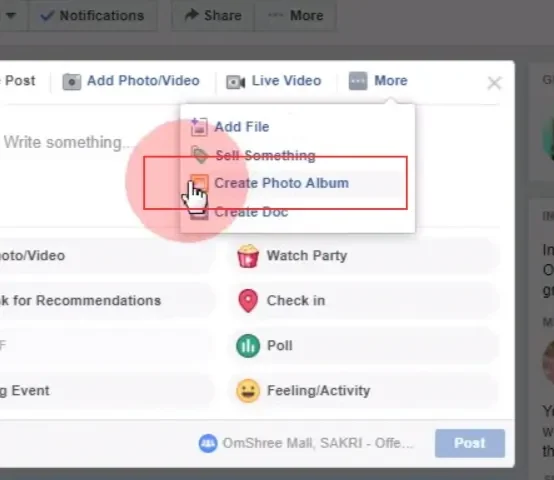
Creating an album in a group
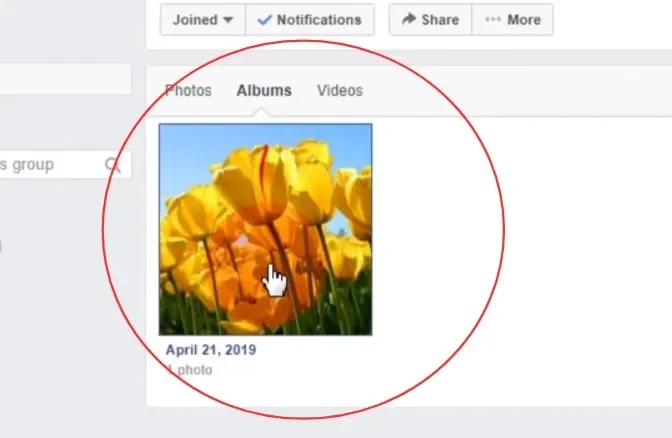
Album created by ABC
Step 2: Add photos as a group member
From XYZ's perspective, add some photos to the album that ABC created.
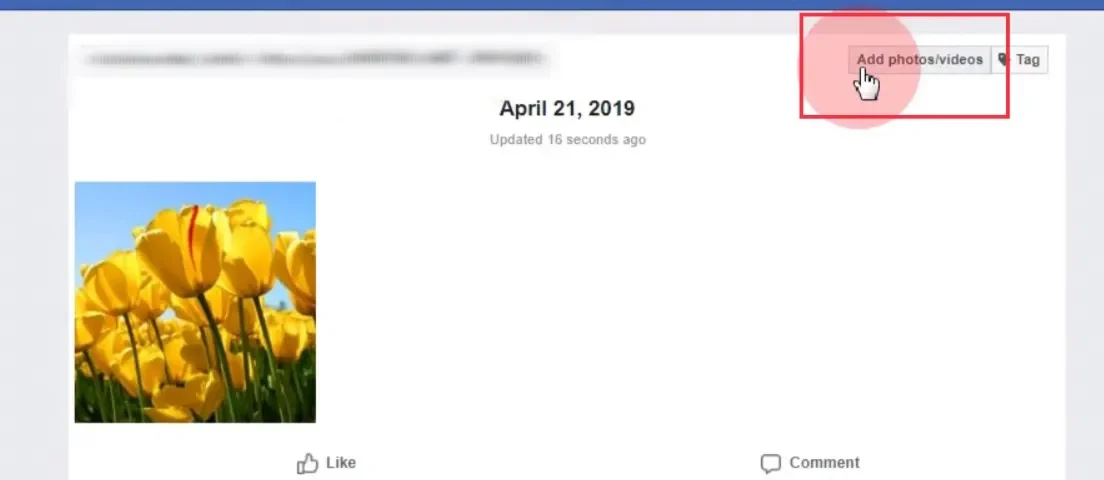
Adding photos to the album
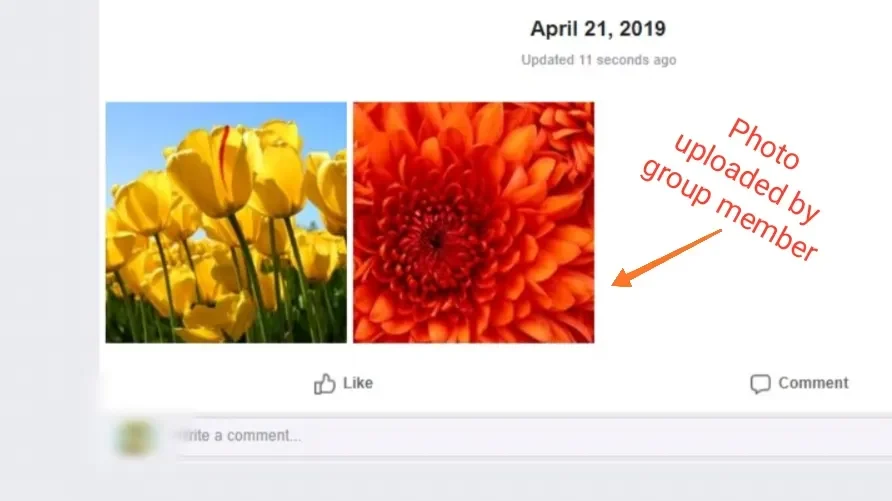
Photo uploaded by group member (XYZ)
Step 3: Try to delete the member's photos as the admin
Now, when ABC tries to delete the photos added by XYZ, there is no option to delete them. The researcher also tried the Android, iOS and Lite apps and the mobile site, and deletion was not possible there either.
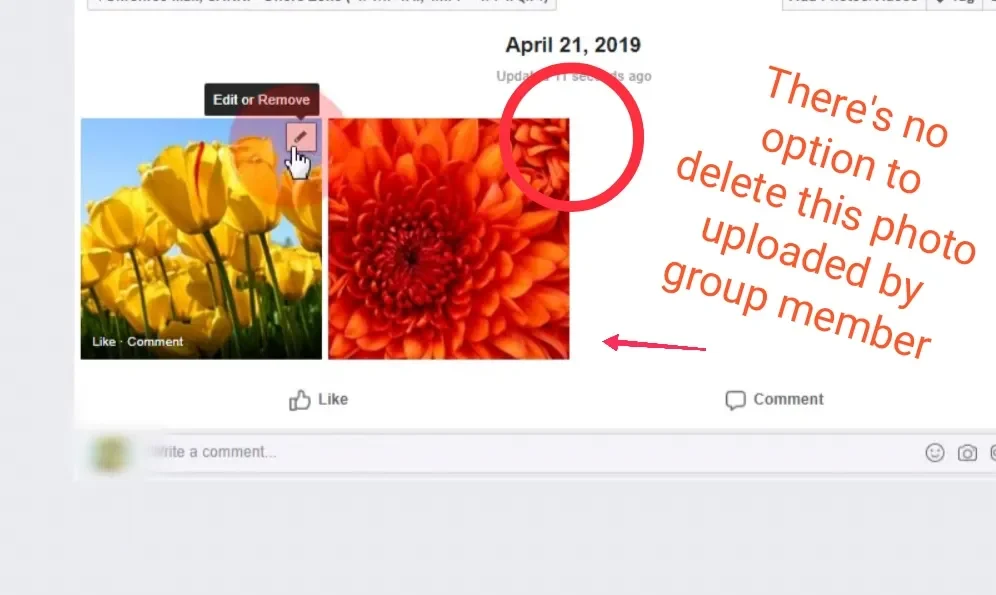
There's no option to delete a photo uploaded by group member
ABC can only delete their own photos. As the admin of the group, ABC should be able to delete photos added by other group members, but at the time of the report there was no such option.
Step 4: Verify the fix and find the bypass
The team fixed the first issue by adding an edit button on photos added by other group members. While verifying that fix, the researcher found a second problem: if the group admin tried to delete the entire album, and the album included photos of other members, the deletion failed with an error message.
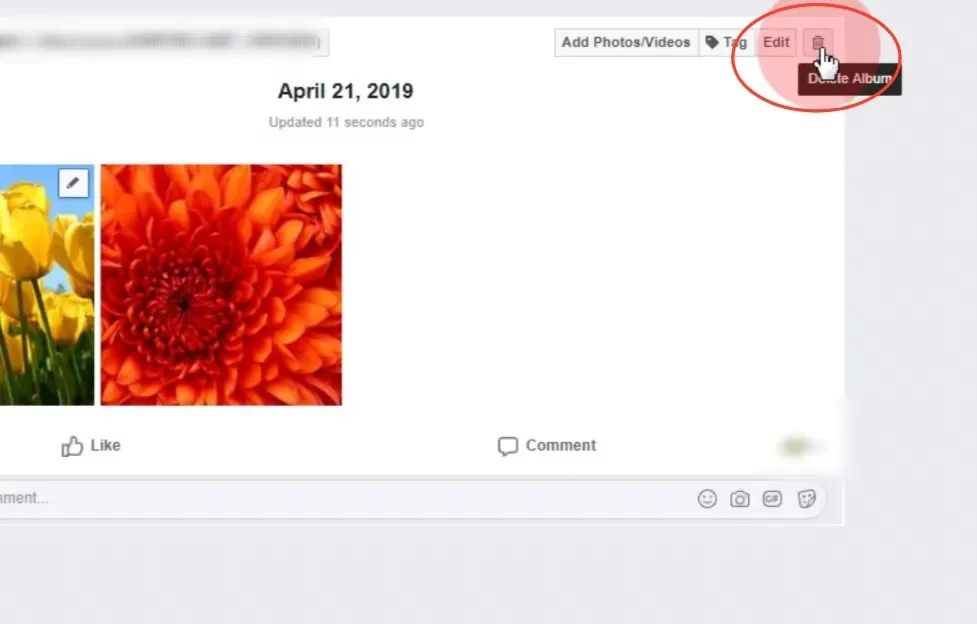
Delete Album button
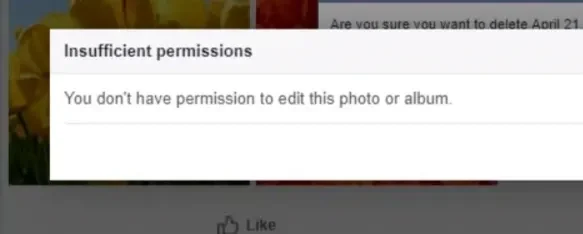
Showing an error message while deleting entire album
The impact of this second issue is that if a malicious member added thousands of inappropriate photos to the album, the group admin could not delete the album as a whole and would have to delete every photo one by one. The same problem scales further if multiple group members add thousands of inappropriate photos to the album.
Root cause
The report describes the behaviour rather than the code behind it. What it shows is that the admin's ability to moderate content did not extend to photos contributed by other members, so the delete control was absent for those photos. The first fix added an edit control on other members' photos, but deleting an album that contained other members' photos still showed an error. The report does not state why that check failed.
Impact
Under the conditions described, a group admin could not remove photos that other members had added to a group album, and after the first fix could not delete the whole album either. A malicious member could therefore fill an album with inappropriate photos and the admin would have to delete them one at a time, or not at all in the case of the album-level failure. The report frames the impact in terms of moderation burden rather than data exposure or account compromise.
Fix
The team first fixed the issue by adding an edit button on photos added by other group members. After the researcher reported that deleting an entire album containing other members' photos produced an error, the issue was fixed completely. The report does not describe the implementation of either fix.
Variants to test
- Album-level moderation on other group types. Create albums in groups with different admin configurations (page-only admin, mixed page and user admins) and have a member upload photos. A positive result is an admin who can edit individual photos but cannot delete the album, or who has no control over the member's photos at all.
- Cross-platform consistency. Repeat the deletion attempts on web, mobile site and the native apps. A positive result is a platform where the admin control is missing or behaves differently from the others.
- Bulk versus single deletion. Where single-photo deletion works for the admin, try deleting the containing album. A positive result is an error on the bulk operation while the single operation succeeds.
- Other shared containers. Apply the same reasoning to shared photo containers outside groups, such as shared albums or event albums, where one user creates the container and others contribute. A positive result is a contributor's content that the container owner cannot moderate.
Timeline
| Date | Event |
|---|---|
| Apr 21, 2019 | Report sent |
| Apr 24, 2019 | Pre-triaged |
| Apr 27, 2019 | Triaged |
| May 15, 2019 | Fixed |
| May 16, 2019 | Fix bypassed / second issue found |
| May 17, 2019 | Fixed completely |
| May 17, 2019 | 1000 USD bounty awarded |
Bounty
1000 USD, made up of 500 USD for the initial report and 500 USD for bypassing the fix or for finding the second issue.
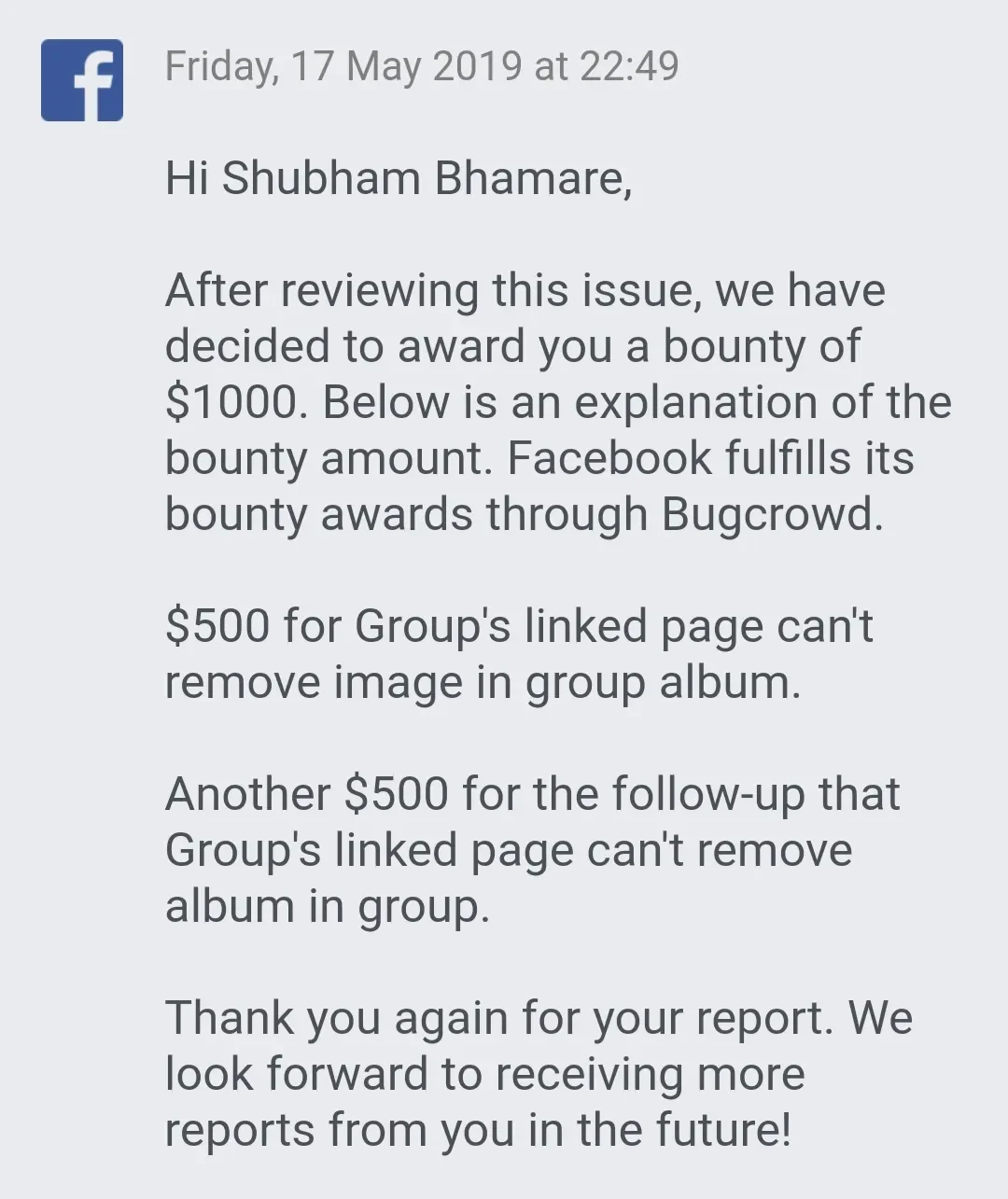
1000 USD bounty awarded by Facebook
Takeaways
- While browsing, even when not in the mood for hunting, observe whether things work as intended.
- Do not reveal findings until you are confident there is no bypass, and check other endpoints and features for similar issues.
- Logical thinking often matters more than advanced tools or knowledge.
- If you are new to Facebook bug bounty, look for logic bugs first.
What happened, in plain words
A Facebook group is a shared space where many people can post things. Groups can have albums, which are collections of photos, a bit like a photo album you keep at home: one cover, many pages, each page holding a picture. In a group, one person creates the album and other members add their own photos to it.
Every group has an admin, the person (or, in this case, a Facebook page) who runs the group and is supposed to be able to remove anything inappropriate. Think of a school noticeboard: the teacher who owns the board can take down any note pinned to it, no matter who pinned it.
This report is about a logic flaw: the rules of the product did not match what everyone would expect. The admin of the group could not delete photos that other members had added to a group album. Only the person who uploaded a photo could delete it. Later, after Facebook fixed that first problem, the researcher found a second one: the admin could not delete the whole album either, once it contained other members' photos. Deleting the album produced an error message.
The researcher, Shubham Bhamare, found the first issue by accident while browsing a business group on Facebook, not during a planned testing session. The platform involved is Facebook Web (https://www.facebook.com), and he also tried the Android, iOS and Lite apps and the mobile site while investigating.
A quick word on the vocabulary that will come up, because this is a beginner's walkthrough:
- Bug bounty: a programme where a company pays people for reporting security or logic problems in its products, instead of punishing them.
- Logic flaw: a mistake in the rules the product follows, not in the low-level code. Nothing crashes; the product simply allows or forbids the wrong thing.
- Admin: the account with extra powers over a group, including moderation.
- Album: a container that holds several photos, created by one person, which others may add to.
Setup
The scenario needs two actors and one group:
- A Facebook group where only a page (referred to as ABC) is an admin.
- An attacker (referred to as XYZ), a Facebook user who is a member of that group.
The platform is Facebook Web. No special tools are mentioned. The researcher found the issue while browsing a business group on Facebook, not during a dedicated testing session.
Why two accounts? Because the whole question is about who is allowed to do what. To see the difference between the admin's view and the member's view, you need to be able to log in as each of them. ABC is the person in charge; XYZ is an ordinary member who can add photos but should not be able to stop the admin from removing them.
Finding it
The researcher came across the behaviour accidentally while browsing a business group. The observation was simple: when the group admin (ABC) looked at photos that the member (XYZ) had added to a group album, there was no option to delete them. The admin could only delete their own photos. Since ABC is the admin of the group, the absence of any moderation control over other members' photos looked wrong.
This is the key beginner lesson: you do not need a scanner or a special tool to notice a logic flaw. You need to know what the product is supposed to do, then look at what it actually does. Here, the expectation is that an admin can moderate the group's content. The reality was that the delete button was missing for other people's photos.
Exploitation
Step 1: Create an album as the admin
From ABC's perspective, create an album in the group.
Creating an album in a group
Album created by ABC
Why this step? You need a container to test with. The admin creates the album, so the album belongs to the admin. That makes the later behaviour more surprising: the owner of the album still cannot remove what others put inside it.
Step 2: Add photos as a group member
From XYZ's perspective, add some photos to the album that ABC created.
Adding photos to the album
Photo uploaded by group member (XYZ)
Why this step? This puts content into the album that is owned by someone other than the admin. The question the researcher is testing is: can the admin moderate content that a member contributed? To answer it, a member first has to contribute something.
Step 3: Try to delete the member's photos as the admin
Now, when ABC tries to delete the photos added by XYZ, there is no option to delete them. The researcher also tried the Android, iOS and Lite apps and the mobile site, and deletion was not possible there either.
There's no option to delete a photo uploaded by group member
ABC can only delete their own photos. As the admin of the group, ABC should be able to delete photos added by other group members, but at the time of the report there was no such option.
Why try several platforms? Because a missing button on one screen could just be a design choice. If the same control is missing on web, mobile site and every app, it looks like a rule enforced everywhere, which is exactly what a logic flaw is. The researcher checked all of them and found the same result.
Step 4: Verify the fix and find the bypass
The team fixed the first issue by adding an edit button on photos added by other group members. While verifying that fix, the researcher found a second problem: if the group admin tried to delete the entire album, and the album included photos of other members, the deletion failed with an error message.
Delete Album button
Showing an error message while deleting entire album
Why verify the fix? Because a fix can be incomplete. Here the team added a way to edit other members' photos, but the album-level delete still failed when the album contained photos owned by other members. The researcher went back and tested the neighbouring action, deleting the whole album, and found the error.
The impact of this second issue is that if a malicious member added thousands of inappropriate photos to the album, the group admin could not delete the album as a whole and would have to delete every photo one by one. The same problem scales further if multiple group members add thousands of inappropriate photos to the album.
Root cause
The report describes the behaviour rather than the code behind it. What it shows is a logic flaw in the permission checks around group album photos: the admin's ability to moderate content was not extended to photos contributed by other members, so the delete control was simply absent for those photos. The first fix added an edit control on other members' photos, but the album-level delete path still failed when the album contained photos owned by other members, returning an error instead of removing the album. The report does not state why that check failed.
In plain words: the product decides who may do what by checking permissions, the rules attached to each account. In practice, the admin could only delete their own photos, and no control was offered for other people's photos. Deleting the whole album then showed an error message.
Impact
Under the conditions described, a group admin could not remove photos that other members had added to a group album, and after the first fix could not delete the whole album either. A malicious member could therefore fill an album with inappropriate photos and the admin would have to delete them one at a time, or not at all in the case of the album-level failure. The report frames the impact in terms of moderation burden rather than data exposure or account compromise.
That distinction matters for a beginner. This bug did not leak private data and did not let anyone take over an account. It broke the group's ability to clean up after a troublemaker, which is a real problem for anyone running a community, but a different kind of problem from a password leak.
Fix
The team first fixed the issue by adding an edit button on photos added by other group members. After the researcher reported that deleting an entire album containing other members' photos produced an error, the issue was fixed completely. The report does not describe the implementation of either fix.
Variants to test
These are the same ideas a beginner can try on their own, in the same order as the technical write-up:
- Album-level moderation on other group types. Create albums in groups with different admin configurations (page-only admin, mixed page and user admins) and have a member upload photos. A positive result is an admin who can edit individual photos but cannot delete the album, or who has no control over the member's photos at all.
- Cross-platform consistency. Repeat the deletion attempts on web, mobile site and the native apps. A positive result is a platform where the admin control is missing or behaves differently from the others.
- Bulk versus single deletion. Where single-photo deletion works for the admin, try deleting the containing album. A positive result is an error on the bulk operation while the single operation succeeds.
- Other shared containers. Apply the same reasoning to shared photo containers outside groups, such as shared albums or event albums, where one user creates the container and others contribute. A positive result is a contributor's content that the container owner cannot moderate.
Why these variants? Because a logic flaw is rarely alone. If one place forgot to give the admin power over other people's content, other places that share the same idea may have forgotten too. Testing the neighbours of the original feature is how you turn one finding into a fuller report.
Timeline
| Date | Event |
|---|---|
| Apr 21, 2019 | Report sent |
| Apr 24, 2019 | Pre-triaged |
| Apr 27, 2019 | Triaged |
| May 15, 2019 | Fixed |
| May 16, 2019 | Fix bypassed / second issue found |
| May 17, 2019 | Fixed completely |
| May 17, 2019 | 1000 USD bounty awarded |
A short note on the words in the table. Triaged means the company's security team looked at the report and confirmed it was a real issue worth working on. Bypassed means the fix did not cover everything: the researcher found a way around it, which here was the album-level delete error.
Bounty
1000 USD, made up of 500 USD for the initial report and 500 USD for bypassing the fix or for finding the second issue.
1000 USD bounty awarded by Facebook
Takeaways
- While browsing, even when not in the mood for hunting, observe whether things work as intended.
- Do not reveal findings until you are confident there is no bypass, and check other endpoints and features for similar issues.
- Logical thinking often matters more than advanced tools or knowledge.
- If you are new to Facebook bug bounty, look for logic bugs first.
Glossary
- Admin: the account with extra powers over a group, including the ability to moderate its content.
- Album: a container that holds several photos, created by one person, which other members may add to.
- Attacker: in this report, the ordinary group member (XYZ) whose photos the admin could not remove.
- Bug bounty: a programme where a company pays people for reporting problems in its products.
- Bypass: a way around a fix, so the original problem or a related one still occurs.
- Edit button: the control the team added on other members' photos as the first fix.
- Endpoint: a specific address or action in a web product that a browser or app talks to.
- Error message: the text shown when an action is refused, here when the admin tried to delete the whole album.
- Facebook Web: the version of Facebook used in a browser at
https://www.facebook.com. - Fix: a change made by the company to correct the behaviour.
- Group: a shared space on Facebook where members post content and an admin moderates it.
- Logic flaw: a mistake in the rules the product follows, where the wrong thing is allowed or forbidden, rather than a crash or a low-level code error.
- Moderation: the act of reviewing and removing content, which is what the admin was unable to do here.
- Page: a Facebook account type used by a business or organisation, which in this scenario is the only admin of the group.
- Permission check: the rule the product applies to decide whether an account may perform an action.
- Pre-triaged: an early check of a report before the security team confirms it.
- Triaged: the state of a report once the security team has confirmed it is a real issue worth working on.
- Variant: a neighbouring feature or configuration where the same kind of flaw might exist.



