How I accidentally found clickjacking in Facebook
Facebook's mobile share dialog page did not set an X-Frame-Options header when loaded from a mobile device, allowing an attacker to embed it in an iframe and trick users into sharing a link. The attacker used this to spread a spam campaign on Facebook.

I would’ve never thought that one of my first blog posts will be about looking for bugs in Facebook. I don’t consider myself a bounty hunter, and had never actively looked for bugs.
The full write-up lives on its author's site
It belongs to its author, so we link to it rather than copy it. The other two tabs are our own rewrites, checked against it.
Context
Facebook's share dialog is the window you normally see when you press a share button: it lets a logged-in user post a link to their own wall. Facebook exposes it as a URL under mobile.facebook.com, and the developer documentation describes a parameter called mobile_iframe which, when set to true, opens the share dialog in an iframe on top of the embedding website. The documentation states that this option is only available for mobile, not desktop.
The story starts with a spam campaign rather than with a deliberate hunt. The author works in incident response, forensics and malware analysis, and this was their first bug report. Friends' walls filled with links to what looked like a site hosted on an AWS bucket, pointing at a French site with funny comics.

One of the spam links.
Setup
No special tooling is described. The researcher used ordinary desktop browsers (Chrome, Chromium, Edge, IE and Firefox are named) and the Facebook app on Android. The only precondition for reproducing the behaviour is a Facebook account that can post a link, plus the ability to open that link from the Android app. For testing, the report suggests setting the post's privacy to "Only Me" or using one of Facebook's test accounts.
Finding it
Clicking the spam link opened the AWS-hosted page, which asked in French whether the visitor was 16 or older before showing restricted content. Pressing the button did redirect to the comic page, ads included, but in the meantime the same link the victim had just clicked appeared on their own Facebook wall.
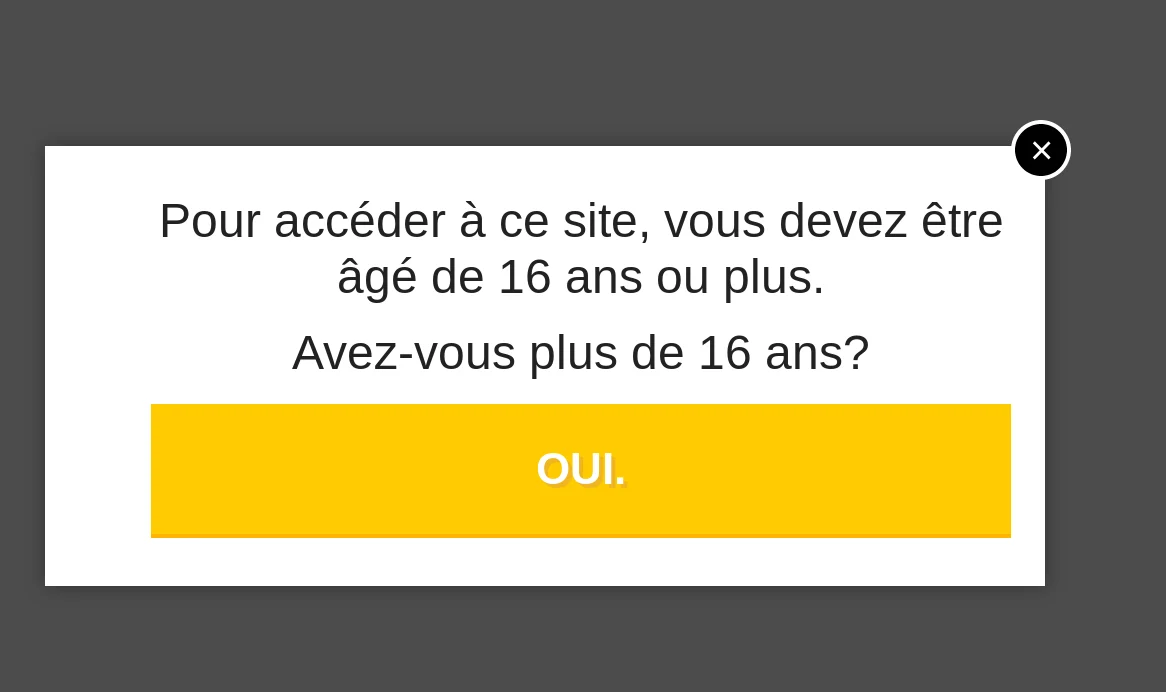
The clickjacking page.
Reading the page source revealed a suspicious iframe tag. That frame led to another AWS-hosted page, which led to another, and the chain ended at this URL (the destination was changed for obvious reasons):
https://mobile.facebook.com/v2.6/dialog/share?app_id=283197842324324&href=https://example.com&in_iframe=1&locale=en_US&mobile_iframe=1
Pasted into a browser, the URL shows the familiar "share a page" window, although the app_id may need changing because it was removed. The response headers for that page carry a properly set X-Frame-Options: DENY, so the page should not be frameable at all. That contradiction is what made the behaviour worth chasing.
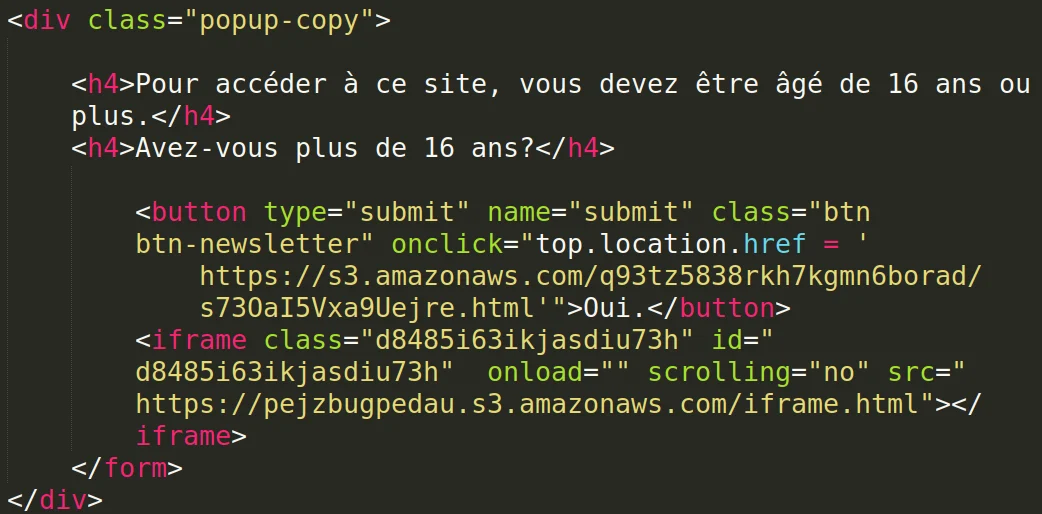
The suspicious iframe code.
Exploitation
Step 1: try to frame the dialog on desktop
The researcher loaded the specific iframe in every popular browser (Chrome, Chromium, Edge, IE, Firefox). Each attempt raised an X-Frame-Options error, confirming the header was being honoured on desktop.
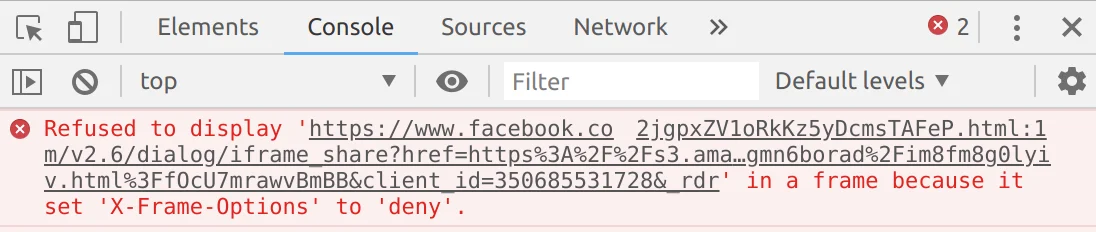
Correct Chromium behaviour.
Step 2: notice the attacker's own filtering
While the desktop tests were stuck, the posts kept appearing on the researcher's wall, so the attack clearly worked for someone. In the meantime the attacker had started banning Polish visitors from his site, redirecting them to a nonexistent domain whose name contained Polish swear words. The researcher's reading is that the campaign targeted French Facebook users but was receiving too much traffic from Poland, and that the attacker was himself Polish. That is stated as an assumption, not a confirmed fact.
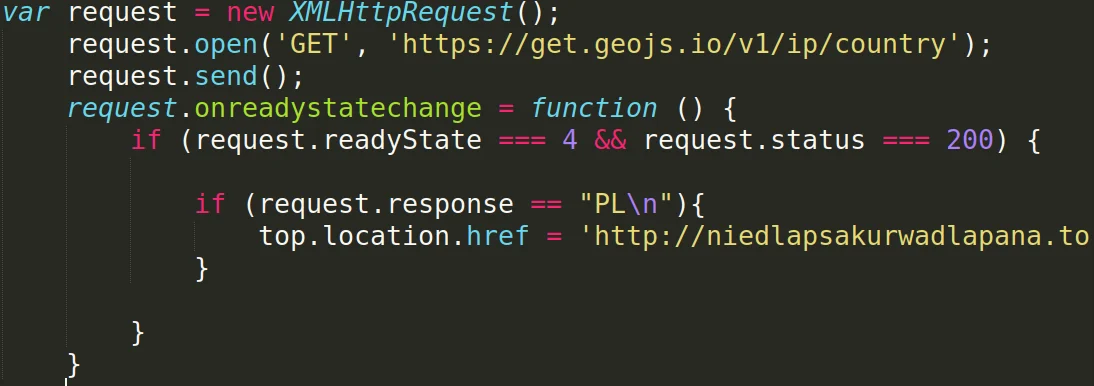
A simple geolocation script to ban victims from Poland.
Step 3: switch to the mobile app
The clue was in the URL itself: the mobile. subdomain. Victims did not have to use a desktop browser. Loading the same page inside the Facebook app on Android worked, and the X-Frame-Options header was totally ignored.
The working iframe in the Android Facebook app.
Framing any other protected content, such as a settings page, still failed. The inbuilt Facebook browser appeared to deliberately ignore X-Frame-Options only for this particular API call.
Step 4: reproduce it with a proof of concept
The report gives these instructions to reproduce the behaviour:
1. Register a new Facebook App2. Publish it and turn on the API3. Create a new website with following html code:<html><body><iframe style="margin-top: -300;width: 100%;height: 340px;" id="tenframe" src="https://facebook.com/v3.2/dialog/share?app_id<your_app_id>&href=https://example.com/&in_iframe=1&locale=en_US&mobile_iframe=1" scrolling="no"></iframe></body></html>where you change <your_app_id> to your app id of course4. Publish a link to this website on a facebook wall5. Click on the link from a Facebook App on Android - you will see it loads an iframe without any issue
The iframe uses a negative top margin, a fixed height and scrolling="no". The URL includes mobile_iframe=1. A live copy of the PoC was published at https://malfind.com/test/poc.html; the link has to be pasted onto a Facebook wall and opened from the Android app.
Root cause
The behaviour is a documented feature rather than an accident. The share dialog documentation describes mobile_iframe as opening the share dialog in an iframe on top of the embedding website, available only on mobile. The implementation, however, is weak: on mobile the Facebook inbuilt browser ignores X-Frame-Options for this API call, which removes the framing protection that desktop users get.
An update to the report adds that when the visitor is connected from a mobile device, Facebook does not even set an X-Frame-Options header for the page. As a substitute precaution against clickjacking, mobile users get a pop-up confirmation asking whether they really want to share the link. The report says the campaign showed the confirmation was not very effective, though how the attacker got around it is unclear.
Impact
An attacker can make a Facebook user share a link on their own wall without intending to, simply by getting them to open a page in the Facebook app on Android and click where the invisible dialog sits. The report frames the risk around trust: a link to a malware document or a phishing site shared by a well-known person with thousands of followers carries far more weight than the same link from a stranger. In this campaign the technique was used only to spread spam.
There are limits. The attack requires the victim to be on a mobile device using the Facebook app, and the update describes a pop-up confirmation for mobile users. The researcher was not sure how the campaign author got around that confirmation. Facebook's position was that clickjacking only counts as a security issue if it lets an attacker change the state of the account, for example disabling security options or deleting the account; sharing a link did not meet that bar, and the report was declined.
Fix
Facebook declined the report as working as intended, so no fix came out of it. The researcher's view is that it should be fixed regardless, because the feature can be abused so easily to make users share unwillingly. The report also notes a ZDNet article in which Facebook says it improved its clickjacking detection "earlier this week". After that, the researcher pulled a full clickjacking site out of the Edge cache and rebuilt it; it no longer worked and the pop-up confirmation still appeared. Whether the confirmation was introduced after the attack, in response to improved detection, is left open.
Variants to test
- Frame other Facebook dialog or API endpoints from the Android inbuilt browser and check whether X-Frame-Options is honoured. A positive result is a dialog rendering inside the frame with no X-Frame-Options error, while the same URL fails to frame on desktop.
- Look for other parameters documented as mobile-only that change how a page is embedded, and test whether they relax framing protections on mobile. A positive result is a documented mobile parameter that produces a frameable page.
- Test whether the mobile confirmation pop-up can be dismissed or bypassed by the surrounding page, for example by sizing or positioning the frame so the confirmation lands under the victim's cursor. A positive result is a share completing after a single user click on attacker-controlled content.
- Repeat the framing test across other inbuilt browsers in mobile apps that embed third-party pages, checking whether they ignore security headers for particular hosts. A positive result is a header that is enforced in a standalone browser but ignored inside the app's webview.
- Check whether the same mobile-only framing behaviour exists on other versions of the share dialog path than the one used here. A positive result is the same missing header or ignored header on another version.
What happened, in plain words
A security researcher who normally works on incident response, forensics and malware analysis (not bug hunting) noticed a spam wave on Facebook. Friends' walls filled with links to what looked like a site hosted on an AWS bucket, pointing at a French site with funny comics. Clicking the link showed a page asking, in French, whether the visitor was 16 or older before showing restricted content. Pressing the button did take the victim to the comic page, ads included, but at the same time the same link the victim had just clicked appeared on their own Facebook wall.
The trick behind it is called clickjacking. In plain terms: an attacker puts a real, legitimate page (here, Facebook's share window) invisibly on top of a page the victim is looking at, so that when the victim clicks what they think is a normal button, they are actually clicking the hidden page underneath. It is like putting a transparent sheet with a fake "claim your prize" button over a real form, so the pen lands on the real form's signature line.
The researcher traced the chain of pages and found it ended at a Facebook URL for the share dialog, the window you normally see when you press a share button. That page was supposed to be protected against being hidden inside another page, yet the attack clearly worked. The rest of the story is about working out why, and about Facebook's response.
One of the spam links.
The pieces you need to know first
Before following the steps, a few ideas from zero.
- iframe: a way to embed one web page inside another. The outer page draws a rectangular window, and the inner page is loaded into it. It is like a picture-in-picture frame on a TV: the small picture is a different channel, but it sits inside the big one. Websites use iframes for maps, videos, adverts and, in this story, Facebook's share window.
- X-Frame-Options: a small instruction a website can send back with a page that tells the browser whether that page is allowed to be shown inside an iframe. The value
DENYmeans "never show me inside a frame". It is the main defence against clickjacking, because if the real page refuses to be framed, the attacker cannot hide it under a fake button. - Response headers: extra lines of information a web server sends alongside the page itself. They are not visible on the page; they are metadata, like the label on a parcel that says how it should be handled.
X-Frame-Optionsis one of these labels. - API: a defined way for one piece of software to ask another to do something. Here, Facebook's share dialog is reachable through a URL that acts as an API call: you ask Facebook to show the share window for a given link.
- AWS bucket: Amazon Web Services offers storage space called buckets, where anyone can put files and make them publicly readable. Attackers often host their fake pages there because it is cheap and quick.
- Geolocation: working out roughly where a visitor is from, usually from their IP address (the number their internet connection is known by). Sites use it to show local content, or, as here, to block visitors from certain countries.
- PoC (proof of concept): a small, deliberately harmless demonstration that a weakness is real, so others can check it themselves.
The setup
The report describes no special tooling. The researcher used ordinary desktop browsers (Chrome, Chromium, Edge, IE and Firefox are named) and the Facebook app on Android. The only precondition for reproducing the behaviour is a Facebook account that can post a link, plus the ability to open that link from the Android app. For testing, the report suggests setting the post's privacy to "Only Me" or using one of Facebook's test accounts, so the experiment does not spam real friends.
Finding it
Clicking the spam link opened the AWS-hosted page, which asked in French whether the visitor was 16 or older before showing restricted content. Pressing the button did redirect to the comic page, ads included, but in the meantime the same link the victim had just clicked appeared on their own Facebook wall.
The clickjacking page.
Reading the page source (the underlying HTML a browser receives, which you can view with "View source" in any browser) revealed a suspicious iframe tag. That frame led to another AWS-hosted page, which led to another, and the chain ended at this URL. The destination was changed for obvious reasons, so the example link is not the real one:
https://mobile.facebook.com/v2.6/dialog/share?app_id=283197842324324&href=https://example.com&in_iframe=1&locale=en_US&mobile_iframe=1
Line by line, in plain words:
https://mobile.facebook.comis Facebook's mobile site, the version served to phones./v2.6/dialog/shareis the address of the share dialog, the "share a page" window.app_id=283197842324324identifies which Facebook app is asking for the dialog. The report notes this value may need changing because it was removed.href=https://example.comis the link that would be shared.in_iframe=1tells Facebook the dialog is being shown inside an iframe.locale=en_USsets the language.mobile_iframe=1is the parameter the documentation describes as opening the dialog in an iframe on mobile.
Pasted into a browser, the URL shows the familiar "share a page" window. The response headers for that page carry a properly set X-Frame-Options: DENY, so the page should not be frameable at all. That contradiction, a page that refuses to be framed yet is clearly being framed in the attack, is what made the behaviour worth chasing.
The suspicious iframe code.
Trying to reproduce it
Step 1: try to frame the dialog on desktop
The researcher loaded the specific iframe in every popular browser (Chrome, Chromium, Edge, IE, Firefox). Each attempt raised an X-Frame-Options error, confirming the header was being honoured on desktop. In other words, the defence worked exactly as it should on a normal computer.
Correct Chromium behaviour.
Step 2: notice the attacker's own filtering
While the desktop tests were stuck, the posts kept appearing on the researcher's wall, so the attack clearly worked for someone. In the meantime the attacker had started banning Polish visitors from his site, redirecting them to a nonexistent domain whose name contained Polish swear words. The researcher's reading is that the campaign targeted French Facebook users but was receiving too much traffic from Poland, and that the attacker was himself Polish. That is stated as an assumption, not a confirmed fact.
A simple geolocation script to ban victims from Poland.
Step 3: switch to the mobile app
The clue was in the URL itself: the mobile. subdomain. Victims did not have to use a desktop browser. Loading the same page inside the Facebook app on Android worked, and the X-Frame-Options header was totally ignored. The app's built-in browser ignored the X-Frame-Options header for this particular API call.
The working iframe in the Android Facebook app.
Framing any other protected content, such as a settings page, still failed. The inbuilt Facebook browser appeared to deliberately ignore X-Frame-Options only for this particular API call.
Step 4: reproduce it with a proof of concept
The report gives these instructions to reproduce the behaviour:
1. Register a new Facebook App2. Publish it and turn on the API3. Create a new website with following html code:<html><body><iframe style="margin-top: -300;width: 100%;height: 340px;" id="tenframe" src="https://facebook.com/v3.2/dialog/share?app_id<your_app_id>&href=https://example.com/&in_iframe=1&locale=en_US&mobile_iframe=1" scrolling="no"></iframe></body></html>where you change <your_app_id> to your app id of course4. Publish a link to this website on a facebook wall5. Click on the link from a Facebook App on Android - you will see it loads an iframe without any issue
Line by line, in plain words:
- Register a new Facebook App: create a small application on Facebook's developer platform, which gives you an app id, a number that identifies your app.
- Publish it and turn on the API: make the app live and enable the programming interface it uses.
- Create a new website with the following HTML code: this is the attacker's page. The
<iframe>element loads the Facebook share dialog.style="margin-top: -300;width: 100%;height: 340px;"sets a negative top margin and a fixed size for the frame.id="tenframe"is just a name for the frame.src="..."is the address being loaded, the share dialog URL.scrolling="no"disables scrollbars in the frame. You change<your_app_id>to your own app id. - Publish a link to this website on a Facebook wall: post the attacker page's address, so victims will click it.
- Click on the link from a Facebook App on Android: the app's built-in browser loads the page and the iframe appears without any issue, because the X-Frame-Options rule is ignored there.
A live copy of the PoC was published at https://malfind.com/test/poc.html; the link has to be pasted onto a Facebook wall and opened from the Android app.
Why it works
The behaviour is a documented feature rather than an accident. Facebook's developer documentation describes a parameter called mobile_iframe which, when set to true, opens the share dialog in an iframe on top of the embedding website. The documentation states that this option is only available for mobile, not desktop. The implementation, however, is weak: on mobile the Facebook inbuilt browser ignores X-Frame-Options for this API call, which removes the framing protection that desktop users get.
An update to the report adds that when the visitor is connected from a mobile device, Facebook does not even set an X-Frame-Options header for the page. As a substitute precaution against clickjacking, mobile users get a pop-up confirmation asking whether they really want to share the link. The report says the campaign showed the confirmation was not very effective, though how the attacker got around it is unclear.
What an attacker could do with it
An attacker can make a Facebook user share a link on their own wall without intending to, simply by getting them to open a page in the Facebook app on Android and click where the invisible dialog sits. The report frames the risk around trust: a link to a malware document or a phishing site shared by a well-known person with thousands of followers carries far more weight than the same link from a stranger. In this campaign the technique was used only to spread spam.
There are limits. The attack requires the victim to be on a mobile device using the Facebook app, and the update describes a pop-up confirmation for mobile users. The researcher was not sure how the campaign author got around that confirmation. Facebook's position was that clickjacking only counts as a security issue if it lets an attacker change the state of the account, for example disabling security options or deleting the account; sharing a link did not meet that bar, and the report was declined.
What Facebook did about it
Facebook declined the report as working as intended, so no fix came out of it. The researcher's view is that it should be fixed regardless, because the feature can be abused so easily to make users share unwillingly. The report also notes a ZDNet article in which Facebook says it improved its clickjacking detection "earlier this week". After that, the researcher pulled a full clickjacking site out of the Edge cache and rebuilt it; it no longer worked and the pop-up confirmation still appeared. Whether the confirmation was introduced after the attack, in response to improved detection, is left open.
Other places to look
- Frame other Facebook dialog or API endpoints from the Android inbuilt browser and check whether X-Frame-Options is honoured. A positive result is a dialog rendering inside the frame with no X-Frame-Options error, while the same URL fails to frame on desktop.
- Look for other parameters documented as mobile-only that change how a page is embedded, and test whether they relax framing protections on mobile. A positive result is a documented mobile parameter that produces a frameable page.
- Test whether the mobile confirmation pop-up can be dismissed or bypassed by the surrounding page, for example by sizing or positioning the frame so the confirmation lands under the victim's cursor. A positive result is a share completing after a single user click on attacker-controlled content.
- Repeat the framing test across other inbuilt browsers in mobile apps that embed third-party pages, checking whether they ignore security headers for particular hosts. A positive result is a header that is enforced in a standalone browser but ignored inside the app's webview.
- Check whether the same mobile-only framing behaviour exists on other versions of the share dialog path than the one used here. A positive result is the same missing header or ignored header on another version.
Glossary
- API: a defined way for one piece of software to ask another to do something, here Facebook's share dialog reached through a URL.
- AWS bucket: Amazon Web Services storage space where files can be made publicly readable.
- Clickjacking: hiding a real page under a fake one so a victim's click lands on the hidden page.
- Cookie: a small piece of data a site stores in your browser to remember who you are; not used in this report but often relevant to clickjacking.
- Geolocation: working out roughly where a visitor is from, usually from their IP address.
- Header: extra information a server sends alongside a page, such as X-Frame-Options.
- HTML: the language web pages are written in.
- IP address: the number an internet connection is known by.
- PoC (proof of concept): a small demonstration that a weakness is real.
- Response headers: the headers a server sends back with a page.
- Share dialog: Facebook's window for posting a link to your wall.
- Spam campaign: a mass effort to spread unwanted links.
- Webview: the built-in browser component inside a mobile app that shows web pages.
- X-Frame-Options: a header that tells the browser whether a page may be shown inside an iframe;
DENYmeans never.


