How I Could Compromise 4% (Locked) Instagram Accounts
A locked-account page lacked authentication and used a user ID, letting an attacker overtake some locked accounts; the researcher estimated about 4% of active accounts were affected.
 Published on arneswinnen.net
It was a while ago that I actually hunted for vulnerabilities in Instagram when I logged back in to one of my test accounts. I have spent most of my free time in 2016 presenting about Instagram vulnerabilities I found in 2015.
The full write-up lives on its author's site
It belongs to its author, so we link to it rather than copy it. The other two tabs are our own rewrites, checked against it.
Context
Instagram, at the time of this report, redirected users who logged in with valid credentials but whose accounts were in a temporary locked state to a verification page. Accounts in the locked state were shown one of several verification pages: captcha, email or SMS verification, or updating the email address or phone number. The researcher's own test account was redirected there after a period of inactivity, and the option offered was verification by email because no phone number had been linked yet.
Setup
The researcher used one of his own Instagram test accounts. After providing valid credentials he was redirected to the verification page. No special tools, versions or roles are described in the report beyond the researcher's own accounts and the enumeration described below.
Finding it
After logging in, the researcher was redirected to a page telling him he had to verify his account, probably due to inactivity. The option offered was to verify by email, as no phone number was linked to the account yet.
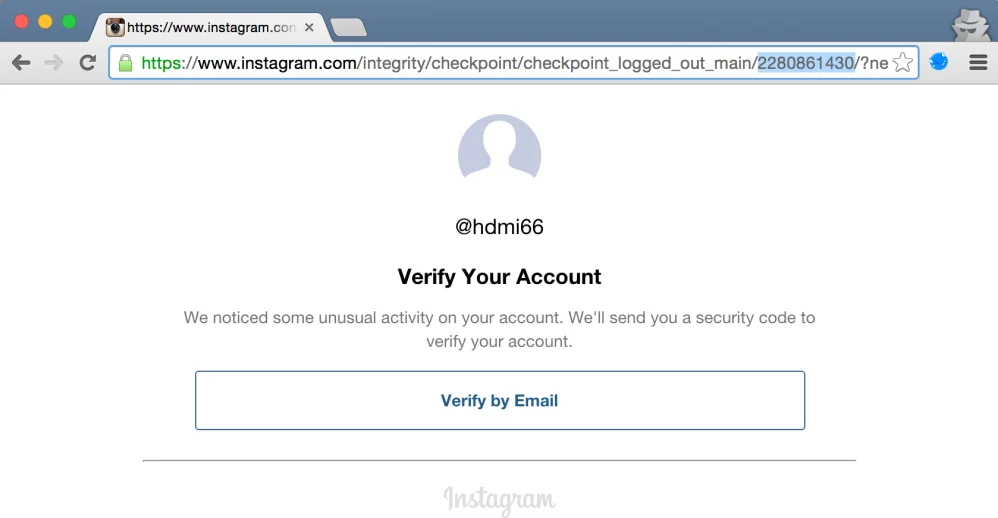
The URL revealed the issue: the page was accessible without being authenticated (checkpoint_logged_out_main) and contained the Instagram test account's unique user id. Landing on the same "Verify by Email" page for other accounts would have no direct security impact on its own, because the researcher does not have access to victims' email addresses. However, Instagram uses incremental user ids, so an enumeration of one million accounts in the range 2.000.000000-2.001.000000 was performed and produced the following results.
Verify account via Captcha: 1.099 accounts (0.1%)
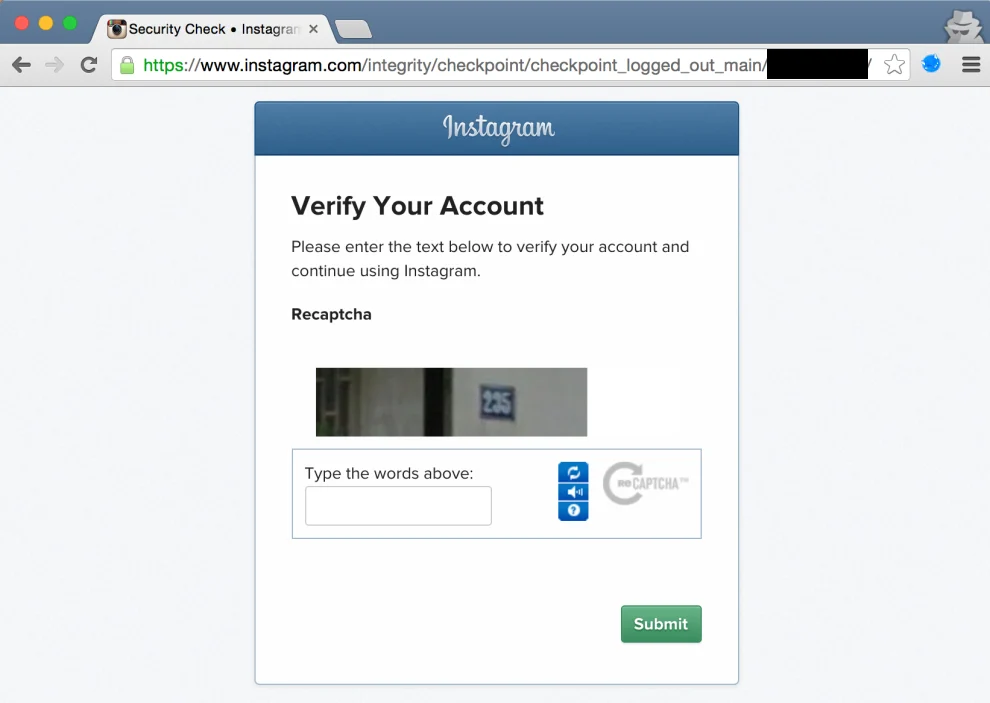
These might have been accounts observed to perform spamming. No direct security impact.
Verify account via email / SMS: 1.960 accounts (0.2%)
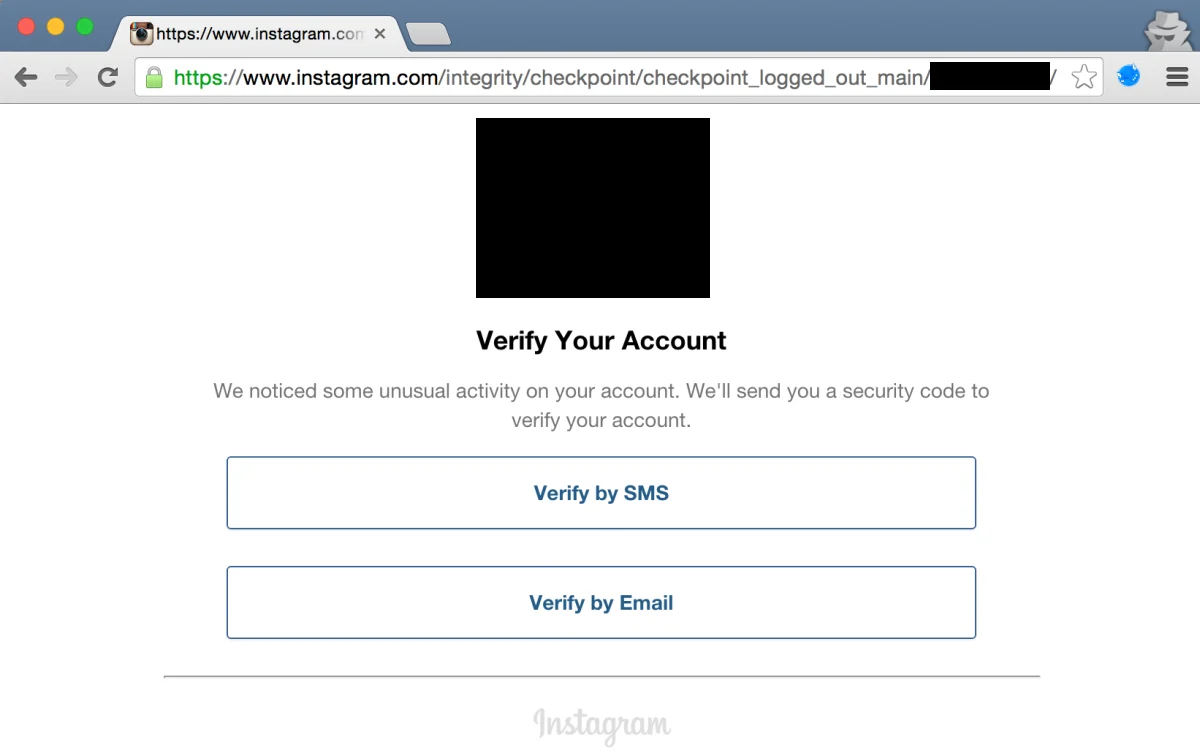
This was the same case as for the test account: no direct security impact.
Update email address & verify account: 1.690 accounts (0.17%)
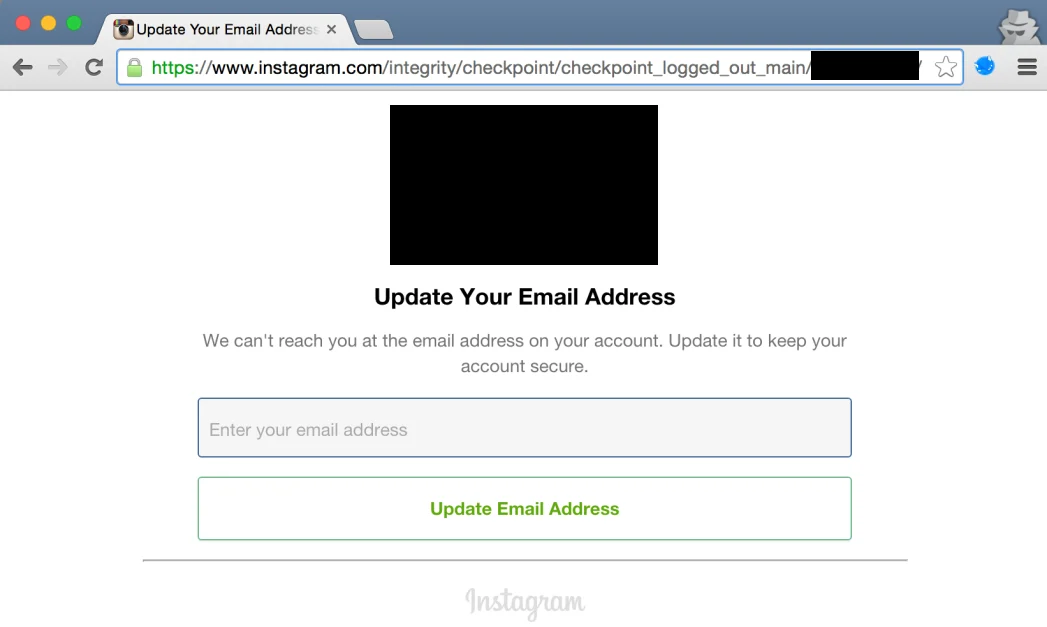
This page allowed the researcher to update the email address of the temporary locked account. Once an attacker could set the email address linked to an Instagram account, they could perform a password reset via email and gain full access to it. Big security impact, but only 0.17% of accounts were affected in the one million range.
Update phone number & verify account: 38.808 accounts (3.88%)
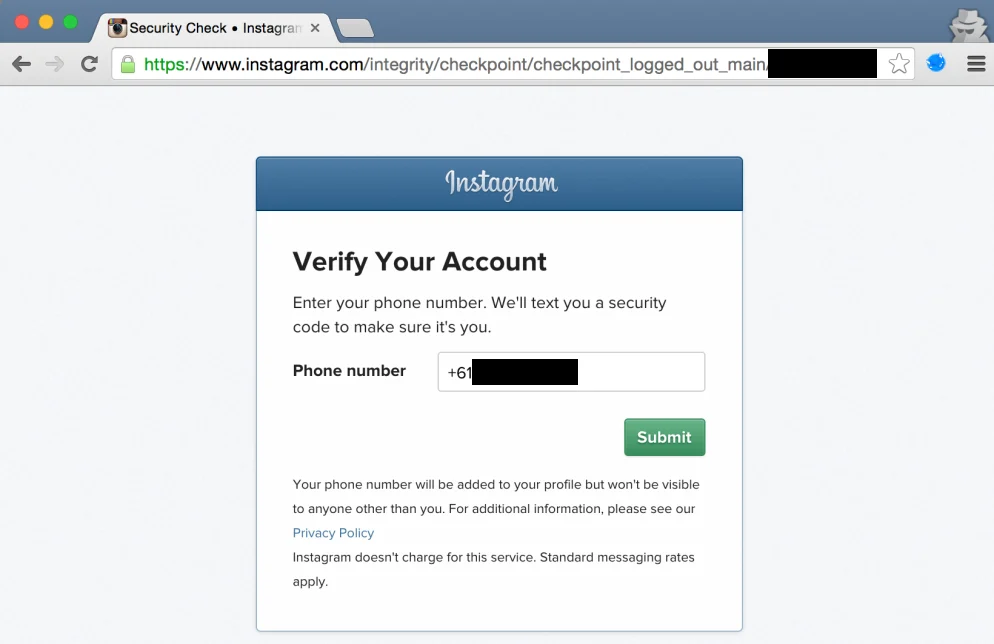
This case was the most troublesome. An attacker could gather sensitive user information (a pre-filled phone number in some cases) and could simply update the phone number linked to the victim Instagram account. After successfully linking a new phone number, an attacker could perform the "reset password via SMS" scenario and gain complete access to the account. Big security impact, and almost 4% of all accounts were affected in the one million range. A quick manual verification showed that these were mostly human accounts which had been inactive for a couple of weeks, many of which had a good amount of followers on Instagram.
Exploitation
The report describes the enumeration and the pages reached, but does not include the individual HTTP requests or responses. The steps are therefore described at the level the report gives them.
- Log in to an Instagram test account with valid credentials. The account is redirected to a verification page because it is in a temporary locked state, probably due to inactivity.
- Observe that the verification page is reachable without authentication (
checkpoint_logged_out_main) and that its URL contains the account's unique user id. - Enumerate one million accounts in the incremental user id range 2.000.000000-2.001.000000 and classify the verification page each account is shown.
- For accounts shown the "Update email address & verify account" page, the page allows the email address of the locked account to be updated. Setting a new email address enables a password reset via email and full access to the account.
- For accounts shown the "Update phone number & verify account" page, the page allows the phone number linked to the locked account to be updated, and in some cases displays a pre-filled phone number. Linking a new phone number enables the "reset password via SMS" scenario and complete access to the account.
The researcher notes that he could not immediately get any of his test accounts into the "phone number verification" state and therefore did not perform an actual account takeover scenario, since he could not reproduce it on his test accounts directly. He explicitly mentioned this to Facebook while reporting, to avoid any confusion. He states that never touching existing accounts is the only thing a researcher can do when adhering to responsible disclosure, and that this is the responsibility of all bug bounty hunters even if it might result in lower bounties in some edge cases. The required trust relationship between researchers and bug bounty providers relies on this.
Root cause
The verification pages that allow updating profile information such as email address and/or phone number were reachable without authentication. Combined with an insecure direct object reference, where the account is selected by the user id in the URL, this let an unauthenticated party reach the update flow for any account whose id was known or guessed. The report frames this as missing authentication combined with a simple insecure direct object reference. The report does not describe any further defence that was in place or why it failed.
Impact
An attacker could take over a selection of temporary locked Instagram accounts. For accounts shown the email update page, the attacker could set the linked email address and then perform a password reset via email. For accounts shown the phone number update page, the attacker could gather sensitive user information (a pre-filled phone number in some cases) and update the linked phone number, then perform a "reset password via SMS" scenario. The researcher extrapolated from the proof of concept account range that 4% of all existing and active Instagram accounts (approximately 500 million) were in a vulnerable locked state (approximately 20 million). The manual verification showed that the affected accounts were mostly human accounts inactive for a couple of weeks, many with a good amount of followers. The actual account takeover was not performed, because the researcher could not reproduce the phone number verification state on his own test accounts.
Fix
Facebook fixed the issue within 24 hours by enforcing authentication on the pages that allow updating profile information such as email address and/or phone number. The report does not describe any other change.
Timeline
| Date | Event |
|---|---|
| 14/03/2016 | Bug submitted to Facebook |
| 14/03/2016 | Facebook reply: "We are sending it to the appropriate product team for further investigation." |
| 15/03/2016 | Facebook reply: "We have looked into this issue and believe that the vulnerability has been patched." |
| 16/03/2016 | Confirmation that bug is fixed to Facebook |
| 25/03/2016 | Facebook reply: "After reviewing the issue you have reported, we have decided to award you a bounty of $5,000 USD." |
Variants to test
- Check whether account recovery and verification flows are reachable without authentication, especially pages whose names suggest a logged-out context. A positive result is a page that renders account-specific data or an update form without a session.
- Look for user ids or other object identifiers in the URL of such flows and try neighbouring values. A positive result is another account's verification state being shown.
- Test whether the verification flow lets you change the email address or phone number linked to the account. A positive result is an update form that accepts a new value for an account you do not control.
- Enumerate a contiguous id range and classify the pages returned. A positive result is a measurable share of accounts in a state that exposes an update form.
- Check whether pre-filled values such as a phone number are disclosed on the page. A positive result is partial personal data being shown to an unauthenticated visitor.
What happened, in plain words
Instagram is a photo and video sharing service. When you sign in, the service checks your username and password. If they are correct, you normally get into your account. But sometimes Instagram decides that an account needs an extra check before it lets the owner back in. This happens, for example, when an account has been quiet for a while. Instead of the normal home screen, the person is sent to a "verification" page that asks them to prove the account is really theirs, for instance by confirming an email address or a phone number.
This report is about a flaw in those verification pages. The researcher found that some of these pages could be opened by anyone, even someone who was not signed in at all. The page also picked which account it was working on based on a number in the web address (the URL). Because those numbers are handed out in order, a stranger could walk through a long list of numbers and reach the verification pages of many other people's accounts. On some of those pages, the stranger could change the email address or the phone number linked to the account. Changing either one is a serious problem, because both email and phone number can be used to reset a forgotten password. If you can reset the password, you can take over the account.
The researcher did not actually take over anyone's account. He tested only his own accounts and counted how many strangers' pages were exposed. Facebook, which owns Instagram, fixed the problem within a day and paid a $5,000 bounty ten days later.
Before going further, a few words on the ideas involved, because the rest of the article uses them constantly.
- Authentication means proving who you are. Signing in with a username and password is authentication. A page that is "reachable without authentication" is a page that does not ask you to sign in first.
- Authorisation means deciding what a signed-in person is allowed to do. Authentication is the bouncer checking your name at the door; authorisation is the list that says which rooms your name opens.
- A URL is the address of a page in your browser, the text in the address bar. It can carry extra pieces of information after a question mark or inside the path, such as an account number.
- An ID (identifier) is a number or string that names one specific thing, here one specific Instagram account. Instagram gives every account a unique number when it is created.
- An API is the way one piece of software talks to another over the internet, like a waiter taking your order to the kitchen and bringing back the dish. A web page in your browser often gets its data from an API behind the scenes.
- A cookie is a small note that a website asks your browser to keep and send back with every later request. It is how a site remembers that you already signed in. A session is the signed-in state that the cookie represents.
- An IDOR (Insecure Direct Object Reference) is when a program lets you name the object you want directly, for example by putting an account number in the URL, and then does not check that the object belongs to you. It is like a hotel that hands out room keys by number without checking that you are the guest in that room.
- Missing authentication is exactly what it sounds like: a page or action that should require a signed-in user but does not.
- Enumeration means going through a list of values one by one, here account numbers, and noting what comes back for each.
- A password reset is the "forgot my password" feature. Sites usually send a reset link to the email address on file, or a code by SMS to the phone number on file. Whoever controls that email or phone can set a new password.
- Responsible disclosure is the practice of telling the company about a flaw privately and not touching other people's data while you investigate.
Context
At the time of this report, Instagram sent people who signed in with correct credentials but whose accounts were in a temporary locked state to a verification page. That page offered a way to verify the account, for example by email, by SMS, or by updating the email address or phone number linked to the account. The researcher's own test account was sent there after a period of inactivity, and the option offered was verification by email because no phone number had been linked yet.
A "temporary locked state" here simply means Instagram has paused normal access to the account until the owner proves it is theirs. It is a safety measure, not a punishment.
Setup
The researcher used one of his own Instagram test accounts. After providing valid credentials he was redirected to the verification page. No special tools, versions or roles are described in the report beyond the researcher's own accounts and the enumeration described below.
Using your own account matters: it let him learn how the flow worked without touching anyone else's data.
Finding it
After logging in, the researcher was redirected to a page telling him he had to verify his account, probably due to inactivity. The only option offered was to verify by email, as no phone number was linked to the account yet.
The screenshot shows that verification page: a message saying the account must be verified, with the email option offered because no phone number was linked.
The URL revealed the issue: the page was accessible without being authenticated (checkpoint_logged_out_main) and contained the Instagram test account's unique user id. Landing on the same "Verify by Email" page for other accounts would have no direct security impact on its own, because the researcher does not have access to victims' email addresses. However, Instagram uses incremental user ids, so an enumeration of one million accounts in the range 2.000.000000-2.001.000000 was performed and produced the following results.
Two things in that paragraph deserve unpacking.
First, the name checkpoint_logged_out_main is a strong hint. "Logged out" in the name of a page suggests the developers built it for people who are not signed in, for example someone who has just been asked to verify. That is a reasonable design in itself, but it means the page cannot rely on a session cookie to know who you are. Instead it has to be told which account to work on, and it is told through the URL.
Second, "incremental user ids" means Instagram hands out account numbers in sequence: the next account created gets the next number. If you know one account's number, the numbers just above and below it very likely belong to accounts created around the same time. That turns a single number into a searchable neighbourhood.
Why enumerate at all? Because a single page showing "verify by email" for someone else's account is harmless: the researcher cannot read that person's inbox, so he cannot complete the verification. The question worth answering was whether some accounts were shown a different kind of verification page, one that lets the visitor change the contact details. To find out, he walked through one million consecutive numbers and sorted the pages by type. One million sounds like a lot, but a computer can request pages far faster than a person can click.
Verify account via Captcha: 1.099 accounts (0.1%)
The screenshot shows the captcha variant of the verification page.
These might have been accounts observed to perform spamming. No direct security impact.
A captcha is the little puzzle that asks you to prove you are a human, for example by picking out certain images. These might have been accounts Instagram observed to perform spamming. For our purposes it is a dead end: solving a captcha does not give a stranger control of the account, so this group carried no direct risk.
Verify account via email / SMS: 1.960 accounts (0.2%)
The screenshot shows the page offering verification by email or SMS.
This was the same case as for the test account: no direct security impact.
SMS means a text message to a mobile phone. Verifying by email or SMS means Instagram sends a code to the address or number already on file, and the owner types it back. A stranger does not receive that code, so again there is nothing to exploit here.
Update email address & verify account: 1.690 accounts (0.17%)
The screenshot shows the page that lets the visitor update the email address and then verify the account.
This page allowed the researcher to update the email address of the temporary locked account. Once an attacker could set the email address linked to an Instagram account, they could perform a password reset via email and gain full access to it. Big security impact, but only 0.17% of accounts were affected in the one million range.
This is the first genuinely dangerous variant. The page lets the visitor replace the email address linked to the account. Follow the chain: if you can set the email address on an account, you can put your own address there. Then you use the ordinary "forgot password" feature, which sends the reset link to the address on file, which is now yours. You click the link, choose a new password, and the account is yours. No clever trick is needed at that point; the site's own recovery feature does the work.
Update phone number & verify account: 38.808 accounts (3.88%)
The screenshot shows the page that lets the visitor update the phone number and then verify the account.
This case was the most troublesome. An attacker could gather sensitive user information (a pre-filled phone number in some cases) and could simply update the phone number linked to the victim Instagram account. After successfully linking a new phone number, an attacker could perform the "reset password via SMS" scenario and gain complete access to the account. Big security impact, and almost 4% of all accounts were affected in the one million range. A quick manual verification showed that these were mostly human accounts which had been inactive for a couple of weeks, many of which had a good amount of followers on Instagram.
The chain is the same as with email, but with two extra problems. First, the page sometimes arrived with the victim's existing phone number already filled in, so a stranger could read part of someone's personal data just by opening the page. Second, replacing the number and then using "reset password via SMS" gives the attacker the account, because the reset code now goes to the attacker's phone.
"Pre-filled" means the form box already contains a value when the page loads, rather than being empty. It is a small convenience for the real owner and a small leak for everyone else.
The manual check matters for judging severity. These were not throwaway spam accounts: they were mostly real people who had simply not signed in for a couple of weeks, and many had a good number of followers. Those are exactly the accounts an attacker would want.
Exploitation
The report describes the enumeration and the pages reached, but does not include the individual HTTP requests or responses. The steps are therefore described at the level the report gives them.
- Log in to an Instagram test account with valid credentials. The account is redirected to a verification page because it is in a temporary locked state, probably due to inactivity.
- Observe that the verification page is reachable without authentication (
checkpoint_logged_out_main) and that its URL contains the account's unique user id. - Enumerate one million accounts in the incremental user id range 2.000.000000-2.001.000000 and classify the verification page each account is shown.
- For accounts shown the "Update email address & verify account" page, the page allows the email address of the locked account to be updated. Setting a new email address enables a password reset via email and full access to the account.
- For accounts shown the "Update phone number & verify account" page, the page allows the phone number linked to the locked account to be updated, and in some cases displays a pre-filled phone number. Linking a new phone number enables the "reset password via SMS" scenario and complete access to the account.
Step 2 is the heart of the finding. The page name says "logged out", and the page really was accessible without being authenticated. The account it acts on is chosen by the number in the URL. That combination is the two weaknesses named in the summary: missing authentication (no sign-in required) plus an insecure direct object reference (the object, here the account, is named directly in the URL and not checked against the requester).
The researcher notes that he could not immediately get any of his test accounts into the "phone number verification" state and therefore did not perform an actual account takeover scenario, since he could not reproduce it on his test accounts directly. He explicitly mentioned this to Facebook while reporting, to avoid any confusion. He states that never touching existing accounts is the only thing a researcher can do when adhering to responsible disclosure, and that this is the responsibility of all bug bounty hunters even if it might result in lower bounties in some edge cases. The required trust relationship between researchers and bug bounty providers relies on this.
This is worth pausing on. He could see that the update form existed for other accounts, but he could not make his own account land in that state, so he had no safe way to prove the full takeover end to end. The alternative would have been to try it on a stranger's account, which would mean changing a real person's contact details. He did not do that. Instead he described the risk and was explicit about what he had and had not demonstrated. A bug bounty is a programme where a company pays researchers for reporting flaws privately, and that arrangement only works if researchers stay off other people's data.
Root cause
The verification pages that allow updating profile information such as email address and/or phone number were reachable without authentication. Combined with an insecure direct object reference, where the account is selected by the user id in the URL, this let an unauthenticated party reach the update flow for any account whose id was known or guessed. The report frames this as missing authentication combined with a simple insecure direct object reference. The report does not describe any further defence that was in place or why it failed.
In everyday terms: the door that should have required a key was open, and the room number was written on the door. Either mistake alone would be less serious. Together they let anyone walk in and pick a room.
Impact
An attacker could take over a selection of temporary locked Instagram accounts. For accounts shown the email update page, the attacker could set the linked email address and then perform a password reset via email. For accounts shown the phone number update page, the attacker could gather sensitive user information (a pre-filled phone number in some cases) and update the linked phone number, then perform a "reset password via SMS" scenario. The researcher extrapolated from the proof of concept account range that 4% of all existing and active Instagram accounts (approximately 500 million) were in a vulnerable locked state (approximately 20 million). The manual verification showed that the affected accounts were mostly human accounts inactive for a couple of weeks, many with a good amount of followers. The actual account takeover was not performed, because the researcher could not reproduce the phone number verification state on his own test accounts.
"Extrapolated" means he took the proportions he measured in his one million account sample and applied them to the whole population. The 4% figure in the title comes from that arithmetic: roughly 4% of about 500 million accounts is about 20 million accounts. It is an estimate based on a sample, not a count of every account.
Fix
Facebook fixed the issue within 24 hours by enforcing authentication on the pages that allow updating profile information such as email address and/or phone number. The report does not describe any other change.
"Enforcing authentication" means the pages now check for a valid signed-in session before doing anything. A visitor without a session is turned away, so the account number in the URL no longer helps.
Timeline
| Date | Event |
|---|---|
| 14/03/2016 | Bug submitted to Facebook |
| 14/03/2016 | Facebook reply: "We are sending it to the appropriate product team for further investigation." |
| 15/03/2016 | Facebook reply: "We have looked into this issue and believe that the vulnerability has been patched." |
| 16/03/2016 | Confirmation that bug is fixed to Facebook |
| 25/03/2016 | Facebook reply: "After reviewing the issue you have reported, we have decided to award you a bounty of $5,000 USD." |
The report was submitted on 14 March 2016, Facebook said it believed the issue was patched on 15 March, the fix was confirmed on 16 March, and the bounty was awarded on 25 March 2016.
Variants to test
If you want to look for similar problems, these are the checks the report suggests. Each one is a question you can ask of a site, with a clear sign of what a positive answer looks like.
- Check whether account recovery and verification flows are reachable without authentication, especially pages whose names suggest a logged-out context. A positive result is a page that renders account-specific data or an update form without a session.
- Look for user ids or other object identifiers in the URL of such flows and try neighbouring values. A positive result is another account's verification state being shown.
- Test whether the verification flow lets you change the email address or phone number linked to the account. A positive result is an update form that accepts a new value for an account you do not control.
- Enumerate a contiguous id range and classify the pages returned. A positive result is a measurable share of accounts in a state that exposes an update form.
- Check whether pre-filled values such as a phone number are disclosed on the page. A positive result is partial personal data being shown to an unauthenticated visitor.
"Contiguous" means the numbers run without gaps, one after another. That is what makes enumeration practical: you do not need to guess scattered numbers, you just count upwards.
Glossary
- API: the way one piece of software talks to another over the internet, like a waiter carrying orders between you and the kitchen.
- Authentication: proving who you are, usually by signing in with a username and password.
- Authorisation: deciding what a signed-in person is allowed to do.
- Bug bounty: a programme where a company pays researchers for reporting security flaws privately.
- Captcha: a puzzle that asks you to prove you are a human rather than a program.
- Contiguous: running in an unbroken sequence, with no gaps.
- Cookie: a small note a website asks your browser to store and send back with later requests, often used to remember that you signed in.
- Enumeration: going through a list of values one by one and noting the result for each.
- Extrapolation: taking proportions measured in a sample and applying them to the whole population.
- ID: a number or string that uniquely names one thing, here one Instagram account.
- IDOR (Insecure Direct Object Reference): a flaw where a program lets you name the object you want directly, for example by an account number in the URL, without checking that it belongs to you.
- Incremental user ids: account numbers handed out in sequence, so the next account created gets the next number.
- Missing authentication: a page or action that should require a signed-in user but does not.
- Password reset: the "forgot my password" feature, which usually sends a reset link by email or a code by SMS to the contact details on file.
- Pre-filled: a form box that already contains a value when the page loads.
- Responsible disclosure: telling a company about a flaw privately and not touching other people's data while investigating.
- Session: the signed-in state a site keeps for you, usually represented by a cookie.
- SMS: a text message sent to a mobile phone.
- URL: the address of a page, the text in your browser's address bar.