Make Featured Product in any video
An attacker could tag their own product as a Featured Product on any Facebook video, including videos they do not own, by sending a crafted GraphQL request. This allowed the attacker to gain more visitors to their product, and the tag could not be removed except by deleting the video.
 Published on medium.com
Victim have upload video or live video that have lot of visitors , an attacker can tags his product as Featured Product in the video.
The full write-up lives on its author's site
It belongs to its author, so we link to it rather than copy it. The other two tabs are our own rewrites, checked against it.
What the report shows
The target is Facebook's GraphQL API at www.facebook.com, and the feature is product tagging: the ability to attach a shop product to a video as a Featured Product. The researcher, abdellah yaala (@yaalaab), reported that a user who administers a Page with a shop can tag one of that shop's products onto a video they do not own.
The setup described in the report is:
- userA is an admin or editor on pageA.
- userA creates a shop section and a product, referred to as P_id.
- video_B is a video not owned by userA, described as any video on Facebook.
The researcher then sends the following request:
POST /api/graphql/ HTTP/1.1
Host: www.facebook.com

doc_id=2781671041948682&variables={"input":{"client_mutation_id":"1","actor_id":"actor_id","video_id":"[video_B_id]","product_item_id":"[P_id]"}}
The result, as the report states it, is that product P_id is tagged on the victim's video. The attacker gains more visitors to their products through that video's audience, and the product cannot be removed from the video; the only remedy the report gives is deleting the video itself.
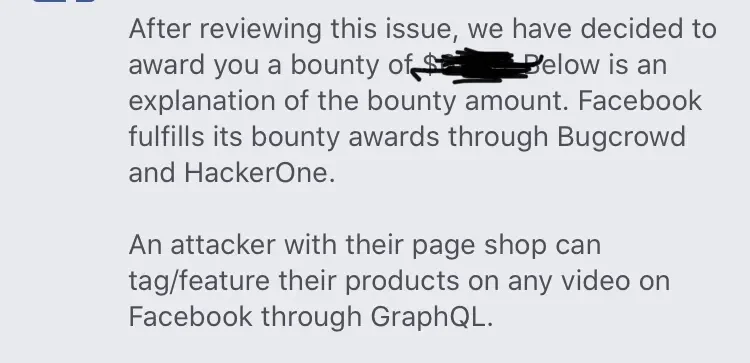
The report gives no bounty amount, no severity rating, no CVSS score and no confirmation of a fix. It ends with the reproduction and the impact statement.
Root cause
The report does not explain the server-side logic. The report does not explain the server-side logic behind the mutation. The video_id and product_item_id are both supplied by the client. The report also states that the product cannot be removed afterwards.
Impact
An attacker who controls a Page shop can attach their product to any video on the platform, including videos with many visitors, and gain more visitors to their products. Because the tag cannot be removed, the only solution the report gives is deleting the video.
How this kind of bug works
This is a broken object-level authorisation problem in a GraphQL mutation. Mutations that link two objects (here a video and a product) take two identifiers from the client. A correct implementation checks permission on both: the caller must be allowed to modify the product and allowed to modify, or at least be associated with, the video. When only one side is checked, the other identifier becomes a free parameter, and any object of that type on the platform can be linked.
GraphQL makes this easy to miss because a single endpoint serves many operations, each selected by a document identifier, and the input object is opaque JSON. Teams often validate the shape of the input and the permission on the object the user "owns" (the product), then persist the relationship without a second authorisation check. The absence of a delete or untag mutation for the relationship turns a nuisance into something the victim cannot undo.
Defences are straightforward in principle: authorise every object referenced in a mutation, not just the primary one; treat relationship creation as a write on both objects; and provide a symmetric removal path with the same checks.
How to test for it
- Identify mutations that create relationships between two objects, for example tagging a product on a video, adding a collaborator, attaching a label, or linking a post to a page. GraphQL document identifiers can be collected from the web client's traffic while performing the action legitimately.
- Create two accounts or contexts: one that owns object A (the product) and one that owns object B (the video). Perform the linking action normally and capture the request, including the document identifier and the variables object.
- Replay the request with the identifier of object B replaced by one belonging to the second account, or by any object of that type you can enumerate. Keep the rest of the request unchanged.
- A positive result is a successful response and a visible change on the other account's object: the tag appears on their video, the collaborator appears in their list, and so on. Confirm from the second account's view, not just from the response body.
- Check whether the relationship can be removed by the victim. If there is no untag or delete mutation available to them, note that in the report.
Common false positives: the mutation may succeed but silently ignore the foreign identifier; the tag may be visible only to the attacker; or the platform may treat the action as a request that the owner must approve. Verify the effect from the victim's session and check whether any notification or approval step exists. Also make sure the object you linked is genuinely not yours and not shared through a page role or business relationship.
How it is fixed
The standard fix is to authorise both objects in the mutation: verify that the caller has edit or management rights over the video as well as the product before creating the tag. Where cross-object tagging is a legitimate feature, restrict it to objects the caller is entitled to modify, or require the owner's approval. Add a removal mutation for the relationship, with the same authorisation checks, so a tag can be undone. Logging and alerting on relationship mutations that reference objects outside the caller's scope helps catch regressions.
Hunting notes
Relationship-creating mutations are common in commerce, creator tools and collaboration features: product tags on posts and videos, mentions, collaborator invites, page roles, and cross-posting. They hide behind opaque GraphQL document identifiers, so recon means exercising the feature in the web or mobile client and recording the document identifier and variable names. Signals worth following are mutations whose input contains two or more object identifiers, especially where one is clearly the caller's own resource. To make the report land, show the effect from the victim's account, state clearly that the victim cannot remove the relationship, and keep the reproduction to the minimum number of steps.
What happened, in plain words
Facebook lets a Page that runs a shop attach one of its products to a video as a "Featured Product". The tag is a link between two things: a video and a product.
The researcher, abdellah yaala (@yaalaab), found that the link could be made in one direction only. A user who administers a Page with a shop could take a product from their own shop and tag it onto a video they did not own, described in the report as any video on Facebook. The attacker's product was then tagged on the victim's video, and the attacker could get more visitors to their products. The report adds that the product could not be removed from the video afterwards: the only remedy it gives is deleting the video itself.
To understand the finding you need a few ideas:
- A Page is a public profile on Facebook for a business or brand. It has admins and editors, people allowed to manage it.
- A shop is the store section of a Page, holding products.
- A product is an item in that shop, identified by an ID, called P_id in the report.
- A video is any video on the platform, identified by an ID, called video_B_id here.
- A request is the message your browser sends to a website when you do something, such as clicking a button. It carries the details of the action.
- GraphQL is a way for a website to talk to its server through one address, where each request names the operation it wants and passes the details as a block of data. Facebook's endpoint is
/api/graphql/onwww.facebook.com.
The setup in the report is:
- userA is an admin or editor on pageA.
- userA creates a shop section and a product, P_id.
- video_B is a video not owned by userA, described as any video on Facebook.
With that in place, the researcher sends this request:
POST /api/graphql/ HTTP/1.1
Host: www.facebook.com

doc_id=2781671041948682&variables={"input":{"client_mutation_id":"1","actor_id":"actor_id","video_id":"[video_B_id]","product_item_id":"[P_id]"}}
Line by line:
POST /api/graphql/ HTTP/1.1says this is a POST request, the kind used to send data and change something, sent to the GraphQL address.Host: www.facebook.comnames the server the request is for.doc_id=2781671041948682is the identifier of the operation being called. Facebook's web client uses numbered documents instead of readable operation names, so this number is the "tag a product on a video" action.variables={...}is the data block for that action. Inside it,inputholds the details:client_mutation_idis a label the client uses to keep track of its own request.actor_idis who is performing the action, here the attacker's account.video_idis the video to tag, here the victim's video.product_item_idis the product to attach, here the attacker's own product.
The important part is that both video_id and product_item_id are supplied by the client. The report does not explain what the server checked. So the pairing was accepted, and the product was tagged on someone else's video.
The report gives no bounty amount, no severity rating, no CVSS score and no confirmation of a fix. It ends with the reproduction and the impact statement.
In general, how this kind of bug works
This is a broken object-level authorisation problem. Authorisation means deciding whether the person making a request is allowed to do it. Object-level means the check is about a specific thing, such as one video or one product, rather than about the feature as a whole.
A useful comparison is a cloakroom. You hand in your coat and get a ticket. If the attendant only checks that the ticket is real and never checks that it matches the coat you are asking for, anyone with any ticket can walk off with any coat. Here the ticket is the product the attacker owns, and the coat is the victim's video.
When an action links two objects, the server receives two identifiers from the client. A correct implementation checks permission on both: the caller must be allowed to change the product and allowed to change, or at least be connected to, the video. When only one side is checked, the other identifier becomes a free choice, and any object of that type on the platform can be linked.
GraphQL makes this easy to miss. One address serves many operations, each picked by a document identifier, and the input is an opaque block of data. Teams often check the shape of the input and the permission on the object the user owns, then save the link without a second check. If there is also no way to remove the link, a nuisance becomes something the victim cannot undo.
To test for it, a beginner can follow the same shape of steps:
- Find actions that create a link between two objects, such as tagging a product on a video, adding a collaborator, or attaching a label. Collect the document identifier from the browser's network traffic while doing the action normally.
- Use two accounts: one that owns object A (the product) and one that owns object B (the video). Do the linking action normally and capture the request.
- Replay the request with object B's identifier replaced by one belonging to the second account, or by any object of that type you can find. Keep everything else the same.
- A positive result is a successful response and a visible change on the other account's object. Confirm it from the second account's view, not just from the response.
- Check whether the victim can remove the link. If there is no untag or delete action available to them, note that in the report.
Common false positives: the action may succeed but silently ignore the foreign identifier; the tag may be visible only to the attacker; or the platform may treat it as a request the owner must approve. Verify from the victim's session and check for any approval step. Also make sure the object you linked is genuinely not yours and not shared through a Page role or business relationship.
The standard fix is to authorise both objects: check that the caller has edit or management rights over the video as well as the product before creating the tag. Where cross-object tagging is a legitimate feature, restrict it to objects the caller may modify, or require the owner's approval. Add a removal action with the same checks so a tag can be undone. Logging and alerting on link-creating actions that reference objects outside the caller's scope helps catch regressions.
Glossary
- Page: a public profile on Facebook for a business or brand, managed by admins and editors.
- Shop: the store section of a Page, holding products.
- Product: an item in a shop, identified by an ID.
- Featured Product: a product attached to a video so viewers can see and click it.
- Request: the message a browser sends to a website when you do something.
- POST: a request type used to send data and change something on the server.
- GraphQL: a way for a website to talk to its server through one address, naming the operation and passing details as data.
- Endpoint: the address a request is sent to, here
/api/graphql/. - Mutation: a GraphQL operation that changes data, such as creating a link.
- Document identifier (doc_id): the number naming which operation a GraphQL request calls.
- Variables: the block of data in a GraphQL request holding the details of the action.
- Identifier (ID): a value that names a specific object, such as a video or product.
- actor_id: the identifier of the account performing the action.
- Authorisation: deciding whether the person making a request is allowed to do it.
- Broken object-level authorisation: a flaw where the server does not check permission on a specific object referenced in a request.
- False positive: a result that looks like a bug but is not, for example because the change is not really visible to the victim.
- CVSS: a scoring system for the severity of a security flaw.

