Rights Manager Graph API Disclosure of business employee to non business employee
A privacy flaw in Facebook's Rights Manager Graph API allowed a non-business employee to access information about a business employee. The attacker could exploit this to disclose business employee data to unauthorised users.
 Published on updatelap.com
The original lives on updatelap.com
We do not hold its text, so we link to it rather than copy it. The other two tabs are our own rewrites, checked against it.
What the report shows
The researcher reported a privacy and identification issue in the Graph API behind Facebook Rights Manager. The stated effect is that a non-business employee can obtain the disclosure of a business employee, using Reference Files in Rights Manager. The report classifies the vulnerability type as Identification / Privacy and the product area as Pages.
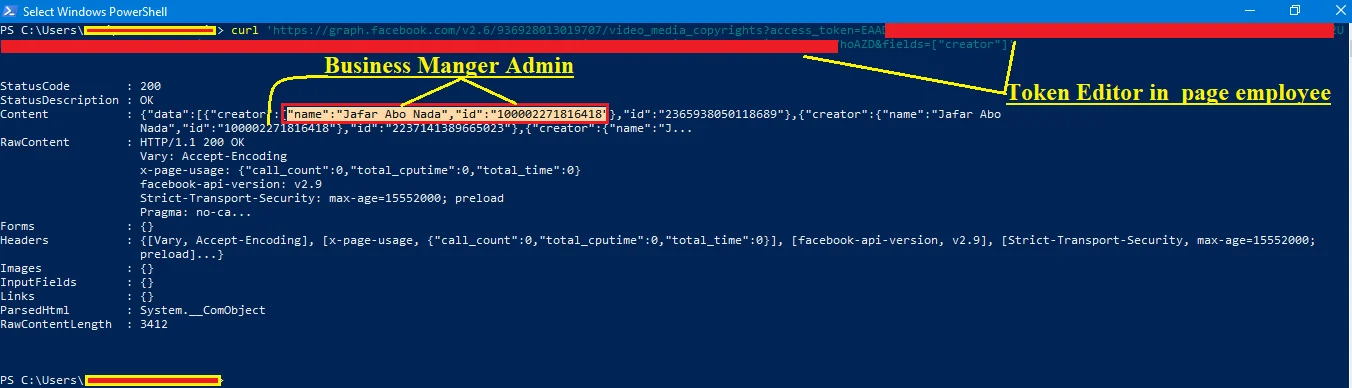
The report is short: its Setup, Steps and Explain impact sections carry no content, and the impact is stated only in the one-line summary. What it does provide is a proof-of-concept GET request, shown in the screenshot below.
The request itself is not reproduced as text anywhere in the report, so the exact endpoint, parameters and headers are not available here. The only technical artefact is the image of the PoC request.
The report gives this timeline:
| Date | Event |
|---|---|
| 8 July 2019 | Report sent |
| 12 July 2019 | Facebook reproduces the report |
| 15 July 2019 | Facebook confirms submission |
| 5 August 2019 | Facebook confirms the patch |
| 22 August 2019 | Bounty awarded |
The report does not state a severity rating, a CVSS score or the bounty amount.
Root cause
The report does not describe the underlying cause. Reading the summary, the likely cause is that data about a business employee is reachable through Reference Files by someone outside that business. In other words, an authorisation check on the object relationship is missing or too weak: the API confirms the caller may read the Reference File but does not confirm that the caller may see the employee data attached to it. This is an inference from the stated effect, not something the report explains.
Impact
The report's own framing is privacy: a non-business employee can learn about a business employee. Treat the impact as information disclosure of employee data across a business boundary, with the caveat that the report gives no detail on the extent.
How this kind of bug works
Object-level authorisation bugs appear when an API resolves a resource by identifier and checks only that the caller can access the resource, not that the caller can access every field or relationship hanging off it. Graph-style APIs make this easy to get wrong because a single object is reachable through many edges, and each edge can carry its own permission model. A field that is safe to show to a member of the business may be sensitive when the same object is fetched by an outsider who was granted access to a different part of it, for example a shared reference file.
The usual failure modes are: a permission check applied at the parent object but not at the child edge; a check that tests the caller's role in any business rather than in the specific business that owns the object; and cached or precomputed responses that skip the per-caller check. Defences are per-field and per-edge authorisation, consistent checks on every path to the same data, and tests that compare responses between an in-business and an out-of-business caller.
How to test for it
- Map the feature. Identify the objects the feature exposes (files, references, assets) and the people-related fields or edges attached to them. Note every identifier the UI uses to fetch them.
- Create two accounts in different business contexts, one with access to the object and one without, and capture the requests each makes.
- Replay the in-business request with the out-of-business session, keeping identifiers unchanged. Then try the reverse: take an identifier from the privileged context and request it from the unprivileged one.
- Vary the edges. If the object is readable, request the employee or member edge directly, and try fields that the UI does not render.
- Compare responses field by field. A positive result is the unprivileged caller receiving employee data (names, identifiers, roles, contact details) that the UI never shows them and that belongs to the other business.
Common false positives: data that is intentionally public, data about the caller themselves, and fields that are visible to any authenticated user by design. Confirm the boundary by checking that the privileged account sees strictly more, and that the extra data belongs to a business the second account is not part of.
How it is fixed
Apply authorisation at the edge and field level, not only at the parent object. Check membership in the specific business that owns the object, on every path that returns employee data. Where a resource is shared across businesses, return only the fields the sharing relationship justifies. Add regression tests that fetch the same object from inside and outside the business and assert the responses differ as intended.
Hunting notes
This class hides in features that share objects across tenants: rights management, asset libraries, shared folders, collaborator lists and anything with a reference or link concept. Recon signals include Graph-style endpoints with numeric or opaque object identifiers, edges named after people or members, and UI screens that show a count or a name without a corresponding visible list. A clear before-and-after of the two responses is usually enough for a triager to reproduce.
What happened, in plain words
A security researcher found a privacy problem in Facebook Rights Manager, a tool that helps businesses manage and protect their copyright material, such as videos. The tool is built on top of the Graph API, which is the part of Facebook that programs use to ask for data. The researcher reported that a person who does not work for a business could learn information about an employee of that business, by using a feature called Reference Files.
The report labels the problem as an identification and privacy issue, and places it in the Pages product area. Its Setup, Steps and Explain impact sections carry no content, and the impact is stated only in the one-line summary.
What the report does give is a proof-of-concept request, a GET request, shown in a screenshot. A request is simply the message your browser or an app sends to a server to ask for something, much like handing a form to a clerk at a counter. GET is the type of request used to fetch information rather than change it.
The request is only shown as an image. Its exact address, parameters and headers are not written out in text anywhere in the report, so they cannot be reproduced here.
The report gives this timeline:
| Date | Event |
|---|---|
| 8 July 2019 | Report sent |
| 12 July 2019 | Facebook reproduces the report |
| 15 July 2019 | Facebook confirms submission |
| 5 August 2019 | Facebook confirms the patch |
| 22 August 2019 | Bounty awarded |
A bounty is a reward a company pays for a valid security report. The report does not state a severity rating, a CVSS score (a standard way of scoring how serious a flaw is) or the bounty amount.
In general, how this kind of bug works
The report does not explain the underlying cause. Based on the stated effect, the likely cause is that a part of the Graph API reachable through Reference Files returned information about a business employee to someone who is not part of that business. In other words, an authorisation check was missing or too weak. Authorisation is the server deciding whether the person asking is allowed to see a particular thing, like a bouncer checking whether your name is on the guest list for a specific party, not just for the building.
Graph-style APIs are easy to get wrong here because one object can be reached through many different connections, and each connection can have its own permission rules. A field that is fine to show a member of the business may be sensitive when the same object is fetched by an outsider who was granted access to a different part of it, such as a shared reference file.
The usual failure modes are:
- A permission check applied to the parent object but not to the child connection.
- A check that tests whether the caller belongs to any business, rather than the specific business that owns the object.
- Cached or precomputed responses that skip the per-caller check.
Defences are per-field and per-connection authorisation, consistent checks on every path to the same data, and tests that compare responses between an in-business and an out-of-business caller.
In general, how to test for it
- Map the feature. Identify the objects it exposes (files, references, assets) and the people-related fields attached to them. Note every identifier the interface uses to fetch them. An identifier is the unique label, often a number, that names one specific object.
- Create two accounts in different business contexts, one with access to the object and one without, and capture the requests each makes.
- Replay the in-business request with the out-of-business session, keeping identifiers unchanged. Then try the reverse: take an identifier from the privileged context and request it from the unprivileged one. A session is the server's memory of who you are after you log in, usually carried by a cookie, a small piece of data your browser stores and sends back with each request.
- Vary the connections. If the object is readable, request the employee or member connection directly, and try fields the interface does not display.
- Compare responses field by field. A positive result is the unprivileged caller receiving employee data (names, identifiers, roles, contact details) that the interface never shows them and that belongs to the other business.
Common false positives are data that is intentionally public, data about the caller themselves, and fields visible to any logged-in user by design. Confirm the boundary by checking that the privileged account sees strictly more, and that the extra data belongs to a business the second account is not part of.
In general, how it is fixed
Apply authorisation at the connection and field level, not only at the parent object. Check membership in the specific business that owns the object, on every path that returns employee data. Where a resource is shared across businesses, return only the fields the sharing relationship justifies. Add regression tests that fetch the same object from inside and outside the business and assert the responses differ as intended.
In general, where to look
This class of bug hides in features that share objects between organisations: rights management, asset libraries, shared folders, collaborator lists and anything with a reference or link concept. Signals worth watching include Graph-style endpoints with numeric or opaque object identifiers, connections named after people or members, and screens that show a count or a name without a corresponding visible list. A clear before-and-after of the two responses is usually enough for a triager to reproduce.
Glossary
- Graph API: the interface Facebook provides for programs to read and write data on its platform.
- Rights Manager: a Facebook tool for businesses to manage and protect copyright material such as videos.
- Reference Files: the Rights Manager feature the researcher used to reach the data.
- Request: the message a browser or app sends to a server to ask for something.
- GET request: a request that fetches information rather than changing it.
- Endpoint: the address a request is sent to.
- Parameter: a named value attached to a request, such as an identifier.
- Header: extra information sent alongside a request, such as the format the client expects.
- Cookie: a small piece of data a browser stores and sends back, often used to identify a session.
- Session: the server's memory of who you are after you log in.
- Authorisation: the server deciding whether the caller is allowed to access a specific thing.
- Object: a single item the API manages, such as a file or a page.
- Connection (edge): a link from one object to related data, such as the employees attached to a business.
- Field: one named piece of data inside an object, such as a name or a role.
- Identifier: the unique label, often a number, that names one specific object.
- Information disclosure: a flaw where data is shown to someone who should not see it.
- Proof of concept (PoC): a minimal demonstration that a flaw is real.
- CVSS: a standard scoring system for the severity of a security flaw.
- Bounty: a reward a company pays for a valid security report.
- False positive: a finding that looks like a flaw but is actually intended behaviour.
- Regression test: an automated test that checks a fixed flaw stays fixed.
- Triager: the person at a company who first reviews and reproduces incoming reports.

