Vulnerabilities in Facebook Login Approval Form
The Facebook Login Approval Form allowed an attacker to enter a victim's email address and then view the victim's support conversation with Facebook admins. A related flaw on mobile subdomains let an attacker bypass the victim's email lookup privacy setting and obtain the victim's numeric Facebook user ID from a profile photo URL.

After multiple bugs found in facebook “Account Recovery Form” i found one another bug.
The full write-up lives on its author's site
It belongs to its author, so we link to it rather than copy it. The other two tabs are our own rewrites, checked against it.
Context
Facebook runs a set of help contact forms under /help/contact/ that users fill in to reach support. One of them is the Facebook Login Approval Form, at:
https://www.facebook.com/help/contact/259497704121855
When a user submits the form, the submission becomes a support conversation between that user and a Facebook administrator, visible on a support dashboard. The researcher had already been looking at the Account Recovery Form, where he had found several bugs, and moved on to this second form after Facebook told him the recovery-form issue was a duplicate.
Setup
The write-up does not describe any special tooling. The work is done in a browser against the live Facebook help forms, with two identities in play: a victim who submits the form with their own email address, and an attacker who submits the same form with the same email address. The only precondition is that the victim has already submitted the form with that email address.
Finding it
The researcher had reported a bug in the Account Recovery Form: if the victim fills in the form with an email such as [redacted], and the attacker then fills in the same form with the same email, the attacker is redirected to the victim's form and can read the conversation between the administrator and the victim. Facebook's reply, from an administrator named Aaron, said the issue had already been reported by another whitehat researcher in February and was being tracked there.
Because Facebook said the issue was already being tracked, he went looking for other forms and found the Login Approval Form. The same behaviour appeared to apply to it, so he tested it in the same way.
Exploitation
Step 1: open the form
The attacker opens the Login Approval Form:
https://www.facebook.com/help/contact/259497704121855
Step 2: submit with the victim's email
The attacker fills in the form using the victim's email address, for example [redacted], the same address the victim used when they submitted the form.
Step 3: read the victim's conversation
After the form is submitted successfully, the attacker is redirected to the victim's form and sees the conversation between the victim and the Facebook administrator on the support dashboard. The report describes the impact in the same terms as the recovery-form bug: the attacker is redirected to the victim's form and can read the admin-to-victim conversation.
Facebook's response, from an administrator named Brandon, said the information was being sent to the appropriate product team for further investigation, with an update to follow once there was progress on the fix.
Step 4: test the same form on the mobile sub-domains
Because the fix for this class of bug was long-term, the researcher kept testing the form in other ways. He found that the form was also vulnerable to a privacy violation: it disclosed which user ID an email address is linked to, even when the user had set the privacy option "Who can look you up using the email you provided?" to Friends Only.
By this point the bugs had been patched on the main facebook.com domain, because of the multiple bugs he had found there, so he moved to the sub-domains:
https://m.facebook.com
https://touch.facebook.com
Step 5: open the form on touch.facebook.com
https://touch.facebook.com/help/contact/259497704121855
Step 6: submit with the victim's email and wrong details
The attacker fills in the form making sure the email address is linked to a Facebook account, and that the account's privacy setting "Who can look you up using the email you provided?" is set to Friends Only. The form is filled in with wrong information, but with the victim's email address.
Step 7: send an additional message
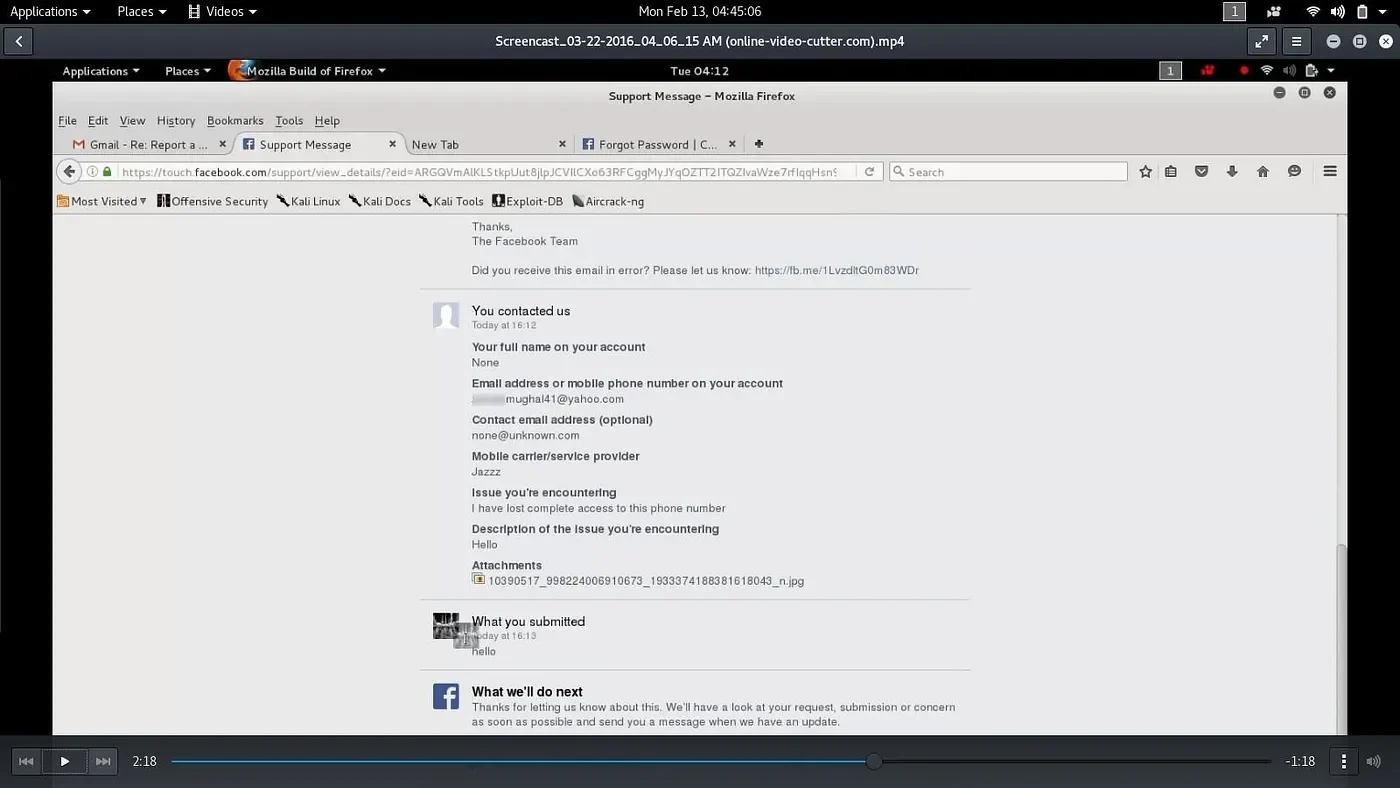
The attacker clicks "Send additional Information", types any message and sends it. The support dashboard then shows the profile photo of the account linked to that email in a small box.
Step 8: extract the photo ID from the image URL
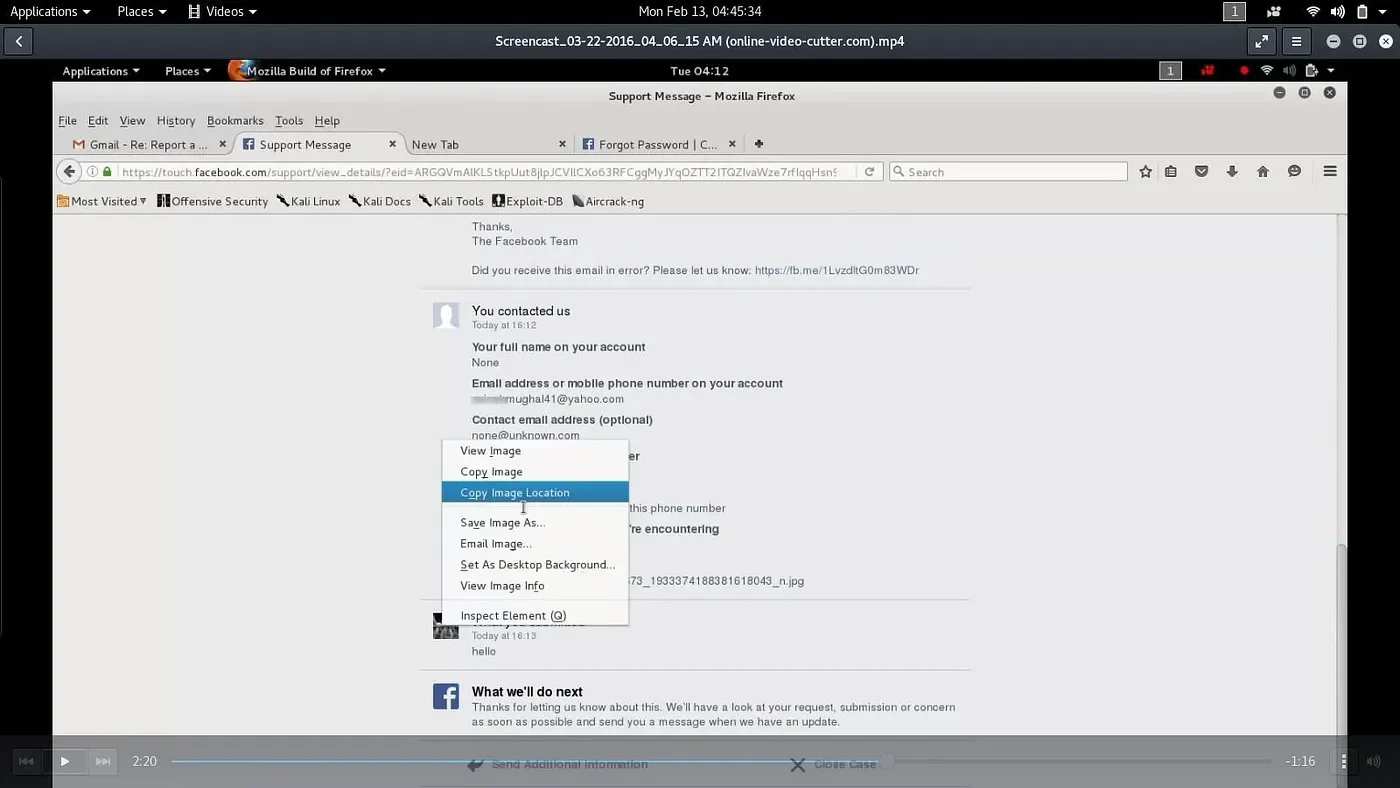
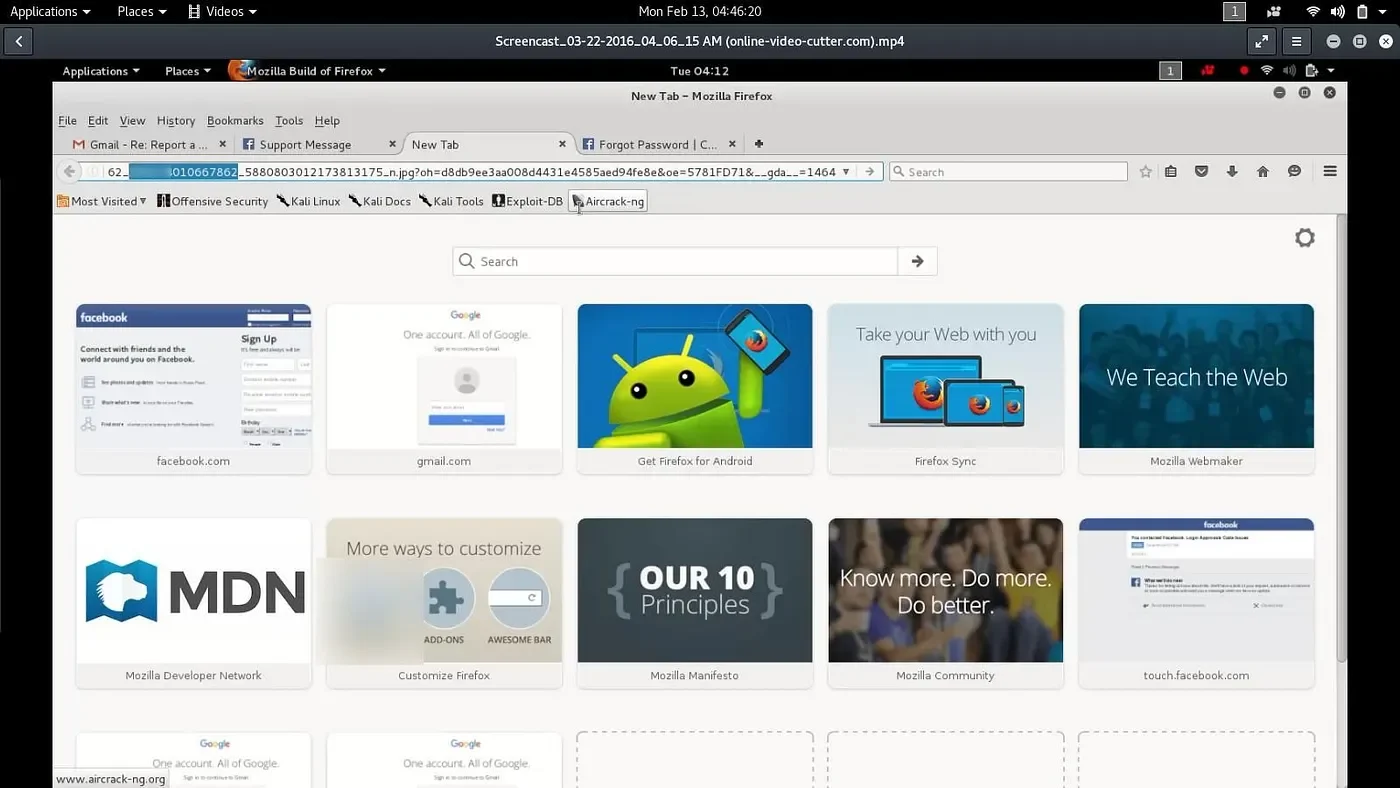
The attacker copies the image location and pastes it into the browser or a notepad. The URL contains the Facebook photo ID:
https://scontent-sit4-1.xx.fbcdn.net/v/t1.0-9/[redacted].jpg?oh=[redacted]&oe=5931F96C
The photo ID in that URL is 10153735080289001.
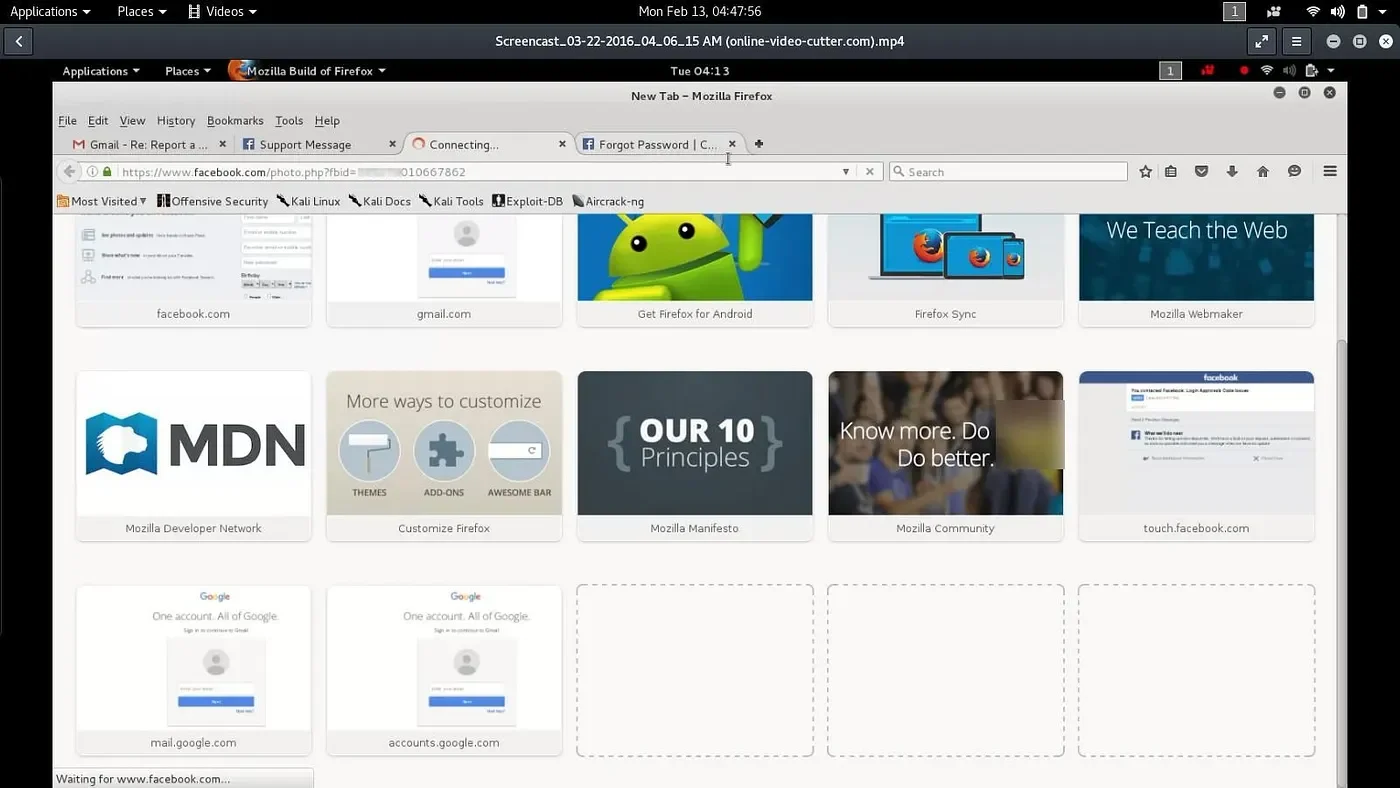
Step 9: resolve the photo ID to the profile
The attacker takes the photo ID and opens:
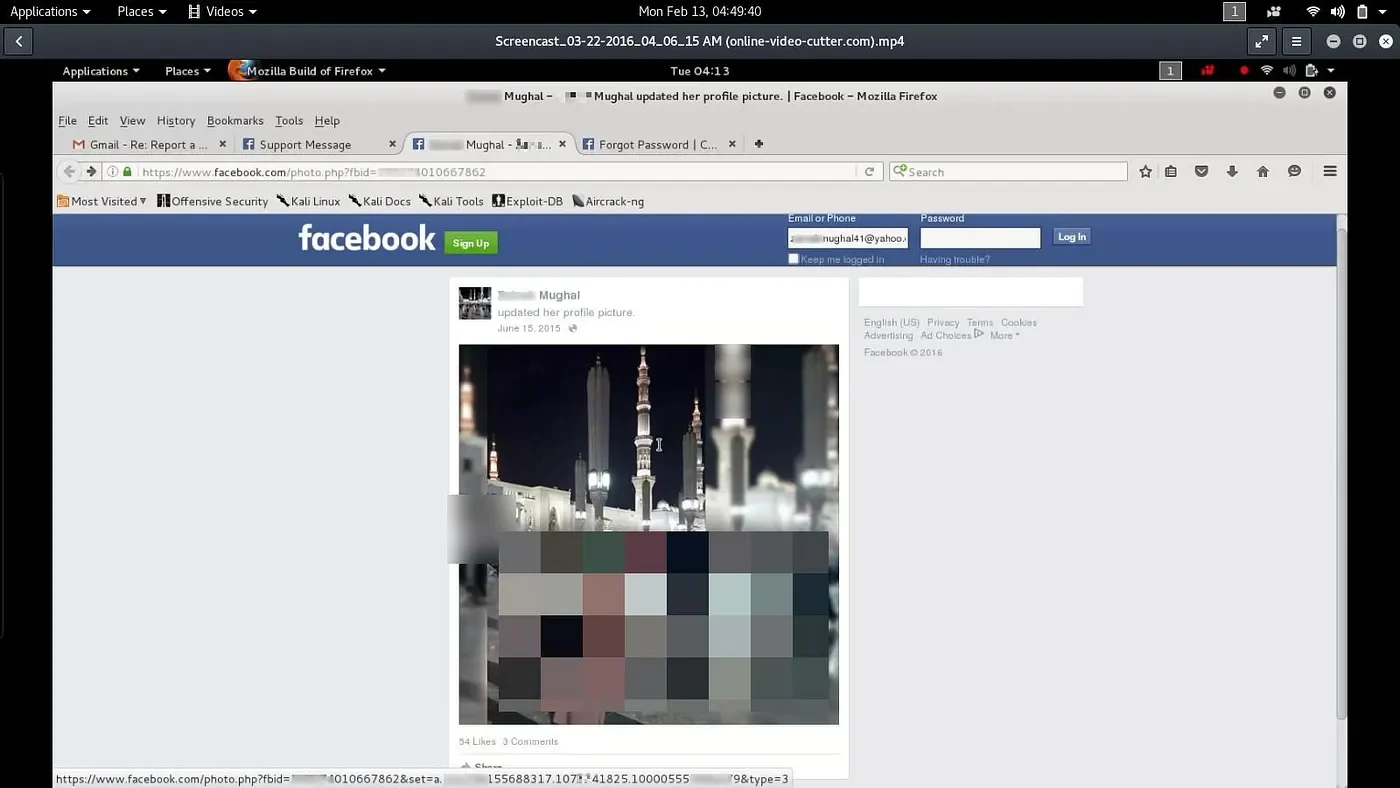
With the ID substituted, this resolves to the victim's Facebook profile. The report includes screenshots of the process:
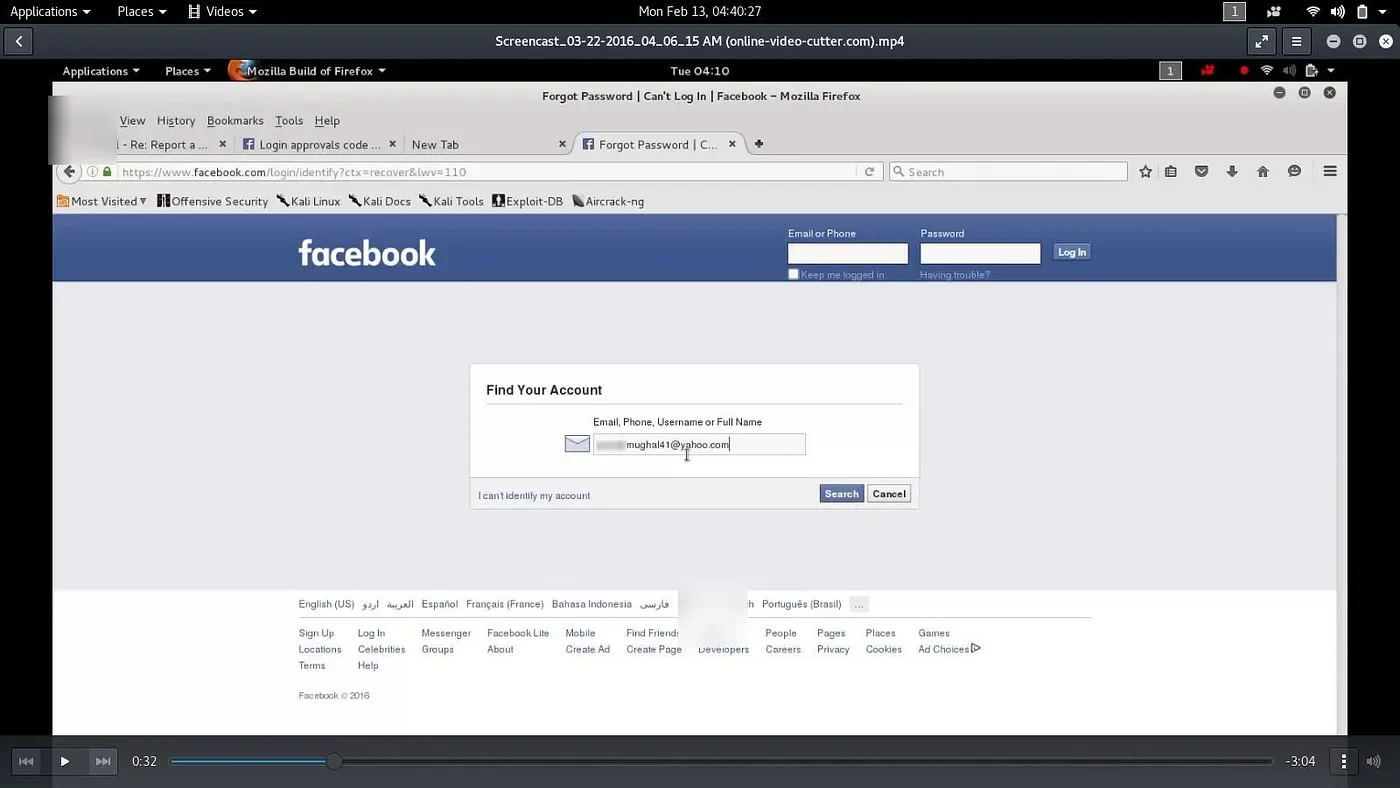
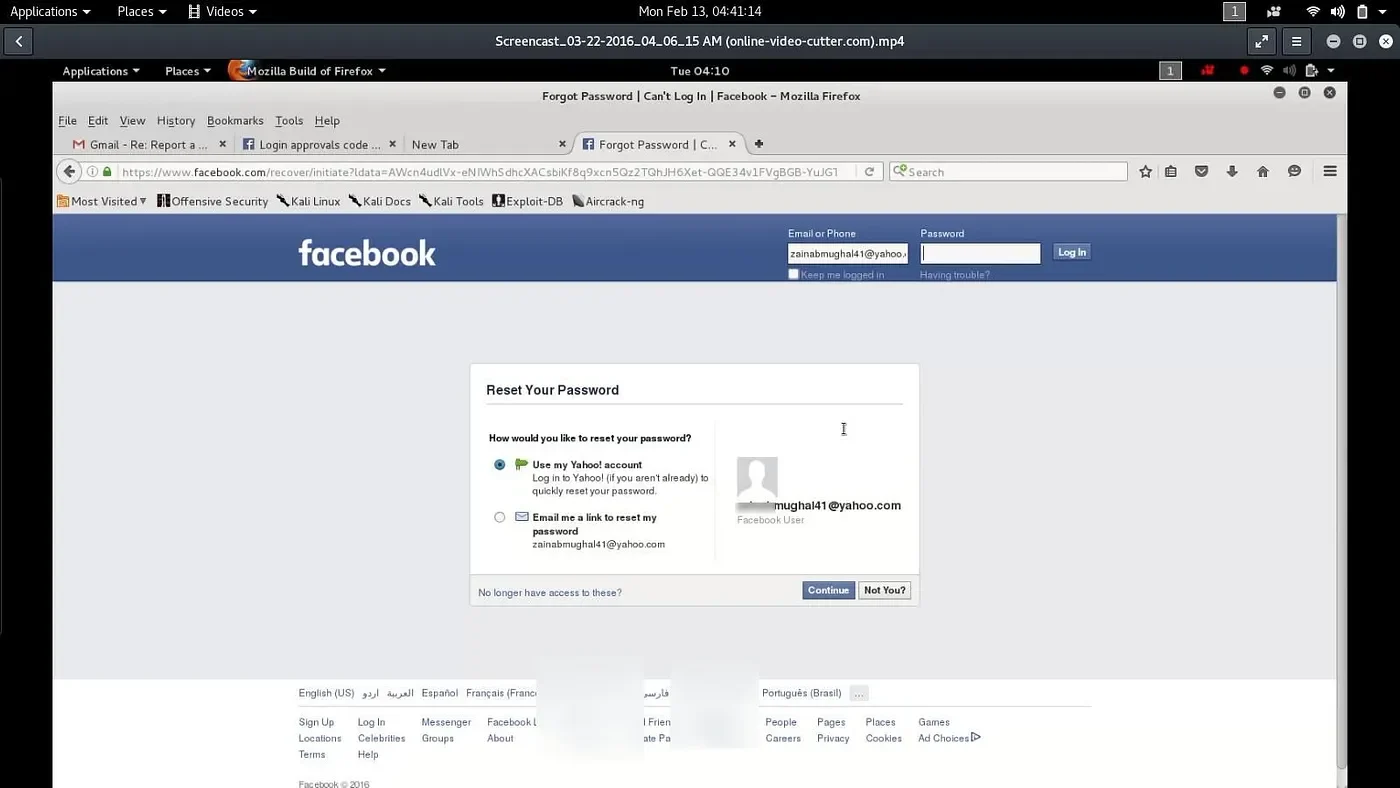
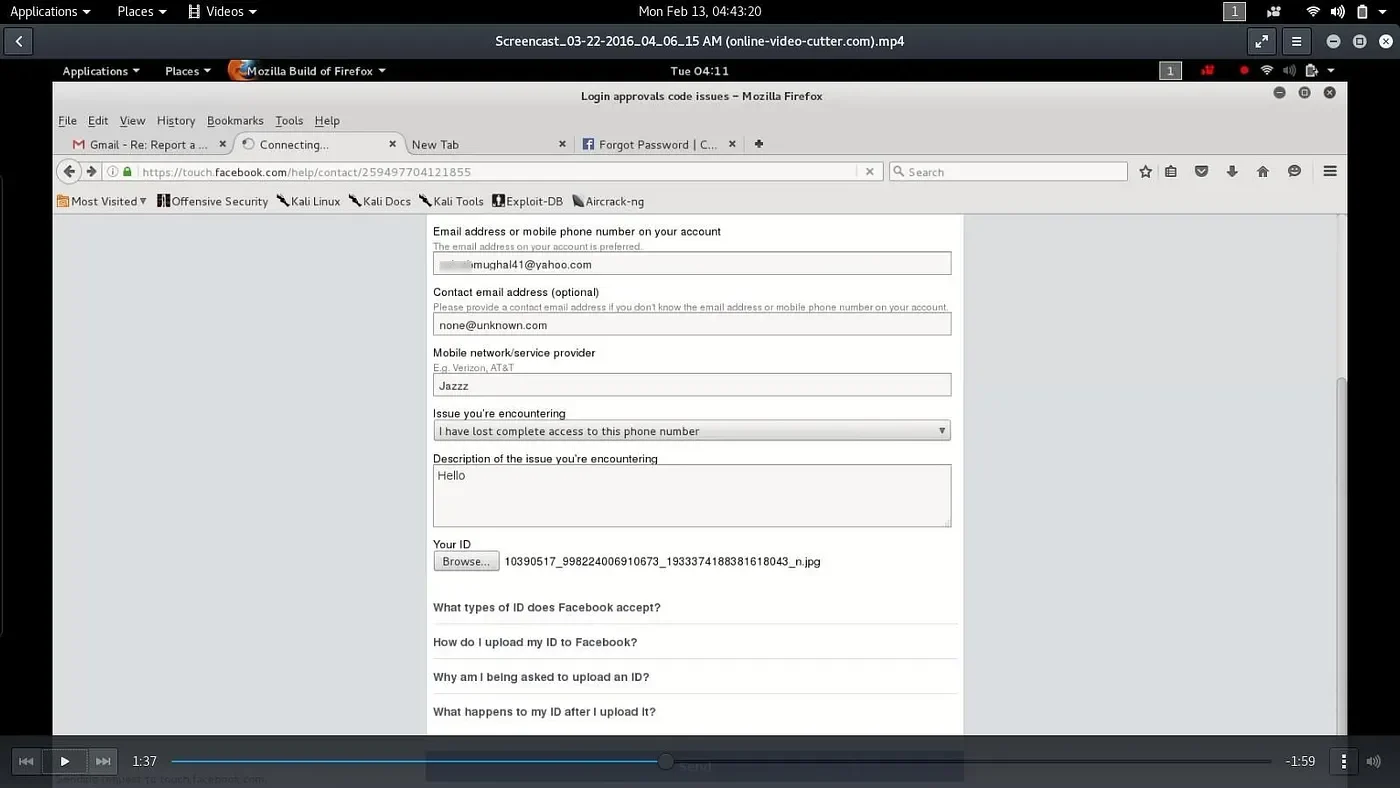
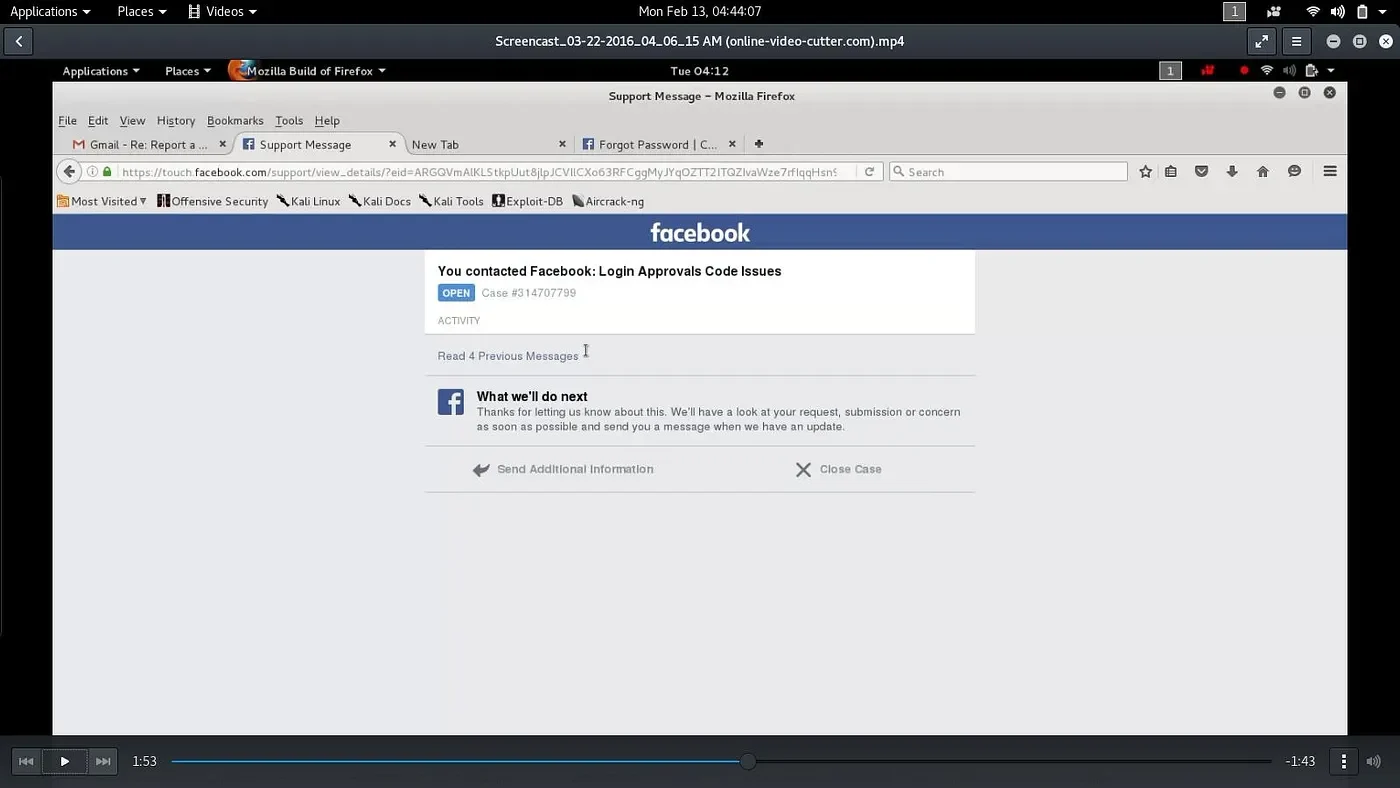
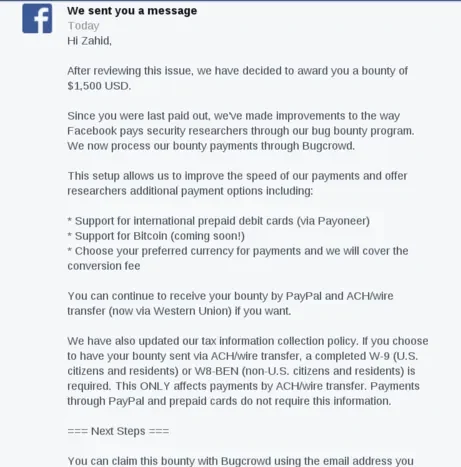
Facebook's reply, from an administrator named Ali, said the information was being sent to the appropriate product team for further investigation. The researcher was awarded 1500 USD for this bug.
Step 10: the long-term fix and the second bounty
A couple of months later, in August 2016, an administrator named Reginaldo replied about the long-term fix bug. The message said Facebook was still working on a fix and asked the researcher to continue withholding the details until the fix was finished. Because of the long time frame, Facebook sent a bounty of 750 USD in appreciation of the report, with details on getting the bounty to follow shortly. The researcher was awarded 750 USD for that bug.

Root cause
In both cases the form keys a support conversation on the email address supplied by whoever submits it, without binding the conversation to the account that owns that address. Anyone who submits the same address is treated as the same submitter and is shown the existing conversation. The report does not describe the server-side implementation, so the exact mechanism is not stated; the observable behaviour is that the attacker's submission lands on the victim's existing form.
The privacy bypass follows from the same design. The support dashboard renders the profile photo of the account linked to the submitted email, and the photo URL contains the account's photo ID. That ID can then be resolved through photo.php to the profile. The "Who can look you up using the email you provided?" setting, set to Friends Only, is supposed to prevent exactly this kind of email-to-account lookup, but the support form performs the lookup regardless of the setting.
Impact
For the first bug, an attacker who knows a victim's email address and submits the Login Approval Form with it can read the support conversation between the victim and the Facebook administrator. The precondition is that the victim has already submitted the form with that email.
For the second bug, an attacker who knows an email address linked to a Facebook account can determine the user ID behind it and reach the victim's profile, even when the victim has restricted lookup by email to Friends Only. The precondition is that the email is linked to a Facebook account.
Fix
Facebook removed the login approval form, and the support dashboard is no longer visible in account recovery forms, though the form can still be submitted after logging in. The researcher notes that the login approval form can still be submitted after logging in to an account.
Variants to test
- Submit any support or contact form with an email address you control, then submit the same form again with the same address from a second session. A positive result is that the second submission shows the first submission's conversation or dashboard state.
- Repeat the same test on mobile and alternative sub-domains (
m.,touch., and any others the target exposes). A positive result is that a sub-domain still shows the shared conversation after the main domain has been fixed. - Set the account's email lookup privacy to the most restrictive option, submit the form with that email, and inspect any images rendered in the response. A positive result is a profile photo URL containing a photo ID that resolves to the account through the photo viewer.
- Look for other places where an email address is used as the key for a record that is later displayed back to the submitter, such as password reset, account recovery, invitation and verification flows. A positive result is any state or data belonging to another account being shown to the submitter.
What happened, in plain words
Facebook has a set of help pages where you can fill in a form to contact support. One of these forms was called the Facebook Login Approval Form. When you sent it, your message became a support conversation between you and a Facebook administrator, and you could see that conversation on a support dashboard.
The researcher had already been testing a different form, the Account Recovery Form, and had found several bugs there. Facebook told him the recovery-form issue had already been reported by someone else and was being tracked there, so he went looking for other forms and found the Login Approval Form. The same kind of problem seemed to apply to it.
The problem was this: the form decided whose conversation you were looking at based on the email address you typed in. If the victim had already sent the form using their email, and the attacker then sent the same form using the same email, the attacker was taken to the victim's form and could read the conversation between the victim and the Facebook administrator.
Later, the researcher found a second problem in the same form. Facebook has a privacy setting called "Who can look you up using the email you provided?", which a user can set to Friends Only. That setting is meant to stop strangers from finding your account from your email address. The form bypassed it: it showed the profile photo of the account linked to the email, and the photo's web address contained a number (the photo ID) that could be turned into the victim's profile page. So the attacker could go from an email address to a full profile even when the victim had asked not to be findable that way.
Facebook paid 1500 USD for the first bug and 750 USD for the second. The form was eventually removed.
Background: the pieces involved
Before walking through the steps, here are the ideas you need. None of them require any special software; everything here happens in an ordinary browser.
A help contact form. A web page with boxes you fill in and a button you press to send. Facebook uses these under addresses that start with /help/contact/. When you send one, the message is stored and shown back to you as a conversation, like a private chat thread between you and a support person.
A support dashboard. The page where that conversation is displayed. It shows your messages, the administrator's replies, and small pieces of information about the account involved, such as a profile picture.
An email address as an identifier. Many websites use your email address as the label for your records: it is how they know which messages belong to which person. This only works safely if the site also checks that you really own that address, for example by sending you a confirmation link. If it does not check, then anyone who types your address is treated as you. A simple comparison: a cloakroom that hands out coats to anyone who says "I'm the person with the blue ticket", without ever asking to see the ticket.
A user ID. A number that uniquely identifies a Facebook account. Profile pages, photos and other objects on Facebook each have their own number too. If you know the number of a photo, you can often use it to reach the page that owns it.
A photo ID. The number in the web address of an image on Facebook. It identifies that particular photo. Because a profile picture belongs to a profile, the photo ID can lead you back to the account.
A privacy setting. An option in your account that controls who can do something, such as find you by your email address. "Friends Only" means only people you have added as friends should be able to do it.
A sub-domain. The part of a web address before the main name. www.facebook.com, m.facebook.com and touch.facebook.com are different sub-domains of the same site. m. and touch. are the mobile versions. A fix applied to one sub-domain does not automatically apply to the others, which is why the researcher moved to them later.
A duplicate report. When two people report the same bug, the second report is marked as a duplicate and usually earns nothing, because the first report is the one being tracked. That is what happened with the Account Recovery Form.
Broken authorization. The general name for the class of bug here. Authorization means deciding whether a particular person is allowed to see or do a particular thing. When a site shows you something you should not be allowed to see, its authorization is broken. The everyday comparison: a hotel receptionist who gives out room keys to anyone who knows the room number, without checking that the person is the guest staying there.
A logic flaw. A bug where the code does what it was written to do, but the design behind it is wrong. Nothing crashes; the site simply makes a bad decision, such as trusting an email address as proof of identity.
The first bug: reading someone else's support conversation
Step 1: open the form
The attacker opens the Login Approval Form in a browser:
https://www.facebook.com/help/contact/259497704121855
This is the address of the form page. Opening it is the same as a normal visitor would do; there is nothing unusual about the request. The number at the end is simply the internal identifier Facebook uses for this particular form.
Step 2: submit with the victim's email
The attacker fills in the form using the victim's email address, for example [redacted], the same address the victim used when they submitted the form. The important precondition is that the victim has already sent the form with that email, so a conversation already exists.
Why this step matters: the form asks for an email address, and the site uses that address to decide which conversation to show. The attacker is betting that the site will not check ownership of the address. Typing the victim's address is the whole attack at this stage; no password, no special tool.
Step 3: read the victim's conversation
After the form is submitted successfully, the attacker is taken to the victim's form and sees the conversation between the victim and the Facebook administrator on the support dashboard. The report describes the impact in the same terms as the recovery-form bug: the attacker is redirected to the victim's form and can read the admin-to-victim conversation.
In plain words: the site treated "same email address" as "same person". The attacker's submission was merged into the victim's existing thread, and the attacker could read everything in it.
Facebook's response, from an administrator named Brandon, said the information was being sent to the appropriate product team for further investigation, with an update to follow once there was progress on the fix. In other words, the report was accepted and passed on to the people who could fix it.
Step 4: test the same form on the mobile sub-domains
Because the fix for this class of bug was long-term, the researcher kept testing the form in other ways. He found that the form was also vulnerable to a privacy violation: it disclosed which user ID an email address is linked to, even when the user had set the privacy option "Who can look you up using the email you provided?" to Friends Only.
By this point the bugs had been patched on the main facebook.com domain, because of the multiple bugs he had found there, so he moved to the sub-domains:
https://m.facebook.com
https://touch.facebook.com
Why this step matters: a website can be made of several separate applications served from different addresses. Fixing one does not necessarily fix the others. Testing the mobile versions is a standard way to find the same bug still alive somewhere else. The two addresses above are the mobile site and the touch-oriented mobile site.
The second bug: finding a profile from an email address
Step 5: open the form on touch.facebook.com
https://touch.facebook.com/help/contact/259497704121855
This is the same form as before, but reached through the mobile sub-domain. The number at the end is the same form identifier.
Step 6: submit with the victim's email and wrong details
The attacker fills in the form making sure the email address is linked to a Facebook account, and that the account's privacy setting "Who can look you up using the email you provided?" is set to Friends Only. The form is filled in with wrong information, but with the victim's email address.
Why the wrong details: the attacker is not trying to start a genuine support case. The goal is only to make the site look up the account behind the email and display something about it. The wrong information is irrelevant to the site's decision about which account to show; the email address is what matters.
Why the privacy setting matters: the victim has explicitly asked Facebook not to let people find them by email. If the form still reveals the account, the setting has been bypassed.
Step 7: send an additional message
The attacker clicks "Send additional Information", types any message and sends it. The support dashboard then shows the profile photo of the account linked to that email in a small box.
In plain words: the dashboard displays a little picture of the account involved. That picture is loaded from a web address, and web addresses can be read. This is the moment the leak happens: the site has now shown the attacker something that belongs to the victim's account.
Step 8: extract the photo ID from the image URL
The attacker copies the image location and pastes it into the browser or a notepad. The URL contains the Facebook photo ID:
https://scontent-sit4-1.xx.fbcdn.net/v/t1.0-9/[redacted].jpg?oh=[redacted]&oe=5931F96C
The photo ID in that URL is 10153735080289001.
Line by line, in plain words:
https://is the protocol, the language browsers use to fetch web pages and images.scontent-sit4-1.xx.fbcdn.netis the address of the server that stores the image.fbcdnstands for Facebook content delivery network, a set of servers that serve files such as pictures./v/t1.0-9/is a path on that server, a folder-like location.[redacted].jpgis the file name. It is made of several numbers joined by underscores. The middle number,10153735080289001, is the photo ID. The.jpgending says it is a picture file.?oh=[redacted]&oe=5931F96Cis the query string, extra information sent to the server.ohlooks like a signature that proves the address was generated by Facebook, andoelooks like an expiry time. These are there to stop people from simply guessing image addresses.
Why this step matters: the attacker did not need to break any protection on the image. The browser had already been given the full address in order to display the picture. Copying that address out of the page is enough to read the number inside it. The signature and expiry do not hide the ID; they only control who can load the file.
Step 9: resolve the photo ID to the profile
The attacker takes the photo ID and opens:
With the ID substituted, this resolves to the victim's Facebook profile.
Line by line:
https://www.facebook.comis the main Facebook site./photo.phpis a page that shows a photo. It takes a parameter telling it which photo to show.?fbid=starts the query string.fbidstands for Facebook ID, and the value after the equals sign is the number of the photo.(type that fb id here )is a placeholder. In practice you replace it with the number you copied,10153735080289001.
Why this step matters: the photo viewer is a normal public page. Given a photo ID, it shows the photo and links to the account that owns it. So the chain is: email address, then profile picture address, then photo ID, then profile page. Each link in the chain is something the site handed to the attacker without asking whether they were allowed to have it.
The report includes screenshots of the process:
Facebook's reply, from an administrator named Ali, said the information was being sent to the appropriate product team for further investigation. The researcher was awarded 1500 USD for this bug.
Step 10: the long-term fix and the second bounty
A couple of months later, in August 2016, an administrator named Reginaldo replied about the long-term fix bug. The message said Facebook was still working on a fix and asked the researcher to continue withholding the details until the fix was finished. Because of the long time frame, Facebook sent a bounty of 750 USD in appreciation of the report, with details on getting the bounty to follow shortly. The researcher was awarded 750 USD for that bug.
Why it worked
In both cases the form keys a support conversation on the email address supplied by whoever submits it, without binding the conversation to the account that owns that address. Anyone who submits the same address is treated as the same submitter and is shown the existing conversation. The report does not describe the server-side implementation, so the exact mechanism is not stated; the observable behaviour is that the attacker's submission lands on the victim's existing form.
In everyday terms: the form uses the email address as a name tag, and it never checks the face behind the tag. Two different people wearing the same tag are treated as one person.
The privacy bypass follows from the same design. The support dashboard renders the profile photo of the account linked to the submitted email, and the photo URL contains the account's photo ID. That ID can then be resolved through photo.php to the profile. The "Who can look you up using the email you provided?" setting, set to Friends Only, is supposed to prevent exactly this kind of email-to-account lookup, but the support form performs the lookup regardless of the setting.
In everyday terms: the privacy setting is a lock on the front door, but the support form is a side window that was left open. The setting only controls the paths Facebook remembered to check.
What an attacker could do with it
For the first bug, an attacker who knows a victim's email address and submits the Login Approval Form with it can read the support conversation between the victim and the Facebook administrator. The precondition is that the victim has already submitted the form with that email.
For the second bug, an attacker who knows an email address linked to a Facebook account can determine the user ID behind it and reach the victim's profile, even when the victim has restricted lookup by email to Friends Only. The precondition is that the email is linked to a Facebook account.
Why this matters even though a profile is often public: the point of the privacy setting is that the link between the email address and the account should not be discoverable. Many people use a separate email address precisely so that their account cannot be traced back to them. The bug removed that separation.
The fix
Facebook removed the login approval form, and the support dashboard is no longer visible in account recovery forms, though the form can still be submitted after logging in. The researcher notes that the login approval form can still be submitted after logging in to an account.
How to look for the same pattern
These are the kinds of checks the researcher describes, written so that someone new can follow them with just a browser.
- Submit any support or contact form with an email address you control, then submit the same form again with the same address from a second session. A positive result is that the second submission shows the first submission's conversation or dashboard state. Why: you are testing whether the site treats "same email" as "same person".
- Repeat the same test on mobile and alternative sub-domains (
m.,touch., and any others the target exposes). A positive result is that a sub-domain still shows the shared conversation after the main domain has been fixed. Why: fixes are often applied to one application and forgotten on another. - Set the account's email lookup privacy to the most restrictive option, submit the form with that email, and inspect any images rendered in the response. A positive result is a profile photo URL containing a photo ID that resolves to the account through the photo viewer. Why: images are loaded from addresses, and those addresses can carry identifiers you were not meant to see.
- Look for other places where an email address is used as the key for a record that is later displayed back to the submitter, such as password reset, account recovery, invitation and verification flows. A positive result is any state or data belonging to another account being shown to the submitter. Why: the same design mistake tends to be repeated across a site, because the same developers build several forms in the same way.
Glossary
- Authorization: the decision about whether a particular person is allowed to see or do a particular thing. Broken authorization means that decision is made wrongly.
- Bounty: a payment a company makes to someone who reports a security bug to it.
- Browser: the program you use to visit websites, such as Chrome or Firefox.
- Content delivery network (CDN): a set of servers spread around the world that serve files such as images quickly.
fbcdn.netis Facebook's. - Cookie: a small piece of data a website stores in your browser so it can recognise you on later requests. It is how a site knows you are logged in.
- Dashboard: a page that displays information and controls, here the support conversation and details about the account involved.
- Duplicate report: a report of a bug that someone else has already reported. It is usually closed without a reward.
- Email lookup setting: the Facebook privacy option "Who can look you up using the email you provided?". Friends Only means only your friends should be able to find you by your email address.
- Form: a web page with boxes to fill in and a button to send the information to the site.
- Logic flaw: a bug where the site works as written but the design is wrong, so it makes a bad decision without crashing.
- Parameter: a named value attached to a web address after a question mark, such as
fbid=10153735080289001. It tells the page what to show. - Photo ID: the number that identifies a particular photo on Facebook. It appears in the image's web address.
- Privacy setting: an account option that controls who can see something or find you.
- Profile: the page that represents a Facebook account, showing its name, picture and other details.
- Protocol: the set of rules used to communicate over a network.
https://means the communication is encrypted. - Query string: the part of a web address after the question mark, carrying parameters.
- Redirect: when a website sends your browser automatically to a different page than the one you asked for.
- Session: a period of activity by one logged-in user. A second session means a separate browser or a separate login, used to act as a different person.
- Sub-domain: a prefix on a domain name, such as
m.ortouch.in front offacebook.com, often serving a different version of the site. - Support dashboard: the page where a support conversation between a user and a Facebook administrator is displayed.
- URL: the address of something on the web, such as a page or an image.
- User ID: the number that uniquely identifies a Facebook account.
- Whitehat researcher: someone who looks for security bugs and reports them to the company rather than misusing them.
- XSS: not used in this report; mentioned here only because it often appears alongside the terms above. It means injecting your own code into someone else's web page.



