Cross-Site Request Forgery in Facebook
A password reset link sent to an unconfirmed phone number, when clicked, silently moved that number from the victim's account to the attacker's account. An attacker could therefore take over a phone number association and impersonate the victim's identity.

Victim having facebook account with number (+9233320xxxxx) — (Number is confirmed on that account)
The full write-up lives on its author's site
It belongs to its author, so we link to it rather than copy it. The other two tabs are our own rewrites, checked against it.
Context
Facebook lets a user attach a phone number to an account and mark it as confirmed. The same number can be added to several accounts, but Facebook's policy is that it can only be confirmed on one of them. The confirmation step is what makes the number trusted: it is the number that password recovery and similar flows rely on.
This report is about what happens when a password reset is requested for a number that is attached to an account but not confirmed on it, and about what the recovery link actually does when it is clicked.
Setup
Two Facebook accounts are involved:
- A victim account with the number
+9233320xxxxx, confirmed on that account. - An attacker account with the same number
+9233320xxxxx, unconfirmed on that account. The report notes that the attacker could equally add the number to any Facebook account, as long as it stays unconfirmed.
No tools or versions are described. The precondition is that the attacker can add the victim's number to an account of their own without confirming it.
Finding it
The researcher had already reported, in 2016, that any number could be added to a Facebook account in an unconfirmed state, and that the number would then be displayed on that profile, allowing impersonation. Facebook's response at the time was that they were already aware of the situation and that it was not a bug.
In December 2016 the researcher found that a password reset could be triggered using unconfirmed numbers and unconfirmed email addresses.
Exploitation
Step 1: request the password reset as the attacker
The attacker sends a password reset request to +9233320xxxxx. Because the attacker does not have physical access to that number, they cannot read the code or the URL that is sent to it. The request itself is not shown in the report.
Step 2: the victim receives the message
The message arrives at the victim's phone from 32665 (FBOOK) and contains a reset code and a URL:
Your password reset code is 283923 and URL https://www.fb.com/h2hdj232
The report calls the URL an encoded link.
Step 3: the victim clicks the link
The victim clicks the encoded link:
https://www.fb.com/h2hdj232
After that single click, the number +9233320xxxxx is removed from the victim's account and added to the attacker's Facebook account. The report explains why: the victim was redirected to the attacker's Facebook account, and the click performed the move of the number rather than a password reset.
So the recovery link carries out a change on the victim's account: the number is moved to the attacker's account.
Root cause
The problem, as Facebook's security contact described it in the reply, is not the ability to reset an account through these methods. It is that the platform confirms the email or phone number when someone simply clicks a link, and the link does not make it clear that clicking it will confirm the account.
In other words, the confirmation of an identifier happens when someone simply clicks a link that does not make clear it will confirm the account, and that link can arrive inside a recovery message. The unconfirmed number on the attacker's account is what lets the attacker aim the flow at the victim's number in the first place. The report does not describe the server-side implementation.
Impact
An attacker who can add a victim's phone number to their own account in an unconfirmed state can trigger a recovery message to that number. When the victim clicks the link in the message, the number is moved from the victim's account to the attacker's account. The victim loses the number from their account, and the number is added to the attacker's Facebook account.
The report does not describe any further consequences beyond the move of the number, and does not state what the attacker can do with the number afterwards.
Fix
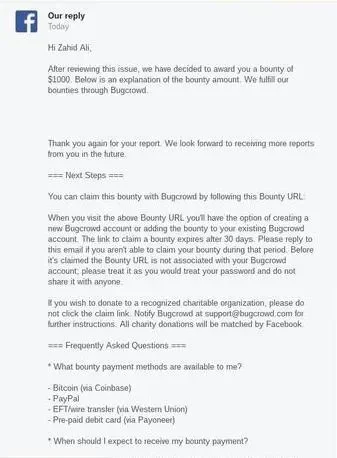
Facebook's response was in three parts:
- They acknowledged that the real issue is confirming an email or phone number when someone simply clicks a link that does not make clear it will confirm the account, and said they would follow up with the team.
- As a mitigation, they temporarily disabled the ability to perform password recovery via unconfirmed phone numbers.
- They said they would change the circumstances in which phone confirmations are allowed to happen in this flow.
Variants to test
- Add a target's phone number or email to your own account in an unconfirmed state, then trigger recovery to it. A positive result is that the platform accepts the unconfirmed identifier as a recovery channel.
- Click a recovery link while logged in as a different account and watch for state changes on the account that owns the identifier. A positive result is that the identifier moves to the account that initiated the flow.
- Look for confirmation or recovery endpoints that act on a plain link click without an explicit confirmation page. A positive result is a state change from a single GET request.
- Check whether the same link works when the victim is not logged in, or when the link is opened in a different browser. A positive result is that the move still happens, which widens who can be targeted.
- Test the same pattern with email addresses as well as phone numbers, since the researcher found both were accepted in an unconfirmed state. A positive result is that an unconfirmed email can be used to drive the same confirmation flow.
What happened, in plain words
Facebook lets you attach a phone number to your account. You can add the same number to more than one account, but Facebook's rule is that the number can only be confirmed on one of them. Confirming a number is what makes Facebook trust it: it is the number that password recovery and similar security flows rely on.
This report is about a gap in that rule. An attacker could add a victim's phone number to their own account and leave it unconfirmed. Then they could ask Facebook to send a password reset to that number. The message that arrived on the victim's phone contained a link. When the victim clicked the link, the number was taken off the victim's account and moved onto the attacker's account. The victim expected a password reset page; instead the click did something else entirely.
To follow the rest of this article you only need to know how to use a browser. Every technical idea is explained as it comes up.
The pieces involved
Before the steps, here are the ideas the report depends on.
- Account: your profile on a website, protected by a username (often an email or phone number) and a password.
- Phone number as an identifier: a way of saying "this is me". Facebook can send you a text message to prove you own the number. That text message is the proof.
- Confirmed vs unconfirmed: a number is confirmed when you have proved you own it, usually by typing in a code that was texted to it. An unconfirmed number is one that has been typed into an account but never proved. Facebook displays it, but does not fully trust it.
- Password recovery: the "I forgot my password" feature. The site sends a code or a link to your email or phone so you can set a new password. It exists so that only the real owner can get back in.
- CSRF (Cross Site Request Forgery): a class of bug where a website is tricked into performing an action on your behalf because you clicked something or loaded something while logged in. The everyday comparison: imagine a form at your bank that says "transfer money" and only checks that you are standing at the counter, not that you actually asked for the transfer. If someone hands you a form to sign and it turns out to be a transfer slip, your signature does the damage. CSRF is that idea on the web: your browser carries your logged-in identity automatically, so a click can act as you.
- GET request: the kind of web request your browser makes when you click a normal link or type an address. It is meant for fetching a page. A well-designed site does not use a plain GET link to change something important, because links get clicked, shared and prefetched.
- Encoded link: a link whose real destination is hidden behind a short or scrambled address. The report calls the reset URL an encoded link.
- Sender ID: the short number a text message appears to come from.
32665is the sender ID Facebook uses, which is why the victim had reason to trust the message.
The setup
Two Facebook accounts are involved:
- A victim account with the number
+9233320xxxxx, confirmed on that account. - An attacker account with the same number
+9233320xxxxx, unconfirmed on that account. The report notes the attacker could equally add the number to any Facebook account, as long as it stays unconfirmed.
The report describes no tools and no software versions. The only precondition is that the attacker can add the victim's number to an account of their own without confirming it.
How the researcher found it
The researcher had already reported, in 2016, that any number could be added to a Facebook account in an unconfirmed state, and that the number would then be displayed on that profile, allowing someone to impersonate another person. Facebook's answer at the time was that they were already aware of the situation and that it was not a bug.
In December 2016 the researcher found that a password reset could be triggered using unconfirmed numbers and unconfirmed email addresses.
Walking through the attack
Step 1: the attacker asks for a password reset
The attacker sends a password reset request to +9233320xxxxx. Because the attacker does not have physical access to that number, they cannot read the code or the URL that is sent to it. The request itself is not shown in the report.
Why this step matters: the attacker is using the victim's number as the recovery channel, even though that number is only sitting unconfirmed on the attacker's own account. If the platform refused to send recovery messages to unconfirmed numbers, the attack would stop here.
Step 2: the victim receives the message
The message arrives at the victim's phone from 32665 (FBOOK) and contains a reset code and a URL:
Your password reset code is 283923 and URL https://www.fb.com/h2hdj232
Line by line:
Your password reset code is 283923is the code the victim would normally type into Facebook to prove they own the number.and URL https://www.fb.com/h2hdj232is a link on Facebook's own domain. The pathh2hdj232looks random, which is what the report means by an encoded link: it does not look like a normal reset page address.
The message came from Facebook's own sender ID, 32665. A cautious person might wonder why they got it, but the link itself points at Facebook.
Step 3: the victim clicks the link
The victim clicks the encoded link:
https://www.fb.com/h2hdj232
Line by line:
https://means the connection is encrypted.www.fb.comis Facebook's domain, so the browser shows a trusted site./h2hdj232is the random-looking path that identifies this particular reset.
After that single click, the number +9233320xxxxx is removed from the victim's account and added to the attacker's Facebook account. The report explains why: the victim was redirected to the attacker's Facebook account, and the click performed the move of the number rather than a password reset.
So the recovery link carries out a change on the victim's account: the number is moved to the attacker's account. This is the CSRF idea in practice: a click, made while logged in, silently changes state.
Why it worked
The problem, as Facebook's security contact described it in the reply, is not the ability to reset an account through these methods. It is that the platform confirms the email or phone number when someone simply clicks a link, and the link does not make it clear that clicking it will confirm the account.
In other words, confirming an identifier happens when someone simply clicks a link that does not make clear it will confirm the account, and that link can arrive inside a recovery message. The unconfirmed number on the attacker's account is what lets the attacker aim the flow at the victim's number in the first place. The report does not describe the server-side implementation.
What the attacker gains
An attacker who can add a victim's phone number to their own account in an unconfirmed state can trigger a recovery message to that number. When the victim clicks the link in the message, the number is moved from the victim's account to the attacker's account. The victim loses the number from their account, and the number is added to the attacker's Facebook account.
The report does not describe any further consequences beyond the move of the number, and does not state what the attacker can do with the number afterwards.
How Facebook responded
Facebook's response came in three parts:
- They acknowledged that the real issue is confirming an email or phone number when someone simply clicks a link that does not make clear it will confirm the account, and said they would follow up with the team.
- As a mitigation, they temporarily disabled the ability to perform password recovery via unconfirmed phone numbers.
- They said they would change the circumstances in which phone confirmations are allowed to happen in this flow.
Things worth testing yourself
These are the same patterns the report points at, written so you can try them on a site you are allowed to test.
- Add a target's phone number or email to your own account in an unconfirmed state, then trigger recovery to it. A positive result is that the platform accepts the unconfirmed identifier as a recovery channel.
- Click a recovery link while logged in as a different account and watch for state changes on the account that owns the identifier. A positive result is that the identifier moves to the account that initiated the flow.
- Look for confirmation or recovery endpoints that act on a plain link click without an explicit confirmation page. A positive result is a state change from a single GET request.
- Check whether the same link works when the victim is not logged in, or when the link is opened in a different browser. A positive result is that the move still happens, which widens who can be targeted.
- Test the same pattern with email addresses as well as phone numbers, since the researcher found both were accepted in an unconfirmed state. A positive result is that an unconfirmed email can be used to drive the same confirmation flow.
Glossary
- Account: your profile on a website, protected by a username and password.
- Attacker: the person trying to abuse the system.
- Confirmed identifier: a phone number or email address that the owner has proved they control, usually by entering a code sent to it.
- CSRF (Cross Site Request Forgery): a bug where a site performs an action on your behalf because you clicked a link or loaded a page while logged in, without you intending that action.
- Endpoint: a specific address on a server that performs a particular action when it receives a request.
- GET request: the kind of request a browser makes when you click a normal link; meant for fetching pages, not for changing data.
- Identifier: a phone number or email address used to identify an account.
- Mitigation: a temporary or partial fix that reduces the risk while a full fix is prepared.
- Password recovery: the feature that lets you reset a forgotten password using a code or link sent to your email or phone.
- State change: any change to data on a server, such as adding, removing or moving a phone number.
- Unconfirmed identifier: a phone number or email address that has been added to an account but never proved.
- Victim: the person whose account or data is being attacked.



