Facebook Account Recovery Form (CONFLICTING)
A Facebook account recovery form was conflicting: when an attacker submitted a recovery form for a victim's account and the victim later submitted their own form, the attacker's form was removed from the support dashboard but the attacker still received an email link to the victim's form. That link let the attacker read the conversation between the victim and Facebook admin.

I started my bug hunting journey in may 2015. I already published my writeups before about bugs i found in Facebook.
The full write-up lives on its author's site
It belongs to its author, so we link to it rather than copy it. The other two tabs are our own rewrites, checked against it.
Context
Facebook's account recovery flow is the feature that lets a user who has lost access to their account ask Facebook for help getting back in. The researcher focused on the recovery form reached from the mobile site, https://m.facebook.com, through the "Forgot Password" link. The form asks for the victim's phone number or Facebook username, then offers the option for users who no longer have access to those details, asks for a recovery email address twice, and finally asks the user to fill in a form with supporting information and submit it.
Submissions of this kind are handled by Facebook support staff, who review the request and reply to the user by email. The reply is a conversation between the Facebook admin and the person who submitted the form. The researcher described the form as conflicting: two submissions for the same account do not coexist cleanly.
Setup
The researcher was new to bug hunting, having started in May 2015, and had no special tooling: the work was done by hand in a browser against the mobile Facebook site. No accounts, roles, versions or extensions are described beyond an attacker and a victim, both of whom go through the same recovery form for the same account. The only precondition is that the attacker submits a recovery form for a target account first, and the legitimate owner of that account later submits one for the same account.
Finding it
The researcher's habit was to look at password recovery areas of different services first. On Facebook the initial idea was cross-site scripting, but that attempt failed, and searching around suggested XSS in Facebook was hard to find, so the researcher moved on to other classes of bug. After a few tests on the recovery form, the observation was that the form is conflicting: two submissions for the same account do not coexist cleanly.
Exploitation
The description of the flaw, in the researcher's words, is that if the attacker submits a form for a specific id and the victim does the same, the first form submitted by the attacker is removed from the Facebook dashboard and the victim's submitted form appears in the dashboard instead. The email the attacker receives, however, still contains a link to the victim's form, and through that link the attacker can see the conversation between the victim and the Facebook admin.
The reproduction steps are:
- Go to
https://m.facebook.com. - Click on "Forgot Password".
- Enter the phone number or Facebook username of the victim.
- Click the option for users who no longer have access to those details.
- Enter the recovery email twice.
- Fill up the form with fake information and submit.
Step 1: Open the mobile site and start recovery
The researcher navigates to the mobile Facebook site and chooses "Forgot Password". This is the entry point to the recovery flow that the rest of the steps use.
Step 2: Identify the victim's account
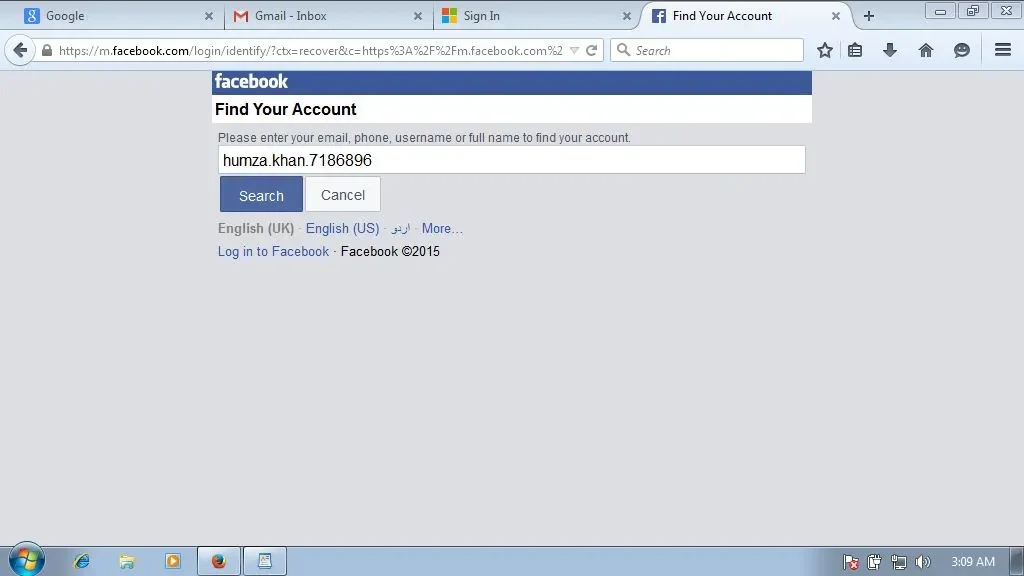
The form asks for the victim's phone number or Facebook username. Supplying either one tells Facebook which account is being recovered, and that identifier is what ties the two submissions together later.
Step 3: Choose the no-access path
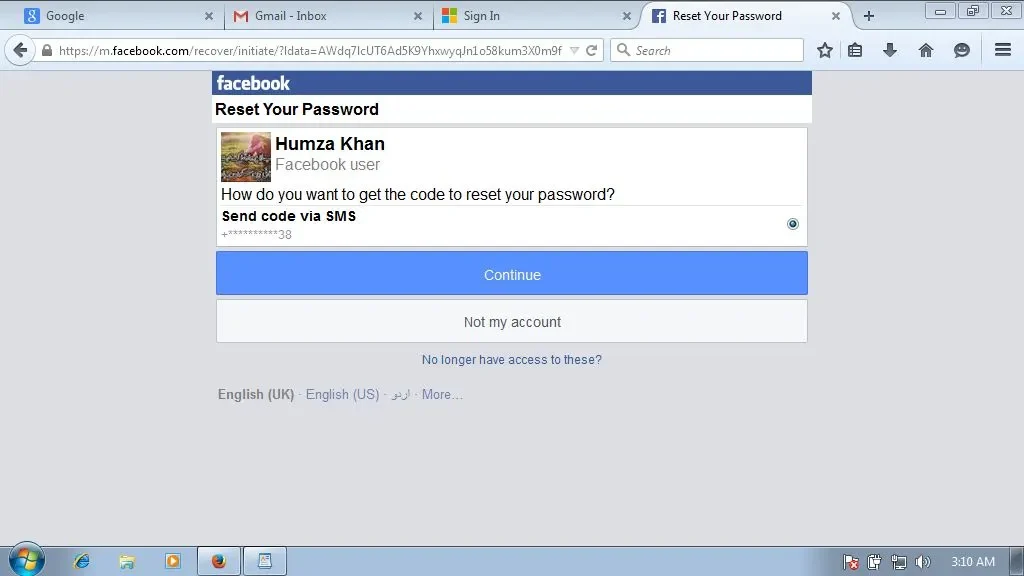
The next screen offers the option for users who no longer have access to the phone number or username. Selecting it moves the flow to the recovery email and the free-form form.
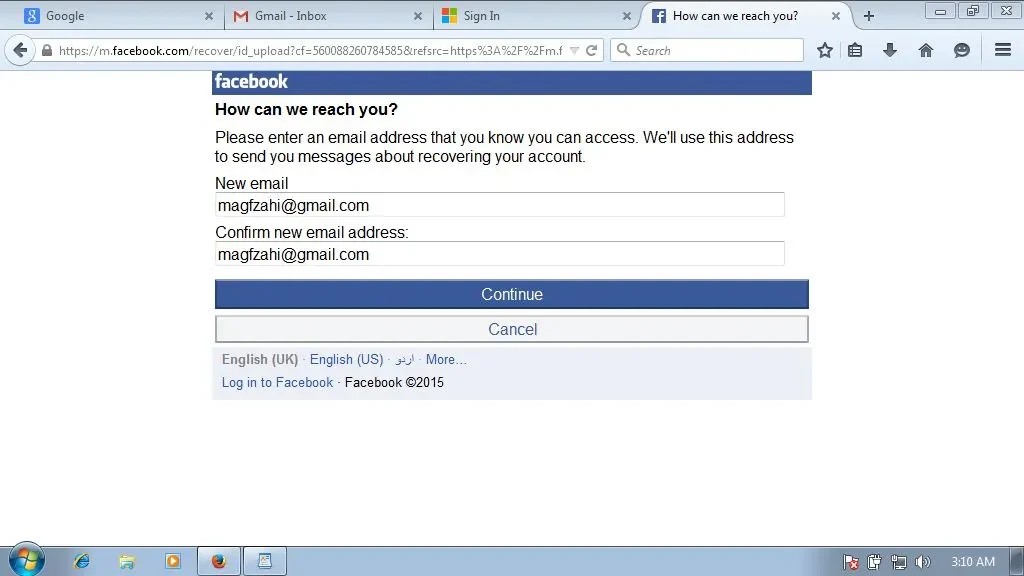
Step 4: Supply a recovery email and fake details
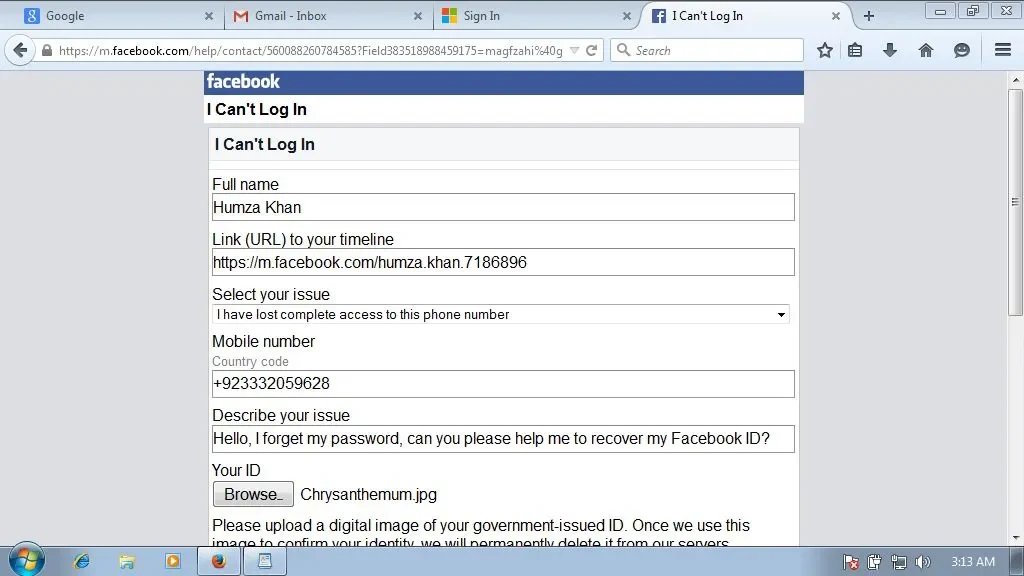
The attacker enters a recovery email address twice and fills the form with fake information, then submits. The screenshots below show the attacker's submission, from the victim's username through the recovery email and the completed form.
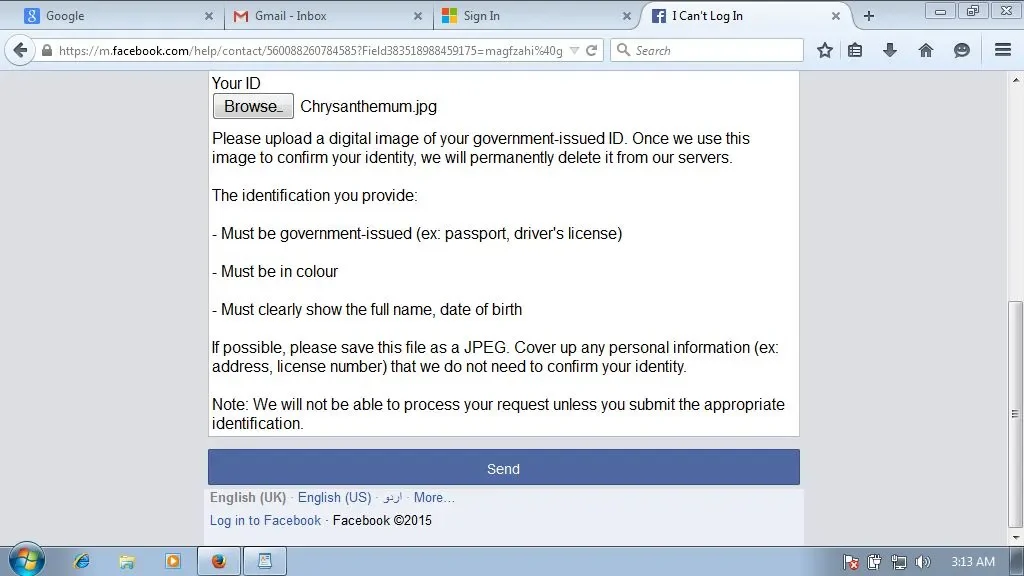
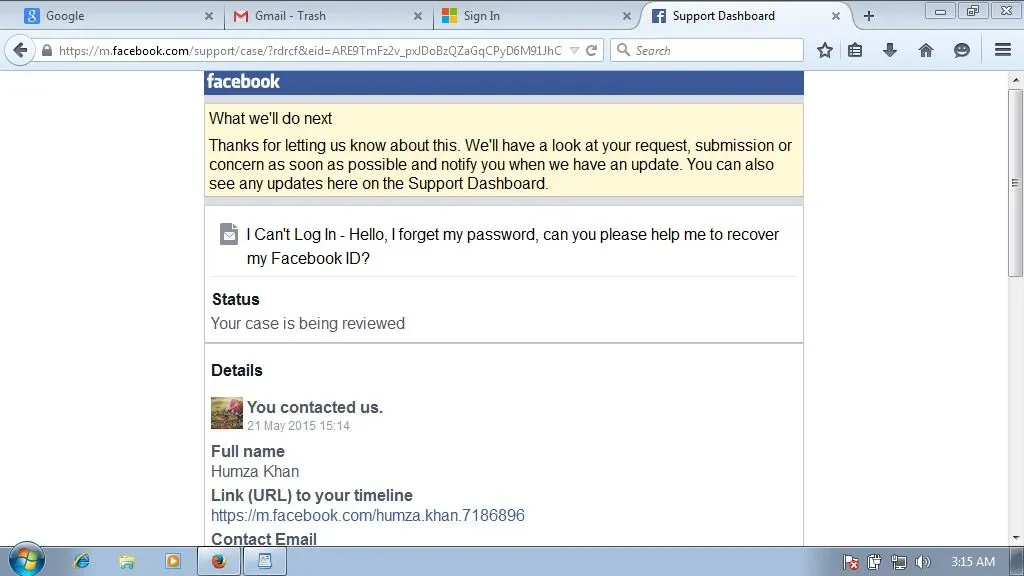
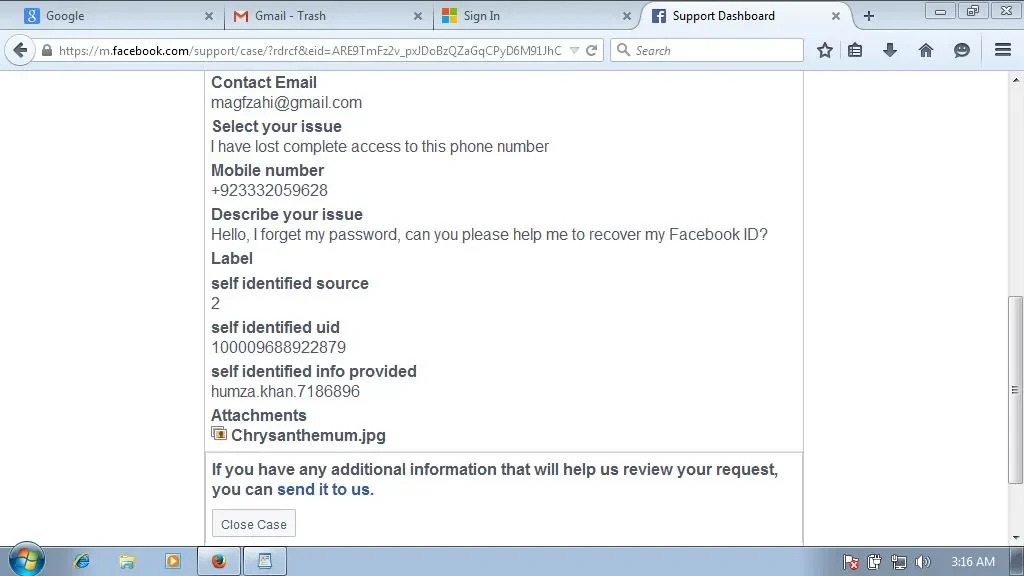
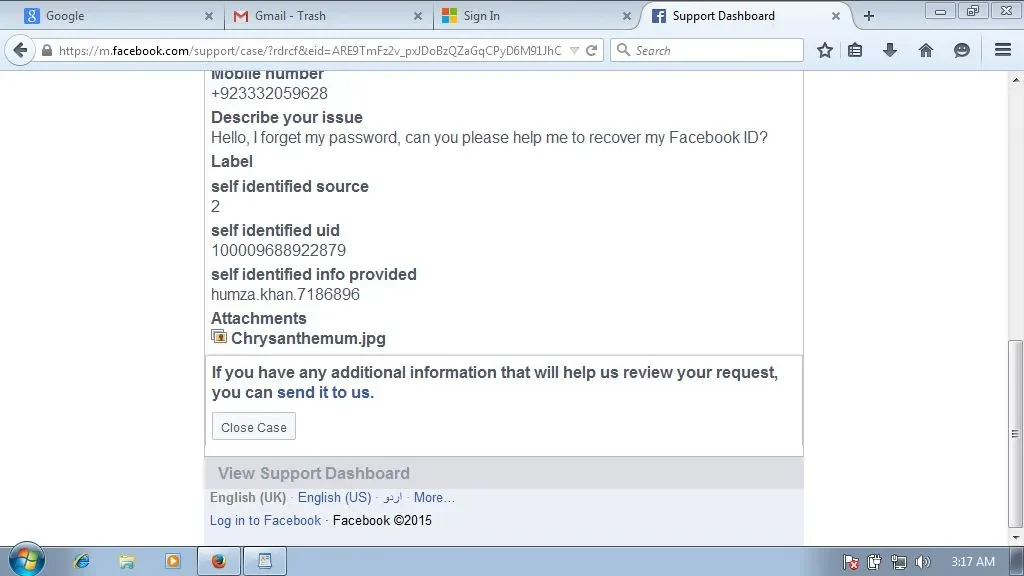
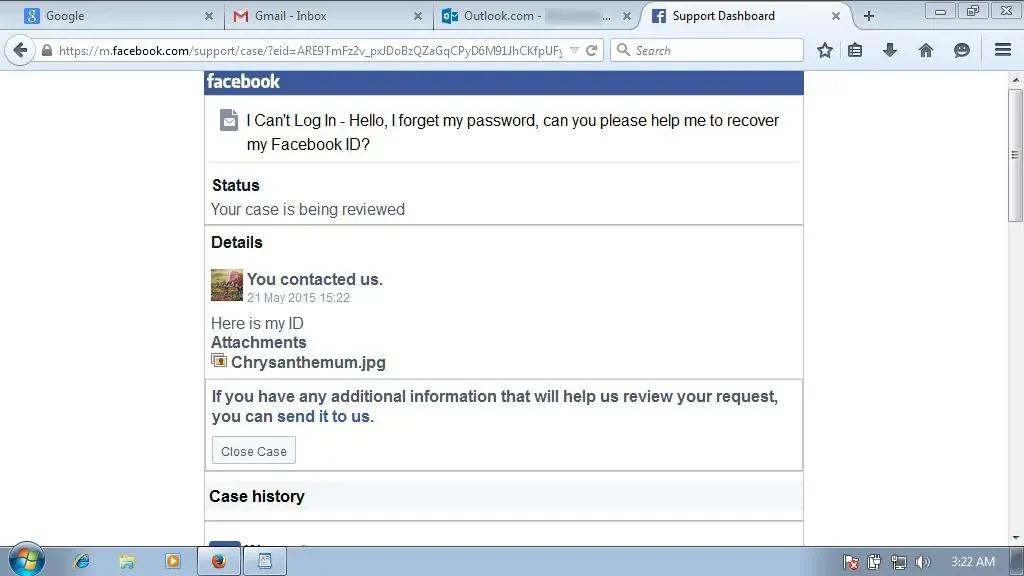
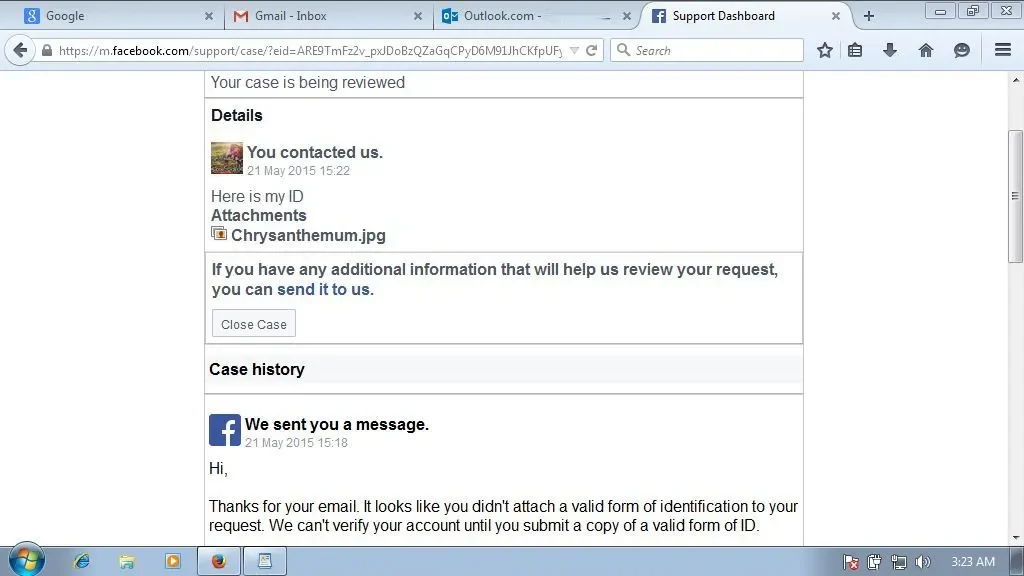
After submitting, the attacker receives a reply by email. The screenshots below show that reply arriving.
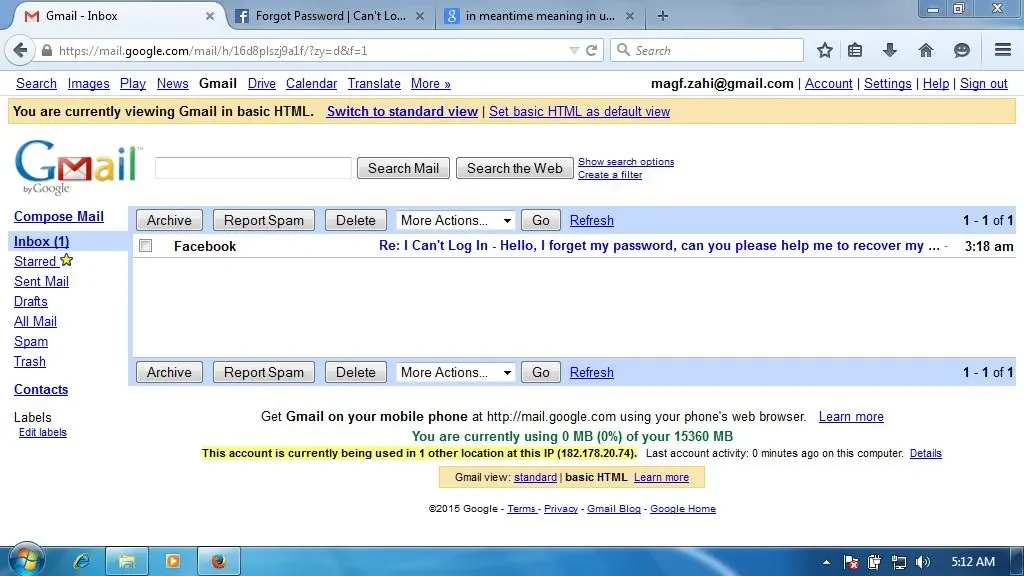
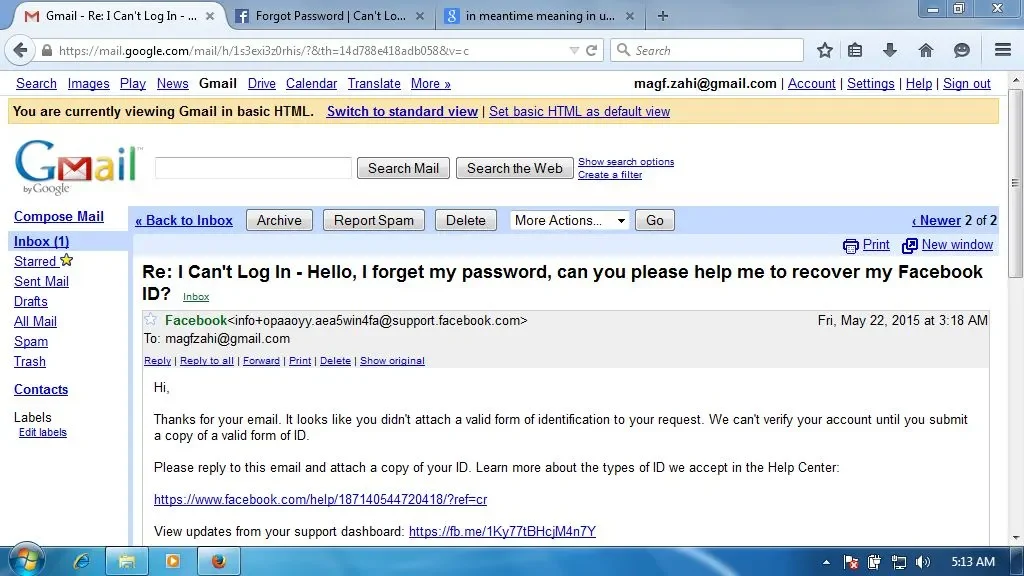
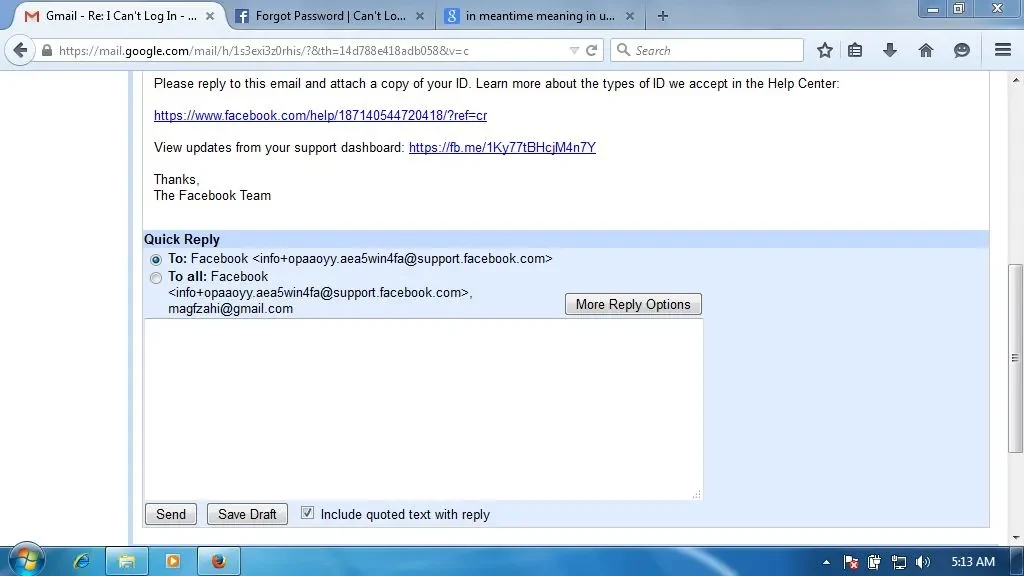
At this point the attacker's form has been submitted successfully.
Step 5: The victim submits a form for the same account
The victim then goes through the same recovery flow for the same account and submits a form. The screenshots below show the victim's submission.
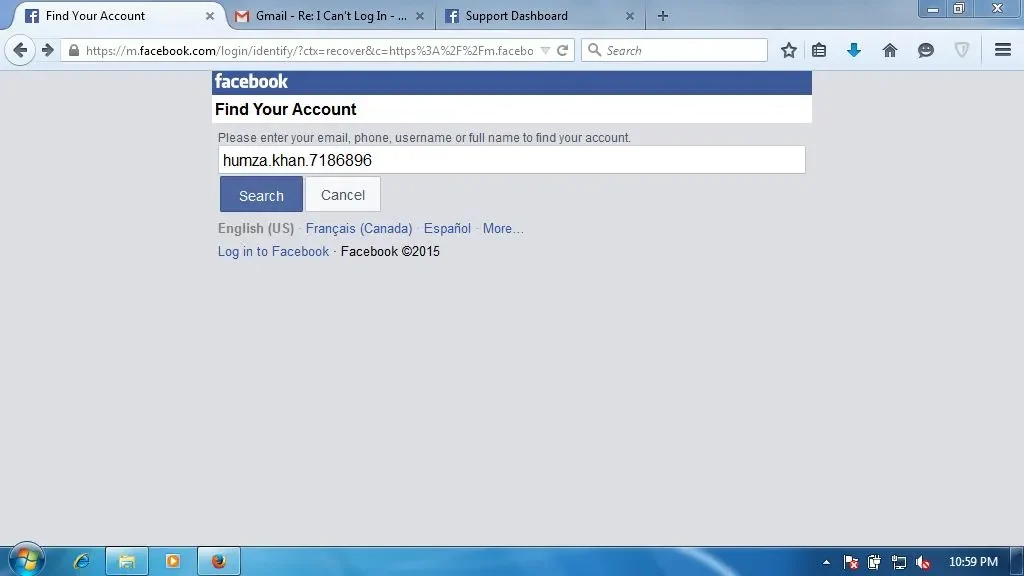
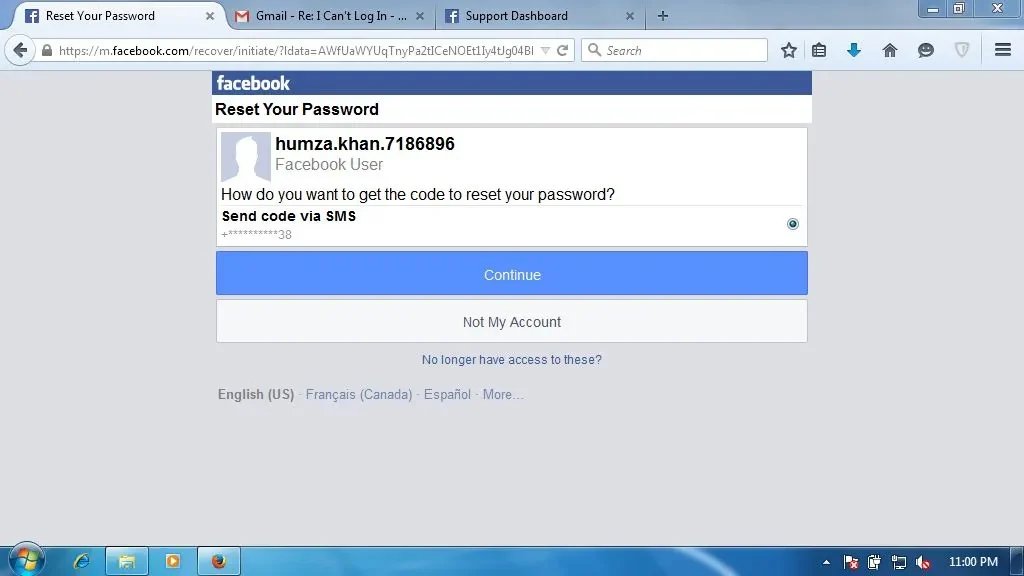
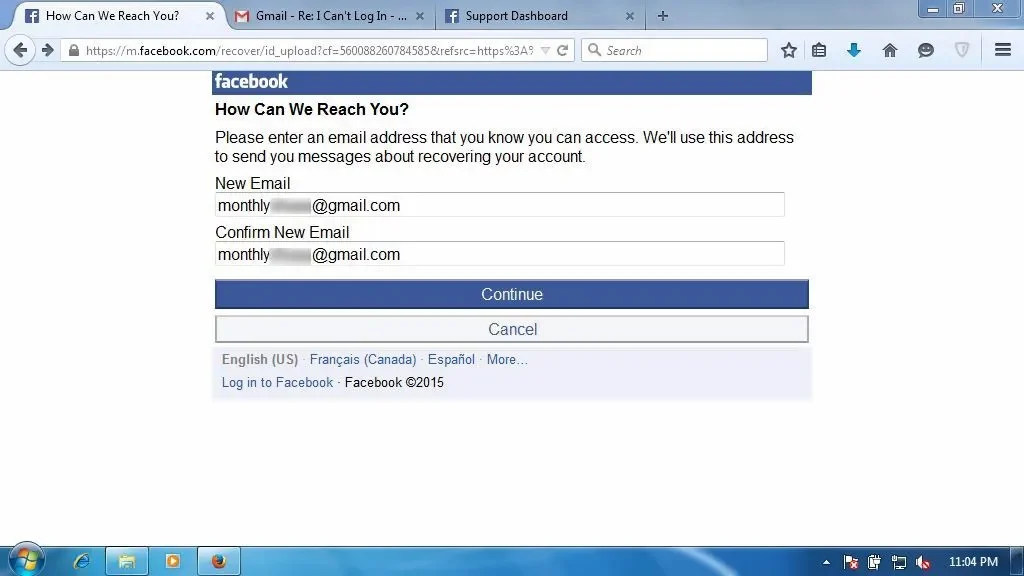
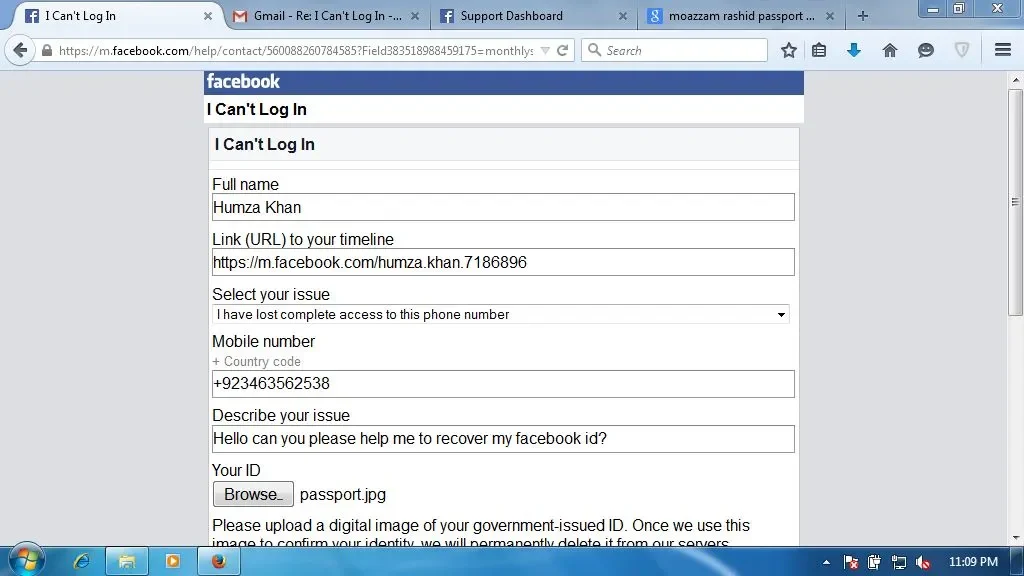
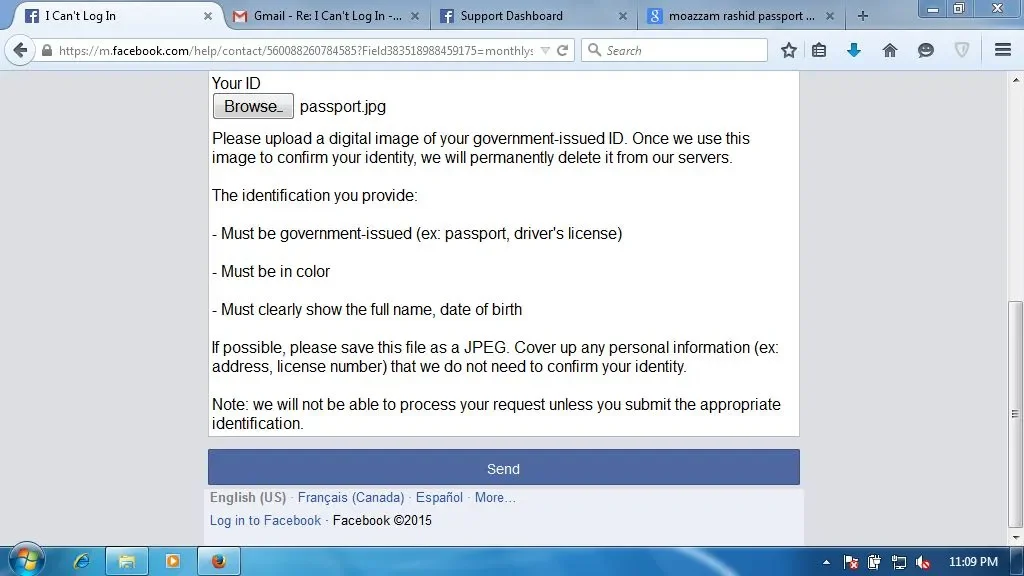
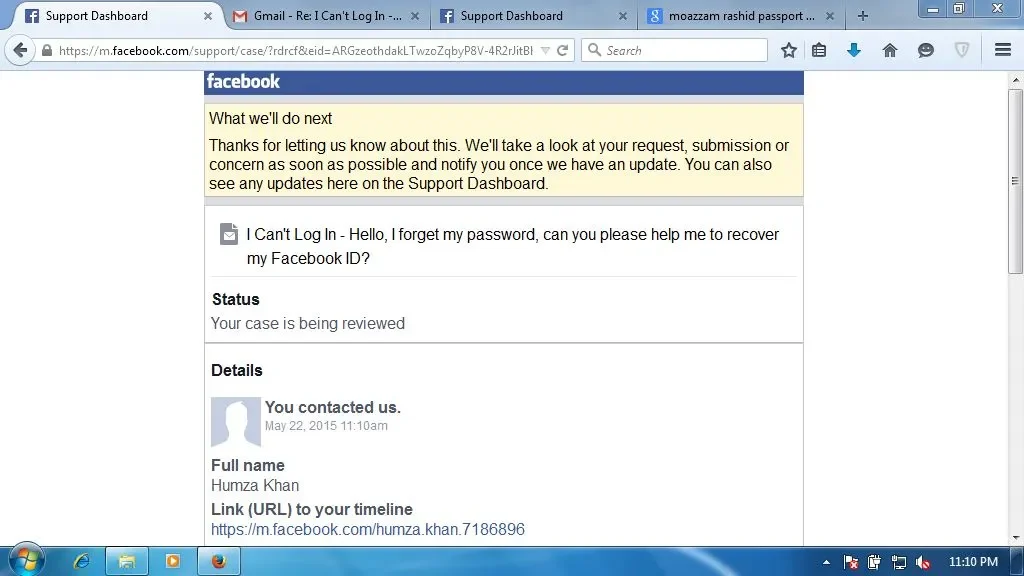
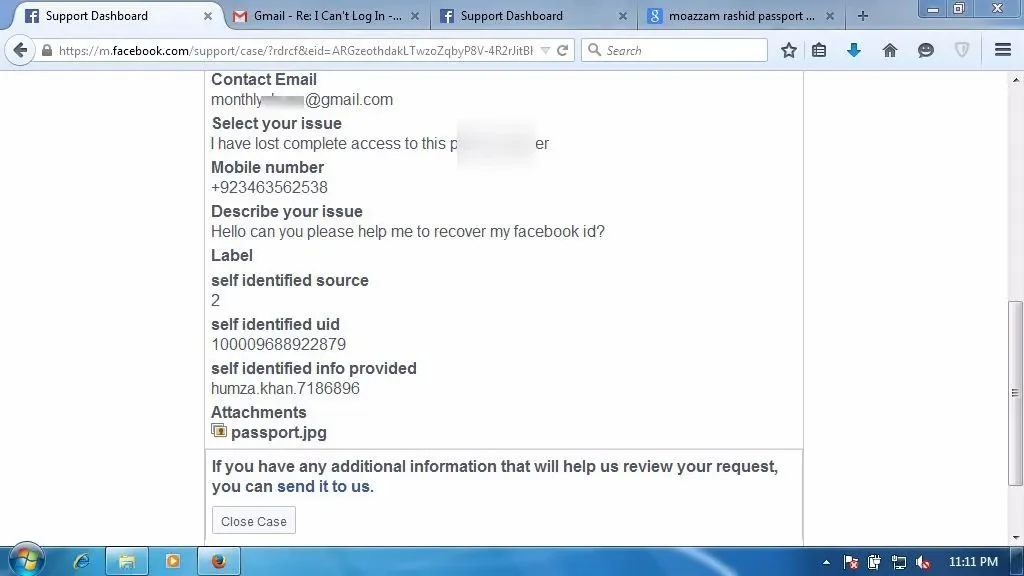
Step 6: The attacker's form disappears from the dashboard
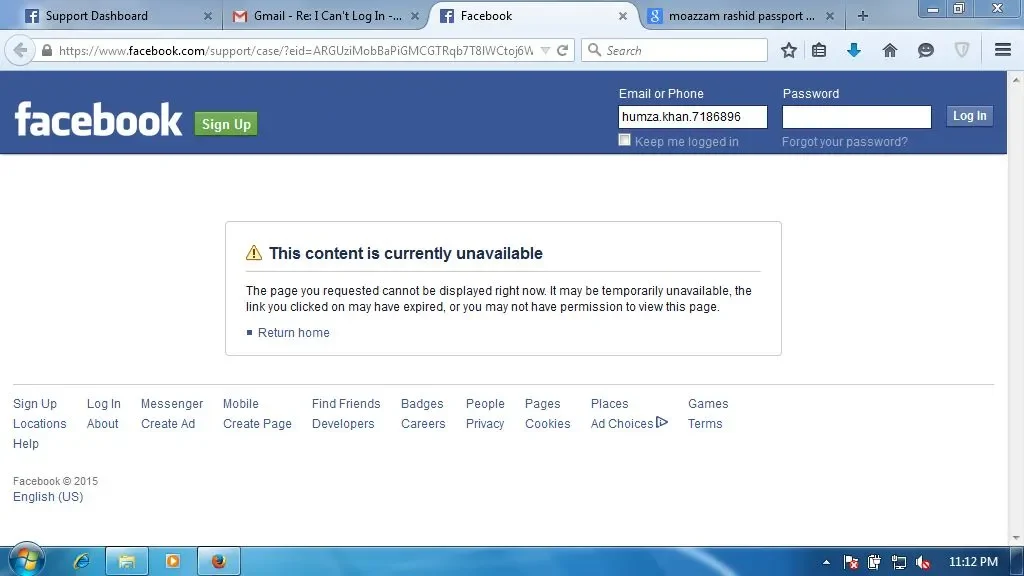
Once the victim's form is submitted, the attacker's form is deleted from the support dashboard. The screenshot below shows the attacker's form gone from the dashboard.
Step 7: The attacker still receives the victim's conversation
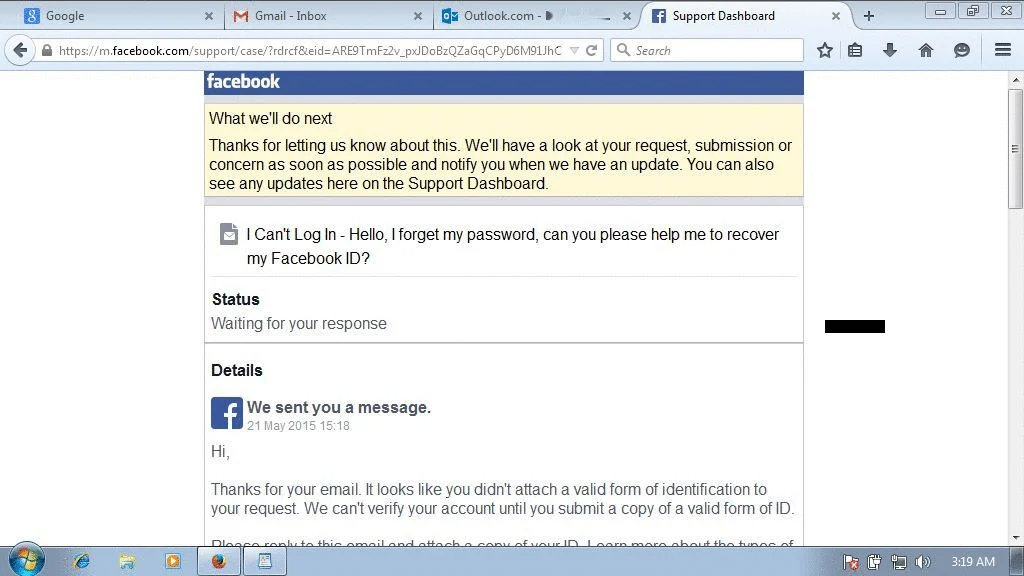
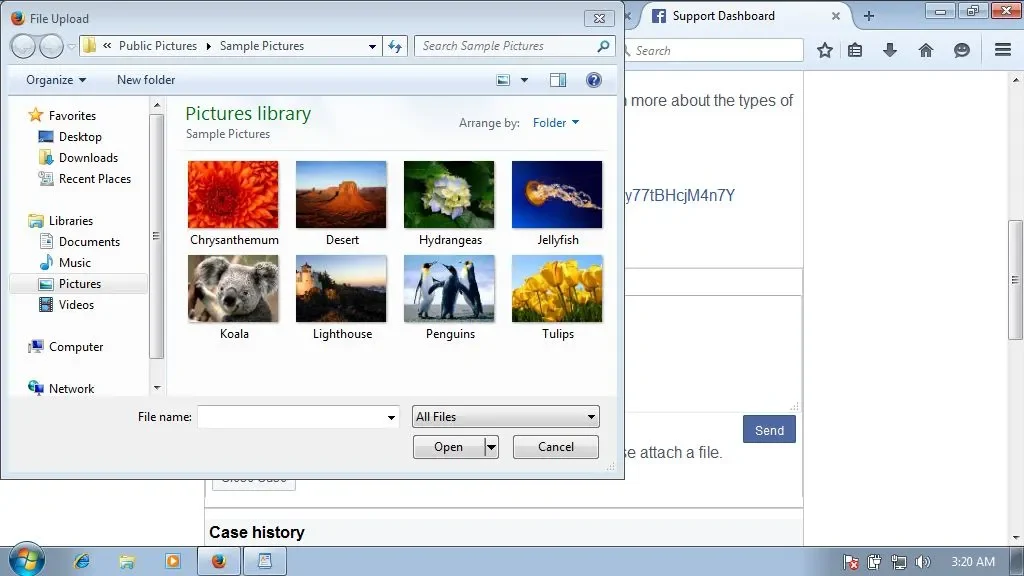
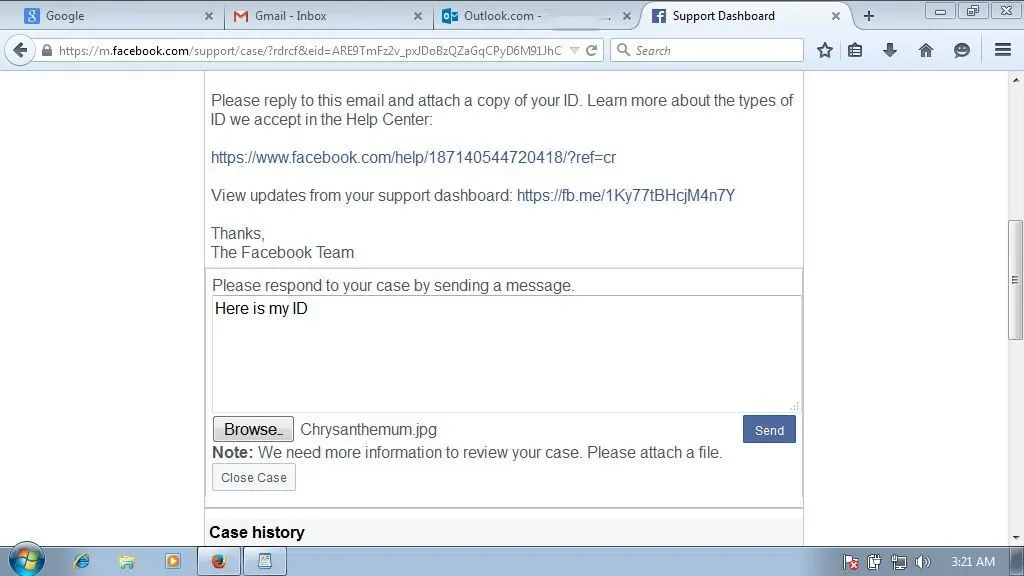
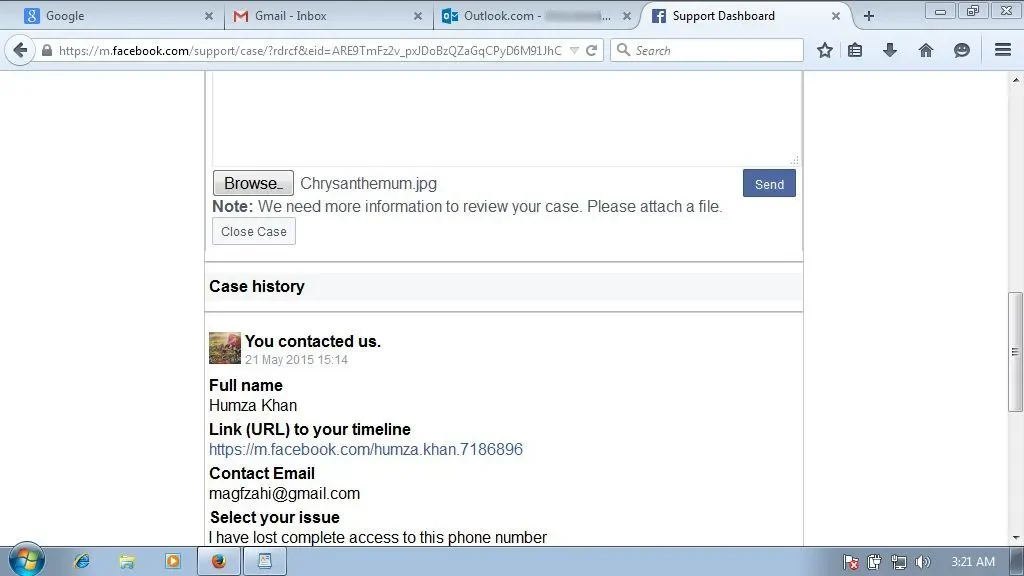
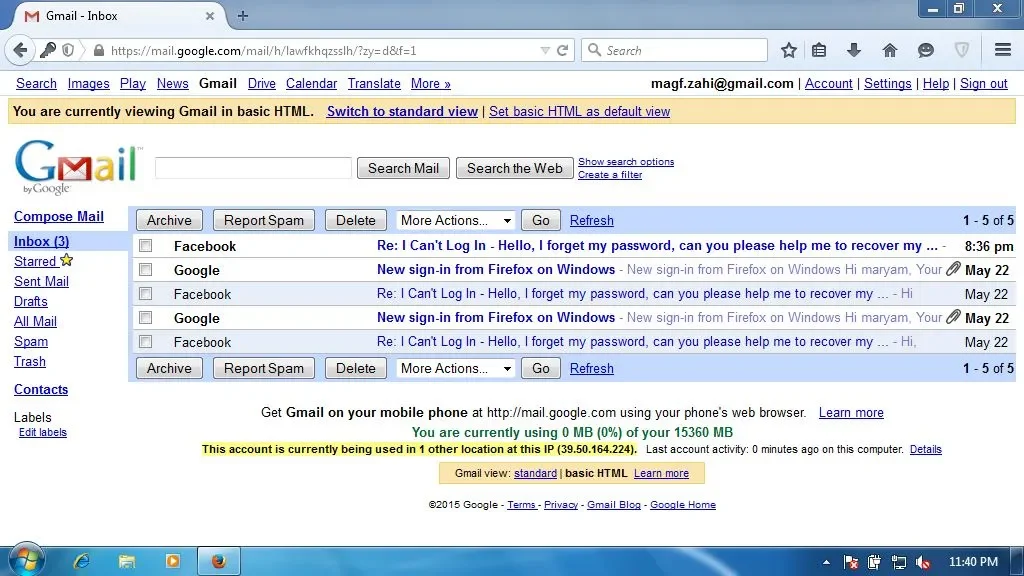
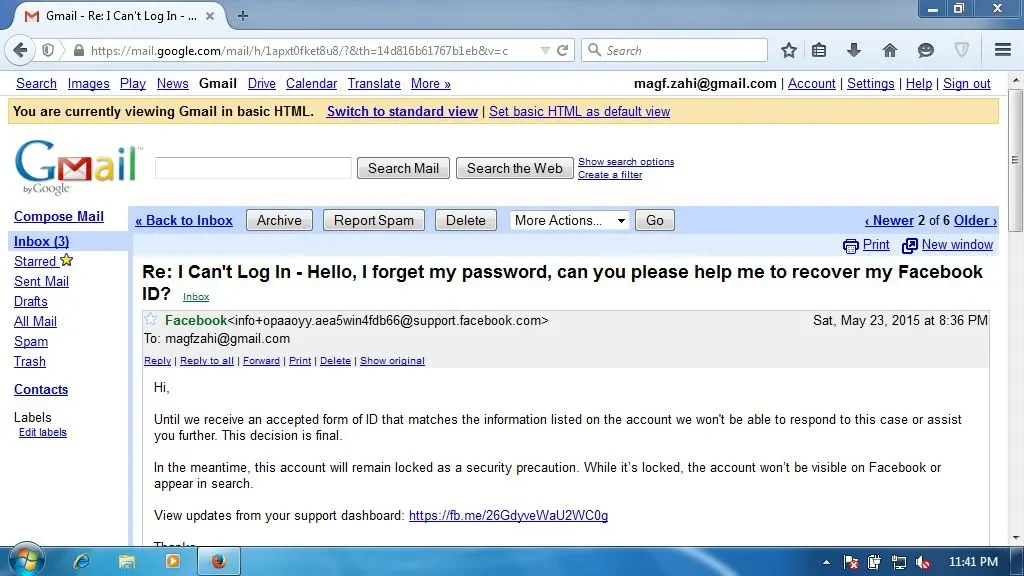
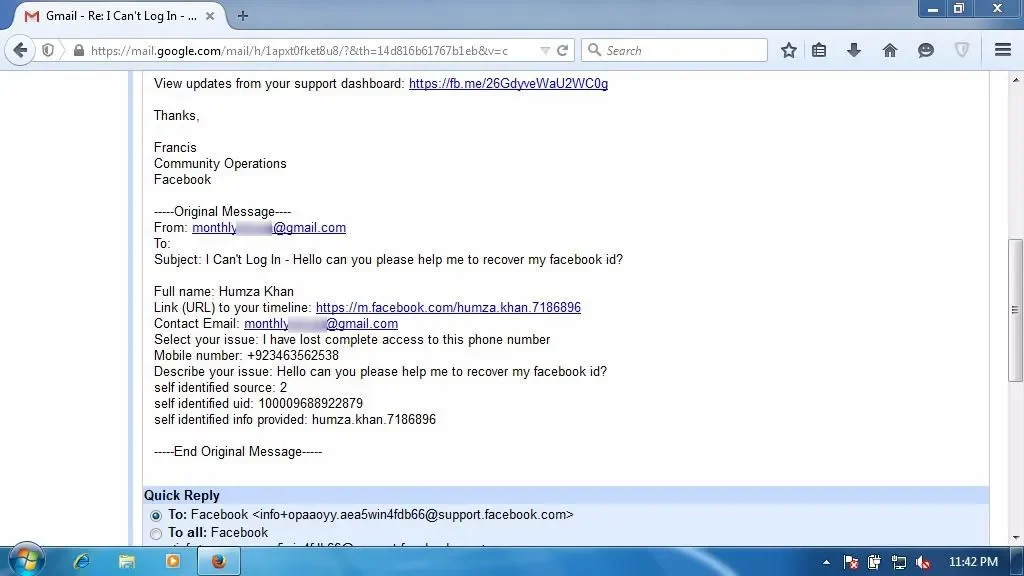
Despite the attacker's form being removed, the attacker keeps receiving replies in the email thread of the victim's form. The screenshots below show the conversation between the admin and the victim as it appears to the attacker.
Root cause
The report does not describe the server-side implementation, so the cause can only be inferred. The behaviour is consistent with the recovery submission being keyed on the account being recovered rather than on the submission itself: when a second form arrives for the same account, the first is removed from the support dashboard, but the email thread and its link are not re-bound to the new submission. The link in the attacker's email therefore still opens the conversation that now belongs to the victim's form. The report does not say what checks, if any, existed on the recovery email or on the link, or why they did not prevent the attacker from reading the conversation.
Impact
An attacker who submits a recovery form for a target account before the real owner does can read the conversation between that owner and Facebook's support admin, provided the owner later submits a form for the same account. The attacker needs the victim's phone number or username to submit the form, but not access to the victim's email. Facebook awarded 1000 USD for the bug, the researcher's first bounty from Facebook, paid in June 2015.
Fix
Based on the behaviour described, the submission and its email thread should be bound to the identity of the person who submitted it, so that a later submission for the same account cannot cause an earlier submitter to receive the new conversation, and the removal of a superseded form from the dashboard should also invalidate the link sent to its submitter.
Variants to test
- Submit a recovery form for an account, then have the owner submit one, and check whether the first submitter still receives replies. A positive result is any reply from support arriving at the first submitter's email after their form has been removed from the dashboard.
- Try the same collision on other support flows that key requests on an account identifier, such as account deletion, data export or appeal forms. A positive result is one user's thread or attachment being visible to another user who submitted for the same identifier.
- Check whether the link in the email is reusable after the form is superseded or closed. A positive result is the link still opening the conversation after the form has been removed.
- Test whether the recovery email entered by the submitter is verified before replies are sent to it. A positive result is replies arriving at an address the submitter never proved ownership of.
- Try submitting for the same account from two different attacker-controlled addresses to see which one keeps receiving the thread. A positive result is either address receiving the victim's conversation, which shows the binding is on the account rather than the submission.
What happened, in plain words
Facebook has a feature for people who are locked out of their account. If you forget your password, you can ask Facebook for help getting back in. You type in your phone number or your username, and Facebook walks you through some screens. One of those screens is a form where you describe your problem and give a recovery email address, and a real person on Facebook's support team reads it and replies to you by email.
Zahid Ali, the researcher who wrote this report, found a logic flaw in that form. A logic flaw (also called a business logic bug) is not a broken lock or a crashed program. It is a situation where every piece of the software works exactly as designed, but the design itself lets two people's information get mixed up. A useful comparison is a cloakroom: the attendant hands out numbered tickets, and everything works fine until two people are given the same number by mistake. Nobody picked the lock, but the wrong person walks away with the wrong coat.
Here the mix-up was this. The attacker fills in a recovery form for someone else's account, using fake details. Later the real owner of that account fills in a recovery form for the same account. Facebook's support dashboard then throws away the attacker's form and shows only the victim's form, which sounds like the right thing to do. But the email thread the attacker started does not get thrown away. The attacker keeps receiving the replies that Facebook's support admin sends to the victim, so the attacker can read a private conversation between the victim and Facebook. Facebook paid 1000 USD for the report, the researcher's first bounty from Facebook, in June 2015.
Background: the recovery flow
The feature in question is Facebook's account recovery flow. It exists for a simple reason: people forget passwords, lose phones, and change email addresses. Without a way back in, a locked-out user would lose their account forever. So Facebook offers a "Forgot Password" link, and behind it a series of screens that collect enough information for support staff to decide whether the person asking really owns the account.
The researcher worked on the mobile version of the site, at https://m.facebook.com. The mobile site is the same Facebook service presented with a layout designed for small screens; it is reached at a different address from the desktop site, but it is the same product underneath.
The flow the researcher used goes like this. First you give the phone number or username of the account you are trying to recover. Then, if you no longer have access to those details, you take an option that leads to a recovery email address (entered twice, the way forms often ask you to confirm a value) and a free-form form where you describe your situation. When you submit, the request goes into a queue that Facebook's support staff work through. A staff member, called an admin in the report, reads it and replies by email. That reply is not a one-off message: it is a conversation, a back-and-forth thread between the admin and the person who submitted the form.
The bug lives in how Facebook keeps track of those submissions. The submission ends up tied to the account being recovered rather than to the person who submitted it. That single design choice is what makes two submissions for the same account collide.
How the researcher got there
The researcher started bug hunting in May 2015 and describes the beginning as hard: it is not obvious where to start or what to look at. The approach was to watch videos and read write-ups by other bug hunters, then pick an area and poke at it by hand in a browser. No special tools are described, and none are needed to follow the story.
The habit that led to the bug was checking password recovery areas of different services first. Recovery flows are interesting to a tester because they are one of the few places where a stranger can make the system act on someone else's account without knowing that person's password. The first idea on Facebook was cross-site scripting, usually shortened to XSS. XSS is a class of bug where an attacker manages to get their own code (normally JavaScript, the language browsers run) to execute inside another user's browser session on a trusted site. It is a serious and well-known class, and it was the obvious thing to try on a form that accepts text. That attempt failed. Searching around suggested XSS in Facebook was hard to find, so the researcher set it aside and looked for something else.
After a few more tests on the recovery form, the researcher noticed that the form is conflicting: two submissions for the same account do not coexist cleanly. That observation, not a tool or a scanner, is the whole discovery. The rest of the work was pinning down exactly what happens when the two submissions meet.
The flaw, as the researcher described it
In the researcher's own words: if the attacker submits a form for a specific id and the victim does the same, the first form submitted by the attacker is removed from the Facebook dashboard and the victim's submitted form appears in the dashboard instead. But the email the attacker receives still contains a link to the victim's form, and through that link the attacker can see the conversation between the victim and the Facebook admin.
Two ideas in that sentence deserve unpacking for a newcomer.
The first is the dashboard. Facebook's support staff do not read submissions as raw email; they work from an internal tool, a dashboard, that lists the forms waiting for attention. When the victim's form arrives for the same account, the dashboard shows the victim's form and no longer shows the attacker's. From the support side everything looks normal: one account, one open request.
The second is the link in the email. When the attacker submitted, Facebook sent a reply to the recovery email address the attacker had typed in. That reply contained a link pointing at the attacker's form. A link like that is a kind of key: whoever holds it can open the page it points to. The problem is that the key was never changed when the form behind it was replaced. The email the attacker received contained a link to the victim's form, which opened the victim's conversation.
Reproduction steps
The steps, exactly as the researcher listed them:
- Go to
https://m.facebook.com. - Click on "Forgot Password".
- Enter the phone number or Facebook username of the victim.
- Click the option for users who no longer have access to those details.
- Enter the recovery email twice.
- Fill up the form with fake information and submit.
Step 1: Open the mobile site and start recovery
The researcher opens the mobile Facebook site and clicks "Forgot Password". This is simply the door into the recovery flow; every later step happens behind it. Nothing unusual is done here, which is part of the point: the attack uses the product exactly as a normal user would.
Step 2: Name the account to recover
The form asks for the victim's phone number or Facebook username. Either one identifies which account is being recovered. This identifier matters more than it looks. It is the value that ties the attacker's submission and the victim's later submission together, because both name the same account. If the two submissions named different accounts, there would be nothing to collide.
Step 3: Take the no-access path
The next screen offers an option for people who no longer have access to the phone number or username. Choosing it moves the flow on to the recovery email and the free-form form. This is the branch that produces a support ticket with an email thread attached, which is what the attack needs.
Step 4: Give a recovery email and fake details, then submit
The attacker types a recovery email address twice and fills the form with fake information, then submits. The recovery email is the address Facebook will reply to. The fake information is what makes the submission look like a genuine plea for help without revealing anything true.
The screenshots below show the attacker's submission, from entering the victim's username through the recovery email and the completed form.
After submitting, the attacker gets a reply by email. The screenshots below show that reply arriving.
At this point the attacker's form has been submitted successfully. The attacker now holds an email thread with Facebook support, and a link inside it that points at the attacker's own form.
Step 5: The victim submits a form for the same account
The victim then goes through the same recovery flow for the same account and submits a form. This is the trigger for the bug. The victim is doing nothing wrong and nothing unusual; they are a locked-out user asking for help, exactly the person the feature exists for. The screenshots below show the victim's submission.
Step 6: The attacker's form disappears from the dashboard
Once the victim's form is submitted, the attacker's form is deleted from the support dashboard. The screenshot below shows the attacker's form gone from the dashboard.
On the surface this looks like the system doing the right thing. Two requests for one account would confuse support staff, so the older one is dropped and the newer one kept. The mistake is that only the dashboard entry was dropped. The email thread and the link inside it were left alone.
Step 7: The attacker still receives the victim's conversation
Despite the attacker's form being removed, the attacker keeps receiving replies in the email thread of the victim's form. The screenshots below show the conversation between the admin and the victim as it appears to the attacker.
This is the payoff of the bug. The attacker never had access to the victim's phone, username or email. The attacker only had to submit first, with fake details, and wait for the real owner to submit afterwards. From that point the attacker reads a private support conversation that was meant for the victim.
Why it happens
The report does not describe how Facebook built the feature on the server, so the cause can only be inferred from the behaviour. What the behaviour suggests is that the recovery submission is keyed on the account being recovered rather than on the submission itself. "Keyed on" means the value the system uses to tell one record apart from another. If the key is the account, then two submissions for one account are, as far as the system is concerned, the same thing.
When the second form arrives, the first is removed from the support dashboard, but the email thread and its link are not re-bound to the new submission. "Re-bound" means updating which record the thread and link point at. Because that update never happens, the link in the attacker's email still opens the conversation, which now belongs to the victim's form. The report does not say what checks, if any, existed on the recovery email or on the link, or why they did not stop the attacker from reading the conversation.
Impact
An attacker who submits a recovery form for a target account before the real owner does can read the conversation between that owner and Facebook's support admin, provided the owner later submits a form for the same account. The attacker needs no access to the victim's phone, username or email, only the phone number or username to name the account. The only requirements are submitting first and using fake information.
What is established is that a stranger could read a private support thread about someone else's account. Facebook awarded 1000 USD for the bug, the researcher's first bounty from Facebook, paid in June 2015.
Fix
Based on the behaviour described, the submission and its email thread should be bound to the identity of the person who submitted it, so that a later submission for the same account cannot cause an earlier submitter to receive the new conversation. Removing a superseded form from the dashboard should also invalidate the link that was sent to its submitter, the way a cloakroom should collect the old ticket when it issues a new one.
Variants to test
These are follow-up tests in the same spirit, useful for anyone learning from this report:
- Submit a recovery form for an account, then have the owner submit one, and check whether the first submitter still receives replies. A positive result is any reply from support arriving at the first submitter's email after their form has been removed from the dashboard.
- Try the same collision on other support flows that key requests on an account identifier, such as account deletion, data export or appeal forms. A positive result is one user's thread or attachment being visible to another user who submitted for the same identifier.
- Check whether the link in the email is reusable after the form is superseded or closed. A positive result is the link still opening the conversation after the form has been removed.
- Test whether the recovery email entered by the submitter is verified before replies are sent to it. A positive result is replies arriving at an address the submitter never proved ownership of.
- Try submitting for the same account from two different attacker-controlled addresses to see which one keeps receiving the thread. A positive result is either address receiving the victim's conversation, which shows the binding is on the account rather than the submission.
Glossary
- Account recovery flow: the series of screens a locked-out user goes through to prove they own an account and get help getting back in.
- Admin: a member of Facebook's support staff who reads submitted forms and replies to users.
- Attacker: the person trying to abuse the feature, here by submitting a form for someone else's account.
- Bounty: a payment a company makes to a researcher who reports a valid security bug.
- Bug bounty program: a scheme where a company invites outside researchers to look for bugs and pays for good reports.
- Business logic bug (logic flaw): a bug where the software works as designed but the design lets something unintended happen, such as two people's records colliding.
- Cross-site scripting (XSS): a class of bug where an attacker gets their own code to run inside another user's browser session on a trusted site.
- Dashboard: the internal tool support staff use to see the forms waiting for attention.
- Email thread: a chain of replies on one topic, kept together as a conversation rather than as separate messages.
- Keyed on: the value a system uses to tell one record apart from another; if two records share that value, the system treats them as the same thing.
- Link: a clickable address in an email or page that opens a particular page; here it acts like a key to the form it points at.
- Mobile site: the version of a website laid out for small screens, reached at a different address but serving the same product.
- Recovery email: the email address a user gives so that support can reply to them.
- Re-bound: updating which record a thread or link points at after the original record is replaced.
- Submission: one filled-in recovery form sent to Facebook support.
- Support ticket: a request in a support system that staff work through and reply to.
- Username: the name that identifies a Facebook account.
- Victim: the owner of the account being recovered, whose support conversation is exposed.
- Write-up: a public account of a bug and how it was found, written after the fact.


