Unauthorized access to companies environment
The server did not properly verify the email address used during self-invite registration, allowing an attacker to create an account in any Workplace community by supplying a target community ID. This gave unauthorised access to the company's files, photos, groups, emails and other data.
 Published on mvinni.medium.com
In this article, I will be describing a serious vulnerability I found in Workplace, an enterprise social network from Facebook.
The full write-up lives on its author's site
It belongs to its author, so we link to it rather than copy it. The other two tabs are our own rewrites, checked against it.
Context
Workplace is Facebook's enterprise social network. Each company that adopts it gets its own environment, identified internally by a community_id, where employees share files, photos, groups and email.
Workplace administrators can enable an option called "self-invite", which lets people join without having an email address verified by the administrator. The help page describing the feature is at https://www.workplace.com/help/work/336227380906523.

The vulnerability described here breaks that assumption: the server did not correctly verify the email used at registration, so accounts could be created with an email address that the administrator had never verified. The catch, and it matters for the impact, is that the whole attack only works against companies that have enabled self-invite.
Setup
The researcher analysed network traffic from the "Workplace from Facebook" Android application, with Burp Suite in the path to inspect the history of requests. The only account needed was a newly registered Workplace account of the researcher's own, plus a personal email address on a public provider (@gmail.com in the example). No administrator role inside the target company, and no prior access to it, was required.
Finding it
After registering a new account in his own Workplace and going through the Burp Suite history tab, the researcher came across a request used during signup. That request is what made the flow worth probing.
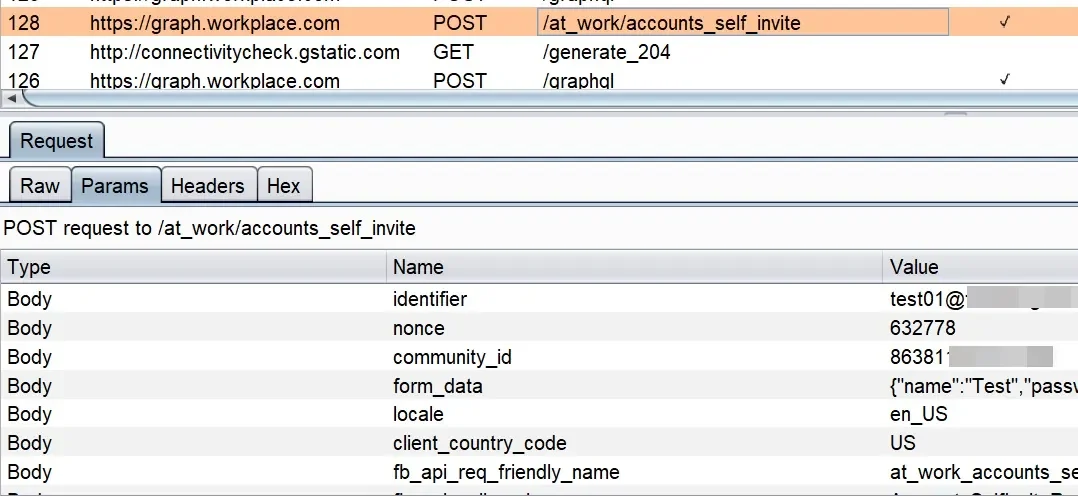
After some tests against this endpoint, he concluded that it was possible to create accounts in other Workplaces simply by modifying community_id. The email used did not have to be verified by the administrator of the target company, and a personal @gmail.com account was enough to execute the attack.
Exploitation
The flow has two requests: one asks Workplace to send an activation code to the email address, the other consumes that code together with the target community_id to create the account.
Step 1: requesting the activation code
POST /at_work/accounts_send_notification HTTP/1.1Host: graph.workplace.comidentifier=[redacted]=SIGNUPaccess_token=*****
The request goes to graph.workplace.com. identifier is the email address being registered, pre_login_flow_type=SIGNUP selects the signup flow, and access_token is the token the client already holds. The activation code was successfully received at the address supplied.
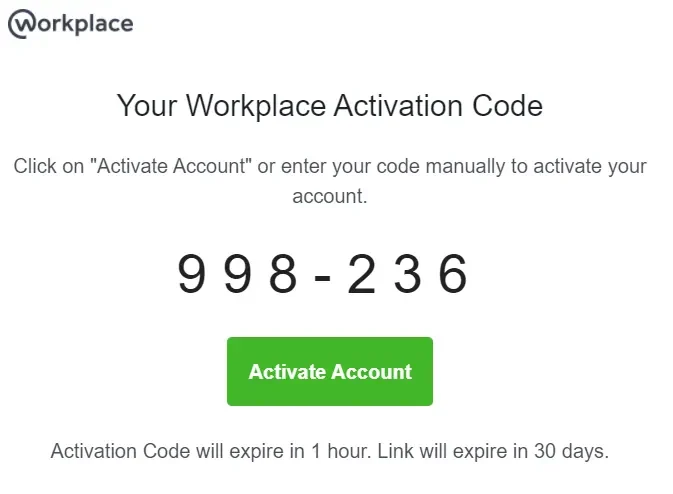
Step 2: creating the Workplace account
POST /at_work/accounts_self_invite HTTP/1.1Host: graph.workplace.comidentifier=[redacted]=998236community_id=86381-----------form_data={"name":"Test","password":"Test1234@"}access_token=*****
The parameters that matter:
nonce: the activation code obtained in step 1.community_id: the community ID of the target company.identifier: the same email address used in step 1.form_data: the profile to create, here a name and password.
With the community_id swapped for the target's, the account was created successfully, and the attacker then had free access to the files, photos, groups, emails and other data of the target company, plus exposure of its employees.
The one precondition
The attacker had to know the target company's community ID. The report notes this could be obtained by brute force, or from someone such as an ex-employee of the company. Some days after receiving the bounty, the researcher found an endpoint that returns the community_id of any company in Workplace, which removes that obstacle entirely; the report does not describe that endpoint.
Root cause
The server did not correctly verify the email used at registration against the administrator's verification of that address. The self-invite flow accepted an email that the administrator had never verified, and it took the community_id from the client without checking that the caller was entitled to join that community.
Impact
A malicious user could access a company's Workplace environment: its files, photos, groups, emails and other data, and its employees were exposed. This was only possible if the company had enabled the self-invite feature, and it required knowledge of the target's community_id, which the report says was obtainable by brute force or from an ex-employee, and later by an endpoint the researcher found. The report was triaged on 25 January 2021, the bug was fixed on 9 February 2021, and the bounty of 27.5k USD was awarded on 23 February 2021, after the initial report on 11 January 2021.
Fix
The bug was fixed on 9 February 2021. The report does not describe the code change.
Variants to test
- On any multi-tenant product with a self-service join flow, replay the signup request with the tenant identifier changed to another tenant's. A positive result is an account created inside a tenant you were never invited to.
- Look for endpoints that return tenant identifiers (the report mentions one that gives the
community_idof any company). A positive result is enumerating identifiers for organisations you have no relationship with. - Test whether the activation nonce is bound to the email, the tenant, or neither. A positive result is a nonce issued for one address or flow being accepted in another context.
- Try the same swap on related flows, such as invitation acceptance or password reset, where a tenant or organisation parameter is taken from the client. A positive result is a state change applied to a tenant you do not belong to.
- Check whether the email used at registration is verified against the administrator's records or only against mailbox control. A positive result is joining with a personal address on a domain the organisation does not own.
What happened, in plain words
Workplace is Facebook's social network for companies. Think of it as a private Facebook that only the employees of one organisation can use. Each company that signs up gets its own separate space, called a community, where staff share files, photos, groups and email.
When a company sets up its Workplace, an administrator (the person in charge of the company's account) can switch on an option called "self-invite". This option lets people join without the administrator first checking and approving their email address. The help page describing the feature is at https://www.workplace.com/help/work/336227380906523.
The vulnerability described here breaks that expectation. The server did not properly check the email used at registration, so someone could create an account with an email address the administrator had never verified. One condition matters for the impact: the attack only works against companies that have turned self-invite on.
The setup: how the researcher looked at the traffic
The researcher did not guess. He watched the network traffic of the "Workplace from Facebook" Android application, using a tool called Burp Suite. Burp Suite sits between the phone and the internet and records every request the app sends and every response it gets back, so you can read them afterwards in a history tab. It is like a logbook of every conversation between the app and Facebook's servers.
The only account he needed was a brand new Workplace account of his own, plus a personal email address on a public provider (the example uses @gmail.com). He did not need to be an administrator of the target company, and he did not need any prior access to it.
Finding the problem
After registering a new account in his own Workplace and scrolling through the Burp Suite history tab, the researcher found a request that the app sends during signup. That request is what made the signup flow worth probing.
A community_id is simply the internal number that identifies one company's Workplace. Every company has its own. If the server accepts whatever number the client sends, then changing that number means aiming the request at a different company.
After some tests against this endpoint, he concluded that it was possible to create accounts in other Workplaces just by modifying community_id. The email used did not have to be verified by the administrator of the target company, and a personal @gmail.com account was enough to carry out the attack.
Carrying out the attack
The flow has two requests. The first asks Workplace to send an activation code to the email address. The second uses that code, together with the target community_id, to create the account.
Step 1: requesting the activation code
POST /at_work/accounts_send_notification HTTP/1.1Host: graph.workplace.comidentifier=[redacted]=SIGNUPaccess_token=*****
Line by line:
POST /at_work/accounts_send_notification HTTP/1.1is the request line.POSTmeans "I am sending data to the server to create or change something"./at_work/accounts_send_notificationis the address of the function on the server that sends a notification, here an activation code.HTTP/1.1is the version of the web protocol being used.Host: graph.workplace.comsays which server the request is for.graph.workplace.comis the part of Facebook's infrastructure that handles Workplace accounts.identifier=[redacted]is the email address being registered. The server will send the activation code to this address.pre_login_flow_type=SIGNUPtells the server which flow this is: the signup flow, as opposed to logging in to an existing account.access_token=*****is a token the app already holds. A token is like a temporary key or wristband: it proves to the server that the request comes from a recognised client, without sending a password every time. The real value is hidden here.
The activation code was successfully received at the address supplied.
Step 2: creating the Workplace account
POST /at_work/accounts_self_invite HTTP/1.1Host: graph.workplace.comidentifier=[redacted]=998236community_id=86381-----------form_data={"name":"Test","password":"Test1234@"}access_token=*****
Line by line:
POST /at_work/accounts_self_invite HTTP/1.1is the request that actually creates the account through the self-invite feature. The name of the endpoint says it plainly:accounts_self_invite.Host: graph.workplace.comis the same server as before.identifier=[redacted]is the same email address used in step 1. It ties this request to the code that was sent there.nonce=998236is the activation code received by email in step 1. A nonce is a one-time value: it is meant to prove you can read the mailbox, because only someone with access to that inbox would know the code.community_id=86381is the community ID of the target company. This is the value the attacker changes. Swapping it for another company's number aims the account creation at that company.-----------form_data={"name":"Test","password":"Test1234@"}is the profile to create: a display name and a password. The long row of dashes is just a separator in the request body.access_token=*****is the same kind of client token as in step 1.
With the community_id swapped for the target's, the account was created successfully. The attacker then had free access to the files, photos, groups, emails and other data of the target company, and the company's employees were exposed.
The one precondition
The attacker had to know the target company's community ID. The report notes this could be obtained by brute force, meaning trying many numbers until one works, or from someone such as an ex-employee of the company who still remembers it. Some days after receiving the bounty, the researcher found an endpoint that returns the community_id of any company in Workplace, which removes that obstacle entirely. The report does not describe that endpoint.
Why it worked
The server did not correctly check the email used at registration against the administrator's verification of that address. The self-invite flow accepted an email the administrator had never verified, and it took the community_id from the client without checking that the caller was entitled to join that community.
Impact
A malicious user could access a company's Workplace environment: its files, photos, groups, emails and other data, and its employees were exposed. This was only possible if the company had enabled self-invite, and it required knowledge of the target's community_id, which the report says was obtainable by brute force or from an ex-employee, and later by an endpoint the researcher found.
The report was triaged on 25 January 2021, the bug was fixed on 9 February 2021, and the bounty of 27.5k USD was awarded on 23 February 2021, after the initial report on 11 January 2021.
The fix
The bug was fixed on 9 February 2021. The report does not describe the code change.
Similar things to test elsewhere
- On any product where one service hosts many separate organisations and people can join themselves, replay the signup request with the organisation identifier changed to another organisation's. A positive result is an account created inside an organisation you were never invited to.
- Look for endpoints that return organisation identifiers (the report mentions one that gives the
community_idof any company). A positive result is being able to list identifiers for organisations you have no relationship with. - Test whether the activation code is tied to the email, to the organisation, or to neither. A positive result is a code issued for one address or flow being accepted in another context.
- Try the same swap on related flows, such as accepting an invitation or resetting a password, where an organisation parameter is taken from the client. A positive result is a change applied to an organisation you do not belong to.
- Check whether the email used at registration is verified against the administrator's records or only against mailbox control. A positive result is joining with a personal address on a domain the organisation does not own.
Glossary
- API: the set of addresses and rules a program uses to talk to a server, like a menu of functions you can call.
- Endpoint: one specific address on a server that performs one function, for example
/at_work/accounts_self_invite. - Request: a message a client (app or browser) sends to a server asking it to do something.
- Response: the message the server sends back.
- HTTP: the language browsers and apps use to exchange requests and responses with web servers.
- POST: an HTTP method used when sending data to the server to create or change something.
- Host: the part of a request that names which server it is for, here
graph.workplace.com. - Burp Suite: a tool that sits between a client and a server and records, inspects and lets you modify the traffic.
- Token (access token): a temporary value that proves a request comes from a recognised client, like a wristband at an event.
- Cookie: a small piece of data a site stores in your browser to remember who you are between requests.
- Parameter: a named value sent with a request, such as
community_id=86381. community_id: the internal number that identifies one company's Workplace environment.- Nonce: a one-time value, here the activation code sent by email, used to prove you can read that mailbox.
- Activation code: the code emailed to an address during signup, which must be sent back to complete registration.
- Self-invite: a Workplace option that lets people join a company's environment without the administrator verifying their email first.
- Administrator: the person who manages a company's Workplace account and its settings.
- Multi-tenant: a product where one service hosts many separate organisations, each with its own space and data.
- Broken authorisation: a flaw where the server does not check that the caller is allowed to perform the action or reach the data they are asking for.
- IDOR (Insecure Direct Object Reference): a flaw where a request names an object by its identifier and the server does not check that the caller owns or may access that object.
- Logic flaw: a bug in the rules of a process rather than in its code syntax, so the steps work but the outcome is wrong.
- Brute force: trying many possible values, such as numbers, until one is accepted.
- Triaged: the stage where the security team has reviewed a report and confirmed it is valid.
- Bounty: the money a company pays a researcher for a valid security report.
- Root cause: the underlying reason a vulnerability exists, as opposed to its visible symptom.

