research
A stored cross-site scripting vulnerability existed in Outlook.com on iOS browsers when a PowerPoint 97-2003 file containing a hyperlink with a javascript: URL was opened. An attacker could send such a file to a victim, and when the victim clicked the link, the script executed in the context of the Outlook page, potentially stealing cookies.
 Published on omespino.com
Title XSS Stored on outlook.com (iOS) via doc file. Product / URL: outlook.com iOS browser (Google chrome)Report sent via [email protected]
The full write-up lives on its author's site
It belongs to its author, so we link to it rather than copy it. The other two tabs are our own rewrites, checked against it.
Context
This is a short account of a stored cross-site scripting bug in Outlook on the web, reported through the Microsoft Bug Bounty Program. The affected product is described in the report as outlook.com (outlook.live.com) when opened in an iOS browser, specifically Google Chrome on iOS. The delivery vector is a Microsoft Office file, in the proof of concept a PowerPoint presentation, sent as an email attachment and later rendered by the browser.
The feature that makes the bug possible is the in-browser rendering of an attached Office document. When a recipient opens the email, clicks the attachment and chooses download, the presentation is rendered inside the browser rather than handed off to a separate application. A hyperlink embedded in that document is then followed by the browser, and because the link uses the javascript: scheme, the script it contains runs in the context of the Outlook page.
The researcher frames the lesson plainly: it is worth re-checking basic payloads, because sometimes they still work. The report was sent to [redacted] and the title given to it was "XSS Stored on outlook.com (iOS) via doc file".
Setup
The environment listed in the report is:
- iPhone 6 running iOS v11.2.5.
- Safari, latest version.
- Google Chrome, latest version.
- A personal email account, with all testing done by sending emails to himself.
The preconditions that matter are narrow. The victim has to be logged in to an Outlook account, has to open the crafted email in an iOS browser, and has to interact with the attachment and then the hyperlink. The report states that the payload works in any iOS browser, naming Safari, Firefox, Chrome and Opera, and that it only works on iOS.
Finding it
The researcher does not describe a period of exploration or a particular anomaly that drew attention. The finding is presented as the result of trying a basic payload in a place where user-supplied content (a hyperlink inside an uploaded Office document) reaches a browser rendering context. The interesting part is the combination: an Office document saved in a legacy format, uploaded and mailed through Outlook, rendered by an iOS browser, with a javascript: URI as the link target.
Exploitation
Step 1: build the document
Create a Microsoft Office document, for example a PowerPoint presentation, containing a hyperlink that points to the following URL:
javascript:prompt(document.cookie)
The javascript: scheme tells the browser that the link target is script rather than a resource to fetch, and prompt(document.cookie) displays the page's cookies in a dialog, which is enough to demonstrate execution in the page's origin. Save the file as "Powerpoint presentation 97-2003 Presentation". The report stresses that saving in the 97-2003 format is essential: if the document is not saved as this version, the bug reproduction may not work.
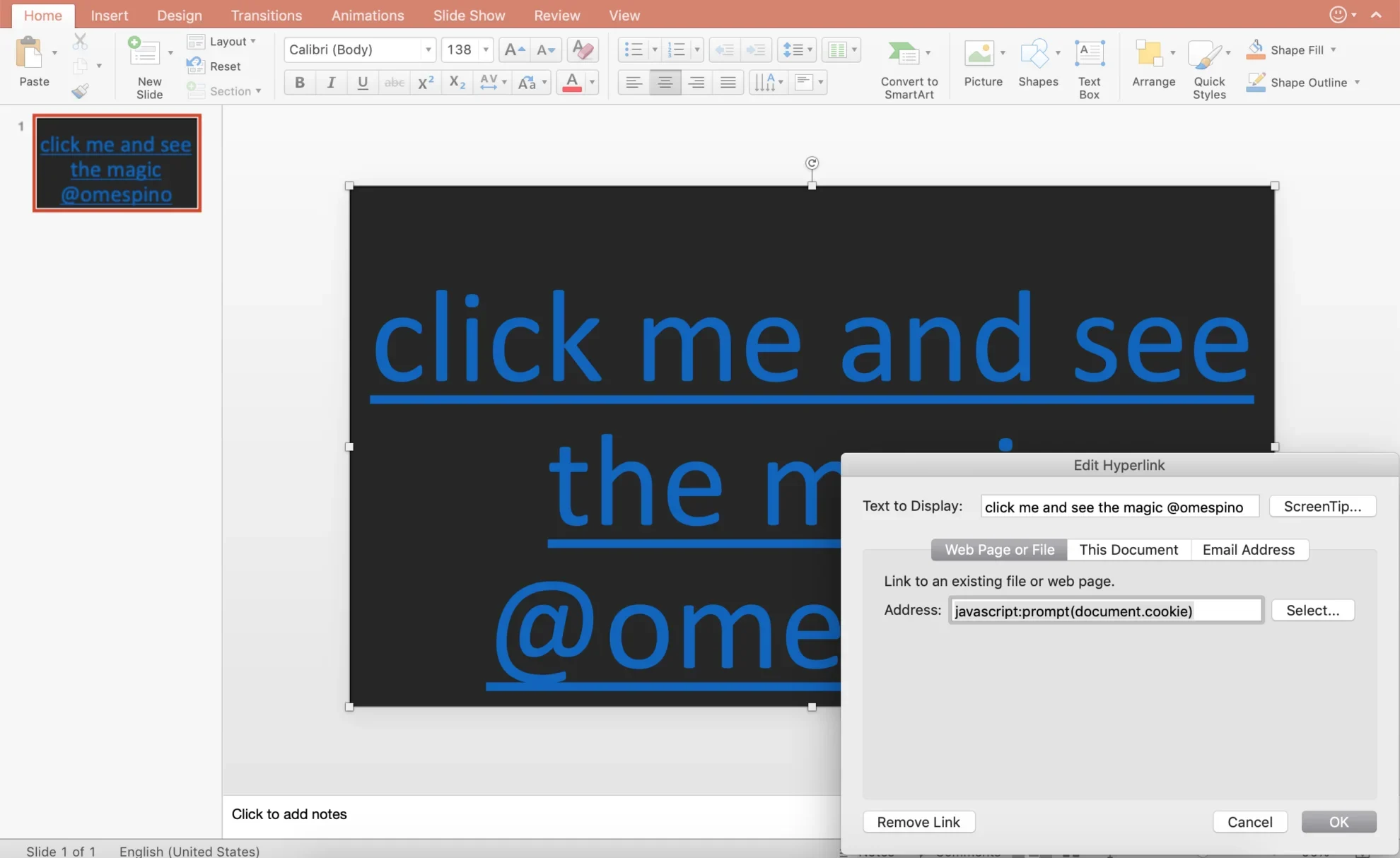
Step 2: upload and send
Log in to outlook.live.com, upload the crafted PowerPoint file and send it by email. In the researcher's testing the recipient was his own account.
Step 3: open the attachment in Chrome on iOS
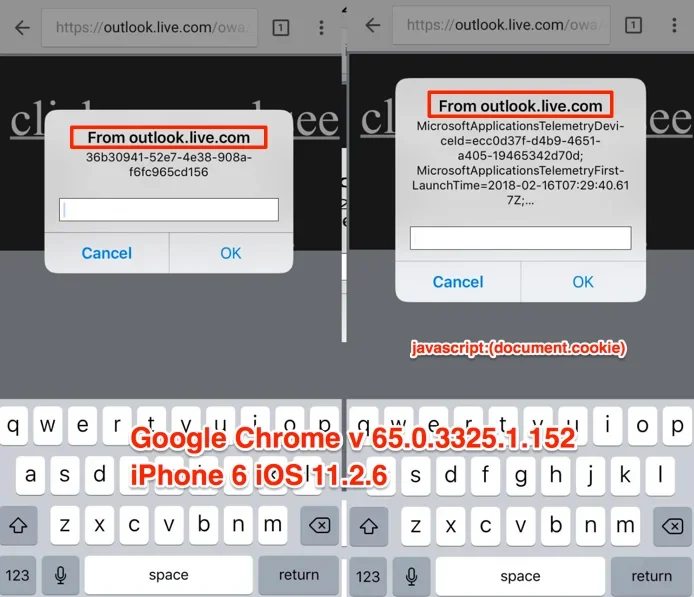
Log in to outlook.live.com in the Google Chrome iOS browser, open the email carrying the crafted document, click the attachment and then click download. The presentation then renders inside Google Chrome. Clicking the hyperlink at that point triggers the XSS and the document.cookie value is shown.
At this stage, the report notes, you already have a "magic" link that points directly to the crafted presentation.
Step 4: use the direct link
Open that link directly in the Chrome iOS browser, click the hyperlink, and the XSS fires again, showing document.cookie once more. The report states that opening the link in any iOS browser (Safari, Firefox, Chrome, Opera) works, provided the user is logged in to their Outlook account, and that it only works on iOS.
Root cause
The report does not analyse the server-side or client-side code, so the precise defect is not stated. What the behaviour implies is that the iOS browser rendering path for the downloaded presentation does not neutralise javascript: URIs in document hyperlinks before the link becomes clickable inside the Outlook origin. Because the document is rendered in the browser rather than opened in a separate application, the link is handled by the same browsing context as the Outlook page, and the script runs there. The report does not say which defence, if any, was expected to block this, so any statement about why existing protections failed would be speculation.
Impact
As the report puts it, stored XSS allows an attacker to embed malicious and arbitrary scripts into a vulnerable page, which are then executed when a victim views the page. In this case the script runs in the context of the victim's Outlook session on iOS, and the proof of concept reads document.cookie to show that. The conditions are restrictive: the victim must be logged in to Outlook, must use an iOS browser, and must open the crafted email and interact with the attachment or the direct link and then the hyperlink.
Fix
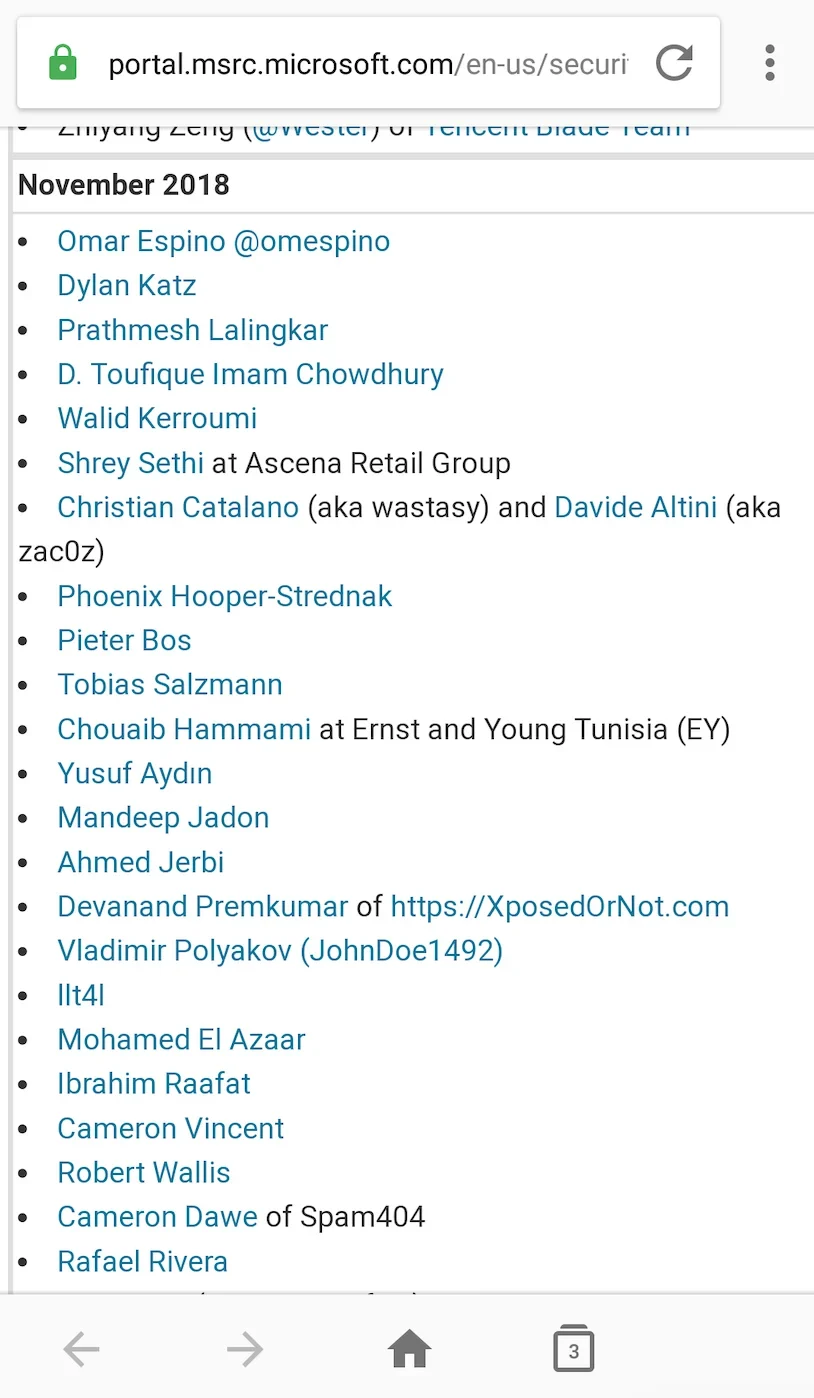
It records only the timeline: the report was sent on 21 February 2018, confirmation came the same day, Microsoft asked for details on 23 March 2018 and the researcher replied the same day, the investigation was still in progress on 26 July 2018, on 7 November 2018 the team said the submission appeared to qualify for a bounty, the reward was paid through the payment system on 26 November 2018, disclosure permission was requested on 4 March 2019 and granted on 14 March 2019.
Variants to test
- A positive result is the script executing in the webmail origin when the rendered document's link is clicked on a mobile browser.
- Try the same document with different
javascript:payloads, such as one that readsdocument.cookieand sends it elsewhere, to confirm the execution context is the webmail page rather than a sandboxed viewer. A positive result is the payload reaching the page's own data. - Try the direct link to the rendered document in other mobile browsers and platforms. A positive result is the same execution on a platform the report did not cover; a negative result on desktop would be consistent with the report's statement that it only works on iOS.
- A positive result is any rendered content whose links are followed in the webmail origin.
What happened, in plain words
A security researcher found a way to make a script run inside someone's Outlook mailbox on the web, using nothing more exotic than a PowerPoint file attached to an email. He reported it to Microsoft through their bug bounty programme, and Microsoft paid him a reward for it.
The trick works like this. You create a presentation that contains a clickable link. Normally a link points to a web page, but this one starts with javascript:, which tells the browser "the thing behind this link is a small program, run it". You save the presentation in an old file format, attach it to an email and send it. When the recipient opens that email in a browser on an iPhone, clicks the attachment and downloads it, Outlook shows the presentation inside the browser page itself instead of handing it to a separate app. The link inside the presentation is then part of the Outlook page, so when the recipient clicks it, the little program runs with the same permissions as the Outlook page. In the proof of concept the program simply pops up a dialog showing the page's cookies.
The researcher's own summary of the lesson is refreshingly simple: it is always worth going back to the basic payloads, because sometimes they still work. He sent the report to [redacted] under the title "XSS Stored on outlook.com (iOS) via doc file".
Before going further, a few words on the words themselves.
What is a cookie? When you log in to a website, the site's server sends your browser a small piece of text called a cookie. The browser stores it and sends it back with every later request to that site, so the server knows which logged-in user is asking. Think of it as the wristband you get at a festival: you show it once at the gate, and after that the staff let you back in without asking for your ID again. If someone else can read your wristband, they can pretend to be you. That is why a script that can read document.cookie is interesting to an attacker: document.cookie is simply the browser's way of letting a page's own scripts see its cookies.
What is XSS? Cross-site scripting, usually shortened to XSS, is a class of bug where an attacker manages to get their own script running inside a page that belongs to someone else's website. The browser cannot tell the difference between the site's own scripts and the injected one, so the injected script can do anything the site's scripts could do: read the page, read cookies, act as the logged-in user. "Stored" XSS means the malicious content is saved somewhere first (here, inside an email attachment sitting in a mailbox) and then served to whoever opens it, rather than being slipped in through a single crafted link.
What is a javascript: link? A normal link starts with http:// or https:// and tells the browser which page to fetch. A link starting with javascript: tells the browser that what follows is code to run immediately, in the context of the page that contains the link. It is a legitimate feature of browsers, and it is exactly why websites have to be careful about which links they let users put on their pages.
What is the product here? Outlook on the web (outlook.live.com) is Microsoft's email service as used through a browser: you log in, you see your inbox, you open messages, you click attachments. The feature that matters for this bug is the built-in viewer: when you download an Office document from an email on a mobile browser, Outlook can display it right there in the browser tab instead of making you open a separate application.
Setup
The environment listed in the report is:
- iPhone 6 running iOS v11.2.5.
- Safari, latest version.
- Google Chrome, latest version.
- A personal email account, with all testing done by sending emails to himself.
That last point is worth pausing on. The researcher did not need a second person, a victim or a special server. He created an account, sent the crafted file to himself, and opened it. This is a common and safe way to test: you are your own guinea pig, and nothing leaves your control.
The conditions for the bug to fire are narrow, and the report is explicit about them. The person has to be logged in to an Outlook account. They have to open the crafted email in a browser on iOS. They have to interact with the attachment and then with the hyperlink inside it. The report says the payload works in any iOS browser, naming Safari, Firefox, Chrome and Opera, and that it only works on iOS.
Finding it
The report does not describe a long hunt or a strange error message that gave the game away. It presents the finding as the result of trying a basic payload in a place where content supplied by a user (a hyperlink inside an uploaded Office document) ends up being handled by a browser. The interesting part is the combination: an Office document saved in an old format, uploaded and mailed through Outlook, rendered by an iOS browser, with a javascript: address as the link target. Each piece is ordinary; together they produce script execution inside the mailbox.
Exploitation
Step 1: build the document
Create a Microsoft Office document, for example a PowerPoint presentation, containing a hyperlink that points to the following URL:
javascript:prompt(document.cookie)
Line by line, in plain words:
javascript:is the label that tells the browser "what comes next is code, not a web address". Without it, the browser would try to fetch a page and nothing would run.prompt(...)is a built-in browser function that opens a small dialog box with a text field and an OK button. Whatever you pass to it is displayed in that box.document.cookieis the browser's way of exposing the current page's cookies to the page's own scripts. Reading it does not change anything; it just returns the text of the cookies.
So the whole payload means: "open a dialog and show me the cookies of whatever page this link is clicked on". It is a deliberately harmless demonstration. It proves the script ran in the page, without stealing anything or changing anything.
Save the file as "Powerpoint presentation 97-2003 Presentation". The report stresses that saving in the 97-2003 format is essential: if the document is not saved as this version, the bug reproduction may not work. The 97-2003 format is the older PowerPoint file format, the one used before the newer format that arrived with later versions of Office. Why the old format matters is not explained in the report; what is clear is that the researcher found the old format necessary for his reproduction.
Step 2: upload and send
Log in to outlook.live.com, upload the crafted PowerPoint file and send it by email. In the researcher's testing the recipient was his own account. The purpose of this step is to get the file into a real mailbox, delivered through the normal email path, so that the later steps exercise the same code that a real recipient would hit.
Step 3: open the attachment in Chrome on iOS
Log in to outlook.live.com in the Google Chrome iOS browser, open the email carrying the crafted document, click the attachment and then click download. The presentation then renders inside Google Chrome. Clicking the hyperlink at that point triggers the XSS and the document.cookie value is shown.
Why does the download matter? Because that is the moment Outlook decides to display the document in the browser tab rather than pass it to another app. Once the presentation is drawn inside the Outlook page, its hyperlink is no longer just a piece of a file: it is a link on a page, and the browser treats it as such. Clicking it runs the javascript: code in the context of the Outlook page, which is why the dialog can show the Outlook cookies.
At this stage, the report notes, you already have a "magic" link that points directly to the crafted presentation. In other words, after the document has been rendered once, there is a URL that leads straight back to that rendered document, without going through the email and the attachment click again.
Step 4: use the direct link
Open that link directly in the Chrome iOS browser, click the hyperlink, and the XSS fires again, showing document.cookie once more. The report states that opening the link in any iOS browser (Safari, Firefox, Chrome, Opera) works, provided the user is logged in to their Outlook account, and that it only works on iOS.
This step matters because it turns the attack into something that can be delivered as a single link. Instead of asking someone to find an email, open it, click the attachment and download it, an attacker could in principle send the direct link. The report does not describe sending such a link to anyone else; it describes opening it himself while logged in.
Root cause
The report does not analyse the server-side or client-side code, so the precise defect is not stated. What the behaviour implies is that the iOS browser rendering path for the downloaded presentation does not neutralise javascript: addresses in document hyperlinks before the link becomes clickable inside the Outlook page. Because the document is rendered in the browser rather than opened in a separate application, the link is handled by the same browsing context as the Outlook page, and the script runs there.
In everyday terms: a website that lets users put links on its pages has to check those links before showing them. If a link says "run this code", the site should refuse to make it clickable, or strip it, or open it in a place where it cannot touch the site's own data. Here, the link arrived inside an uploaded document rather than typed into a comment box, and the check that should have caught it either did not exist on that path or did not cover this case. The report does not tell us which.
Impact
As the report puts it, stored XSS allows an attacker to embed malicious and arbitrary scripts into a vulnerable page, which are then executed when a victim views the page. In this case the script runs in the context of the victim's Outlook session on iOS, and the proof of concept reads document.cookie to show that.
Why is that serious? Because a script running in the Outlook page can do what the page can do. It can read the page's contents, including the cookies that identify the logged-in session. With those cookies, an attacker could in principle act as the victim without knowing their password.
The conditions are restrictive, and it is worth listing them because they shape how serious the bug is in practice: the victim must be logged in to Outlook, must use an iOS browser, and must open the crafted email and interact with the attachment or the direct link and then the hyperlink. A bug that needs that many clicks from a victim on a particular kind of device is harder to exploit at scale than one that fires on its own, but it is still a real flaw: the script runs with the victim's privileges on a page that handles their email.
Fix
It records only the timeline:
| Date | What happened |
|---|---|
| 21 Feb 2018 | Report sent to [redacted] |
| 21 Feb 2018 | Microsoft confirmed receipt and began the investigation |
| 23 Mar 2018 | Microsoft asked for some details |
| 23 Mar 2018 | Researcher sent the details |
| 26 Jul 2018 | Microsoft said the investigation was still in progress |
| 07 Nov 2018 | Microsoft said the submission appeared to qualify for a bounty |
| 26 Nov 2018 | Reward paid through Microsoft's payment system |
| 04 Mar 2019 | Researcher asked for permission to disclose |
| 14 Mar 2019 | Microsoft granted disclosure permission |
A note on the timeline for anyone new to this world: nine months from report to payment is not unusual for a large vendor. The researcher asked for permission to disclose and Microsoft granted it.
Variants to test
These are directions the researcher or a reader could explore next.
- A positive result is the script executing in the webmail origin when the rendered document's link is clicked on a mobile browser.
- Try the same document with different
javascript:payloads, such as one that readsdocument.cookieand sends it elsewhere, to confirm the execution context is the webmail page rather than a sandboxed viewer. A positive result is the payload reaching the page's own data. - Try the direct link to the rendered document in other mobile browsers and platforms. A positive result is the same execution on a platform the report did not cover; a negative result on desktop would be consistent with the report's statement that it only works on iOS.
- A positive result is any rendered content whose links are followed in the webmail origin.
Glossary
- Bug bounty programme: a scheme run by a company that pays independent researchers for reporting security flaws in its products, with rules about what is in scope and how much each kind of finding is worth.
- Cookie: a small piece of text a website stores in your browser and asks for back on later visits, commonly used to remember that you are logged in.
document.cookie: the browser feature that lets a page's own scripts read (and, with limits, write) the cookies belonging to that page.- Cross-site scripting (XSS): a bug where an attacker gets their own script to run inside another website's page, so the script inherits that page's permissions.
- Stored XSS: XSS where the malicious content is saved on the server first (in an email, a comment, a profile) and served to whoever views it later.
javascript:URI: a link whose target is code rather than a web address; the browser runs the code in the context of the page containing the link.- Payload: the piece of code or input an attacker uses to trigger a bug; here, the
javascript:prompt(document.cookie)link. prompt(): a built-in browser function that opens a dialog box showing whatever text you give it.- Origin: the combination of scheme, host and port that a browser uses to decide which pages may access each other's data; scripts from one origin cannot normally read another's cookies.
- Browsing context: the page or tab in which a document is loaded and scripts run; content rendered in the same context as the Outlook page shares its permissions.
- Rendering: the browser drawing a document on screen; here, Outlook drawing the downloaded presentation inside its own page.
- Attachment: a file sent along with an email message.
- PowerPoint 97-2003 presentation: the older PowerPoint file format, used before the newer format introduced with later versions of Office.
- iOS: Apple's operating system for iPhone and iPad.
- Coordinated disclosure: an arrangement where a researcher reports a flaw privately and waits for the vendor to fix it before publishing details.
- Hall of Fame: a public list where a company thanks researchers who have reported security issues to it.
- Secure email address ([redacted]): the mailbox Microsoft provides for receiving reports of security vulnerabilities.






