research
A stored cross-site scripting vulnerability existed in Slack's file hosting on iOS, where an uploaded XML/SVG file containing a script would execute when viewed in the iOS app or browser. An attacker could upload such a file and trick a victim into opening it, leading to script execution in the victim's Slack session.
 Published on omespino.com
Hi everyone It’s been a while since my last post but I’m back, I want to tell you a short story about the Slack bug bounty program and why you can always check the basic payloads because you will surprise that some times will work
The full write-up lives on its author's site
It belongs to its author, so we link to it rather than copy it. The other two tabs are our own rewrites, checked against it.
Context
Slack hosts uploaded files on https://files.slack.com. The report covers a stored cross-site scripting issue in that file-hosting surface, reached through the Slack iOS app and through iOS browsers. The trigger is an uploaded XML/SVG file: opening it through the app's viewer or a direct link causes the embedded script to run.
The researcher frames the lesson plainly: it is worth re-checking basic payloads, because sometimes they still work. The title given to the finding is "XSS stored in https://files.slack.com iOS app / iOS browsers via xml/svg file".
Setup
The testing environment described in the report:
- iPhone 6 running iOS v11.2.5.
- Safari, latest version.
- Google Chrome, latest version.
- The researcher's own personal Slack workspace and account, with all test files sent to himself.
No special tooling is mentioned. The precondition for the payload to fire in a browser is that the victim is logged in to their Slack account, and the report states the behaviour only works on iOS.
Finding it
The researcher uploaded a simple XML document containing an SVG element with a script tag, then opened it through the iOS app's file viewer. The interesting part is the path the file takes: the app offers a "raw view" of the file, and from there a "View in Browser" option, which hands the file URL to a browser. That URL points directly at the crafted XML document, and the script inside it executes.
Exploitation
Step 1: upload the crafted XML file
Log in to the Slack team space and upload an XML file with the following content to any Slack channel (the report calls the file slack-xss.xml):
<?xml version="1.0" encoding="utf-8"?>
<svg xmlns="http://www.w3.org/2000/svg">
    <script>prompt(document.location)</script>
</svg>
The document is a valid XML declaration followed by an SVG root element. The script element inside the SVG carries the payload, prompt(document.location), which pops a dialog showing the document location when the file is rendered as a document rather than downloaded.
Step 2: open it from the iOS app
Look up the XML file in the iOS app, see the snippet, click it to open the "raw view", and then open the option "View in Browser". The XSS fires.
Step 3: obtain a direct link
In the "raw view" you can copy the link for quick access to that file. If you want to send the link in a Slack channel, paste the copied link and append a space plus a string, for example:
https:// files[dot]slack[dot]com/files-pri/XXXXXXXXX-XXXXXXXXX/slack-xss.xml[SPACE]xss
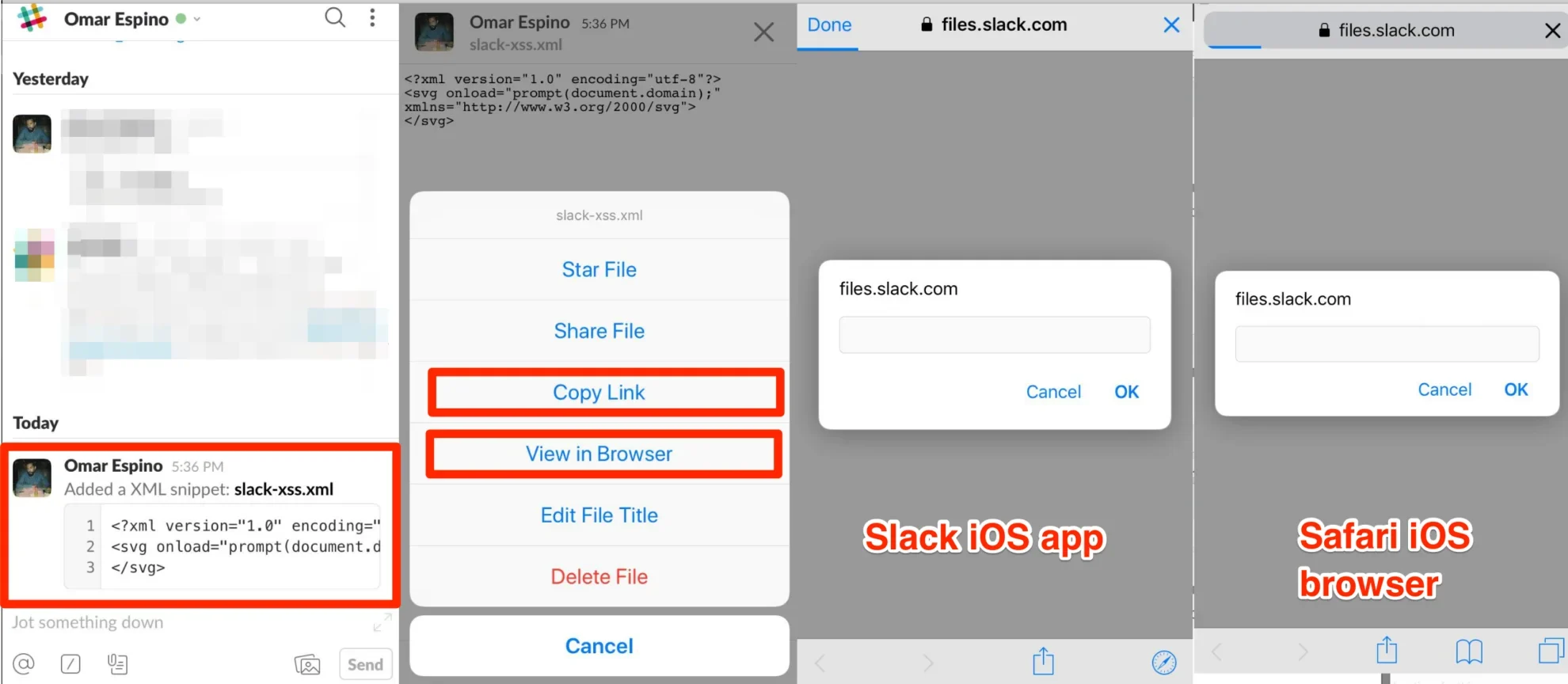
The image shows that link construction step. The important outcome, as the report stresses, is that at this point you have a "magic" link that points directly to the specially crafted XML document.
Step 4: open the link
Open the link directly in the Slack iOS app and the XSS shows up. The same works if you open the link in any iOS browser, such as Safari, Firefox, Chrome or Opera, provided you are logged in to your Slack account. The report notes it only works on iOS.
Root cause
The report does not describe the server-side handling or the response headers that files.slack.com returned for the uploaded XML file. What it establishes is the behaviour: the file is served such that the embedded script executes when the document is opened as a page, both inside the Slack iOS app and in iOS browsers, for a logged-in Slack user. Why the existing defences did not stop it is not stated in the report.
Impact
As the report puts it, stored XSS allows an attacker to embed malicious and arbitrary scripts into a vulnerable page, which are then executed when a victim views the page. In this case the page is the file on files.slack.com, and the victim must be logged in to their Slack account and viewing the link on iOS. The report does not go further into what an attacker could reach from that execution context.
Fix
The report records that the issue was fixed by the Slack team on 5 June 2019. It does not describe the change that was made.
Variants to test
These follow from the mechanics shown in the report rather than from anything Slack documented:
- Other XML-based formats that browsers can render as documents, such as SVG served with an XML content type. A positive result is the script executing when the file URL is opened directly.
- The same upload opened through every viewer path an app offers, including "raw view" and "View in Browser". A positive result is execution in the browser rather than a download prompt.
- Direct links to the file host opened in mobile browsers while authenticated. A positive result is the payload running in the file host's origin.
Hunting notes
This kind of bug tends to hide in file-hosting and attachment surfaces where uploaded content is later served back to users, especially when a mobile app hands a file URL to the system browser. During recon, the signals are a file host on its own domain, viewer options that open files in a browser, and the ability to upload XML or SVG. The researcher showed impact with a minimal payload, prompt(document.location), and a reproducible path from upload to execution, which was enough for the report to be triaged as High (7 to 8.9).
The timeline in the report:
| Date | Event |
|---|---|
| 5 Feb 2018 | Report sent to the Slack team |
| 13 Feb 2018 | Slack triaged the bug as High (7 to 8.9) |
| 14 Feb 2019 | $1,000 bounty rewarded |
| 5 Jun 2019 | Fixed by the Slack team |
The report links to Slack's Hall of Fame page.
What happened, in plain words
Slack is a messaging app that teams use to talk to each other. Besides text messages, you can upload files into a channel: documents, images, and so on. Slack stores those uploaded files on a separate web address, https://files.slack.com, and hands them back to people when they click on them.
A security researcher found that if you uploaded a particular kind of file (an XML file that contains a small drawing format called SVG), and then opened that file in a certain way on an iPhone, a small piece of code hidden inside the file would run. That is called cross-site scripting, or XSS. The code ran when the file was opened on an iPhone. The researcher reported it to Slack, Slack confirmed it was a real problem, paid a bounty (a reward for finding the bug), and later fixed it.
The researcher's own lesson from the story is simple: it is worth re-checking the basic, well-known payloads, because sometimes they still work. The title given to the finding was "XSS stored in https://files.slack.com iOS app / iOS browsers via xml/svg file".
Some words you will meet
Before the steps, a few ideas explained from zero, because the rest of the article leans on them.
- A web page and its origin. When your browser loads a page, it remembers which site the page came from. That combination of protocol, hostname and port is called the origin. Code running on one origin is normally not allowed to touch another origin. This separation is one of the main walls protecting you online.
- JavaScript. The programming language that browsers run to make pages interactive. A short piece of JavaScript can show a pop-up, read the page address, or do much more.
- XSS (cross-site scripting). A bug where an attacker manages to get their own JavaScript to run inside a page that belongs to someone else's site. The browser believes the script came from that site, so it grants it the site's trust. Think of it like someone slipping a forged letter into your company's internal mail: the recipient trusts it because it arrived in the internal tray.
- Stored XSS. The malicious script is saved somewhere on the server first (here, inside an uploaded file) and runs later, whenever a victim opens it. The alternative, reflected XSS, runs immediately from a crafted link without being saved.
- XML. A text format for structured data, built from tags in angle brackets. It is used to describe documents and data in a way both humans and machines can read.
- SVG. A way to describe images using XML tags instead of pixels. Because SVG is XML, and XML can carry a
scriptelement, an SVG file can contain code as well as shapes. - Payload. The actual piece of attack code. Here it is a single JavaScript call.
- Bounty. A reward a company pays to someone who reports a security problem responsibly instead of abusing it.
- Triaged. When a bug report is reviewed and accepted as valid, and given a severity rating.
The setup
The testing environment described in the report:
- iPhone 6 running iOS v11.2.5.
- Safari, latest version.
- Google Chrome, latest version.
- The researcher's own personal Slack workspace and account, with all test files sent to himself.
No special tooling is mentioned. The precondition for the payload to fire in a browser is that the victim is logged in to their Slack account, and the report states the behaviour only works on iOS.
Using your own workspace and sending files to yourself is a sensible habit: you never touch anyone else's data while you experiment.
Finding it
The researcher uploaded a simple XML document containing an SVG element with a script tag, then opened it through the iOS app's file viewer. The interesting part is the path the file takes: the app offers a "raw view" of the file, and from there a "View in Browser" option, which hands the file URL to a browser. That URL points directly at the crafted XML document, and the script inside it executes.
In other words, the app did not just show a preview. It gave the browser a direct address for the file, and the browser treated the file as a page to render rather than as something to download. Rendering it as a page is what lets the embedded script run.
Exploitation
Step 1: upload the crafted XML file
Log in to the Slack team space and upload an XML file with the following content to any Slack channel (the report calls the file slack-xss.xml):
<?xml version="1.0" encoding="utf-8"?>
<svg xmlns="http://www.w3.org/2000/svg">
    <script>prompt(document.location)</script>
</svg>
Line by line:
<?xml version="1.0" encoding="utf-8"?>is the XML declaration. It tells whatever reads the file that this is XML, version 1.0, and that the text is encoded as UTF-8 (a common way of storing characters). It is a label, not code.<svg xmlns="http://www.w3.org/2000/svg">opens an SVG element. Thexmlnsattribute says which vocabulary the tags belong to, here the standard SVG one. Everything until the closing tag is part of the drawing.<script>prompt(document.location)</script>is the payload.scriptis the tag that holds JavaScript. Inside it,prompt(...)asks the browser to show a small dialog box with a text field.document.locationis the address of the current page. So the whole line means: show a dialog containing the address of the page I am running in. It is a harmless way to prove that code is executing, because the dialog only appears if the script really ran.</svg>closes the SVG element.
The document is a valid XML declaration followed by an SVG root element. The script element inside the SVG carries the payload, prompt(document.location), which pops a dialog showing the document location when the file is rendered as a document rather than downloaded.
Why upload it into a channel? Because that is the normal way a file reaches Slack's file host. The file then lives at a Slack address, and a logged-in Slack user with the link can open it. That is the "stored" part: the payload is saved on Slack's servers, not carried in a link.
Step 2: open it from the iOS app
Look up the XML file in the iOS app, see the snippet, click it to open the "raw view", and then open the option "View in Browser". The XSS fires.
Why this path matters: a preview inside an app is usually sandboxed and safe. The "raw view" shows the file as it really is, and "View in Browser" passes the file's address to a full browser. The browser then loads the file from files.slack.com and, because the file is XML/SVG, renders it as a document. The script tag inside is part of that document, so it runs.
Step 3: obtain a direct link
In the "raw view" you can copy the link for quick access to that file. If you want to send the link in a Slack channel, paste the copied link and append a space plus a string, for example:
https:// files[dot]slack[dot]com/files-pri/XXXXXXXXX-XXXXXXXXX/slack-xss.xml[SPACE]xss
What this line is doing: it is the copied file address, written here with [dot] in place of dots and [SPACE] in place of a space so that the example does not turn into a clickable link in the text. The XXXXXXXXX-XXXXXXXXX parts stand for the numbers Slack puts in the address for your particular file. The report gives this as the way to send the link in a Slack channel.
The image shows that link construction step. The important outcome, as the report stresses, is that at this point you have a "magic" link that points directly to the specially crafted XML document.
Step 4: open the link
Open the link directly in the Slack iOS app and the XSS shows up. The same works if you open the link in any iOS browser, such as Safari, Firefox, Chrome or Opera, provided you are logged in to your Slack account. The report notes it only works on iOS.
The report states the payload only works when you are logged in to your Slack account.
Root cause
The report does not describe the server-side handling or the response headers that files.slack.com returned for the uploaded XML file. What it establishes is the behaviour: the file is served such that the embedded script executes when the document is opened as a page, both inside the Slack iOS app and in iOS browsers, for a logged-in Slack user. Why the existing defences did not stop it is not stated in the report; likely the file was rendered as an active document rather than forced to download or served under a policy that would block the inline script.
To unpack that last sentence for a beginner: when a server sends a file, it can add instructions called headers. One common instruction is "treat this as a download, never as a page". Another is a content security policy, which tells the browser which kinds of script it may run. The report does not say which of these was missing.
Impact
As the report puts it, stored XSS allows an attacker to embed malicious and arbitrary scripts into a vulnerable page, which are then executed when a victim views the page. In this case the page is the file on files.slack.com, and the victim must be logged in to their Slack account and viewing the link on iOS. The report does not go further into what an attacker could reach from that execution context.
The report stops at proving the script runs; it does not spell out what an attacker would do next.
Fix
The report records that the issue was fixed by the Slack team on 5 June 2019.
Variants to test
These follow from the mechanics shown in the report rather than from anything Slack documented:
- Other XML-based formats that browsers can render as documents, such as SVG served with an XML content type. A positive result is the script executing when the file URL is opened directly.
- The same upload opened through every viewer path an app offers, including "raw view" and "View in Browser". A positive result is execution in the browser rather than a download prompt.
- Direct links to the file host opened in mobile browsers while authenticated. A positive result is the payload running in the file host's origin.
Hunting notes
This kind of bug tends to hide in file-hosting and attachment surfaces where uploaded content is later served back to users, especially when a mobile app hands a file URL to the system browser. During recon, the signals are a file host on its own domain, viewer options that open files in a browser, and the ability to upload XML or SVG. The researcher showed impact with a minimal payload, prompt(document.location), and a reproducible path from upload to execution, which was enough for the report to be triaged as High (7 to 8.9).
"Recon" here just means looking around a product before testing: which addresses serve files, which buttons open them, what kinds of file are accepted. A minimal payload is a good choice because it is easy to reproduce and hard to argue with: either the dialog appears or it does not.
The timeline in the report:
| Date | Event |
|---|---|
| 5 Feb 2018 | Report sent to the Slack team |
| 13 Feb 2018 | Slack triaged the bug as High (7 to 8.9) |
| 14 Feb 2019 | $1,000 bounty rewarded |
| 5 Jun 2019 | Fixed by the Slack team |
The report links to Slack's Hall of Fame page.
Glossary
- Bounty: a reward a company pays to someone who reports a security problem responsibly.
- Browser: the program you use to open web pages, such as Safari or Chrome.
- Content security policy: an instruction a server can send telling the browser which scripts it is allowed to run.
- Cross-site scripting (XSS): a bug where an attacker's JavaScript runs inside another site's page and inherits that site's trust.
- Download prompt: the browser asking whether to save a file instead of displaying it.
- Header: an extra instruction a server sends along with a file or page.
- iOS: Apple's operating system for iPhone and iPad.
- JavaScript: the programming language browsers run to make pages interactive.
- Origin: the combination of protocol, hostname and port that identifies which site a page belongs to.
- Payload: the piece of attack code itself.
- Raw view: a viewer option that shows a file as it really is rather than as a preview.
- Recon: looking around a product to understand its parts before testing.
- Reflected XSS: XSS that runs straight from a crafted link without being saved on the server.
- Stored XSS: XSS where the malicious script is saved on the server and runs when a victim opens it later.
- SVG: an image format written in XML tags rather than pixels.
- Triaged: reviewed and accepted as a valid bug, usually with a severity rating.
- UTF-8: a common way of encoding text characters in a file.
- Workspace: a team's own area inside Slack, with its own channels and members.





