Bypassing the Current Password Protection at PayPal TechSupport Portal
The change password feature at PayPal's technical support portal did not properly validate the current password when the corresponding parameter was removed from the request. An attacker could change a victim's password without knowing the current one.

Please kindly visit this simple paper directly to looking this release (December, 2017 Article):
The full write-up lives on its author's site
It belongs to its author, so we link to it rather than copy it. The other two tabs are our own rewrites, checked against it.
Context
PayPal runs a technical support portal at https://www.paypal-techsupport.com so that its merchants can talk to PayPal and to each other about integration work, feedback on new features, and technical issues they run into. The portal lets customers register their own account with their own credentials, and like most portals it offers a "Change Password" feature.
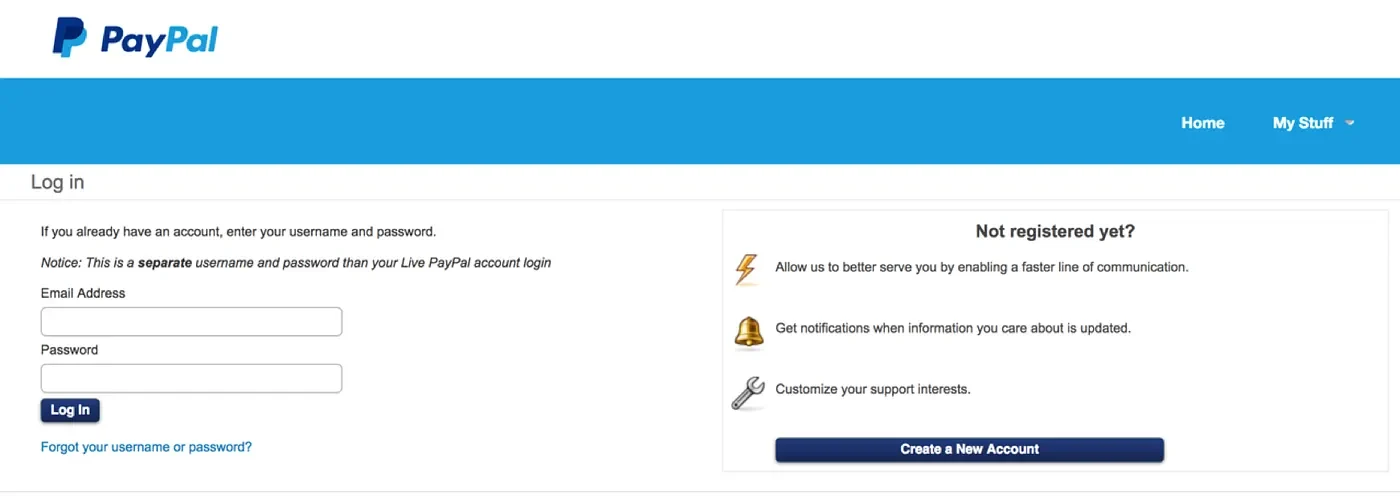
Figure 1: the PayPal Technical Support Portal.
The change password form asks the user for the current password and a new password. The feature lives at https://www.paypal-techsupport.com/app/account/change_password, and it can also be reached by clicking the "My Stuff" link at https://www.paypal-techsupport.com/app/account/overview.
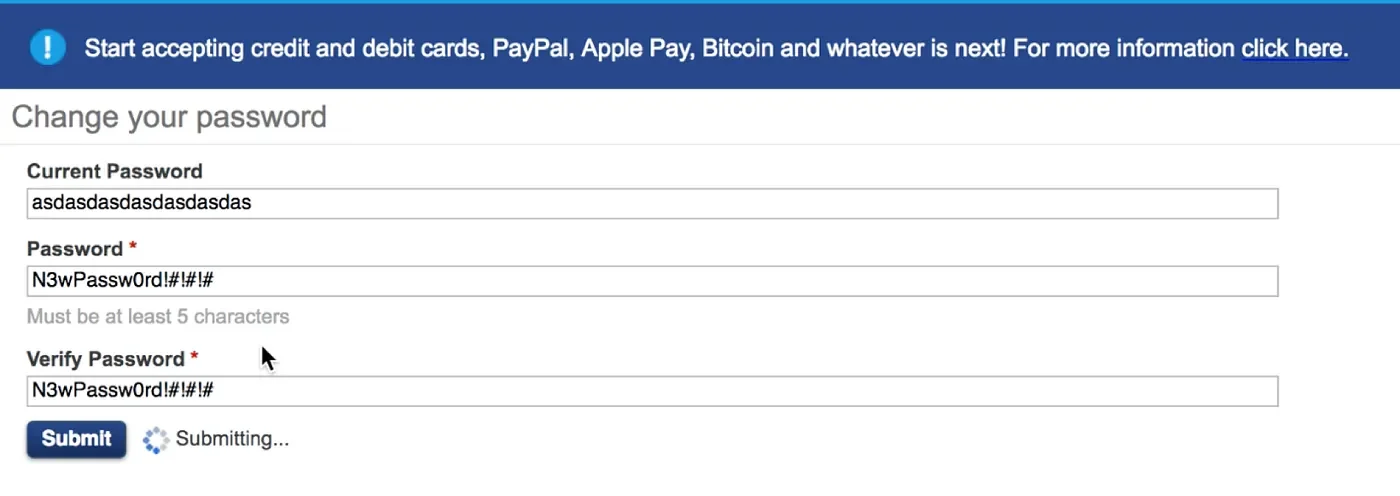
Figure 2: the Change Password feature.
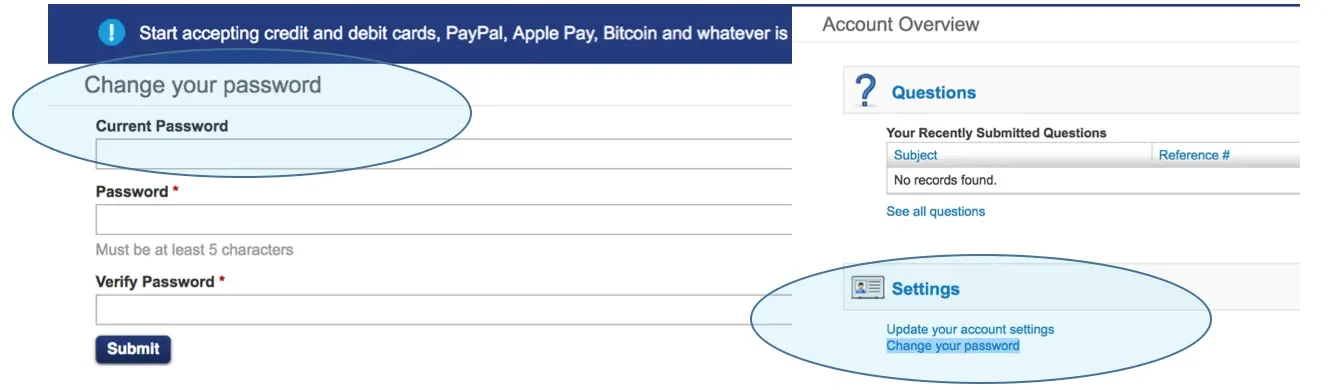
Figure 3: the Change Password feature on the left, and where to find it on the right.
The problem is that the current password check does not actually protect the account. An attacker who can get a request in front of an interceptor can strip the current password out of it and still have the password changed.
Setup
No special account setup is described beyond a normal registered portal account. The tools used are a browser and Burp Suite with the interceptor switched on. The proof of concept uses a victim account and an attacker who is able to submit the change password request, intercept it, modify it and forward it. The report does not describe how the attacker obtains a session in the victim's browser; the request shown carries the victim's cookies.
Finding it
When a user submits the change password form, the application sends a POST request to https://www.paypal-techsupport.com/ci/ajaxRequest/sendForm with several parameters. The captured request looks like this:
POST /ci/ajaxRequest/sendForm HTTP/1.1Host: www.paypal-techsupport.comAccept: */*REDACTEDContent-Length: 477Cookie: <cookies_over_here>Connection: closef_tok=[redacted]!!&form=%5B%7B%22name%22%3A%22Contact.NewPassword%22%2C%22value%22%3A%22Passw0rd!%23%25!%23%25%22%2C%22required%22%3Atrue%2C%22currentValue%22%3A%22Passw0rd!%23%25%22%7D%5D&updateIDs=%7B%22asset_id%22%3Anull%2C%22product_id%22%3Anull%2C%22serial_no%22%3Anull%2C%22i_id%22%3Anull%7D
Table 1: request for password change.
The interesting part is the form parameter, which is a URL-encoded JSON array. Decoded, the POST parameters read:
f_tok=[redacted]!!&form=[{"name":"Contact.NewPassword","value":"Passw0rd!#%!#%","required":true,"currentValue":"Passw0rd!#%"}]&updateIDs={"asset_id":null,"product_id":null,"serial_no":null,"i_id":null}
Table 2: decoded POST parameters.
Inside the form array there is a currentValue field that carries the previous password typed by the user. In the decoded example the current password is Passw0rd!#% and the new password is Passw0rd!#%!#%. The f_tok parameter is also present in the request, and updateIDs carries a set of null identifiers.
The flaw is that if the currentValue entry is removed and only the Contact.NewPassword entry is left, the application still processes the request and changes the password without validating the current password at all.
Exploitation
The PoC removes the currentValue parameter completely. "Completely" here means the encoded fragment %2C%22currentValue%22%3A%22%22, which decodes to ,"currentValue":"".
Step 1: submit a random current password
Put a random password in the "Current Password" field, for example asdasdasdasdasdasdas.
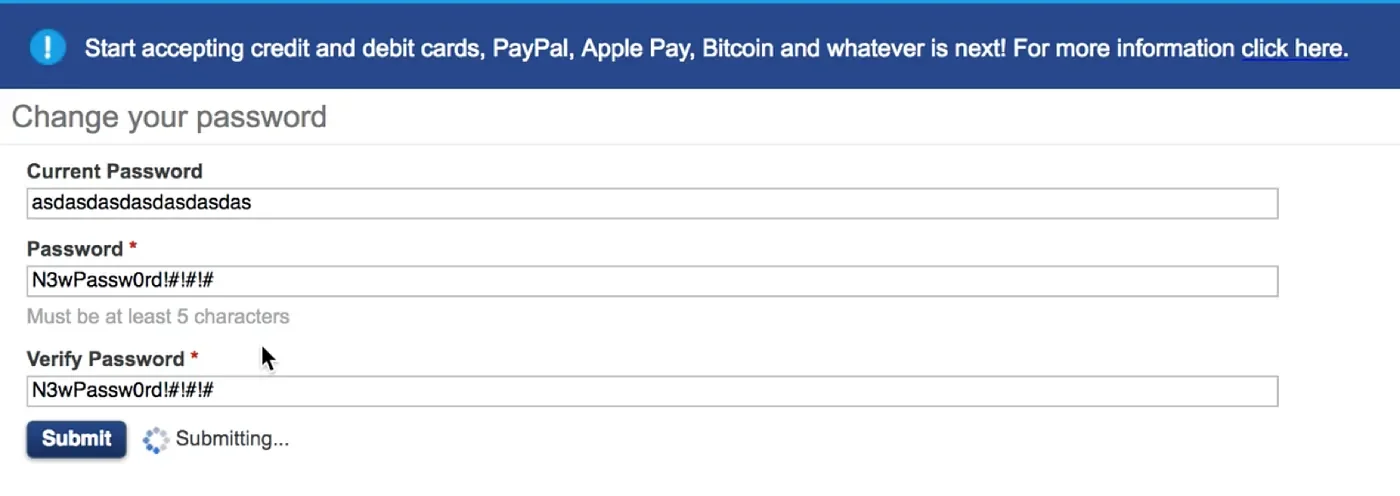
Figure 4: submitting a random old password.
Step 2: fill in the new password
Put the new password in the remaining fields, as shown in the figure above.
Step 3: turn on the interceptor
Set up the Burp Suite interceptor and switch it on so the request can be held.
Step 4: send the request
Go back to the browser and submit the form, either by clicking "submit" or by pressing the enter key.
Step 5: inspect the held request
Return to the interceptor and look at the request.
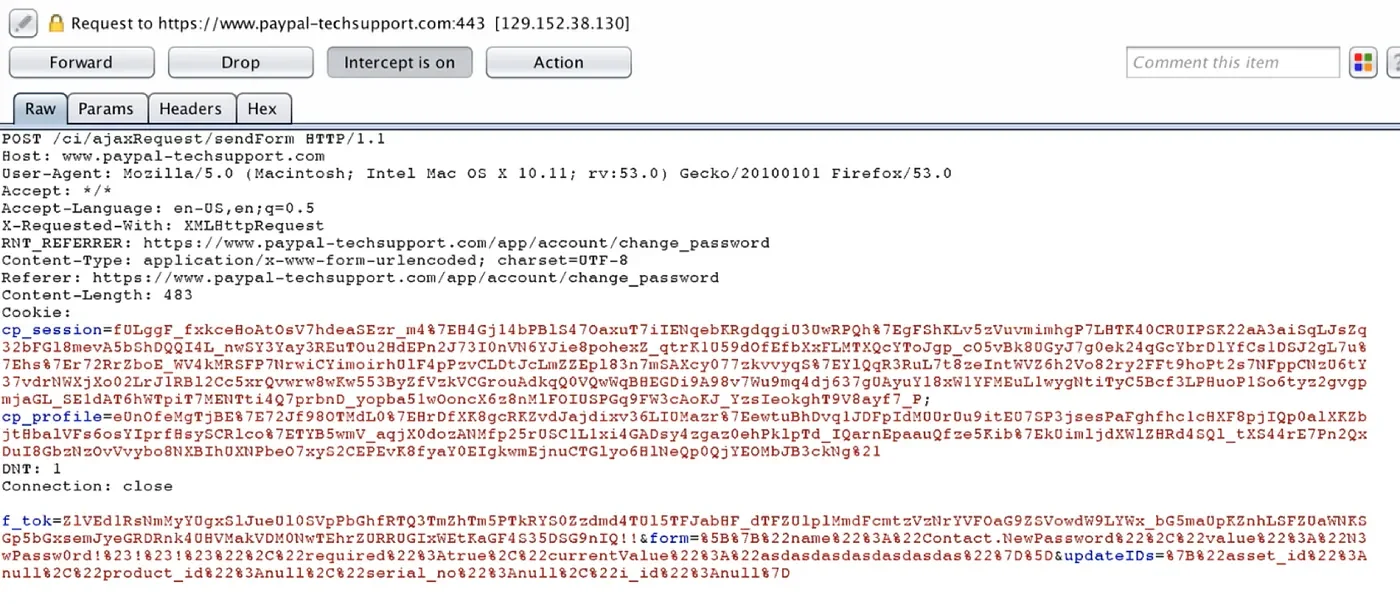
Figure 5: the request held in the interceptor.
The held request contains a currentValue parameter with the value asdasdasdasdasdasdas, visible as %2C%22currentValue%22%3A%22asdasdasdasdasdasdas%22.
Step 6: delete the current password from the request
Remove everything from %2C%22currentValue (which is ,"currentValue) through asdas%22 (which is asdas"). Decoded, the POST parameters are then left as:
&form=[{"name":"Contact.NewPassword","value":"N3wPassw0rd!#!#!#","required":true}]&updateIDs={"asset_id":null,"product_id":null,"serial_no":null,"i_id":null}
Table 3: modified POST parameters.
Step 7: forward the request
Send the modified request. The application displays an error, but that does not matter: in the backend process the password has already been changed completely.
The recorded proof of concept
The video walkthrough is available at https://www.youtube.com/watch?v=QGBpjDDs9pY.
The report lists the following details for the video:
- The victim account is
[redacted]. - The current password is
Sup3rN3wPassw0rd!#. - The attacker puts a random password,
asdasdasdasdasdasdas. - The attacker tries to change the password to
N3wPassw0rd!#!#!#. - The attacker sends the request and intercepts it.
- The attacker removes the
asdasdasdasdasdasdasvalue from the request. - The attacker removes the
%2C%22currentValue%22%3A%22%22parameter from the request. - The attacker sends the request to the server.
- The application shows an error.
- The attacker refreshes the application and is logged out automatically.
- The attacker tries to log in with the new password the attacker chose.
- The attacker logs in successfully.
Root cause
When the currentValue entry is removed, the application still processes the request and changes the password. When the field is absent, the backend skips the current password comparison and proceeds to set Contact.NewPassword. The application shows an error, but in the backend the password has already been changed.
Impact
An attacker who can submit a change password request with a victim's session can set a new password without knowing the current one, and then log in with it. The attacker can then log in with the new password. The precondition is that the attacker can send the request in the victim's session context; the report does not describe how that session is obtained.
Fix
The fix should be server-side: treat currentValue as mandatory, reject any request where it is missing or empty, and verify it against the stored password before applying Contact.NewPassword. The password change should also be committed only after the whole request has been validated, so that an error response never corresponds to a completed change.
Variants to test
- Remove the current password field from the JSON body entirely, as in this report. A positive result is a successful login with the new password.
- Send
currentValueas an empty string. A positive result is the same. - Send
currentValuewith a wrong value. A positive result is a password change despite the mismatch. - Duplicate the
currentValuekey, once with the real value and once empty, and see which one the backend uses. A positive result is a change accepted with the wrong value. - Reorder the JSON array so
Contact.NewPasswordcomes beforecurrentValue. A positive result is a change processed before validation. - Replay the modified request after the error response, in case the backend commits asynchronously. A positive result is a change that lands on the second attempt.
- Try the same removal on other account forms that carry a
currentValuefield, such as email change or security question change. A positive result is any protected field updated without the old value.
What happened, in plain words
PayPal runs a website called the Technical Support Portal. It is a place where shops and businesses that accept PayPal (PayPal calls them merchants) can log in and talk to PayPal support, and to each other, about connecting PayPal to their own websites, about new features they would like, and about technical problems they hit. The portal is at https://www.paypal-techsupport.com.
Figure 1: the PayPal Technical Support Portal.
Like most websites that let people create an account, the portal lets each merchant register with their own username and password. And like most such sites, it has a "Change Password" page, where a logged-in user can replace their old password with a new one.
Figure 2: the Change Password feature.
A change password page normally asks for the current password and the new password. Asking for the current password is a safety measure. If someone walks up to your unlocked computer, or steals your login session in some other way, they still cannot lock you out of your own account, because they do not know the old password.
That safety measure did not work here. The researcher found that the check on the current password could be skipped. If you catch the request the browser sends when you press submit, and you delete the part that carries the current password, the server still changes the password. The attacker never needs to know the old password.
Figure 3: the Change Password feature on the left, and where to find it on the right.
Some words you will meet
Before going further, a few ideas that the rest of this article depends on.
- A request is the message your browser sends to a website when you do something, such as clicking a button. It is like posting a filled-in form to an office: the envelope has an address on it, and inside is the information you want processed.
- A response is the message the website sends back, usually a page to display or an error to show.
- A POST request is a request that carries information in its body, rather than in the address. When you submit a form, that is usually a POST.
- A parameter is one named piece of information inside a request, like one field on a paper form.
name=Aliceis a parameter callednamewith the valueAlice. - A cookie is a small piece of text that a website stores in your browser after you log in, and that your browser sends back with every later request. It is how the site recognises you from one page to the next. Think of it as the wristband you get at an event: showing it lets you back in without queueing at the entrance again.
- A token is similar in spirit: a value the server hands out and expects to see again, used to prove that a request really came from the page it claims to come from.
- URL encoding is a way of writing characters that are not allowed, or are ambiguous, inside a web address or a form. A space becomes
%20, a comma becomes%2C, a double quote becomes%22, and so on. It is a translation layer: the same information, written in a safe alphabet. - JSON is a common text format for structured data, built from names and values in curly braces and square brackets.
{"name":"Alice"}is JSON meaning "there is a field called name, and its value is Alice". - An interceptor (here, Burp Suite) is a tool that sits between your browser and the website. When it is switched on, it holds each request so you can read it, edit it, and then let it continue. Think of a postal worker who is allowed to open your letter, change a line, and seal it again before delivery.
- Account takeover is the name for the outcome where an attacker ends up in control of someone else's account. Here, it means being able to log in as the victim because the attacker set a password only they know.
- Broken authorisation (sometimes called broken access control) is the general name for the class of bug where a website fails to check that the person making a request is allowed to do what the request asks. The site knows who you are, but does not properly check what you may do.
Finding the change password page
The change password page lives at https://www.paypal-techsupport.com/app/account/change_password. You can also reach it by clicking the "My Stuff" link on the overview page at https://www.paypal-techsupport.com/app/account/overview.
What the browser actually sends
When a user fills in the change password form and submits it, the browser sends a POST request to https://www.paypal-techsupport.com/ci/ajaxRequest/sendForm. The captured request looks like this:
POST /ci/ajaxRequest/sendForm HTTP/1.1Host: www.paypal-techsupport.comAccept: */*REDACTEDContent-Length: 477Cookie: <cookies_over_here>Connection: closef_tok=[redacted]!!&form=%5B%7B%22name%22%3A%22Contact.NewPassword%22%2C%22value%22%3A%22Passw0rd!%23%25!%23%25%22%2C%22required%22%3Atrue%2C%22currentValue%22%3A%22Passw0rd!%23%25%22%7D%5D&updateIDs=%7B%22asset_id%22%3Anull%2C%22product_id%22%3Anull%2C%22serial_no%22%3Anull%2C%22i_id%22%3Anull%7D
Table 1: request for password change.
Line by line, in plain words:
POST /ci/ajaxRequest/sendForm HTTP/1.1says "I am sending information to the address/ci/ajaxRequest/sendForm, using version 1.1 of the web protocol". The word POST tells the server to expect a body of data.Host: www.paypal-techsupport.comsays which website this request is for. One server can host many sites, so the request names the one it wants.Accept: */*says the browser will accept any kind of reply.REDACTEDstands where the original capture had other header lines that are not relevant here.Content-Length: 477says the body of the request is 477 bytes long, so the server knows where the body ends.Cookie: <cookies_over_here>is where the browser attaches the login cookie. This is the wristband that tells the server which account is making the request. In the real capture this would be the victim's session cookie.Connection: closeasks the server to close the connection after replying.- The last long line is the body: three parameters,
f_tok,formandupdateIDs, joined by&signs.
f_tok is a long random-looking string. form is the interesting one: it is a URL-encoded JSON array describing the fields of the form. updateIDs is a set of identifiers, all of them null (empty) in this example.
If you decode the URL encoding, the body reads:
f_tok=[redacted]!!&form=[{"name":"Contact.NewPassword","value":"Passw0rd!#%!#%","required":true,"currentValue":"Passw0rd!#%"}]&updateIDs={"asset_id":null,"product_id":null,"serial_no":null,"i_id":null}
Table 2: decoded POST parameters.
Now the structure is readable:
f_tokis unchanged, because it contained no characters that needed encoding.formis now a JSON array with one object inside it. That object has four fields:nameisContact.NewPassword,valueisPassw0rd!#%!#%,requiredistrue, andcurrentValueisPassw0rd!#%.- In other words, the browser is telling the server: "the field called Contact.NewPassword should be set to
Passw0rd!#%!#%, and by the way, the old password the user typed wasPassw0rd!#%". updateIDsis a JSON object whose four identifiers are allnull, meaning "no particular record is being referenced".
The key observation is that the old password is not sent as a separate, protected field. It is just one more entry inside the same JSON blob that the browser builds and sends. Anything the browser builds, the user (or an attacker with an interceptor) can rebuild.
The flaw
If you delete the currentValue entry from that JSON and leave only the Contact.NewPassword entry, the server still processes the request and changes the password. It never compares the old password against anything, because the old password is simply not there to compare. The check is skipped rather than failed.
This is why the bug belongs to the broken authorisation family: the server knows who is asking (the cookie tells it), but it does not enforce the rule that a password change must be accompanied by proof of the old password.
Reproducing it step by step
To reproduce the issue, the currentValue parameter has to be removed completely. "Completely" here means the encoded fragment %2C%22currentValue%22%3A%22%22, which decodes to ,"currentValue":"". That fragment is the comma, the field name, and an empty value: the whole entry, not just the value.
Step 1: type a random current password
Open the change password page and put a random password in the "Current Password" field, for example asdasdasdasdasdasdas. The point of using nonsense is to prove later that the real password was never needed: if the change succeeds with nonsense in that field, the field was not really being checked.
Figure 4: submitting a random old password.
Step 2: fill in the new password
Put the new password in the remaining fields, as shown in the figure above. This is the password the attacker wants the account to end up with.
Step 3: switch the interceptor on
Set up Burp Suite's interceptor and turn it on, so that the next request the browser sends will be held instead of delivered. Without this, the request would reach the server before it could be edited.
Step 4: send the request
Go back to the browser and submit the form, either by clicking "submit" or by pressing the enter key. The browser sends the request, and the interceptor catches it.
Step 5: look at the held request
Return to the interceptor and read the request.
Figure 5: the request held in the interceptor.
The held request contains a currentValue parameter with the value asdasdasdasdasdasdas, which appears in the encoded body as %2C%22currentValue%22%3A%22asdasdasdasdasdasdas%22. Reading that fragment in decoded form gives ,"currentValue":"asdasdasdasdasdasdas": the comma that separates it from the previous field, the field name, and the nonsense value.
Step 6: delete the current password from the request
Remove everything from %2C%22currentValue (which is ,"currentValue) through asdas%22 (which is asdas"). In other words, delete the whole entry, including the comma in front of it, so that the JSON remains valid and simply has one fewer field. Decoded, the body is then left as:
&form=[{"name":"Contact.NewPassword","value":"N3wPassw0rd!#!#!#","required":true}]&updateIDs={"asset_id":null,"product_id":null,"serial_no":null,"i_id":null}
Table 3: modified POST parameters.
What changed: the form array now has a single object, with name, value and required only. There is no currentValue at all. The new password in this example is N3wPassw0rd!#!#!#. Everything else, including f_tok and updateIDs, is untouched.
Step 7: forward the request
Send the modified request on to the server. The application displays an error. That error is misleading: by the time it is shown, the backend has already changed the password. The change is done; only the message on screen is wrong.
The recorded proof of concept
The full walkthrough is recorded in a video at https://www.youtube.com/watch?v=QGBpjDDs9pY.
The report lists these details for the video:
- The victim account is
[redacted]. - The current password is
Sup3rN3wPassw0rd!#. - The attacker puts a random password,
asdasdasdasdasdasdas. - The attacker tries to change the password to
N3wPassw0rd!#!#!#. - The attacker sends the request and intercepts it.
- The attacker removes the
asdasdasdasdasdasdasvalue from the request. - The attacker removes the
%2C%22currentValue%22%3A%22%22parameter from the request. - The attacker sends the request to the server.
- The application shows an error.
- The attacker refreshes the application and is logged out automatically.
- The attacker tries to log in with the new password the attacker chose.
- The attacker logs in successfully.
Step 10 is worth pausing on: the attacker is logged out after the change, but step 12 shows the new password works. It is not a sign that the change failed. Step 12 is the proof that it worked: the new password, chosen by the attacker, opens the account.
Why it works
When the currentValue entry is removed, the application still processes the request and changes the password. When the field is missing, the backend skips the comparison against the stored password and goes straight to setting Contact.NewPassword. The application shows an error, but in the backend the password has already been changed.
What an attacker could do with it
An attacker who can send a change password request inside a victim's session can set a new password without knowing the old one, and then log in with it. The attacker can then log in with the new password. The precondition is that the attacker can send the request in the victim's session context; the report does not describe how that session is obtained.
How it should be fixed
The report does not state what PayPal changed. The fix belongs on the server: treat currentValue as mandatory, reject any request where it is missing or empty, and check it against the stored password before applying Contact.NewPassword. The password change should also be saved only after the whole request has been validated, so that an error response never corresponds to a completed change.
Related things worth testing
These are variations on the same idea, useful for learning how to probe a check like this:
- Remove the current password field from the JSON body entirely, as in this report. A positive result is a successful login with the new password.
- Send
currentValueas an empty string. A positive result is the same. - Send
currentValuewith a wrong value. A positive result is a password change despite the mismatch. - Duplicate the
currentValuekey, once with the real value and once empty, and see which one the backend uses. A positive result is a change accepted with the wrong value. - Reorder the JSON array so
Contact.NewPasswordcomes beforecurrentValue. A positive result is a change processed before validation. - Replay the modified request after the error response, in case the backend saves asynchronously. A positive result is a change that lands on the second attempt.
- Try the same removal on other account forms that carry a
currentValuefield, such as email change or security question change. A positive result is any protected field updated without the old value.
What the researcher took away from it
The lesson the researcher draws is to spend time reading other people's research. The trick in this report was inspired by two earlier pieces of work: Henry Hoggard's PayPal 2FA Bypass and Suleman Malik's password validation bypass at Blackberry. The report says the trick was inspired by both pieces of research.
Timeline
The initial bounty was sent on August 10th, 2017, and the final bounty was sent on October 27th, 2017.
Glossary
- Account takeover: a situation where an attacker gains control of someone else's account, for example by setting a password only they know.
- Authorisation: the process of checking that a user is allowed to perform the action they are attempting. Broken authorisation means that check is missing or flawed.
- Burp Suite: a tool that sits between a browser and a website so that requests can be inspected, paused and edited.
- Cookie: a small piece of text stored by the browser for a website, sent back with later requests, commonly used to keep a user logged in.
- CSRF token: a random value placed in a form or request to make it hard for another site to forge a request on the user's behalf. The
f_tokparameter plays this role here. - GET / POST: two kinds of HTTP request. GET asks for a page; POST sends data to the server, as a form submission does.
- HTTP: the protocol browsers and websites use to exchange requests and responses.
- Interceptor: a feature of a proxy tool that pauses requests so they can be read and modified before being forwarded.
- JSON: a text format for structured data, using curly braces for objects and square brackets for lists.
- Parameter: one named piece of data in a request, such as
name=Alice. - Payload: the part of a request that carries the data being sent, or, in security testing, the crafted data used to trigger a bug.
- Proof of concept (PoC): a demonstration that a vulnerability can actually be exploited, usually with exact steps.
- Request: the message a browser sends to a website when the user does something.
- Response: the message a website sends back to the browser.
- Session: the period during which a website remembers a logged-in user, usually tied to a cookie.
- Token: a value issued by a server and expected back later, used to prove a request came from a legitimate place.
- URL encoding: a way of writing characters that are not safe in a web address or form, such as
%20for a space or%22for a double quote. - Vulnerability: a weakness in a website or program that allows it to be made to behave in a way its designers did not intend.