CVE-2026–18963: Breaking Down Keycloak’s reset-credentials Auth Bypass
Keycloak's reset-credentials flow let an unauthenticated attacker who knew only a victim's username reach the set-new-password step without ever using the emailed reset link. The missing check in the email authenticator's action method, combined with a loosely scoped screen-state flag, allowed takeover of the victim's account.
 Published on medium.com
Linux
The full write-up lives on its author's site
It belongs to its author, so we link to it rather than copy it. The other two tabs are our own rewrites, checked against it.
Context
Keycloak is an identity and access management server. Its reset-credentials flow is the forgot-password feature: a user who cannot sign in supplies a username, Keycloak emails a reset link, and following that link lets the user set a new password. The flow is built from Authenticator implementations in keycloak-services, and the two that matter here are:
reset-credentials-choose-user  → org.keycloak.authentication.authenticators.resetcred.ResetCredentialChooseUser
reset-credential-email         → org.keycloak.authentication.authenticators.resetcred.ResetCredentialEmail
CVE-2026-18963 is an authentication bypass in that flow. An unauthenticated attacker who knows only a victim's username can reach the "set a new password" step without ever clicking the emailed reset link. The CVSS 3.1 score is 9.1 (Critical), vector AV:N/AC:L/PR:N/UI:N/S:U/C:H/I:H/A:N, classified as CWE-640 (Weak Password Recovery Mechanism). It was reported by James Paremain, disclosed on 2026-08-18 by Red Hat and on 2026-08-19 as keycloak#51833, and fixed in 26.7.2, 26.6.6, 26.4.15 (LTS) and 26.8.0 by commit [redacted] (PR #51844).

Setup
The attack needs no account of its own and no interaction from the victim. The precondition is knowledge of the victim's username, on a realm where the reset-credentials flow is reachable. The analysis below is a source-level walk through the pre-patch code and the patch diff, function by function.
A quick primer on Keycloak's Authenticator model
Every step of a Keycloak flow (login, forgot-password and so on) is an Authenticator with two entry points:
authenticate(context): called when the step is first shown. It can render a form, or callcontext.success()immediately if the step's condition is already satisfied.action(context): called when the user submits that form (POST). It validates the submission and callscontext.success()orcontext.failure().
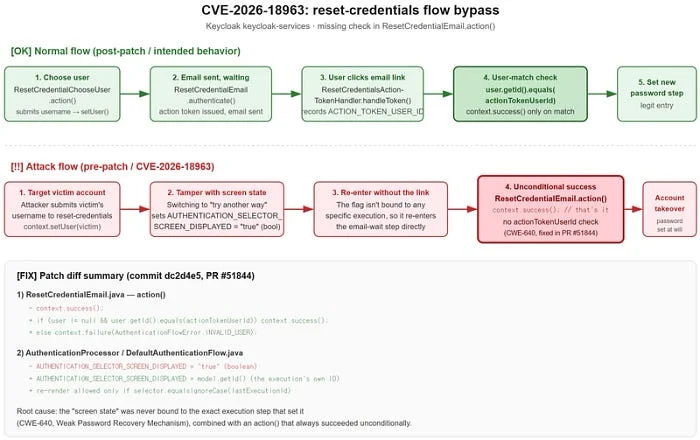
Clicking the link in the reset email re-enters the same flow through a separate Action Token path (ResetCredentialsActionTokenHandler), which stamps the auth session with DefaultActionTokenKey.ACTION_TOKEN_USER_ID. That value, meaning "the link that was clicked was minted for this exact user ID", is the only signal that email verification actually happened. The whole bug comes down to one place where that signal stopped being checked.
Finding it
Two separate weaknesses combine. First, ResetCredentialEmail.action() contains no verification at all, while its sibling authenticate() performs the ACTION_TOKEN_USER_ID comparison. Second, the "try another way" screen-switch logic in DefaultAuthenticationFlow.java stores a session-wide boolean that says a selector screen was shown, without recording which execution showed it, and later pairs that flag with whatever execution happens to be current. Combining "a selector screen was shown at some point" with "whatever execution is current right now" assumes the two always refer to the same step, an assumption the code never enforced. Together they let a request aimed at the reset-credential-email execution be routed straight to its action() method, skipping authenticate() entirely.
Exploitation
Step 1: Pin the target account
The attacker submits the victim's username to the first authenticator:
UserModel user = context.getSession().users().getUserByUsername(realm, username);
...
context.getAuthenticationSession().setAuthNote(RESET_CREDENTIAL_USER_CHOSEN, "true");
context.setUser(user);
context.success();
Nothing has been emailed yet and nothing has been verified. This only sets a pointer: "this session's target is this user." That pointer is trusted downstream without re-verification, which is the precondition for everything that follows.
Step 2: The legitimate path stalls here
The flow moves to reset-credential-email. For a normal user this is where it stops until they check their inbox:
String actionTokenUserId = authenticationSession.getAuthNote(DefaultActionTokenKey.ACTION_TOKEN_USER_ID);
if (actionTokenUserId != null && Objects.equals(user.getId(), actionTokenUserId)) {
    context.success();
    return;
}
...
context.getSession().getProvider(EmailTemplateProvider.class).
...
sendPasswordReset(link, expirationInMinutes);
context.forkWithSuccessMessage(new FormMessage(Messages.EMAIL_SENT));
At this point ACTION_TOKEN_USER_ID is not in the session yet. The attacker cannot read the victim's inbox, so authenticate() alone stops them cold. The interesting bug lives in the sibling method, action().
Step 3: Tamper with the screen state to reroute past authenticate()
Keycloak decides which Authenticator handles an incoming request using an execution URL parameter. The second bug is in the "try another way" screen-switch logic in DefaultAuthenticationFlow.java:
if (inputData.containsKey("tryAnotherWay")) {
    processor.getAuthenticationSession()
             .setAuthNote(AuthenticationProcessor.AUTHENTICATION_SELECTOR_SCREEN_DISPLAYED, "true");
    return createSelectAuthenticatorsScreen(model);
}
...
public Response processFlow() {
    if (Boolean.parseBoolean(processor.getAuthenticationSession()
            .getAuthNote(AUTHENTICATION_SELECTOR_SCREEN_DISPLAYED))) {
        String lastExecutionId = ...getAuthNote(CURRENT_AUTHENTICATION_EXECUTION);
        if (lastExecutionId != null) {
            return createSelectAuthenticatorsScreen(executionModel);
        }
    }
}
AUTHENTICATION_SELECTOR_SCREEN_DISPLAYED is a session-wide "true"/"false" string with zero information about which execution set it. CURRENT_AUTHENTICATION_EXECUTION, meanwhile, keeps getting overwritten as the flow progresses. By tripping this screen switch, an attacker could get a request aimed at the reset-credential-email execution routed straight to its action() method, skipping authenticate() entirely.
Step 4: The actual hole in ResetCredentialEmail.action()
Here is the whole pre-patch method:
@Override
public void action(AuthenticationFlowContext context) {
    context.success();
}
One line. It does not check whether ACTION_TOKEN_USER_ID exists, and it does not check whether it matches the current user. The exact comparison authenticate() performs a few lines above it is simply absent from action(). However this method got invoked, it always said yes. Combined with step 3's rerouting, the entire "wait for the email" gate becomes a formality.
Step 5: Account takeover
The flow advances to the set-new-password screen. Since context.setUser(victim) from step 1 is still in effect, the attacker types in a new password for an account they never proved control of.
Root cause
Two mistakes combine. ResetCredentialEmail.action() unconditionally calls context.success(), so the email-verification signal (ACTION_TOKEN_USER_ID) is never consulted on the submission path. And the selector-screen state is a bare boolean that is not bound to the execution that set it, so the flow can be made to treat a stale screen state as belonging to the current execution. The authenticate() check was the only defence, and step 3 routes around it. Either fix alone would have closed most of the path; together they close it completely.
Impact
An unauthenticated attacker who knows only a victim's username can set a new password on that account, with no prior credentials and no user interaction from the victim. That is why the issue scored 9.1 (Critical). The attack applies to realms where the reset-credentials flow is reachable.
Fix
ResetCredentialEmail.java gets the missing check back where it belongs:
public void action(AuthenticationFlowContext context) {
-    context.success();
+    UserModel user = context.getUser();
+    String actionTokenUserId = context.getAuthenticationSession().getAuthNote(DefaultActionTokenKey.ACTION_TOKEN_USER_ID);
+    if (user != null && user.getId().equals(actionTokenUserId)) {
+        context.success();
+    } else {
+        context.failure(AuthenticationFlowError.INVALID_USER);
+    }
}
AuthenticationProcessor.java and DefaultAuthenticationFlow.java bind the screen-state flag to the execution that actually set it:
-+ public static final String AUTHENTICATION_SELECTOR_SCREEN_DISPLAYED = "auth.selector.screen.rendered";
if (inputData.containsKey("tryAnotherWay")) {
-    ...setAuthNote(AUTHENTICATION_SELECTOR_SCREEN_DISPLAYED, "true");
+    ...setAuthNote(AUTHENTICATION_SELECTOR_SCREEN_DISPLAYED, model.getId());
    return createSelectAuthenticatorsScreen(model);
}
...
public Response processFlow() {
-    if (Boolean.parseBoolean(...getAuthNote(AUTHENTICATION_SELECTOR_SCREEN_DISPLAYED))) {
-        String lastExecutionId = ...getAuthNote(CURRENT_AUTHENTICATION_EXECUTION);
-        if (lastExecutionId != null) { ... return createSelectAuthenticatorsScreen(executionModel); }
+    String selector = ...getAuthNote(AUTHENTICATION_SELECTOR_SCREEN_DISPLAYED);
+    if (selector != null) {
+        String lastExecutionId = ...getAuthNote(CURRENT_AUTHENTICATION_EXECUTION);
+        if (selector.equalsIgnoreCase(lastExecutionId)) {
+            ... return createSelectAuthenticatorsScreen(executionModel);
+        } else {
+            ...removeAuthNote(AUTHENTICATION_SELECTOR_SCREEN_DISPLAYED);
+        }
+    }
}
Instead of a bare "true", the note now stores the exact execution ID that displayed the selector screen, and re-entry only re-renders it when that ID matches the current execution byte-for-byte. Screen state and execution step are now bound 1:1.
Affected and fixed versions:
| Stream | Vulnerable | Fixed |
|---|---|---|
| 26.7.x | < 26.7.2 | 26.7.2 |
| 26.6.x | < 26.6.6 | 26.6.6 |
| 26.4.x (LTS) | < 26.4.15 | 26.4.15 |
| 26.8.x | < 26.8.0 | 26.8.0 |
26.5.x and earlier are out of support and will not get a backport, so upgrading to a supported stream is the only real fix. If you cannot patch immediately, disabling resetPasswordAllowed on the realm removes the entry point (step 1) at the cost of users' self-service password reset.
- Other flows with a selector screen. Look for any flow that uses the "try another way" selector and then re-enters
processFlow(). A positive result is a request that reaches a later execution'saction()without that execution'sauthenticate()having run. - Authenticators whose
action()trusts session state set earlier. Compare eachaction()with itsauthenticate()and check whether the verification performed in the latter is repeated in the former. A positive result is anaction()that callscontext.success()without re-checking the note or token thatauthenticate()required. - Reset flows on other products. Test whether the set-new-password step can be reached with only a username and a manipulated
executionparameter. A positive result is a password-change form rendered for an account whose reset email was never followed. - Realm configuration. Check whether
resetPasswordAllowedis enabled and whether the reset-credentials flow is reachable unauthenticated. A positive result is a reachable forgot-password entry point on a realm you are authorised to test.
What happened, in plain words
Keycloak is a piece of software that companies run on their own servers to handle logins for their other applications. Think of it as a very large, very strict receptionist: it holds the list of who works where, checks people's badges at the door, and hands out temporary visitor passes.
One of the receptionist's jobs is the "I forgot my password" desk. You tell it your username, it sends an email to the address on file, and the link in that email lets you choose a new password. The whole point is that only the person who can open that inbox should be able to change the password.
CVE-2026-18963 is a bug in that desk. An attacker who knows nothing except a victim's username could walk up to the "choose a new password" screen and set one, without ever opening the victim's email. No password of their own, no trick played on the victim, no clicking required from anyone. That is why it was rated 9.1 out of 10 on CVSS, a scoring system for how serious a security flaw is, and labelled Critical.
The rest of this article walks through the bug the way an attacker would meet it, then looks at the code change that fixed it. Every code snippet below is the real source from the report.
The basics you need first
What an authenticator is
Keycloak does not hard-code its login screens. Instead it builds a flow: an ordered list of steps, where each step is a small plug-in called an Authenticator. A login flow might be "ask for username, then ask for password, then ask for a one-time code". The forgot-password flow is another such list.
Each Authenticator has two entry points, and the difference between them is the heart of this story:
authenticate(context)runs when the step is first shown. It can draw a form on screen, or, if the step's condition is already satisfied, it can callcontext.success()and move straight on.action(context)runs when the user submits that form, that is, when the browser sends the filled-in form back. It is supposed to check the submission and then callcontext.success()(carry on) orcontext.failure()(stop).
A useful comparison: authenticate() is the bouncer looking at your invitation before letting you into the room, and action() is the same bouncer checking your ticket again when you come back from the bar. If the second check is missing, the first one does not help much.
The forgot-password flow chains two of these steps:
reset-credentials-choose-user  → org.keycloak.authentication.authenticators.resetcred.ResetCredentialChooseUser
reset-credential-email         → org.keycloak.authentication.authenticators.resetcred.ResetCredentialEmail
Line by line: the first line names the step where the user types a username, and points at the Java class that implements it, ResetCredentialChooseUser. The second line names the step that deals with the email, implemented by ResetCredentialEmail. The arrow means "then". So the flow is: pick a user, then handle the email.
What a token is, and what the email link carries
When you click the link in a password-reset email, you are not just opening a web page. The link contains a long, unguessable string called an action token. A token here is like a cloakroom ticket: it is a small piece of data that proves something, in this case that whoever holds it received the email that Keycloak sent.
Keycloak handles that click through a separate path, ResetCredentialsActionTokenHandler, which writes a note into the user's current session. A session is the server's memory of one ongoing visit, kept alive by a cookie in your browser. The note is stored under the name DefaultActionTokenKey.ACTION_TOKEN_USER_ID, and its value is the ID of the user the link was created for.
That note is the only evidence in the whole flow that the email was actually received. Everything that follows hinges on one place where that evidence stopped being checked.
Step 1: Pin the target account
The attacker starts by typing the victim's username into the first screen of the forgot-password flow. Behind that screen, this code runs:
UserModel user = context.getSession().users().getUserByUsername(realm, username);
...
context.getAuthenticationSession().setAuthNote(RESET_CREDENTIAL_USER_CHOSEN, "true");
context.setUser(user);
context.success();
Line by line:
UserModel user = context.getSession().users().getUserByUsername(realm, username);looks the username up in the user database and gets back a user record. A realm is Keycloak's word for an isolated tenant, a separate world of users and settings, so the lookup is scoped to the right one.context.getAuthenticationSession().setAuthNote(RESET_CREDENTIAL_USER_CHOSEN, "true");writes a sticky note on the session saying "a user has been chosen". Session notes are just key/value pairs the server keeps for the duration of the visit.context.setUser(user);records which user this session is now aimed at.context.success();tells the flow to move to the next step.
Why this matters: at this point nothing has been emailed and nothing has been verified. The code has only set a pointer saying "this session's target is this user". The rest of the flow trusts that pointer without asking again, and that trust is the precondition for everything that follows.
Step 2: The legitimate path stalls here
The flow now arrives at reset-credential-email. For an honest user, this is where it waits until they open their inbox:
String actionTokenUserId = authenticationSession.getAuthNote(DefaultActionTokenKey.ACTION_TOKEN_USER_ID);
if (actionTokenUserId != null && Objects.equals(user.getId(), actionTokenUserId)) {
    context.success();
    return;
}
...
context.getSession().getProvider(EmailTemplateProvider.class).
...
sendPasswordReset(link, expirationInMinutes);
context.forkWithSuccessMessage(new FormMessage(Messages.EMAIL_SENT));
Line by line:
String actionTokenUserId = authenticationSession.getAuthNote(DefaultActionTokenKey.ACTION_TOKEN_USER_ID);reads the note that the email link would have written. If the user has not clicked the link, this is empty.if (actionTokenUserId != null && Objects.equals(user.getId(), actionTokenUserId)) {asks two questions: is there a note at all, and does the user ID in it match the user this session is aimed at? Both must be true.context.success(); return;if both are true, the email was genuinely received for this exact account, so the flow moves on immediately.- The
...lines are elided code, not shown in the report. sendPasswordReset(link, expirationInMinutes);sends the email containing the reset link, which expires after a number of minutes.context.forkWithSuccessMessage(new FormMessage(Messages.EMAIL_SENT));shows the user a "we have sent you an email" message and pauses the flow there.
So authenticate() does its job. The attacker cannot read the victim's inbox, the note is absent, and the flow stops. The interesting bug is in the sibling method, action(), which is what runs when a form is submitted rather than when it is shown.
Step 3: Tamper with the screen state to reroute past authenticate()
Keycloak decides which step should handle an incoming request by looking at a parameter in the URL called execution. A URL parameter is the part after the question mark; it is a value the browser sends to the server.
The second weakness is in the "try another way" logic, the link on a login screen that lets you pick a different sign-in method. It lives in DefaultAuthenticationFlow.java:
if (inputData.containsKey("tryAnotherWay")) {
    processor.getAuthenticationSession()
             .setAuthNote(AuthenticationProcessor.AUTHENTICATION_SELECTOR_SCREEN_DISPLAYED, "true");
    return createSelectAuthenticatorsScreen(model);
}
...
public Response processFlow() {
    if (Boolean.parseBoolean(processor.getAuthenticationSession()
            .getAuthNote(AuthenticationProcessor.AUTHENTICATION_SELECTOR_SCREEN_DISPLAYED))) {
        String lastExecutionId = ...getAuthNote(CURRENT_AUTHENTICATION_EXECUTION);
        if (lastExecutionId != null) {
            return createSelectAuthenticatorsScreen(executionModel);
        }
    }
}
Line by line:
if (inputData.containsKey("tryAnotherWay")) {checks whether the incoming request contains a field namedtryAnotherWay, which is what the "try another way" link sends..setAuthNote(AuthenticationProcessor.AUTHENTICATION_SELECTOR_SCREEN_DISPLAYED, "true");writes a session note saying "a chooser screen has been shown". Note what it does not record: which step showed it.return createSelectAuthenticatorsScreen(model);draws the chooser screen listing the alternative methods.- In
processFlow(),Boolean.parseBoolean(...)reads that note and turns the text"true"into the boolean value true. String lastExecutionId = ...getAuthNote(CURRENT_AUTHENTICATION_EXECUTION);reads a second note, which holds the ID of whichever step is current. That note is overwritten every time the flow moves on.if (lastExecutionId != null) { return createSelectAuthenticatorsScreen(executionModel); }if there is a current step, redraw the chooser screen.
The problem is a mismatch of meaning. AUTHENTICATION_SELECTOR_SCREEN_DISPLAYED is a session-wide "true" or "false" with no information about which step set it. CURRENT_AUTHENTICATION_EXECUTION keeps changing as the flow progresses. The code combines "a chooser screen was shown at some point" with "whatever step is current right now", and silently assumes the two always refer to the same step. Nothing in the code enforces that assumption.
A comparison: imagine a hotel where the front desk writes "guest has been shown the lift" on a shared whiteboard, and later a cleaner reads that note together with whatever room number happens to be written next to it. The note was true once, but it says nothing about the room now.
By tripping this screen switch, an attacker could get a request aimed at the reset-credential-email step routed straight to its action() method, skipping authenticate() entirely. In other words, the bouncer who checks invitations is walked past, and the request lands directly on the second check.
Step 4: The actual hole in ResetCredentialEmail.action()
Here is the entire pre-patch method:
@Override
public void action(AuthenticationFlowContext context) {
    context.success();
}
Line by line:
@Overrideis a Java annotation meaning this method replaces one defined in a parent class. It is bookkeeping, not logic.public void action(AuthenticationFlowContext context) {declares the method that runs when the form is submitted.AuthenticationFlowContextis the bundle of session, user and helpers the step is given.context.success();declares the step passed.}closes the method.
That is all of it. It does not check whether ACTION_TOKEN_USER_ID exists, and it does not check whether it matches the current user. The exact comparison that authenticate() performs a few lines above is simply absent from action(). However this method got invoked, it always said yes.
Combine that with the rerouting from step 3 and the entire "wait for the email" gate becomes a formality. The gate is still painted on the door, but the door is not locked.
Step 5: Account takeover
The flow advances to the set-new-password screen. Because context.setUser(victim) from step 1 is still in effect, the session still points at the victim's account. The attacker types a new password of their choosing, and the server accepts it for an account they never proved any control over.
That is the whole attack: a username, a rerouted request, and a submitted form.
Why it worked: the root cause
Two mistakes combine.
ResetCredentialEmail.action()unconditionally callscontext.success(), so the email-verification signal (ACTION_TOKEN_USER_ID) is never consulted on the submission path.- The chooser-screen state is a bare boolean that is not tied to the step that set it, so the flow can be made to treat an old screen state as belonging to the current step.
The authenticate() check was the only defence, and step 3 routes around it. Either fix alone would have closed most of the path; together they close it completely.
Who was affected and how bad it was
An unauthenticated attacker, meaning someone with no account and no credentials, who knows only a victim's username, can set a new password on that account. The victim does not have to do anything. That is why the issue scored 9.1 (Critical) on CVSS 3.1, with the vector AV:N/AC:L/PR:N/UI:N/S:U/C:H/I:H/A:N. In plain terms, that vector says the attack works over the network, needs no special conditions, needs no privileges, needs no user interaction, affects only this one system, and has a high impact on both confidentiality and integrity, with no impact on availability.
The classification is CWE-640, Weak Password Recovery Mechanism: a catalogue entry for exactly this family of mistake, where the recovery route is weaker than the login it is meant to restore. It was reported by James Paremain, disclosed on 2026-08-18 by Red Hat and on 2026-08-19 as keycloak#51833, and fixed in 26.7.2, 26.6.6, 26.4.15 (LTS) and 26.8.0 by commit [redacted] (PR #51844).
The attack applies to realms where the reset-credentials flow is reachable.
The fix, in two parts
Part one: put the missing check back
ResetCredentialEmail.java gets the verification it was missing:
public void action(AuthenticationFlowContext context) {
-    context.success();
+    UserModel user = context.getUser();
+    String actionTokenUserId = context.getAuthenticationSession().getAuthNote(DefaultActionTokenKey.ACTION_TOKEN_USER_ID);
+    if (user != null && user.getId().equals(actionTokenUserId)) {
+        context.success();
+    } else {
+        context.failure(AuthenticationFlowError.INVALID_USER);
+    }
}
Line by line, with - marking the removed line and + the added ones:
- The old body was a single
context.success();, now removed. UserModel user = context.getUser();fetches the user this session is aimed at.String actionTokenUserId = ...getAuthNote(DefaultActionTokenKey.ACTION_TOKEN_USER_ID);reads the note that only a genuine email-link click would have written.if (user != null && user.getId().equals(actionTokenUserId)) {requires both that a user exists and that its ID matches the note.context.success();only then does the step pass.} else { context.failure(AuthenticationFlowError.INVALID_USER); }otherwise the flow stops with an invalid-user error.
This is the same comparison authenticate() already made, now repeated on the submission path. The bouncer checks the ticket on the way back from the bar too.
Part two: tie the screen state to the step that set it
AuthenticationProcessor.java and DefaultAuthenticationFlow.java are changed so the flag records which step displayed the chooser:
-+ public static final String AUTHENTICATION_SELECTOR_SCREEN_DISPLAYED = "auth.selector.screen.rendered";
This line declares the constant that names the session note. The -+ prefix in the diff is how the report presents it; the substance is that the note's name is defined in one place as auth.selector.screen.rendered.
if (inputData.containsKey("tryAnotherWay")) {
-    ...setAuthNote(AUTHENTICATION_SELECTOR_SCREEN_DISPLAYED, "true");
+    ...setAuthNote(AUTHENTICATION_SELECTOR_SCREEN_DISPLAYED, model.getId());
    return createSelectAuthenticatorsScreen(model);
}
...
public Response processFlow() {
-    if (Boolean.parseBoolean(...getAuthNote(AUTHENTICATION_SELECTOR_SCREEN_DISPLAYED))) {
-        String lastExecutionId = ...getAuthNote(CURRENT_AUTHENTICATION_EXECUTION);
-        if (lastExecutionId != null) { ... return createSelectAuthenticatorsScreen(executionModel); }
+    String selector = ...getAuthNote(AUTHENTICATION_SELECTOR_SCREEN_DISPLAYED);
+    if (selector != null) {
+        String lastExecutionId = ...getAuthNote(CURRENT_AUTHENTICATION_EXECUTION);
+        if (selector.equalsIgnoreCase(lastExecutionId)) {
+            ... return createSelectAuthenticatorsScreen(executionModel);
+        } else {
+            ...removeAuthNote(AUTHENTICATION_SELECTOR_SCREEN_DISPLAYED);
+        }
+    }
}
Line by line:
- When
tryAnotherWayis present, the old code stored the text"true". The new code storesmodel.getId(), the ID of the step that actually displayed the chooser. - In
processFlow(), the old code read the note and parsed it as a boolean. The new code reads it as a string,selector. - It still reads the current step's ID into
lastExecutionId. - The old check was only "is there a current step?". The new check is
selector.equalsIgnoreCase(lastExecutionId): does the step that showed the chooser match the step that is current now? - If they match, the chooser is redrawn, as before.
- If they do not match,
removeAuthNote(AUTHENTICATION_SELECTOR_SCREEN_DISPLAYED);deletes the stale note, so it cannot be reused later.
Instead of a bare "true", the note now stores the exact step ID that displayed the chooser screen, and re-entry only redraws it when that ID matches the current step byte-for-byte. Screen state and flow step are now bound one to one. The whiteboard note now carries the room number it was written for.
Which versions are affected
| Stream | Vulnerable | Fixed |
|---|---|---|
| 26.7.x | < 26.7.2 | 26.7.2 |
| 26.6.x | < 26.6.6 | 26.6.6 |
| 26.4.x (LTS) | < 26.4.15 | 26.4.15 |
| 26.8.x | < 26.8.0 | 26.8.0 |
A stream here is a line of releases that receive updates together; LTS means Long Term Support, a stream kept alive for longer. 26.5.x and earlier are out of support and will not get a backport, meaning the fix will not be ported back to them, so upgrading to a supported stream is the only real fix.
If you cannot patch immediately, disabling resetPasswordAllowed on the realm removes the entry point from step 1, at the cost of users' self-service password reset. In receptionist terms, you close the forgot-password desk entirely.
Where else to look
- Other flows with a chooser screen. Look for any flow that uses the "try another way" selector and then re-enters
processFlow(). A positive result is a request that reaches a later step'saction()without that step'sauthenticate()having run. - Authenticators whose
action()trusts session state set earlier. Compare eachaction()with itsauthenticate()and check whether the verification done in the first is repeated in the second. A positive result is anaction()that callscontext.success()without re-checking the note or token thatauthenticate()required. - Reset flows on other products. Test whether the set-new-password step can be reached with only a username and a manipulated
executionparameter. A positive result is a password-change form rendered for an account whose reset email was never followed. - Realm configuration. Check whether
resetPasswordAllowedis enabled and whether the reset-credentials flow is reachable without signing in. A positive result is a reachable forgot-password entry point on a realm you are authorised to test.
Glossary
- Action token: a long, unguessable value inside a password-reset email link that proves the recipient received that email.
action(): the method of an Authenticator that runs when a form is submitted, and is supposed to validate the submission.authenticate(): the method of an Authenticator that runs when a step is first shown, and can either draw a form or pass the step immediately.- Authentication bypass: a flaw that lets someone get past a check that was supposed to stop them.
- Authenticator: a plug-in that implements one step of a Keycloak flow, such as asking for a username.
- Boolean: a value that is either true or false.
- Cookie: a small piece of data a browser stores for a site and sends back with each request, often used to keep a session alive.
- CVE: Common Vulnerabilities and Exposures, a public identifier given to a specific security flaw.
- CVSS: Common Vulnerability Scoring System, a 0 to 10 scale for the severity of a flaw, with a vector string describing the conditions.
- CWE: Common Weakness Enumeration, a catalogue of categories of software mistake; CWE-640 is Weak Password Recovery Mechanism.
- Execution: in Keycloak, one step of a flow, identified by an ID that also appears as a URL parameter telling the server which step a request is for.
- Flow: an ordered list of steps that together make up a process such as login or password reset.
- Fork: to pause a flow and show a message while waiting for something, here waiting for the user to open their email.
- Keycloak: an identity and access management server, software that organisations run to handle logins for their applications.
- LTS: Long Term Support, a release stream maintained with fixes for longer than usual.
- Parameter: a value sent in a URL after the question mark, which the user can change.
- Realm: Keycloak's term for an isolated tenant with its own users and settings.
resetPasswordAllowed: a Keycloak realm setting that switches self-service password reset on or off.- Session: the server's memory of one ongoing visit by one browser, kept alive by a cookie.
- Session note: a key/value pair stored on a session for the duration of the visit.
- Token: a small piece of data that proves something, such as that an email was received.
- Unauthenticated: not signed in, with no account or credentials.
- Vector (CVSS): the string of letters describing how a flaw can be exploited and what it affects.



