CVE-2026–38526 Deep Dive: Unrestricted PHP Upload RCE in Krayin CRM
The TinyMCE image upload endpoint in Krayin CRM did not validate uploaded files, so an authenticated low-privileged user could upload a PHP file that was stored in a publicly executable directory and then run it by requesting its URL. This allowed arbitrary command execution with the web server's privileges.
 Published on medium.com
Cybersecurity
The full write-up lives on its author's site
It belongs to its author, so we link to it rather than copy it. The other two tabs are our own rewrites, checked against it.
Context
Krayin CRM is the target of this write-up, and the vulnerable feature is its rich-text editing path. Krayin uses the TinyMCE editor for content such as email templates and notes. When a user pastes or inserts an image into the editor, the browser uploads that image through an API endpoint. That endpoint is the subject of CVE-2026-38526.
The flaw is an unrestricted file upload that leads to remote code execution. The report rates it with the CVSS vector AV:N/AC:L/PR:L/UI:N/S:C/C:H/I:H/A:H: network reachable, low attack complexity, low privileges required, no user interaction, with high impact on confidentiality, integrity and availability. In plain terms, as the author puts it: if you can log in at all, you can take over the server.
Setup
The precondition is an authenticated account. The report stresses that no admin role is required: a low-privileged authenticated user can reach the upload endpoint. No other tooling, version numbers or configuration details are given.
Finding it
The problem is stated directly: the upload endpoint never checks whether the uploaded file is actually an image. An attacker can submit a .php file instead of a .jpg, and the server stores it in a directory the web server will execute.
The report walks through a typical vulnerable Laravel upload handler, reconstructed from the pattern described in the public advisory and PoC. It is presented as a reconstruction of the pattern described in the public advisory and proof of concept, not a verbatim copy of the proprietary source file, but it captures the logic flaw:
public function upload(Request $request){ $file = $request->file('file'); $fileName = $file->getClientOriginalName(); $path = $file->storeAs('tinymce', $fileName, 'public'); return response()->json([ 'location' => asset('storage/' . $path), ]);}
The line-by-line reasoning:
$request->file('file')reads the uploaded file straight from the request. No validation has happened yet.getClientOriginalName()trusts whatever filename the browser sent. If an attacker names the fileshell.php, the server accepts that name verbatim. This is a textbook case of trusting client-controlled input that should never be trusted server-side.- Laravel's
storage/app/publicdisk is symlinked to the public web root viaphp artisan storage:link. Anything saved there is reachable by URL. That is fine for actual images, but a.phpfile dropped in this directory becomes a script the web server will execute on request, not just serve. - The response returns the exact path of the uploaded file, so the attacker does not need to guess it.
Three layers of defence are missing, any one of which would have stopped the attack:
- No extension allowlist: nothing restricts uploads to
.jpg,.png,.gifand similar. - No MIME or content validation: the
Content-Typeheader is either trusted blindly or not checked at all. - Storage in an executable path: uploaded files land under the PHP-interpreted web root instead of an isolated, non-executable location.
Exploitation
The attack proceeds in four stages.
Step 1: Authenticate
A low-privileged authenticated user, with no admin role required, can reach /admin/tinymce/upload.
Step 2: Upload the payload
The payload is sent as a multipart request:
POST /admin/tinymce/upload HTTP/1.1Host: targetCookie: <authenticated session>Content-Type: multipart/form-data; boundary=----boundary------boundaryContent-Disposition: form-data; name="file"; filename="shell.php"Content-Type: image/jpeg<?php ?>------boundary--
The Content-Type: image/jpeg header is entirely attacker-controlled. If the server trusts this header instead of inspecting the file's actual bytes (its magic number), the spoofed header is enough to get through.
Step 3: Stored without validation
The file lands in a public directory such as storage/tinymce/ under its original filename, and the server returns the file's public URL in the response.
Step 4: Code execution
A plain GET request to that URL is enough. The web server sees the .php extension, hands the file to the PHP interpreter, and the embedded code runs with the web server's privileges, typically www-data.
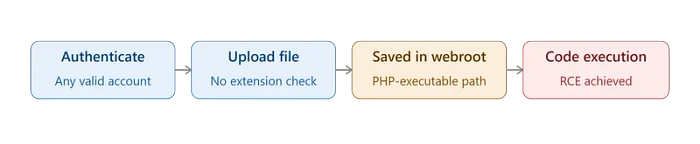
Authenticate → Upload file → Saved in webroot → Code execution (valid (no ext. (PHP-exec. (RCE account) check) path) achieved)
The upload itself is only a file write. The vulnerability exists because the write lands in a location the server will execute. That is the essence of CWE-434.
Root cause
In the reconstructed handler, the client-supplied filename is stored under the public disk without validation, and the resulting URL is returned. Because the public disk is symlinked into the web root, the stored file is both reachable and, for a .php extension, executable. The missing extension allowlist, the missing content inspection and the executable storage location are the three defects; the report notes that any one of them would have stopped the attack.
Impact
The report lists the following consequences:
- Arbitrary command execution with web server process privileges
- Exposure of
.envand other config files, including database credentials - Potential for full system compromise
- Given that this is CRM software, customer PII and sales data are directly at risk
- An estimated ~2,700 internet-facing instances are believed affected
Fix
The report gives both immediate mitigations and a code fix.
| Category | Action |
|---|---|
| Immediate | Block or restrict /admin/tinymce/upload at the WAF or reverse proxy |
| Short term | Disable PHP execution in upload directories (.htaccess with php_flag engine off, or an Nginx location block denying .php execution) |
| Code fix | Enforce both an extension allowlist and real MIME/content inspection |
| Structural | Never trust the client filename; generate a random name (UUID) server-side |
| Structural | Move uploads outside the web root, or to an isolated object store (e.g. S3) |
| Access control | Restrict upload capability to the roles that actually need it |
| Monitoring | Alert on unusual access to, or execution from, upload directories |
The report shows a corrected version of the handler, roughly like this:
public function upload(Request $request){ $request->validate([ 'file' => 'required|image|mimes:jpg,jpeg,png,gif,webp|max:4096', ]);$file = $request->file('file'); $fileName = Str::uuid() . '.' . $file->getClientOriginalExtension(); $path = $file->storeAs('tinymce', $fileName, 'public'); return response()->json([ 'location' => asset('storage/' . $path), ]);}
The report states that the mimes: rule validates the file's actual signature (magic bytes), not just its extension or Content-Type header, so header spoofing alone can no longer bypass it.
Variants to test
- Other TinyMCE-backed upload endpoints. Look for image or file upload routes used by rich-text editors in other Laravel applications. A positive result is a stored file whose returned URL serves attacker-controlled content, or executes it if the extension is interpreted.
- Client filename trust. Submit a file with a dangerous extension and a benign
Content-Type. A positive result is the server storing the file under the supplied name and returning its path. - Public disk symlink. Check whether
storage/app/publicis linked into the web root and whether the web server executes PHP from it. A positive result is aGETto the returned URL running the embedded code. - Header-only validation. Send a PHP payload with
Content-Type: image/jpegand no valid image bytes. A positive result is acceptance despite the missing magic number. - Role boundaries. Repeat the upload with the lowest-privileged account available. A positive result is success without any administrative role.
What happened, in plain words
Krayin CRM is a piece of software that companies use to keep track of their customers: contact details, sales conversations, notes, email templates and so on. It runs on a web server, and staff use it through a normal browser, the same way you would use any website.
One of its features is a rich-text editor called TinyMCE. A rich-text editor is the box you type into when you want formatting, bold text, bullet lists and pictures, like the compose window of a webmail service. In Krayin it is used for things such as email templates and notes. When someone pastes or inserts an image into that editor, the browser does not put the picture inside the text. Instead it quietly sends the image file to the server through an API endpoint, and the server saves it and hands back a link to it.
An API endpoint is simply a web address that a program (here, the browser running the editor) talks to, rather than a page a person clicks. You can think of it as a service counter: you hand something over at the counter, and the counter hands something back. The endpoint in question is the one that receives those pasted images.
The flaw, tracked as CVE-2026-38526, is that this counter never checks whether what it receives is actually a picture. You can hand it a .php file instead of a .jpg, and the server will store it in a folder that the web server is willing to run as a program. A .php file is a script written in the PHP programming language, which is the language Krayin itself is built in. Normally a web server either shows a file to visitors or runs it; for .php files it runs them. So an attacker who can log in can leave a small program on the server and then trigger it, which means running their own code on the company's machine. That is called remote code execution, usually shortened to RCE.
The report rates the flaw with the CVSS vector AV:N/AC:L/PR:L/UI:N/S:C/C:H/I:H/A:H. CVSS is a standard scoring system for security bugs; the vector is the shorthand list of reasons behind the score. Read piece by piece it says: reachable over the network (AV:N), easy to carry out (AC:L), needs only a low-privileged login (PR:L), needs no action from any victim (UI:N), can affect components beyond the vulnerable one (S:C), and has a high impact on confidentiality, integrity and availability (C:H/I:H/A:H). Confidentiality means keeping data secret, integrity means keeping it correct, and availability means keeping the service working. In the author's own words: if you can log in at all, you can take over the server.
Before you start: what the attacker needs
The precondition described is an account on the Krayin system. The report is explicit that it does not have to be an administrator account: an ordinary, low-privileged user can reach the upload endpoint. Think of a shared office: you do not need the master key, any key that opens the front door is enough.
No other tools, software versions or server settings are described.
Finding the problem
The report states the problem directly: the upload endpoint never checks whether the uploaded file is really an image. An attacker can send a .php file instead of a .jpg, and the server stores it in a directory that the web server will execute.
To show why, the report walks through a typical vulnerable upload handler written in Laravel. Laravel is a popular framework, meaning a ready-made toolkit, for building web applications in PHP. A handler is the piece of code that deals with one particular request, here the request carrying the uploaded file. The snippet is presented as a reconstruction of the pattern described in the public advisory and proof of concept, not a word-for-word copy of the real product's file, but it captures the logic flaw:
public function upload(Request $request){ $file = $request->file('file'); $fileName = $file->getClientOriginalName(); $path = $file->storeAs('tinymce', $fileName, 'public'); return response()->json([ 'location' => asset('storage/' . $path), ]);}
Line by line, in plain words:
$request->file('file')takes the uploaded file straight out of the incoming request. Nothing has been checked yet: no size limit, no type check, nothing. It is like a receptionist accepting a parcel without looking at the label.getClientOriginalName()asks the browser what the file was called and believes the answer. The browser is under the attacker's control, so if the attacker names the fileshell.php, the server accepts that name exactly as given. This is a textbook case of trusting input from the client side, which should never be trusted on the server side. The client is the visitor's browser; the server is the machine that owns the data. Anything the client says can be a lie.storeAs('tinymce', $fileName, 'public')saves the file in a folder calledtinymceon Laravel'spublicdisk, under the name from step 2. This is the real killer. Laravel'sstorage/app/publicdisk is linked into the public web root with the commandphp artisan storage:link, which makes a shortcut so that anything saved there can be reached by a normal web address. That is fine for genuine images, but a.phpfile dropped in this directory becomes a script the web server will execute when someone requests it, not merely a file it hands out.- The last lines build a response containing
location, the exact web address of the saved file, and send it back as JSON. JSON is a simple text format for structured data, the kind of thing programs exchange with each other. Because the address is returned, the attacker does not even have to guess where the file landed.
Three layers of defence are missing, and any single one of them would have stopped the attack:
- No extension allowlist. An allowlist is a list of things that are permitted, and everything else is refused. Here nothing restricts uploads to
.jpg,.png,.gifand similar image extensions. - No MIME or content validation. MIME type is the label that says what kind of file something is, such as
image/jpegfor a JPEG photo. The server either believes that label blindly or does not look at it at all, instead of inspecting the file's actual bytes. - Storage in an executable path. Uploaded files land under the part of the site the PHP engine is allowed to run, instead of an isolated place where files can only be stored and downloaded, never executed.
The attack, step by step
The attack proceeds in four stages.
Step 1: Log in
A low-privileged authenticated user, with no admin role required, can reach /admin/tinymce/upload. In a URL, the part after the site name is the path, and it points at a particular feature on the server. Here it is the upload endpoint used by the editor. The attacker first logs in normally, because the endpoint sits behind the login, and then talks to that address.
Step 2: Send the malicious file
The payload, meaning the malicious content the attacker wants to plant, is sent as a multipart request. Multipart is the format browsers use when a form includes a file: the request is split into parts, each with its own little label, one part for each field and one for the file itself.
POST /admin/tinymce/upload HTTP/1.1Host: targetCookie: <authenticated session>Content-Type: multipart/form-data; boundary=----boundary------boundaryContent-Disposition: form-data; name="file"; filename="shell.php"Content-Type: image/jpeg<?php ?>------boundary--
What each piece means:
POST /admin/tinymce/upload HTTP/1.1is the request line: POST is the method used to send data to the server (as opposed to GET, which asks for a page), the path is the upload endpoint, andHTTP/1.1is the version of the web protocol being spoken.Host: targetsays which website the request is for.targetis a placeholder for the real site name.Cookie: <authenticated session>carries the login. A cookie is a small piece of text that a website stores in your browser and that your browser sends back with every request, so the site can recognise you between page loads. When you log in, the server gives your browser a cookie that proves who you are; that is your session. Anyone holding that cookie is treated as you, which is why it is sensitive and why it is shown here as a placeholder rather than a real value.Content-Type: multipart/form-data; boundary=----boundaryannounces that the body is split into parts, and gives the separator string, the boundary, used to mark where one part ends and the next begins. Without it the server could not tell the parts apart.Content-Disposition: form-data; name="file"; filename="shell.php"starts the part for the file field. The field is calledfile, matching what the handler reads, and the filename isshell.php. That name is the attacker's choice, and it is the name the server will keep.Content-Type: image/jpeginside the part is the label claiming the file is a JPEG photo. This label is entirely under the attacker's control. If the server trusts this header instead of inspecting the file's actual bytes, its magic number, the spoofed label is enough to get through. A magic number is a short fixed sequence of bytes at the start of a file that identifies its real format, a bit like the first letters of a word telling you which language it is in.<?php ?>is the body of the planted file: the opening and closing markers of a PHP script. In the report it appears with nothing between them, so the snippet shows where the attacker's code would go rather than any particular command.- The final
------boundary--line closes the last part and ends the request body.
Step 3: The server stores it without checking
The file lands in a public directory such as storage/tinymce/ under its original filename, and the server returns the file's public web address in the response. Nothing along the way asked whether the content was really an image. The attacker now knows exactly where their file sits and how to reach it.
Step 4: The code runs
A plain GET request to that address is enough. GET is the ordinary method a browser uses when you open a link. The web server sees the .php extension, hands the file to the PHP interpreter, the component that reads and runs PHP code, and the embedded code runs with the web server's privileges, typically the www-data user. A user account on a server is an identity with certain permissions; www-data is the conventional low-privilege account that the web server runs as on many Linux systems. The attacker's code now runs with whatever access that account has.
Authenticate → Upload file → Saved in webroot → Code execution (valid (no ext. (PHP-exec. (RCE account) check) path) achieved)
This diagram is the whole chain in one line: a valid account logs in, uploads a file, the file is saved in the web root (the folder the web server serves and, for PHP, executes), and code execution is achieved. The upload itself is only a file write. The vulnerability exists because the write lands in a location the server will execute. That is the essence of CWE-434, a catalogue entry for unrestricted upload of a file with a dangerous type.
Why it happens
The handler takes the filename supplied by the client, stores the file on the public disk without any validation, and returns the resulting address. Because the public disk is linked into the web root, the stored file is both reachable and, with a .php extension, executable. The missing extension allowlist, the missing content inspection and the executable storage location are the three defects, and the report notes that any one of them would have stopped the attack.
What an attacker could do with it
The report lists the following consequences:
- Arbitrary command execution with the web server process's privileges. Arbitrary means the attacker chooses which commands run, not just the one in the uploaded file.
- Exposure of
.envand other configuration files, including database credentials. A.envfile is a plain text file where an application keeps its settings and secrets, such as the username and password for its database. The database is where the customer records live. - Potential for full system compromise, meaning control of the whole server rather than one feature.
- Because this is CRM software, customer personal data and sales data are directly at risk.
- An estimated ~2,700 internet-facing instances are believed affected. Internet-facing means reachable from the open internet rather than only from inside a company network.
How to fix it
The report gives both quick mitigations and a code fix.
| Category | Action |
|---|---|
| Immediate | Block or restrict /admin/tinymce/upload at the WAF or reverse proxy |
| Short term | Disable PHP execution in upload directories (.htaccess with php_flag engine off, or an Nginx location block denying .php execution) |
| Code fix | Enforce both an extension allowlist and real MIME/content inspection |
| Structural | Never trust the client filename; generate a random name (UUID) server-side |
| Structural | Move uploads outside the web root, or to an isolated object store (e.g. S3) |
| Access control | Restrict upload capability to the roles that actually need it |
| Monitoring | Alert on unusual access to, or execution from, upload directories |
A few of those terms need unpacking. A WAF, web application firewall, is a filter that sits in front of a site and blocks requests matching known-bad patterns. A reverse proxy is the server that receives visitors first and passes requests on to the application behind it. .htaccess is a small configuration file that many Apache web servers read per folder, and php_flag engine off in it tells the server not to run PHP in that folder. Nginx is another web server, and a location block is a rule in its configuration for a particular path. A UUID is a long random identifier, effectively impossible to guess, so a file saved under one cannot be found by guessing its name. S3 is Amazon's cloud file storage service, kept separate from the web server. Roles are the permission groups in the application, such as administrator or sales agent.
The report shows a corrected version of the handler, roughly like this:
public function upload(Request $request){ $request->validate([ 'file' => 'required|image|mimes:jpg,jpeg,png,gif,webp|max:4096', ]);$file = $request->file('file'); $fileName = Str::uuid() . '.' . $file->getClientOriginalExtension(); $path = $file->storeAs('tinymce', $fileName, 'public'); return response()->json([ 'location' => asset('storage/' . $path), ]);}
Line by line:
$request->validate([...])runs a set of checks before anything is saved. If any check fails, the request is rejected and the file never reaches the disk.'file' => 'required|image|mimes:jpg,jpeg,png,gif,webp|max:4096'is the rule list for the field namedfile.requiredmeans the field must be present.imagemeans the content must really be an image.mimes:jpg,jpeg,png,gif,webplimits it to those formats.max:4096caps the size at 4096 kilobytes, about 4 MB.$file = $request->file('file')then reads the file, but only after the checks have passed.$fileName = Str::uuid() . '.' . $file->getClientOriginalExtension()builds a new name: a random UUID, a dot, and only the extension taken from the original name. The rest of the attacker's chosen name is thrown away, soshell.phpcannot keep its name.storeAs('tinymce', $fileName, 'public')saves the file under that new name, and the response returns its address as before.
The report states that the mimes: rule validates the file's actual signature, its magic bytes, not just its extension or Content-Type header, so spoofing the header alone can no longer get past it.
Other places to look
The report lists variants worth testing, which are useful because the same mistake tends to repeat:
- Other TinyMCE-backed upload endpoints. Look for image or file upload routes used by rich-text editors in other Laravel applications. A positive result is a stored file whose returned address serves attacker-controlled content, or executes it if the extension is interpreted.
- Client filename trust. Submit a file with a dangerous extension and a harmless
Content-Type. A positive result is the server storing the file under the supplied name and returning its path. - Public disk symlink. Check whether
storage/app/publicis linked into the web root and whether the web server executes PHP from it. A positive result is aGETto the returned address running the embedded code. - Header-only validation. Send a PHP payload with
Content-Type: image/jpegand no valid image bytes. A positive result is acceptance despite the missing magic number. - Role boundaries. Repeat the upload with the lowest-privileged account available. A positive result is success without any administrative role.
Glossary
- API endpoint: a web address that programs talk to, rather than a page a person clicks, to send or fetch data.
- Allowlist: a list of things that are permitted, with everything else refused.
- Boundary: in a multipart request, the separator string that marks where one part ends and the next begins.
- Cookie: a small piece of text a website stores in your browser and your browser sends back with each request, used to recognise you.
- CRM: customer relationship management software, used to store customer details, notes and sales information.
- CVSS: a standard scoring system for security bugs; the vector is the shorthand list of reasons behind a score.
- CWE-434: a catalogue entry for the mistake of accepting an uploaded file of a dangerous type without restriction.
.envfile: a plain text file where an application keeps settings and secrets such as database credentials.- Extension: the part of a filename after the last dot, such as
.phpor.jpg, which usually says what kind of file it is. - GET: the ordinary web request method a browser uses when you open a link.
- Handler: the piece of application code that deals with one particular request.
.htaccess: a per-folder configuration file read by many Apache web servers.- JSON: a simple text format for structured data exchanged between programs.
- Laravel: a popular framework, a ready-made toolkit, for building web applications in PHP.
- Magic number (magic bytes): a short fixed sequence of bytes at the start of a file that identifies its real format.
- MIME type: the label saying what kind of file something is, such as
image/jpeg. - Multipart: the request format used when a form includes a file, splitting the request into labelled parts.
- Nginx: a widely used web server, configured with blocks such as
location. - PHP: the programming language Krayin and many web applications are written in.
- PHP interpreter: the component that reads and runs PHP code.
- POST: the web request method used to send data to the server.
- Public disk / web root: the storage area Laravel links into the folder the web server serves, and that folder itself.
- Remote code execution (RCE): running the attacker's own code on someone else's server.
- Reverse proxy: the server that receives visitors first and passes requests on to the application behind it.
- Role: a permission group in an application, such as administrator or sales agent.
- Session: the logged-in state a site keeps for you, usually tied to a cookie.
- Symlink: a shortcut that makes one folder appear inside another.
- TinyMCE: the rich-text editor used by Krayin for email templates and notes.
- UUID: a long random identifier, effectively impossible to guess.
- WAF (web application firewall): a filter in front of a site that blocks requests matching known-bad patterns.
www-data: the conventional low-privilege user account a web server runs as on many Linux systems.


