I mean, IDOR is NOT only about others ID
A free user could bypass the three-list limit by manipulating the bookmark_id parameter to rename, add icons to, and share locked lists. The attacker could use and share locked lists as if they were regular lists.

Hi folks! In this write-up, I’m going to talk about the vulnerability I found to broaden your perspective on IDORs.
The full write-up lives on its author's site
It belongs to its author, so we link to it rather than copy it. The other two tabs are our own rewrites, checked against it.
Context
The target is a company running a private bug bounty programme, referred to in the write-up as "redacted". The feature in question is the list (bookmark list) creation and management function. Free users can create up to three lists at the same time. If a user sends requests to create more than three lists, the site lets them choose three lists and locks the fourth and any further lists. Locked lists cannot be managed, added to or removed from, shared, or renamed.
The researcher's point is that IDOR is not only about reaching other people's objects. Here every list and every identifier in the attack scenario belonged to the same user, and an IDOR still occurred, because the lock state was not enforced on the management endpoints.
Setup
The researcher used the browser DevTools and an intercepting proxy (the write-up refers to the Repeater and to Intercept), and tried the IDOR from a second account of their own. No versions, endpoints or hostnames are given. The precondition is a free account, since the three-list limit and the locking behaviour apply to non-premium users.
Finding it
The researcher first submitted a request to create a list and reviewed it.
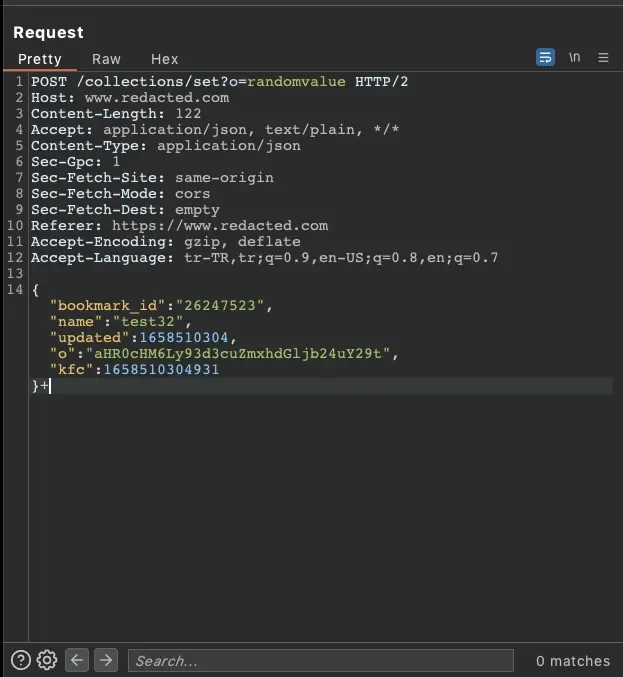
The first thing that caught their attention was a possible IDOR in the bookmark_id parameter. Two things stopped the obvious attack: they could not see the bookmark_id value of other users, and the id values were not increasing numerically. They still tried the IDOR from their second account and received 403 Forbidden.
That is why they turned to the locking condition described above: the question was no longer whether they could reach another user's list, but whether they could still manage their own locked lists through IDOR.
Exploitation
Step 1: multiply the lists
The researcher created a list, sent the request to the repeater, and resubmitted it under different names to multiply the lists. The goal was to see whether the locked lists could still be reached via IDOR.
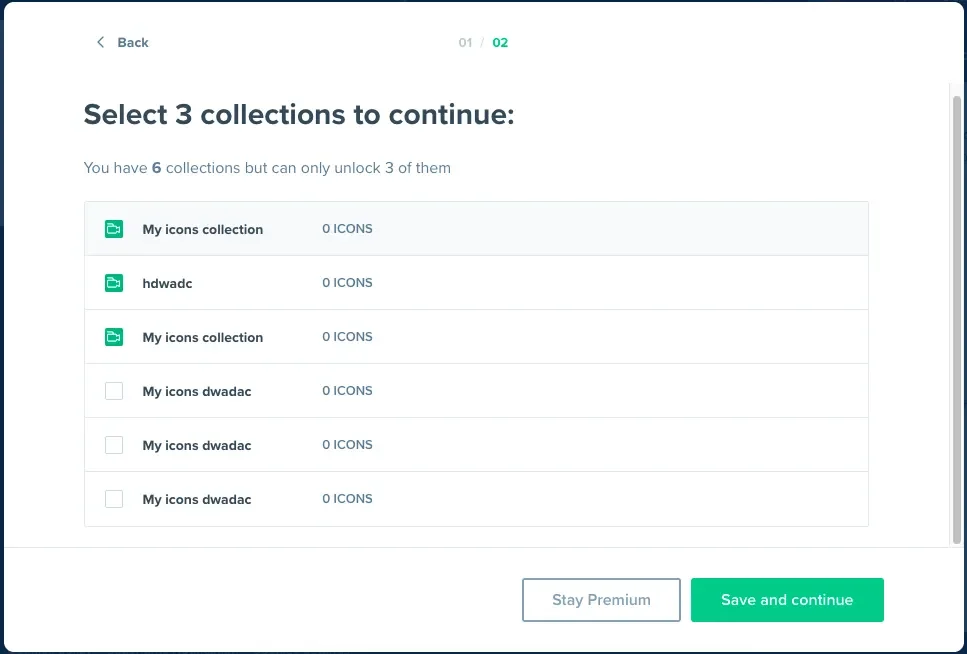
Back on the site, a message appeared saying that, since the account was not premium, only three lists were allowed.
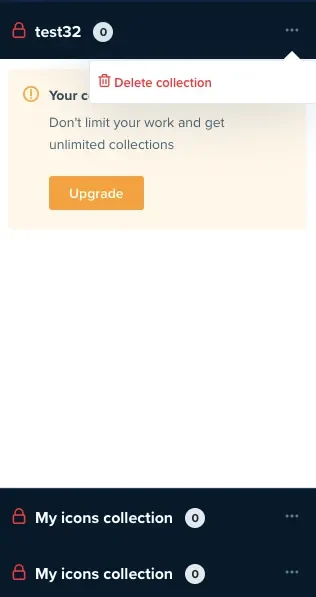
They selected three lists, and the other three were locked automatically.
Step 2: confirm the lock is enforced in the UI
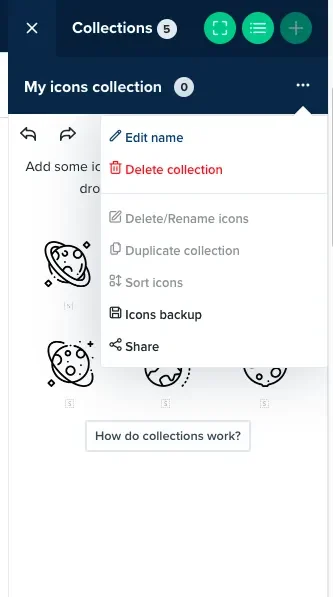
They tried to manipulate a locked list without intercepting requests, and it did not work. They could not add an icon to the locked lists, edit their names, or share them. The only right they had was to delete them.
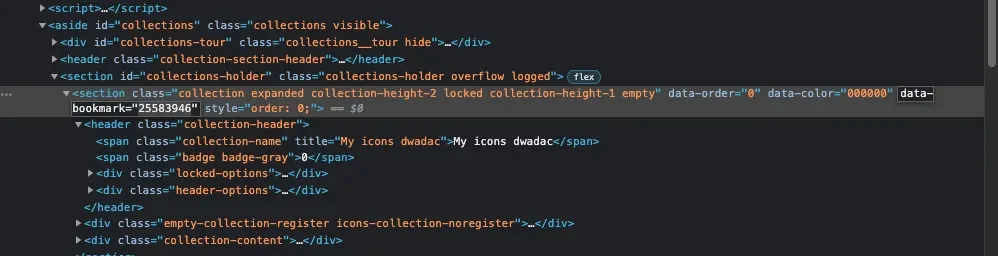
Step 3: collect the locked list's identifier
They selected one of the target locked lists and copied the bookmark_id value via DevTools.
Step 4: capture a legitimate management request
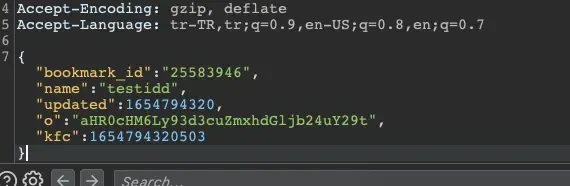
They went back to the unlocked lists, chose one, opened Intercept, and sent a name change request.
Step 5: swap the identifier
They encountered the same request again and replaced the value of bookmark_id with the value of the locked list they had copied.
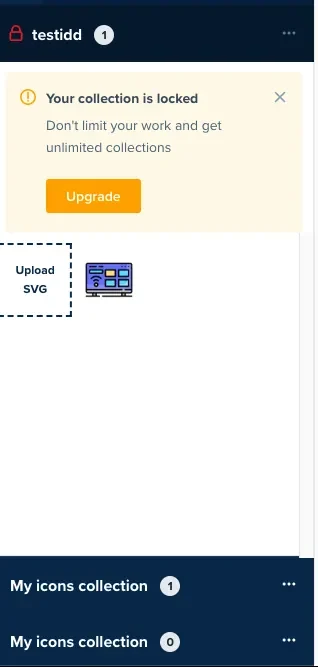
The rename succeeded: they were able to rename the locked list. They did the same for the other alternatives: changed the name of the locked list and added an icon. Most importantly, they were able to share it with other people even though the list was locked.
The company added the bookmark_id value directly to the URL path to navigate to lists, so the researcher could share a locked list using the path redacted.com/lists/<<bookmarkID> even when the list was locked.
As a result, the locked list could be used and shared just like a regular list.
Root cause
The rename, icon and share requests accepted the swapped bookmark_id of a locked list, so the lock was not enforced on those requests. The UI hid the controls for locked lists, but the server accepted the same requests once the identifier was swapped. The researcher's guess is that the company did not put a separate security procedure in place for this feature. The bookmark_id values were not sequential, and the cross-account attempt returned 403 Forbidden.
Impact
A free user could rename, give an icon to, and share locked lists exactly like regular lists, and could be reached through the path redacted.com/lists/<<bookmarkID>. The researcher notes that all the lists and IDs in the attack scenario were their own. The write-up does not describe any access to another user's data.
Fix
The report does not say what was changed. A fix would be to enforce the lock state server-side on every management endpoint that takes a bookmark_id, not only in the UI.
Variants to test
- Quota and plan limits: create objects up to the free-tier limit, then keep sending creation requests and look for management endpoints that still act on the over-limit objects. A positive result is a rename, update or share succeeding on an object the UI marks as locked.
- State flags in general: wherever an object has a status such as locked, archived, disabled or pending, capture a legitimate request on an active object and swap in the identifier of an object in the restricted state. A positive result is the restricted object being modified.
- Identifier in the URL path: if the application builds navigation links from the identifier, try reaching a restricted object directly through that path. A positive result is the restricted object rendering or being shareable.
- Cross-account check: repeat the same swap with an identifier belonging to a second account. A
403 Forbiddenhere, as in this report, shows the ownership check works and narrows the bug to the state check.
What happened, in plain words
A security researcher was testing a website that lets people save lists of bookmarks, a bit like a folder of links. The site had a rule: if you use the free plan, you can only have three lists at once. If you try to make more, the site lets you pick three to keep active and puts the rest into a "locked" state. A locked list is supposed to be frozen: you cannot rename it, add an icon to it, share it, or change what is in it. You can only delete it.
The researcher found that the freeze could be bypassed by swapping the identifier in a request. By taking a normal request that renames an unlocked list and swapping in the identifier of a locked list, they could rename, decorate and share the locked list anyway. That meant a free user could use locked lists as if they were normal ones.
The interesting part, and the reason for the write-up, is that this is still called an IDOR even though no other person's data was involved. Every list and every identifier in the attack belonged to the researcher. The vulnerability was not about reaching someone else's object; it was about reaching a restricted state of your own object.
A few words before we start, because this write-up uses them constantly:
- A server is the computer that runs the website and stores the data. Your browser (the client) asks it for things, and it decides whether to say yes.
- An API is the way the browser talks to the server behind the scenes. When you click "rename", your browser does not magically change the page; it sends a small message to the server, and the server replies. You can think of it as a waiter taking your order to the kitchen: the menu on your table is the screen, the waiter is the API, the kitchen is the server.
- A request is one of those messages. It has a method (what kind of action, such as create, read, update or delete), a URL (where it goes), sometimes a body (the data being sent), and headers (extra information, such as who you are).
- A parameter is a named piece of data inside a request.
bookmark_idis one: it tells the server which list you mean. - An identifier (ID) is a unique label for an object, like a coat-check ticket number. If two people have different tickets, they get different coats.
- IDOR stands for Insecure Direct Object Reference. It means the server accepts an identifier from the client and acts on it without properly checking that the client is allowed to act on that particular object. The everyday comparison: a hotel clerk who hands over any room key you ask for, as long as you say the room number, without checking that the room is yours.
- DevTools are the built-in tools in a browser (usually opened with F12) that let you see the requests the page makes and the data it holds.
- An intercepting proxy is a tool that sits between your browser and the server and lets you pause a request, edit it, and then send it on. The write-up mentions Intercept (the pause-and-edit view) and Repeater (a view where you can resend the same request over and over with changes).
- 403 Forbidden is the server's way of saying "I understood you, but you are not allowed to do that".
The setup
The target is a company running a private bug bounty programme, which means researchers are invited to test but the company is not named publicly. The write-up calls it "redacted". The feature under test is list creation and management. The researcher used two accounts of their own, plus the browser DevTools and an intercepting proxy. The precondition is a free account, because the three-list limit and the locking behaviour only apply to non-premium users. The write-up does not give versions, endpoint paths or hostnames.
Finding it
The researcher first created a list and looked at the request the browser sent.
The first thing that caught their attention was a possible IDOR in the bookmark_id parameter. In other words: the request carried a list identifier, and if the server trusted that identifier without checking, maybe it could be pointed at a list it should not touch.
Two things stopped the obvious attack. First, they could not see the bookmark_id value of other users, so they had nothing to point at. Second, the id values were not increasing numerically, so guessing the next one (1, 2, 3...) was not possible. They still tried the IDOR from their second account anyway, and the server answered 403 Forbidden. That is a good sign: it means the server does check that the list belongs to the account making the request.
So the researcher changed the question. Instead of asking "can I reach another user's list?", they asked "can I still manage my own locked lists through IDOR?". The lock is a restriction on the object, and if the server only hides the buttons but does not enforce the restriction, the same trick might work on their own data.
Exploitation
Step 1: multiply the lists
The researcher created a list, sent the request to the Repeater, and resubmitted it under different names to multiply the lists. The goal was to see whether the locked lists could still be reached via IDOR. Sending the same request repeatedly with small changes is a standard way to produce more objects than the interface would normally let you create.
Back on the site, a message appeared saying that, since the account was not premium, only three lists were allowed.
They selected three lists, and the other three were locked automatically. So the site did enforce the limit in the sense that it stopped them having more than three active lists, but it kept the extra ones around in a locked state.
Step 2: confirm the lock is enforced in the UI
They tried to manipulate a locked list without intercepting requests, and it did not work. They could not add an icon to the locked lists, edit their names, or share them. The only right they had was to delete them.
This step matters because it establishes the baseline: through the normal screen, the lock is real. The question is whether the lock is enforced by the server or only by the screen hiding the buttons.
Step 3: collect the locked list's identifier
They selected one of the target locked lists and copied the bookmark_id value via DevTools.
In plain words: they opened the browser's developer tools, found the data for the locked list, and copied its identifier. This is the coat-check ticket for the locked list. They now have a value they can put into a request.
Step 4: capture a legitimate management request
They went back to the unlocked lists, chose one, opened Intercept, and sent a name change request.
Why this step? Because the easiest way to find out whether the server checks the lock is to take a request the server definitely accepts (renaming an unlocked list, which is allowed) and then change only the identifier. If the server still says yes, the lock is not being checked on that endpoint.
Step 5: swap the identifier
They encountered the same request again and replaced the value of bookmark_id with the value of the locked list they had copied.
The rename succeeded: they were able to rename the locked list. They did the same for the other alternatives: changed the name of the locked list and added an icon. Most importantly, they were able to share it with other people even though the list was locked.
The company added the bookmark_id value directly to the URL path to navigate to lists, so the researcher could share a locked list using the path redacted.com/lists/<<bookmarkID> even when the list was locked.
In plain words: the site builds the address of a list by putting the identifier straight into the URL, like a street address that ends in the house number. If you know the number, you can type the address. Because the identifier was in the path, a locked list could be shared just like a normal one.
As a result, the locked list could be used and shared just like a regular list.
Why it worked
The rename, icon and share requests accepted the swapped bookmark_id of a locked list, so the lock was not enforced on those requests. The screen hid the controls for locked lists, but the server accepted the same requests once the identifier was swapped. The researcher's guess is that the company did not put a separate security procedure in place for this feature.
The bookmark_id values were not sequential, and the cross-account attempt returned 403 Forbidden. What was missing was the check on the locked state of the user's own object. That is the distinction the write-up is making: IDOR is not only about other people's IDs. It is about the server trusting an identifier without checking every rule that applies to the object behind it.
Impact
A free user could rename, give an icon to, and share locked lists exactly like regular lists, and could be reached through the path redacted.com/lists/<<bookmarkID>. The researcher notes that all the lists and IDs in the attack scenario were their own. The write-up does not describe any access to another user's data.
Fix
A fix would be to enforce the lock state on the server for every management endpoint that takes a bookmark_id, not only in the screen. The everyday comparison: the hotel clerk should check not only that the room is yours, but also that the room is not marked "do not disturb".
Variants to test
- Quota and plan limits: create objects up to the free-tier limit, then keep sending creation requests and look for management endpoints that still act on the over-limit objects. A positive result is a rename, update or share succeeding on an object the screen marks as locked.
- State flags in general: wherever an object has a status such as locked, archived, disabled or pending, capture a legitimate request on an active object and swap in the identifier of an object in the restricted state. A positive result is the restricted object being modified.
- Identifier in the URL path: if the application builds navigation links from the identifier, try reaching a restricted object directly through that path. A positive result is the restricted object rendering or being shareable.
- Cross-account check: repeat the same swap with an identifier belonging to a second account. A
403 Forbiddenhere, as in this report, shows the ownership check works and narrows the bug to the state check.
Glossary
- Server: the computer that runs the website and stores its data; it decides whether each request is allowed.
- Client: the program on your side, usually the browser, that sends requests to the server.
- API: the set of messages the browser and server use to talk to each other behind the screen.
- Request: one message from the client to the server, with a method, a URL, headers and sometimes a body.
- Method: the kind of action a request asks for, such as create, read, update or delete.
- Header: extra information attached to a request, such as who is making it.
- Parameter: a named piece of data inside a request, such as
bookmark_id. - Identifier (ID): a unique label for an object, used to refer to it in requests.
bookmark_id: the identifier of a bookmark list in this application.- IDOR (Insecure Direct Object Reference): a bug where the server accepts an identifier from the client and acts on the object without properly checking that the client is allowed to.
- 403 Forbidden: the server's reply meaning "understood, but not allowed".
- DevTools: the built-in browser tools for inspecting requests and page data.
- Intercepting proxy: a tool between browser and server that can pause, edit and forward requests.
- Intercept: the view in such a tool where a request is paused for editing.
- Repeater: the view in such a tool where the same request can be resent repeatedly with changes.
- Locked list: a list the site marks as frozen because the free plan allows only three active lists; it cannot be renamed, given an icon, shared or edited, only deleted.
- Premium / free plan: the paid and unpaid tiers of the service; the three-list limit applies to the free tier.
- Endpoint: a specific address on the server that performs a specific action, such as renaming a list.
- URL path: the part of a web address after the domain, such as
/lists/123. - Bug bounty programme: a scheme where a company invites researchers to test its systems and report problems.
- Private bug bounty programme: a programme where only invited researchers may take part and the company is not named publicly.
- Root cause: the underlying reason a bug exists, as opposed to its visible symptom.
- State check: a server-side check that an object is in an allowed state (for example, not locked) before acting on it.
- Ownership check: a server-side check that an object belongs to the account making the request.