IDN Homograph Attack and Response Manipulation - The Rarest Case
 Published on shahjerry33.medium.com
IDN stands for Internationalized Domain Name which is a system that allows domain names to be written and displayed in different scripts and character sets. It enables the use of non-ASCII characters, such as letters with diacritical marks (é, á, č, ŭ, í, ó) in domain names.
The full write-up lives on its author's site
It belongs to its author, so we link to it rather than copy it. The other two tabs are our own rewrites, checked against it.
Context
The target was a private program on one of the platforms. The feature involved is user registration and the password reset flow, both of which rely on email addresses. The report does not name the application or the platform.
The weakness described is an IDN homograph attack against the SMTP handling of email addresses, chained with HTTP response status code manipulation to complete an account takeover.
IDN stands for Internationalized Domain Name, a system that allows domain names to be written and displayed in different scripts and character sets. It enables non-ASCII characters, such as letters with diacritical marks (é, á, č, ŭ, í, ó), in domain names. This makes it possible for a user to register a look-alike name and navigate to websites, or create an account that collides with an existing user.
If an SMTP server is vulnerable to an IDN homograph attack, it treats a and á as the same character, which can lead to security risks such as account takeover during registration.
Setup
The researcher used Burp Suite, specifically the Burp Collaborator client, as the mail infrastructure. Burp Collaborator does not act as an SMTP server itself; it provides unique subdomains that can be used in various testing scenarios, including SMTP-related tests. In this case the subdomain was:
eew1utlvg6yth0mjd8shb1z8kzqpww.burpcollaborator.net
That subdomain was appended to an email address so that the address looked like this:
[redacted]
The address consists of three parts: the username pentest, the domain gmail.com, and the subdomain eew1utlvg6yth0mjd8shb1z8kzqpww.burpcollaborator.net, which acts as the SMTP server. In other words, the Collaborator subdomain is used in conjunction with the email address [redacted] to test email handling within the web application. If you do not have your own SMTP server, you can use a Burp Collaborator subdomain as your SMTP server for testing IDN homograph attacks.
In a real world scenario you would need to buy an IDN domain, for example gmáil.com, yáhoo.com or outloók.com. Any character can be replaced with an IDN character to buy an IDN homographed domain.

Finding it
The researcher registered with the address [redacted] and then tried to register again with the same address, changing only the a of gmail to the IDN character á:
[redacted]
This gave an error saying the email was already registered. That collision suggested the application might be vulnerable to an IDN homograph attack. The researcher then went to the forgot password page and used the IDN homographed address to reset the password, and received a password reset link on the Burp Collaborator client. Attempting to reset the password of the user [redacted] produced an internal server error, so the attack was chained with response status code manipulation to change the password successfully and log into the victim's account.
How to tell whether the SMTP server is vulnerable
If the SMTP server is vulnerable to the IDN homograph attack, the reset link you receive will show the IDN email as:
[redacted]
The IDN code for á is xn--, so for gmáil.com it is xn--gmil-6na.com.
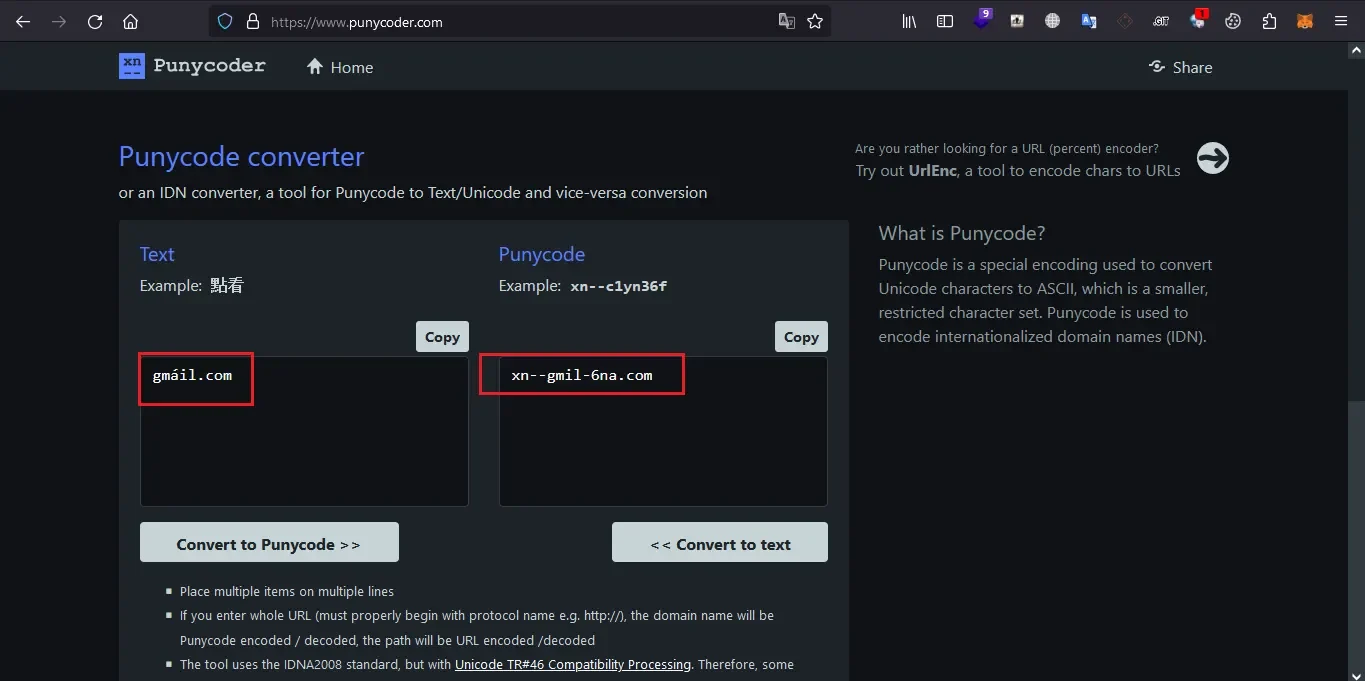
In some cases you will still receive the password reset link even if you use an IDN homographed email for the victim's account password reset (for example [redacted]), but the link you receive will be a normal one (for example [redacted]) instead of the IDN homographed link ([redacted]). In that case the SMTP server is not vulnerable to the IDN homograph attack.
Exploitation
Step 1: Register with a plain address
The researcher went to the target website and used the email [redacted].
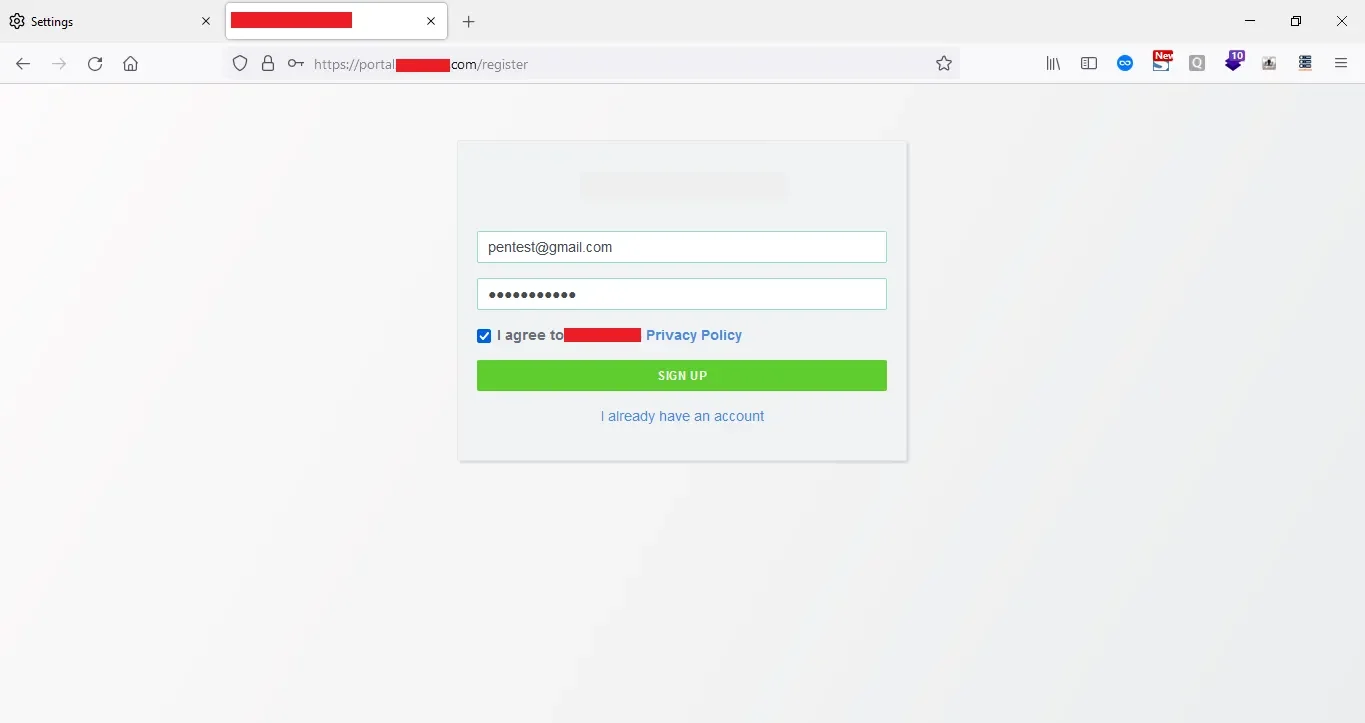
Sign-up Page
Step 2: Register with the Collaborator subdomain appended
The Burp Collaborator client was started, the subdomain was copied to the clipboard and appended to the email, and sign up was clicked:
[redacted]
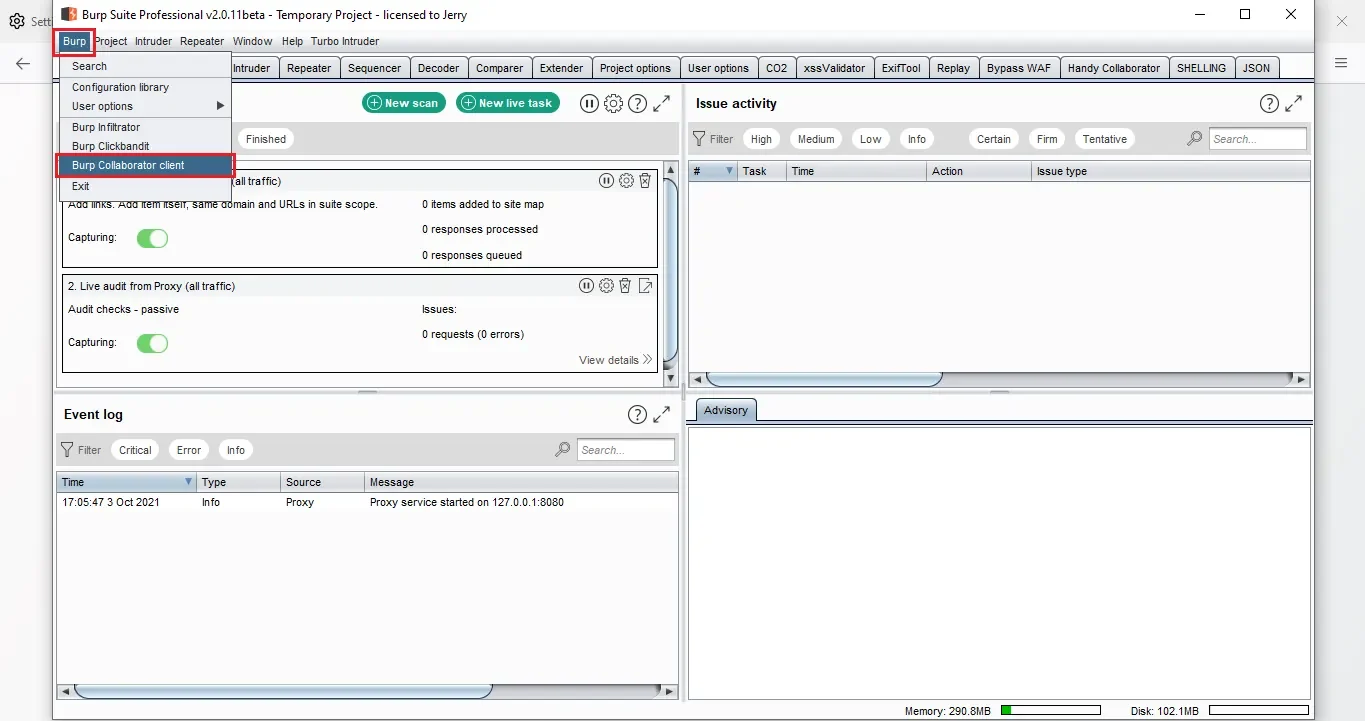
Burp Collaborator Client
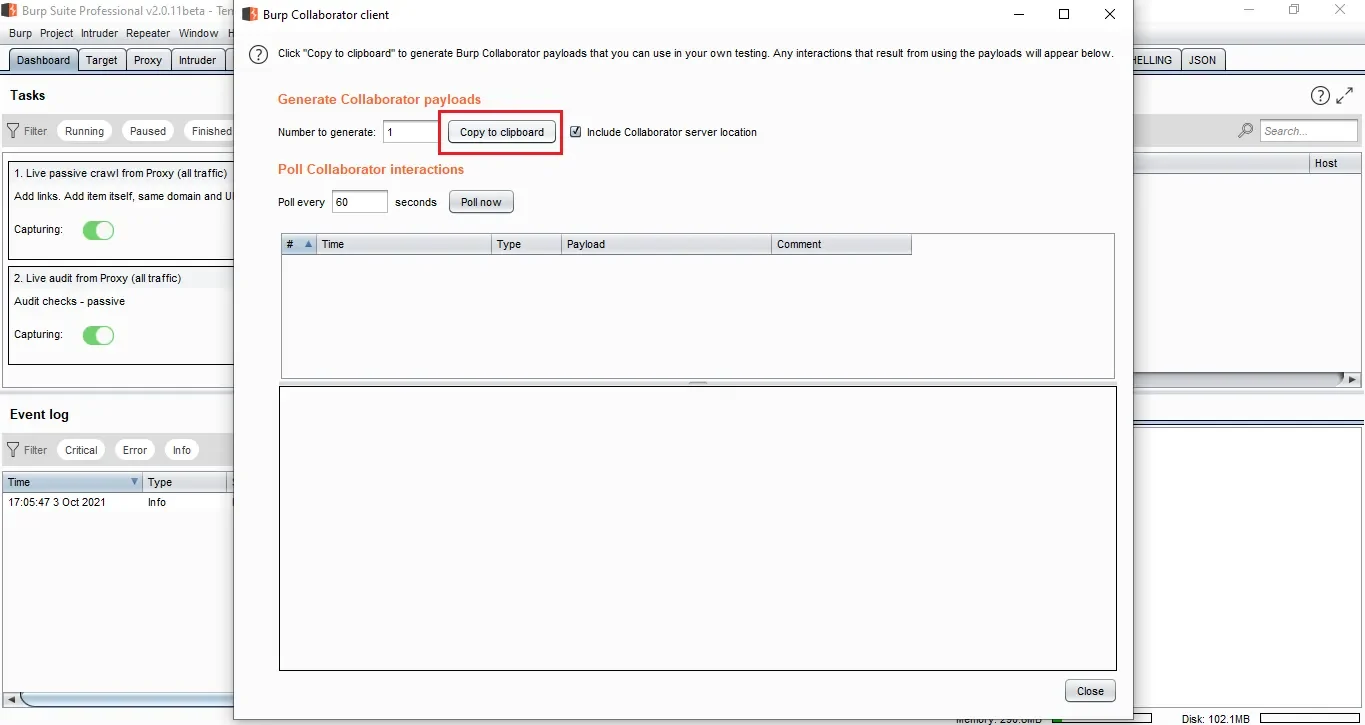
Getting Subdomain
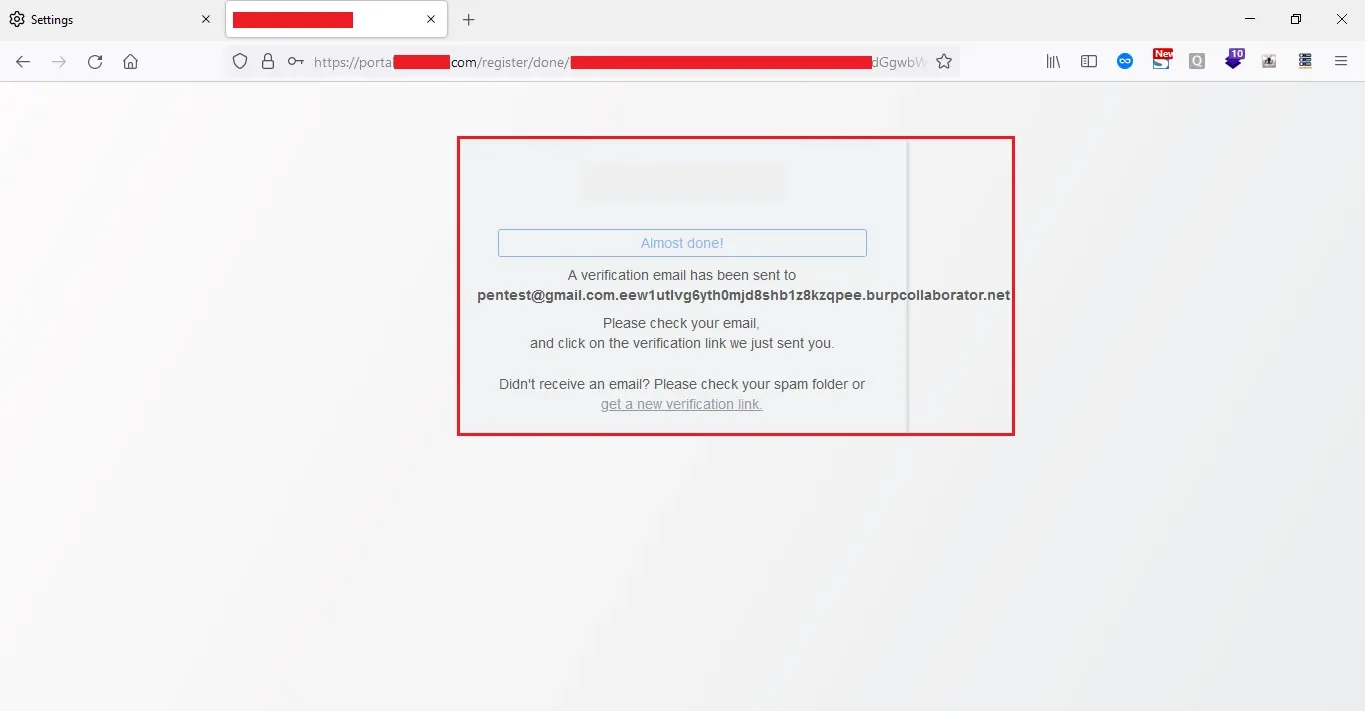
Verification Link - Sent
Step 3: Complete registration and log out
A verification link arrived on the Burp Collaborator client. The researcher used it and logged into the account to complete further processing (the victim's account).
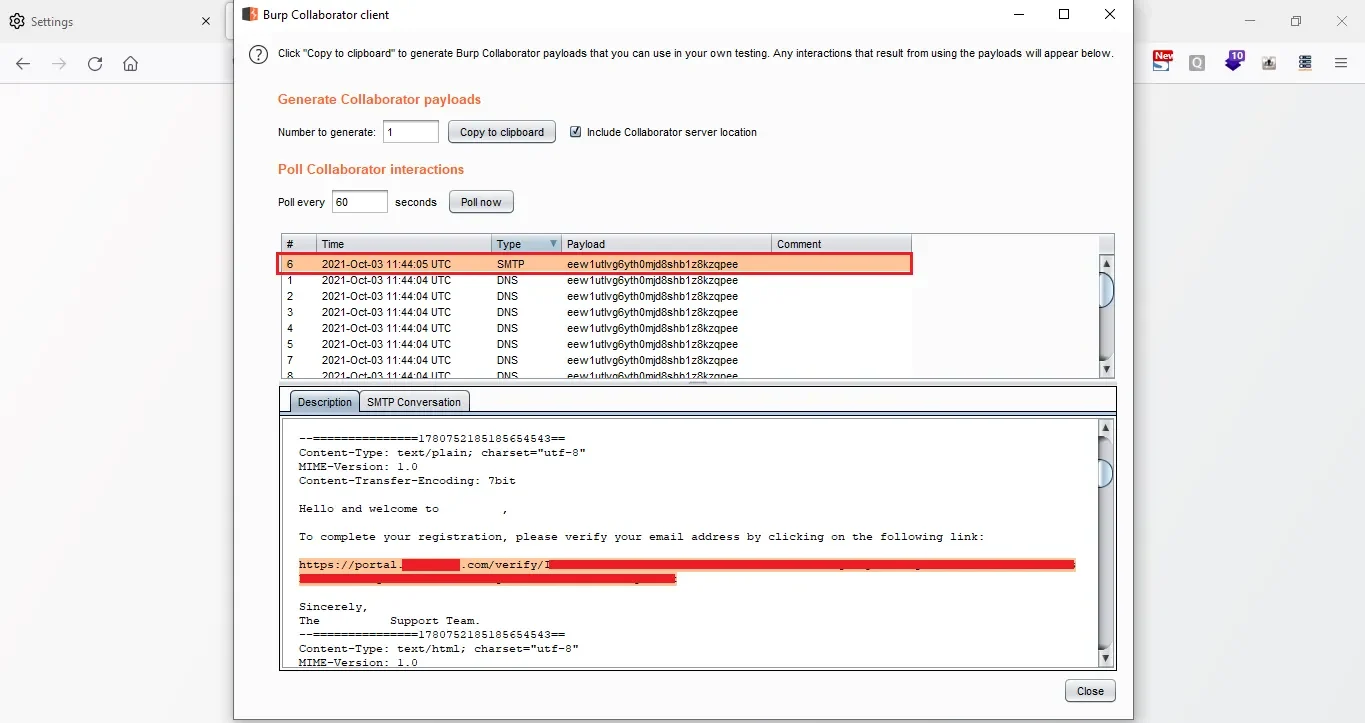
Verification Link - Received
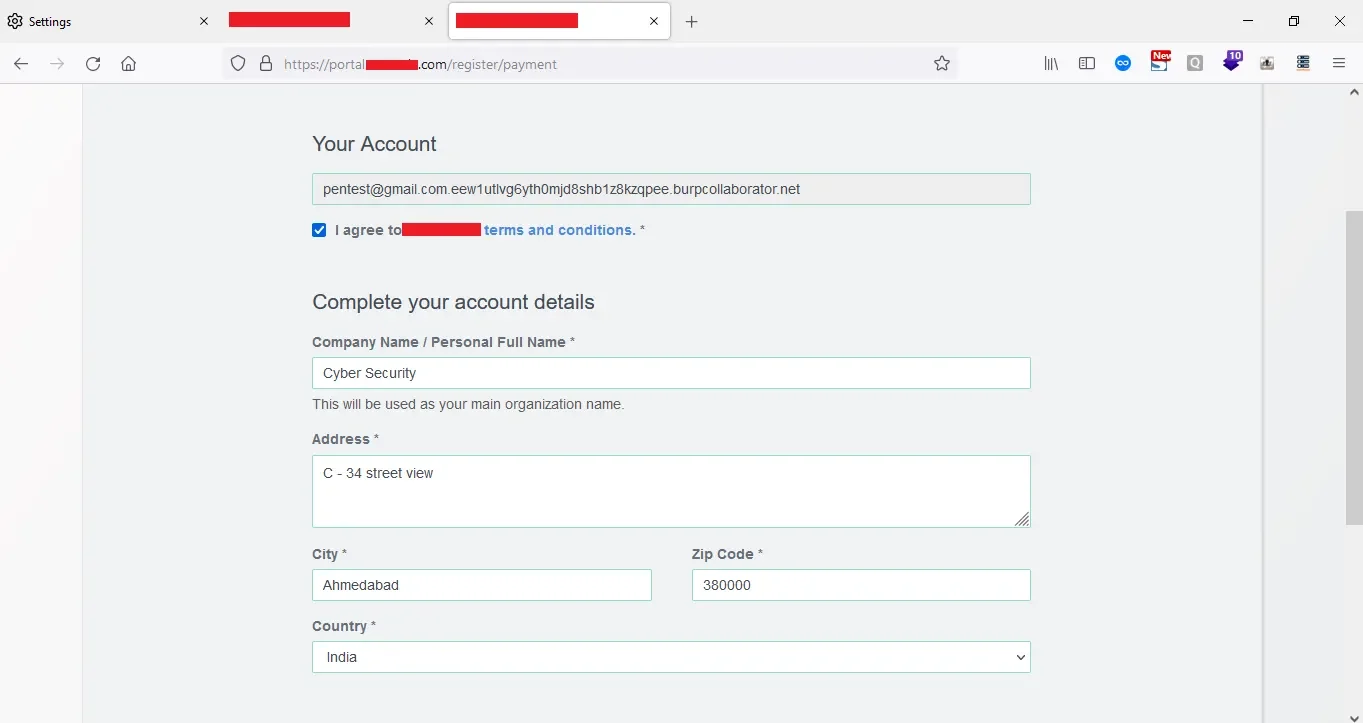
Registration
The process was deliberately left incomplete and the researcher logged out of the account.
Step 4: Request a password reset with the IDN homographed address
The researcher went to the forgot password page as an attacker and entered:
[redacted]
with the a of gmail.com changed to the IDN character á, and sent a password reset email.
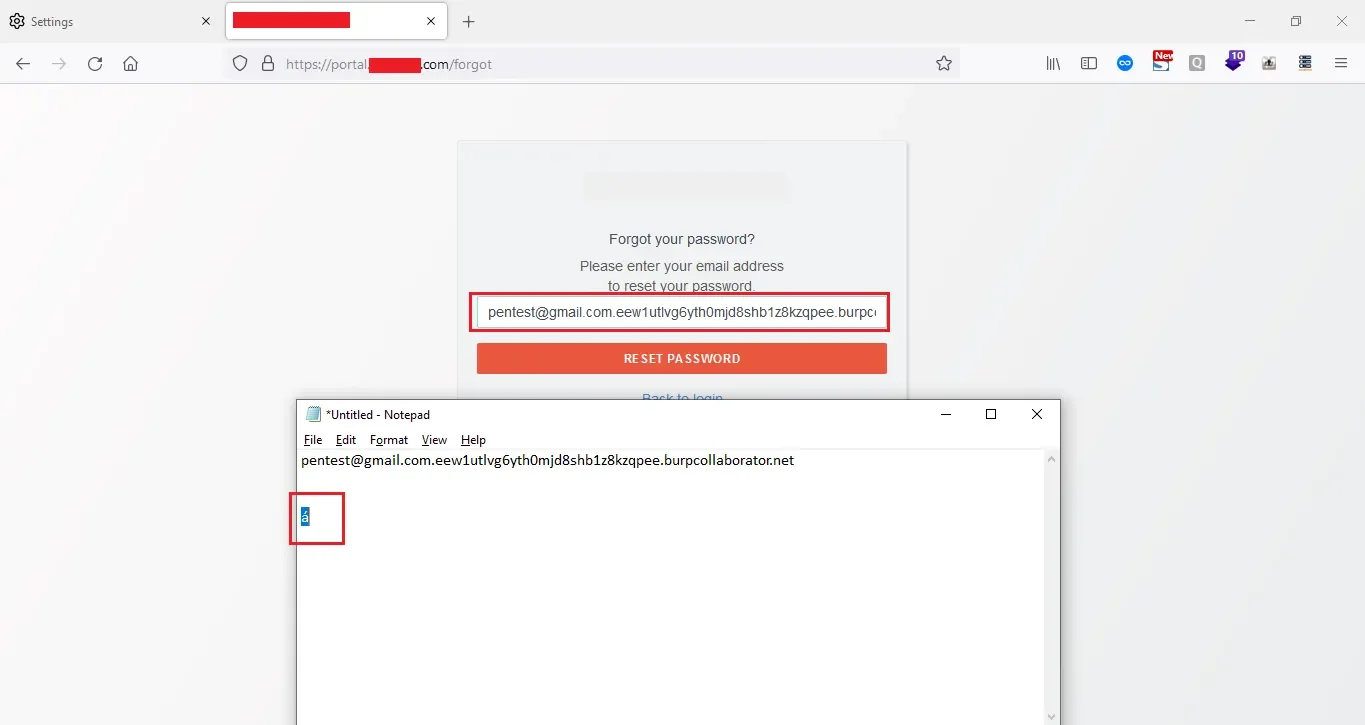
IDN character - á
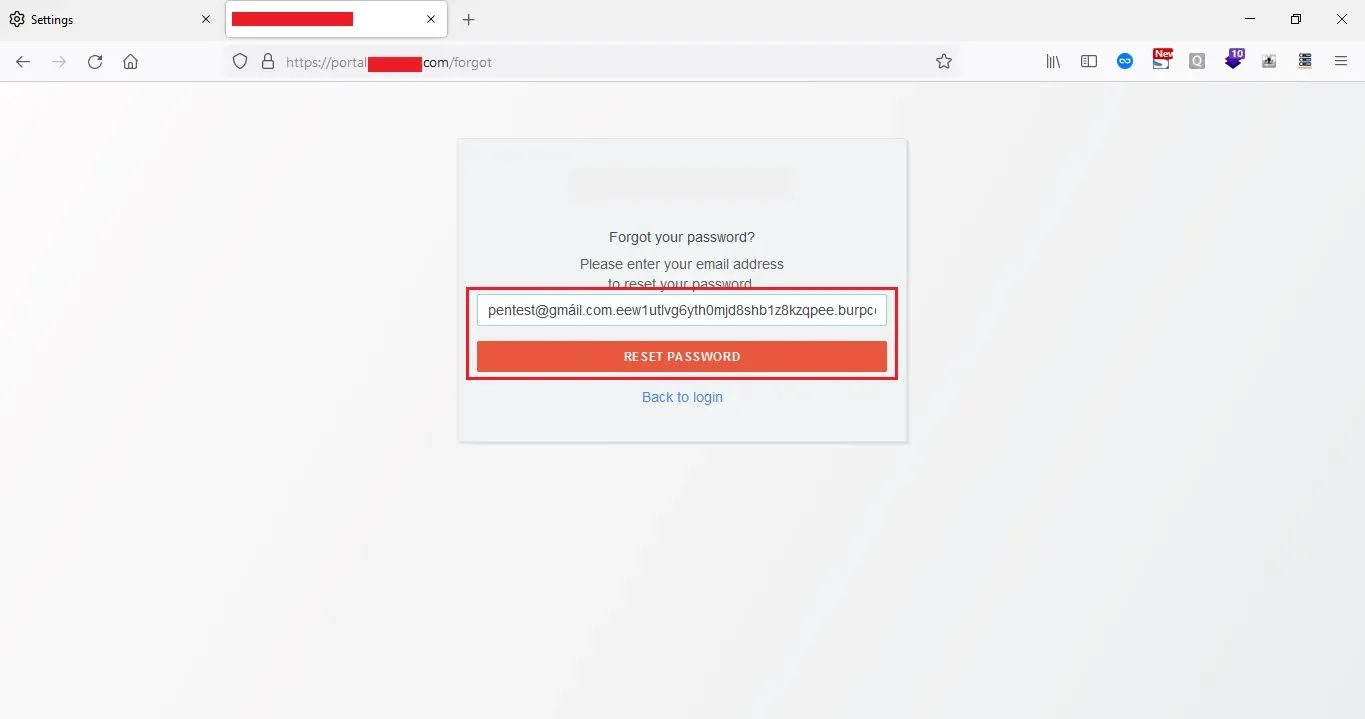
IDN Homograph Email
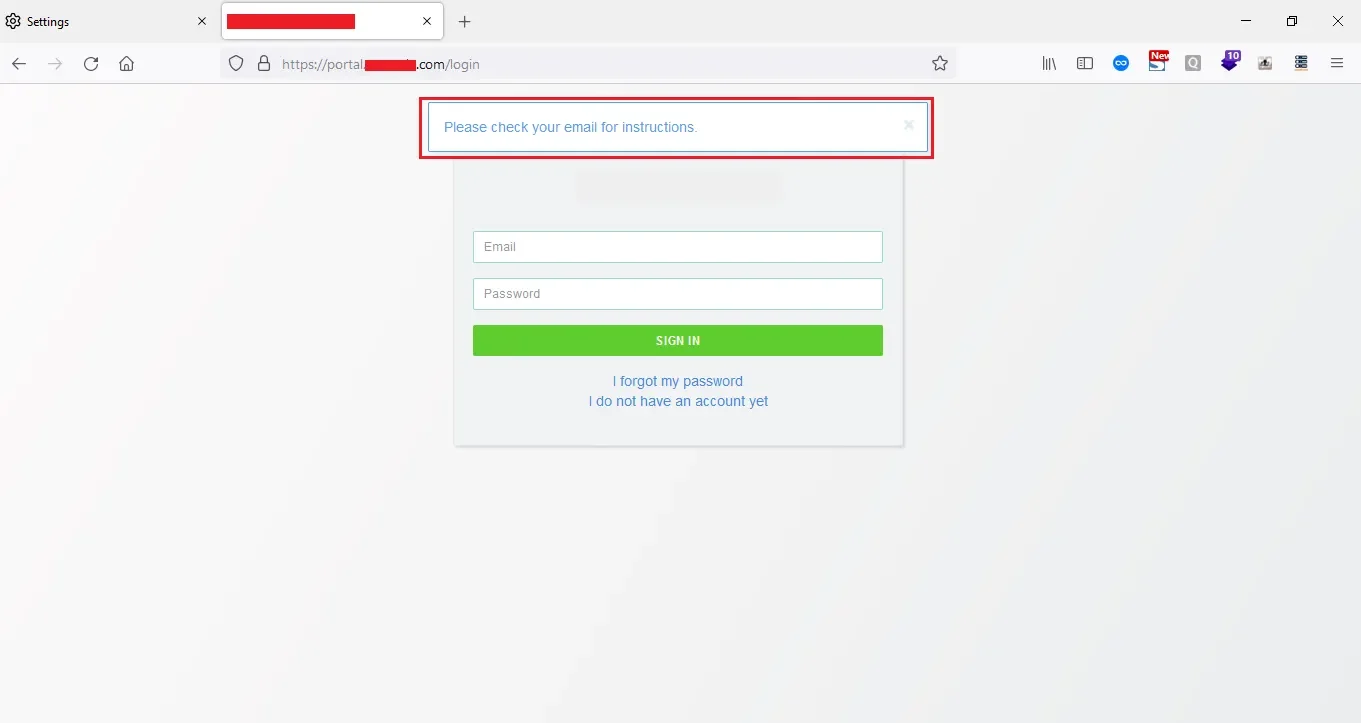
Email Sent
Step 5: Receive the reset link
The forgot password link for the victim's account ([redacted]) arrived at the IDN homographed address ([redacted]).
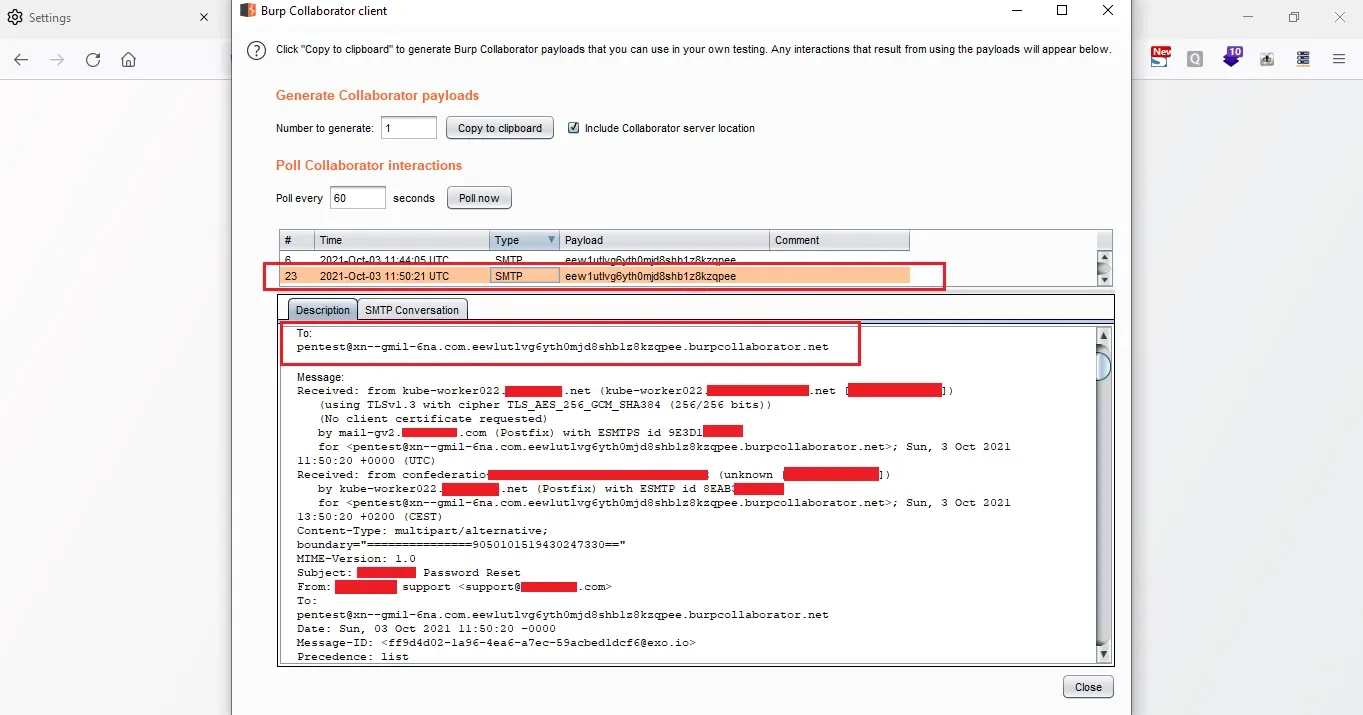
Email Received - 1
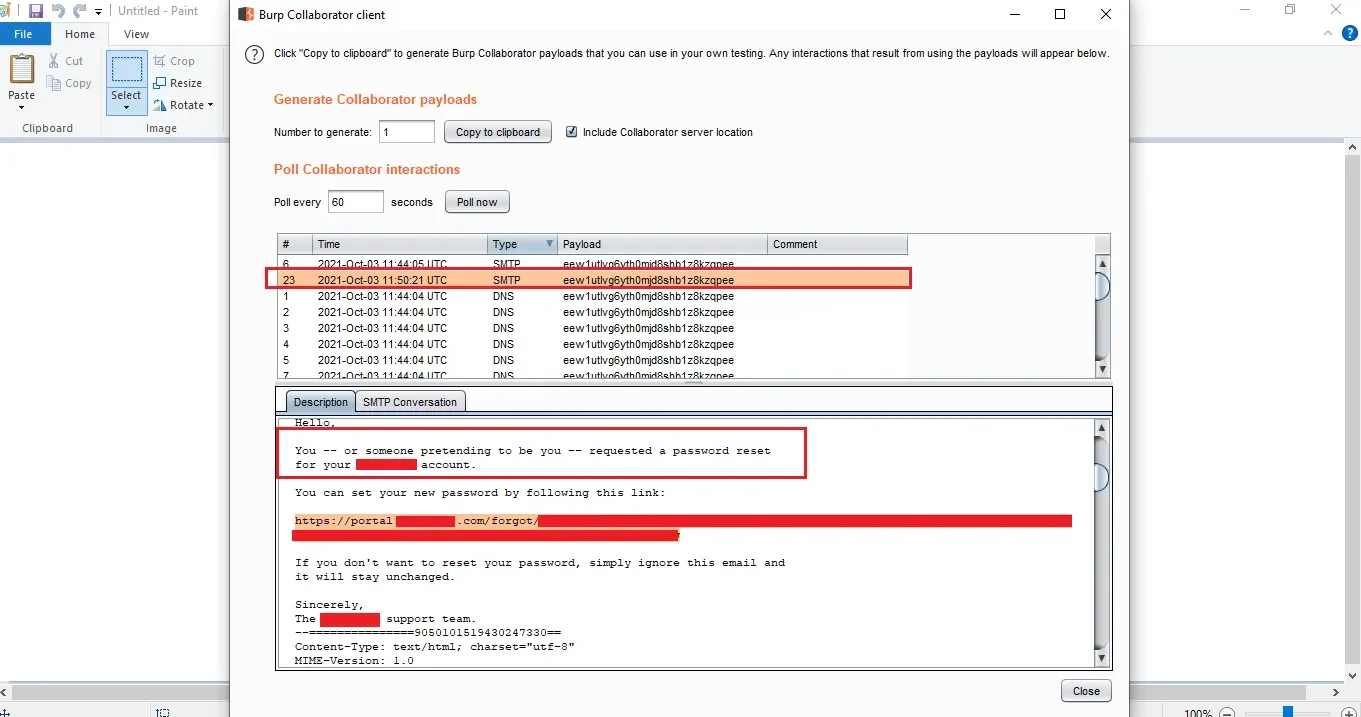
Email Received - 2
The message in the screenshot reads: "You -- or someone pretending to be you -- requested a password for your account."
Step 6: Hit the internal server error
Using the password reset link to change the password of the victim's account produced an error.
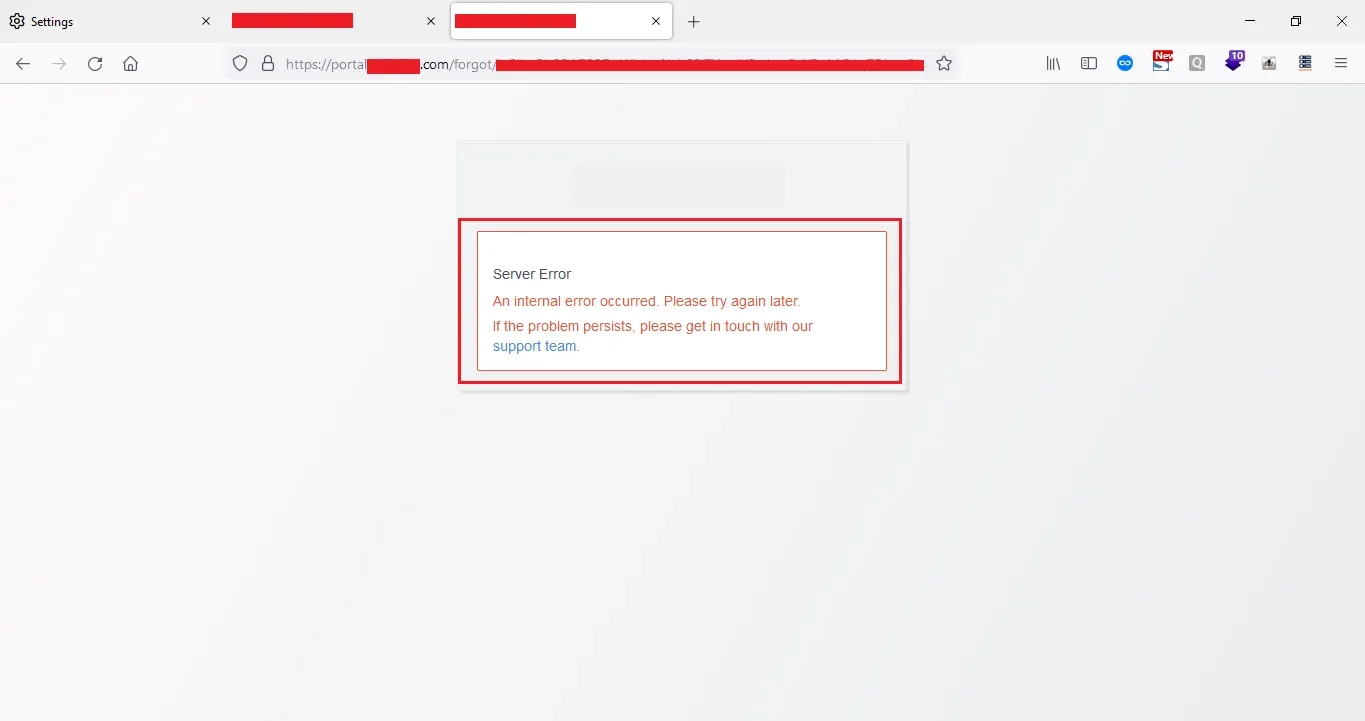
Internal Server Error - 500
Step 7: Manipulate the response status code
The forgot password link request was intercepted in Burp, right clicked, Do Intercept, Response to request was selected, and the status code was changed from 500 Internal Server to 200 OK.
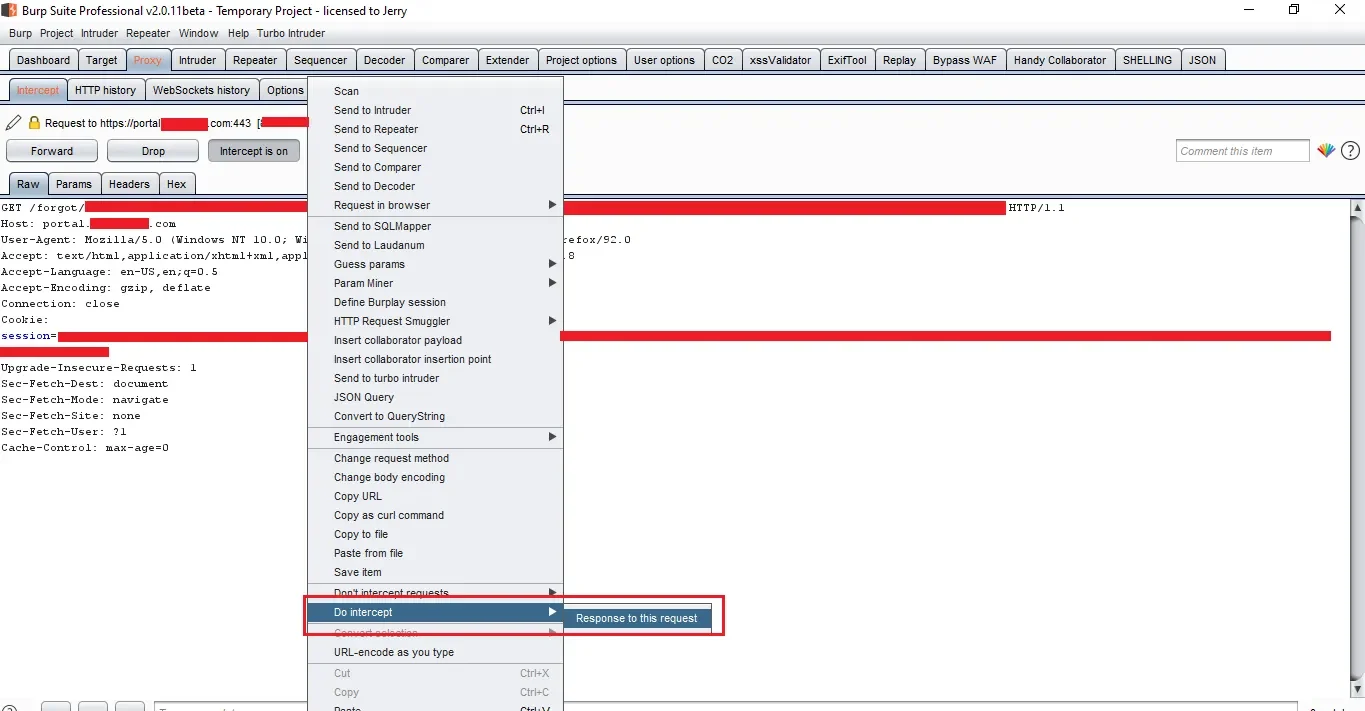
Forgot Password Request
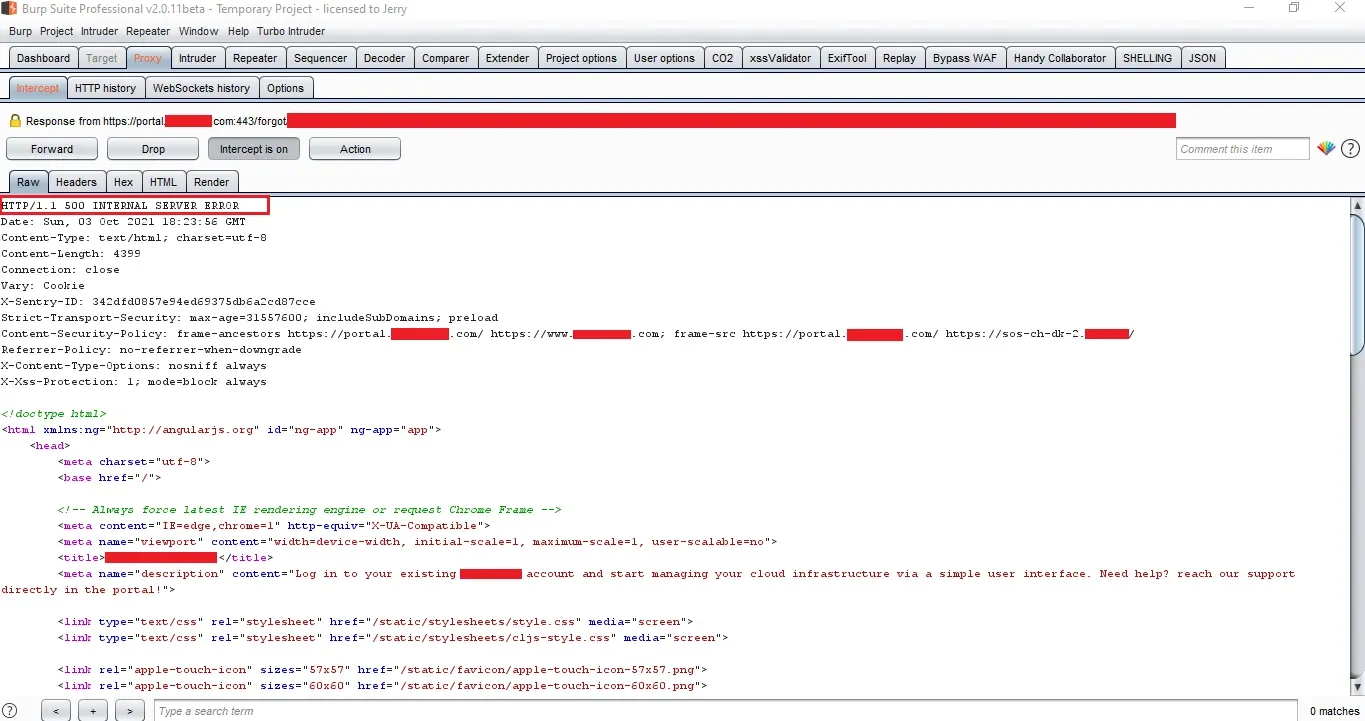
500 - Internal Server
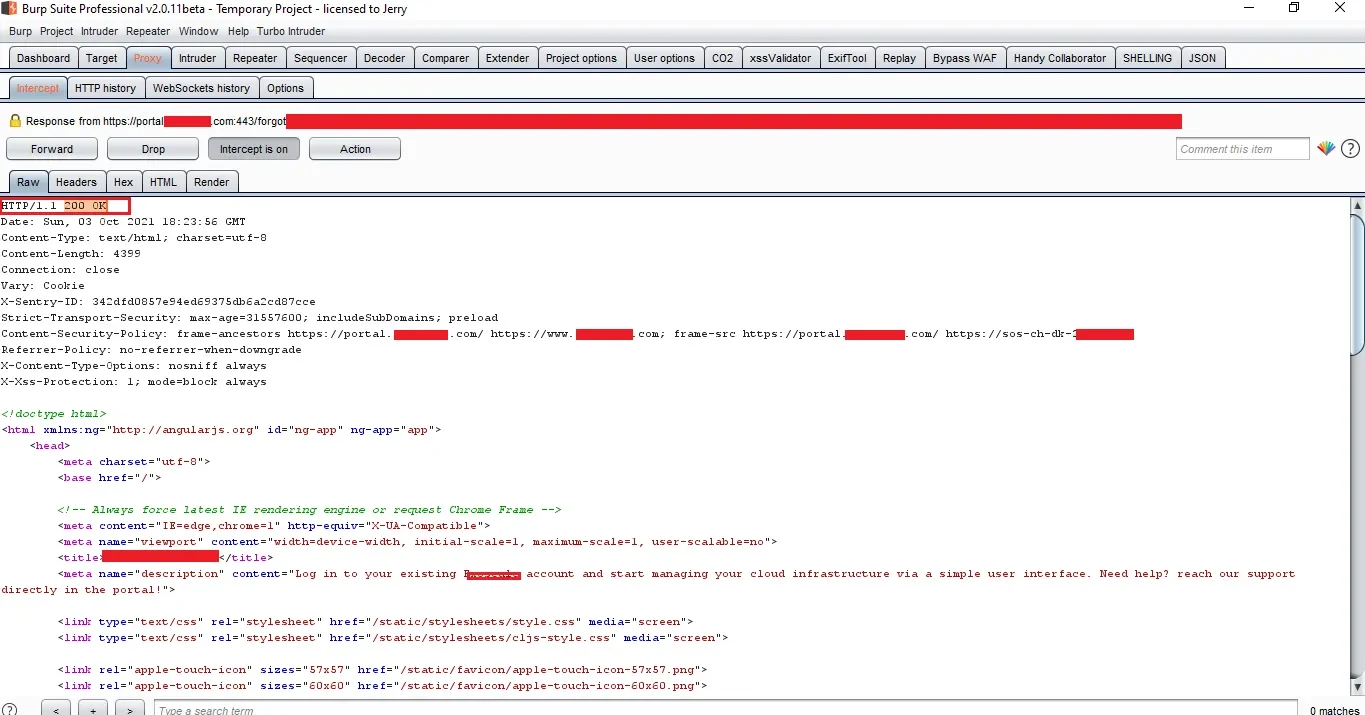
200 - OK
Step 8: Set a new password
The researcher then used the password of their choice and changed the password of the victim's account ([redacted]).
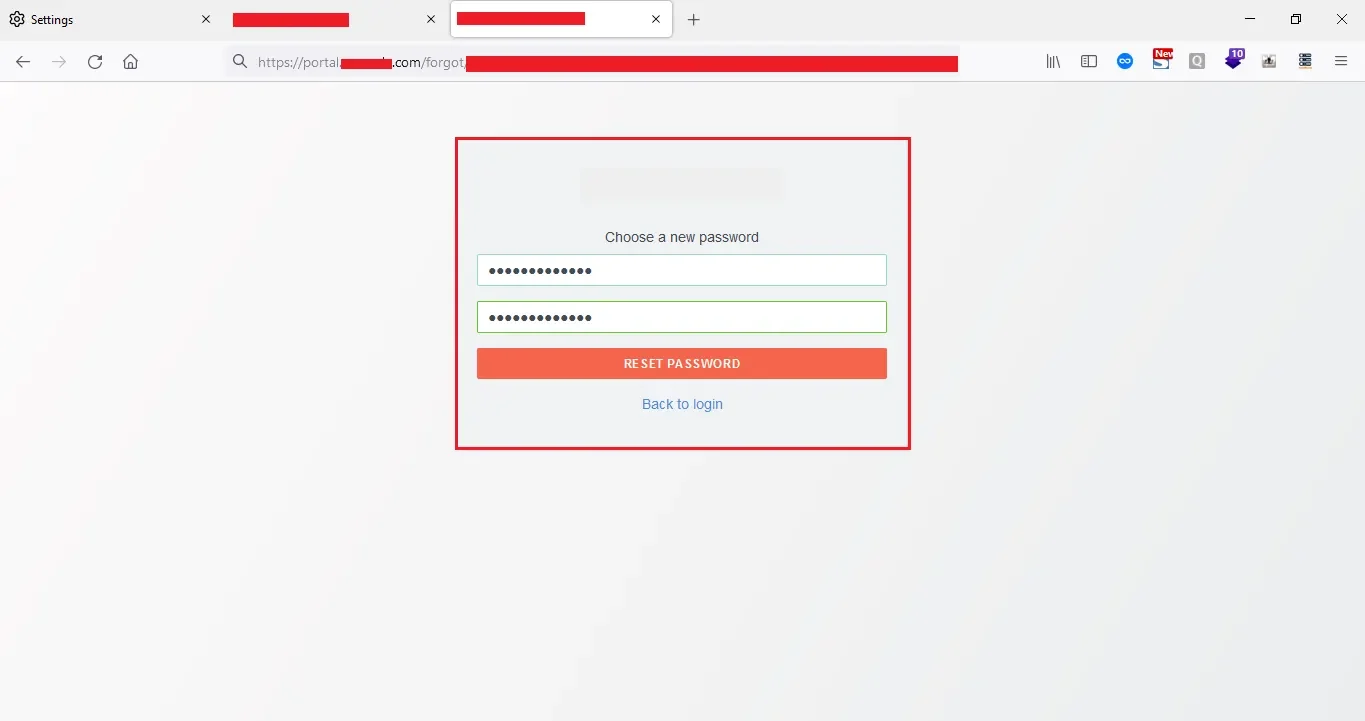
Changing Password
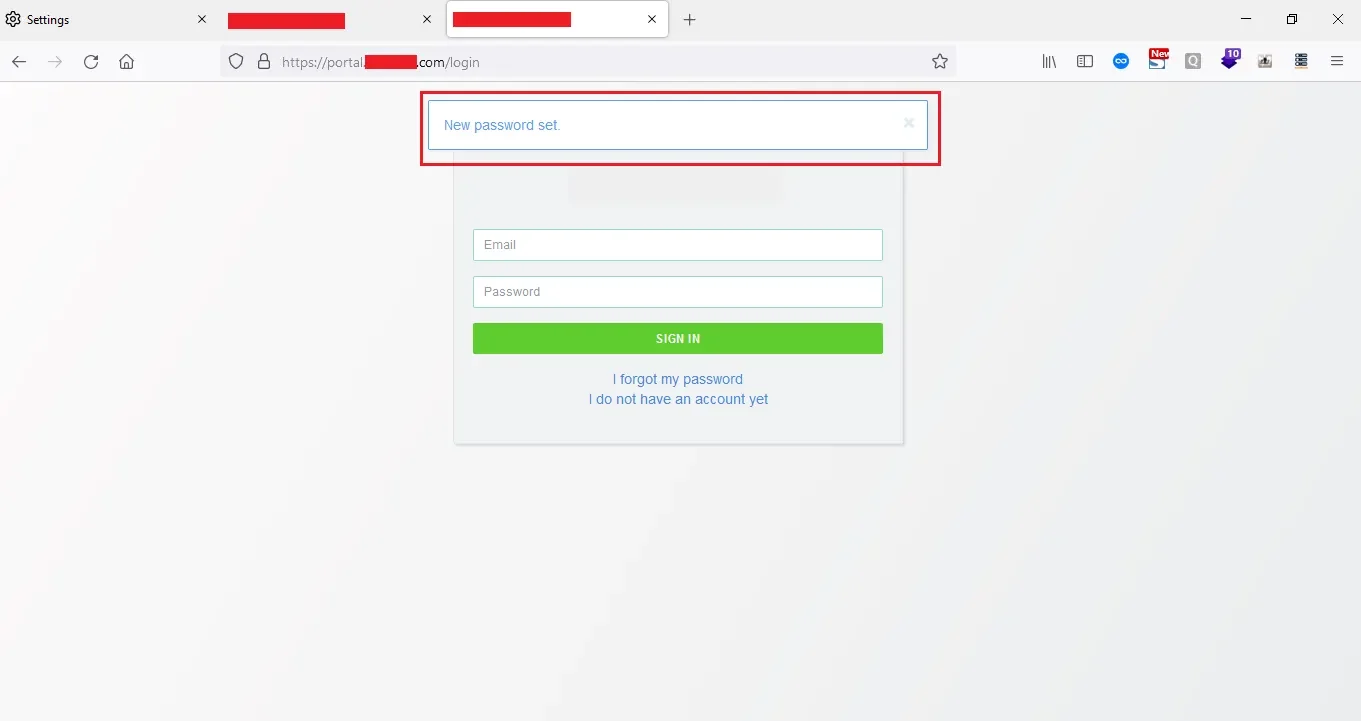
New Password Set
Step 9: Confirm the takeover
Because the change was made using response manipulation, the researcher wanted to confirm whether the password had really been changed, so they tried to log into the account and the login was successful.
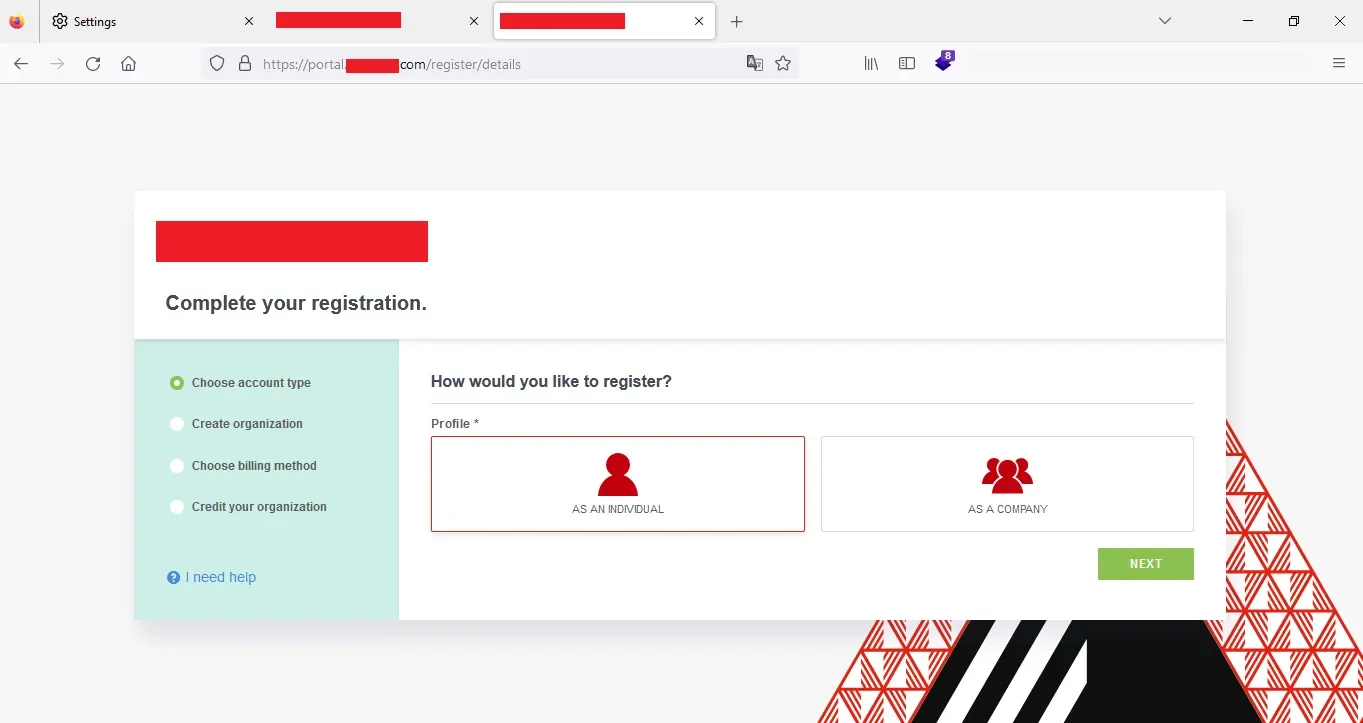
Logged in to Victim's Account
The process was still pending at this point because, earlier, as the victim, the researcher had left the process incomplete.
Root cause
In the researcher's opinion, the SMTP server did not have proper handling and verification mechanisms for IDN homograph characters. When processing the email address, the SMTP server was not able to differentiate between the ASCII a and the non-ASCII á because of their visual similarity, which made the attack possible.
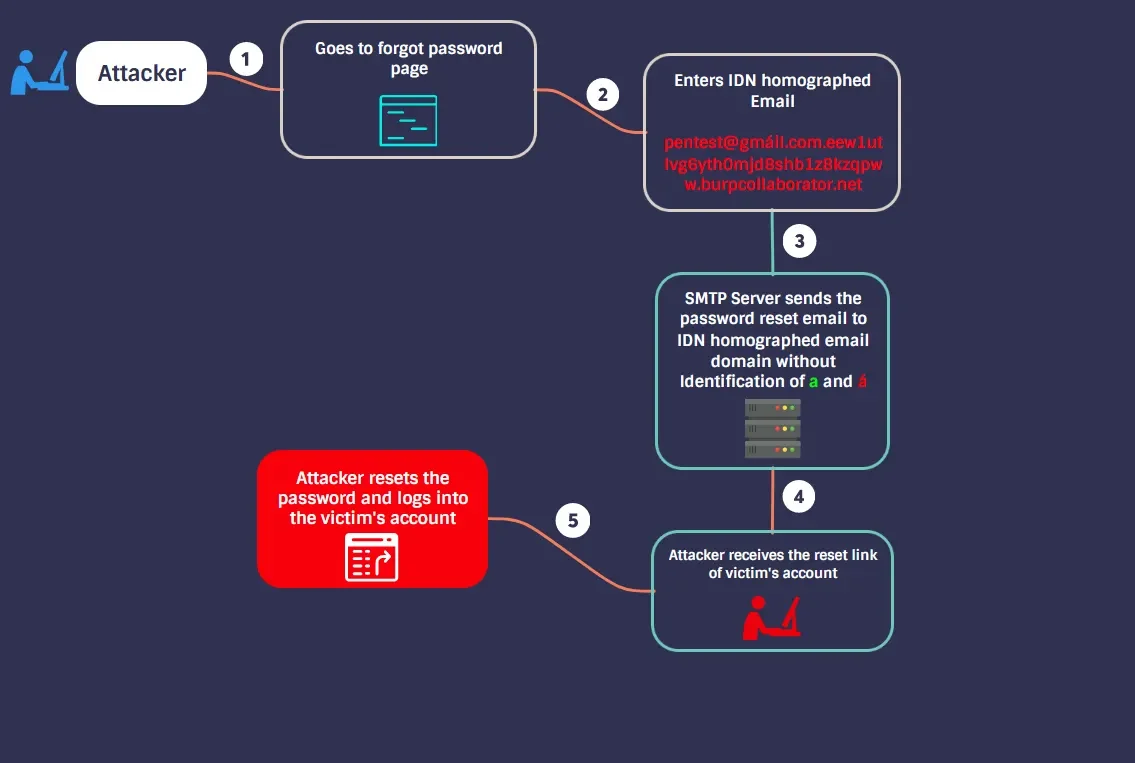
The Process
The report explains the background as follows.
ASCII character encoding
- SMTP servers historically used ASCII, which represents characters using a 7-bit encoding scheme.
- ASCII includes characters commonly used in the English language and lacks support for many non-English characters or diacritics, including accented (IDN) characters like á.
- Due to the limited character set in ASCII, SMTP servers traditionally handled and processed only ASCII characters.
Punycode and Internationalized Domain Names (IDNs)
- To enable the use of non-ASCII characters in domain names, the IDN system was introduced.
- IDNs use a process called Punycode encoding to represent non-ASCII characters using a combination of ASCII characters, so á will be treated as U+00E1 in the ASCII table, which will differentiate a and á in the SMTP server.
SMTP server vulnerability
- SMTP servers that do not incorporate proper handling and verification mechanisms for IDN homographs can be vulnerable.
- When processing email addresses, the SMTP server may not differentiate between the ASCII a and the non-ASCII á due to their visual similarity.
The second half of the chain, the 500 error on the reset link, is not explained in the report; the researcher only notes that the error occurred and that the password was then changed.
Impact
This kind of vulnerability makes it possible for an attacker to take over anyone's account on the target website and to steal all the PII data of the user.
The researcher scored it 5.6 Medium with the vector:
CVSS:3.0/AV:N/AC:H/PR:N/UI:N/S:U/C:L/I:L/A:L
Fix
To mitigate IDN homograph attacks, SMTP servers should implement measures to handle IDN domains properly, such as:
- Incorporating Punycode decoding to accurately interpret and process IDN email addresses.
- Enforcing strict email address validation to detect suspicious or potentially spoofed domains.
- Regularly updating server configurations and security policies to stay updated with the latest best practices for handling IDN domains.

The report does not say what the program changed.
Variants to test
- Registration collision check. Register with
[redacted]<collaborator>and then try to register with[redacted]<collaborator>. A positive result is an "email already registered" error, which shows the two addresses are being treated as the same identity. - Password reset delivery. Request a reset for the plain address and submit the IDN homographed address. A positive result is a reset link for the victim's account arriving at the Collaborator subdomain, with the IDN email shown in its xn-- form.
- Negative control. If the reset link arrives showing the plain
gmail.comform rather than thexn--form, the SMTP server is not vulnerable and the test should be considered negative. - Other diacritics. Replace other characters with IDN equivalents (the report lists é, á, č, ŭ, í, ó as examples of diacritical marks) in both the registration and reset flows, and check for the same collision and delivery behaviour.
- Response manipulation on the reset endpoint. Where the reset link returns a 500, intercept the response in Burp and change the status code to 200 OK, then submit the new password and attempt a login. A positive result is a successful login with the new password.
What happened, in plain words
A website let people create accounts with an email address. To prove the address is real, the site sends a link to that address, and the person clicks it. The same address is used later to reset a forgotten password.
The researcher found that the site's registration flow appeared to treat two different addresses as the same one: [redacted] and [redacted]. The only difference is the letter a versus á, a letter with a small accent mark on top. To a human these look almost identical. To a computer they are different characters, and normally they should be different addresses.
Because of this, the researcher could ask for a password reset for someone else's account and receive the reset link at the IDN homographed address. The reset link then failed with a server error, but the researcher changed the status code the browser received from 500 to 200, and then changed the password. They logged in as the other user.
This is called an IDN homograph attack. "IDN" stands for Internationalized Domain Name: a system that lets domain names use letters from many languages, including accented ones. "Homograph" means two things written the same or nearly the same. In the researcher's opinion, the attack works because the mail server could not tell a from á.
The second half is HTTP response manipulation: the browser is told by the server whether a request worked (for example "200 OK") or failed (for example "500 Internal Server Error"). If you can sit between the browser and the server, as a tool like Burp Suite does, you can rewrite that answer before the browser sees it.
The pieces you need to understand first
What a web server and an SMTP server are
A web server hosts and serves web pages over the internet. It handles HTTP and HTTPS requests and responses, serving web content to clients that access the website. Think of it as the shop counter: you ask for a page, it hands you the page.
An SMTP server is responsible for sending and receiving email messages. It handles the delivery of emails between mail servers and is used by email clients such as Outlook or Gmail to send outgoing messages. Think of it as the postal sorting office: it takes an envelope with an address and moves it towards the destination.
The two are separate systems. A website can be perfectly careful about what it shows in the browser and still hand an email address to a mail server that is careless about accents.
What Burp Suite and Burp Collaborator are
Burp Suite is a tool that sits between your browser and a website. Every request your browser makes passes through it, and you can read it, pause it, change it, and change the answer that comes back. It is like a postal worker who opens every letter you send and every reply you receive, and is allowed to rewrite them.
Burp Collaborator is a feature of Burp Suite. It provides unique subdomains that can be used for testing various security vulnerabilities. It provides unique subdomains that can be used in various testing scenarios, including SMTP-related tests. In this case the subdomain was:
eew1utlvg6yth0mjd8shb1z8kzqpww.burpcollaborator.net
Burp Collaborator does not act as an SMTP server itself. In practice, you put that subdomain at the end of an email address.
The trick with the email address
The researcher appended the Collaborator subdomain to an ordinary address, so it looked like this:
[redacted]
The address consists of three parts: the username pentest, the domain gmail.com, and the subdomain eew1utlvg6yth0mjd8shb1z8kzqpww.burpcollaborator.net, which acts as the SMTP server. In other words, the Collaborator subdomain is used in conjunction with the email address [redacted] to test email handling within the web application.
If you do not have your own SMTP server, you can use a Burp Collaborator subdomain as your SMTP server for testing IDN homograph attacks.
In a real world scenario you would need to buy an IDN domain, for example gmáil.com, yáhoo.com or outloók.com. Any character can be replaced with an IDN character to buy an IDN homographed domain. That is the real-world version of the same trick: a domain that looks like a well-known brand but is not.
Finding it
The researcher registered with the address [redacted] and then tried to register again with the same address, changing only the a of gmail to the IDN character á:
[redacted]
Why do this? Because registration usually refuses an address that is already taken. If the site says "this email is already registered" for the accented version, that suggests it may consider the two addresses to be the same account.
This gave an error saying the email was already registered. That collision suggested the application might be vulnerable to an IDN homograph attack.
The researcher then went to the forgot password page and used the IDN homographed address to reset the password, and received a password reset link on the Burp Collaborator client. Attempting to reset the password of the user [redacted] produced an internal server error, so the attack was chained with response status code manipulation to change the password successfully and log into the victim's account.
How to tell whether the SMTP server is vulnerable
If the SMTP server is vulnerable to the IDN homograph attack, the reset link you receive will show the IDN email as:
[redacted]
The IDN code for á is xn--, so for gmáil.com it is xn--gmil-6na.com.
What does that mean? Computers cannot store á in the old ASCII character set, which only covers basic English letters, digits and punctuation. So the IDN system uses a process called Punycode to represent non-ASCII characters using a combination of ASCII characters. A Punycode label always starts with xn--. When you see xn--gmil-6na.com in a received email, the IDN email has been shown in its Punycode form, which the report says indicates the SMTP server is vulnerable.
In some cases you will still receive the password reset link even if you use an IDN homographed email for the victim's account password reset (for example [redacted]), but the link you receive will be a normal one (for example [redacted]) instead of the IDN homographed link ([redacted]). In that case the SMTP server is not vulnerable to the IDN homograph attack.
That last point is the control for the experiment. Getting a reset email is not enough on its own. What matters is which address the mail system decided the message was for. If it shows the plain gmail.com form, it treated the accented address as a different thing and the trick failed.
Exploitation, step by step
Step 1: Register with a plain address
The researcher went to the target website and used the email [redacted].
Sign-up Page
Step 2: Register with the Collaborator subdomain appended
The Burp Collaborator client was started, the subdomain was copied to the clipboard and appended to the email, and sign up was clicked:
[redacted]
Burp Collaborator Client
Getting Subdomain
Verification Link - Sent
Why append the subdomain? Because the site will send a verification link to whatever address you give it. If the address ends in the Collaborator subdomain, that link arrives where you can read it, instead of in a mailbox you do not control. The gmail.com part is there to make the address look like a normal one to the site.
Step 3: Complete registration and log out
A verification link arrived on the Burp Collaborator client. The researcher used it and logged into the account to complete further processing (the victim's account).
Verification Link - Received
Registration
The process was deliberately left incomplete and the researcher logged out of the account.
Step 4: Request a password reset with the IDN homographed address
The researcher went to the forgot password page as an attacker and entered:
[redacted]
with the a of gmail.com changed to the IDN character á, and sent a password reset email.
IDN character - á
IDN Homograph Email
Email Sent
Why this step? The forgot password page is where the site looks up an account by email address and sends a reset link to it. If the site matches the accented address to the plain account, the reset link for that account will be sent to the address the attacker controls.
Step 5: Receive the reset link
The forgot password link for the victim's account ([redacted]) arrived at the IDN homographed address ([redacted]).
Email Received - 1
Email Received - 2
The message in the screenshot reads: "You -- or someone pretending to be you -- requested a password for your account."
That sentence is the site's own wording, and it is a little ironic here: the person who requested the reset really was pretending to be someone else, and the site sent the link to the wrong place.
Step 6: Hit the internal server error
Using the password reset link to change the password of the victim's account produced an error.
Internal Server Error - 500
A 500 Internal Server Error is the server saying "something went wrong on my side". It is a status code, a three-digit number that comes back with every web response. 200 means success, 500 means the server failed while handling the request. At this point the attack is stuck: the link is in hand, but the change does not go through.
Step 7: Manipulate the response status code
The forgot password link request was intercepted in Burp, right clicked, Do Intercept, Response to request was selected, and the status code was changed from 500 Internal Server to 200 OK.
Forgot Password Request
500 - Internal Server
200 - OK
Step 8: Set a new password
The researcher then used the password of their choice and changed the password of the victim's account ([redacted]).
Changing Password
New Password Set
Step 9: Confirm the takeover
Because the change was made using response manipulation, the researcher wanted to confirm whether the password had really been changed, so they tried to log into the account and the login was successful.
Logged in to Victim's Account
The process was still pending at this point because, earlier, as the victim, the researcher had left the process incomplete.
Why it happened
In the researcher's opinion, the SMTP server did not have proper handling and verification mechanisms for IDN homograph characters. When processing the email address, the SMTP server was not able to differentiate between the ASCII a and the non-ASCII á because of their visual similarity, which made the attack possible.
The Process
The report explains the background as follows.
ASCII character encoding
- SMTP servers historically used ASCII, which represents characters using a 7-bit encoding scheme.
- ASCII includes characters commonly used in the English language and lacks support for many non-English characters or diacritics, including accented (IDN) characters like á.
- Due to the limited character set in ASCII, SMTP servers traditionally handled and processed only ASCII characters.
Think of ASCII as a small box of letter stamps: the English alphabet in both cases, the digits, and some punctuation. There is no stamp for á in that box.
Punycode and Internationalized Domain Names (IDNs)
- To enable the use of non-ASCII characters in domain names, the IDN system was introduced.
- IDNs use a process called Punycode encoding to represent non-ASCII characters using a combination of ASCII characters, so á will be treated as U+00E1 in the ASCII table, which will differentiate a and á in the SMTP server.
U+00E1 is the code the report gives for the character á, which differentiates a and á in the SMTP server.
SMTP server vulnerability
- SMTP servers that do not incorporate proper handling and verification mechanisms for IDN homographs can be vulnerable.
- When processing email addresses, the SMTP server may not differentiate between the ASCII a and the non-ASCII á due to their visual similarity.
The second half of the chain, the 500 error on the reset link, is not explained in the report; the researcher only notes that the error occurred and that changing the status code to 200 OK allowed the password change to go through.
Impact
This kind of vulnerability makes it possible for an attacker to take over anyone's account on the target website and to steal all the PII data of the user.
PII means personally identifiable information: the details that identify a real person, such as a name, address, phone number or date of birth. If an attacker can log in as any user, they can read whatever that user can read.
The researcher scored it 5.6 Medium with the vector:
CVSS:3.0/AV:N/AC:H/PR:N/UI:N/S:U/C:L/I:L/A:L
CVSS is a standard scoring system for the severity of a security flaw. The vector string is the recipe behind the score. AV:N means the attack can be carried out over the network, not from the same machine. AC:H means the attack is hard to carry out because it depends on specific conditions. PR:N means the attacker needs no account or privileges beforehand. UI:N means no action is needed from the victim. S:U means the impact stays within the vulnerable component. C:L, I:L and A:L mean low impact on confidentiality, integrity and availability respectively.
Fix
To mitigate IDN homograph attacks, SMTP servers should implement measures to handle IDN domains properly, such as:
- Incorporating Punycode decoding to accurately interpret and process IDN email addresses.
- Enforcing strict email address validation to detect suspicious or potentially spoofed domains.
- Regularly updating server configurations and security policies to stay updated with the latest best practices for handling IDN domains.
The report does not say what the program changed.
Variants to test
- Registration collision check. Register with
[redacted]<collaborator>and then try to register with[redacted]<collaborator>. A positive result is an "email already registered" error, which shows the two addresses are being treated as the same identity. - Password reset delivery. Request a reset for the plain address and submit the IDN homographed address. A positive result is a reset link for the victim's account arriving at the Collaborator subdomain, with the IDN email shown in its xn-- form.
- Negative control. If the reset link arrives showing the plain
gmail.comform rather than thexn--form, the SMTP server is not vulnerable and the test should be considered negative. - Other diacritics. Replace other characters with IDN equivalents (the report lists é, á, č, ŭ, í, ó as examples of diacritical marks) in both the registration and reset flows, and check for the same collision and delivery behaviour.
- Response manipulation on the reset endpoint. Where the reset link returns a 500, intercept the response in Burp and change the status code to 200 OK, then submit the new password and attempt a login. A positive result is a successful login with the new password.
Glossary
- ASCII: A basic character set covering English letters, digits and some punctuation, with no accented letters.
- Burp Collaborator: A Burp Suite feature that gives you unique subdomains and records anything that contacts them, useful for seeing emails and other outbound requests.
- Burp Suite: A tool that sits between your browser and a website so you can read, pause and change requests and responses.
- CVSS: A standard scoring system for the severity of a security flaw, expressed as a number and a vector string.
- Diacritical mark: A small mark added to a letter, such as the accent in á.
- Homograph: A word or name that looks the same as, or very similar to, another but is different.
- HTTP status code: A three-digit number in every web response saying how the request went, such as 200 OK or 500 Internal Server Error.
- IDN (Internationalized Domain Name): A system that lets domain names use letters from many languages, including accented ones.
- Internal Server Error (500): A status code meaning the server failed while handling the request.
- PII (personally identifiable information): Details that identify a real person, such as a name, address or phone number.
- Punycode: The encoding that represents non-ASCII characters in domain names using only ASCII characters, always starting with
xn--. - Response manipulation: Changing a server's response before the browser sees it, for example rewriting a 500 into a 200.
- SMTP server: The system that sends and receives email messages.
- Subdomain: A label placed in front of a domain name, such as
mailinmail.example.com. - U+00E1: The standard Unicode code number for the character á.
- Unicode: The standard that assigns a number to every character in every writing system.
- Web server: The system that hosts and serves web pages over HTTP and HTTPS.




