IDN Homograph Attack - Reborn of the Rare Case
The password reset page accepted an X-Forwarded-Host header containing an IDN homograph domain (auth.tárget.com) and sent the reset link with that host. An attacker could send a victim a reset link pointing to an attacker-controlled look-alike domain and capture the reset token, leading to account takeover.
 Published on shahjerry33.medium.com
IDN stands for Internationalized Domain Name which is a system that allows domain names to be written and displayed in different scripts and character sets. It enables the use of non-ASCII characters, such as letters with diacritical marks (é, á, č, ŭ, í, ó) in domain names.
The full write-up lives on its author's site
It belongs to its author, so we link to it rather than copy it. The other two tabs are our own rewrites, checked against it.
Context
The target was a private bug bounty program on one of the platforms, and the feature in scope for this write-up is the password reset flow. A password reset normally works like this: the user enters their email address, the application generates a reset token, and an email is sent to that address containing a link back to the application. The host used in that link is normally derived from the incoming request, and the SMTP server is the component that actually delivers the message.
The vulnerability described here is an IDN homograph attack. IDN stands for Internationalized Domain Name, a system that allows domain names to be written and displayed in different scripts and character sets. It enables the use of non-ASCII characters, such as letters with diacritical marks (é, á, č, ŭ, í, ó), in domain names. This makes it possible for an attacker to register a look-a-like name and either navigate victims to a website or create an account that collides with an existing user.
If an SMTP server is vulnerable to an IDN homograph attack, it treats a and á as the same characters. That can lead to security risks such as account takeover during registration or account takeover via password reset.
Setup
The researcher was digging for request headers on the private program and found the X-Forwarded-Host header in use. The tooling was Burp Suite, used to intercept the forgot-password request and to inspect the response via the Do intercept > Response to this request option.
Finding it
The researcher noticed the X-Forwarded-Host header and thought of trying it on the password reset page. The idea was to see whether the host used in the reset link could be influenced by the client. The first attempt with an unrelated domain was rejected, but the same header carrying the target's own domain returned 200 OK. Replacing one character of that domain with its IDN look-alike then produced a link pointing at the homographed host.
Exploitation
Step 1: Capture the forgot-password request
The researcher went to the forgot password page of the target, entered the victim's email and clicked on send link, then intercepted the request using Burp Suite.
Forgot Password Request
Step 2: Try an attacker-controlled host
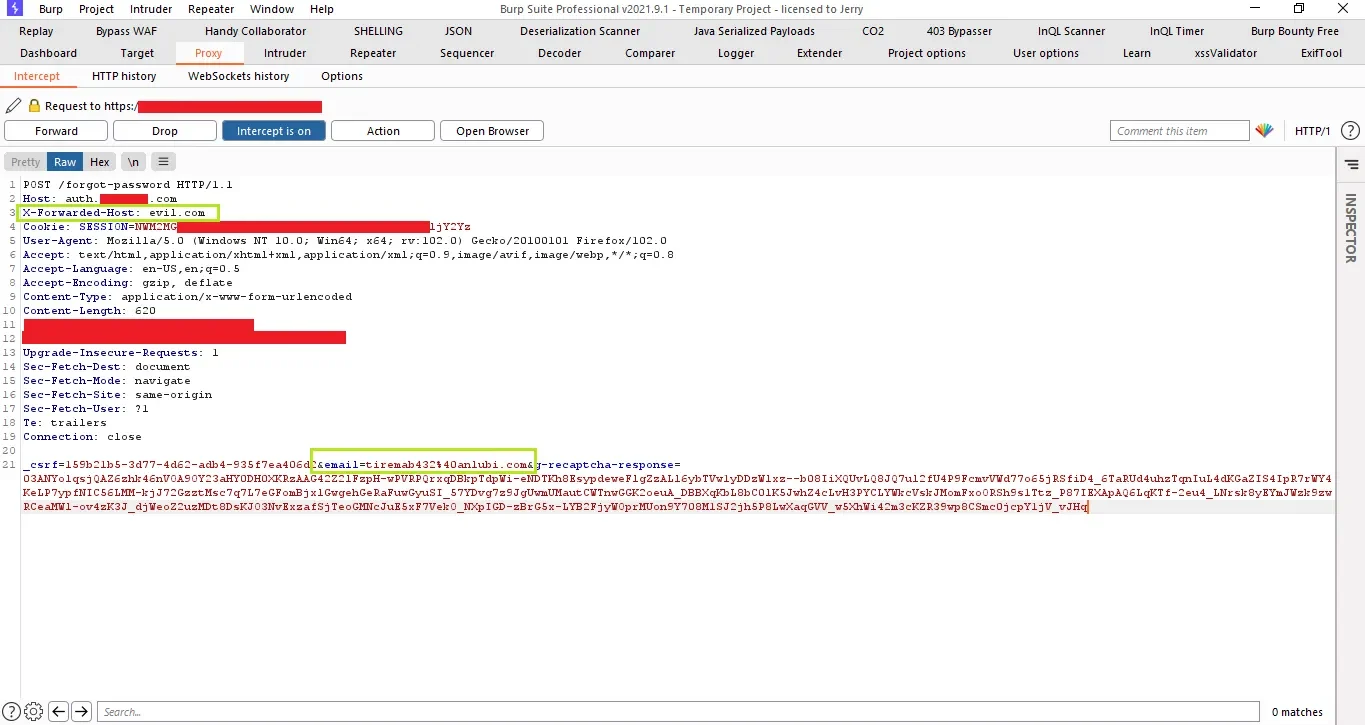
The header X-Forwarded-Host: evil.com was added, then the researcher right clicked on the request, chose Do intercept > Response to this request to check the response, and got a 403 Forbidden error.
X-Forwarded-Host: evil.com
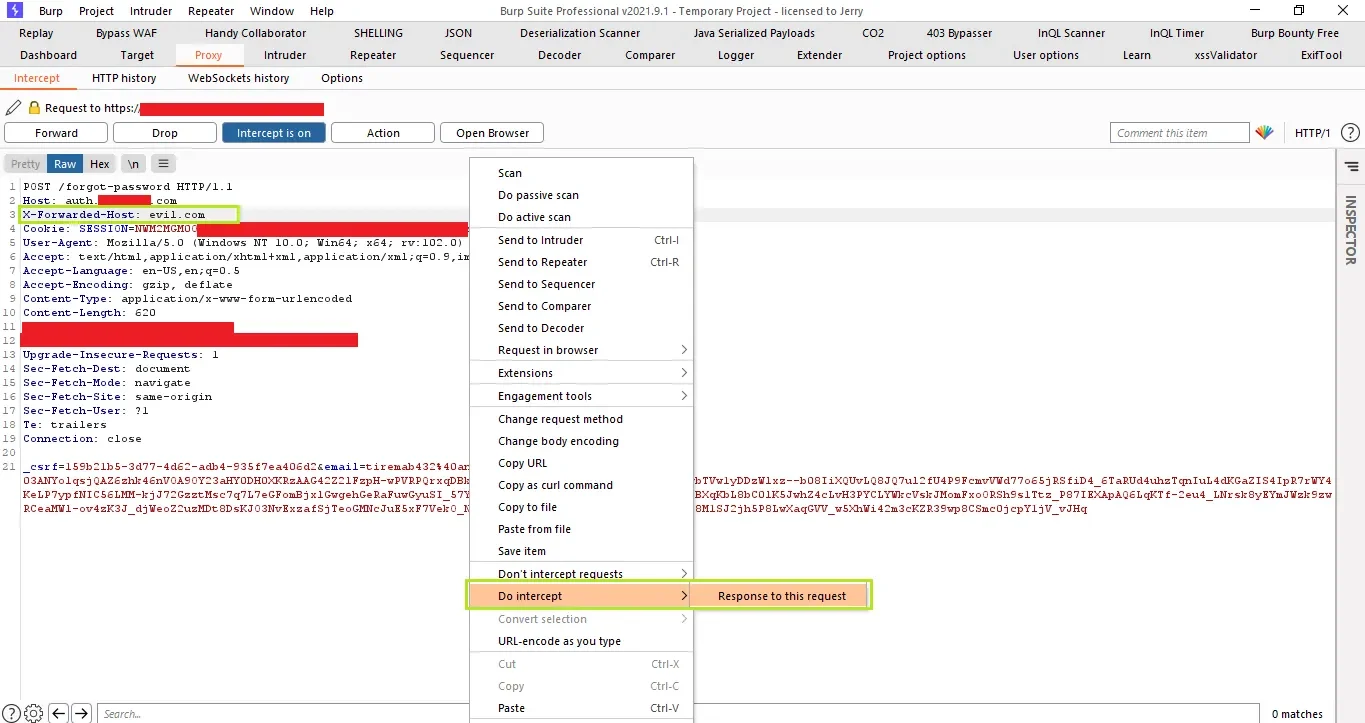
X-Forwarded-Host: evil.com header Request
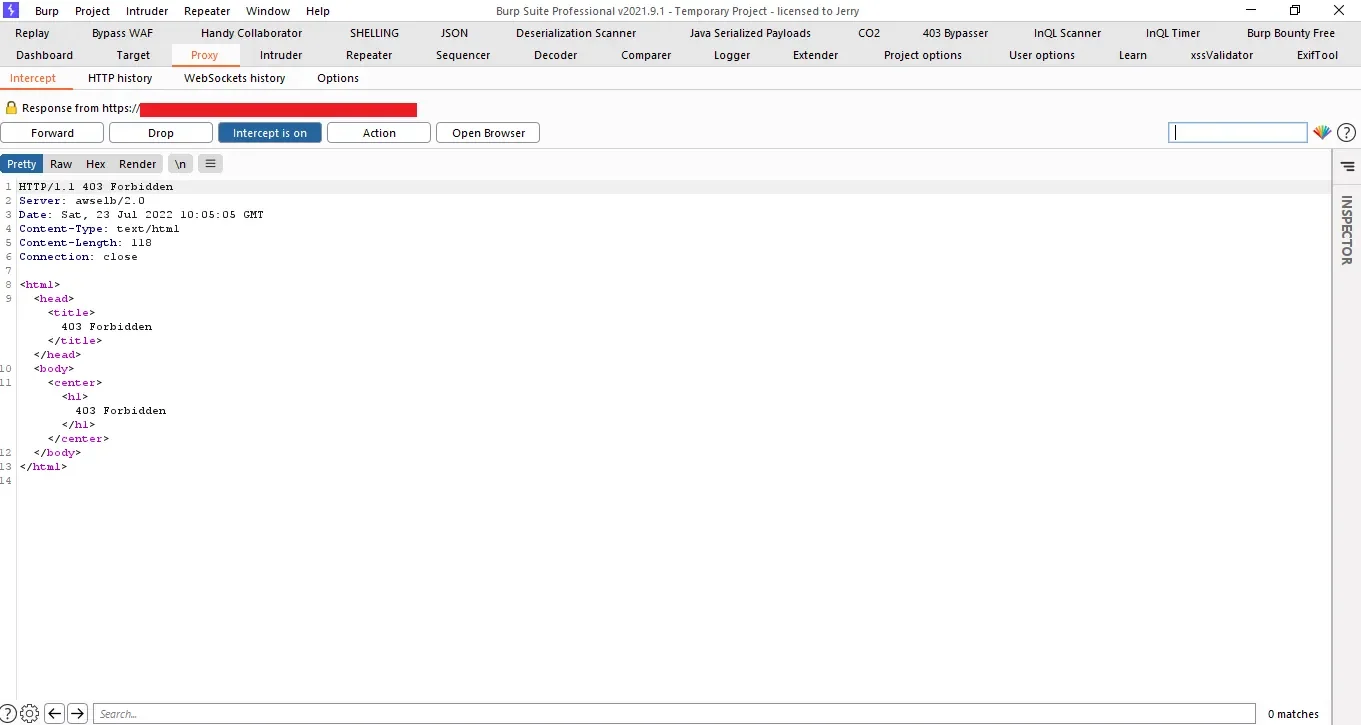
X-Forwarded-Host: evil.com header Response - 403 Forbidden
The application rejected a host that did not belong to it, so a plain external domain could not be injected into the reset link.
Step 3: Repeat the reset request
The researcher went back to the forgot password page of the target, entered the victim's email and clicked on send link again.
Step 4: Use the target's own host
The request was intercepted with Burp Suite and the header X-Forwarded-Host: auth.target.com was added. Again the researcher right clicked on the request, chose Do intercept > Response to this request to check the response, and this time it was a 200 OK response.
X-Forwarded-Host: auth.target.com
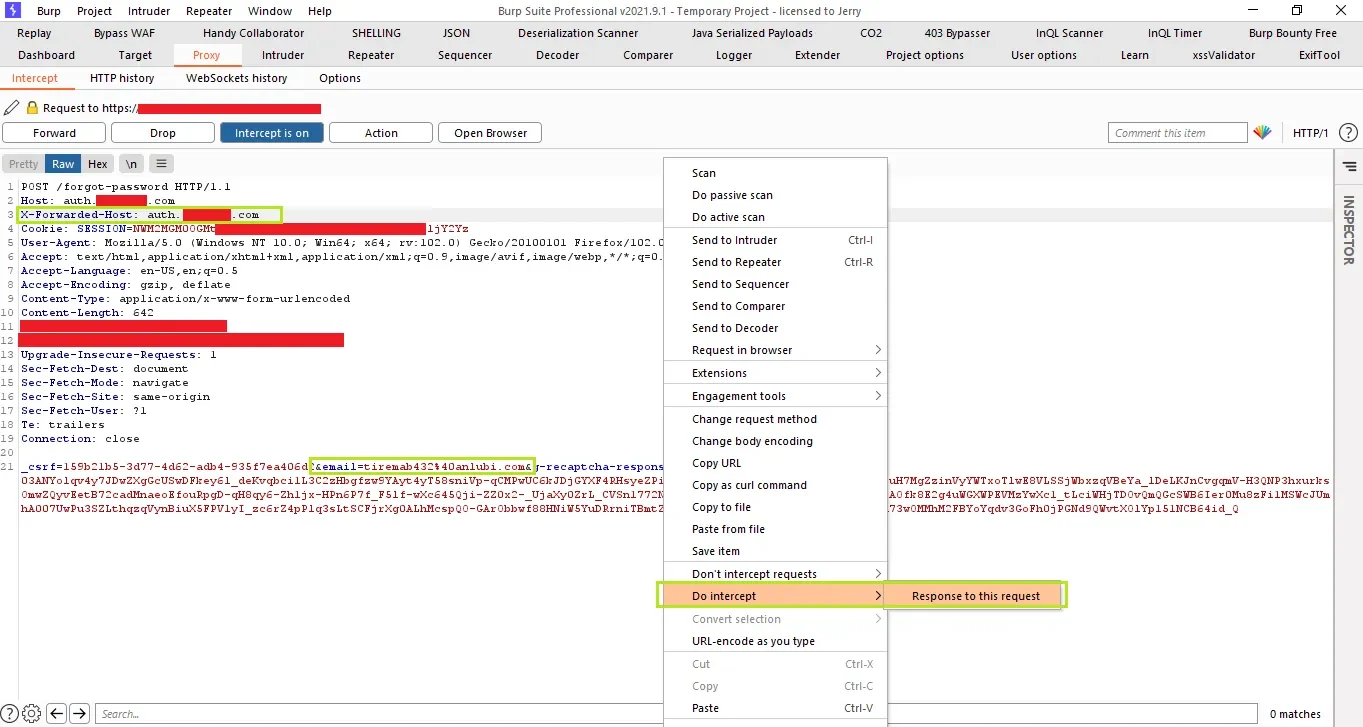
X-Forwarded-Host: auth.target.com - Request
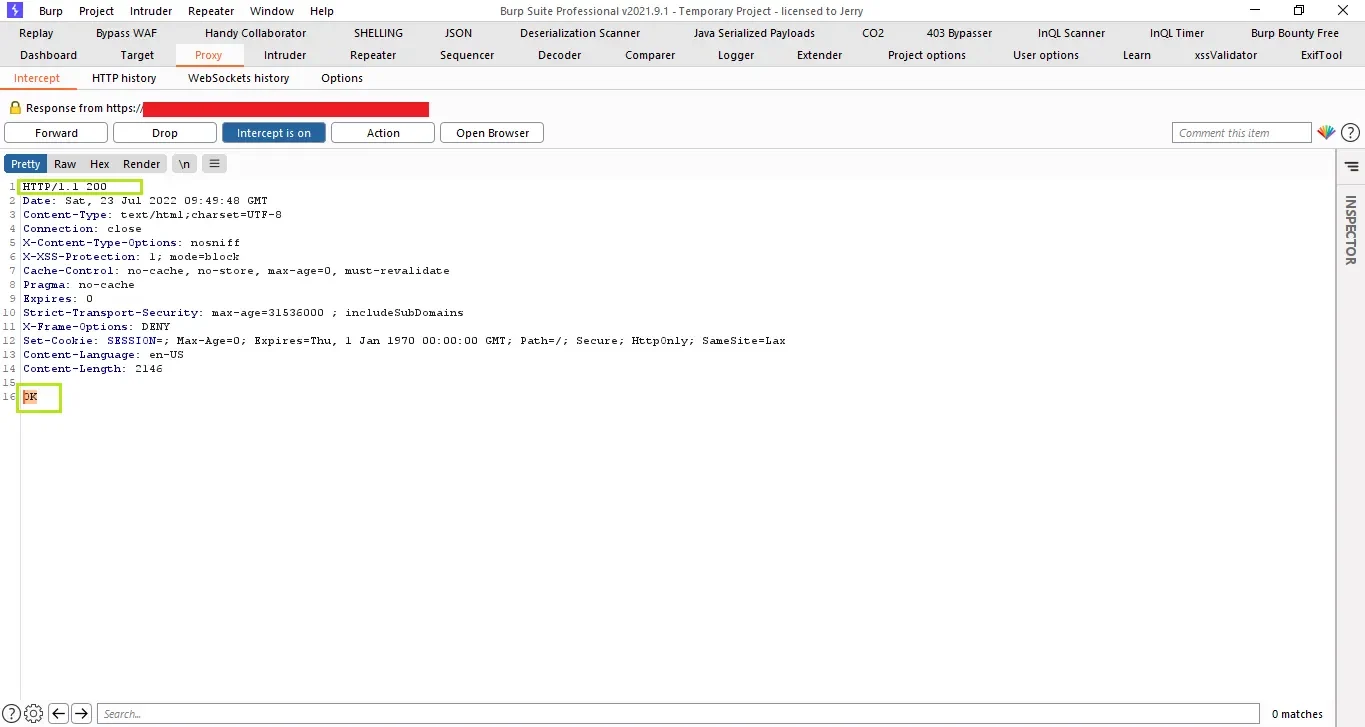
X-Forwarded-Host: auth.target.com header Response - 200 OK
The value matched the legitimate host and the response was 200 OK.
Step 5: Repeat the reset request again
The researcher went to the forgot password page of the target once more, entered the victim's email, clicked on send link and intercepted the request using Burp Suite.
Step 6: Swap the ASCII character for its IDN look-alike
The header X-Forwarded-Host: auth.tárget.com was added, the researcher right clicked on the request, chose Do intercept > Response to this request to check the response, and this time it was a 200 OK response.
X-Forwarded-Host: auth.tárget.com
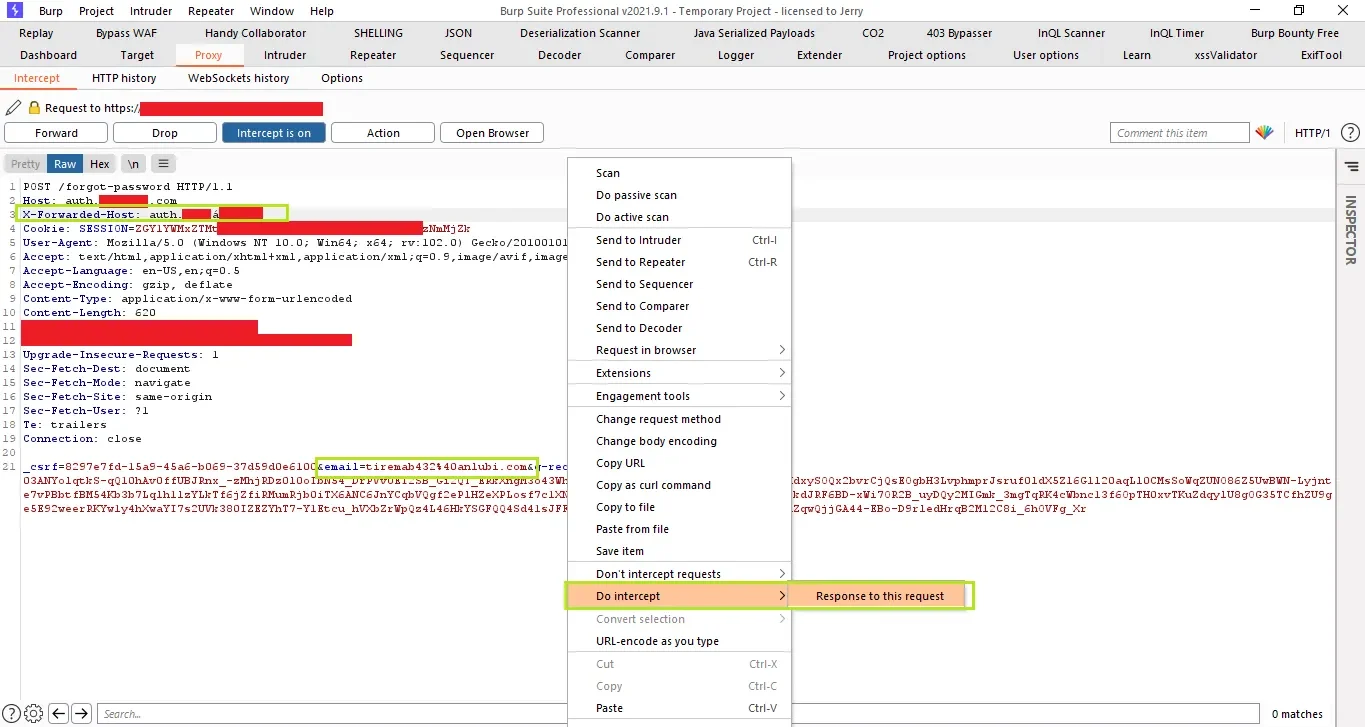
X-Forwarded-Host: auth.tárget.com - Request
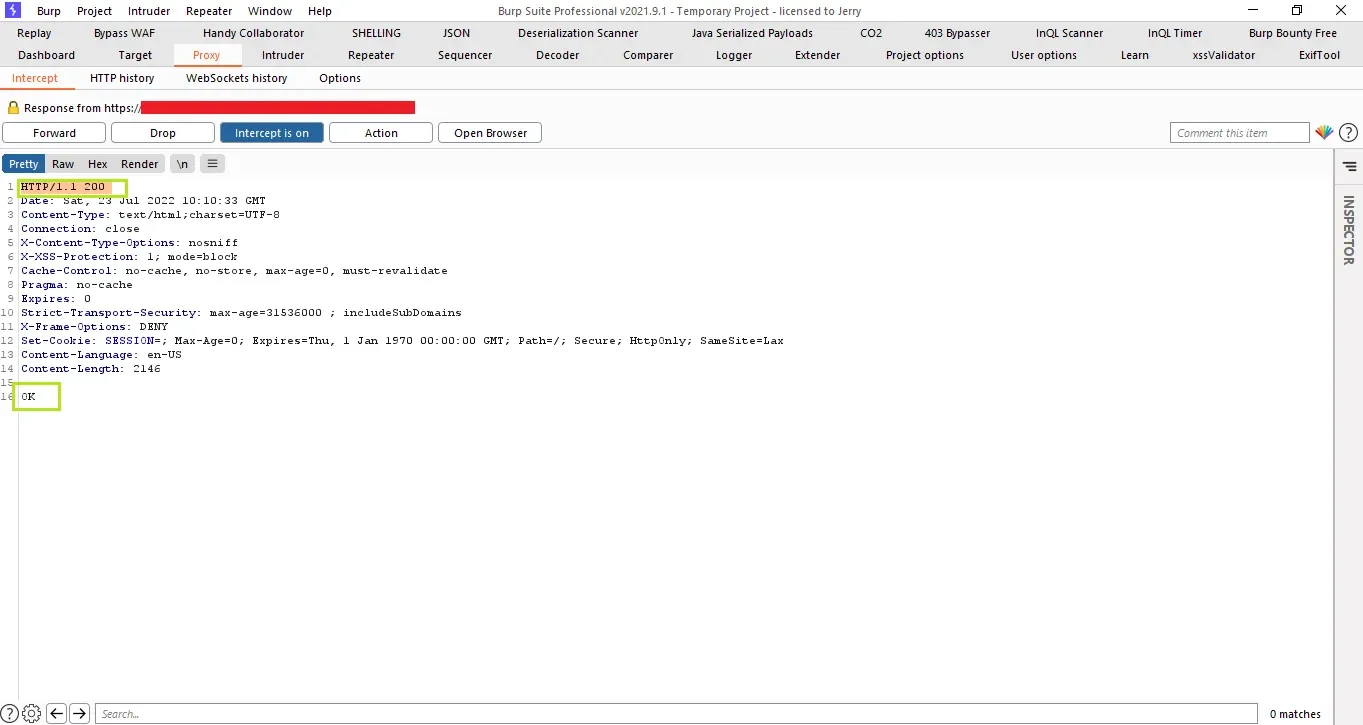
X-Forwarded-Host: auth.tárget.com - Response
The only change from the accepted value is the a in the domain replaced by the IDN character á (for example, auth.target.com becomes auth.tárget.com). The response was 200 OK, and the password reset link was sent with the domain auth.tárget.com.
Step 7: Read the reset email
The researcher checked the inbox and received the link with the IDN homographed target host, for example:
https://auth.tárget.com/forgot-password/verify/?reset-[redacted]
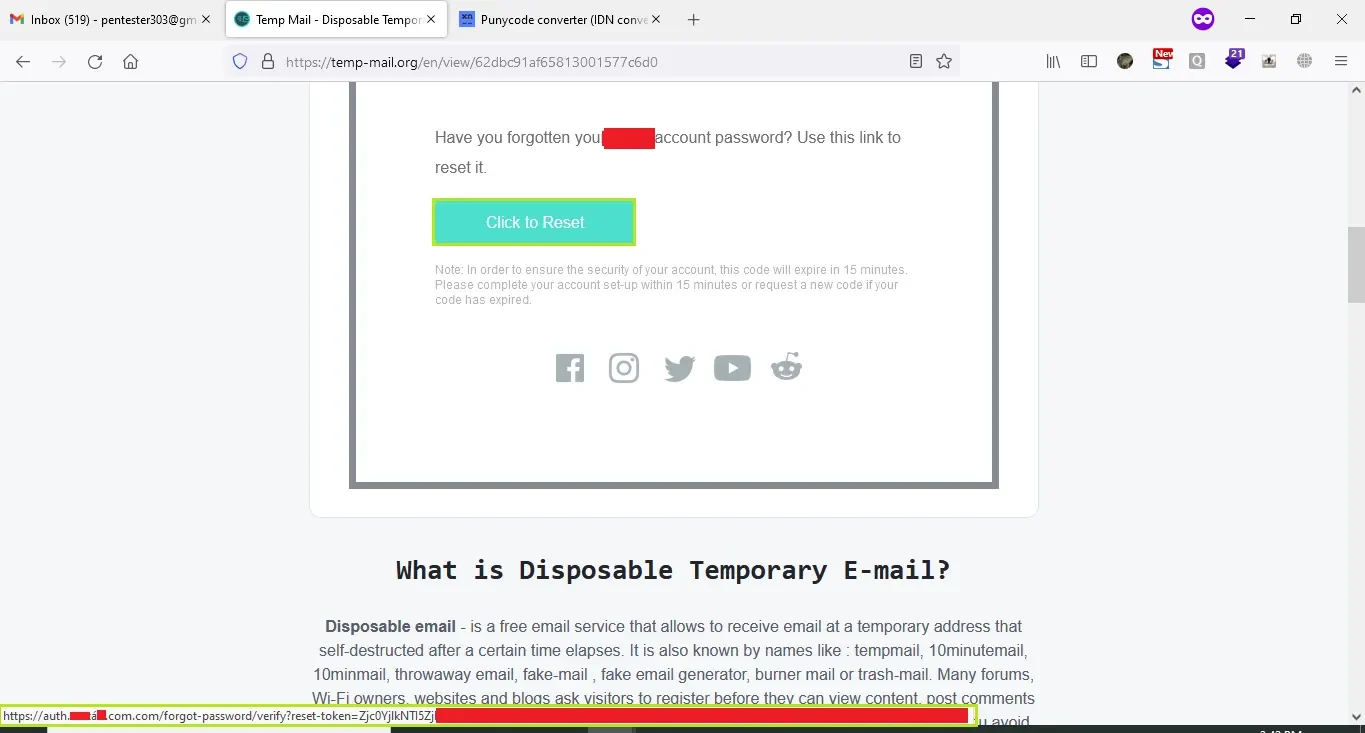
Password Reset Link - IDN Homographed Target Domain
Step 8: Confirm the host in the link
The researcher clicked the link and intercepted the request to check the host.
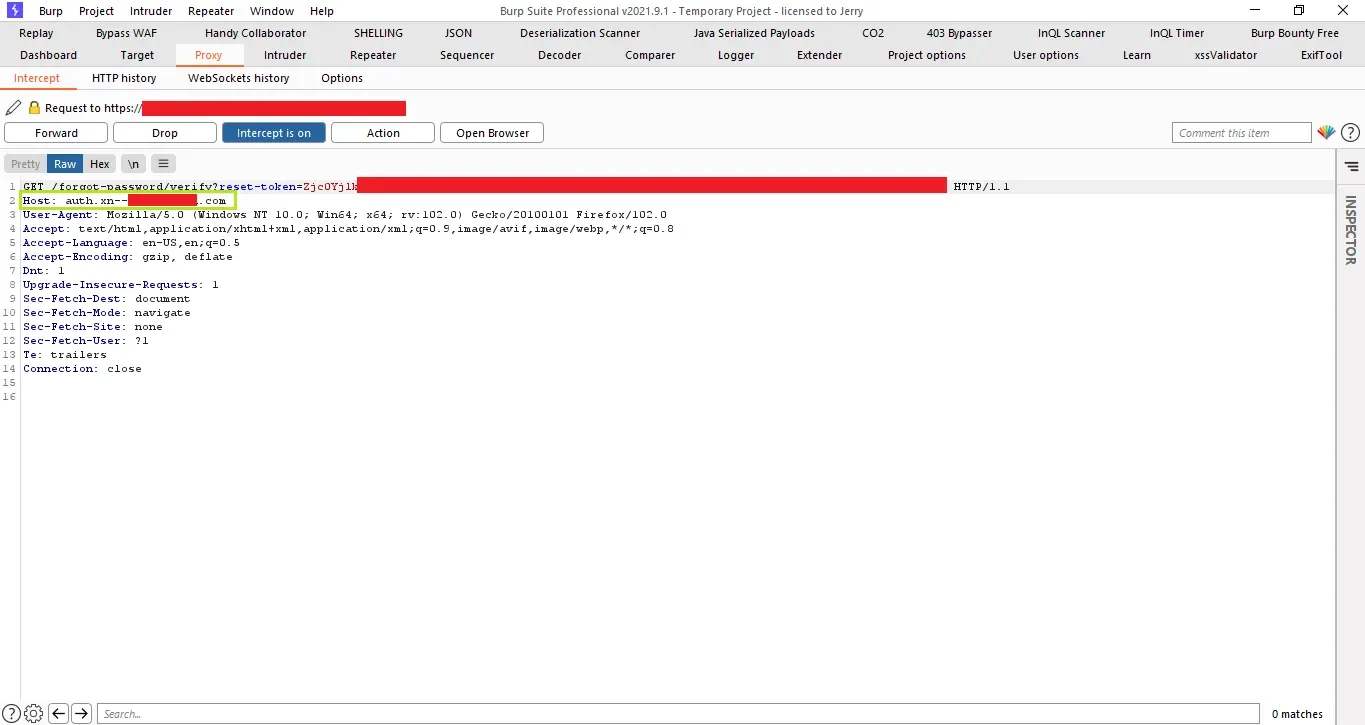
IDN Homographed Host
The attack scenario
In this scenario, an attacker sends a password reset link to the victim's inbox with the IDN domain that is controlled by the attacker. As soon as the victim clicks on the link, the password reset token will be logged into the attacker's server and the attacker will be able to reset the password on behalf of the victim, leading to complete account takeover.
In a real world scenario you need to buy an IDN domain, for example auth.tárget.com. Any character can be replaced with an IDN character to buy an IDN homographed domain.
Root cause
The researcher's opinion is that the SMTP server did not have proper handling and verification mechanisms for IDN homograph characters. When processing the host name, the SMTP server was not able to differentiate between the ASCII a and the non-ASCII á due to their visual similarity, which made this attack possible.
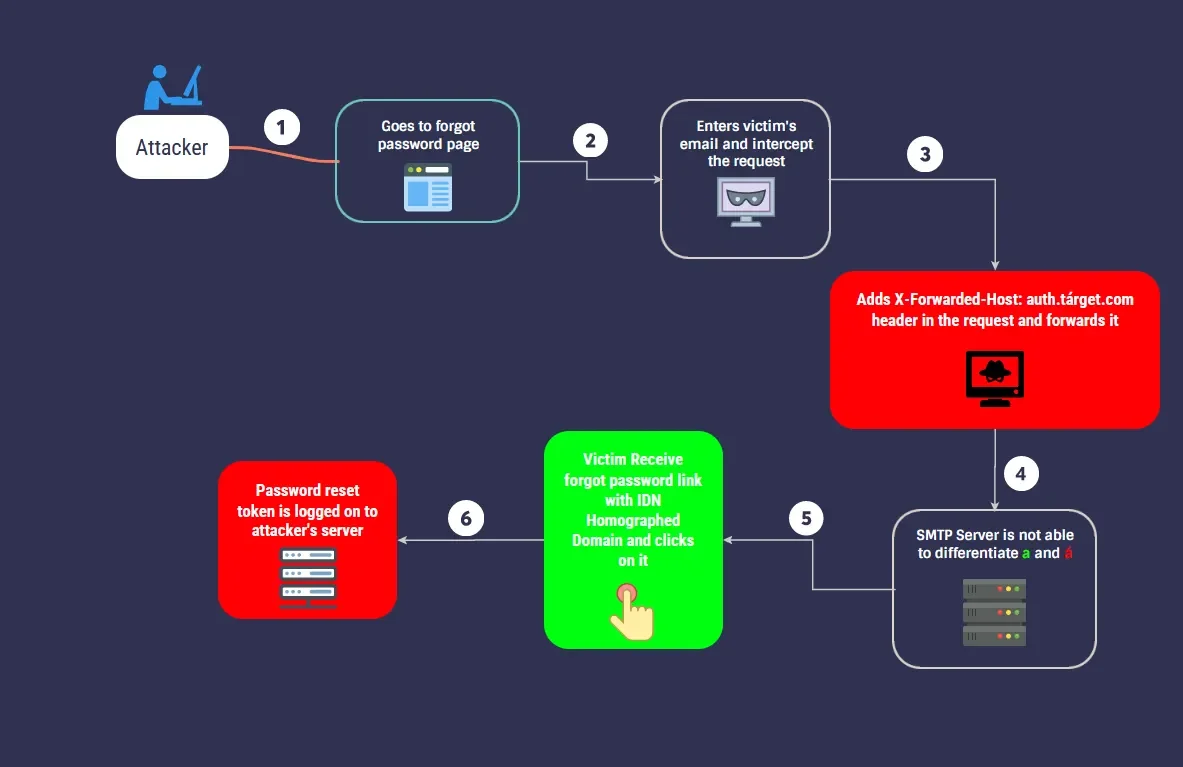
Attack Flow
The report explains the background in terms of the difference between a web server and an SMTP server. A web server is responsible for hosting and serving web pages over the internet; it handles HTTP/HTTPS requests and responses, serving web content to clients that access the website. An SMTP server is responsible for sending and receiving email messages; it handles the delivery of emails between mail servers and is used by email clients (such as Outlook or Gmail) to send outgoing messages.
SMTP servers typically treat a and á as the same characters because they often rely on ASCII (American Standard Code for Information Interchange) character encoding, which does not differentiate between them. This can make SMTP servers vulnerable to IDN homograph attacks.
ASCII character encoding:
- SMTP servers historically used ASCII, which represents characters using a 7-bit encoding scheme.
- ASCII includes characters commonly used in the English language and lacks support for many non-English characters or diacritics, including accented (IDN) characters like á.
- Due to the limited character set in ASCII, SMTP servers traditionally handled and processed only ASCII characters.
Punycode and Internationalized Domain Names (IDNs):
- To enable the use of non-ASCII characters in domain names, the Internationalized Domain Name (IDN) system was introduced.
- IDNs use a process called Punycode encoding to represent non-ASCII characters using a combination of ASCII characters, so á will be treated as U+00E1 in the ASCII table, which will differentiate a and á in the SMTP server.
SMTP server vulnerability:
- SMTP servers that do not incorporate proper handling and verification mechanisms for IDN homographs can be vulnerable.
- When processing host names, the SMTP server cannot differentiate between the ASCII a and the non-ASCII á due to their visual similarity.
The reset link was sent with the host supplied in the X-Forwarded-Host header, including the IDN variant.
Impact
This kind of vulnerability makes it possible for an attacker to take over anyone's account on the target website and can steal all the PII data of that user. The attack requires the victim to click the link in the reset email.
The researcher calculated the score as 5.9 Medium with the vector string:
CVSS:3.0/AV:N/AC:H/PR:N/UI:R/S:U/C:L/I:N/A:H
Fix
To mitigate the vulnerability of IDN homograph attacks, SMTP servers should implement measures to handle IDN domains properly, such as:
- Incorporating Punycode decoding to accurately interpret and process IDN email addresses.
- Enforcing strict email address validation to detect suspicious or potentially spoofed domains.
- Regularly updating server configurations and security policies to stay updated with the latest best practices for handling IDN domains.

- Other host headers on the reset flow. Send the forgot-password request with X-Forwarded-Host, X-Host, X-Forwarded-Server or Forwarded set to the target's own host. A positive result is a reset email whose link uses the value you supplied.
- IDN look-alikes of the accepted host. Once the target's own host is accepted, replace one character with a visually similar non-ASCII character (for example a with á). A positive result is a 200 OK response and a reset email whose link points at the homographed host.
- Other characters and scripts. Try other diacritics and other scripts that render like Latin letters. A positive result is the same: the link host is accepted and delivered in the email.
- Registration and invitation emails. Apply the same header manipulation to account registration or invitation flows. A positive result is an email whose verification link points at the homographed host.
- Punycode form directly. Supply the Punycode representation of the homographed host in the header. A positive result is that the application accepts it and the email link resolves to the attacker-controlled domain.
What happened, in plain words
A website had a "forgot my password" feature. When you use it, you type your email address, the site creates a special one-time link, and it emails that link to you. Clicking the link lets you set a new password.
The researcher found that adding a request header called X-Forwarded-Host changed the host name in the reset link. When the researcher put a completely different domain in that header, the site refused. When the researcher put the site's own domain in, the site accepted it. Then the researcher replaced one ordinary letter in that domain with a look-alike letter from another alphabet, and the site still accepted it.
The result was a password reset email whose link pointed at a domain that looks almost identical to the real one but is not the real one. If an attacker owns that look-alike domain, the victim clicks the link, the secret reset token lands on the attacker's server, and the attacker can take over the account.
This is called an IDN homograph attack. "IDN" means Internationalized Domain Name, a system that lets domain names contain letters from many alphabets, not just the plain English ones. "Homograph" means two things written differently but looking the same. The trick here is that the letter a and the letter á (an a with an accent) look very similar, and the email server that sent the reset message did not tell them apart.
The feature involved: password reset
A password reset normally works like this:
- You open the "forgot password" page and type your email address.
- The application creates a reset token: a long random string that proves whoever holds it is allowed to set a new password. Think of it as a temporary claim ticket you get at a cloakroom. Whoever holds the ticket gets the coat.
- The application sends you an email containing a link. The link includes the token, so clicking it proves you received the email.
- The host name in that link (the part like
auth.target.com) is normally taken from the incoming request, because the application wants the link to point back at itself. - The SMTP server is the piece of software that actually delivers the email. SMTP stands for Simple Mail Transfer Protocol, the standard way mail servers hand messages to each other. Think of it as the postal service: the website writes the letter, the SMTP server puts it in the envelope and delivers it.
The vulnerability described here is an IDN homograph attack. IDN stands for Internationalized Domain Name, a system that allows domain names to be written and displayed in different scripts and character sets. It enables the use of non-ASCII characters, such as letters with diacritical marks (é, á, č, ŭ, í, ó), in domain names. This makes it possible for an attacker to register a look-a-like name and either navigate victims to a website or create an account that collides with an existing user.
If an SMTP server is vulnerable to an IDN homograph attack, it treats a and á as the same characters. That can lead to security risks such as account takeover during registration or account takeover via password reset.
Setting up
The researcher was digging for request headers on the private program and found the X-Forwarded-Host header in use. A request header is a small labelled line that your browser (or a tool) adds to every request, carrying extra information such as what kind of browser you use or which host name you were trying to reach. X-Forwarded-Host is a non-standard header that proxies and load balancers use to tell the application which host name the visitor originally asked for. A proxy is a middle computer that passes requests along, like a receptionist forwarding calls.
The tooling was Burp Suite, a program that sits between your browser and the website so you can pause a request, read it, change it, and send it on. Think of it as a mail intercept service that lets you open an envelope, swap the letter, and reseal it. The researcher used it to intercept the forgot-password request and to inspect the response via the Do intercept > Response to this request option, which tells Burp to also pause the website's reply so you can read it.
Finding it
The researcher noticed the X-Forwarded-Host header and thought of trying it on the password reset page. The idea was to see whether the host used in the reset link could be influenced by the client. "Client" here means the browser or tool sending the request, that is, the side the attacker controls.
The first attempt with an unrelated domain was rejected, but the same header carrying the target's own domain returned 200 OK. "Reflected" means the value you sent came back out in the result, here inside the email. Replacing one character of that domain with its IDN look-alike then produced a link pointing at the homographed host.
Exploitation
Step 1: Capture the forgot-password request
The researcher went to the forgot password page of the target, entered the victim's email and clicked on send link, then intercepted the request using Burp Suite.
Forgot Password Request
Why this step: before you can change a request, you have to catch it. Burp Suite holds the request in place so the researcher can look at exactly what the browser was about to send, and then edit it before it reaches the website.
Step 2: Try an attacker-controlled host
The header X-Forwarded-Host: evil.com was added, then the researcher right clicked on the request, chose Do intercept > Response to this request to check the response, and got a 403 Forbidden error.
X-Forwarded-Host: evil.com
X-Forwarded-Host: evil.com header Request
X-Forwarded-Host: evil.com header Response - 403 Forbidden
Line by line:
X-Forwarded-Hostis the header name. It is the label on the envelope telling the application which host name the visitor wanted.evil.comis the value. It is a domain the researcher controls, standing in for an attacker's server.- The colon separates the name from the value, and the space after the colon is the usual formatting.
A 403 Forbidden is the web's way of saying "I understood you, and I refuse". The application rejected a host that did not belong to it, so a plain external domain could not be injected into the reset link. This is a good sign for the site: it means some check exists. The researcher's next question was what exactly that check allows.
Step 3: Repeat the reset request
The researcher went back to the forgot password page of the target, entered the victim's email and clicked on send link again.
Why repeat: each attempt needs a fresh request, because the previous one was already answered. Starting again from the real page keeps everything else identical, so the only thing that changes between attempts is the header value.
Step 4: Use the target's own host
The request was intercepted with Burp Suite and the header X-Forwarded-Host: auth.target.com was added. Again the researcher right clicked on the request, chose Do intercept > Response to this request to check the response, and this time it was a 200 OK response.
X-Forwarded-Host: auth.target.com
X-Forwarded-Host: auth.target.com - Request
X-Forwarded-Host: auth.target.com header Response - 200 OK
Line by line:
X-Forwarded-Hostis the same header as before.auth.target.comis the site's own host name, the one the real reset link should use.authis a subdomain, a smaller section of the main domain, often used for login and account pages.
A 200 OK means "done, here is the result". The value matched the legitimate host and the response was 200 OK. In other words, the site's check was not "is this header present?" but "does this header look like us?". That is the gap the next step walks through.
Step 5: Repeat the reset request again
The researcher went to the forgot password page of the target once more, entered the victim's email, clicked on send link and intercepted the request using Burp Suite.
Step 6: Swap the ASCII character for its IDN look-alike
The header X-Forwarded-Host: auth.tárget.com was added, the researcher right clicked on the request, chose Do intercept > Response to this request to check the response, and this time it was a 200 OK response.
X-Forwarded-Host: auth.tárget.com
X-Forwarded-Host: auth.tárget.com - Request
X-Forwarded-Host: auth.tárget.com - Response
Line by line:
X-Forwarded-Hostis unchanged.auth.tárget.comlooks like the real host, but the a intargethas been replaced by á, an a with an acute accent. That is a different character in the computer's memory even though it looks almost the same on screen.
The only change from the accepted value is the a in the domain replaced by the IDN character á (for example, auth.target.com becomes auth.tárget.com). The response was 200 OK, and the password reset link was sent with the domain auth.tárget.com.
Step 7: Read the reset email
The researcher checked the inbox and received the link with the IDN homographed target host, for example:
https://auth.tárget.com/forgot-password/verify/?reset-[redacted]
Password Reset Link - IDN Homographed Target Domain
Line by line:
https://is the scheme, meaning the link is opened over an encrypted web connection.auth.tárget.comis the host name, the look-alike domain. This is the part that matters: it is not the real site./forgot-password/verify/is the path, the page on that host that handles the reset.?reset-[redacted] is the query string. The?starts it,reset-tokenis the name of the value, andZwdft567ugr` is the token itself. This is the claim ticket. Anyone who receives it can use it.
Step 8: Confirm the host in the link
The researcher clicked the link and intercepted the request to check the host.
IDN Homographed Host
Why this step: the email could have been rewritten by the mail system on the way out. Clicking the link and pausing the outgoing request shows which host the browser is really about to contact, which is the final proof that the link points at the look-alike domain.
The attack scenario
In this scenario, an attacker sends a password reset link to the victim's inbox with the IDN domain that is controlled by the attacker. As soon as the victim clicks on the link, the password reset token will be logged into the attacker's server and the attacker will be able to reset the password on behalf of the victim, leading to complete account takeover.
"Account takeover" means the attacker ends up logged in as the victim, with the same access the victim has. "Logged into the attacker's server" means the attacker's web server records the incoming request, including the token in the query string, the same way a shop records an order.
In a real world scenario you need to buy an IDN domain, for example auth.tárget.com. Any character can be replaced with an IDN character to buy an IDN homographed domain. Domain names are rented from registrars, the companies that sell them, and many registrars sell names containing accented letters.
Why this happened
The researcher's opinion is that the SMTP server did not have proper handling and verification mechanisms for IDN homograph characters. When processing the host name, the SMTP server was not able to differentiate between the ASCII a and the non-ASCII á due to their visual similarity, which made this attack possible.
Attack Flow
The report explains the background in terms of the difference between a web server and an SMTP server. A web server is responsible for hosting and serving web pages over the internet; it handles HTTP/HTTPS requests and responses, serving web content to clients that access the website. An SMTP server is responsible for sending and receiving email messages; it handles the delivery of emails between mail servers and is used by email clients (such as Outlook or Gmail) to send outgoing messages.
In everyday terms: the web server is the shop counter where you look at goods, and the SMTP server is the delivery van that brings the receipt to your house. They are different machines doing different jobs, and a mistake in the van's route does not show up at the counter.
SMTP servers typically treat a and á as the same characters because they often rely on ASCII (American Standard Code for Information Interchange) character encoding, which does not differentiate between them. This can make SMTP servers vulnerable to IDN homograph attacks. Character encoding is the rulebook a computer uses to turn letters into numbers. If two different letters get the same number under the rulebook, the computer cannot tell them apart.
ASCII character encoding:
- SMTP servers historically used ASCII, which represents characters using a 7-bit encoding scheme. A bit is a single zero or one; seven bits give 128 possible values, enough for the English alphabet, digits and punctuation, and not much else.
- ASCII includes characters commonly used in the English language and lacks support for many non-English characters or diacritics, including accented (IDN) characters like á. A diacritic is the mark added to a letter, such as the accent on á.
- Due to the limited character set in ASCII, SMTP servers traditionally handled and processed only ASCII characters.
Punycode and Internationalized Domain Names (IDNs):
- To enable the use of non-ASCII characters in domain names, the Internationalized Domain Name (IDN) system was introduced.
- IDNs use a process called Punycode encoding to represent non-ASCII characters using a combination of ASCII characters, so á will be treated as U+00E1 in the ASCII table, which will differentiate a and á in the SMTP server. Punycode is a translation scheme: it writes a name with foreign letters using only plain ASCII letters, digits and hyphens, so old systems can still carry it. U+00E1 is the official code number for á in the Unicode standard, the modern worldwide character list. Think of Punycode as spelling a foreign word out letter by letter over the phone so the listener can write it down exactly.
SMTP server vulnerability:
- SMTP servers that do not incorporate proper handling and verification mechanisms for IDN homographs can be vulnerable.
- When processing host names, the SMTP server cannot differentiate between the ASCII a and the non-ASCII á due to their visual similarity.
The reset link was sent with the host supplied in the X-Forwarded-Host header, including the IDN variant.
Impact
This kind of vulnerability makes it possible for an attacker to take over anyone's account on the target website and can steal all the PII data of that user. PII means personally identifiable information: name, address, phone number, and anything else that identifies a real person. The attack requires the victim to click the link in the reset email.
The researcher calculated the score as 5.9 Medium with the vector string:
CVSS:3.0/AV:N/AC:H/PR:N/UI:R/S:U/C:L/I:N/A:H
CVSS is a standard scoring system for how serious a security flaw is. The vector string is the shorthand that produces the score. Reading it piece by piece:
AV:Nmeans the attack can be carried out over the network, not only by someone sitting at the machine.AC:Hmeans the attacker needs special conditions to succeed, here a look-alike domain and a victim who clicks.PR:Nmeans the attacker needs no account or privileges on the site beforehand.UI:Rmeans the victim has to do something, namely click the link.S:Umeans the flaw stays within the affected component rather than spreading to others.C:Lmeans limited loss of confidentiality.I:Nmeans no loss of integrity.A:Hmeans a high loss of availability.
Fix
To mitigate the vulnerability of IDN homograph attacks, SMTP servers should implement measures to handle IDN domains properly, such as:
- Incorporating Punycode decoding to accurately interpret and process IDN email addresses. Decoding means turning the Punycode form back into the real letters so the server can compare names correctly.
- Enforcing strict email address validation to detect suspicious or potentially spoofed domains. Validation means checking that a value follows the rules before using it, the way a form checks that a date is a real date.
- Regularly updating server configurations and security policies to stay updated with the latest best practices for handling IDN domains.
- Other host headers on the reset flow. Send the forgot-password request with X-Forwarded-Host, X-Host, X-Forwarded-Server or Forwarded set to the target's own host. A positive result is a reset email whose link uses the value you supplied.
- IDN look-alikes of the accepted host. Once the target's own host is accepted, replace one character with a visually similar non-ASCII character (for example a with á). A positive result is a 200 OK response and a reset email whose link points at the homographed host.
- Other characters and scripts. Try other diacritics and other scripts that render like Latin letters. A positive result is the same: the link host is accepted and delivered in the email.
- Registration and invitation emails. Apply the same header manipulation to account registration or invitation flows. A positive result is an email whose verification link points at the homographed host.
- Punycode form directly. Supply the Punycode representation of the homographed host in the header. A positive result is that the application accepts it and the email link resolves to the attacker-controlled domain.
Glossary
- Account takeover: when an attacker gains control of someone else's account and can act as that person.
- ASCII: the old character encoding that covers English letters, digits and punctuation only.
- Bit: a single zero or one, the smallest unit of computer data.
- Burp Suite: a tool that sits between browser and website so requests can be paused, read and edited.
- Character encoding: the rulebook that maps letters to numbers inside a computer.
- Client: the side sending the request, such as a browser or a testing tool.
- CVSS: a standard scoring system for the severity of a security flaw.
- Diacritic: a mark added to a letter, such as the accent on á.
- Domain name: the human-readable name of a site, such as target.com.
- Homograph: two characters or words that look the same but are different.
- Host name: the part of a URL that names the server, such as auth.target.com.
- HTTP/HTTPS: the protocol browsers use to talk to web servers; HTTPS is the encrypted version.
- IDN (Internationalized Domain Name): a domain name that may contain letters from non-English alphabets.
- IDN homograph attack: using a look-alike IDN domain to trick people into visiting an attacker's site.
- PII: personally identifiable information, data that identifies a real person.
- Proxy: a middle computer that forwards requests between client and server.
- Punycode: the translation that writes IDN names using only ASCII characters.
- Query string: the part of a URL after the
?, carrying named values such as a token. - Reflected: a value you sent that comes back out in the response or in a generated message.
- Request header: a labelled line added to a request carrying extra information.
- Reset token: a random string that proves the holder may set a new password.
- SMTP (Simple Mail Transfer Protocol): the standard way mail servers send email to each other.
- Subdomain: a smaller section of a domain, such as auth in auth.target.com.
- U+00E1: the Unicode code number for the letter á.
- Unicode: the modern worldwide character list covering all scripts.
- Validation: checking that a value follows the rules before using it.
- X-Forwarded-Host: a non-standard header used by proxies to pass along the host name the visitor asked for.
- 403 Forbidden: the server understood the request and refused it.
- 200 OK: the server accepted the request and returned a normal result.