Reflected XSS di Portal Pemerintah Kota [REDACTED] via Parameter Tahun pada Root Domain dan Subdomain
The year-filter parameters on a city government portal's root domain and a subdomain reflected user input into the HTML response without proper output encoding. An attacker could inject a mixed-case script tag so that JavaScript executed in a victim's browser, potentially stealing session cookies or redirecting the user.
 Published on icikiwirsol.medium.com
Bug Hunter
The full write-up lives on its author's site
It belongs to its author, so we link to it rather than copy it. The other two tabs are our own rewrites, checked against it.
Context
The target is a public service portal belonging to the municipal government of a city whose name is redacted in the write-up. The researcher, Primandito Adi Setiya, was testing year-based filter features on several pages of that portal. Two of those pages are named in the report:
- an awards page on the root domain, at
https://redactedkota.go.id/penghargaan/tahun; - a legal products page on a subdomain, at
https://redacted.redactedkota.go.id/produk-hukum/tahun.
Both pages take a year from the URL and echo it back into the HTML response. The report does not describe what the pages display beyond that filter behaviour.
Setup
The write-up does not list any accounts, roles, tools or software versions. The testing was done on 13 November 2025 against the live portal, and the only precondition shown is that the two URLs above are reachable. No authentication is mentioned at any point, so the pages appear to be public.
Finding it
While testing year-based filters across several pages, the researcher noticed that input from the URL parameters was being reflected into the HTML response without proper output encoding. The parameters involved are datatahun on the root-domain awards page and tahun on the subdomain legal products page.
The same pattern appeared in two separate places, the root domain and a subdomain.
Exploitation
Step 1: identify the first target (root domain)
Open the awards page on the root domain:
Step 2: inject the payload into the first target
Insert the following payload into the datatahun parameter of that URL:
<ScRiPt>alert(document.domain)</ScRiPt>
The mixed-case tag name <ScRiPt> was used to avoid basic sanitisation filters that might block the lowercase <script> tag, while the browser still parses the tag as a script element. The body, alert(document.domain), does nothing more than display the current origin, which is enough to prove execution without touching any data.
The report gives the encoded form of the parameter as:
?datatahun=%3CScRiPt%3Ealert(document.domain)%3C/ScRiPt%3E&page=1&per-page=1
Here the angle brackets are percent-encoded (%3C and %3E), and two further parameters, page=1 and per-page=1, travel alongside the payload. The report does not explain what those two parameters control.

Step 3: execution and verification on the first target
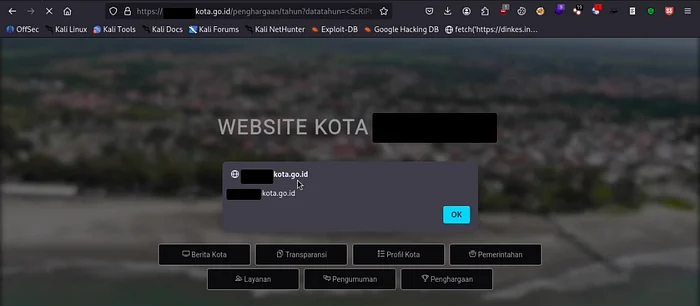
When the URL is opened, the browser processes the payload and an alert box appears showing the target domain name, redactedkota.go.id. That confirms the JavaScript ran in the page's origin rather than being rendered as inert text.
Step 4: identify the second target (subdomain)
The same test is repeated on the legal products page of the subdomain:
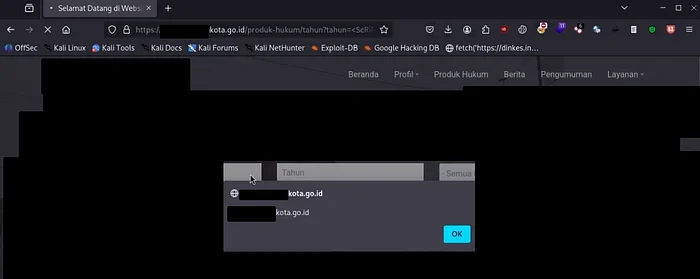
The same payload is inserted, this time into the tahun parameter. The report does not reproduce the full encoded URL for this second target, but the outcome is the same: the script executes on the subdomain.

Step 5: status after the fix window
As of publication of the write-up on 9 October 2026, the responsible party had not responded and the vulnerability had not been fixed. The same payload still executed when retested.
Root cause
The application accepts input from URL parameters (datatahun and tahun) and reflects it into the HTML response without adequate output encoding. Because the reflected value lands in a context where the browser still interprets markup, an attacker-supplied tag becomes live script in the victim's browser.
The report mentions only that mixed case was used to avoid basic sanitisation filters that might block the lowercase <script> tag.
Impact
The report rates the issue as Medium severity and lists four ways an attacker could use it:
- Cookie and session theft: stealing the session cookie of a logged-in user, leading to account takeover if the cookie is not set with
HttpOnly. - Phishing: manipulating the page's appearance to trick users into entering sensitive data.
- Defacement: temporarily altering how the page looks.
- Malicious redirect: sending users to an attacker-controlled site.
The account takeover scenario is explicitly conditional on the session cookie lacking the HttpOnly flag.
Fix
No fix was applied. The report recommends three measures:
- Output encoding: apply HTML entity encoding to
<,>,",'and&on every input that is echoed back into an HTML page. - Input validation: restrict the characters allowed in the URL parameters and reject suspicious input, for example by refusing
<and>. - Content Security Policy: deploy a strong CSP to limit the damage if an XSS flaw appears again.
Variants to test
- Case and tag variations on the same parameter. Try other mixed-case or alternative-tag forms of the same payload against
datatahunandtahun. A positive result is an alert box showing the page's domain, which shows the filter is matching strings rather than encoding output. - Other year-style parameters on sibling pages. The report found the pattern on an awards page and a legal products page; other pages with year filters are worth the same test. A positive result is the reflected value breaking out of its context and executing.
- Encoding variations. If the plain payload is blocked, try different encodings of the angle brackets and tag name. A positive result is execution despite the filter, which again indicates blacklist-based sanitisation.
- Context checks. Determine whether the reflection lands in text, an attribute or a script block, and adapt the payload to that context. A positive result is execution in the correct context, confirming the missing output encoding rather than a lucky filter gap.
What happened, in plain words
A security researcher was looking at a public website run by a city government. The city's name is hidden in the write-up, so I will call it "the city portal" throughout. The portal has pages that let you filter content by year: you pick a year, and the page shows you the items from that year. Two of those pages are named in the report: an awards page on the main address of the site, and a legal products page on a subdomain (a second, related address under the same main domain).
On both pages, the year you choose is taken from the web address you type and then written back into the page that comes back to you. The site did not clean that value properly before putting it back. That means a person could put a small piece of JavaScript (the programming language that web pages run in your browser) into the year part of the address, and the browser would run it as if the site itself had written it. This kind of flaw is called Reflected Cross-Site Scripting, or reflected XSS. "Reflected" because the bad input bounces straight back to whoever sent it, rather than being saved on the server for later visitors.
The researcher proved it with a harmless pop-up box that shows the site's own domain name. The report rates the issue as Medium severity. As of the write-up's publication on 9 October 2026, the site had not replied and had not fixed it.
Background you need first
A few ideas come up again and again below, so here they are from zero.
A URL and its parameters. A URL is the address you type in the browser bar. Some addresses carry extra pieces after a question mark, like ?year=2024. Each piece is a parameter: a name, an equals sign, and a value. The site reads those values to decide what to show you. Think of a restaurant order slip: the dish name is the parameter name, and "no onions" is the value. The kitchen reads the slip and plates your food accordingly.
HTML and JavaScript. HTML is the language that describes what a page contains: headings, paragraphs, links, images. JavaScript is code that the browser runs to make the page do things, such as open a pop-up or react to a click. When a browser receives a page, it reads the HTML and, if it finds a script, it runs it. That is normal and is how most websites work.
Output encoding. When a site takes something a user typed and puts it back on a page, it should first turn dangerous characters into harmless text. For example, the character < normally starts an HTML tag. If the site replaces < with a code that means "just show a less-than sign", the browser displays it as text instead of treating it as the start of a tag. This conversion is called output encoding, or escaping. Without it, whatever the user typed can become live HTML or live script.
XSS. Cross-Site Scripting is the name for the family of bugs where an attacker gets their own JavaScript to run inside someone else's page, in that page's origin. The origin is the combination of scheme, host and port, roughly "which site this is". Script running in the site's origin can read and change what that site is allowed to read and change in the victim's browser. That is why it matters.
A cookie and a session. When you log in, the site usually gives your browser a small piece of data called a session cookie. Your browser sends it back with every request so the site knows it is still you. Think of a wristband at an event: show it at the door and you get back in without queueing again. If someone else copies your wristband, they can walk in as you. That is why stealing a session cookie can lead to account takeover.
The HttpOnly flag. A cookie can carry a flag called HttpOnly. When it is set, the browser will not let JavaScript read that cookie. It still sends it to the server, but scripts on the page cannot see it. So even if an attacker gets script running on the page, they cannot simply read the session cookie out of it.
Content Security Policy (CSP). CSP is a set of instructions a site can send with its pages that tells the browser which sources of script are allowed. It is a second line of defence: if a bad script does get into the page, the browser may refuse to run it because the policy does not allow it.
Sanitisation and blacklists. Some sites try to stop bad input by looking for known-bad strings and blocking them. That is a blacklist approach: block the things you thought of. It tends to fail against small variations the author did not think of. Proper output encoding is a whitelist-style defence: it does not try to guess what is bad, it makes everything safe to display.
The target
The target is a public service portal belonging to the municipal government of a city whose name is redacted in the write-up. The researcher, Primandito Adi Setiya, was testing year-based filter features on several pages of that portal. Two of those pages are named in the report:
- an awards page on the root domain, at
https://redactedkota.go.id/penghargaan/tahun; - a legal products page on a subdomain, at
https://redacted.redactedkota.go.id/produk-hukum/tahun.
Both pages take a year from the URL and echo it back into the HTML response. The report does not describe what the pages display beyond that filter behaviour.
A root domain is the main address, like example.go.id. A subdomain is a name placed in front of it, like shop.example.go.id. They can be run by the same organisation and share the same main name, but they are separate hosts as far as the browser is concerned. That distinction matters later, because the same flaw turned up on both.
Setup
The write-up does not list any accounts, roles, tools or software versions. The testing was done on 13 November 2025 against the live portal, and the only precondition shown is that the two URLs above are reachable. No authentication is mentioned at any point, so the pages appear to be public.
"Public" here means you do not need to log in to see them. That is why the researcher could test them with nothing more than a browser.
Finding it
While testing year-based filters across several pages, the researcher noticed that input from the URL parameters was being reflected into the HTML response without proper output encoding. The parameters involved are datatahun on the root-domain awards page and tahun on the subdomain legal products page.
In plain terms: the researcher typed something into the year part of the address, and that same something appeared in the page that came back, unchanged. When a value comes back unchanged, the next question is always whether the site is treating it as text or as code. If it is treated as code, you have a potential XSS.
The same pattern appeared in two separate places, the root domain and a subdomain. If one page echoes input unsafely, it is worth checking the pages built the same way.
Exploitation
Step 1: identify the first target (root domain)
Open the awards page on the root domain:
Line by line: https:// is the scheme, meaning the connection is encrypted. redactedkota.go.id is the host, the main address of the city portal. /penghargaan/tahun is the path, which points at the awards page and its year filter. Opening this page is the baseline: you see what the page normally looks like before you change anything, so you can tell what your input does to it.
Step 2: inject the payload into the first target
Insert the following payload into the datatahun parameter of that URL:
<ScRiPt>alert(document.domain)</ScRiPt>
Line by line: <ScRiPt> is an opening script tag, but written with mixed capital and small letters. HTML tag names are not case-sensitive, so the browser reads this exactly as it would read <script>. alert(document.domain) is the JavaScript inside the tag. alert opens a pop-up box with a message. document.domain is the current page's domain name. So the whole thing says: open a pop-up showing this page's domain. </ScRiPt> closes the tag, again in mixed case.
The mixed-case tag name was used to avoid basic sanitisation filters that might block the lowercase <script> tag, while the browser still parses the tag as a script element. The body, alert(document.domain), does nothing more than display the current origin, which is enough to prove execution without touching any data. Showing the domain is a safe proof: it demonstrates that your code ran in the site's own context, and it does not read, change or send anything.
The report gives the encoded form of the parameter as:
?datatahun=%3CScRiPt%3Ealert(document.domain)%3C/ScRiPt%3E&page=1&per-page=1
Line by line: the leading ? starts the list of parameters. datatahun= is the parameter name the awards page reads. %3C is the percent-encoded form of <, and %3E is the encoded form of >. Characters like angle brackets cannot always travel safely in a URL, so they are written as a percent sign plus two hexadecimal digits. The browser or the site decodes them back to < and > before use. alert(document.domain) sits between them unchanged. %3C/ScRiPt%3E is the encoded closing tag. Then & separates the next parameter, page=1, and another & separates per-page=1. The report does not explain what those two parameters control.
Step 3: execution and verification on the first target
When the URL is opened, the browser processes the payload and an alert box appears showing the target domain name, redactedkota.go.id. That confirms the JavaScript ran in the page's origin rather than being rendered as inert text.
This is the key distinction. If the site had encoded the input properly, you would see the literal characters <ScRiPt>alert(document.domain)</ScRiPt> printed on the page as text, and nothing would happen. A pop-up means the browser treated your input as a real script tag and ran the code inside it.
Step 4: identify the second target (subdomain)
The same test is repeated on the legal products page of the subdomain:
Line by line: this is the same scheme and the same main domain, but with an extra name in front, redacted.redactedkota.go.id, which makes it a subdomain. /produk-hukum/tahun is the path to the legal products page and its year filter. The reason to test here is that a flaw on the main site does not automatically mean the subdomain has it too, and vice versa. They may be built from the same code, or they may not.
The same payload is inserted, this time into the tahun parameter. The report does not reproduce the full encoded URL for this second target, but the outcome is the same: the script executes on the subdomain.
Step 5: status after the fix window
As of publication of the write-up on 9 October 2026, the responsible party had not responded and the vulnerability had not been fixed. The same payload still executed when retested.
A retest matters because a report is only useful if you can say whether the problem is still there. Here it was.
Root cause
The application accepts input from URL parameters (datatahun and tahun) and reflects it into the HTML response without adequate output encoding. Because the reflected value lands in a context where the browser still interprets markup, an attacker-supplied tag becomes live script in the victim's browser.
Think of it like a noticeboard where visitors can pin a note. The problem is not that visitors write notes; it is that the notes are copied without being made safe first.
The report mentions only that mixed case was used to avoid basic sanitisation filters that might block the lowercase <script> tag. In other words, the filter was checking for one exact spelling, and the browser accepts many spellings of the same tag.
Impact
The report rates the issue as Medium severity and lists four ways an attacker could use it:
- Cookie and session theft: stealing the session cookie of a logged-in user, leading to account takeover if the cookie is not set with
HttpOnly. - Phishing: manipulating the page's appearance to trick users into entering sensitive data.
- Defacement: temporarily altering how the page looks.
- Malicious redirect: sending users to an attacker-controlled site.
Going through them in plain words:
- If the session cookie can be read by script, then script running on the page can read it and send it elsewhere. Whoever holds that cookie can use it to act as the logged-in user. The report is explicit that this depends on the cookie lacking
HttpOnly. - Phishing means making the real page show a fake login form or a fake message, so the user types a password into something the attacker controls. Because the page is the real site, the user has less reason to be suspicious.
- Defacement means changing what the page shows, for example replacing text or images, for as long as the victim is on that page.
- A redirect means sending the victim's browser to another site, for example one that looks like the real one and asks for credentials.
Reflected means the bad input is not saved on the server; it only appears in the response to the specific request that carried it. So the attacker has to get the victim to open a prepared URL, for example by sending it in a message. The account takeover scenario is explicitly conditional on the session cookie lacking the HttpOnly flag.
Fix
No fix was applied. The report recommends three measures:
- Output encoding: apply HTML entity encoding to
<,>,",'and&on every input that is echoed back into an HTML page. - Input validation: restrict the characters allowed in the URL parameters and reject suspicious input, for example by refusing
<and>. - Content Security Policy: deploy a strong CSP to limit the damage if an XSS flaw appears again.
In plain words:
- Output encoding is the main fix. Each of those five characters has a special meaning in HTML. Turning them into their safe entity forms means the browser displays them as characters instead of acting on them. Do this at the moment the value is written into the page, because that is where you know whether it is going into text, an attribute or a script block.
- Input validation is a supporting measure. A year filter has no reason to accept angle brackets, so refusing them is reasonable. It should not be the only defence, because filters can be bypassed, as this report shows.
- CSP is the safety net. If a bad script still gets in, a strong policy can stop the browser from running it or from loading code from places you did not allow.
Variants to test
- Case and tag variations on the same parameter. Try other mixed-case or alternative-tag forms of the same payload against
datatahunandtahun. A positive result is an alert box showing the page's domain, which shows the filter is matching strings rather than encoding output. - Other year-style parameters on sibling pages. The report found the pattern on an awards page and a legal products page; other pages with year filters are worth the same test. A positive result is the reflected value breaking out of its context and executing.
- Encoding variations. If the plain payload is blocked, try different encodings of the angle brackets and tag name. A positive result is execution despite the filter, which again indicates blacklist-based sanitisation.
- Context checks. Determine whether the reflection lands in text, an attribute or a script block, and adapt the payload to that context. A positive result is execution in the correct context, confirming the missing output encoding rather than a lucky filter gap.
Why these are worth doing: a single blocked payload does not mean the site is safe. It may mean the site blocks one exact spelling. Trying variations tells you whether the defence is real (encoding everything) or shallow (matching a few strings). The context check matters because the same characters behave differently depending on where they land on the page. Inside ordinary text, a tag starts a tag. Inside an attribute, you may need to close the attribute first. Inside a script block, you are already in code. Knowing the context tells you what a correct fix would have to do.
Glossary
- Alert box: a small pop-up the browser shows with a message, opened by the JavaScript
alertfunction. - Blacklist: a defence that blocks a list of known-bad strings, rather than making all input safe.
- Content Security Policy (CSP): instructions sent with a page that tell the browser which sources of script and other content are allowed.
- Cookie: a small piece of data a site stores in your browser and your browser sends back with requests, often used to remember who you are.
- Cross-Site Scripting (XSS): a flaw where an attacker's JavaScript runs inside another site's page, in that site's origin.
- Defacement: changing how a page looks, usually to make a point or to mislead.
- Domain: the main name of a site, such as
example.go.id. document.domain: in JavaScript, the domain name of the current page.- HTML: the language that describes the structure and content of a web page.
- HTML entity encoding: replacing special characters like
<,>,",'and&with safe codes so they display as text instead of being treated as markup. HttpOnly: a cookie flag that stops JavaScript on the page from reading that cookie.- JavaScript: the programming language browsers run to make pages interactive.
- Origin: the combination of scheme, host and port that identifies which site a page belongs to; script in one origin is not supposed to touch another.
- Output encoding: converting user input into a safe form before writing it into a page.
- Parameter: a name and value pair in a URL after the
?, used to pass information to the site. - Payload: the piece of input an attacker sends to trigger a flaw; here, the script tag.
- Percent encoding: writing characters in a URL as a percent sign plus two hexadecimal digits, such as
%3Cfor<. - Phishing: tricking a user into entering sensitive information, often by imitating a trusted page.
- Reflected XSS: XSS where the bad input is echoed straight back in the response to the request that carried it, rather than being stored on the server.
- Root cause: the underlying reason a flaw exists, as opposed to its symptoms.
- Sanitisation: processing input to remove or neutralise dangerous parts.
- Session: the state of being logged in, usually tracked by a session cookie.
- Session hijacking / account takeover: using a stolen session cookie to act as another user.
- Severity: a rating of how serious a flaw is; this report rates it Medium.
- Subdomain: a name placed in front of a main domain, such as
shop.example.go.id. - Tag: a piece of HTML syntax such as
<script>, which tells the browser what an element is. - URL: the address of a resource on the web, typed in the browser bar.
- Validation: checking input against rules and rejecting what does not fit.



