A stored cross-site scripting flaw existed in the Calendar Name field of Concrete5's Add Calendar feature, allowing a user with calendar-creation rights to inject JavaScript that executes in another user's browser when they view the calendar. An attacker could run script in an administrator's session, though the HttpOnly cookie flag prevented direct session theft.
Greetings, (There is no soup like crayons soup with vegetables).
Hello @Concrete5 Team.
Like my last report #300532 I found other Stored XSS vulnerability in your nice CMS. If you don't mind I will omit what Stored - XSS is and its description, hope everything is fine in your side about that :).
The testing scenario is the same: Concrete5 8.3.1 released at 12/20/17, while searching for some fields where I could insert a XSS payload I stopped into: Dashboard > Calendar & Events > Add Calendar
###Steps to reproduce:
Open your favorite updated web browser (Firefox or Chrome)
Log into your Concrete5 instance as admin
For the ease create an user (or use an existent one) and add it to Administrators group
Open a new window browser in Private or Incognito mode and log in as the new user (user2)
As user2 go to Dashboard > Calendar & Events
Now, click on Add Calendar
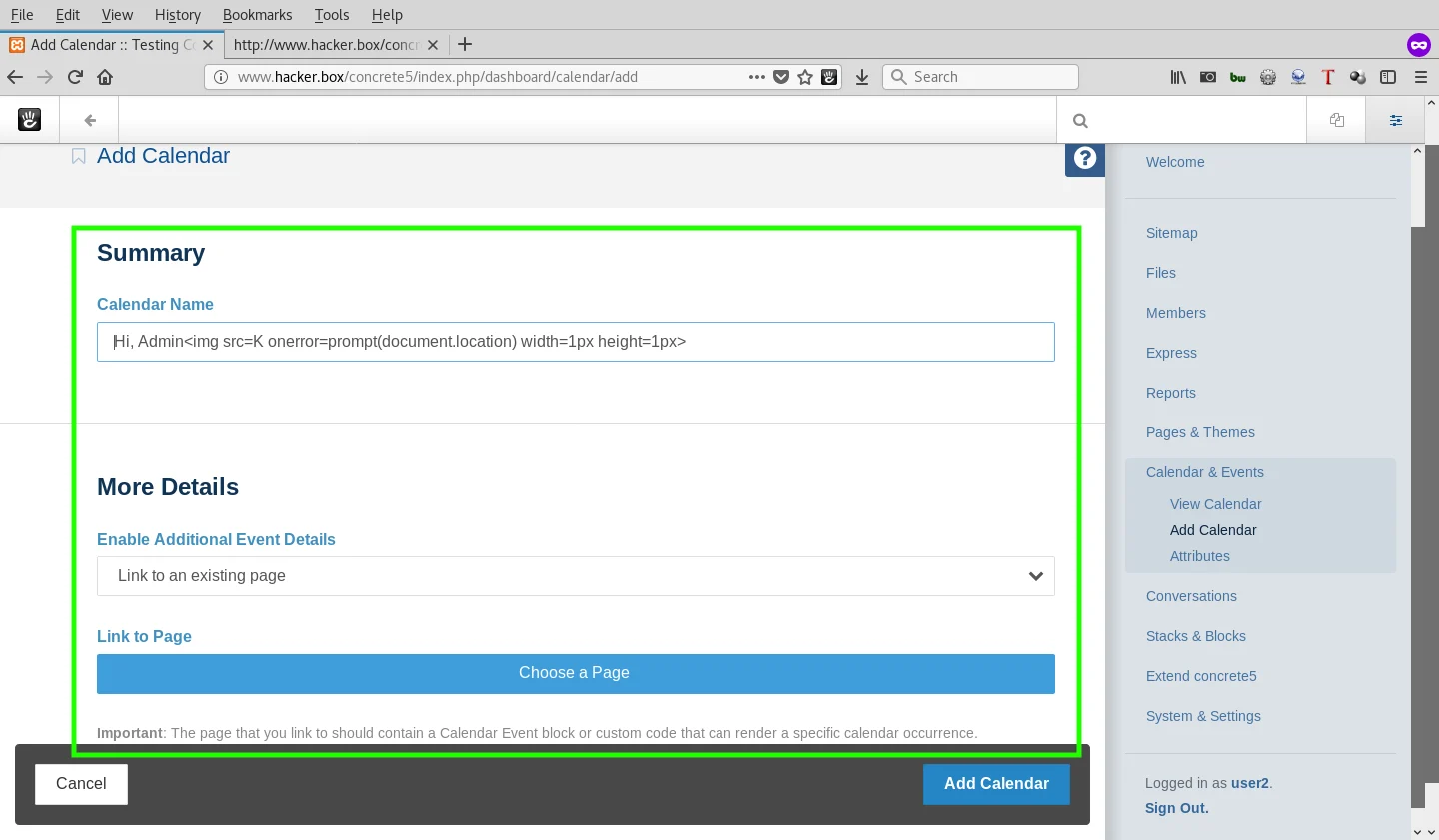
In Calendar Name type something like: TEST<img src=K onerror={here goes js payload}>
My js payload:
Hi, Admin<img src=K onerror=prompt(document.location) width=1px height=1px>Calendar_XSS_AddCalendar-field.pngFrom the original on HackerOne
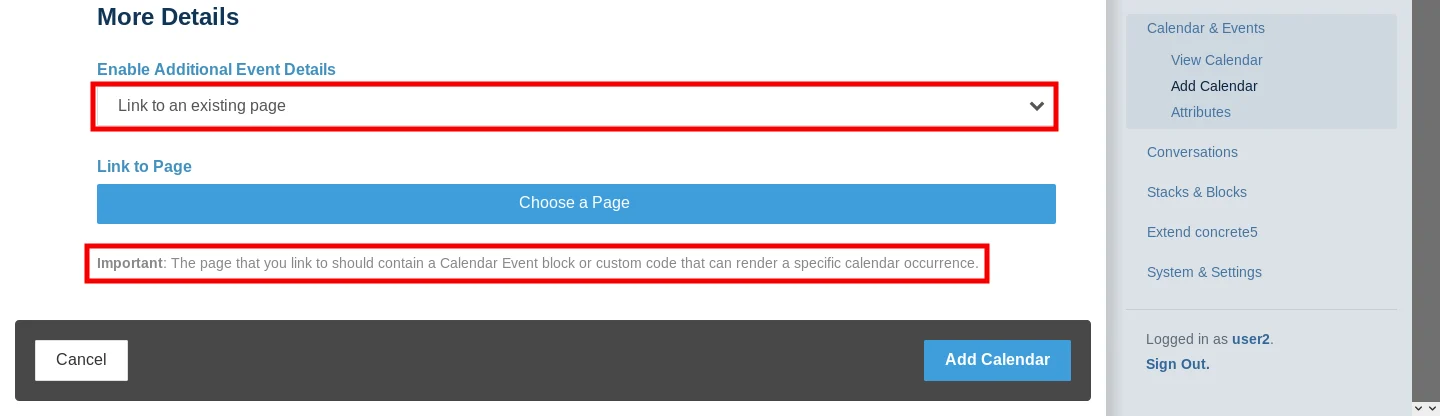
(If there's a public page containing a Calendar Event block or custom code that can render a specific calendar the Stored XSS would be public to and all a malicious user have to do is in Enable Additional Event Details chose Link to an existing page)
Now, click on Add Calendar button
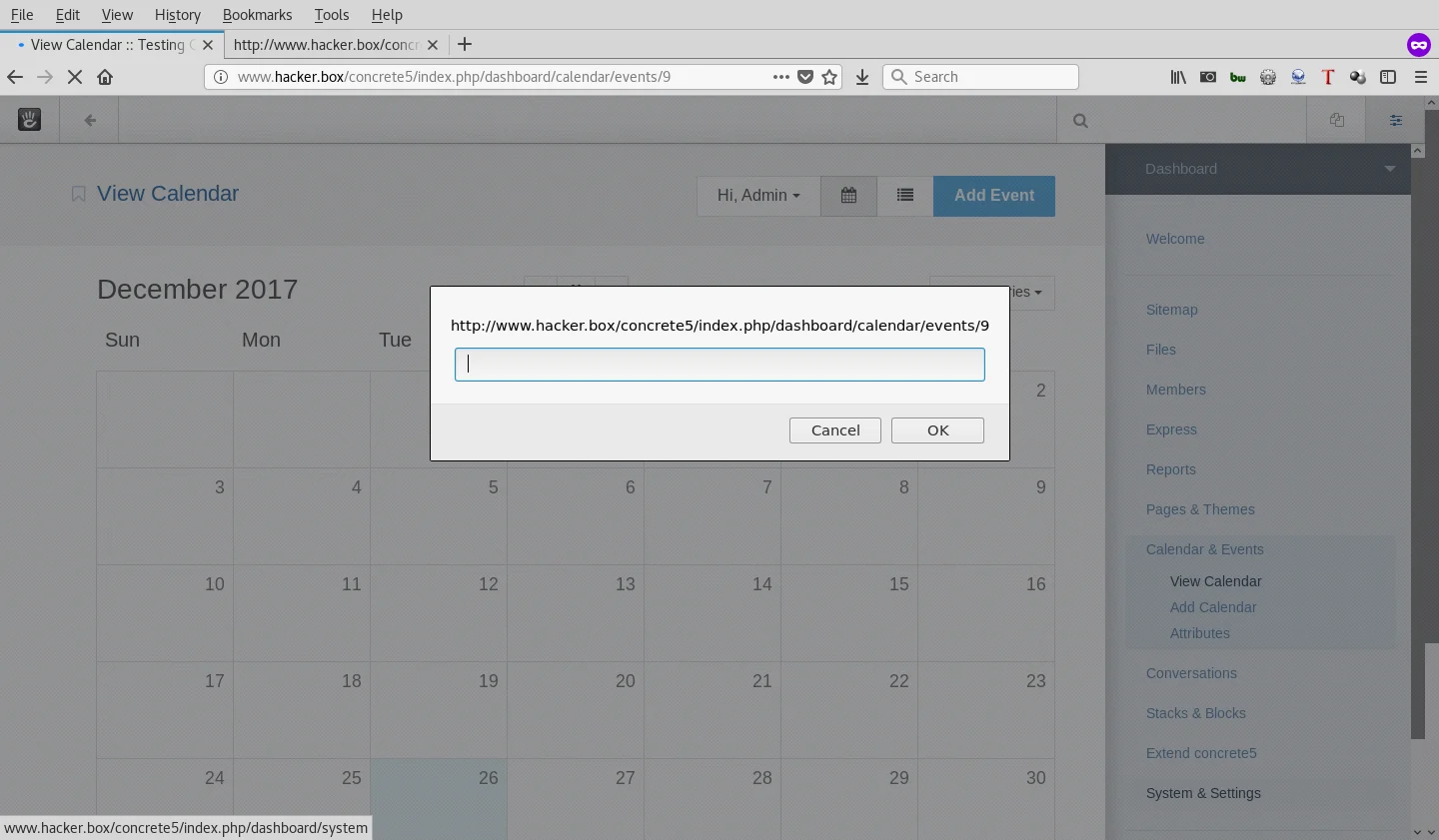
In user2 browser the prompt box is showing the page's document location Calendar_XSS_User2-browser.pngFrom the original on HackerOne (close it)
Now, go to the window browser where admin user is logged
Go to Dashboard > Calendar & Events
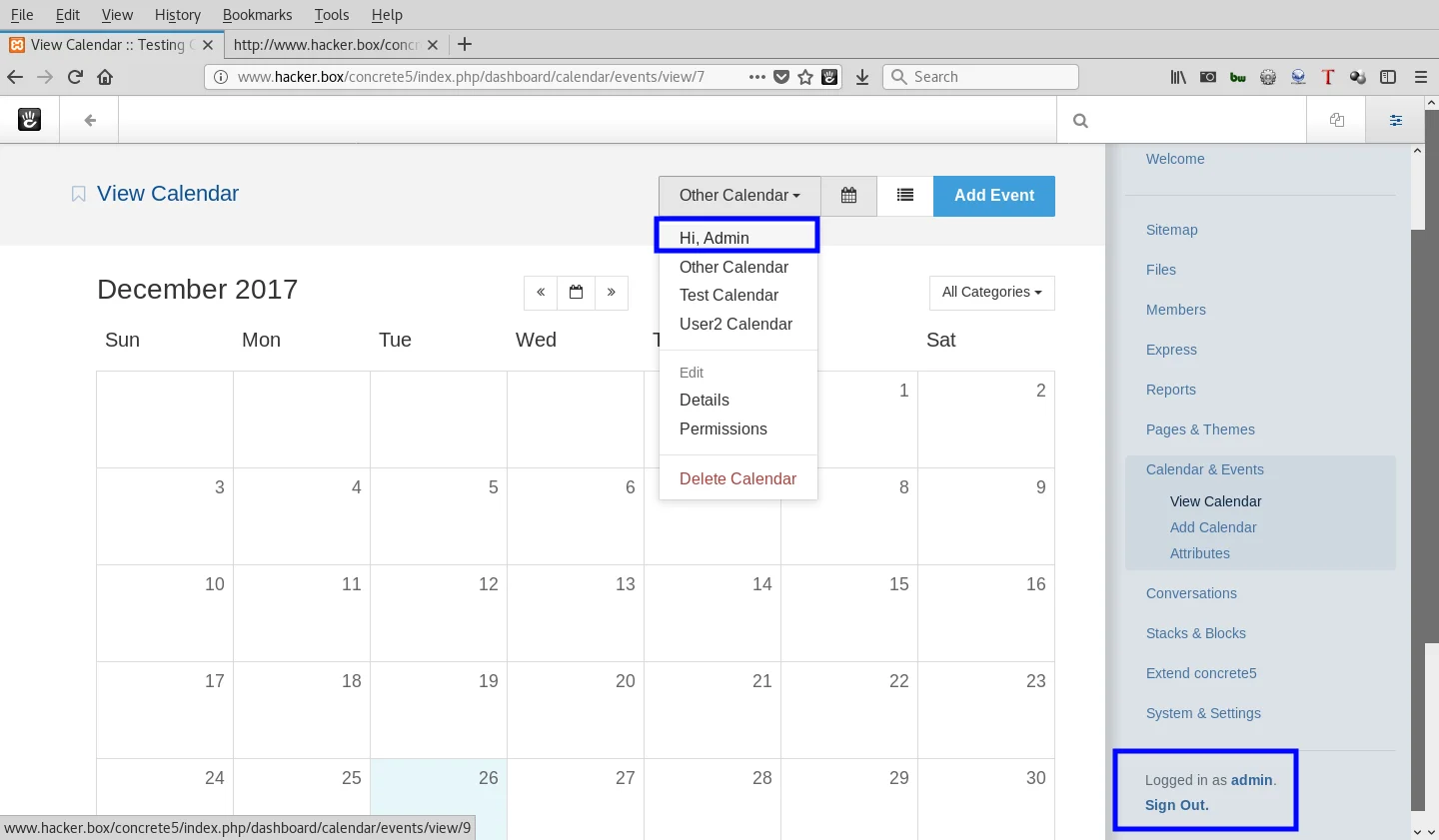
Select "Hi, Admin" Calendar Calendar_XSS_Select-HiAdmin-Calendar.pngFrom the original on HackerOne
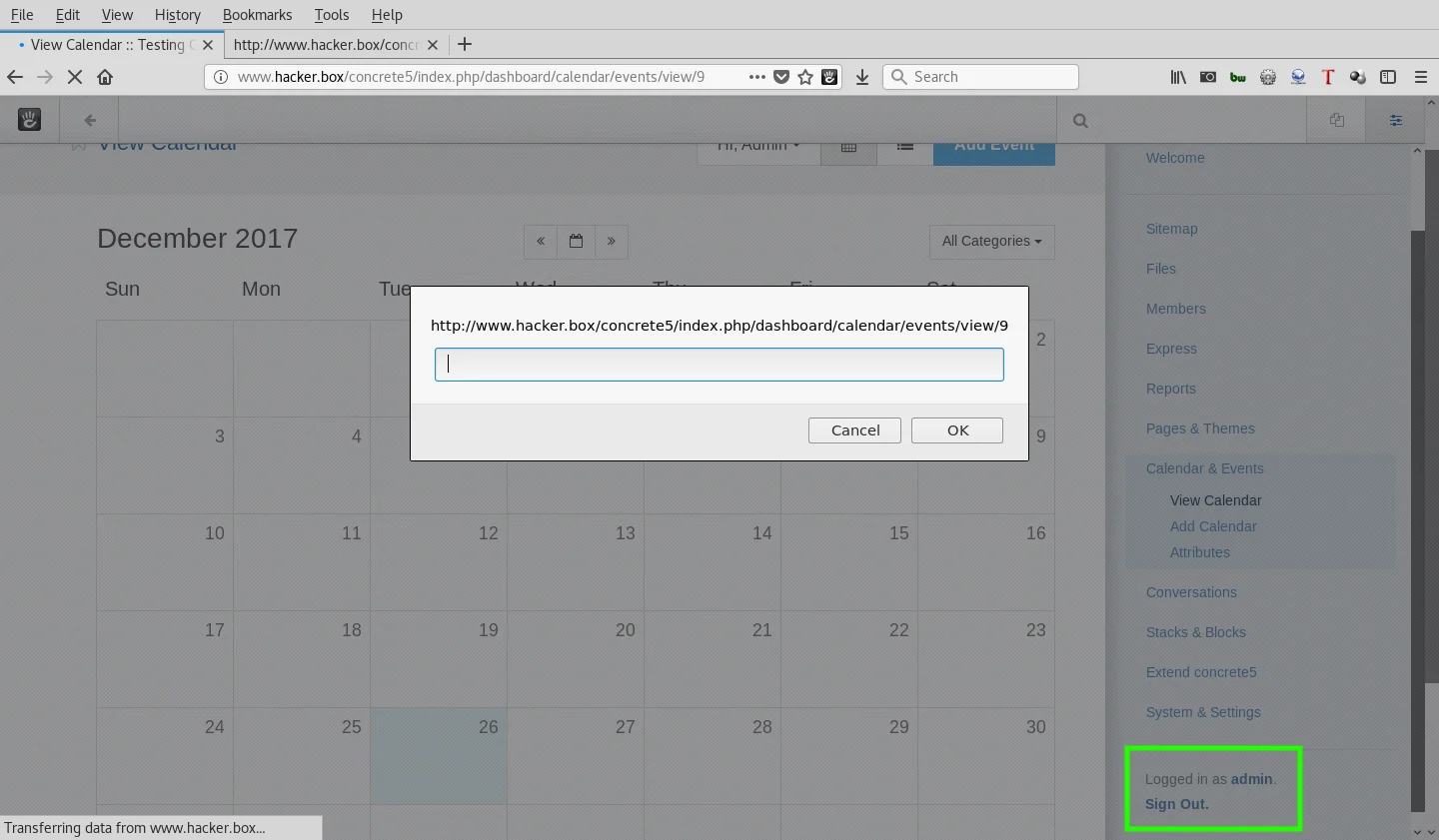
The prompt box will appear in the context of admin user browser Calendar_XSS_Calendar-XSSED-Selected.pngFrom the original on HackerOne
Impact
Again, in Step 3 I mentioned "for the ease" creating an user and add it to Administrators group for the ease of give to the new user quick access to add Calendars but, in other scenario, an administrator can grant access to (for example) Registered Users to add Calendars. Remember, a calendar could be linked to existing public pages
Calendar_XSS_Link-to-page.pngFrom the original on HackerOne
if the page is previously designed to show a calendar too.
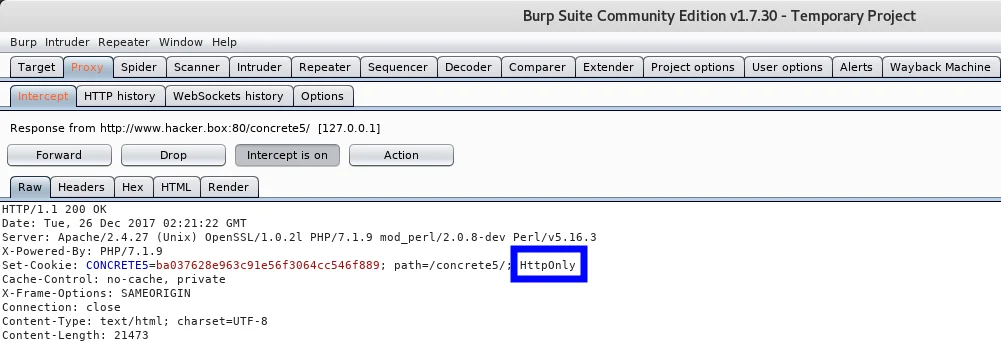
Regarding to impact, even if the cookie can't be stolen to takeover the session or account because it has set the HttpOnly flag
Calendar_httponly-flag.pngFrom the original on HackerOne
and it cannot be directly accessed via client-side JavaScript, If malicious user can insert JavaScript code in a field where he is allowed to. The limit of mad actions is the attacker's imagination.
Some (mad) actions could be:
setting a Javascript keylogger
JavaScript can read and make arbitrary modifications to the browser’s DOM (within the page that JavaScript is running)
As said before, the limit is attacker creativity. I hope it helps to improve Concrete5 CMS.
Kind regards,
Gamliel Hernandez.
Attachments
Calendar_XSS_Link-to-page.pngFrom the original on HackerOne
The original report as published on HackerOne, by gamliel. Images and videos are our own copies; raw HTML is shown as text. View it on HackerOne.
Not written yet. The AI write-up for this report has not been written yet. The Original tab links to the source.
Generating the AI write-up for this report.
This usually takes about 40 seconds. You can read the original meanwhile; this page updates itself.
Writing the technical write-up
Writing the version for beginners
Checking every passage against the original
How it worked
Impact
A malicious user with calendar-creation rights could execute arbitrary JavaScript in another user's browser, including an administrator's, though the HttpOnly cookie flag prevented direct session cookie theft.
What the attacker needed
Account with calendar-creation rights; victim views the malicious calendar
How it was found
Log into Concrete5 as admin and create a user in the Administrators group.
In a private window, log in as the new user and go to Dashboard > Calendar & Events.
Click Add Calendar and enter a calendar name containing an image tag with an onerror JavaScript payload.
Click Add Calendar; the payload executes in the new user's browser.
Switch to the admin browser, go to Dashboard > Calendar & Events, and select the malicious calendar.
The payload executes in the admin's browser context.
Explained by bugbounty.wiki with AI from the original and checked against quotes from it; it can still be wrong. Read the original before relying on a detail.
Not written yet. The AI write-up for this report has not been written yet. The Original tab links to the source.
Generating the AI write-up for this report.
This usually takes about 40 seconds. You can read the original meanwhile; this page updates itself.
Writing the technical write-up
Writing the version for beginners
Checking every passage against the original
Cross-site scripting (XSS) is when a website lets someone put code into a page that other people's browsers then run. Here, a calendar name field accepted HTML and JavaScript, so a low-privileged user could plant code that ran when an admin opened the calendar list. The session cookie was protected from JavaScript reading it, but the code could still act inside the admin's browser.
What is XSS?
Script an attacker supplies runs in another user's browser, on the target's origin, with that user's session.