[3/3] Cache Poisoning & Lateral Movement @ GitLab
GitLab CI/CD build caches lacked access control, allowing a user with push access to overwrite cached dependencies used by other branches. This could inject malicious code into build artifacts and let the attacker act with the permissions of other users who trigger builds.

Around 6 months ago I spent a few weeks reviewing Gitlab — I was particularly interested in how their Continuous Integration/Continuous Delivery (CI/CD) systems work. If you’re not familiar with the term, here’s a high level summary from RedHat:
The full write-up lives on its author's site
It belongs to its author, so we link to it rather than copy it. The other two tabs are our own rewrites, checked against it.
Context
GitLab's CI/CD pipelines include a caching feature intended to speed up repetitive tasks across builds. The documentation's example configuration caches installed dependencies so that, when the hash of a dependency file matches an existing cache entry, the cached value is reused instead of re-running the install command. In the example, this avoids reinstalling ruby and npm dependencies on every build when the versions have not changed.
test-job: stage: build cache: - key: files: - Gemfile.lock paths: - vendor/ruby - key: files: - yarn.lock paths: - .yarn-cache/ script: - bundle install --path=vendor - yarn install --cache-folder .yarn-cache - echo Run tests...
That pattern, the author argues, creates a cache poisoning vulnerability in the build process. It can be used to inject malicious dependencies into build artifacts, to circumvent controls on protected branches, and to perform privileged actions within the context of another contributor. Exploiting it requires a valid set of credentials with the ability to push code to a branch within the project, so the impact is privilege escalation and compromised integrity of build artifacts.
Setup
The demonstration uses a pipeline that builds a test suite and then runs it, mirroring the common pattern of caching code dependencies that would otherwise be installed by a package manager such as pip or npm.
cache: key: files: - cachekey.txt paths: - dependenciesbuild-job: stage: build script: - ./install.shtest-job: stage: test script: - ./dependencies/testrunner.sh
The first phase, build-job, runs install.sh. The script is contrived but emulates running something like npm install: it skips installation if the test suite dependencies are already present, and installs them otherwise.
#!/bin/shif [ -f "dependencies/testrunner.sh" ]; then echo "[+] dependencies exists - skipping installation"else echo "[+] dependencies does not exist - installing dependencies" mkdir dependencies echo "#!/bin/sh" > dependencies/testrunner.sh echo "echo '[+] Test runner, all is good!'" >> dependencies/testrunner.sh chmod +x ./dependencies/testrunner.shfi
The second phase, test-job, runs the test suite built in the previous phase. The expected message, "Test runner, all is good", appears in the output.

Finding it
The flaw is a lack of access control on the project CI/CD build cache. Cache keys are scoped at the project level and fully controlled by the user, and GitLab Runner does not implement a write-once cache, so a malicious build can overwrite existing entries. Because CI/CD pipelines inherit some of the permissions of the user who triggered them, overwriting cached assets used by builds in other branches lets an attacker act on behalf of another user who triggers a build. Among other things, that gives access to the user's repositories and the ability to push to the container registry.
Exploitation
Step 1: Create a branch with a malicious build script
A second user, a developer on the project who also happens to be malicious, creates another branch whose build-job additionally executes poison.sh.
cache: key: files: - cachekey.txt paths: - dependenciesbuild-job: stage: build script: - ./install.sh - ./poison.shtest-job: stage: test script: - ./dependencies/testrunner.sh
Step 2: Overwrite the cached test runner
The script replaces the cached test runner with a version containing injected code.
#!/bin/bashecho "Poisoning cache..."rm -rf ./dependenciesmkdir dependenciesecho 'echo "👹👹👹👹👹👹👹👹👹👹👹👹👹👹👹👹👹👹👹👹👹👹👹👹👹👹"' > dependencies/testrunner.shecho 'echo "[-] Injected comment due to cache poisoning"' >> dependencies/testrunner.shecho 'echo "👹👹👹👹👹👹👹👹👹👹👹👹👹👹👹👹👹👹👹👹👹👹👹👹👹👹"' >> dependencies/testrunner.shchmod +x dependencies/testrunner.sh
GitLab Runner picks the new version up and adds it to the cache automatically, even if a cache entry already exists.
Step 3: Commit and observe the poisoned output
The code is committed and the pipeline runs. Afterwards, when any contributor on any branch commits code, the poisoned message appears in their logs.

With this primitive the attacker can:
- Inject malicious dependencies into build assets such as executables and libraries, with potentially massive downstream impact if those assets are used in production systems.
- Gain access to other contributors' repositories and perform other privileged actions within their authentication context.
Root cause
GitLab Runner is the component that talks to the GitLab API and spins up pipelines in response to job requests. How it does so depends on the runner configuration: runners can be internal to the GitLab infrastructure or external, integrated with a Kubernetes cluster, with Docker directly, or simply running on a Linux or Windows server with access to host resources. On gitlab.com, shared runners are provided by GitLab and run in a Kubernetes cluster outside the main infrastructure.
When a build job is created, GitLab Runner generates a shell script that sets up the environment: it clones the repository that triggered the build and handles uploading and downloading cached assets. The vulnerable code is in the generateObjectName function. Because the user fully controls the cache key and there is no write-once behaviour, any existing entry in the project cache can be overwritten.
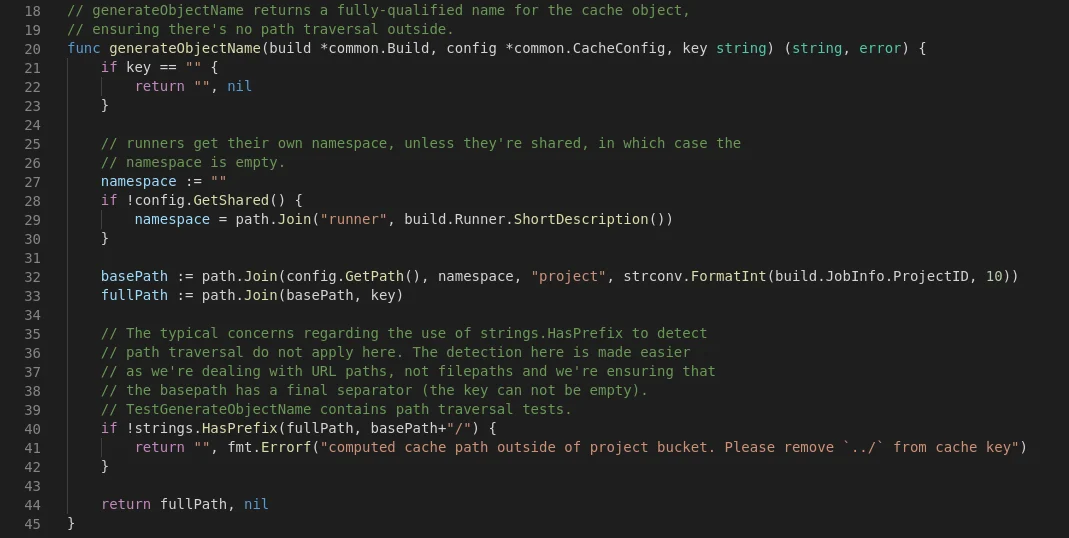
cache/cache.go
Impact
How serious this is depends on the relationship between project members. For a small start-up with a handful of contributors it is probably not much of an issue. For a large organisation, or an open source foundation, with hundreds or more contributors, employees and contractors, the risk of a malicious contributor is real. Trust among members was enough of a consideration for GitLab to invest in Protected Branches, which offer more granular access controls on branches. Enabling caching lets an attacker circumvent those controls.
Once the pipeline authenticates with the GitLab API, it is effectively delegated the identity of the user. A user who executes a build job implicitly trusts that job to act on their behalf.
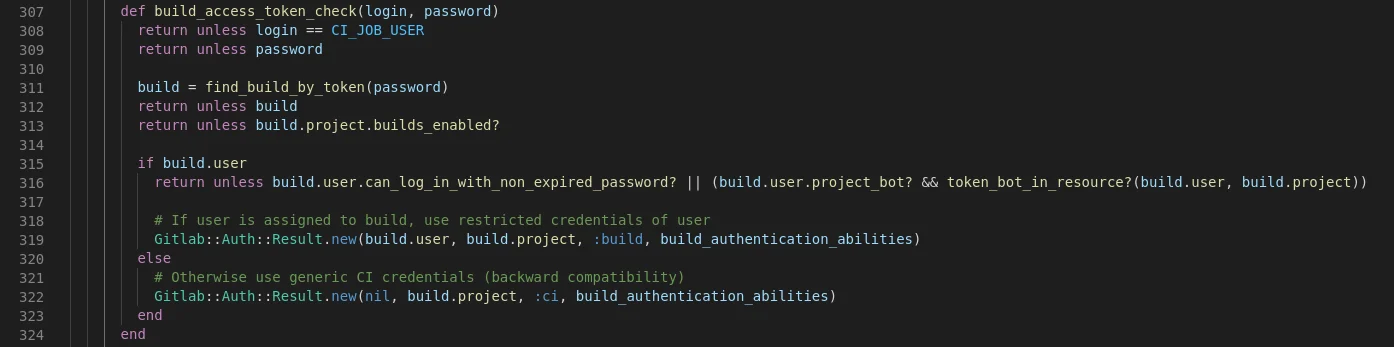
lib/gitlab/auth.rb
The build job can reach any endpoint requiring any of the following access scopes:
:read_project:build_download_code:build_read_container_image:build_create_container_image:build_destroy_container_image
These permissions are not limited to the project that triggered the build.
Fix
Variants to test
- Any CI system that caches build outputs under a key the job author controls: try writing a different payload under an existing key from a low-privilege branch and check whether a later build on another branch consumes it.
- Pipelines that run on protected branches but share a project-level cache with unprotected branches: a positive result is a protected-branch job executing content you supplied from an unprotected branch.
- Jobs whose tokens carry scopes beyond the triggering project, such as repository read or container registry push: a positive result is the job using those scopes against a project it was not started for.
- Cache implementations without write-once semantics: check whether a second upload with the same key replaces the first, and whether the replacement is served to subsequent jobs.

What happened, in plain words
GitLab is a website where teams keep their code and where, on top of that, they can run automatic jobs on that code. Those automatic jobs are called a CI/CD pipeline. CI stands for continuous integration and CD for continuous delivery: instead of a person building and testing software by hand, a robot does it every time someone saves a change. The pipeline can review and merge code contributions, run automated test suites, build assets and deliver or deploy those assets to other systems.
To save time, GitLab lets a pipeline keep the results of slow steps in a store called a cache, so the next run can reuse them instead of doing the work again. The researcher found that this cache has no access control inside a project: any contributor who can push code to any branch can overwrite what is stored there, including entries that other people's builds will later pick up. Because a pipeline runs with some of the permissions of the person who started it, a poisoned cache entry can make another person's build do things on that person's behalf.
To exploit it, the attacker needs a valid account with permission to push code to a branch in the project. The result is privilege escalation (doing things as someone with more rights than you) and compromised integrity of build artifacts (the files a build produces can no longer be trusted).
The researcher spent a few weeks reviewing GitLab, with a particular interest in how its CI/CD systems work.
Overview
GitLab's pipelines have a caching feature meant to speed up repetitive tasks across builds. The documentation gives this example configuration:
test-job: stage: build cache: - key: files: - Gemfile.lock paths: - vendor/ruby - key: files: - yarn.lock paths: - .yarn-cache/ script: - bundle install --path=vendor - yarn install --cache-folder .yarn-cache - echo Run tests...
Line by line, in plain words:
test-job:is the name of the job. A job is one unit of work inside a pipeline.stage: buildputs the job in the build stage, so it runs in the part of the pipeline that produces things.cache:starts the section that describes what to keep between runs.- The first
- key:block says how to name one cache entry. Underfiles:it listsGemfile.lock, a file that records the exact versions of Ruby libraries the project uses. GitLab takes a fingerprint (a hash, explained below) of that file and uses it as the name of the cache entry. paths:listsvendor/ruby, the folder where those Ruby libraries get installed. That folder is what actually gets stored.- The second
- key:block does the same foryarn.lock(the version list for JavaScript libraries) and.yarn-cache/(where those libraries are stored). script:lists the commands to run:bundle install --path=vendorinstalls the Ruby libraries intovendor,yarn install --cache-folder .yarn-cacheinstalls the JavaScript ones, andecho Run tests...just prints placeholder text.
The key idea: when the fingerprint of the dependency file matches an entry already in the cache, the stored value is used instead of running the install command again. In this example that avoids reinstalling Ruby and npm dependencies on every build when the versions have not changed. A hash is a short fingerprint computed from a file's contents: change one character and the fingerprint changes completely, so it is a convenient way to say "this is the same file as before".
This pattern, the researcher argues, creates a cache poisoning vulnerability in the build process. Cache poisoning means putting something harmful into a shared store so that later, innocent users of that store receive the harmful thing instead of the good one. Think of a shared office fridge where anyone can relabel any container: if you swap the label on your own lunch box for the label on a colleague's, your colleague picks up your lunch. Here the shared store is the project cache and the labels are cache keys.
The flaw can be used to inject malicious dependencies into build artifacts, to get around the controls on protected branches, and to perform privileged actions in the context of another contributor. Exploiting it requires valid credentials with the ability to push code to a branch in the project, so the impact is privilege escalation and compromised integrity of build artifacts.
Setup
The demonstration uses a pipeline that builds a test suite and then runs it, mirroring the common pattern of caching code dependencies that would otherwise be installed by a package manager such as pip or npm. A package manager is a tool that downloads and installs ready-made pieces of software (libraries) that a project depends on.
cache: key: files: - cachekey.txt paths: - dependenciesbuild-job: stage: build script: - ./install.shtest-job: stage: test script: - ./dependencies/testrunner.sh
Line by line:
cache:describes the shared store for this pipeline.key:withfiles: - cachekey.txtsays the cache entry's name is derived from the fingerprint of a file calledcachekey.txt. Whoever can change that file can change the name, and whoever can run a job can choose the name too.paths: - dependenciessays the folder calleddependenciesis what gets saved and restored.build-job:is the first job, instage: build. Itsscriptruns./install.sh, a shell script stored in the repository. The./simply means "the file in the current folder".test-job:is the second job, instage: test, and it runs./dependencies/testrunner.sh, the test runner that the first job was supposed to have installed.
The first phase, build-job, runs install.sh. The script is contrived, meaning deliberately simple for the demonstration, but it emulates running something like npm install:
#!/bin/shif [ -f "dependencies/testrunner.sh" ]; then echo "[+] dependencies exists - skipping installation"else echo "[+] dependencies does not exist - installing dependencies" mkdir dependencies echo "#!/bin/sh" > dependencies/testrunner.sh echo "echo '[+] Test runner, all is good!'" >> dependencies/testrunner.sh chmod +x ./dependencies/testrunner.shfi
Line by line:
#!/bin/shtells the operating system which program should interpret the file. Here it is the standard Unix shell.if [ -f "dependencies/testrunner.sh" ]; thenasks a yes/no question: does a file calledtestrunner.shalready exist inside thedependenciesfolder? The-ftest means "is this an existing regular file?".- If yes,
echo "[+] dependencies exists - skipping installation"prints a message saying installation is skipped. This is the shortcut that the cache is meant to provide: if the folder was restored from the cache, the work is already done. elsecovers the case where the file is missing.echo "[+] dependencies does not exist - installing dependencies"prints that installation is starting.mkdir dependenciescreates the folder.echo "#!/bin/sh" > dependencies/testrunner.shwrites the first line of a new script intotestrunner.sh. The single>creates or overwrites the file.echo "echo '[+] Test runner, all is good!'" >> dependencies/testrunner.shappends a second line to that file. The double>>adds to the end instead of overwriting. The line it adds is itself anechocommand, so when the test runner later runs, it will print[+] Test runner, all is good!.chmod +x ./dependencies/testrunner.shmarks the file as executable, meaning the system is allowed to run it as a program.ficloses theifblock.
The second phase, test-job, runs the test suite built in the previous phase. The expected message, "Test runner, all is good", appears in the output.
Finding it
The flaw is a lack of access control on the project CI/CD build cache. Access control means rules about who is allowed to read or change what. Here there are none inside the project: any job can write to any cache entry. Cache keys are scoped at the project level, meaning they live in one shared namespace for the whole project rather than per branch or per user, and they are fully controlled by the user. GitLab Runner, the program that actually executes jobs, does not implement a write-once cache: a write-once store refuses to replace an entry that already exists, like a form you can only submit once. Here a second write simply replaces the first.
Because CI/CD pipelines inherit some of the permissions of the user who triggered them, overwriting cached assets used by builds in other branches lets an attacker act on behalf of another user who triggers a build. Among other things, that gives access to the user's repositories and the ability to push to the container registry. A container registry is a storage service for container images, the packaged bundles that applications are shipped and run in.
Exploitation
Step 1: Create a branch with a malicious build script
A second user, a developer on the project who also happens to be malicious, creates another branch whose build-job additionally executes poison.sh. A branch is a parallel copy of the code where someone can make changes without touching the main version; merging later brings the changes back together.
cache: key: files: - cachekey.txt paths: - dependenciesbuild-job: stage: build script: - ./install.sh - ./poison.shtest-job: stage: test script: - ./dependencies/testrunner.sh
Line by line, the only difference from the earlier configuration is one extra line:
- The
cache:block is unchanged, so this branch writes to exactly the same shared cache entry as every other branch. build-jobstill runs./install.shfirst, so the job looks normal.- ./poison.shis the addition: after the install, the job runs the attacker's script.test-jobis unchanged.
Why this step: the attacker needs a job of their own to run inside the project, because that job is what gets permission to write to the cache.
Step 2: Overwrite the cached test runner
The script replaces the cached test runner with a version containing injected code.
#!/bin/bashecho "Poisoning cache..."rm -rf ./dependenciesmkdir dependenciesecho 'echo "👹👹👹👹👹👹👹👹👹👹👹👹👹👹👹👹👹👹👹👹👹👹👹👹👹👹"' > dependencies/testrunner.shecho 'echo "[-] Injected comment due to cache poisoning"' >> dependencies/testrunner.shecho 'echo "👹👹👹👹👹👹👹👹👹👹👹👹👹👹👹👹👹👹👹👹👹👹👹👹👹👹"' >> dependencies/testrunner.shchmod +x dependencies/testrunner.sh
Line by line:
#!/bin/bashagain names the interpreter, here the Bash shell.echo "Poisoning cache..."prints a note so the attacker can see in the job log that the script ran.rm -rf ./dependenciesdeletes thedependenciesfolder and everything in it.rmremoves files,-rmeans do it recursively (into subfolders) and-fmeans force it without asking for confirmation.mkdir dependenciesrecreates an empty folder with the same name.echo 'echo "👹..."' > dependencies/testrunner.shwrites a newtestrunner.shwhose only content is a command that prints a line of emoji. The single>overwrites whatever was there.echo 'echo "[-] Injected comment due to cache poisoning"' >> dependencies/testrunner.shappends a second print command, so the poisoned runner also announces itself.- The next
echo ... >> dependencies/testrunner.shappends another line of emoji. chmod +x dependencies/testrunner.shmakes the new file executable.
Why this step: the attacker is not trying to break into anything directly. They are replacing the contents of the shared folder that the cache stores, so that the next time any job restores that folder, it gets the attacker's version of the test runner instead of the real one.
GitLab Runner picks the new version up and adds it to the cache automatically, even if a cache entry already exists. That last part is the bug: a well-behaved cache would refuse to overwrite an existing entry.
Step 3: Commit and observe the poisoned output
The code is committed and the pipeline runs. A commit is the act of saving a set of changes to the repository, with a record of who did it and when. Afterwards, when any contributor on any branch commits code, the poisoned message appears in their logs.
With this primitive the attacker can:
- Inject malicious dependencies into build assets such as executables and libraries, with potentially massive downstream impact if those assets are used in production systems. Downstream means later in the chain: the poisoned file is built once and then shipped to servers that real users talk to.
- Gain access to other contributors' repositories and perform other privileged actions within their authentication context. Authentication context means the identity and permissions the system believes the action is coming from.
Root cause
GitLab Runner is the component that talks to the GitLab API and spins up pipelines in response to job requests. An API (application programming interface) is the set of addresses a program uses to ask a service to do things, the way a restaurant menu lists what you can order and how to ask for it. How the runner does its work depends on its configuration: runners can be internal to the GitLab infrastructure or external, integrated with a Kubernetes cluster, with Docker directly, or simply running on a Linux or Windows server with access to host resources. Kubernetes is a system for running many containers across many machines; Docker is a tool for packaging and running a single container. On gitlab.com, shared runners are provided by GitLab and run in a Kubernetes cluster outside the main infrastructure.
When a build job is created, GitLab Runner generates a shell script that sets up the environment: it clones the repository that triggered the build and handles uploading and downloading cached assets. Cloning means making a full local copy of the repository. The vulnerable code is in the generateObjectName function. A function is a named block of code that does one job; this one works out the name under which a cache entry is stored. Because the user fully controls the cache key and there is no write-once behaviour, any existing entry in the project cache can be overwritten.
cache/cache.go
Impact
How serious this is depends on the relationship between project members. For a small start-up with a handful of contributors it is probably not much of an issue. For a large organisation, or an open source foundation, with hundreds or more contributors, employees and contractors, the risk of a malicious contributor is real. Trust among members was enough of a consideration for GitLab to invest in Protected Branches, which offer more granular access controls on branches. Protected Branches are branches where the project can say who is allowed to push and who is allowed to merge, so that, for example, only senior people can change the main line of code. Enabling caching lets an attacker circumvent controls on protected branches.
Once the pipeline authenticates with the GitLab API, it is effectively delegated the identity of the user. A user who executes a build job implicitly trusts that job to act on their behalf. A token, in this context, is a short string that proves to the API which user a request is acting for, much like a cloakroom ticket proves which coat is yours.
lib/gitlab/auth.rb
The build job can reach any endpoint requiring any of the following access scopes. An endpoint is one specific address in the API that performs one action, and a scope is a named permission attached to a token that says which kinds of action it may perform.
:read_project:build_download_code:build_read_container_image:build_create_container_image:build_destroy_container_image
In plain words, those scopes allow reading a project, downloading code for a build, and reading, creating and destroying container images. These permissions are not limited to the project that triggered the build.
Fix
Variants to test
- Any CI system that caches build outputs under a key the job author controls: try writing a different payload under an existing key from a low-privilege branch and check whether a later build on another branch consumes it.
- Pipelines that run on protected branches but share a project-level cache with unprotected branches: a positive result is a protected-branch job executing content you supplied from an unprotected branch.
- Jobs whose tokens carry scopes beyond the triggering project, such as repository read or container registry push: a positive result is the job using those scopes against a project it was not started for.
- Cache implementations without write-once semantics: check whether a second upload with the same key replaces the first, and whether the replacement is served to subsequent jobs.
Glossary
- API: the set of addresses and rules a program uses to ask a service to do something, like a menu you order from.
- Access control: rules about who may read or change what.
- Artifact: a file produced by a build, such as an executable or a library.
- Authentication context: the identity and permissions the system believes a request is coming from.
- Branch: a parallel copy of the code where changes can be made without affecting the main version.
- Build: the automated process of turning source code into runnable files.
- Cache: a store of results kept between runs so slow work does not have to be repeated.
- Cache key: the name under which one cache entry is stored and looked up.
- Cache poisoning: putting harmful content into a shared cache so later users of that cache receive it.
- CI/CD: continuous integration and continuous delivery, the practice of automatically building, testing and shipping code on every change.
- Clone: to make a full local copy of a repository.
- Commit: to save a set of changes to a repository, with a record of who did it and when.
- Container: a packaged bundle of an application and everything it needs to run.
- Container registry: a storage service for container images.
- Credentials: the account details that prove who you are.
- Docker: a tool for packaging and running containers.
- Endpoint: one specific API address that performs one action.
- Executable: a file the system is allowed to run as a program.
- Fingerprint (hash): a short value computed from a file's contents; the same contents give the same value, any change gives a different one.
- Function: a named block of code that performs one task.
- GitLab Runner: the program that executes CI/CD jobs on behalf of GitLab.
- Kubernetes: a system for running many containers across many machines.
- Package manager: a tool that downloads and installs the libraries a project depends on, such as pip or npm.
- Pipeline: the ordered set of jobs that run automatically on a code change.
- Privilege escalation: gaining the ability to do things as an identity with more rights than your own.
- Protected branch: a branch with extra rules about who may push to it or merge into it.
- Scope: a named permission attached to a token that says which kinds of action it may perform.
- Shell script: a text file of commands that the operating system runs in order.
- Token: a short string that proves to an API which user a request is acting for.
- Write-once: a store that refuses to replace an entry that already exists.



