[1/3] Brute-Force Protection Bypass @ GitLab
GitLab's basic authentication used a global failed-login counter per IP address that could be reset by any successful login, allowing an attacker to brute-force user passwords without triggering a ban or cooldown. This affected accounts without two-factor authentication enabled.

This is the first of three reports describing my findings from a review I did of Gitlab around 6 months ago. I thought I’d start with the simplest and the least impactful of them.
The full write-up lives on its author's site
It belongs to its author, so we link to it rather than copy it. The other two tabs are our own rewrites, checked against it.
Context
GitLab supports several ways for a client to authenticate. Most user-facing logins go through the standard authentication methods, which track failed attempts per user and enforce a cooldown once a threshold is reached. Separately, GitLab CI/CD pipelines authenticate against the core API using basic authentication, and for some endpoints basic authentication is also a supported method for user authentication.
This report is the first of three from a review of GitLab. The author describes it as the simplest and least impactful of the three. The weakness is a brute-force protection bypass: the rate limiting that should slow down password guessing can be reset at will.
Setup
The report does not describe a specific GitLab version, deployment type or tooling. The relevant precondition is stated in the code path: basic authentication is accepted for some endpoints, and the rate limiting for that path is configured through rack_attack.git_basic_auth.maxretry, which defaults to 5. The author also notes that GitLab has open registration by default, which matters for the impact discussion below.
Finding it
The flaw was found incidentally while exploring how GitLab CI/CD pipelines authenticate against the core API. That process uses basic authentication, which for some endpoints doubles as a user authentication method. For what looks like legacy reasons, this path does not keep track of failed login attempts per user. Instead it uses a global counter per IP address, and that counter can be reset by sending a valid login request.
The consequence is that user logins without 2FA enabled can be brute forced indefinitely, without the IP address being banned and without the user being put into a login cooldown period.
Exploitation
The report describes the mechanism rather than giving a captured request. The steps are as follows.
Step 1: Target the basic authentication path
Send authentication attempts against an endpoint that accepts basic authentication. Because this path is rate limited per IP address rather than per user, failed attempts accumulate in a single counter tied to the source IP.
Step 2: Guess up to the retry limit
Keep guessing passwords for the target account. The counter allows rack_attack.git_basic_auth.maxretry attempts before the IP is blocked; by default this value is 5.
Step 3: Reset the counter with a valid login
Once the limit is close, send a login request using one set of valid credentials the attacker controls. On successful authentication the code calls IpRateLimiter.reset!, which clears the counter for that IP address. The attacker can then continue guessing against the target account.
Step 4: Repeat
Loop steps 2 and 3. Each successful reset discards the record of failed attempts, so the target account never accumulates enough failures to trigger a ban or a cooldown.
Root cause
The vulnerable code is in the IpRateLimiter class in the auth component.
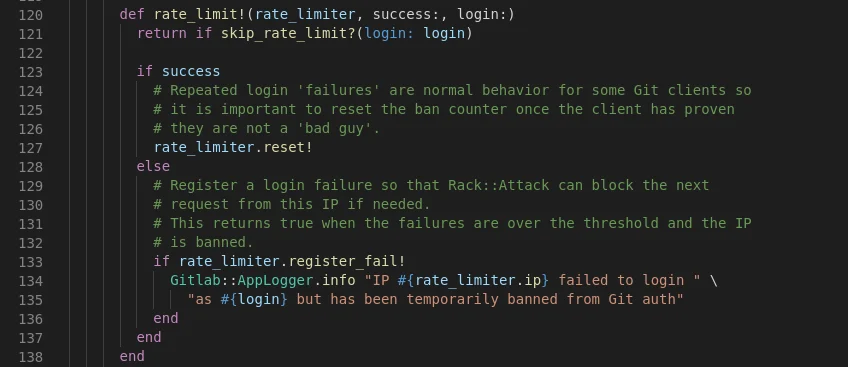
lib/gitlab/auth.rb
On successful authentication, the function calls IpRateLimiter.reset!, which clears the counter.
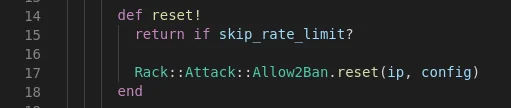
lib/gitlab/auth/ip_rate_limiter.rb
The problem is that the reset is global for the IP address. It effectively disregards the number of failed attempts made against a specific user. Other authentication methods supported by GitLab typically increment the users.failed_attempts database field and enforce a cooldown period once a threshold is met. Basic authentication does not do this, so as long as the attacker holds one set of valid credentials to reset the counter every rack_attack.git_basic_auth.maxretry attempts, guessing can continue with impunity.
Impact
Accounts without 2FA enabled can be brute forced without the source IP being banned and without a login cooldown being enforced for the user. The author is explicit that this is not a high severity vulnerability, but notes that brute forcing credentials is a typical and low cost avenue of attack. The impact can extend beyond the vulnerable system to the network it is deployed in: credential reuse is common, so one system with brute-forceable logins can weaken the overall security of a network.
The attack requires the attacker to hold at least one valid set of credentials, used to reset the counter. The report notes that GitLab has open registration by default.
Fix
The report does not describe a fix or a change made by GitLab. The design gap it identifies is that the basic authentication path resets a per-IP counter on success instead of tracking failures per user.
Variants to test
What happened, in plain words
GitLab is a website and service that teams use to store their code, track work and run automated jobs. Like any website with user accounts, it has a login screen where you type a username and a password. Because people often pick weak passwords, websites usually add a guard: after a few wrong guesses, the site stops you for a while. That guard is called brute-force protection, and it exists to stop someone from simply trying thousands of passwords until one works.
This report is about a way around that guard on GitLab. The author found that one particular way of logging in, the one used by automated jobs rather than by people clicking a login form, counts wrong guesses in a strange way. Instead of counting failures against the account being attacked, it counts them against the computer making the requests. And that count can be wiped clean at any moment by logging in successfully with any valid account. So an attacker who owns one working account can keep guessing passwords against someone else's account forever, resetting the counter whenever it gets close to the limit.
The author is clear that this is the first of three reports and the least serious of them. It is not a way to break into a system in one step. It is a weakness in a safety net, and safety nets matter because people reuse the same passwords on many systems.
Sometimes the simple methods work best
The background you need
Before the details, a few ideas that come up throughout.
- Authentication is simply proving who you are. Typing a password is authentication. So is a badge at an office door.
- An API is a way for one computer program to talk to another, without a human clicking buttons. Think of it as a service counter at a shop: you hand over a request in a fixed format and get an answer back in a fixed format. GitLab has a core API that programs use to do things on the site.
- Basic authentication is one of the oldest ways to prove identity over the web. The program sends a username and a password with each request, encoded in a simple, reversible format. It is like showing your membership card at every door rather than carrying a wristband.
- CI/CD pipelines are automated jobs that build and test code. They run without a person watching, so they need a way to log in to GitLab by themselves. GitLab lets them use basic authentication for this.
- 2FA, or two-factor authentication, means logging in needs two things, usually a password plus a short code from a phone. It makes stolen passwords much less useful. The weakness in this report only matters for accounts that do not have 2FA turned on.
- Rate limiting is the guard that slows down repeated requests. It is like a ticket machine that only gives out five tickets per minute: after that, you wait.
- An IP address is the numeric label a computer or network uses on the internet, a bit like a return address on an envelope. Websites often use it to tell one visitor from another.
- A counter here is just a number kept in the server's memory. Each failed login adds one. When the number gets too high, the server blocks that visitor for a while.
- A cooldown period is a forced wait after too many failures, applied to the account being attacked. It is the lockout that most login forms use.
- A brute-force attack is guessing passwords over and over, usually with a computer, until one works. It is the digital version of trying every key on a keyring in a door.
- Credential reuse means using the same password on several different websites. It is extremely common, which is why one weak login can matter far beyond the site where it was found.
How GitLab normally protects logins
GitLab supports several ways for a program or a person to prove who they are. Most logins that a person makes go through the standard methods. Those methods keep a record of failed attempts for each user account, stored in a database field called users.failed_attempts. When the number of failures passes a threshold, the account is put into a cooldown: even the correct password will not work until the wait is over. That is the usual, sensible design, because the thing being attacked is the account, so the account is what should be protected.
Separately, GitLab's CI/CD pipelines log in to the core API using basic authentication. For some endpoints, basic authentication is also accepted as a way for a normal user to log in. This is the path where the problem lives.
How the author found it
The author was not hunting for this bug. They were exploring how GitLab CI/CD pipelines authenticate against the core API, out of curiosity about how that machinery works. While following that path, they noticed that it handles failed logins differently from the normal login form. For what looks like legacy reasons, meaning code kept around from older designs, this path does not track failures per user. Instead it keeps one global counter per IP address, and that counter can be reset by sending a valid login request.
That single observation is the whole finding. The rest of the report explains why it matters and where in the code it happens.
What the attacker can do
Because the counter is tied to the IP address and not to the account, an attacker can do the following.
- Target the basic authentication path. Send login attempts to an endpoint that accepts basic authentication. Every wrong password adds to one counter attached to the attacker's IP address, not to the victim's account.
- Guess up to the retry limit. Keep trying passwords for the target account. The counter allows a number of attempts set by a configuration value called
rack_attack.git_basic_auth.maxretry. By default this value is 5, so five attempts are allowed before the IP address is blocked. - Reset the counter with a valid login. Before hitting the limit, send a login request using one set of valid credentials the attacker controls. When that login succeeds, the code calls
IpRateLimiter.reset!, which clears the counter for that IP address. The attacker is back to zero failures. - Repeat. Loop steps 2 and 3. Each reset throws away the record of failed guesses, so the target account never builds up enough failures to trigger a ban or a cooldown.
The result is that user logins without 2FA enabled can be guessed indefinitely, without the IP address being banned and without the user ever being put into a login cooldown period.
Where the code goes wrong
The vulnerable code is in the IpRateLimiter class in the auth component. A class is a named block of code that groups related behaviour; this one is responsible for limiting how often an IP address can try to log in.
lib/gitlab/auth.rb
The file shown is lib/gitlab/auth.rb, part of GitLab's authentication code. The report points to it as the place where the flow reaches the rate limiter. On successful authentication, the function calls IpRateLimiter.reset!, which clears the counter.
lib/gitlab/auth/ip_rate_limiter.rb
The second file, lib/gitlab/auth/ip_rate_limiter.rb, contains the limiter itself. The problem is that the reset is global for the IP address. It wipes the count for everything that IP address has done, which effectively disregards the number of failed attempts made against a specific user.
Put simply: the guard is watching the door, not the safe behind it. Anyone who can show a valid key to the door resets the guard's notebook, even if the safe they are actually attacking is someone else's.
Why this is different from the normal login path
Other authentication methods supported by GitLab typically increment the users.failed_attempts database field and enforce a cooldown period once a threshold is met. That field belongs to the account, so failures follow the account wherever the attack comes from. Basic authentication does not do this. As long as the attacker holds one set of valid credentials to reset the counter every rack_attack.git_basic_auth.maxretry attempts, guessing can continue with impunity.
How bad is it
The author is explicit that this is not a high severity vulnerability. It does not, on its own, hand over anyone's account. But brute forcing credentials is a typical and low cost avenue of attack: guessing is cheap, and it needs no clever exploit.
The impact can reach beyond the vulnerable system to the network it is deployed in. Credential reuse is common, so one system with brute-forceable logins can weaken the overall security of a network. If a person uses the same password on GitLab and on an internal system, a guessed GitLab password becomes a key to more than GitLab.
The attack does require the attacker to hold at least one valid set of credentials, used to reset the counter. The report notes that GitLab has open registration by default.
What the report does not cover
The report does not describe a specific GitLab version, deployment type or tooling, and it does not describe a fix or a change made by GitLab. The design gap it identifies is that the basic authentication path resets a per-IP counter on success instead of tracking failures per user.
Where else to look
Glossary
- 2FA (two-factor authentication): logging in with two separate proofs of identity, usually a password plus a one-time code.
- API: a fixed way for one program to send requests to another and receive answers, without a human using a browser.
- Authentication: the process of proving who you are, for example with a username and password.
- Basic authentication: an old method where a username and password are sent with each request in a simple encoded form.
- Brute force: guessing passwords repeatedly, usually by computer, until one works.
- CI/CD pipeline: an automated job that builds and tests code without a person watching, and therefore needs its own way to log in.
- Class: a named block of code that groups related behaviour and data.
- Cooldown period: a forced wait applied to an account after too many failed logins, during which even the right password is refused.
- Counter: a number kept by the server that goes up with each failed attempt and triggers a block when it gets too high.
- Credential reuse: using the same password on more than one website or system.
- Credentials: the pair of a username and password used to log in.
- Database field: a named slot in a database table that stores one piece of information, such as a user's failed attempt count.
- Endpoint: a specific address on a server that accepts a particular kind of request.
- IP address: the numeric label a computer or network uses on the internet, used by servers to tell visitors apart.
IpRateLimiter: the GitLab code class responsible for limiting login attempts per IP address.IpRateLimiter.reset!: the function that clears the per-IP attempt counter, called on successful authentication.- Legacy reasons: code or behaviour kept from an older design, often because changing it is risky or nobody has got to it.
- Open registration: a setting that lets anyone create an account without an invitation or approval.
rack_attack.git_basic_auth.maxretry: the GitLab configuration value that sets how many basic authentication attempts are allowed before the IP address is blocked; it defaults to 5.- Rate limiting: deliberately slowing down or blocking repeated requests to stop abuse.
users.failed_attempts: the database field where GitLab's normal login methods count failed attempts for each user account.- Vulnerability: a weakness in software that can be used to make it behave in a way its designers did not intend.



