[2/3] XSS Through The Front-Door @ GitLab
A DOM injection flaw in GitLab's mermaid classDiagram-v2 renderer allowed arbitrary HTML elements to be inserted, and a misconfiguration caused .mjs files to be served with a JavaScript content type, together enabling stored XSS that executed when any user viewed a page containing a malicious graph.

Sometimes XSS flaws are met with shrugs. They’re an incredibly common vulnerability in web applications even today with so many mitigations available.
The full write-up lives on its author's site
It belongs to its author, so we link to it rather than copy it. The other two tabs are our own rewrites, checked against it.
Context
GitLab lets users attach diagrams to written content through the mermaid js library. A graph is written in a declarative syntax inside a fenced block annotated with mermaid, saved with the issue, pull request, wiki page or other content, and rendered by default when anyone views that page. The rendering happens in the browser, so the graph syntax ends up producing DOM elements in the viewer's session.
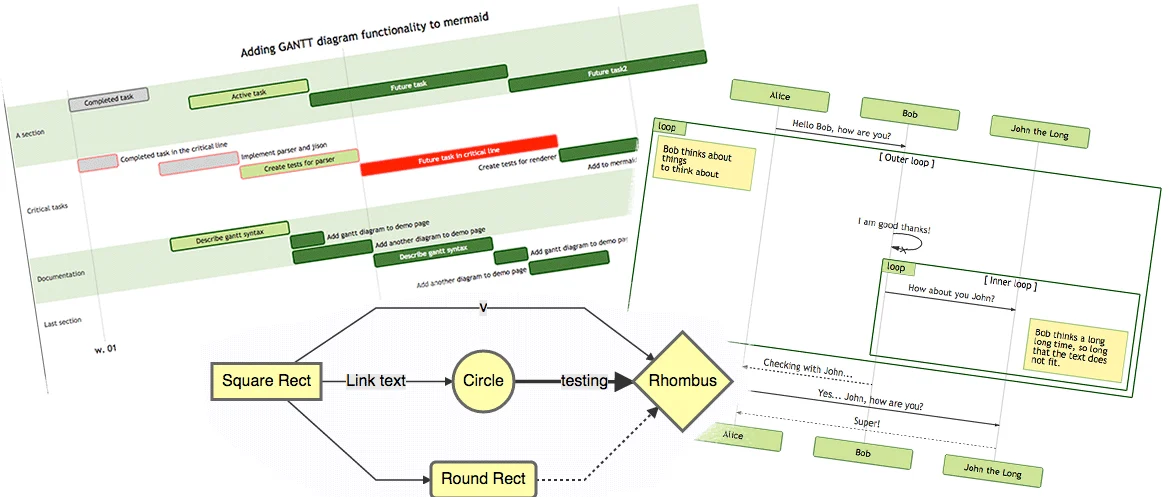
Graphs rendered via Javascript
This is a write-up about two flaws that combine into stored XSS on GitLab: insufficient sanitisation of input in the classDiagram-v2 graph type, which allows arbitrary elements to be written into the DOM, and a content type misconfiguration that lets an attacker host JavaScript on a GitLab domain and so neutralise the Content Security Policy.
Setup
The report does not describe a lab setup, accounts or tool versions. The only preconditions it makes explicit are on the attacker's side: the ability to create content on GitLab that carries a mermaid graph, and the ability to run a Continuous Integration job whose artifacts can be configured to be publicly available. The payload below references a project path and a job artifact URL, which the report shows as an example rather than as a required configuration.
Finding it
The researcher found the vulnerability at the end of the time allocated to reviewing GitLab, while looking around the UI in a general way for additional features worth diving into, and looking for a quick win to finish with.
The starting point is the graph feature. Mermaid renders graphs from a declarative syntax, and the report shows a benign graph on a GitLab issue page:
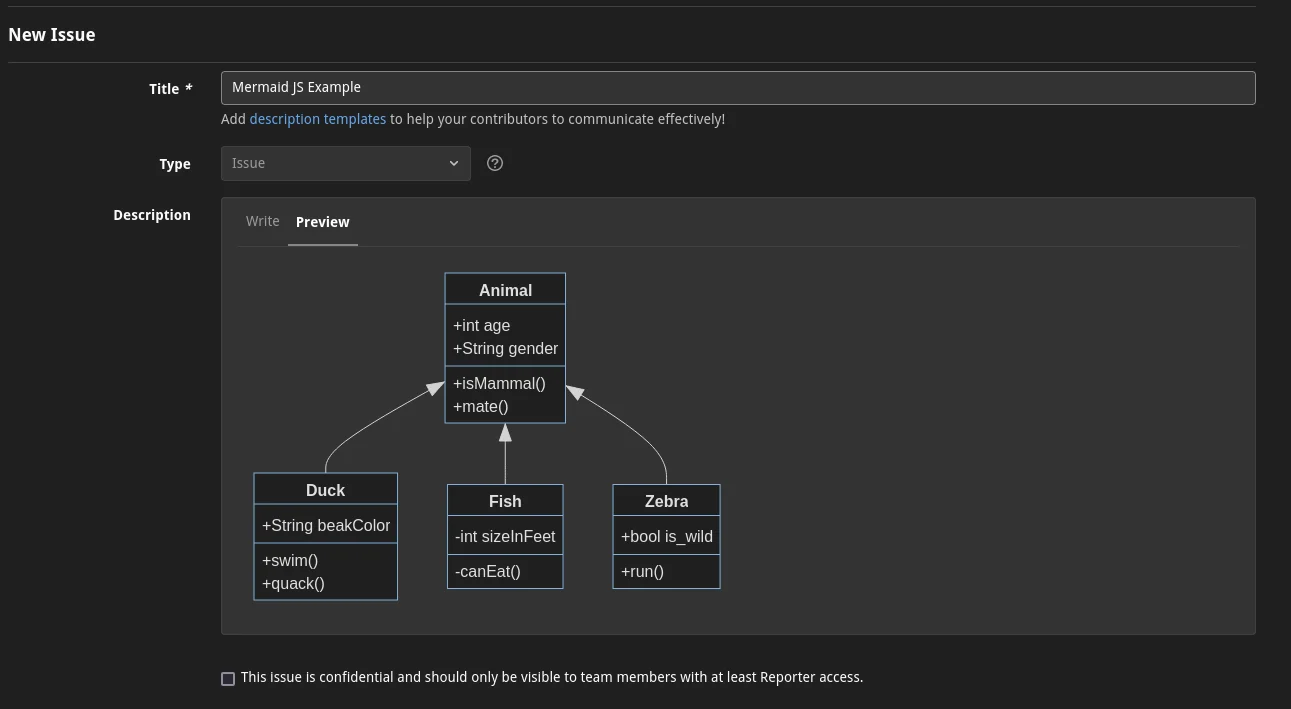
An example of ordinary mermaid js output
The corresponding input is a fenced block annotated with mermaid:
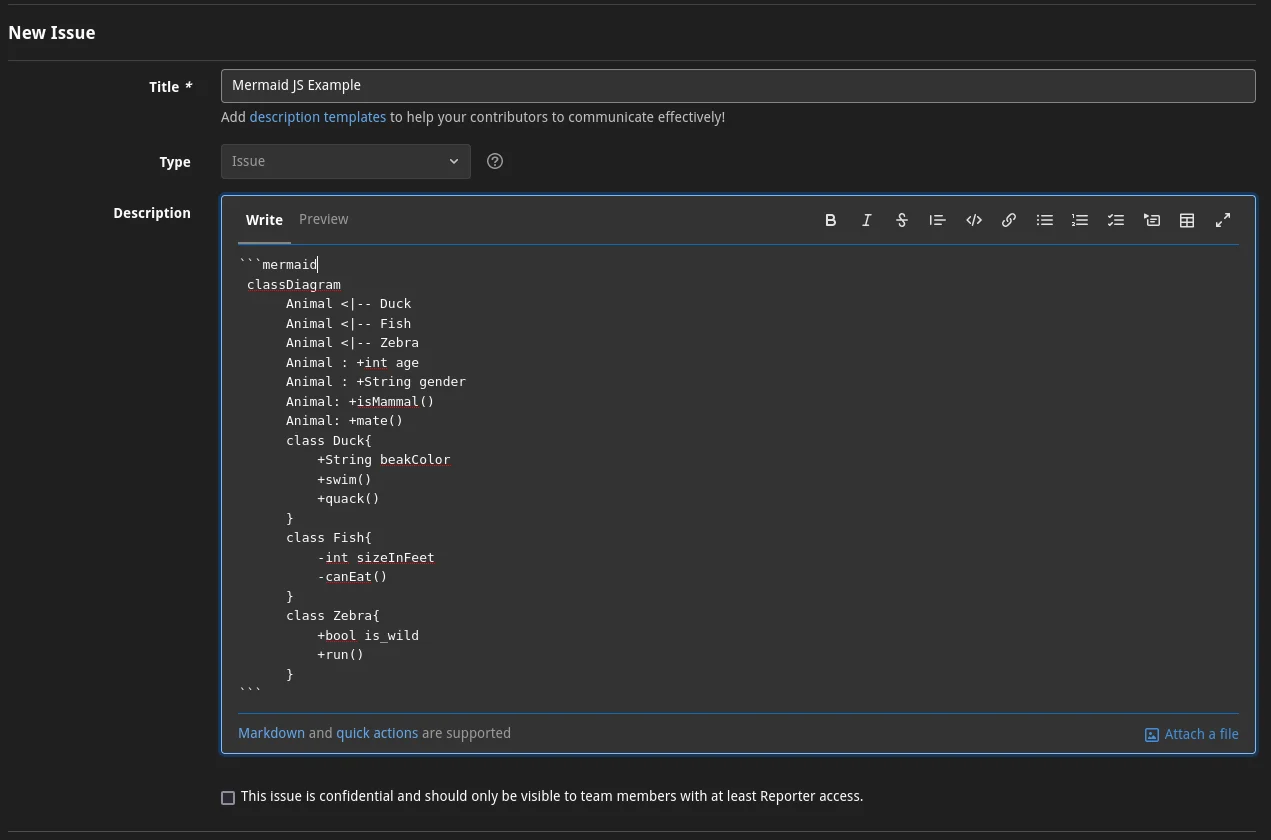
An example of ordinary mermaid js input
What made this interesting is that mermaid has a configurable setting that allows users to input HTML labels. For most graph types a sanitiser is used in an attempt to mitigate the obvious risks. The report shows its definition and asks the reader to spot the issues:
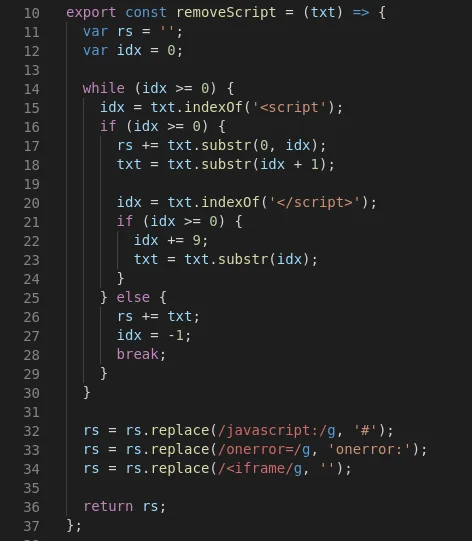
Bonus, can you spot any issues with this?
For the classDiagram-v2 renderer, that sanitiser is not used. The vulnerable code is in src/dagre-wrapper/createLabel.js. When the htmlLabels setting is enabled, as it is on GitLab, the addHtmlLabel function is called:
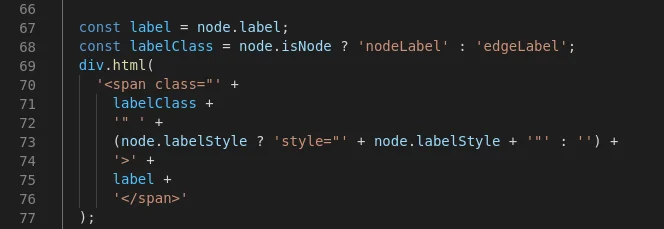
src/dagre-wrapper/createLabel.js:addHtmlLabel
That function uses string concatenation with user input to generate HTML elements. Malicious input can therefore escape the span and add additional elements of the attacker's choice.
The DOM injection alone is not enough to achieve XSS on GitLab because of the Content Security Policy, which prevents inline JavaScript, and JavaScript from a domain outside the whitelist, from executing. The researcher therefore looked for a way to serve script from a GitLab-controlled origin, and found a second flaw: files can be uploaded to GitLab that, when requested, are returned with the text/javascript content type.
Exploitation
Step 1: inject elements through the class diagram label
Saving the following payload in a mermaid graph triggers the XSS when the page is visited:
classDiagram-v2class Exploit~/span><iframe srcdoc="<script src='https://gitlab.com/ip/test-project/-/jobs/1234/artifacts/raw/evil.mjs' nonce=''></script>" />~{ int id}
The class name contains ~/span> followed by an iframe whose srcdoc holds a script element pointing at an .mjs file served from a GitLab job artifact URL, with an empty nonce attribute. Because addHtmlLabel concatenates user input into the label markup, malicious input can escape the span and add additional elements of the attacker's choice.
Step 2: host the script on a GitLab domain
The CSP bypass is caused by a misconfiguration inside GitLab that causes .mjs files to be incorrectly returned with the text/javascript content type. By creating an .mjs file as part of a Continuous Integration job and configuring the resulting artifacts to be publicly available, a malicious JavaScript file can be hosted on a GitLab domain. The report's example file contains:
alert(1);
With the script served from a GitLab URL, the CSP no longer blocks execution, and attacker-controlled JavaScript runs in the browser of any user who visits the issue, pull request, wiki page or any other page the graph is attached to.
Root cause
There are two independent mistakes.
- Missing sanitiser in
classDiagram-v2. Mermaid's HTML label support is dangerous by design, and the project mitigates it for most graph types with a sanitiser. TheclassDiagram-v2renderer does not apply it. Instead,addHtmlLabelinsrc/dagre-wrapper/createLabel.jsbuilds HTML by string concatenation with user input, so a crafted class name can close the generatedspanand introduce arbitrary elements. - Content type handling in
send_upload. The vulnerable code on the GitLab side is in thesend_uploadfunction:
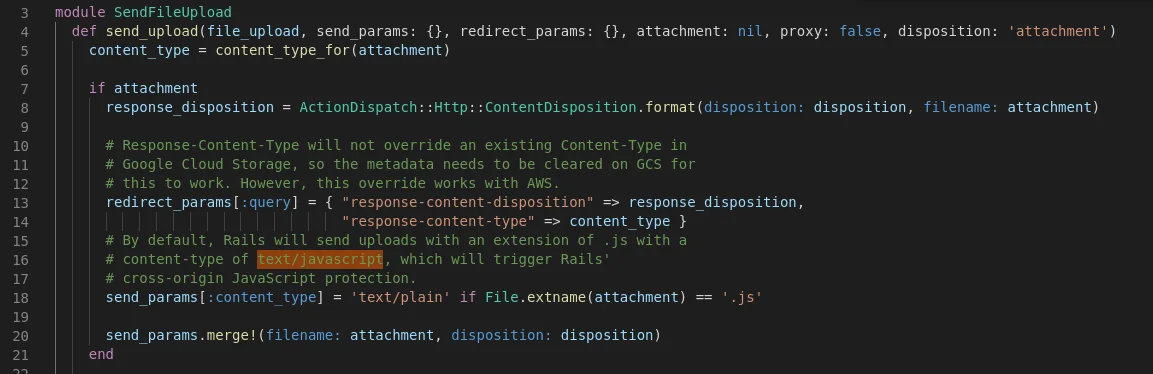
app/controllers/concerns/send_file_upload.rb:SendFileUpload
The code explicitly checks whether the extension name is .js in order to convert the response type to text/plain. It does not account for the many other extensions that map to the text/javascript MIME type. Using the rails console, the researcher inspected which content types GitLab returns for a given file name:
[4] pry(main)> MIME::Types.type_for('evil.mjs')=> [#<MIME::Type: application/javascript>, #<MIME::Type: text/javascript>, #<MIME::Type: application/x-javascript>]
Because .mjs is not caught by the .js check, an uploaded .mjs artifact is served as JavaScript from a GitLab domain.
Impact
The graphs are saved by GitLab and rendered by default, so the injected script executes in the browser of any user who visits the issue, pull request, wiki page or any other page the graph is attached to. The author contrasts it with low-impact XSS reports where a user has to be tricked into visiting an unusual link or doing something specific on a page. The report does not state which user roles or data the script could reach once running in a victim's session.
Fix
Based on the root cause, the two changes needed are: apply the sanitiser to the classDiagram-v2 renderer (or stop concatenating user input into HTML in addHtmlLabel), and extend the send_upload content type handling so that every extension mapping to text/javascript, not just .js, is returned as text/plain or otherwise neutralised.
Variants to test
- Other mermaid graph types with HTML labels. Try payloads that close the generated
spanin graph types other thanclassDiagram-v2, especially any renderer that does not go through the sanitiser. A positive result is an element of your choice appearing in the DOM next to the label. - Other extensions mapping to JavaScript MIME types. Query the framework's MIME type table for extensions that resolve to
text/javascriptorapplication/javascriptand upload each as a public artifact. A positive result is a response with a JavaScript content type for an extension the upload handler does not special-case. - CSP whitelist origins that serve user content. For any target with a strict CSP, look for origins on the whitelist that host user-uploaded files, CI artifacts or similar. A positive result is a script you control loading from a whitelisted origin.
srcdocandnonceinteraction. Where a CSP uses nonces, test whether an injectediframe srcdocwith an emptynonceattribute still loads a same-origin script. A positive result is script execution despite the nonce policy.
What happened, in plain words
GitLab is a website where teams keep their work: code, notes, task lists, wiki pages and discussions. One of its features lets you draw diagrams inside a page by typing a short description of the diagram. The page then turns that description into a picture in your browser. The tool that does the drawing is called mermaid js.
This write-up is about two separate mistakes in GitLab that, put together, let an attacker run their own JavaScript in the browser of anyone who opens a page containing a booby-trapped diagram. JavaScript is the programming language that web pages use to be interactive; when someone else's JavaScript runs in your browser on a site you are logged into, that is called cross-site scripting, or XSS. The attacker does not need to trick you into clicking a strange link. The diagram is saved on GitLab and drawn by default, so simply viewing the page is enough.

Here's Johnny!
The author opens by noting that XSS reports are often greeted with a shrug, because so many of them are low impact: the victim has to be lured to an odd link, or has to do something unusual on the page. This one is different, and the rest of the article explains why.
The author found it at the end of the time set aside for reviewing GitLab, around six months ago, while browsing the interface in a general way looking for extra features worth digging into, and hoping for a quick win to finish with.
Overview
Graphs rendered via Javascript
The feature at the centre of this is the graphs that can be attached to written content on GitLab through the mermaid js library. You write a graph in a declarative syntax, meaning you describe what the graph should contain rather than how to draw it, and GitLab saves it and draws it by default. The drawing happens in the viewer's browser, so the text of the graph ends up producing elements on the page.
Two flaws combine here:
- In one kind of graph, called
classDiagram-v2, the input is not cleaned properly, so an attacker can write arbitrary elements into the page. Cleaning input like this is called sanitisation: removing or neutralising anything that could be interpreted as markup or code rather than as plain text. - GitLab has a setting that decides what type a file is when it is served back to a browser. Because of a mistake there, an attacker can host a JavaScript file on a GitLab address, which defeats the site's Content Security Policy.
A Content Security Policy, or CSP, is a rule the site sends to your browser saying which scripts are allowed to run: usually only scripts from an approved list of addresses, and no scripts written directly into the page. It is a safety net against exactly this kind of injection. The second flaw cuts a hole in that net.
Below is an example of a harmless graph drawn on a GitLab issue page with mermaid js:
An example of ordinary mermaid js output
These graphs are made with a declarative syntax, annotated with mermaid, like this:
An example of ordinary mermaid js input
Saving the following payload, however, would trigger the XSS when the page is visited:
classDiagram-v2class Exploit~/span><iframe srcdoc="<script src='https://gitlab.com/ip/test-project/-/jobs/1234/artifacts/raw/evil.mjs' nonce=''></script>" />~{ int id}
Line by line, in plain words:
-
classDiagram-v2tells mermaid which kind of diagram to draw. This is the renderer that does not use the sanitiser. -
class Exploitstarts the definition of a class, which is a box in this kind of diagram. The name given to the class isExploit, and everything that follows is smuggled in as part of that name. -
<iframe ... />inserts an iframe, which is a small window inside the page that can hold its own document. Itssrcdocattribute holds the HTML for that inner document. -
Inside
srcdocthere is a<script src='...'>element. Thesrcpoints at an.mjsfile on a GitLab address, under a job artifacts path. Artifacts are files that a Continuous Integration job produces and that can be kept and downloaded afterwards. Continuous Integration, or CI, is GitLab's system for running automated tasks, such as tests or builds, whenever code changes.
The Content Security Policy bypass is caused by a misconfiguration inside GitLab that makes .mjs files come back with the text/javascript content type. The content type is the label a server attaches to a file to tell the browser what it is: a picture, a web page, a script. If a browser is told a file is JavaScript, it will run it. By creating an .mjs file as part of a Continuous Integration job and configuring the resulting artifacts to be publicly available, an attacker can host a malicious JavaScript file on a GitLab address.
The example file contains:
alert(1);
The example file contains alert(1), which asks the browser to show a pop-up box containing the number 1.
The Nitty Gritty: Mermaid JS
Mermaid js has a configurable setting that lets users put HTML labels into their diagrams. HTML is the language web pages are written in, made of tags such as span and iframe. Allowing users to write HTML into a page is risky, because HTML can carry scripts. For most graph types mermaid uses a sanitiser to try to reduce the obvious risks. Its definition is shown here:
Bonus: can you spot any issues with this?
For the classDiagram-v2 renderer, however, the sanitiser is not used. The vulnerable code is in the file src/dagre-wrapper/createLabel.js. When the htmlLabels setting is enabled, as it is on GitLab, the addHtmlLabel function is called. It is shown here:
src/dagre-wrapper/createLabel.js:addHtmlLabel
That function builds HTML elements by gluing strings together with user input. Gluing text together like this is called string concatenation. Because the user's text is treated as markup rather than as plain text, malicious input can escape the span and add extra elements of the attacker's choosing. Think of it like a form where you write your name and the clerk stamps it straight onto an official letter: if you write a name that includes instructions, the letter will carry those instructions too.
The Nitty Gritty: CSP Bypass
The vulnerable code on the GitLab side, the one behind the CSP bypass, is in the send_upload function:
app/controllers/concerns/send_file_upload.rb:SendFileUpload
The code explicitly checks whether the file extension is .js, and if so converts the response type to text/plain. An extension is the part of a file name after the dot, such as .jpg or .pdf. text/plain tells the browser the file is ordinary text, so it is displayed rather than run. The check is a blocklist of one: it only thinks about .js. But many other extensions map to the text/javascript MIME type. MIME types are the standard names for file types that servers and browsers use to agree on what a file is.
Using the rails console, an interactive prompt for running code inside a Ruby on Rails application (the framework GitLab is built on), the author inspected which content types GitLab returns for a given file name:
[4] pry(main)> MIME::Types.type_for('evil.mjs')=> [#<MIME::Type: application/javascript>, #<MIME::Type: text/javascript>, #<MIME::Type: application/x-javascript>]
Line by line:
[4] pry(main)>is the prompt of the rails console, showing this is the fourth command entered.MIME::Types.type_for('evil.mjs')asks the framework's table of file types: what types does the nameevil.mjscorrespond to?- The answer lists three:
application/javascript,text/javascriptandapplication/x-javascript. All three are JavaScript types. So a file ending in.mjsis served as JavaScript, and the.jscheck insend_uploadnever notices it.
Because .mjs is not caught by the .js check, an uploaded .mjs artifact is served as JavaScript from a GitLab address. The CSP is doing its job: it trusts GitLab, and GitLab is handing out the attacker's file. It is like a club with a strict doorman who only admits members, and a member walking in with a stranger's bag.
Impact
The graphs are saved by GitLab and drawn by default, so the injected script runs in the browser of any user who visits the issue, pull request, wiki page or any other page the graph is attached to. The author contrasts it with low-impact XSS reports where a user has to be tricked into visiting an unusual link or doing something specific on a page. The report does not say which user roles or data the script could reach once running in a victim's session.
Fix
The report does not describe the fix GitLab applied. From the root cause, two changes are needed: apply the sanitiser to the classDiagram-v2 renderer, or stop gluing user input into HTML in addHtmlLabel; and extend the content type handling in send_upload so that every extension mapping to text/javascript, not just .js, is returned as text/plain or otherwise neutralised.
Variants to test
- Other mermaid graph types with HTML labels. Try payloads that close the generated
spanin graph types other thanclassDiagram-v2, especially any renderer that does not go through the sanitiser. A positive result is an element of your choice appearing on the page next to the label. - Other extensions mapping to JavaScript MIME types. Query the framework's MIME type table for extensions that resolve to
text/javascriptorapplication/javascript, and upload each as a public artifact. A positive result is a response with a JavaScript content type for an extension the upload handler does not special-case. - CSP whitelist addresses that serve user content. For any target with a strict CSP, look for addresses on the whitelist that host user-uploaded files, CI artifacts or similar. A positive result is a script you control loading from a whitelisted address.
srcdocandnonceinteraction. Where a CSP uses nonces, test whether an injectediframe srcdocwith an emptynonceattribute still loads a same-origin script. A positive result is script execution despite the nonce policy.
Glossary
- XSS (cross-site scripting): a flaw that lets an attacker's JavaScript run in another person's browser on a site they trust.
- Stored XSS: XSS where the malicious content is saved on the server, so every visitor to the page is affected.
- JavaScript: the programming language browsers run to make pages interactive.
- DOM: the browser's in-memory model of the page, a tree of elements such as
spanandiframe; writing into it is called DOM injection. - HTML: the markup language web pages are written in, made of tags.
- Sanitisation: cleaning input so that anything that could be read as markup or code is removed or neutralised.
- Sanitiser: the piece of code that performs sanitisation.
- String concatenation: joining pieces of text end to end to build a larger string.
- Payload: the crafted input an attacker sends to trigger a flaw.
- Mermaid js: a library that draws diagrams from a short declarative description.
- Declarative syntax: describing what you want rather than how to produce it.
classDiagram-v2: the mermaid renderer for class diagrams, the one that skips the sanitiser here.htmlLabels: a mermaid setting that allows HTML in diagram labels.span: a generic HTML container element.iframe: an HTML element that embeds a separate document inside the page.srcdoc: an iframe attribute holding the HTML of the embedded document.script: the HTML element that loads or contains JavaScript.src: an attribute giving the address of an external file.- CSP (Content Security Policy): a rule from the site telling the browser which scripts may run and from where.
- Whitelist: a list of things that are explicitly allowed.
- Nonce: a one-time random value a strict CSP can require on each script tag.
- Content type / MIME type: the standard label for a file's type, such as
text/javascriptortext/plain. - Extension: the part of a file name after the dot, such as
.mjs. .mjs: a file extension for JavaScript modules.send_upload: the GitLab function that serves uploaded files and sets their content type.- Continuous Integration (CI): GitLab's system for running automated tasks when code changes.
- Artifacts: files produced by a CI job and kept for download.
- Rails console: an interactive prompt for running code inside a Ruby on Rails application.
- Ruby on Rails: the web framework GitLab is built on.
alert(1): a JavaScript call that shows a pop-up, used to prove code ran.text/plain: the content type for ordinary text, which browsers display rather than run.text/javascript: the content type that tells a browser a file is JavaScript to run.





