A developer can disclose group/project protected CI/CD vars using MRs approvals conflicts broken logic
A developer could bypass merge request approval rules and merge code without the required approvals, allowing them to run code on a protected branch and disclose protected CI/CD variables.

GitLab
Originally disclosed on GitLab
- Fixed in 37 days
- Disclosed after 37 days
⚠️ Please read the process on how to fix security issues before starting to work on the issue. Vulnerabilities must be fixed in a security mirror.
HackerOne report #2078069 by js_noob on 2023-07-20, assigned to @cmaxim:
Report | Attachments | How To Reproduce
Report
Summary
Hello team, for a developer to be able to disclose the protected CI/CD vars he should have to merge and push access to a project. However, even without those, there is some broken logic in the MRs approvals where it allows him to bypass all approvals logic and merge his evil code which allows him to disclose the vars.
Steps to reproduce
As an owner:
- Create a new group and apply the ultimate trial to it
- Add a developer to the group
- Add a protected var in that group, Group Settings => CI/CD => Variables
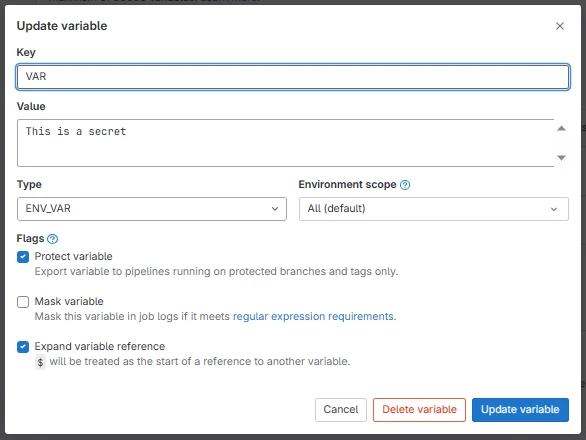
- Create a new project in that group, and add a
.gitlab-ci.ymlfile with the following content
build:
    script:
        - echo "This is safe..."
- Allow developers to merge MRs, Project Settings -=> Repository => Protected branches
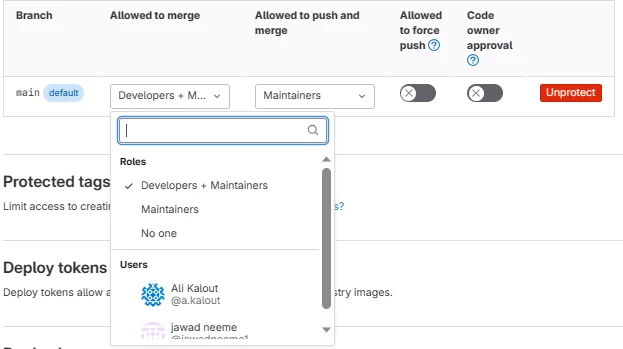
- Add MR approval rule to require 2 approvals before merging any MR, Project Settings => Merge requests => Merge request approvals
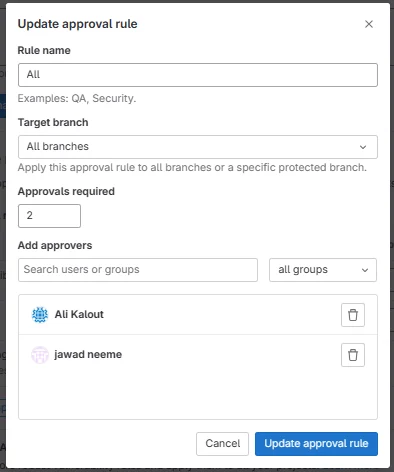
- On the same page, make sure
Prevent approval by authoris checked. Now no MRs should be merged unless approved by both members, right?
As the developer:
- Edit
.gitlab-ci.ymlto match the following
build:
    script:
        - echo "This is safe..."
        - echo $VAR
- Create a merge request, and verify that you can merge it (knowing that the logic that should be here, is that now it should require 1 approval)
- Merge it, navigate to the pipeline logs, and verify that the protected variable is disclosed
The developer in this case is trusted to merge MRs, that are approved by the owner (requires 2 approvals dev + owner), however, he was able to bypass this and merge a MR without the owner's approval, allowing him to run any code on protected branches (main in this case).
The expected logic, in this case, is requiring 1 approval not 2, as the other member that should approve is the MR author, while here it required 0 approvals.
Examples/POC
Output of checks
This bug happens on GitLab.com
Impact
A developer can disclose project/group protected CI/CD variables.
Attachments
Warning: Attachments received through HackerOne, please exercise caution!
How To Reproduce
Please add reproducibility information to this section:
Not written yet. The AI write-up for this report has not been written yet. The Original tab links to the source.
How it worked
Root cause
Likely a logic error in merge request approval rules where the system failed to require the correct number of approvals when the author is also a developer with merge rights.
Impact
A developer could disclose project or group protected CI/CD variables by merging code without required approvals.
What the attacker needed
A GitLab group with Ultimate trial; developer role in the group; protected CI/CD variable set; merge request approvals configured
How it was found
- As owner, create a group, add a developer, and add a protected CI/CD variable.
- Create a project in the group with a basic CI configuration.
- Allow developers to merge merge requests and set an approval rule requiring two approvals with 'Prevent approval by author' checked.
- As the developer, edit the CI configuration to echo the protected variable.
- Create a merge request and merge it without any approvals.
- View the pipeline logs to see the protected variable disclosed.
Explained by bugbounty.wiki with AI from the original and checked against quotes from it; it can still be wrong. Read the original before relying on a detail.
Not written yet. The AI write-up for this report has not been written yet. The Original tab links to the source.
In GitLab, protected CI/CD variables are secret values used in pipelines. Normally, only trusted users can merge code to protected branches. Here, a developer with limited rights found a way to merge their own code without the required approvals, so they could print the secret variable in the pipeline logs.
What is Access control?
A user can do something their role should not allow: reach an admin function, act on a feature they have not paid for, or skip a permission check. IDOR is the special case where the object belongs to someone else.

