Arbitrary PUT request as victim user through Sentry error list
The error tracking feature concatenated an unsanitised error ID from a spoofed Sentry server into action button URLs, allowing path traversal. When a victim clicked an action button, the UI sent a PUT request with a valid CSRF token to any GitLab endpoint, potentially elevating privileges to administrator.

GitLab
Originally disclosed on GitLab
- Fixed in 3 months
- Disclosed after 3 months
HackerOne report #1600343 by joaxcar on 2022-06-14, assigned to @nmalcolm:
Report | Attachments | How To Reproduce
Report
Summary
By spoofing a Sentry server a malicious user can inject a path traversal in the code that generate function buttons on the "Error tracking list" page in a project. If a victim user click any of the action buttons (ignore or resolve) the UI will issue a PUT request with a valid CSRF token to any endpoint on the GitLab instance. By abusing this an attacker can in worst case elevate its privilege to administrator. Many other attacks are possible, and the functionality is to be considered "normal workflow" as you will see, even if some user interaction is needed.
Details
A maintainer of a project can activate error tracking docs in a project by configuring a Sentry server URL, a project name and an access token. After enabling error tracking any error connected to the project in Sentry will be listed under https://gitlab.com/groupname/projectname/-/error_tracking. This list contains a card for every error showing the title, a description and two action buttons to either ignore or resolve the error. The title of the error work as a link to the error details page.
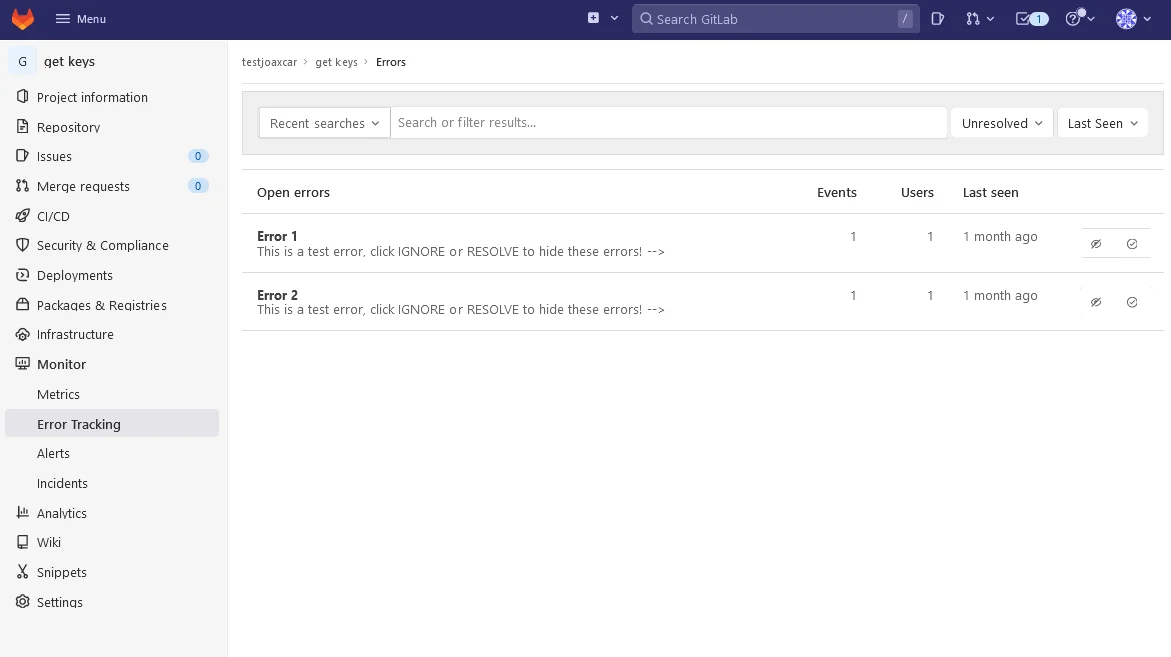
Both the details page link and the action buttons get their related URLs by concatenating the error ID with a preexisting URL. This error ID is taken from the response from the server and used in the URLs without any escaping or sanitization. By spoofing the Sentry server one can thus inject anything in these URLs. By giving any error an ID beginning with ../../../../api/v4/ any click on the action buttons will now send PUT requests to the GitLab API.
This is the put request
https://gitlab.com/gitlab-org/gitlab/-/blob/master/app/assets/javascripts/error_tracking/services/index.js
  updateErrorStatus(endpoint, status) {
    return axios.put(endpoint, { status });
  },
and here is the endpoint generated. As you can see there is no sanitation to the errorId at this point
https://gitlab.com/gitlab-org/gitlab/-/blob/master/app/assets/javascripts/error_tracking/components/error_tracking_list.vue
getIssueUpdatePath(errorId) {
  return `/${this.projectPath}/-/error_tracking/${errorId}.json`;
}
But the problem goes deeper where there is no validation of the error data input in the https://gitlab.com/gitlab-org/gitlab/-/blob/master/lib/gitlab/error_tracking lib. This allows an error ID like ../../../../api/v4 to be accepted.
Now giving an error the ID ../../../../api/v4/users/4?admin=true# will generate actions that when clicked by an administrator will elevate the user with ID 4 to administrator. The trailing # is just to remove any trailing data from the requests.
To make it more likely for a victim to click the action buttons the attacker can give all errors in the list the title (a blank space), this will effectively remove the "error details page" link, leaving only the infected buttons and the error summary. (see image)
list with empty title, links does not exist only the action buttons
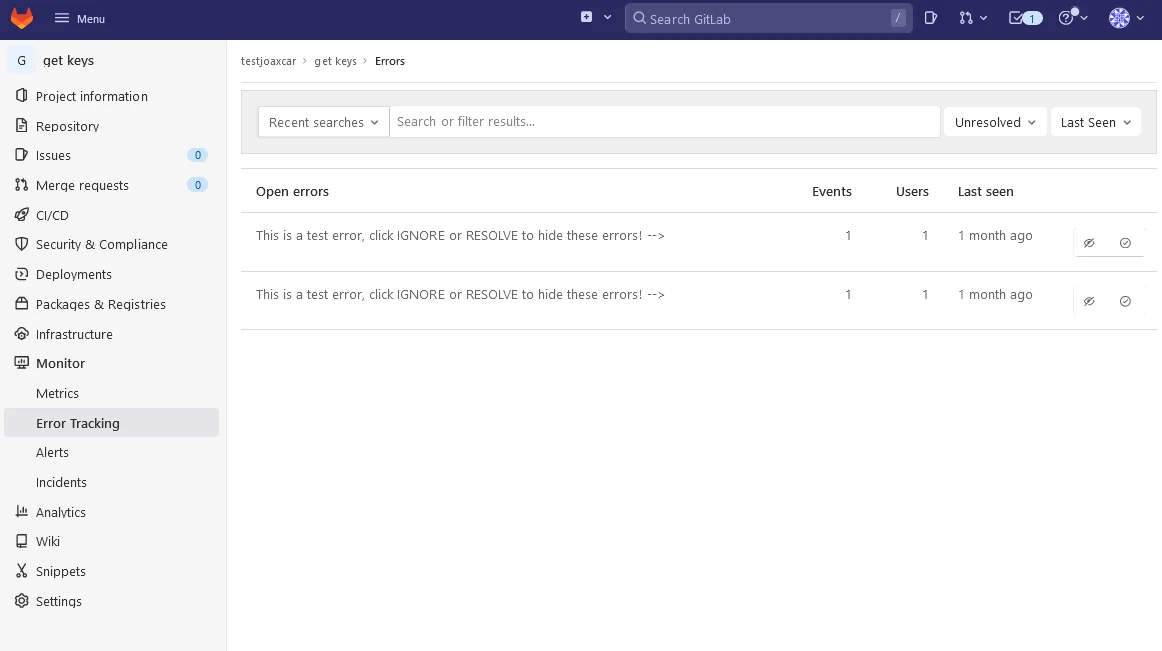
The attacker need maintainer access to add a spoofed Sentry server, but the attacker can create a new project, add the server, invite any user as a developer and then convince the user of "cleaning up the errors".
To attack an administrator the attacker can generate the infected project and then ask an administrator to "take a look at the error list in my project, it seems to not respond to actions, can you take a look at this. All errors in the list should be moved to ignore!".
Steps to reproduce
If possible test with an admin account, if you only want to see a working minimal PoC use a regular account and click the second "update user status" error injection. By using my spoof server the user that will be made admin is the user with ID 4. Make sure to revert this after the test!
- Create two users
attacker(normal user) andvictim(admin user) - Log in to the GitLab instance as
attacker - Create a new project, call it
project01 - Go to https://gitlab.example.com/attacker/project01/-/settings/operations and expand the tab "Error tracking"
- Configure the fields with my spoofed server
- URL: https://joaxcar.com
- Token: anything
- Click
Connecton the side of the Token field - There should now exist a project in the project dropdown, select
Test | test - Make sure
Activeis checked and click save - If the
victimis not admin, go to members page and invite the user to the project asDeveloper, ifvictimis administrator just move on - Log out and log back in as
victim - Go to https://gitlab.com/attacker/project01/-/error_tracking
- Click any of the
action buttonson the right on the first error - Click any of the
action buttonson the right on the second error - Refresh the page
- Click the user icon in the top right of the UI, the status should now be
hacked
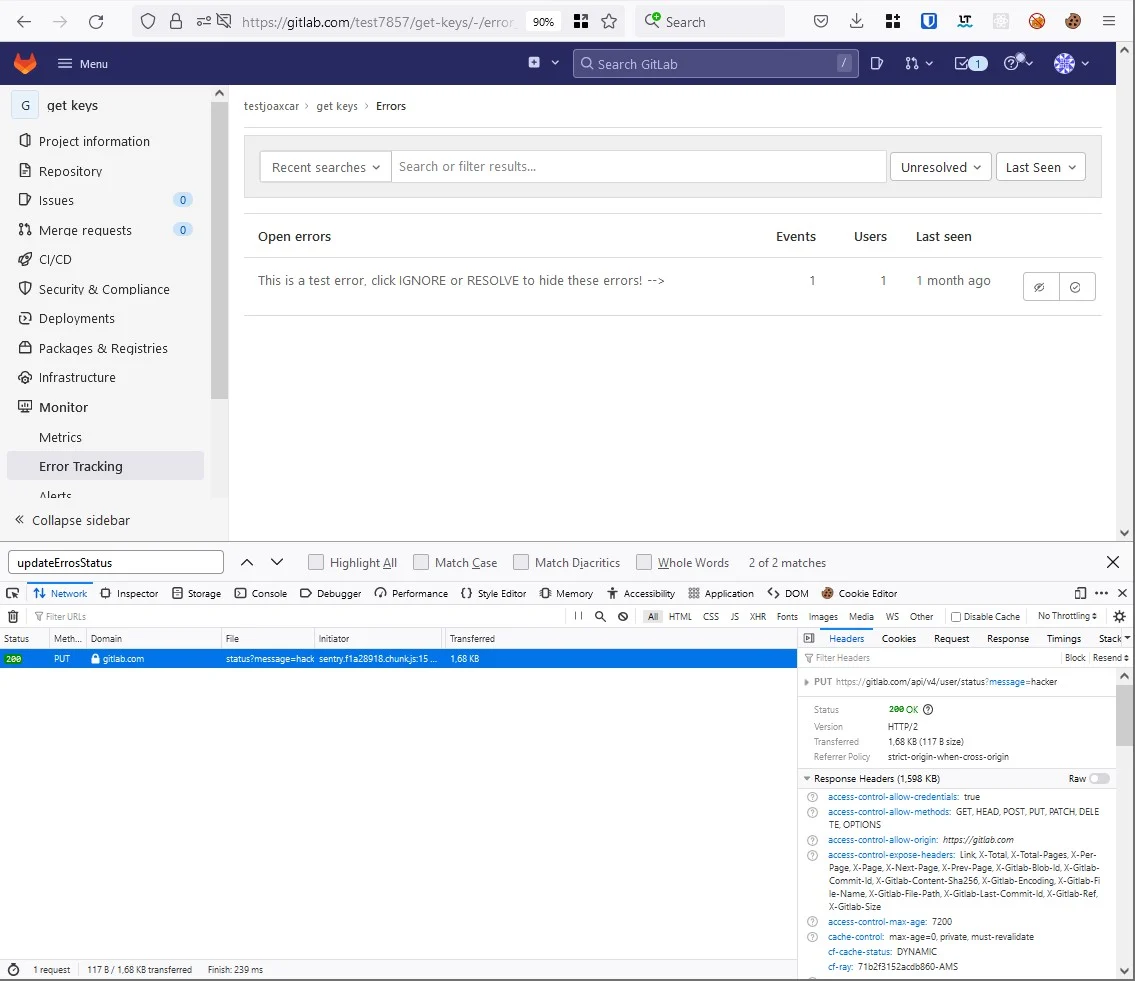
- If
victimis an administrator now the user on the instance with ID 4 will also be an admin.
Setting up a mock server
To host your own mock server follow these steps
- Add these lines to the
.htaccessfile in the root directory
RewriteCond %{REQUEST_URI} ^/api/0/projects/test/test/issues/
RewriteRule .* /sentry/list.json [L]
RewriteCond %{REQUEST_URI} ^/api/0/projects/
RewriteRule .* /sentry/projects.json [L]
- Upload the two files that I have submitted under a folder
sentry
- You will now be able to add your server as a sentry server, click
connectand be presented with a projectTest / test. And be able to list the two fake errors
Impact
Valid arbitrary PUT request as victim user. There is no restriction on what type of PUT request can be sent.
Examples:
- Make admin
PUT /users/:id - Elevate membership
PUT /groups/:id/members/:user_id/state - Approve member to a group
PUT /groups/:id/members/:member_id/approve - Change visibility
PUT /groups/:id
And much more
What is the current bug behavior?
Error IDs are not sanitized or validated and can contain arbitrary values.
What is the expected correct behavior?
The id value should be restricted, sanitized or validated.
Output of checks
This bug happens on GitLab.com
Impact
Valid arbitrary PUT request as victim user. Can be used to elevate user to admin, change visibility of projects, accept access requests on groups/projects and much more. There is no restriction on what type of PUT request can be sent.
Attachments
Warning: Attachments received through HackerOne, please exercise caution!
How To Reproduce
Please add reproducibility information to this section:
Not written yet. The AI write-up for this report has not been written yet. The Original tab links to the source.
How it worked
Root cause
Likely the error ID from the Sentry response was concatenated into URLs without validation or sanitisation, allowing path traversal.
Impact
An attacker could send arbitrary PUT requests as the victim, potentially elevating a user to administrator or changing project visibility, though user interaction is required.
What the attacker needed
Attacker has maintainer access to a project; victim clicks action buttons; victim is logged in
The fix
The error ID should be restricted, sanitised, or validated.
How it was found
- Create an attacker account and a victim account (admin).
- As attacker, create a new project.
- Configure error tracking with a spoofed Sentry server URL and any token.
- Connect and select the fake project, then save.
- Invite the victim as Developer if not admin.
- As victim, visit the error tracking page and click the action buttons on the errors.
Explained by bugbounty.wiki with AI from the original and checked against quotes from it; it can still be wrong. Read the original before relying on a detail.
Not written yet. The AI write-up for this report has not been written yet. The Original tab links to the source.
The error tracking page builds links by sticking together a base address and an error ID that comes from an external server. If that server is fake, the ID can contain '../' sequences that make the browser go to a different part of the GitLab site. Clicking a button then sends a request to that unintended place, and because the user is logged in, the request carries their permissions.
What is Path traversal?
Input that builds a file path escapes the intended folder, reading or writing files the application should never touch.


