Attacker can abuse slack/mattermost integrations to execute slash commands as another user
The slash command integration for Slack and Mattermost did not link the integration token to the user identity, so an attacker who knew a victim's team_id and user_id could send a request that executed slash commands as that victim. This allowed running ChatOps jobs, deploying environments, and creating issues or comments with the victim's privileges.

GitLab
Originally disclosed on GitLab
- Fixed in 3 months
- Disclosed after 3 months
⚠️ Please read the process on how to fix security issues before starting to work on the issue. Vulnerabilities must be fixed in a security mirror.
HackerOne report #2188868 by yvvdwf on 2023-10-01, assigned to H1 Triage:
Report | Attachments | How To Reproduce
Report
Hello,
I found a vulnerability in slash command integration (either slack or mattermost). It allows attackers to execute any slash commands, including exection the ChatOps jobs, as victims.
Before executing a slash command, Gitlab will:
- 1. verify whether the given token is the same as the one in the integration setting
- 2. identify the current user via
team_idanduser_idparameters
The vulnerability is at the non-correlation between [1] and [2]. Consequently attackers can impersonate another user when knowing his/her team_id and user_id in a Slack (or Mattermost) workspace.
Steps to reproduce on gitlab.com
- As Victim:
- On an existing project, or create a new one, (note its name, e.g.,
victim/project-a) follow the steps to integrate Slack from project integration settings by creating a new Slack workspace - Test the integration by sending a message in Slack to create a new issue:
/gitlab victim/project-a issue new issue-title - Invite attacker to the Slack workspace which has been used in the integration above
- As Attacker:
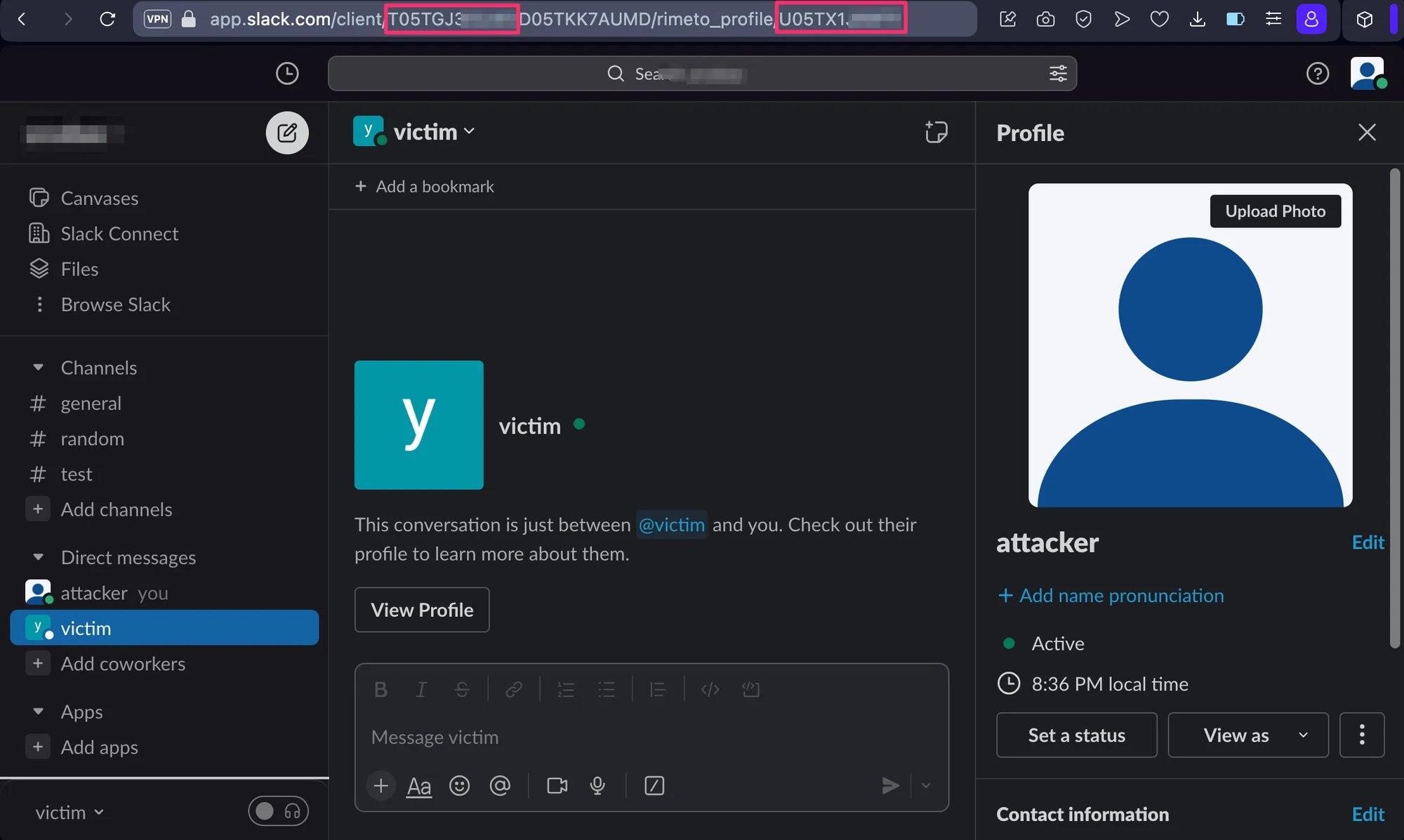
- Join to the invited Slack workspace using Web browser, then view victim's profile
- From the URL of the victim's profile, copy
team_id(which started byT, e.g.,T05TGJXXXX) anduser_id(which started byU, e.g.,U05TX1JXXXX)
- Create a new project, then add
.gitlab-ci.ymlfile as the following:
test:
  script:
    - echo hi ${GITLAB_USER_LOGIN}
    - echo run $CHAT_INPUT
    - bash -xc "$CHAT_INPUT"
-
Add the victim to the project's members as
Maintainer -
Then go to
Settings/Integrations/Mattermost slash commandsand fill the form:Active: checkedToken:abcdef- Click
Save changes
-
Note the ID of the project above, e.g.,
11111111 -
Open a terminal, execute the following command after replacing your project ID,
team_idanduser_id:
curl -X POST https://gitlab.com/api/v4/projects/11111111/services/mattermost_slash_commands/trigger --data 'token=abcdef&user_id=U05TX1JXXXX&team_id=T05TGJXXXX&text=run test date'
- Go to
Build/Pipelinesyou should see a new pipeline which was triggered asvictim
Impacts
The vulnerability allows attackers to execute as victims any slash commands, such as, execute the ChatOps jobs, deploy from an environment to another environment, create a new issue/comment (thus execute any quick action ).
Consequently, I think that the impact should be at least the same as CVE-2023-5207 or CVE-2023-5207, unless the attack complex vector should be Low as any member in a Slack integration workspace of a project can view team_id and user_id of victim. Furthermore, since team_id and user_id are not confidential information, then they can be easily leaked, e.g., by quickly searching on Gitlab.com, I found some:
Team id: T02592416
Team id: T03TQEUUA49
Thank you!
Impact
The vulnerability allows attackers to execute as victims any slash commands, such as, execute the ChatOps jobs, deploy from an environment to another environment, create a new issue/comment (thus execute any quick action ).
Attachments
Warning: Attachments received through HackerOne, please exercise caution!
How To Reproduce
Please add reproducibility information to this section:
Not written yet. The AI write-up for this report has not been written yet. The Original tab links to the source.
How it worked
Root cause
Likely the integration verified the shared token but then trusted user-supplied team_id and user_id to identify the acting user, without binding those identifiers to the token or the authenticated session.
Impact
An attacker could execute any slash command as the victim, including running ChatOps jobs, deploying between environments, and creating issues or comments with quick actions; the report notes the attack complexity may be Low because any workspace member can view the IDs.
What the attacker needed
Victim has Slack/Mattermost integration; attacker is in the same chat workspace; attacker knows victim's team_id and user_id
How it was found
- As the victim, integrate Slack with a project and invite the attacker to the Slack workspace.
- As the attacker, view the victim's Slack profile and copy the team_id and user_id from the profile URL.
- Create a project with a CI job that runs the chat input, add the victim as a Maintainer, and enable the Mattermost slash commands integration with a chosen token.
- Send a POST request to the project's slash command trigger endpoint with the token, the victim's team_id and user_id, and a command such as running the CI job.
- Observe that a new pipeline is triggered as the victim.
Explained by bugbounty.wiki with AI from the original and checked against quotes from it; it can still be wrong. Read the original before relying on a detail.
Not written yet. The AI write-up for this report has not been written yet. The Original tab links to the source.
Slash commands let you type something like /gitlab in a chat app to make GitLab do things. The integration checked that the request had the right secret token, but it did not check that the person sending it was really the user they claimed to be. So anyone who knew two public-looking IDs from a chat profile could pretend to be someone else and run commands as them.
What is Access control?
A user can do something their role should not allow: reach an admin function, act on a feature they have not paid for, or skip a permission check. IDOR is the special case where the object belongs to someone else.

