Blind SSRF in FogBugz project import
The FogBugz project import feature in GitLab allowed a user to specify an arbitrary URL, which the server would then request. An attacker could use this to make requests to internal network resources from the GitLab instance.

- Disclosed after 3.6 years
Steps to reproduce
- Run GitLab
docker run --detach --hostname gitlab.example.com --publish 443:443 --publish 80:80 --publish 22:22 --name gitlab gitlab/gitlab-ce:latest - Connect to the GitLab Docker container:
docker exec -it gitlab /bin/bash - Install netcat:
apt update && apt install -y netcat - Run server in container:
nc -llvp 12345 - Use http://localhost:12345 as FogBugz URL (see screenshot)
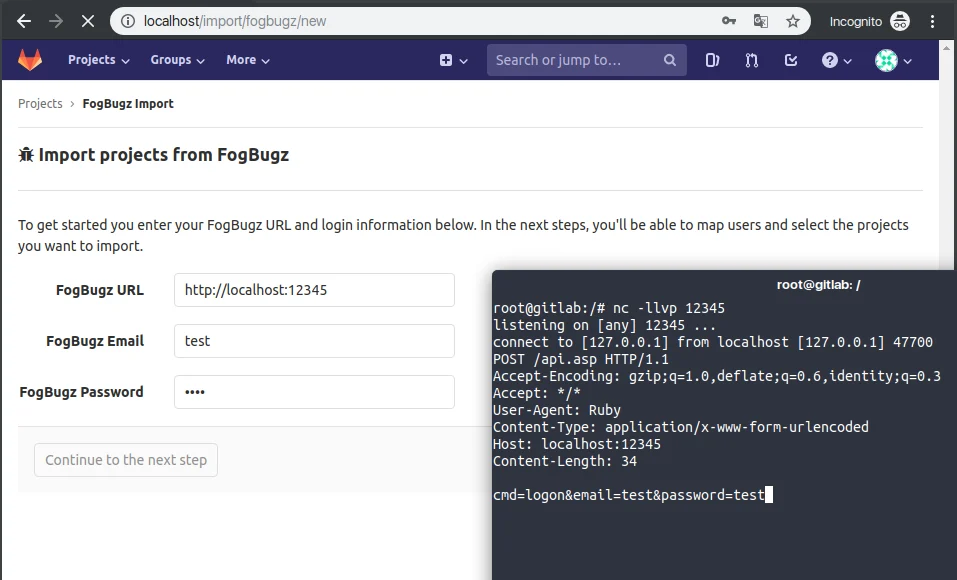
Results of GitLab environment info
root@gitlab:/# gitlab-rake gitlab:env:info

System information
System:
Current User:  git
Using RVM:  no
Ruby Version:  2.6.3p62
Gem Version:  2.7.9
Bundler Version:1.17.3
Rake Version:  12.3.2
Redis Version:  3.2.12
Git Version:  2.22.0
Sidekiq Version:5.2.7
Go Version:  unknown

GitLab information
Version:  12.3.5
Revision:  2417d5becc7
Directory:  /opt/gitlab/embedded/service/gitlab-rails
DB Adapter:  PostgreSQL
DB Version:  10.9
URL:    http://gitlab.example.com
HTTP Clone URL:  http://gitlab.example.com/some-group/some-project.git
SSH Clone URL:  [email protected]:some-group/some-project.git
Using LDAP:  no
Using Omniauth:  yes
Omniauth Providers:

GitLab Shell
Version:  10.0.0
Repository storage paths:
- default:   /var/opt/gitlab/git-data/repositories
GitLab Shell path:    /opt/gitlab/embedded/service/gitlab-shell
Git:    /opt/gitlab/embedded/bin/git
Impact
The vulnerability allows an attacker to make arbitrary requests inside a GitLab instance's network.
Not written yet. The AI write-up for this report has not been written yet. The Original tab links to the source.
How it worked
Root cause
Likely the FogBugz import feature did not validate or restrict the URL provided by the user, allowing requests to internal addresses.
What the attacker needed
Access to GitLab project import feature
How it was found
- Start a GitLab instance using Docker.
- Access the GitLab container's shell.
- Install netcat inside the container.
- Start a netcat listener on port 12345.
- Use http://localhost:12345 as the FogBugz URL in the import feature.
Explained by bugbounty.wiki with AI from the original and checked against quotes from it; it can still be wrong. Read the original before relying on a detail.
Not written yet. The AI write-up for this report has not been written yet. The Original tab links to the source.
When importing a project, GitLab fetches data from a URL you provide. This report shows GitLab did not check where that URL pointed, so someone could make GitLab connect to internal servers.
What is SSRF?
The server can be made to fetch an address the attacker chooses, reaching internal services, cloud metadata or other customers' data.