Stored XSS on the job page
A stored cross-site scripting vulnerability existed in the GitLab job page's environment block, where the Kubernetes namespace value from a CI/CD configuration was rendered without proper escaping. An attacker could inject a script that executes in the browser of any user who views the job page, allowing them to perform actions as the victim and steal data.

- Triaged in 23 hours
- Fixed in 3 months
- Paid in 23 hours
- Disclosed after 9 months
Hello Gitlab!
Steps to reproduce:
-
Run Gitlab
docker run --detach --hostname gitlab.example.com --publish 443:443 --publish 80:80 --publish 22:22 --name gitlab gitlab/gitlab-ce:latest -
Create a new project with README.md
-
Go to Operations->Kubernetes
- Click on the "Add Kubernetes cluster" button
- Select the "Add existing cluster" tab
- Kubernetes cluster name: cluster-example
- API URL: https://google.com
- Service Token: token-example
- Uncheck the "GitLab-managed cluster" checkbox
- Click on the "Add Kubernetes cluster" button
-
Add ".gitlab-ci.yml" file to the repository (to the master branch)
deploy: stage: deploy script: - echo "Example" environment: name: production url: https://google.com kubernetes: namespace: <img src=x onerror=alert(1)> only: - master -
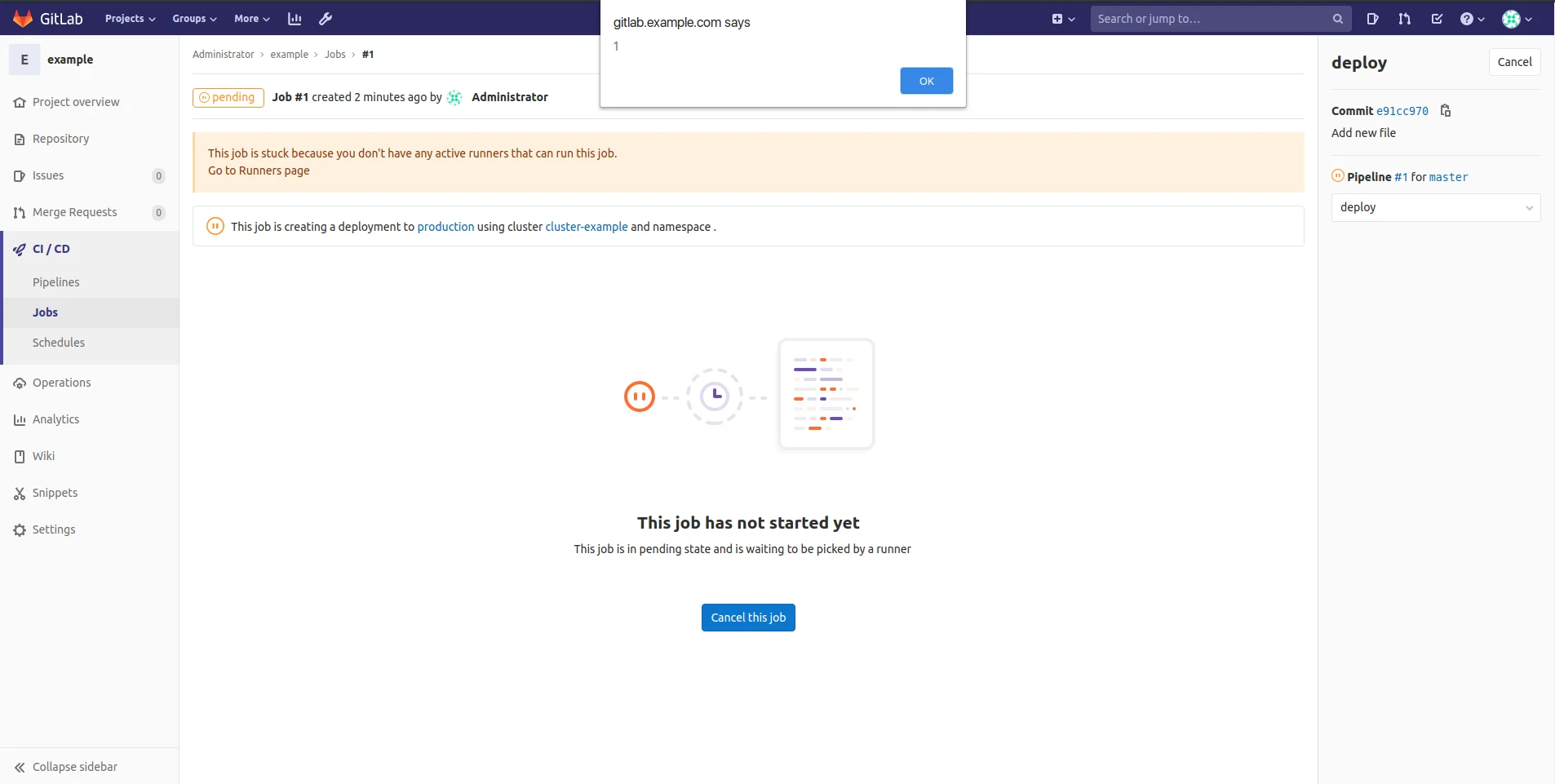
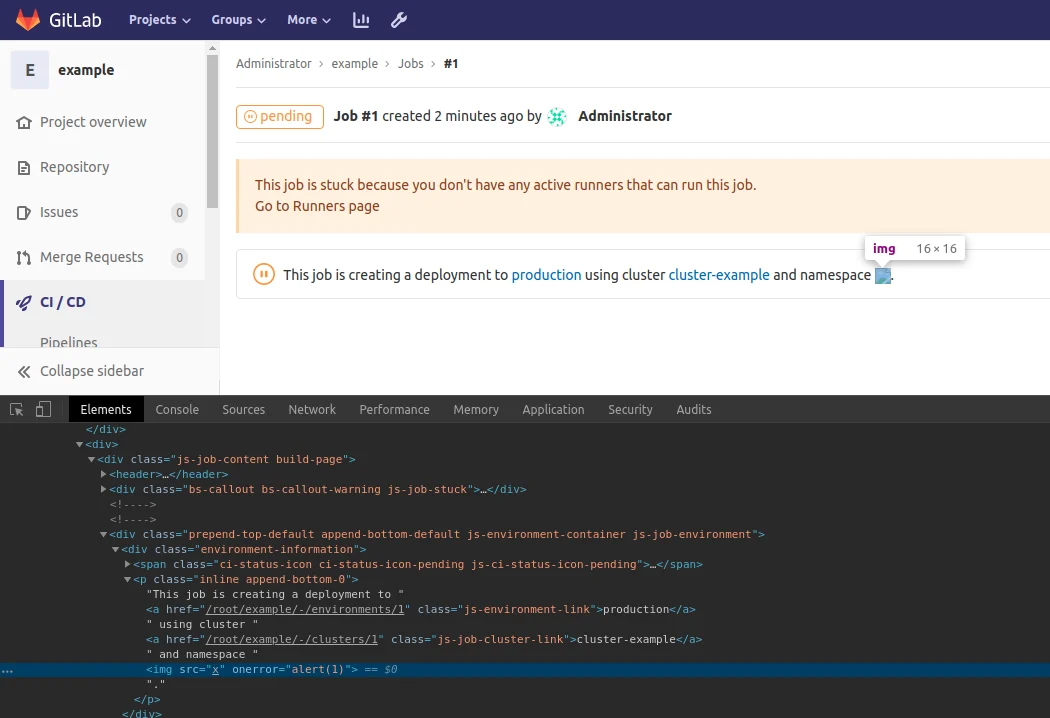
Go to CI/CD->Jobs and open the last job
Vulnerable code
All vulnerable code is in one file environments_block.vue
Impact
An attacker can:
- Perform any action within the application that a user can perform
- Steal sensitive user data
- Steal user's credentials
What the report shows
The target is a self-hosted GitLab instance, and the feature under test is the Kubernetes cluster integration combined with the job page. The researcher reported a stored cross-site scripting issue in the way a job's environment block renders the Kubernetes namespace value.
The reproduction starts from a fresh container:
docker run --detach --hostname gitlab.example.com --publish 443:443 --publish 80:80 --publish 22:22 --name gitlab gitlab/gitlab-ce:latest
- Create a new project with a
README.md. - Go to Operations, then Kubernetes.
- Click "Add Kubernetes cluster", choose the "Add existing cluster" tab, and fill in the form: cluster name
cluster-example, API URLhttps://google.com, service tokentoken-example. Uncheck "GitLab-managed cluster" and submit. - Add a
.gitlab-ci.ymlfile to the master branch containing a deploy job whose environment declares a Kubernetes namespace holding an image tag with an event handler:
deploy:
  stage: deploy
  script:
    - echo "Example"
  environment:
    name: production
    url: https://google.com
    kubernetes:
      namespace: <img src=x onerror=alert(1)>
  only:
  - master
- Go to CI/CD, then Jobs, and open the last job. The namespace value is rendered into the page.
The report points to a single frontend file, environments_block.vue, and names three lines in it (125, 156 and 251) plus "other places where %{kubernetesNamespace} is used". The report lists three lines in that file and other places where %{kubernetesNamespace} is used.
The report was rated high severity and paid a 3,000 USD bounty. It was disclosed on 8 January 2021. The text does not describe the fix.
Root cause
Anywhere a template interpolates a user-controlled string into markup without escaping, or uses an HTML-sink binding instead of a text binding, the string is parsed as markup and event handlers such as onerror execute in the victim's session.
Impact
The report lists three consequences for an attacker: performing any action within the application that a user can perform, stealing sensitive user data, and stealing the user's credentials.
How this kind of bug works
Stored XSS happens when input is persisted by the application and later rendered into a page without correct output encoding. The dangerous step is the sink: assigning to innerHTML, using a framework's raw-HTML directive, or building markup by string concatenation. The browser then parses the stored string as HTML, so tags and attributes, including event handlers, become live.
In single-page applications the value often travels through an API as JSON and is rendered client-side, so server-side escaping of the API response is not enough; the frontend must treat it as text. The defences are contextual output encoding at the sink, framework text bindings or sanitisation for the rare cases where HTML is genuinely needed, and a Content Security Policy that blocks inline script as a second layer.
How to test for it
- Identify every field you can store that is later displayed to another user: names, descriptions, labels, namespaces, environment names, URLs, commit messages.
- Store a benign marker first, for example a distinctive string, and confirm where and to whom it renders.
- Replace the marker with a payload that only fires if HTML is parsed, such as an image tag with a broken source and an error handler, or a tag that would visibly alter layout.
- Reload the page and open it as a different user or role to confirm the value is stored and rendered for others, not just reflected back to you.
- Check every rendering context: list views, detail views, tooltips, dropdowns, and any export or email that includes the value.
A positive result is the handler executing or the markup rendering as markup in a context where the value should be plain text. Common false positives are payloads that appear in the page source but are escaped, values that only render to the user who entered them, and cases where the browser blocks execution because of a strict CSP; in the last case the injection may still matter but the impact needs a different demonstration.
How it is fixed
Render untrusted values as text, using the framework's text binding or escaping helpers, and avoid raw-HTML sinks for anything user-controlled. Where markup is required, sanitise with a maintained library and an allowlist. Add a Content Security Policy that disallows inline script, and validate or restrict the fields that end up in these views. Regression tests should assert that a payload string is displayed literally.
Hunting notes
This class hides in features that combine configuration with display: CI/CD variables, environment and namespace names, cluster and integration settings, project and group metadata, and anything shown in dashboards or job logs. Recon signals include rich configuration surfaces, values echoed back into the UI, and frontend code that references raw-HTML directives or innerHTML.
To get a report accepted, show the full path from storing the value to it executing for a second user, include the exact configuration and payload, and state the impact in terms of the victim's session. Screenshots of the rendered page and of the stored value help reviewers reproduce it quickly.
What happened, in plain words
GitLab is a website where teams keep their source code and run automated tasks on it. You can install your own copy of GitLab on a server you control, and that is what this report is about: a self-hosted GitLab instance. The researcher found a stored cross-site scripting bug, usually shortened to stored XSS.
XSS means that a website takes something a person typed or configured and later shows it back to other people as if it were part of the page itself, instead of as plain text. "Stored" means the bad value is saved on the server first and shown to every visitor afterwards, not just bounced back to the person who entered it. A simple comparison: imagine a guestbook where someone writes a note, and the next visitor's browser reads that note as an instruction to the page rather than as words on paper.
The feature involved is GitLab's Kubernetes integration. Kubernetes is a system for running and managing software containers, and GitLab can be told about a Kubernetes cluster so that automated jobs can deploy to it. A job is one automated task defined in a configuration file called .gitlab-ci.yml. Each job can declare an environment, which is a named place the software is deployed to, and that environment can carry a Kubernetes namespace, a label that groups resources inside the cluster.
The researcher showed that the namespace value ends up in the job page's environment block. The payload used was an image tag with a broken source and an error handler, which makes the browser run a small piece of JavaScript when the image fails to load.
How the researcher reproduced it
The starting point is a fresh GitLab instance running in a container, a self-contained package that includes everything the software needs:
docker run --detach --hostname gitlab.example.com --publish 443:443 --publish 80:80 --publish 22:22 --name gitlab gitlab/gitlab-ce:latest
This command downloads the official GitLab image and starts it, publishing the standard web and SSH ports. A clean instance matters because it shows the bug exists in a default installation, not because of some unusual local setting.
- Create a new project with a
README.mdfile. A project is the container for a repository, the place where code and its history live. - Go to Operations, then Kubernetes. This is where GitLab is told about clusters it can deploy to.
- Click "Add Kubernetes cluster", choose the "Add existing cluster" tab, and fill in the form: cluster name
cluster-example, API URLhttps://google.com, service tokentoken-example. Uncheck "GitLab-managed cluster" and submit. The values are placeholders; the point is simply to have a cluster entry saved. - Add a
.gitlab-ci.ymlfile to the master branch. This file tells GitLab what automated jobs to run. The job here declares an environment whose Kubernetes namespace contains the payload:
deploy:
  stage: deploy
  script:
    - echo "Example"
  environment:
    name: production
    url: https://google.com
    kubernetes:
      namespace: <img src=x onerror=alert(1)>
  only:
  - master
Line by line: deploy is the job's name. stage: deploy places it in the deploy phase of the pipeline, the sequence of jobs GitLab runs. script lists the commands the job runs, here just printing the word Example. environment describes where the result goes: name: production labels it, url: https://google.com is the address shown as a link, and kubernetes with namespace sets the cluster namespace. The namespace value is the payload: an img tag whose src is x, a source that will not load, and an onerror attribute holding alert(1), a tiny script that shows a pop-up box. only: - master restricts the job to the master branch.
- Go to CI/CD, then Jobs, and open the last job. The job page shows an environment block, and the namespace value is placed into that block as markup.
The report points to a single frontend file, environments_block.vue, and names three lines in it (125, 156 and 251) plus "other places where %{kubernetesNamespace} is used". Frontend means the part of the code that runs in the visitor's browser. The report lists three lines in that file and other places where %{kubernetesNamespace} is used.
The report was rated high severity and paid a 3,000 USD bounty. It was disclosed on 8 January 2021. The text does not describe the fix.
Why it matters
The report lists three consequences for an attacker: performing any action within the application that a user can perform, stealing sensitive user data, and stealing the user's credentials. A session is the period a logged-in user is recognised by the site, usually via a cookie, a small piece of data the browser stores and sends with each request. If script runs in that session, it can act as the user.
In general, how this kind of bug works
Stored XSS happens when input is saved by the application and later rendered into a page without correct output encoding. Encoding means converting characters that have special meaning in HTML, such as < and >, into harmless equivalents so the browser shows them as text. The dangerous step is the sink: the place in the code where the value is put into the page. Assigning to innerHTML, using a framework's raw-HTML directive, or building markup by string concatenation all count. The browser then parses the stored string as HTML, so tags and attributes, including event handlers, become live.
In single-page applications, where the page is assembled in the browser rather than on the server, the value often travels through an API as JSON and is rendered client-side. Escaping the API response on the server is therefore not enough; the frontend must treat the value as text. The defences are contextual output encoding at the sink, framework text bindings or sanitisation for the rare cases where HTML is genuinely needed, and a Content Security Policy, a header that tells the browser which scripts it may run, as a second layer.
In general, how to test for it
- Identify every field you can store that is later displayed to another user: names, descriptions, labels, namespaces, environment names, URLs, commit messages.
- Store a benign marker first, for example a distinctive string, and confirm where and to whom it renders.
- Replace the marker with a payload that only fires if HTML is parsed, such as an image tag with a broken source and an error handler, or a tag that would visibly alter layout.
- Reload the page and open it as a different user or role to confirm the value is stored and rendered for others, not just reflected back to you.
- Check every rendering context: list views, detail views, tooltips, dropdowns, and any export or email that includes the value.
A positive result is the handler executing or the markup rendering as markup in a context where the value should be plain text. Common false positives are payloads that appear in the page source but are escaped, values that only render to the user who entered them, and cases where the browser blocks execution because of a strict Content Security Policy; in the last case the injection may still matter but the impact needs a different demonstration.
In general, how it is fixed
Render untrusted values as text, using the framework's text binding or escaping helpers, and avoid raw-HTML sinks for anything user-controlled. Where markup is required, sanitise with a maintained library and an allowlist. Add a Content Security Policy that disallows inline script, and validate or restrict the fields that end up in these views. Regression tests should assert that a payload string is displayed literally.
In general, where to look
This class hides in features that combine configuration with display: CI/CD variables, environment and namespace names, cluster and integration settings, project and group metadata, and anything shown in dashboards or job logs. Signals worth noticing include rich configuration surfaces, values echoed back into the interface, and frontend code that references raw-HTML directives or innerHTML.
To get a report accepted, show the full path from storing the value to it executing for a second user, include the exact configuration and payload, and state the impact in terms of the victim's session. Screenshots of the rendered page and of the stored value help reviewers reproduce it quickly.
Glossary
- GitLab: a website for hosting source code and running automated tasks on it; it can be installed on your own server.
- Self-hosted: software you run on infrastructure you control rather than using the vendor's service.
- Container: a self-contained package holding an application and everything it needs to run.
- Docker: a tool for building and running containers.
- Repository: the storage for a project's code and its full history of changes.
- Branch: a named line of development in a repository; master is the default one here.
- Pipeline: the sequence of automated jobs GitLab runs for a change.
- Job: one automated task defined in
.gitlab-ci.yml. - Environment: a named deployment target, such as production.
- Kubernetes: a system for running and managing software containers across machines.
- Cluster: a group of machines managed together by Kubernetes.
- Namespace: a label that groups resources inside a Kubernetes cluster.
- API: the interface one piece of software uses to talk to another.
- Token: a secret string used to prove identity or grant access.
- XSS (cross-site scripting): a bug where input is shown to users as executable page content instead of plain text.
- Stored XSS: XSS where the bad value is saved on the server and shown to later visitors.
- HTML: the language web pages are written in, made of tags and attributes.
- Tag and attribute: a tag is an element such as
img; an attribute is a setting on it, such assrcoronerror. - Event handler: an attribute holding code the browser runs when something happens, such as an image failing to load.
- JavaScript: the programming language browsers run.
- Payload: the crafted value an attacker submits to trigger a bug.
- Sink: the place in code where a value is inserted into the page.
- Output encoding: converting special characters so the browser displays them as text.
- Sanitisation: cleaning a value by removing anything dangerous while keeping allowed markup.
- Frontend: the code that runs in the visitor's browser.
- Single-page application: a site whose pages are assembled in the browser rather than sent ready-made by the server.
- JSON: a text format for exchanging structured data.
- Cookie: a small piece of data the browser stores for a site and sends with each request.
- Session: the period during which a logged-in user is recognised by a site.
- Content Security Policy: a header that tells the browser which scripts it may run.
- Bounty: a payment made to a researcher for reporting a valid security bug.
- Severity: a rating of how serious a bug is.
- False positive: a finding that looks like a bug but is not exploitable.