Blocked user Git access through CI/CD token
A blocked GitLab user could still use a CI/CD token obtained before being blocked to clone or pull repositories, because running CI/CD jobs ignore the user's blocked status and the token can be kept alive indefinitely by dropping the runner's status updates. This allowed access to projects the user was already a member of and to new internal projects.

- Triaged in 23 days
- Fixed in 7 months
- Paid in 7 months
- Disclosed after 10 months
###Summary
A blocked user does not have the ability to utilise Git client operations, GitLab UI access or API access. However, a blocked user can still use Git clone/Git pull client commands if they are able to obtain a CI/CD token before being blocked. This allows them to access projects they are already added to and any new internal projects.
There appears to be two possible bugs in the software that when combined can provide git pull/clone operations to a blocked user:
- Running CI/CD jobs don't take into account whether a user is blocked or not
- Manipulation of gitlab-runner output can result in a CI/CD job that never completes and surpasses timeout thresholds, thus the short lived CI/CD token never expires
The steps for reproducing the above are summarised below:
Before user block:
- Create a new project
- Install GitLab-runner and add to project
- Add a .gitlab-ci.yml file
- Configure gitlab-runner http/git client connections to proxy through attacker's Burp Suite
- Start a job and intercept the request in Burp
- Capture request over HTTP from gitlab-runner Git client to clone/pull repository and obtain token
- Drop HTTP responses from Gitlab-runner, job will now run indefinitely
After user block:
- Configure attacker's Git client to use tinyproxy with additional CI/CD HTTP authorisation header added
- Carry out git pull/clone operations across repositories that blocked user had access to
###PoC setup
For this PoC, the following configuration will be used:
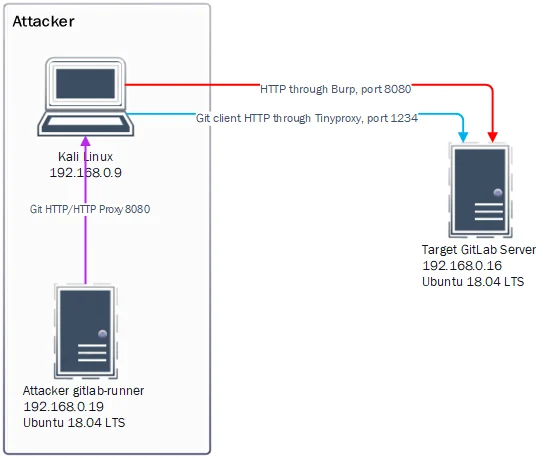
Attacker user account: testuser1
All systems are updated and using the latest version of GitLab. There will be some additional example projects added that belong to other users that the attacker will have access to. This is to demonstrate pull/clone operations after being blocked.
###PoC Part 1: Setup CI/CD
-As the attacker, create a new project called block_poc
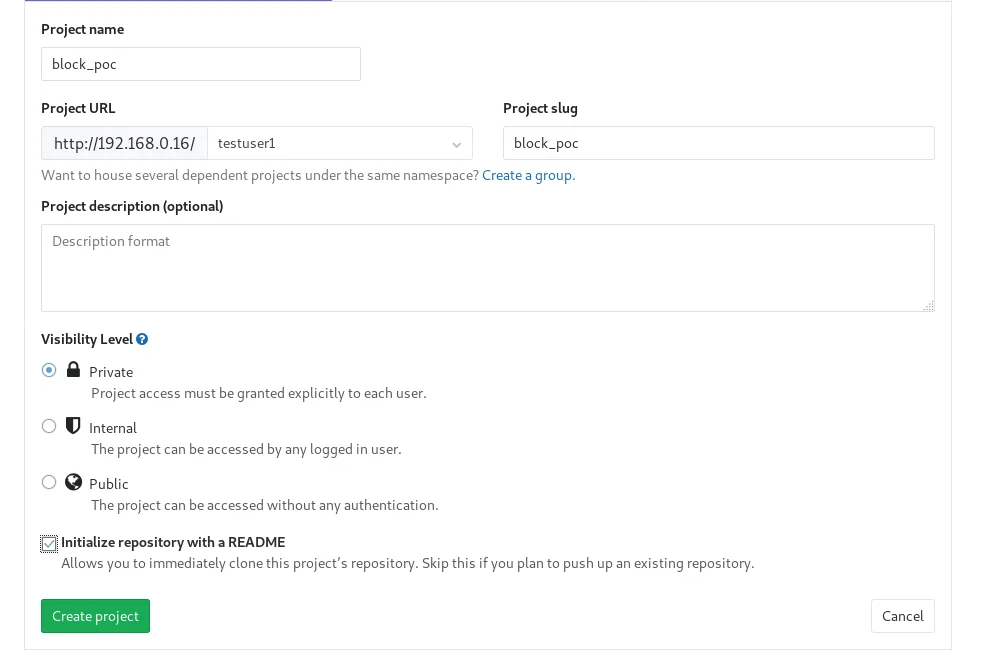
-Within the block_poc project, set the CI/CD job timeout to be 10 minutes
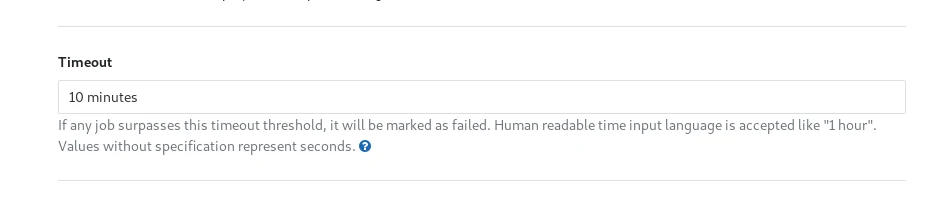
-On the attacker's GitLab runner server 192.168.0.19, install GitLab Runner using the below instructions and join it to the block_poc project using the unique token:
https://docs.gitlab.com/runner/install/linux-repository.html
Note. The executor was set to shell
-Configure the GitLab runner 192.168.0.19 to use the attacker's Burp Proxy on 192.168.0.9:8080
$ mkdir /etc/systemd/system/gitlab-runner.service.d
$ vim /etc/systemd/system/gitlab-runner.service.d/http-proxy.conf
        #Add the following content
	[Service]
	Environment="HTTP_PROXY=http://192.168.0.9:8080/"
$ :wq
$ systemctl daemon-reload
$ systemctl restart gitlab-runner
Note. Attacker's Burp proxy should listen on all interfaces
-On the gitlab-runner server 192.168.0.19, also proxy git client HTTP requests through the Burp Suite application on the attacker's client 192.168.0.9:8080. This is required as gitlab-runner will clone the repo using the git-client
$ su gitlab-runner
$ git config --global http.proxy http://192.168.0.9:8080
$ exit
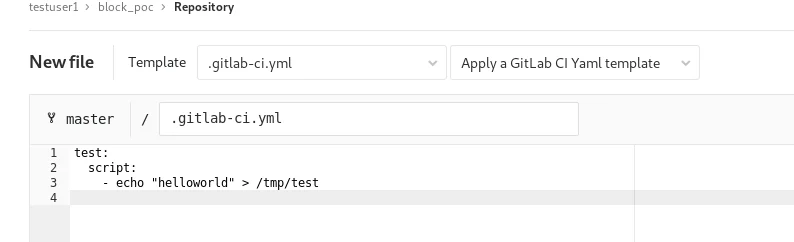
-Within the block_poc project add a new .gitlab-ci.yml file with the following contents and commit it.
test:
  script:
    - echo "helloworld" > /tmp/test
###PoC Part 2: Obtain CI/CD token
-Turn on Burp Suite intercept and run the pipeline for the block_poc project. Intercept the request that the gitlab-runner makes when it attempts to clone the repository. This will contain the CI/CD token, DO NOT SWITCH OFF THE INTERCEPT YET
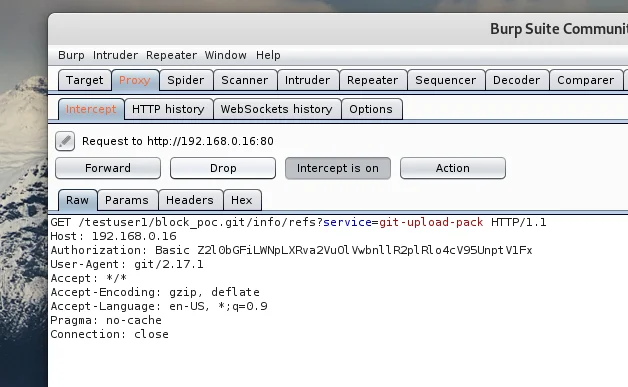
GET /testuser1/block_poc.git/info/refs?service=git-upload-pack HTTP/1.1
Host: 192.168.0.16
Authorization: Basic Z2l0bGFiLWNpLXRva2VuOlVwbnllR2plRlo4cV95UnptV1Fx
User-Agent: git/2.17.1
Accept: */*
Accept-Encoding: gzip, deflate
Accept-Language: en-US, *;q=0.9
Pragma: no-cache
Connection: close
The Token can be base64 decoded which will reveal the following:
==gitlab-ci-token:UpnyeGjeFZ8q_yRzmWQq==
-Continue moving through the HTTP requests in Burp until you encounter the gitlab-runner sending trace logs and a status update back to the GitLab server. Drop these requests, usually there are about 2/3.
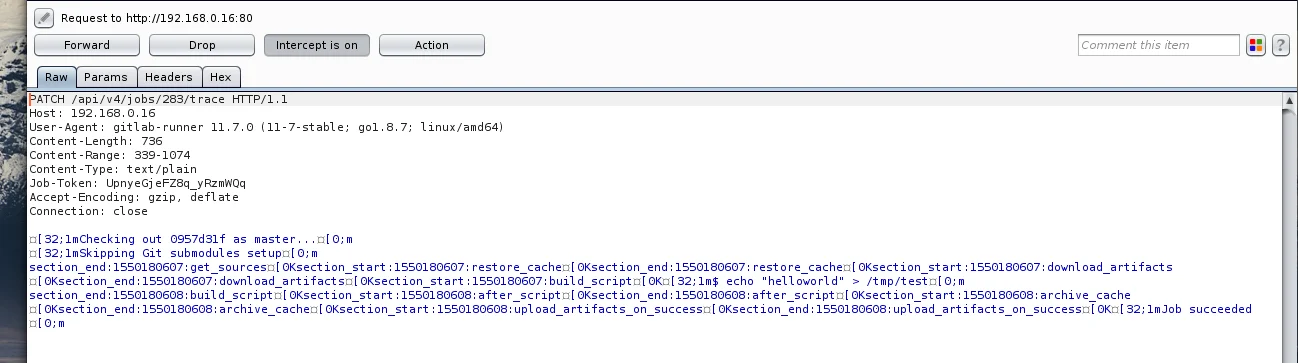
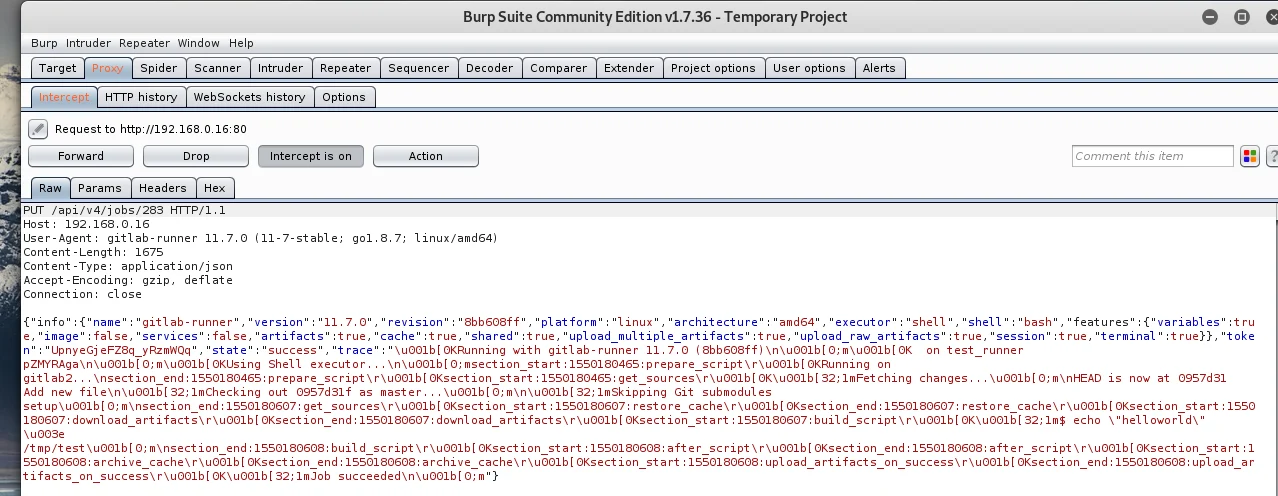
Note. There is no need to drop the runners standard job polling requests
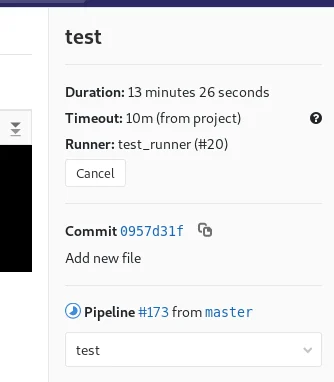
-The CI/CD job is now in a continuous running state and as can be seen below and will not be terminated even if it passes the timeout threshold of 10 minutes. The attacking user or a GitLab admin would have to manually stop the job, until that point, the CI/CD token is still active.
###PoC Part3: Token usage
-As the GitLab server root user, block the attacker user account testuser1
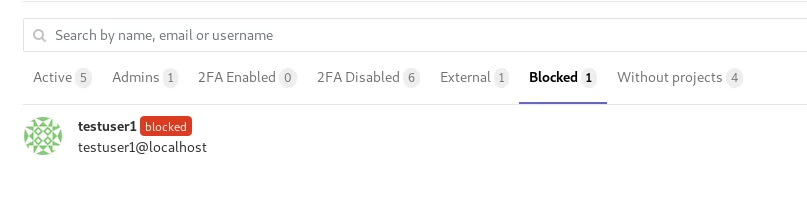
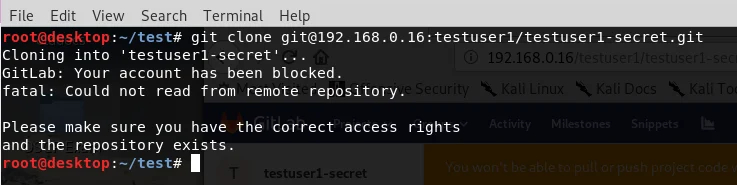
-As the attacker user, install Tinyproxy on the attacker's host 192.168.0.9. We will use this software as a forward proxy for the attacker's Git client and append the GitLab CI/CD token as a HTTP header for all outbound traffic
$ apt-get install tinyproxy
$ vim /etc/tinyproxy/tinyproxy.conf
	#Add the following content
	Port 1234    #changed from default
	AddHeader Authorization: Basic Z2l0bGFiLWNpLXRva2VuOlVwbnllR2plRlo4cV95UnptV1Fx
$ :wq
$ systemctl enable tinyproxy
$ systemctl start tinyproxy
Note. Token above will change on each job run
Note. I believe you cannot manipulate the headers when Gitlab is running on HTTPS with Tinyproxy, this was only tested on HTTP. However, you could manually test this step using Burp Suite if you want instead. e.g. intercept a git client HTTP request to clone a repo and then add in the authorisation header.
-Configure the attacker's Git client on 192.168.0.9 to use the TinyProxy service
$ git config --global http.proxy http://127.0.0.1:1234
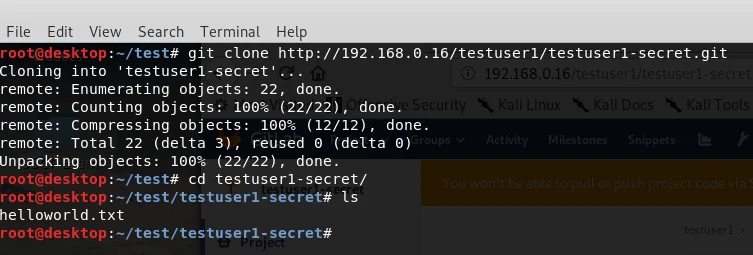
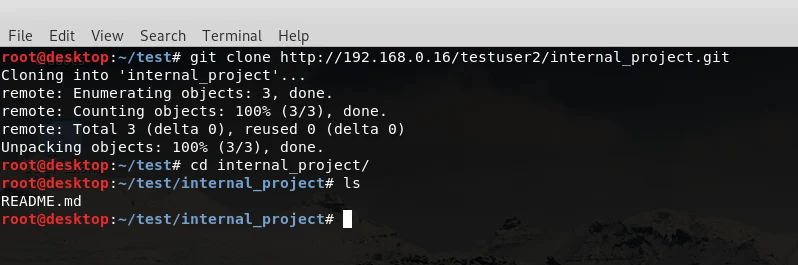
-As the attacker user, you can now carry out Git Pull operations on projects already downloaded locally or clone any new projects. This is dependent on tetuser1's access permissions, but the user block in place has no effect.
#Clone testuser1-secret project
$ git clone http://192.168.0.16/testuser1/testuser1-secret.git
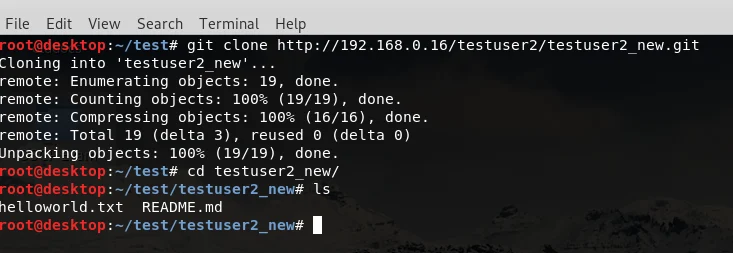
#Clone tetuser2/tetsuser2_new
#testuser1 granted developer permissions
$ git clone http://192.168.0.16/testuser2/testuser2_new.git
#Clone testuser2/internal_project
#new internal project added by testuser2 after testuser1 block
$ git clone http://192.168.0.16/testuser2/internal_project.git
Impact
The above PoC has demonstrated that a blocked user still has the ability to carry out some Git operations (and possibly docker operations, although not tested) on existing or new projects, e.g. pull down new code or clone new internal projects. However, this vulnerability could be halted by a GitLab administrator carrying out any of the below actions if detected:
- Manually terminate the hung CI/CD job which will invalidate the CI/CD token
- Delete the blocked user account
- Remove the block_poc project which would also terminate the job and the CI/CD token
Obviously the attacker would need to set the above up before their account was blocked, if it was blocked before they obtained to CI/CD token then they will not have access.
Context
GitLab gives users three main ways to reach a repository: the Git client over HTTP(S), the web UI, and the API. When an administrator blocks an account, all three are expected to stop working. The report examines a fourth path that the block does not cover: the short lived CI/CD token that a runner receives when it clones a repository to execute a pipeline.
The researcher found that a blocked user can keep using Git clone and Git pull against the server if they captured a CI/CD token before the block was applied. Two behaviours combine to make this possible:
- Running CI/CD jobs do not take into account whether the user who started them is blocked.
- Manipulation of gitlab-runner output can leave a CI/CD job running indefinitely, past its timeout threshold, so the short lived CI/CD token never expires.
The report was filed against GitLab on HackerOne, rated medium severity under Improper Access Control, and paid a 1500 USD bounty. It was disclosed on 13 December 2019.
Setup
The proof of concept uses the following configuration.
The attacker account is testuser1. All systems run the latest version of GitLab at the time of testing. Additional example projects belonging to other users are added so that the attacker has something to reach after being blocked.
The attacker controls two hosts: a GitLab runner server at [redacted] and a client at [redacted], where Burp Suite and later Tinyproxy run. The runner is installed from the official Linux repository instructions and its executor is set to shell.
Finding it
The starting observation is a gap between what a block is meant to do and what the CI/CD path checks. A blocked user loses Git client operations, UI access and API access, but a pipeline that was already started keeps running, and the token that the runner uses to fetch code is not tied to the user's current block state. If that token can be kept alive past its normal lifetime, the block becomes irrelevant for Git operations.
The second observation is about job lifetime. The runner reports progress and status back to the GitLab server. If those reports never arrive, the job does not finish, and the timeout threshold does not terminate it. A token belonging to a job that never ends therefore never expires.
Exploitation
Step 1: Create the project and set the timeout
As the attacker, create a new project called block_poc.
Inside block_poc, set the CI/CD job timeout to 10 minutes.
This value matters later: the job will run past it without being stopped.
Step 2: Install the runner and route its traffic through Burp
Install GitLab Runner on [redacted] using the official instructions and join it to block_poc with the project's unique token. The executor is set to shell.
Configure the runner service to send its HTTP traffic through the attacker's Burp Proxy at [redacted]:8080:
$ mkdir /etc/systemd/system/gitlab-runner.service.d
$ vim /etc/systemd/system/gitlab-runner.service.d/http-proxy.conf
        #Add the following content
	[Service]
	Environment="HTTP_PROXY=http://[redacted]:8080/"
$ :wq
$ systemctl daemon-reload
$ systemctl restart gitlab-runner
The Burp proxy must listen on all interfaces for this to work.
The git client on the runner also needs to be proxied, because the runner clones the repository with the git client rather than over its own connection:
$ su gitlab-runner
$ git config --global http.proxy http://[redacted]:8080
$ exit
Step 3: Add the pipeline definition
Add a .gitlab-ci.yml file to block_poc with the following contents and commit it:
test:
  script:
    - echo "helloworld" > /tmp/test
Step 4: Capture the CI/CD token
Turn on Burp Suite intercept and run the pipeline. Intercept the request the runner makes when it clones the repository. That request carries the CI/CD token. Do not switch off the intercept yet.
GET /testuser1/block_poc.git/info/refs?service=git-upload-pack HTTP/1.1
Host: [redacted]
Authorization: Basic [redacted]
User-Agent: git/2.17.1
Accept: */*
Accept-Encoding: gzip, deflate
Accept-Language: en-US, *;q=0.9
Pragma: no-cache
Connection: close
The Authorization header is HTTP Basic. Base64 decoding it reveals the credential:
gitlab-ci-token:UpnyeGjeFZ8q_yRzmWQq
The username is the fixed string gitlab-ci-token and the password is the job token. This is the value that will later be replayed.
Step 5: Keep the job alive by dropping the runner's reports
Continue stepping through the intercepted requests until the runner sends trace logs and a status update back to the GitLab server. Drop these requests; there are usually about two or three of them.
The runner's standard job polling requests do not need to be dropped.
With the trace and status reports dropped, the job enters a continuous running state. It is not terminated even after it passes the 10 minute timeout threshold. Only the attacking user or a GitLab administrator can stop it manually, and until that happens the CI/CD token stays active.
Step 6: Block the user
As the GitLab server root user, block the attacker account testuser1.
Step 7: Replay the token through a header injecting proxy
Install Tinyproxy on the attacker host [redacted] and use it as a forward proxy for the Git client, appending the CI/CD token as an HTTP header to all outbound traffic:
$ apt-get install tinyproxy
$ vim /etc/tinyproxy/tinyproxy.conf
	#Add the following content
	Port 1234    #changed from default
	AddHeader Authorization: Basic [redacted]
$ :wq
$ systemctl enable tinyproxy
$ systemctl start tinyproxy
The token changes on each job run. The researcher also notes that header manipulation with Tinyproxy did not work when GitLab runs on HTTPS; this was only tested on HTTP. As an alternative, the same step can be done manually in Burp Suite by intercepting a git client request to clone a repository and adding the authorisation header.
Point the attacker's git client at the proxy:
$ git config --global http.proxy http://[redacted]:1234
Step 8: Clone and pull as a blocked user
The attacker can now pull projects already downloaded locally and clone new ones, limited only by testuser1's access permissions. The block has no effect.
#Clone testuser1-secret project
$ git clone http://[redacted]/testuser1/testuser1-secret.git
#Clone tetuser2/tetsuser2_new
#testuser1 granted developer permissions
$ git clone http://[redacted]/testuser2/testuser2_new.git
#Clone testuser2/internal_project
#new internal project added by testuser2 after testuser1 block
$ git clone http://[redacted]/testuser2/internal_project.git
The third clone targets an internal project added after the block, which the blocked user still reaches.
Root cause
Two design gaps combine, and the report names both:
- Job execution ignores the block state. A pipeline that is already running continues to run after its triggering user is blocked, and the CI/CD token issued to it remains valid for the lifetime of the job.
- Job lifetime is controlled by the runner's reports. The server relies on the runner sending trace logs and a status update to know that a job has finished. If those requests are dropped, the job never completes and the timeout threshold does not terminate it, so the short lived token is never invalidated.
Together they let a blocked account keep Git access. The report does not describe the server side code, so the exact implementation is not stated; the behaviour above is what was observed.
Impact
A blocked user can still carry out some Git operations on existing and new projects: pulling down new code and cloning new internal projects. The report mentions possible Docker operations, although these were not tested.
The access is bounded by the permissions the user had before the block. The attacker must set the whole arrangement up before the account is blocked; if the block happens before the CI/CD token is obtained, there is no access.
A GitLab administrator can stop the attack if it is detected, by any of the following:
- Manually terminating the hung CI/CD job, which invalidates the CI/CD token.
- Deleting the blocked user account.
- Removing the block_poc project, which also terminates the job and the token.
Fix
The report does not describe a patch or the change that was made. Based on the two gaps it identifies, the fixes that follow from it are: have running jobs and their tokens respect the block state of the user who started them, and make job lifetime and token expiry independent of whether the runner's trace and status reports arrive, so a dropped report cannot keep a token alive past its intended lifetime.
Variants to test
- Other token types tied to a user. Check whether personal access tokens, deploy tokens or job tokens issued before a block are invalidated when the account is blocked. A positive result is a successful authenticated Git operation after the block.
- Other ways to suppress runner reports. Instead of dropping requests in a proxy, try network level blocking of the runner's outbound calls to the GitLab server. A positive result is a job that stays in a running state past its configured timeout.
- HTTPS deployments. The report only tested header injection over HTTP and states that Tinyproxy header manipulation did not work against HTTPS. Test whether a client that can add headers to HTTPS requests (for example a proxy with a trusted CA) achieves the same replay.
- New projects after the block. Create an internal project after blocking the user and attempt a clone with the old token. A positive result shows the token is not scoped to the projects that existed when it was issued.
- Other CI/CD operations. The report mentions Docker operations as untested. Attempt registry or Docker related actions with the retained token and observe whether they succeed.
Hunting notes
This class of bug hides at the boundary between an account level control (blocking) and a machine credential (the job token). The signal during recon is a CI/CD system that issues short lived tokens to runners: ask what invalidates those tokens, and whether the invalidation depends on the job finishing normally. Any place where the server trusts the runner to report its own completion is worth probing, because a runner under attacker control can simply stop reporting.
The researcher showed impact by going past a simple post block clone: the third clone targets an internal project created after the block, which shows the token is not limited to pre-existing access. The report also states the preconditions plainly (the token must be captured before the block) and lists the administrative actions that end the attack, which keeps the claim credible and bounded.
What happened, in plain words
GitLab is a website and service where teams keep their computer code. Think of it as a shared online filing cabinet for software projects. People log in with an account, and each account has permissions: some people can only read a project, others can change it, and so on.
When someone misbehaves or leaves a company, an administrator can block their account. A blocked account is supposed to be shut out completely: no logging in to the website, no using the API (the machine-to-machine interface that programs use to talk to GitLab), and no using the Git client (the program developers run on their own computer to download and upload code).
The researcher found a way around that. GitLab has a feature called CI/CD. CI/CD is an automated assembly line: when code is uploaded, GitLab can automatically run a small program (called a job) on a separate machine (called a runner) to test or build it. To fetch the code it needs, the runner is given a temporary password called a CI/CD token. That token is meant to be short lived: it should stop working when the job finishes.
The report shows that a blocked user can still download code with the Git client if they grabbed a CI/CD token before being blocked. Two separate weaknesses combine to make this work:
- A CI/CD job that is already running does not care whether the person who started it has since been blocked. It keeps running.
- The runner is the one that tells GitLab "I have finished". If those messages are blocked, the job never finishes, so it never hits its timeout, so the token never expires.
Put together: capture the token, keep the job alive forever, get blocked, then keep using the token to clone and pull code. The report was filed on HackerOne (a website where security researchers report bugs to companies), rated medium severity, classified as Improper Access Control (meaning the software fails to check whether someone is allowed to do something), and paid a 1500 USD bounty. It was disclosed on 13 December 2019.
Context
GitLab gives users three main ways to reach a repository (a project's store of code):
- The Git client over HTTP or HTTPS. The Git client is a program on your computer; HTTP is the same protocol your browser uses to load web pages.
- The web UI, the pages you see in a browser.
- The API, a way for programs to talk to GitLab without a browser.
When an administrator blocks an account, all three are expected to stop working. The report looks at a fourth path that the block does not cover: the short lived CI/CD token that a runner receives when it clones a repository to run a pipeline. A pipeline is the whole automated sequence of jobs.
The researcher found that a blocked user can keep using Git clone and Git pull against the server if they captured a CI/CD token before the block was applied. Clone means downloading a full copy of a repository; pull means fetching new changes into a copy you already have. Two behaviours combine to make this possible:
- Running CI/CD jobs do not take into account whether the user who started them is blocked.
- Manipulation of gitlab-runner output can leave a CI/CD job running indefinitely, past its timeout threshold, so the short lived CI/CD token never expires.
Setup
The proof of concept uses the following configuration.
The attacker account is testuser1. All systems run the latest version of GitLab at the time of testing. Additional example projects belonging to other users are added so that the attacker has something to reach after being blocked.
The attacker controls two hosts: a GitLab runner server at [redacted] and a client at [redacted], where Burp Suite and later Tinyproxy run. Burp Suite is a tool that sits between a program and a server and lets you look at, pause and change the traffic going both ways; Tinyproxy is a small proxy server, a middleman program that forwards requests. The GitLab server is at [redacted]. The runner is installed from the official Linux repository instructions and its executor is set to shell. The executor is the part of the runner that decides how to run a job; shell means it runs the job's commands directly in a command shell on the runner machine.
Finding it
The starting observation is a gap between what a block is meant to do and what the CI/CD path checks. A blocked user loses Git client operations, UI access and API access, but a pipeline that was already started keeps running, and the token that the runner uses to fetch code is not tied to the user's current block state. If that token can be kept alive past its normal lifetime, the block becomes irrelevant for Git operations.
The second observation is about job lifetime. The runner reports progress and status back to the GitLab server. If those reports never arrive, the job does not finish, and the timeout threshold does not terminate it. A token belonging to a job that never ends therefore never expires.
Exploitation
Step 1: Create the project and set the timeout
As the attacker, create a new project called block_poc.
Inside block_poc, set the CI/CD job timeout to 10 minutes.
This value matters later: the job will run past it without being stopped.
Step 2: Install the runner and route its traffic through Burp
Install GitLab Runner on [redacted] using the official instructions and join it to block_poc with the project's unique token. The executor is set to shell. Joining the runner to the project means registering it with a token that GitLab gives the project, so the runner is allowed to pick up that project's jobs.
Configure the runner service to send its HTTP traffic through the attacker's Burp Proxy at [redacted]:8080:
$ mkdir /etc/systemd/system/gitlab-runner.service.d
$ vim /etc/systemd/system/gitlab-runner.service.d/http-proxy.conf
        #Add the following content
	[Service]
	Environment="HTTP_PROXY=http://[redacted]:8080/"
$ :wq
$ systemctl daemon-reload
$ systemctl restart gitlab-runner
Line by line:
mkdir /etc/systemd/system/gitlab-runner.service.dcreates a folder where extra settings for the runner service can be placed. systemd is the part of Linux that starts and manages background services.vim .../http-proxy.confopens a text editor to create a settings file inside that folder.- The
[Service]line starts a settings section, and theEnvironment=line sets an environment variable calledHTTP_PROXYpointing at the Burp proxy. An environment variable is a named value that a program reads when it starts. SettingHTTP_PROXYtells programs that respect it to send their web traffic through that address. :wqis the editor command to save and quit.systemctl daemon-reloadtells systemd to re-read its configuration files.systemctl restart gitlab-runnerrestarts the runner so the new setting takes effect.
The Burp proxy must listen on all interfaces for this to work. Listening on all interfaces means accepting connections on every network address the machine has, not just the local one, so the runner on another machine can reach it.
The git client on the runner also needs to be proxied, because the runner clones the repository with the git client rather than over its own connection:
$ su gitlab-runner
$ git config --global http.proxy http://[redacted]:8080
$ exit
Line by line:
su gitlab-runnerswitches to the user account that the runner runs under, so the setting is stored for that account.git config --global http.proxy ...tells the git client, for all of that user's repositories, to send its HTTP traffic through the Burp proxy. This is the traffic that will carry the token.exitleaves that account and returns to the previous one.
Step 3: Add the pipeline definition
Add a .gitlab-ci.yml file to block_poc with the following contents and commit it:
test:
  script:
    - echo "helloworld" > /tmp/test
Line by line:
test:is the name of the job. GitLab reads this file to know what to run.script:lists the commands the job should execute.- echo "helloworld" > /tmp/testis the single command:echoprints text, and>redirects that text into a file at/tmp/test. It is a harmless placeholder that proves the pipeline runs.
Committing means saving the file into the repository, which is what triggers the pipeline.
Step 4: Capture the CI/CD token
Turn on Burp Suite intercept and run the pipeline. Intercept means Burp pauses each request so you can read it before it continues. Intercept the request the runner makes when it clones the repository. That request carries the CI/CD token. Do not switch off the intercept yet, because the next steps depend on controlling the rest of the traffic.
GET /testuser1/block_poc.git/info/refs?service=git-upload-pack HTTP/1.1
Host: [redacted]
Authorization: Basic [redacted]
User-Agent: git/2.17.1
Accept: */*
Accept-Encoding: gzip, deflate
Accept-Language: en-US, *;q=0.9
Pragma: no-cache
Connection: close
Line by line:
GET /testuser1/block_poc.git/info/refs?service=git-upload-pack HTTP/1.1is the request line.GETis the method, meaning "give me this". The path points at the repository'sinfo/refsendpoint, which the git client asks for first to learn what the repository contains.service=git-upload-packsays the client wants to download code.HTTP/1.1is the protocol version.Host: [redacted]names the server being contacted.Authorization: Basic ...is the header that carries the credential. HTTP Basic is a simple scheme where the username and password are joined with a colon and encoded in Base64, a reversible encoding that is not encryption. A header is a labelled line of extra information sent with a request.User-Agent: git/2.17.1says which program is making the request, here the git client.Accept: */*says the client will accept any content type.Accept-Encoding: gzip, deflatelists the compression formats the client understands.Accept-Language: en-US, *;q=0.9states language preferences.Pragma: no-cacheasks that no cached copy be used.Connection: closeasks that the connection be closed after the response.
The Authorization header is HTTP Basic. Base64 decoding it reveals the credential:
gitlab-ci-token:UpnyeGjeFZ8q_yRzmWQq
The username is the fixed string gitlab-ci-token and the password is the job token. This is the value that will later be replayed. Replaying means sending the same credential again later, from somewhere else, as if you were still the original caller.
Step 5: Keep the job alive by dropping the runner's reports
Continue stepping through the intercepted requests until the runner sends trace logs and a status update back to the GitLab server. Trace logs are the running output of the job, and the status update is the message that says whether the job succeeded or failed. Drop these requests; there are usually about two or three of them. Dropping means letting the request go nowhere, so the server never receives it.
The runner's standard job polling requests do not need to be dropped. Polling is the runner regularly asking the server "is there a job for me?". Those requests are harmless to leave alone.
With the trace and status reports dropped, the job enters a continuous running state. It is not terminated even after it passes the 10 minute timeout threshold. Only the attacking user or a GitLab administrator can stop it manually, and until that happens the CI/CD token stays active.
Step 6: Block the user
As the GitLab server root user, block the attacker account testuser1. The root user is the top level administrator account on the server.
Step 7: Replay the token through a header injecting proxy
Install Tinyproxy on the attacker host [redacted] and use it as a forward proxy for the Git client, appending the CI/CD token as an HTTP header to all outbound traffic. A forward proxy is a middleman that your program sends requests to, and which then forwards them on your behalf; because everything passes through it, it can add extra information to each request.
$ apt-get install tinyproxy
$ vim /etc/tinyproxy/tinyproxy.conf
	#Add the following content
	Port 1234    #changed from default
	AddHeader Authorization: Basic [redacted]
$ :wq
$ systemctl enable tinyproxy
$ systemctl start tinyproxy
Line by line:
apt-get install tinyproxyinstalls the Tinyproxy program.vim /etc/tinyproxy/tinyproxy.confopens its configuration file.Port 1234sets the port the proxy listens on, changed from the default. A port is a numbered channel on a machine, so several services can share one address.AddHeader Authorization: Basic ...tells the proxy to add this header to every request it forwards. This is the captured token, so every request now looks like it comes from the still valid job.:wqsaves and quits.systemctl enable tinyproxymakes the proxy start automatically in future.systemctl start tinyproxystarts it now.
The token changes on each job run. The researcher also notes that header manipulation with Tinyproxy did not work when GitLab runs on HTTPS; this was only tested on HTTP. HTTPS is HTTP wrapped in encryption, so a middleman cannot read or change the traffic without being trusted by the client. As an alternative, the same step can be done manually in Burp Suite by intercepting a git client request to clone a repository and adding the authorisation header.
Point the attacker's git client at the proxy:
$ git config --global http.proxy http://[redacted]:1234
This tells the git client to send all its HTTP traffic to the local Tinyproxy on port 1234, which then adds the token and forwards the request to GitLab. [redacted] is the address a machine uses to refer to itself.
Step 8: Clone and pull as a blocked user
The attacker can now pull projects already downloaded locally and clone new ones, limited only by testuser1's access permissions. The block has no effect.
#Clone testuser1-secret project
$ git clone http://[redacted]/testuser1/testuser1-secret.git
This clones the attacker's own project. The # line is a comment describing what the command does; git clone downloads a full copy of the repository at the given address.
#Clone tetuser2/tetsuser2_new
#testuser1 granted developer permissions
$ git clone http://[redacted]/testuser2/testuser2_new.git
This clones a project belonging to another user, where testuser1 had been given developer permissions. Developer is a role that allows reading and writing code.
#Clone testuser2/internal_project
#new internal project added by testuser2 after testuser1 block
$ git clone http://[redacted]/testuser2/internal_project.git
This clones a project created after the block. An internal project is one visible to any logged in user, not just its members.
The third clone targets an internal project added after the block, which the blocked user still reaches.
Root cause
Two design gaps combine, and the report names both:
- Job execution ignores the block state. A pipeline that is already running continues to run after its triggering user is blocked, and the CI/CD token issued to it remains valid for the lifetime of the job.
- Job lifetime is controlled by the runner's reports. The server relies on the runner sending trace logs and a status update to know that a job has finished. If those requests are dropped, the job never completes and the timeout threshold does not terminate it, so the short lived token is never invalidated.
Together they let a blocked account keep Git access. The report does not describe the server side code, so the exact implementation is not stated; the behaviour above is what was observed.
Impact
A blocked user can still carry out some Git operations on existing and new projects: pulling down new code and cloning new internal projects. The report mentions possible Docker operations, although these were not tested. Docker is software for packaging and running programs in isolated containers.
The access is bounded by the permissions the user had before the block. The attacker must set the whole arrangement up before the account is blocked; if the block happens before the CI/CD token is obtained, there is no access.
A GitLab administrator can stop the attack if it is detected, by any of the following:
- Manually terminating the hung CI/CD job, which invalidates the CI/CD token.
- Deleting the blocked user account.
- Removing the block_poc project, which also terminates the job and the token.
Fix
The report does not describe a patch or the change that was made. Based on the two gaps it identifies, the fixes that follow from it are: have running jobs and their tokens respect the block state of the user who started them, and make job lifetime and token expiry independent of whether the runner's trace and status reports arrive, so a dropped report cannot keep a token alive past its intended lifetime.
Variants to test
- Other token types tied to a user. Check whether personal access tokens, deploy tokens or job tokens issued before a block are invalidated when the account is blocked. A personal access token is a password-like string a user creates for a program to act as them; a deploy token is a similar credential made for deploying code. A positive result is a successful authenticated Git operation after the block.
- Other ways to suppress runner reports. Instead of dropping requests in a proxy, try network level blocking of the runner's outbound calls to the GitLab server. A positive result is a job that stays in a running state past its configured timeout.
- HTTPS deployments. The report only tested header injection over HTTP and states that Tinyproxy header manipulation did not work against HTTPS. Test whether a client that can add headers to HTTPS requests (for example a proxy with a trusted CA) achieves the same replay. A CA is a certificate authority, an organisation whose signature makes a client trust an encrypted connection.
- New projects after the block. Create an internal project after blocking the user and attempt a clone with the old token. A positive result shows the token is not scoped to the projects that existed when it was issued.
- Other CI/CD operations. The report mentions Docker operations as untested. Attempt registry or Docker related actions with the retained token and observe whether they succeed. A registry is a storage service for packaged software images.
Hunting notes
This class of bug hides at the boundary between an account level control (blocking) and a machine credential (the job token). The signal during recon is a CI/CD system that issues short lived tokens to runners: ask what invalidates those tokens, and whether the invalidation depends on the job finishing normally. Recon is the early stage of looking around a system to understand how it works. Any place where the server trusts the runner to report its own completion is worth probing, because a runner under attacker control can simply stop reporting.
The researcher showed impact by going past a simple post block clone: the third clone targets an internal project created after the block, which shows the token is not limited to pre-existing access. The report also states the preconditions plainly (the token must be captured before the block) and lists the administrative actions that end the attack, which keeps the claim credible and bounded.
Glossary
- API: a machine-to-machine interface that programs use to talk to a service, without a browser.
- Base64: a reversible encoding that turns data into letters and digits; it hides nothing and is not encryption.
- Block (a user): an administrator action that disables an account and is meant to cut off all access.
- Burp Suite: a tool that sits between a program and a server so you can pause, read and change the traffic.
- CA (certificate authority): an organisation whose signature makes a client trust an encrypted connection.
- CI/CD: automation that runs jobs, such as tests or builds, when code changes.
- CI/CD token: a temporary credential given to a runner so it can fetch code for a job.
- Clone: download a full copy of a repository.
- Commit: save a change into a repository.
- Deploy token: a credential made for deploying code.
- Developer: a GitLab role that allows reading and writing code.
- Docker: software for packaging and running programs in isolated containers.
- Environment variable: a named value a program reads when it starts.
- Executor: the part of a runner that decides how to run a job; shell means directly in a command shell.
- Forward proxy: a middleman program that your program sends requests to, which forwards them on your behalf.
- Git client: the program on a developer's computer used to download and upload code.
- Header: a labelled line of extra information sent with an HTTP request or response.
- HTTP: the protocol browsers and many programs use to exchange data over a network.
- HTTP Basic: a simple authentication scheme where username and password are joined with a colon and Base64 encoded.
- HTTPS: HTTP wrapped in encryption.
- Improper Access Control: a weakness where software fails to check whether someone is allowed to do something.
- Internal project: a project visible to any logged in user, not just its members.
- Intercept: pause a request in a proxy so you can read or change it before it continues.
- Job: one automated task run by a runner as part of a pipeline.
- Pipeline: the whole automated sequence of jobs for a project.
- Personal access token: a password-like string a user creates so a program can act as them.
- Polling: regularly asking a server whether there is work to do.
- Port: a numbered channel on a machine so several services can share one address.
- Pull: fetch new changes into a copy of a repository you already have.
- Recon: the early stage of looking around a system to understand how it works.
- Registry: a storage service for packaged software images.
- Replay: send a captured credential again later, from somewhere else.
- Repository: a project's store of code and its history.
- Root user: the top level administrator account on a server.
- Runner: a machine or program that picks up and executes CI/CD jobs.
- Shell: a command line interface for running commands on a machine.
- systemd: the part of Linux that starts and manages background services.
- Timeout: a time limit after which something is supposed to be stopped.
- Tinyproxy: a small proxy server program.
- Token: a password-like string used by a program to prove who it is.
- Trace logs: the running output of a job.
- Web UI: the pages you see and click in a browser.

