Broken access control allows malicious user to set/change an issue as parent of tasks.
A user with only the Guest role could use the /set-parent quick action to set or change the parent issue of a task, which should require at least the Reporter role. This allowed a malicious guest to assign arbitrary issues as parents of tasks, contrary to documented permissions.

GitLab
Originally disclosed on GitLab
- Fixed in 5 months
- Disclosed after 5 months
⚠️ Please read the process on how to fix security issues before starting to work on the issue. Vulnerabilities must be fixed in a security mirror.
HackerOne report #2708195 by rasfania on 2024-09-09, assigned to GitLab Team:
Report | Attachments | How To Reproduce
Report
Summary
Hi team!
Based on Gitlab's document https://docs.gitlab.com/ee/user/tasks.html#set-an-issue-as-a-parent to be able to set an issue as parent you must have at least the Reporter role for the project.
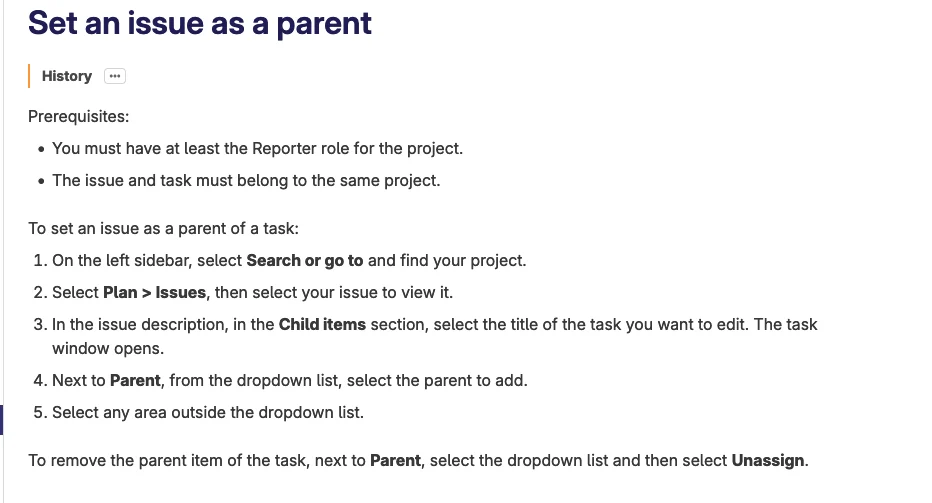
However it's found out that any user with Guest role can also set an issue as parent of tasks, using /set-parent quick action.
Steps to reproduce
You need two accounts on Gitlab.com (free trial) one for victim and another for attacker.
Victim Side
- Login to https://gitlab.com
- Create a new public group through https://gitlab.com/dashboard/groups
- Create a new public project inside this group
- Create an issue for this project -- > Project -- > Plan -- > Issues
- Add couple of new tasks to this issue, from "Child Item" section
- Remove a task from list(in this step the removed task does not have a parent issue anymore)
- Invite a user to your project/group with "Guest" role. (this is attacker)
Attacker Side
- Login to https://gitlab.com
- Navigate to the issue list page -- > Project -- > Plan -- > Issues
- Click on task name you removed in step 6 and confirm that this task does not have a parent (issue) from the right sidebar
- Insert
/set-parentin the text box and paste the issue URL that you want to assign this task to it, and click on comment button. (attacker has access to this URL since he/she is a member of this project) - Confirm that you assigned the issue as parent of this task
Impact
Malicious user with guest role can assign arbitrary issues to any task as parent, which is not permitted based on Gitlab document https://docs.gitlab.com/ee/user/tasks.html#remove-a-task-from-an-issue
Output of checks
This bug happens on GitLab.com
Impact
Malicious user with guest role can remove tasks from issues, which is not permitted based on Gitlab document https://docs.gitlab.com/ee/user/tasks.html#set-an-issue-as-a-parent
NOTE: Attacker can also change the parent issue for tasks which already have the parent using the same steps, so for replicating this you can skip step 6 since you don't need a task without a parent.
How To Reproduce
Please add reproducibility information to this section:
Not written yet. The AI write-up for this report has not been written yet. The Original tab links to the source.
How it worked
Root cause
Likely the /set-parent quick action did not enforce the same permission check as the documented requirement for setting a parent issue.
Impact
A malicious user with the Guest role could assign arbitrary issues as parents of tasks, or change existing parent issues, which is not permitted according to GitLab documentation.
What the attacker needed
Victim has a public project; attacker has Guest role in the project; attacker knows the issue URL
How it was found
- Victim creates a public group and project, then creates an issue and adds tasks as child items.
- Victim removes a task from the issue so it has no parent.
- Victim invites the attacker with the Guest role.
- Attacker logs in and navigates to the issue list, then clicks the removed task and confirms it has no parent.
- Attacker enters /set-parent with the issue URL in a comment and submits it.
- Attacker confirms the issue is now set as the parent of the task.
Explained by bugbounty.wiki with AI from the original and checked against quotes from it; it can still be wrong. Read the original before relying on a detail.
Not written yet. The AI write-up for this report has not been written yet. The Original tab links to the source.
In GitLab, tasks can be linked to a parent issue, but only users with a certain permission level (Reporter or higher) are supposed to do this. The report found that even users with the lowest permission level (Guest) could perform this action, letting them change task relationships they shouldn't control.
What is Access control?
A user can do something their role should not allow: reach an admin function, act on a feature they have not paid for, or skip a permission check. IDOR is the special case where the object belongs to someone else.

