Bypass group SAML SSO enforcement for git access, using CI Job Token
A user without an active SAML SSO session could bypass the group's SSO enforcement for Git activity by using a CI job token to clone a protected repository. The token was not checked against SAML SSO sessions, allowing access despite the restriction.

GitLab
Originally disclosed on GitLab
- Fixed in 18 days
- Disclosed after 18 days
HackerOne report #1647721 by joaxcar on 2022-07-23, assigned to @nmalcolm:
Report | Attachments | How To Reproduce
Report
Summary
An owner/maintainer of a (premium +) top group can configure SAML SSO requirements for access to the group. See documentation link. If the group activate the setting "Enforce SSO-only authentication for Git and Dependency Proxy activity for this group" any user that does not have an active SSO session with the configured provider is restricted from accessing the group projects through Git actions.
In the docs for "SSO enforcement" link this is stated
Credentials that are not tied to regular users (for example, project and group access tokens, and deploy keys) do not have the SSO check enforced.
As far as I can read in the docs CI Job Tokens link should not fall in this category as they are tied to the user that initialized the pipeline.
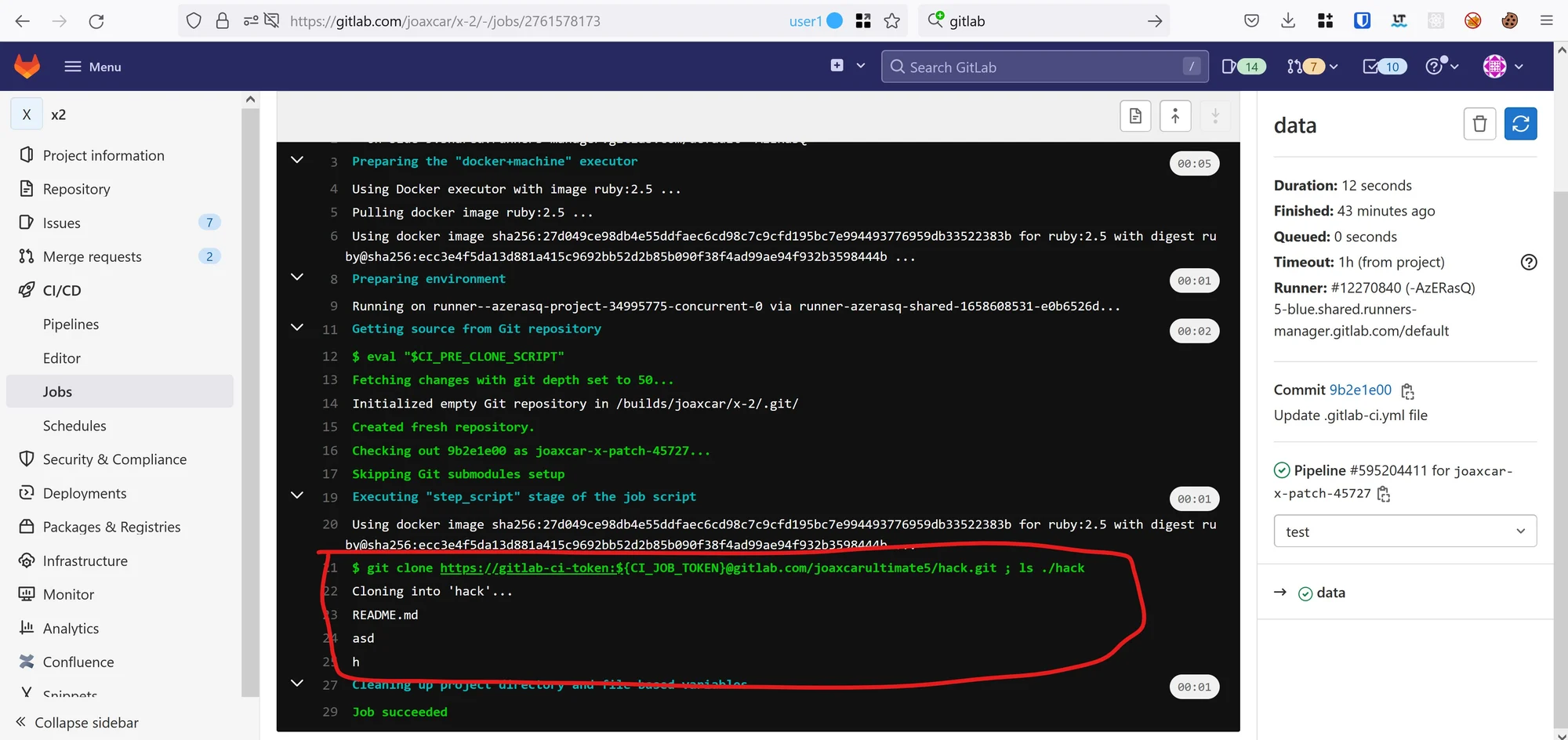
For me the SSO enforcement for git actions blocks all attempts to clone using authentications like personal access tokens, but if I run a pipeline job in any arbitrary project I can use the CI_JOB_TOKEN from that job to check out the repository that is protected by SSO.
First I thought that this might be related to the fix for SSO enforcement blocking pipeline schedules in the protected project (see issue and MR). But this MR seems to use a check for server generated requests on the http schema, and not anything to do with CI tokens. The fix tries to open up access for pipelines running "inside the project".
A simple clone can be run like so:
data:
  script:  git clone https://gitlab-ci-token:${CI_JOB_TOKEN}[@]gitlab.com/groupname/projectname.git ; ls ./hack
Steps to reproduce
- Create two users
owner01andattacker01, log in asowner01 - Make sure the
owner01user haveUltimatesubscription. You can use a free trail on GitLab.com - Create a
privategroupultimate_group - Create a
privateproject in the group calledproject01(make sure to have create README checked) - Go to https://gitlab.com/groups/ultimate_group/-/group_members and invite
attacker01as adeveloper - Go to https://gitlab.com/groups/ultimate_group/-/saml
- Scroll down to configuration and check all checkboxes (Enable SAML, enforce SSO and enforce SSO for git) and add URL
https://example.comand Certificate fingerprint752c14ea195c369bac3c3b7896975ee9fd15eeb7(the settings does not matter, we want it to fail on request) - Click save
- Log out and log back in as
attacker01 - Go to https://gitlab.com/-/profile/personal_access_tokens and generate a
personal access token, take a note of the token - Create a new project called
attack_project - Create a new file in the project called
.gitlab-ci.ymland add (replace <PERSONAL_ACCESS_TOKEN with the token)
data:
  script:  git clone https://attacker01:<PERSONAL_ACCESS_TOKEN>[@]gitlab.com/ultimate_group/project01.git ; ls ./project01
- When the file is created a pipeline will run, check the logs for the pipeline job in the list at https://gitlab.com/attacker01/attack_project/-/jobs
- You should see an error message telling you that the checkout failed as there exists no SSO session for the user
[Image redacted - a PAT was in the screenshot]
- Now go back and edit the pipeline file to (do not change anything except the project path)
data:
  script:  git clone https://gitlab-ci-token:${CI_JOB_TOKEN}[@]gitlab.com/ultimate_group/project01.git ; ls ./project01
- Check the new job in the pipeline job list and you should see that the git clone succeeded and the files from the project are listed
Impact
A user that is restricted to access a project through Git actions due to SAML SSO enforcement can bypass this restriction and access the repository by requests using the CI job token. The user needs to have "gitlab access" to the project (the project is internal, or the user is added to the member list) but is blocked due to not using a SAML SSO login. Group owners might rely on SAML configurations and be relaxed with other access permissions as the SAML restrictions should block users. This is especially true for internal projects where the user can now access the repository through git.
What is the current bug behavior?
Using CI job tokens as authentication will allow cloning a repository that have SAML SSO git access restriction
What is the expected correct behavior?
Using CI job tokens should be checked against SAML SSO Sessions
Output of checks
This bug happens on GitLab.com
Impact
A user that is restricted to access a project through Git actions due to SAML SSO enforcement can bypass this restriction and access the repository by requests using the CI job token. The user needs to have "gitlab access" to the project (the project is internal, or the user is added to the member list) but is blocked due to not using a SAML SSO login. Group owners might rely on SAML configurations and be relaxed with other access permissions as the SAML restrictions should block users. This is especially true for internal projects where the user can now access the repository through git.
Attachments
Warning: Attachments received through HackerOne, please exercise caution!
[REDACTED]
How To Reproduce
Please add reproducibility information to this section:
Proposal
Since this is expected behavior from a CI Job Token, we will instead be more descriptive in what the SSO enforcement for git activity provides, by rewording the description when enabling this option in the Group Settings:
"Before enforcing SSO-only authentication for Git activity, enable SSO-only authentication for web activity."
To:
"Before enforcing SSO-only authentication for users' Git activity, enable SSO-only authentication for web activity."
https://gitlab.com/gitlab-org/gitlab/-/issues/368961#note_1043076641
Not written yet. The AI write-up for this report has not been written yet. The Original tab links to the source.
How it worked
Impact
A user restricted by SAML SSO enforcement could bypass the restriction and access the repository via CI job token, especially for internal projects.
What the attacker needed
Ultimate subscription; attacker is a group member with developer role; attacker can create a project and run pipelines
The fix
The behaviour was not fixed; instead, the group setting description was reworded to clarify that SSO enforcement for Git activity applies to users' Git activity.
How it was found
- Create two users, one as group owner and one as attacker, and ensure the owner has an Ultimate subscription.
- Create a private group and a private project inside it.
- Invite the attacker as a developer to the group.
- Enable SAML SSO enforcement for Git activity in the group settings with a dummy URL and certificate.
- Log in as the attacker, create a personal access token, and attempt to clone the protected project via a CI pipeline; observe failure due to missing SSO session.
- Edit the pipeline to use the CI job token instead of the personal access token, and observe successful clone.
Explained by bugbounty.wiki with AI from the original and checked against quotes from it; it can still be wrong. Read the original before relying on a detail.
Not written yet. The AI write-up for this report has not been written yet. The Original tab links to the source.
SAML SSO is a way for organisations to require users to log in through a central identity provider before accessing resources. GitLab groups can enforce this for Git actions, but the report shows that a CI job token, which is automatically generated for pipeline jobs, was not checked against the SSO session. This meant a user who was blocked from cloning via normal credentials could still clone the repository by running a pipeline job.
What is Access control?
A user can do something their role should not allow: reach an admin function, act on a feature they have not paid for, or skip a permission check. IDOR is the special case where the object belongs to someone else.

